Administrative Efficiency for Managers: A Practical Guide
Boost your team's productivity with practical strategies for administrative efficiency. Learn to streamline processes and reduce costs today!


Administrative efficiency means getting the maximum useful output from the minimum administrative input: fewer hours, lower cost, and less error per transaction, decision, or service delivered. If you manage a team and want to move the needle this week, do three things now: (1) pick one high-volume process and map every step, (2) measure its current cycle time as your baseline KPI, and (3) cut the first non-value step you find. That sequence alone, repeated across a handful of processes, is how organizations shift from reactive overhead to a function that actually supports strategy.
Why those three moves? Because most efficiency programs stall on scope. A single mapped process gives you a concrete before-and-after. One KPI keeps the team honest. One eliminated step proves the method works before you ask anyone to change more.
Key Takeaways
Administrative efficiency is the ratio of administrative output to input, and improving it requires aligning process, people, policy, and technology changes to measurable KPIs before scaling.
| Point | Details |
|---|---|
| Define before you measure | Distinguish efficiency (speed/cost) from effectiveness (outcomes) to avoid optimizing the wrong process. |
| Simplify before automating | Eliminate non-value steps first; automating a broken process produces wrong outputs faster. |
| Start with one KPI | Cycle time is the fastest baseline to establish and the clearest signal that a change worked. |
| Pilot before scaling | Use a staged pilot with clearly defined success gates before rolling changes to the full organization. |
| DocuPOW for document-heavy workflows | Template-free extraction and workflow orchestration cut cycle time and error rates on high-volume document processes. |
Table of Contents
- What does “administrative efficiency” mean, and how is it different from effectiveness?
- Why administrative efficiency matters for your organization
- What levers actually improve administrative efficiency?
- How do you measure administrative efficiency with KPIs?
- How do you launch an administrative efficiency program?
- What are the common pitfalls and tradeoffs to avoid?
- How does document automation reduce administrative burden?
- The efficiency trap most managers walk straight into
- DocuPOW cuts administrative overhead where it costs you most
- Sources
- FAQ
What does “administrative efficiency” mean, and how is it different from effectiveness?
Administrative efficiency is an input-to-output ratio: how much administrative resource (time, labor, cost) you consume to produce a unit of output (a processed invoice, an approved request, a completed report). The goal is to produce the same or better output with less resource, or more output with the same resource.
Managers often blur three related terms, and the confusion leads to measuring the wrong thing entirely.
Efficiency asks: Are we doing things right? It is about the process mechanics — speed, cost, error rate.
Effectiveness asks: Are we achieving the intended outcome? A process can be fast and cheap yet still fail its purpose. Processing invoices quickly is efficient; paying the right suppliers on time and maintaining supplier relationships is effective.
Efficacy describes performance under ideal or controlled conditions. It answers: Can this process work at its best? Think of it as the ceiling — what the process achieves when staffed correctly, with clean data and no exceptions.
University of Bologna course materials on organizational efficiency make the practical implications clear: aligning all three concepts is what separates process optimization that supports strategy from optimization that merely reduces inputs. A conference proceedings paper from Atlantis Press reinforces this, noting that administrative efficiency and administrative efficacy are related but distinct, and that understanding both is necessary to design interventions that improve both operational performance and outcomes.
A quick reference:
| Concept | Core question | Invoice-processing example |
|---|---|---|
| Efficiency | Are we doing it right? | Faster processing, lower cost per invoice |
| Effectiveness | Are we achieving the goal? | Suppliers paid accurately and on time |
| Efficacy | Can it work at its best? | Zero-error processing when data is clean |
Why administrative efficiency matters for your organization
The business case is straightforward: administrative overhead that consumes more resource than it produces crowds out the work that actually creates value. Cutting cycle time on a purchase-order approval from five days to one day does not just save labor hours. It accelerates cash flow, reduces supplier friction, and frees procurement staff for vendor negotiations.
Direct benefits managers typically see first:
- Cost reduction: fewer labor hours per transaction and less rework from errors
- Faster decisions: shorter cycle times mean leaders get the data they need sooner
- Lower error rates: standardized processes reduce variance and downstream correction costs
- Better service delivery: internal customers (other departments) wait less and get more consistent outputs
The strategic benefits take longer but matter more. When administrative work runs leaner, you can redeploy staff to analysis, relationship management, or product support. Financial visibility improves because data moves faster and with fewer manual touchpoints.
The sector context matters here. A 2025 comparative study found that private organizations tend to convert administrative efficiency gains into profitability faster, while public-sector organizations prioritize accountability and service delivery as the primary payoff. That distinction should shape how you frame the business case internally. A hospital system or university justifies efficiency investment differently than a manufacturing company, even when the underlying process improvements are identical.
What levers actually improve administrative efficiency?
Four categories of levers drive most of the gains. They are not equally powerful, and the order matters.
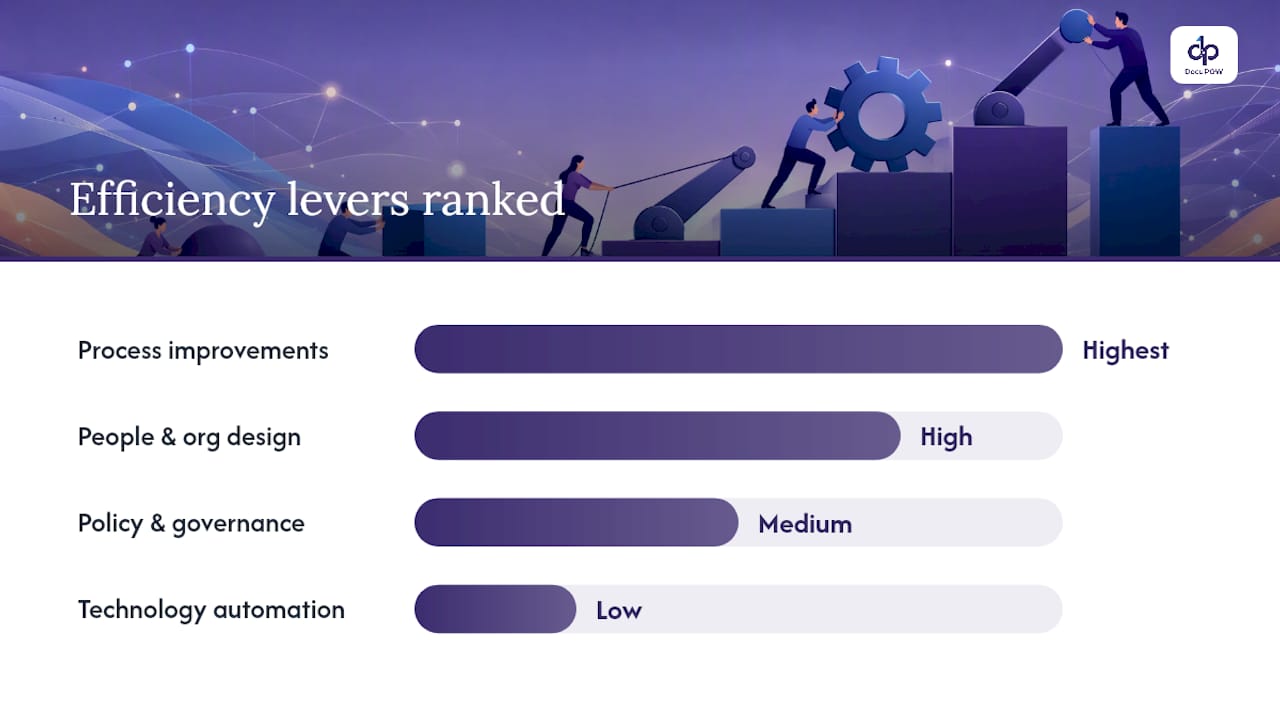
Process: map, simplify, standardize
Start by making the current process visible. A simple swim-lane diagram showing who does what, in what order, and how long each step takes will surface waste that no one has formally acknowledged. Once mapped, eliminate steps that exist only because “we’ve always done it that way.” Standardize what remains so variance drops.
Example: A finance team that mapped its month-end close found three separate manual reconciliation steps that all pulled from the same source file. Collapsing them into one cut close time by roughly a third.
People and org design: clarity, capacity, cross-functional pods
Role ambiguity is a hidden efficiency killer. When two people both think they own a task, it either gets done twice or falls through. Small cross-functional pods, where finance, operations, and IT share ownership of a workflow, tend to move faster than sequential handoffs across siloed departments.
Policy and governance: thresholds, SLAs, and decentralization
Approval bottlenecks are almost always a policy problem, not a people problem. Raising a purchase-order approval threshold from $500 to $2,500 can eliminate dozens of low-stakes approvals per week. Internal SLAs (e.g., “HR responds to onboarding requests within 48 hours”) create accountability without adding headcount. Decentralizing routine decisions to the team level, while keeping exceptions escalated, is often the fastest governance change available.
Technology: automate after you simplify
Automation delivers its biggest return on processes that are already clean. Practitioner guidance is consistent on this point: simplify before you digitalize. Automating a broken process just produces wrong outputs faster. Document automation, workflow orchestration, and intelligent data extraction (IDP) are the highest-leverage technology investments for administrative teams handling high-volume paperwork.

Example: A logistics team that automated invoice matching after first eliminating duplicate approval steps cut processing time from four days to same-day, with error rates dropping alongside. For a practical look at automation benefits for operations, the ROI case typically rests on those two metrics together.
Pro Tip: Scope your first automation pilot to a single document type or a single workflow step. A narrow scope produces a clean before-and-after comparison and builds internal credibility for the next phase.
How do you measure administrative efficiency with KPIs?
Measurement is where most programs either gain traction or lose it. Pick the wrong KPI and you optimize the wrong behavior. The metrics below cover the core dimensions of administrative workflow performance.
| KPI | Formula | Sample target (corporate team) |
|---|---|---|
| Cycle time | End timestamp minus start timestamp (hours or days) | Invoice approval: under 2 days |
| Cost per transaction | Total process cost ÷ number of transactions | Purchase order: — |
| Error rate | Errors ÷ total transactions × 100 | Data entry: under 1% |
| Throughput | Transactions completed ÷ time period | AP team: — |
| Utilization | Active work time ÷ total available time × 100 | Target: 70–80% (not 100%) |
| Automation rate | Automated transactions ÷ total transactions × 100 | High-volume processes: 60%+ |
A few measurement pitfalls to watch:
- Data quality: KPIs are only as reliable as the timestamps and counts feeding them. Spot-check source data before reporting.
- Double-counting: In multi-step workflows, a single transaction can appear in multiple queues. Count completions at the final step only.
- Biased sampling: Measuring only the easy transactions inflates throughput and understates cycle time. Sample across document types and exception cases.
Common measurement approaches in administrative contexts use processing time, error rates, and throughput as the primary indicators, with cost-per-transaction as the financial anchor. Tracking employee efficiency alongside process KPIs gives managers a fuller picture of where capacity is being consumed.
Utilization above 85% is a warning sign, not a success metric. A team running at full capacity has no buffer for exceptions, training, or improvement work — and exception rates typically rise as a result.
How do you launch an administrative efficiency program?
The most common failure mode is starting too big. EAB recommends beginning with small, measurable pilots on high-volume tasks, then scaling based on pre-defined success gates. That advice holds well beyond higher education.
Quick diagnostic: find your highest-impact processes
Score candidate processes on four dimensions:
- Volume: How many transactions per month?
- Time per transaction: How long does each take?
- Error rate: How often does it require rework?
- Strategic value: Does it directly affect revenue, compliance, or customer experience?
Multiply volume by time to get total hours consumed. Processes with high hours AND high error rates are your first targets. Processes with high strategic value but low volume may still warrant early attention if errors carry compliance risk.
30/60/90-day pilot roadmap
- Days 1–30 (Diagnose and design): Map the selected process end-to-end. Establish baseline KPIs (cycle time, error rate, cost per transaction). Identify the top three non-value steps. Assign a process owner and a small cross-functional team (2–4 people). Get stakeholder sign-off on the success gate (e.g., “20% cycle time reduction by day 60”).
- Days 31–60 (Pilot): Remove or simplify the identified steps. If automation is in scope, deploy it on the cleaned process. Measure weekly against the baseline. Document exceptions and edge cases.
- Days 61–90 (Review and scale decision): Compare KPIs to the baseline and the success gate. Conduct a short stakeholder review. If the gate is met, document the playbook and identify the next two processes. If not, diagnose why before scaling.
Scaling governance
Once two or three pilots have succeeded, establish a lightweight steering group (operations, finance, IT, and one business-unit lead) that meets monthly to review KPI dashboards, approve new pilots, and manage resource allocation. A step-by-step back-office optimization approach typically includes this kind of cross-functional governance as the mechanism that keeps efficiency gains from eroding over time.
What are the common pitfalls and tradeoffs to avoid?
Efficiency programs fail in predictable ways. Knowing the failure modes in advance is the cheapest form of risk management.
Speed vs. control. Cutting approval steps reduces cycle time but can increase compliance exposure. The fix is not to keep all approvals — it is to keep the ones that carry real risk and automate or eliminate the rest.
Standardization vs. local flexibility. A process that works perfectly for the headquarters finance team may break in a regional office with different regulatory requirements or document formats. Over-standardization is a real cost. Build exception paths before you need them.
Cost cuts vs. capability loss. Reducing administrative headcount without a capability and measurement plan degrades service. West Virginia University’s 2023 administrative restructuring, which included cuts to administrative leadership as part of a broader transformation, illustrates the point: organizational redesign tied to a measurement plan is manageable; cuts without one risk service degradation that takes years to repair.
Measuring the wrong KPI. Optimizing throughput without tracking error rate produces fast, inaccurate outputs. Always pair a speed metric with a quality metric.
Individual vs. administrative efficiency. A policy that improves the organization’s aggregate output can simultaneously slow down individual contributors. A new approval routing system that saves the CFO two hours a week might add 30 minutes of friction for every frontline manager submitting a request. Measure both sides.
Warning: Before rolling out any process change to the full organization, run a stakeholder alpha test with 5–10 users from different roles. Edge cases that break the new process almost always surface within the first week of real use — far cheaper to catch then than after a full deployment.
How does document automation reduce administrative burden?
Document-heavy processes — invoice processing, contract review, onboarding packets, compliance filings — are where administrative overhead concentrates. They are also where automation delivers the clearest ROI, because the inputs are high-volume, the steps are repetitive, and the errors are costly.
Modern intelligent document processing (IDP) platforms offer four capabilities that directly address administrative burden:
- Template-free data extraction: AI agents read and extract data from any document format without requiring a pre-built template for each vendor or form type.
- Multi-step workflow orchestration: Extracted data routes automatically through approval chains, validation checks, and ERP/CRM updates without manual handoffs.
- Human-in-the-loop review: Exceptions and low-confidence extractions are flagged for human review, keeping accuracy high without requiring humans to touch every document.
- Real-time dashboards: Managers see cycle time, error rate, and throughput live, rather than waiting for end-of-month reports.
The biggest ROI tends to come from three scenarios: high-volume, high-variance documents (invoices from hundreds of different suppliers); repetitive approvals (purchase orders, expense reports); and reconciliation tasks (three-way matching of POs, invoices, and receipts).
Practitioner guidance consistently shows that automating administrative processes after simplification produces the largest time savings — with the diagnosis-simplify-automate-monitor cycle delivering substantially greater gains than automation applied to unreformed processes.
The headcount freed from data entry shifted to vendor relationship management.
Vendor-evaluation checklist for document automation
When assessing any IDP or document automation platform, score each criterion before you commit to a pilot:
- Accuracy: What is the extraction accuracy rate on your specific document types? Ask for a proof-of-value test on your own documents.
- Adaptability: Does it work without pre-built templates? Can it handle new document formats without IT intervention?
- Integration: Does it connect to your ERP and CRM via standard APIs? What is the typical integration timeline?
- Auditability: Does it log every extraction decision and human override for compliance review?
- SLAs: What uptime and support response commitments does the vendor offer?
- Deployment model: Cloud, on-premise, or hybrid? Does it meet your data-residency requirements?
For enterprise-scale pilots, the AI workflow automation enterprise guide covers deployment models and integration considerations in detail.
Pro Tip: Run your proof-of-value on a single document type with at least 500 real examples from your own data. That sample size is large enough to surface accuracy issues on edge cases before you commit to a full deployment.
The efficiency trap most managers walk straight into
The conventional wisdom on administrative efficiency says: find the waste, cut it, measure the result. That framing is not wrong, but it misses the most common failure mode — which is not failing to find waste, but failing to ask whether the process being optimized is worth optimizing at all.
The University of Bologna materials cited earlier make this point precisely: improving efficiency without aligning to strategic objectives risks optimizing non-value tasks.
The practical implication is that every efficiency initiative should start with a short effectiveness check: does this process produce an output that someone actually uses to make a decision or deliver a service? If the answer is unclear, the first intervention is not process mapping — it is a conversation with the process’s customers about what they actually need.
Automation makes this trap more expensive, not less. Automating a process that should not exist at all locks in the waste at machine speed and makes it harder to question later. The simplify-before-you-digitalize principle is partly about removing redundant steps, but it is also about forcing that effectiveness question before you invest in technology.
The managers who get the most from efficiency programs are not the ones who move fastest. They are the ones who spend an extra week at the start asking whether they are optimizing the right thing.
DocuPOW cuts administrative overhead where it costs you most
Manual document processing is the single largest source of avoidable administrative cost in most mid-size and enterprise organizations. DocuPOW’s agent-based platform extracts data from any document type without templates, routes it through configurable multi-step workflows, and delivers real-time dashboards so managers can track cycle time and error rate without waiting for month-end reports.
The capabilities map directly to the levers covered in this guide: template-free extraction handles high-variance supplier documents; workflow orchestration replaces manual approval routing; human-in-the-loop review keeps accuracy high on exceptions; and API integration connects to your existing ERP or CRM without a custom build. Security and compliance logging satisfy audit requirements out of the box.
The right way to start is a scoped pilot on one high-volume document type, with baseline KPIs agreed before day one. DocuPOW’s proof-of-value approach is built around exactly that model. See document process automation benefits for operations for ROI benchmarks, or request a demo to run your own documents through the platform before committing.
Sources
- TOWARD_1.PDF (University of Bologna course material on organizational efficiency)
- A how-to guide for kickstarting administrative efficiency initiatives on campus
- Optimizing Administrative Processes: The Ultimate Guide
- Discussion on the Relationship of Administrative Efficiency and Administrative Efficacy | Atlantis Press
FAQ
What does “administrative efficiency” mean?
Administrative efficiency is the ratio of useful administrative output (processed transactions, completed requests, delivered reports) to the inputs consumed (labor hours, cost, time). A more efficient administrative function produces the same or better output with fewer resources.
How is administrative efficiency different from administrative effectiveness?
Efficiency measures how well a process uses resources; effectiveness measures whether the process achieves its intended outcome. A fast invoice process is efficient; paying the right suppliers on time is effective. University of Bologna course materials recommend aligning both so process improvements support strategic objectives.
What does “administrative efficacy” mean?
Administrative efficacy describes what a process can achieve under ideal conditions — essentially its performance ceiling when staffed correctly with clean data. Atlantis Press conference proceedings note that efficacy and efficiency are related but distinct, and that understanding both is necessary for designing effective interventions.
How do you improve administrative efficiency quickly?
Map one high-volume process, establish a cycle-time baseline, and remove the first non-value step. EAB guidance recommends starting with small, measurable pilots on high-volume tasks before scaling, which produces faster results than organization-wide rollouts.
Which KPI should managers track first?
Cycle time (the elapsed time from process start to completion) is the fastest baseline to establish and the clearest early signal that a change worked. Pair it with error rate to avoid optimizing speed at the expense of accuracy.
Recommended
See DocuPOW on your documents.
Stop building templates. Start extracting data.