Intelligent Records Processing: From Paper to Decisions
Unlock the power of Intelligent Records Processing to transform unstructured documents into accurate, actionable data for seamless business operations.


Intelligent Records Processing turns unstructured documents into validated, structured data and routes that data straight into the business systems that run your company. It reads an invoice, a claim, or an intake form the way a trained clerk would, then delivers clean fields into your ERP, EHR, or CRM without a human retyping a single number. Modern systems hit 95 to 99% accuracy on well-defined structured documents, and when a human-in-the-loop reviewer catches the remaining edge cases, effective accuracy climbs close to 100%.
That accuracy shows up downstream as straight-through processing, or STP: the percentage of documents that flow from ingestion to your system of record with zero human touch. By improving STP, finance teams significantly reduce the number of exceptions handled manually. The math is why operations leaders care about this technology more than almost any other automation category on the market.
A properly built Intelligent Records Processing system produces three things for every document it touches:
- Document classification — what type of record this is (invoice, W-2, claim form, contract)
- Extracted fields — the specific data points pulled from the page (vendor name, claim amount, effective date)
- Validated records — data that has been checked against business rules and, where needed, human review, before it enters your system of record
Security posture matters just as much as accuracy for anything touching financial or patient records, which is why enterprise buyers should expect SOC 2 and, where health data is involved, HIPAA-aligned controls from any vendor they evaluate.
Key Takeaways
Intelligent Records Processing works because it pairs contextual understanding with confidence-based human review, turning unstructured documents into structured data your systems can act on immediately.
| Point | Details |
|---|---|
| Definition matters | IRP goes beyond OCR by classifying, extracting, validating, and delivering structured data into business systems. |
| Accuracy is high but not absolute | Expect 95 to 99% accuracy on structured documents, with HITL review closing the remaining gap. |
| Start with a pilot | Scope your first pilot on the highest-volume, highest-error document type, not the easiest one. |
| Track the right KPIs | Monitor STP rate, extraction accuracy, throughput, error rate, and cost per document from day one. |
| DocuPOW’s approach reduces maintenance | Its template-free, agent-based extraction avoids the rebuild cycle that template-based systems require for every new layout. |
Table of Contents
- What Is Intelligent Records Processing, Really?
- How Does an Intelligent Records Processing Pipeline Work?
- What Technologies Power Intelligent Records Processing?
- What Business Benefits Should You Expect From IRP?
- Where Does Intelligent Records Processing Deliver the Most Value?
- IDP vs. OCR vs. RPA: What Does Each One Actually Do?
- How Do You Roll Out Intelligent Records Processing Without Breaking Anything?
- How Should You Evaluate an IRP Vendor?
- How Does DocuPOW Approach Intelligent Records Processing Differently?
- What Do Most Teams Get Wrong When They Roll This Out?
- Ready to See What a Pilot Looks Like?
- Sources
- FAQ
What Is Intelligent Records Processing, Really?
Intelligent Records Processing is the software category that reads a document, understands its context, and outputs structured, business-ready data. It is not the same thing as optical character recognition, and confusing the two is the single most common mistake buyers make when scoping a project.
OCR does one job: it converts pixels into text. Feed it a scanned invoice and it hands back a wall of characters with no understanding of what a “total due” field is or where the vendor’s name sits relative to the invoice number. Traditional OCR is a text-extraction layer, not a data pipeline.
IRP builds on top of that layer. It classifies the document, maps the layout, identifies which text block is a field versus a label, extracts that field with a confidence score, and validates it against rules before handing off structured output, often as JSON with key-value pairs and table data intact. Databricks frames this well: the goal isn’t just readable text, it’s AI-ready structured data that downstream systems and analytics tools can consume immediately.
Here’s why that distinction actually matters in practice:
- An accounts payable team using OCR alone still has to manually map “Total Due: $4,215.00” to the right ledger field, invoice by invoice.
- A claims team relying on OCR gets a text blob per page, with no reliable way to tell a diagnosis code from a policy number without a human reading it.
- An IRP system extracts both fields directly, tags them with a confidence score, and routes anything below a set threshold to a reviewer instead of straight into the ledger or claims system.
Layout-aware extraction, the kind that preserves bounding boxes and cell coordinates rather than flattening everything into raw text, is also what makes an audit trail possible months later when a compliance team needs to trace exactly where a number came from on the original page.
How Does an Intelligent Records Processing Pipeline Work?
An IRP pipeline moves a document through six stages, and each one exists to catch a specific type of error before it reaches your system of record. The standard pipeline runs from raw file to structured, delivered data, and understanding each stage is what separates a well-scoped pilot from a stalled one.
- Ingestion. Documents arrive by email, upload, scan, or API from a partner system. Common pitfall: no standard intake channel, so documents scatter across inboxes and shared drives before processing ever starts.
- Image pre-processing. The system straightens skewed scans, removes noise, and enhances contrast. Poor scan quality here is the single biggest driver of downstream extraction errors, which is part of why the National Archives digitization guidance puts so much weight on scanning standards and file handling before automation even enters the picture.
- Classification. The system identifies document type. A pitfall worth flagging: mixed-format batches (an invoice with a packing slip stapled to it) routinely trip up classifiers trained on clean, single-document samples.
- Extraction. Fields, tables, and key-value pairs get pulled out with a confidence score attached to each one.
- Validation and enrichment. Extracted data gets checked against business rules (does this vendor exist in our master list?) and enriched with lookups (does this tax ID match a known record?).
- Integration and delivery. Clean, structured data lands in the ERP, CRM, or case management system, typically over an API.
Confidence scoring is the mechanism that decides what happens next. A field at 62% confidence, maybe a handwritten total or a smudged date, gets routed to a human reviewer instead of guessed at. This is human-in-the-loop, or HITL, and it’s the difference between a system that quietly makes errors and one that knows what it doesn’t know.
A practical confidence threshold rule looks like this: route anything under 85% confidence on a financial total to a reviewer, but allow 70% confidence on a non-critical field like a customer’s middle name to pass through automatically. The threshold should track the cost of being wrong, not a single blanket number across every field.
Pro Tip: Track your confidence score distribution weekly during the first three months of a rollout. A slow downward drift usually means new document variants are entering the pipeline that your model hasn’t seen, and it’s your earliest warning sign before error rates actually spike.
What Technologies Power Intelligent Records Processing?
Modern IRP systems combine seven distinct technology layers, and knowing what each contributes helps you evaluate whether a vendor’s platform actually covers your document mix or just handles the easy cases.
- OCR/ICR — converts printed and handwritten characters into machine-readable text; the foundational layer everything else builds on.
- Layout analysis — maps where text blocks sit relative to each other, so the system knows a number near the label “Total” is different from one near “Subtotal.”
- NLP and entity extraction — identifies named entities (dates, amounts, party names) inside unstructured text like a contract clause or a doctor’s note.
- ML classification — sorts documents into types using patterns learned from labeled examples.
- LLM and zero-shot capabilities — handle previously unseen document formats without requiring a labeled training set for every new variant.
- Computer vision models — read stamps, signatures, checkboxes, and photographic evidence like damage images in a claim.
- Rules engines and connectors — enforce business logic and push validated data into ERP, CRM, or EHR systems via API.
Choosing between a trained ML model and an LLM/zero-shot approach comes down to volume and variability. A high-volume, stable document type like a standard vendor invoice format justifies training a dedicated model because the accuracy payoff compounds over thousands of transactions. A low-volume, highly variable document, like a one-off legal notice or an unusual claim attachment, is a better fit for zero-shot LLM extraction since building a trained model for a handful of documents a month rarely pays for itself. A tiered extraction framework that routes easy documents to fast local OCR and only sends hard cases to a cloud vision-language model gives you the best of both: lower cost on the bulk of your volume and better accuracy where it counts.
Semantic extraction (understanding that “amount owed” and “balance due” mean the same thing) matters as much as positional extraction (knowing where on the page a number typically sits), because vendor and partner documents rarely follow one fixed template. A system that only knows positional patterns breaks the moment a new supplier sends an invoice laid out differently.

What Business Benefits Should You Expect From IRP?
Well-implemented Intelligent Records Processing cuts manual data entry, shortens cycle times, and pushes extraction accuracy to a high level on structured documents, and those effects compound into real budget impact within a single fiscal year.
Six KPIs matter more than any others when you’re building the business case or tracking a live pilot:
| KPI | What It Measures |
|---|---|
| STP rate | Percentage of documents processed with zero human touch |
| Extraction accuracy | Percentage of fields correctly extracted and validated |
| Processing throughput | Pages or documents handled per hour |
| Error rate | Percentage of records requiring correction after delivery |
| Mean time to exception resolution | Average time a flagged document sits before a human resolves it |
| Cost per document | Total processing cost divided by document volume |
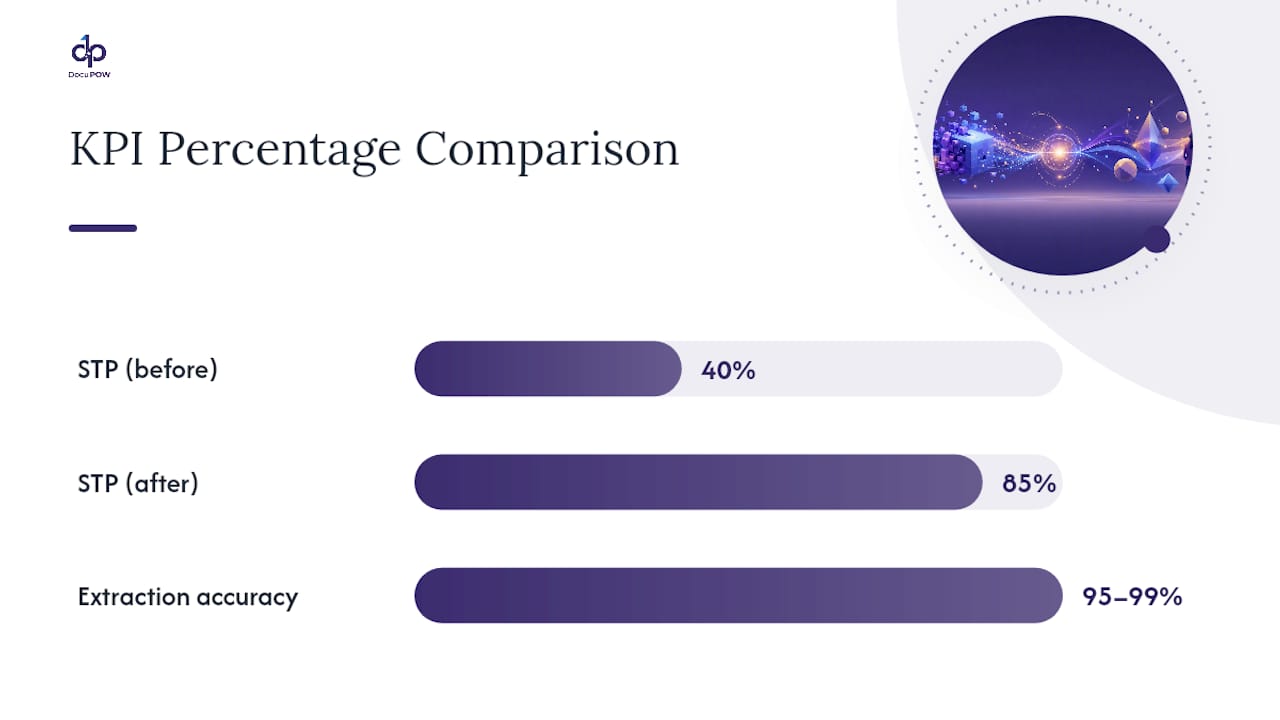
On the accuracy side, reported ranges of 95 to 99% on structured documents are consistent across well-scoped implementations, and HITL review on the flagged remainder pushes effective accuracy close to full reliability. Production cost per document varies with complexity. Cost considerations for production IDP typically break down across classification, extraction, validation, and human review, with simpler structured forms costing less per document than dense, variable contracts.
A rough rule of thumb for estimating payback: multiply your monthly document volume by your fully loaded labor cost per document, then multiply that by the percentage reduction in manual touches you expect. A team processing 15,000 invoices a month at $4 in labor cost per invoice, moving from 40% STP to 85% STP, is looking at labor savings on roughly 6,750 additional documents a month that no longer need manual handling. Run that math against your own volume before you scope a pilot, not after.
Where Does Intelligent Records Processing Deliver the Most Value?
The highest-value use cases share one trait: high document volume paired with a repetitive, rules-based decision that a human currently makes by hand. Accounts payable, claims processing, patient intake, contract ingestion, and KYC onboarding top the list for a reason.
- Accounts payable — extracts header fields (vendor, invoice number, date, total) and line-item detail, then matches against purchase orders before posting to the general ledger.
- Claims processing — pulls procedure codes, diagnosis codes, and claim totals, then routes anything with a coding mismatch to an adjuster.
- Patient intake — captures demographic data, insurance details, and consent form fields from scanned or photographed documents at check-in.
- Contract ingestion — identifies parties, effective dates, renewal terms, and key clauses like indemnification or termination language.
- KYC and onboarding — extracts identity document fields and cross-references them against compliance databases before an account opens.
Healthcare offers one of the clearest scale examples. A 2024 industry index on administrative transactions found continued friction in how healthcare data moves between payers and providers, much of it tied to manual document handling that automated data exchange could resolve. Integration points matter as much as the extraction itself: a claims IRP deployment is only as useful as its connection to the adjudication system on the other end, and a patient intake deployment lives or dies on how cleanly it feeds the EHR.
IDP vs. OCR vs. RPA: What Does Each One Actually Do?
OCR, IDP, and RPA solve three different layers of the automation stack, and most failed implementations trace back to a team picking the wrong one, not a bad vendor. OCR reads text. IDP understands and structures it. RPA acts on structured data once it exists.
OCR alone is enough when you just need searchable text from scanned archives, no structured data, no downstream automation, just a text index for a document repository. Full IDP becomes necessary the moment you need structured fields flowing into a business system with any accuracy guarantee, which covers the vast majority of finance, healthcare, and legal document work. RPA adds value downstream of IDP, taking the clean structured data and executing the next step in a business process, like posting an approved invoice or updating a policy record, once IDP has already done the understanding.
The most durable orchestration pattern pairs IDP for the understanding layer with RPA or direct API integration for the action layer, rather than trying to stretch either technology to cover both jobs. Treating OCR as a substitute for IDP is the most expensive mistake on this list, because it looks cheaper upfront and gets far more costly once exception volume overwhelms a manual review team.
How Do You Roll Out Intelligent Records Processing Without Breaking Anything?
A phased rollout, pilot, refine, scale, monitor, cuts risk more than any single technology choice you’ll make. Skipping straight to full production on your highest-volume document type is the single most common cause of stalled IDP projects.
- Select representative documents. Pull a sample that includes your messiest real-world cases, not your cleanest ones.
- Label and train. Build ground-truth labels for the fields that matter most, then train or configure the extraction models against them.
- Set confidence thresholds. Decide, field by field, what confidence level triggers automatic pass-through versus human review.
- Integrate with one downstream system. Connect to a single ERP, CRM, or case management endpoint before attempting a multi-system rollout.
- Run human-in-the-loop review. Have reviewers work flagged exceptions and track how often their corrections match the model’s low-confidence guess.
- Evaluate KPIs. Measure STP rate, accuracy, throughput, and cost per document against your baseline before deciding to scale.
A first document type typically takes several weeks to move from pilot to stable production, with simpler structured forms like standard invoices requiring less time and highly variable documents like contracts or medical records requiring more. Budget across four categories: model inference and processing costs, human review labor during the pilot phase, integration engineering for connecting to your systems of record, and a decision on cloud versus on-premise processing driven largely by your data residency and compliance requirements.
Scanning quality set at the ingestion stage has an outsized effect on everything downstream. The National Archives’ digitization policy on file formats and metadata capture is worth reviewing even for a private-sector rollout, since the same scanning discipline that protects long-term government records also protects extraction accuracy in a commercial pipeline.
How Should You Evaluate an IRP Vendor?
Prioritize extraction accuracy, integration depth, security certifications, HITL support, monitoring capability, and pricing model, in roughly that order, when scoring vendors during an RFP or demo cycle.
- Does the platform support template-free extraction, or does every new document layout require a new template to be built and maintained?
- What are the documented APIs and connectors for your specific ERP, CRM, or EHR?
- Does the vendor carry SOC 2 certification, and HIPAA-aligned controls if you handle patient data?
- What SLA governs model drift, meaning how quickly does the vendor detect and correct accuracy degradation as new document variants appear?
- Does the platform support configurable HITL review queues, or is exception handling an afterthought bolted onto the extraction engine?
- What analytics and confidence-trend dashboards come standard versus custom-built?
In the actual demo, ask pointed operational questions rather than accepting a canned walkthrough: What throughput did this handle in your last production deployment? What documents were used in this demo, yours or a curated sample? What’s the actual error-handling path when a field extraction fails outright? How is model drift detected and who owns retraining?
Pro Tip: Run every finalist vendor on your worst 20 to 30 documents, the ones with coffee stains, handwritten margins, and inconsistent layouts, not the clean samples a sales team hands you. A vendor’s real accuracy shows up on your ugliest documents, not their best case study.
How Does DocuPOW Approach Intelligent Records Processing Differently?
DocuPOW uses autonomous agents and template-free extraction to cut setup time and ongoing maintenance, the two costs that quietly eat most of the ROI out of traditional IDP deployments. Where template-based systems break every time a vendor changes an invoice layout, an agent-based approach reads context the way a person would, understanding that “amount due” and “balance owed” point to the same field regardless of where they sit on the page.
That approach shows up in five practical differentiators:
- Template-free extraction that adapts to new document layouts without a manual configuration cycle.
- Human-in-the-loop audit review built into the workflow rather than added as a separate tool.
- Real-time analytics and predictive insights that surface processing trends as they happen, not in a weekly report.
- API connectors for direct integration with ERP and CRM systems already running in your stack.
- Enterprise-grade security features built for the compliance expectations of finance, healthcare, and legal teams.
Global manufacturers running high document volumes across accounts payable and vendor onboarding are a natural starting point, and the same template-free extraction approach extends cleanly into construction site intake documents and real estate transaction paperwork, where document variability across vendors and jurisdictions has historically made template-based systems expensive to maintain.
The recurring failure in traditional IDP isn’t the extraction accuracy on day one, it’s the maintenance burden that builds every time a new document variant shows up and a template has to be rebuilt. An agent-based system that understands context rather than memorizing layout removes that maintenance tax entirely, which is where the real cost savings show up over a full year, not just in the pilot.
What Do Most Teams Get Wrong When They Roll This Out?
Treat Intelligent Records Processing as an ongoing data-engineering discipline, not a one-time software purchase, and most of the common rollout failures disappear before they start. The teams that struggle almost always installed a system, watched the initial accuracy numbers, and stopped paying attention.
Start small on a single document type with clear boundaries, an invoice format or a standard intake form, rather than trying to automate every document category in your organization simultaneously. Instrument everything from day one: confidence score trends, exception volume, and reviewer correction patterns tell you far more about system health than a single accuracy percentage measured once at launch.
A few do’s and don’ts worth internalizing before you scope your next phase:
- Do treat labeling quality as seriously as you’d treat data quality in any analytics pipeline, because a sloppy label set trains sloppy extraction.
- Do monitor for drift monthly, since new vendors, new form layouts, and seasonal document variants all erode accuracy quietly over time.
- Don’t assume a model trained on last year’s documents will hold up against this year’s variants without periodic retraining.
- Don’t skip change management for the human reviewers whose job shifts from data entry to exception handling. That’s a different skill set and it needs training, not just a new tool.
Governance is the piece that gets skipped most often. Someone on your team needs explicit ownership of confidence threshold tuning, retraining schedules, and periodic bias checks on how the model handles different document formats or languages, because a “set-and-forget” system degrades in ways that are invisible until the error rate spike shows up in a monthly report.
Ready to See What a Pilot Looks Like?
DocuPOW runs a structured pilot program built specifically for teams that want proof before they commit to a full rollout, not a generic trial account with no clear success criteria. Unlike a template-based platform where onboarding means weeks of configuration work before you see a single processed document, DocuPOW’s agent-based extraction starts working on your actual documents from day one.
A DocuPOW pilot typically includes:
- Integration with one downstream system of your choice (ERP, CRM, or case management)
- Human-in-the-loop review setup tuned to your risk tolerance
- Real-time dashboards tracking accuracy, STP rate, and throughput from the first document processed
- Clearly defined success criteria agreed upon before the pilot starts, not after
If accounts payable is your highest-volume pain point, the financial data extraction guide walks through what a first 90 days typically looks like. For teams weighing the broader cost and staffing case, the document process automation benefits overview breaks down where the savings actually show up. Request a demo through DocuPOW’s platform page to scope a pilot against your own worst documents, the same ones you’d hand any vendor in an evaluation.
Sources
- What Is Intelligent Document Processing (IDP)? A Practical Guide for Business Leaders
- We’ve talked previously about the risks this can create for the business, and how Intelligent Document Processing (IDP) can be a solution to that problem.
- What is Intelligent Document Processing? | Databricks Blog
FAQ
What does intelligent document processing do?
It classifies documents by type, extracts specific data fields with a confidence score, validates that data against business rules, and delivers structured output directly into systems like an ERP or CRM.
What is the difference between OCR and intelligent document processing?
OCR converts scanned text into machine-readable characters with no understanding of meaning, while IDP adds classification, layout awareness, semantic extraction, and validation on top of that raw text.
What is IDP and how does it work?
IDP is a pipeline that moves a document through ingestion, image pre-processing, classification, extraction, validation, and integration, using OCR, NLP, and machine learning at each stage to produce structured, business-ready data.
How accurate is intelligent document processing?
Well-scoped IDP systems typically report 95 to 99% accuracy on well-defined structured documents, with human-in-the-loop review pushing effective accuracy close to full reliability on flagged exceptions.
How is DocuPOW different from template-based IDP platforms?
DocuPOW uses autonomous, agent-based extraction that reads document context rather than relying on fixed templates, which reduces the setup and maintenance work required every time a new document layout appears.
Recommended
See DocuPOW on your documents.
Stop building templates. Start extracting data.