Business Process Digitization: A Playbook for Leaders
Transform your business efficiency with effective process digitization. Start with high-impact areas to reduce errors and save costs.


Business process digitization means converting manual workflows and paper-based documents into digital, instrumented processes that can be tracked, automated, and improved over time. If you’re deciding where to start, don’t start with your most complex process. Start with the one that already hurts.
Target processes that are high-volume, repetitive, and prone to error, especially ones that involve documents crossing between systems: invoice processing, procurement approvals, vendor onboarding. These are the workflows where digitization pays for itself fastest.
Look for these signals before you pick a pilot:
- Transaction volume high enough that small time savings compound quickly
- Cost-per-transaction that finance already flags as too high
- Error rates that trigger rework, disputes, or compliance exposure
- Audit or regulatory pain from missing or inconsistent paper trails
Key Takeaways
Business process digitization succeeds when leaders pilot one high-volume, document-heavy process with predefined KPIs before scaling automation across the organization.
| Point | Details |
|---|---|
| Start narrow | Pilot one high-volume, high-error process like invoicing or onboarding before scaling. |
| Separate the stages | Treat digitization, digitalization, and digital transformation as distinct goals with distinct metrics. |
| Simplify before automating | Fix broken process steps first; automation only speeds up whatever you feed it. |
| Set KPIs before launch | Lock in cycle time, error rate, and cost-per-transaction targets before the pilot begins. |
| Match tools to complexity | Use template-free extraction for variable documents; DocuPOW’s agent-based approach fits high-volume, inconsistent-format workflows. |
Table of Contents
- What Is Business Process Digitization, Exactly?
- What Are the Benefits of Digitizing Business Processes?
- How Do I Digitize My Business Step by Step?
- What Do Real Business Process Digitization Examples Look Like?
- What Technology Do You Need to Digitize Processes?
- How Do You Measure Digitization Maturity and ROI?
- What Goes Wrong With Digitization Projects, and How Do You Fix It?
- When Does Agent-Based Document Automation Make Sense?
- Sources
- FAQ
What Is Business Process Digitization, Exactly?
Confusion here costs companies real money, because teams set the wrong goals for the wrong stage of maturity. Digitization is narrow and technical: it’s the act of converting analog information (a paper invoice, a signed contract, a fax) into digital form. Digitalization is what happens next, when you use that newly digital data to change how a process actually runs, routing approvals automatically instead of walking a folder around the office. Digital transformation is bigger still: a strategic shift in operating model, culture, and business logic that digitalized processes make possible.
SAP frames the distinction simply: digitization creates the digital asset, digitalization uses that asset to change workflows and business models. A systematic review in the Journal of Product Innovation Management found so many overlapping, inconsistent definitions across academic and industry literature that the authors recommended organizations adopt precise, parsimonious definitions and stick to them, specifically to avoid the confusion that derails cross-functional projects.
| Stage | Purpose | Typical technology | Short-term outcome |
|---|---|---|---|
| Digitization | Convert analog records to digital format | Scanners, OCR, document capture | Searchable, storable digital files |
| Digitalization | Use digital data to change how work flows | Workflow engines, BPM, RPA | Faster cycle times, fewer manual handoffs |
| Digital transformation | Rethink strategy and operating model around digital capability | AI/ML, analytics platforms, integrated ecosystems | New business models, competitive repositioning |
Precise, separate definitions of digitization and digitalization aren’t academic nitpicking. When a CFO says “digitize AP” and means one thing while IT hears another, budgets and timelines both slip.
Getting this vocabulary straight before you scope a project saves you from measuring a digitization pilot against digital-transformation-sized expectations.
What Are the Benefits of Digitizing Business Processes?
The business case writes itself once you can see it in numbers. Digitized processes cut cycle times because work no longer waits in a physical inbox or a shared drive folder nobody checks. Error rates drop because data gets captured once, correctly, instead of being retyped at every handoff. Operating costs fall as headcount previously spent on manual entry and reconciliation shifts toward exception handling and analysis.
Beyond cost, digitization delivers benefits that are harder to put a dollar figure on but matter just as much:
- Faster cycle times across approvals, onboarding, and fulfillment
- Lower error rates from eliminating repeated manual data entry
- Reduced cost per transaction as manual labor shrinks
- Stronger auditability with a digital trail for every action and approval
- Better customer and employee experience through faster turnaround
- Sharper decision-making, since instrumented processes generate the data leaders need in real time
Research on BPM implementation reports productivity gains up to roughly 50% for administrative processes and up to 30% for knowledge-worker tasks when automation is applied well, though results vary widely by sector and process complexity. Operational efficiency also functions as a mediator for financial performance: firms that integrate digital processes report better resource use and fewer errors, and those gains tend to show up on the P&L within a few quarters.
Pro Tip: Don’t promise the board your full ROI range on day one. Set a modest benefit horizon for the pilot (cycle time and error rate only), then expand your KPI set once you scale, so early wins build credibility instead of setting up a letdown.
How Do I Digitize My Business Step by Step?
A digitization project fails less often from bad technology than from bad sequencing. Here’s the order that actually works.
- Inventory your processes. List every workflow that touches documents or crosses departments. Rank by volume, cost, and error frequency.
- Map the current state. Document every step, handoff, and decision point in your target process, including the informal workarounds nobody put in the manual.
- Simplify before you automate. Cut redundant approvals and dead steps first. Automating a broken process just makes it fail faster.
- Set acceptance criteria and KPIs. Define cycle time, error rate, labor hours, SLA compliance, and cost per transaction targets before you build anything.
- Select your tools. Match technology to the process complexity (more on this below) and prioritize API-friendly platforms over rigid, template-locked systems.
- Build and pilot. Scope the pilot to one process, one team, one region if possible. Keep it small enough to fix quickly.
- Run user acceptance testing. Validate against your predefined KPIs, not just “does it technically work.”
- Go live, measure, and scale. Expand to adjacent processes once the pilot clears its acceptance gates.
Timeline expectations matter for setting stakeholder patience correctly. Discovery and mapping typically take one to two weeks for a single process. Pilot build and testing run four to eight weeks depending on integration complexity. Most organizations should expect measurable ROI within three to six months of go-live, a timeline consistent with BPM implementation case data showing pilots reaching ROI payback in roughly six months and scaling to ten or fifteen processes within a year.
Budget across three categories: licensing (the platform itself), integration (connecting to ERP, CRM, or accounting systems), and change management (training, champions, and communication). Underfunding the third category is the most common reason pilots stall after a promising start.
Build go/iterate/stop gates into your plan:
- Go if the pilot hits at least 80% of its KPI targets within the test window
- Iterate if results are directionally right but short of targets, and the gap traces to a fixable configuration issue
- Stop if the underlying process itself is still broken after simplification, meaning the problem isn’t technology at all
Pro Tip: Freeze your KPI definitions before the pilot starts. Teams that redefine “success” mid-project almost always do it to avoid admitting the pilot underperformed.
What Do Real Business Process Digitization Examples Look Like?
Abstract benefits convince nobody. Concrete before/after numbers do.
- Accounts payable / invoice processing: Manual three-way matching across email and spreadsheets shrinks to automated extraction and matching, cutting invoice cycle time from days to hours and removing most manual keying errors.
- Procurement approvals: Paper or email approval chains that stall when someone is out of office become routed digital approvals with automatic escalation, closing an entire class of bottleneck.
- HR onboarding: New-hire paperwork scattered across forms and file cabinets becomes a single digital packet with e-signatures and automatic system provisioning.
- Shipping and receiving paperwork: Bills of lading and receiving reports move from clipboard to scan-and-extract, syncing directly into inventory systems.
- Quality and CAPA tracking in manufacturing: Corrective action reports that lived in binders become searchable digital records with automatic escalation on overdue items.
McKinsey’s research on process digitization documents cases where a multi-day manual process, like customer onboarding, dropped to minutes once the paperwork and approval chain were digitized end to end, with pilots scoped tightly enough to show payback within months rather than years.
The pattern repeats across industries: pick one painful process, digitize it completely rather than partially, measure the before and after honestly, then use that proof point to fund the next one.
What Technology Do You Need to Digitize Processes?
Six categories cover most digitization stacks, and picking the wrong one for your use case is the fastest way to build something brittle.
- Document capture and intelligent data extraction (IDP): Pulls structured data out of invoices, contracts, and forms regardless of layout.
- BPM or low-code workflow engines: Route tasks, approvals, and exceptions between people and systems.
- RPA (robotic process automation): Useful for narrow, stable, rule-based tasks, but brittle when the underlying screens or data formats change.
- Integration middleware / iPaaS: Connects your document and workflow layer to ERP, CRM, and accounting systems.
- Analytics and BI layer: Turns process data into the dashboards leaders actually check.
- Identity and security controls: Governs who can see, approve, or edit what, and creates the audit trail compliance teams need.
| Use case complexity | Recommended technology mix |
|---|---|
| High-volume structured documents (invoices, POs) | Document capture / IDP + workflow engine |
| Cross-system approvals with multiple stakeholders | BPM platform + integration middleware |
| Narrow, stable, repetitive data-entry tasks | Targeted RPA, tightly monitored |
| Unstructured or variable-format documents | Template-free, AI-driven extraction |
A practical guide to intelligent document processing walks through how capture technology fits into a broader workflow stack for teams evaluating this layer first.

Pro Tip: Prioritize API-first platforms over anything that only integrates through screen scraping. RPA-only solutions built on brittle UI automation break every time a vendor updates their portal, and you’ll spend more on maintenance than you saved on labor.
How Do You Measure Digitization Maturity and ROI?
Most organizations move through four recognizable stages, and knowing which one you’re in keeps expectations realistic.
- Manual: Paper or unstructured digital files (PDFs, scanned images) with no instrumentation. Nobody can answer “how long does this actually take?”
- Instrumented: Processes are digitized and timestamped, so you can measure cycle time and volume, even if steps are still manual.
- Automated: Routing, matching, and approvals run without manual intervention for the majority of cases.
- Optimized / insight-driven: Analytics and predictive signals flag exceptions before they become problems, and the process improves itself over time.
Track these KPIs from day one: cycle time, error rate, cost per transaction, automation rate (percentage of cases requiring no human touch), SLA compliance, and user satisfaction. Baseline each one before you touch the process, or you’ll have no credible before/after story.
A quick ROI example: if a process currently costs $12 per transaction across 10,000 transactions a month ($120,000/month) and digitization cuts that to $7 per transaction, you’re saving $50,000 monthly. Against a $150,000 implementation cost, that’s a three-month payback, in line with the three-to-six-month range BPM benchmarks report for well-scoped pilots.
What Goes Wrong With Digitization Projects, and How Do You Fix It?
Most failures trace back to a small set of repeat offenders.
- Automating a broken process: Speeding up bad workflow steps just produces errors faster. Simplify first, then automate.
- Underinvesting in change management: Technology adoption fails when people aren’t trained or bought in. Budget training and champions from the start, not as an afterthought.
- Scope creep: Pilots that try to digitize everything at once rarely ship. Keep the first phase narrow.
- Brittle integrations and RPA-only builds: Screen-scraping automation breaks on every UI update. Favor API-based integration where it exists.
- Poorly defined KPIs: Vague goals like “improve efficiency” can’t be measured or defended to finance. Set specific, numeric targets before launch.
- Lack of executive sponsorship: Without a visible sponsor, funding dries up the moment priorities shift elsewhere.
Pro Tip: Publicize small wins loudly and early.
When Does Agent-Based Document Automation Make Sense?
Traditional template-based extraction tools break the moment a vendor changes their invoice layout or a new document type shows up. That’s the gap agent-based platforms like DocuPOW are built to close: autonomous agents interpret document context and structure rather than matching against a fixed template, which matters most when your document mix is genuinely varied.
- Template-free extraction across invoices, contracts, and unstructured records without manual template maintenance
- Human-in-the-loop audit review to catch exceptions before they hit your financial systems
- API integrations with ERP and CRM platforms for straight-through processing
- Real-time analytics and predictive insights that shift teams from reactive fixes to proactive monitoring
This approach earns its keep fastest in high-volume invoice processing, cross-border document sets with inconsistent formatting, and rapid post-acquisition integration where two companies’ document systems collide overnight.
The processes that benefit most from agent-based extraction are the ones where “just add another template” stopped working years ago.
Whatever platform you evaluate, check its integration depth with your existing ERP or CRM and its support model before committing. A tool that extracts data brilliantly but can’t get that data into your financial system solves only half the problem.
Why Incremental Pilots Beat Big-Bang Digitization Programs
Big-bang digitization programs collapse under their own scope more often than they fail on technology. A tightly scoped pilot with predefined KPIs proves value in weeks and builds the internal credibility that funds everything after it. Leaders who wait for a perfect enterprise-wide plan usually wait past the point where competitors already moved.
If you take one action from this guide, run a 60 to 90 day pilot on a single high-volume invoice or onboarding flow, with cycle time, error rate, and cost-per-transaction targets locked in before day one.
Put Your Documents to Work Instead of Filing Them Away
DocuPOW is built for exactly the bottleneck this guide keeps circling back to: document-heavy processes that break rigid, template-based tools the moment formats vary. Instead of maintaining a template library that falls apart with every new vendor invoice or contract format, DocuPOW’s agents read the document itself, extract what matters, and route it through your workflow with a human checkpoint for anything uncertain.
That means faster financial close, cleaner data feeding your ERP, and fewer manual corrections down the line for finance, operations, and procurement teams juggling high volumes of varied paperwork. If your first pilot process involves invoices, contracts, or cross-border documents with inconsistent layouts, DocuPOW’s AI workflow automation services are built for exactly that starting point. Start a trial or request a demo to see how quickly your own high-volume document set can move from manual to measured.
Sources
- Industry research linking digitization/digitalization to operational performance (Springer article)
- Systematic review and definitional synthesis for digitization and digitalization (Journal of Product Innovation Management / Wiley)
FAQ
What Are the 7 Steps of Business Process Digitization?
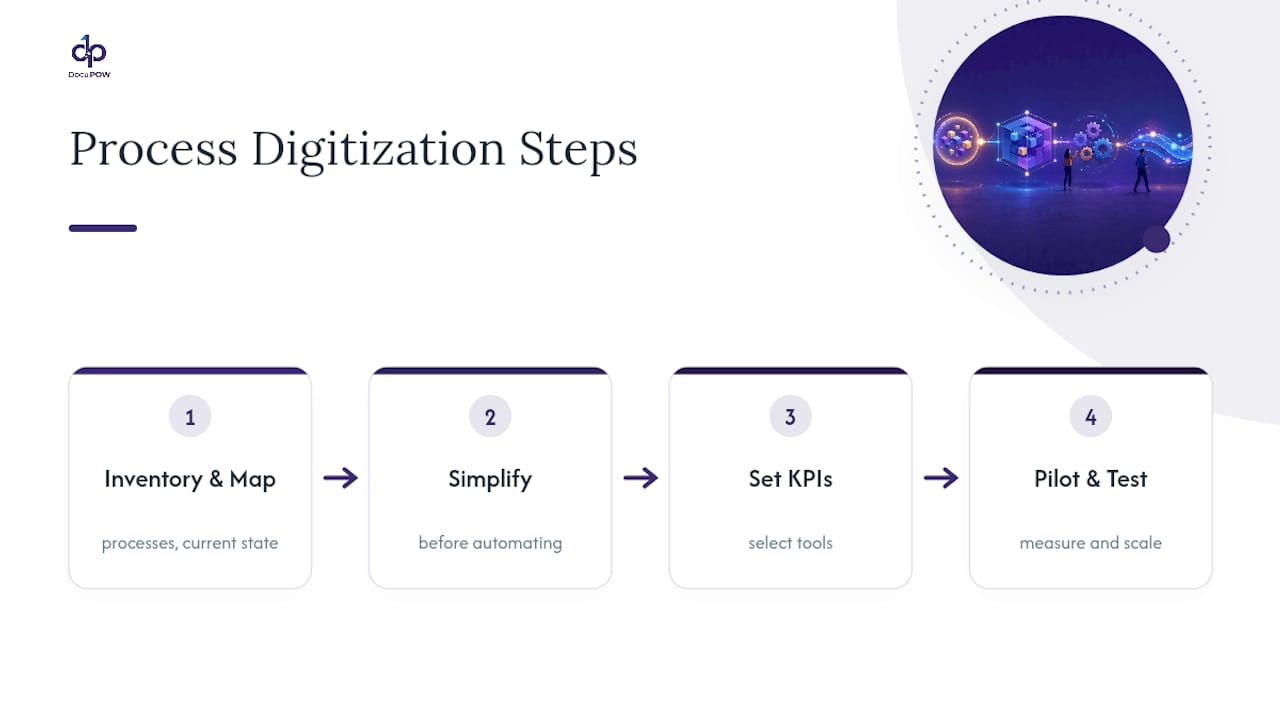
Most implementation playbooks follow: inventory processes, map the current state, simplify before automating, set KPIs, select tools, pilot and test, then measure and scale.
What Are the Four Types of Digitalization?
Digitalization commonly applies at four levels: task-level (automating one step), process-level (redesigning a workflow), function-level (transforming a department), and organization-level (changing the business model itself).
How Do I Digitize My Business?
Start by inventorying document-heavy, high-volume processes, simplify them, then pilot digital capture and workflow tools on the highest-cost one before expanding to others.
What Are the Steps Involved in the Digitization Process?
The core steps are assessing current processes, mapping workflows, selecting the right technology (document capture, workflow automation, or agent-based extraction), piloting, measuring against KPIs, and scaling what works.
How Long Does a Digitization Pilot Take to Show ROI?
Most well-scoped pilots reach measurable ROI within three to six months, based on BPM implementation benchmarks and McKinsey case data.
Recommended
See DocuPOW on your documents.
Stop building templates. Start extracting data.