Vendor Onboarding Automation: A Procurement Guide
Streamline your vendor onboarding with automation to ensure faster approvals, reduce errors, and enhance compliance without increasing headcount.


Vendor onboarding automation standardizes intake, validates documents, and enforces risk-based approvals so you can cut cycle time and close compliance gaps without adding headcount. If you take one action after reading this, pick a medium-risk, high-volume supplier class and measure your current baseline cycle time. That single measurement is what separates a successful pilot from a wishful one.
Immediate benefits you can expect:
- Faster approvals: structured digital intake replaces email chains and chases
- Standardized evidence capture aligned to SOC 2 and ISO 27001 controls
- Automated risk-based routing using SIG or CAIQ questionnaire frameworks
- Fewer data-entry errors in ERP master records
- Continuous monitoring that catches vendor deterioration earlier than quarterly reviews
Pro Tip: The highest-impact pilot is almost always a medium-risk, high-volume supplier class — complex enough to stress-test the workflow, common enough to generate statistically meaningful cycle-time data within six to eight weeks.
Your immediate next step: select one supplier lane, document the current average days from request to approved status, and set a target. Without that baseline, you cannot prove ROI to the CFO.
Key Takeaways
Vendor onboarding automation delivers measurable cycle-time reduction, cleaner ERP master data, and a defensible TPRM posture when implemented with a clear pilot lane, a baseline measurement, and human-in-the-loop review for high-risk cases.
| Point | Details |
|---|---|
| Baseline before you automate | Measure current cycle time and FTE hours per onboarding before selecting a platform. |
| Pilot on medium-risk, high-volume lanes | This supplier class generates enough data in 6–8 weeks to prove or disprove ROI. |
| Template-free extraction is non-negotiable | Platforms requiring per-layout configuration create bottlenecks every time a new document type appears. |
| Continuous monitoring closes the TPRM gap | Post-activation monitoring catches certificate expirations and sanctions changes that periodic reviews miss. |
| DocuPOW for the full workflow | DocuPOW’s agent-based platform covers intake, document extraction, ERP sync, and compliance evidence in one integrated system. |
Table of Contents
- Why manual vendor onboarding breaks down at scale
- What automation actually delivers for procurement, security, and operations
- Capabilities to require from any vendor onboarding automation platform
- How an automated vendor onboarding workflow runs, stage by stage
- How to implement automation and choose the right solution
- Security, compliance, and TPRM specifics you cannot skip
- KPIs to track and how to build your ROI case
- How DocuPOW addresses real vendor onboarding challenges
- What I’ve learned from onboarding automation implementations
- DocuPOW cuts vendor onboarding cycle time from weeks to days
- Useful sources and further reading
- FAQ
Why manual vendor onboarding breaks down at scale
Email threads, shared spreadsheets, and PDF attachments are not a vendor onboarding process. They are a collection of workarounds that happen to produce an approved vendor record — eventually.
The failure modes are predictable. Approvers get CC’d inconsistently, so the same document gets reviewed twice or not at all. Data entered by a supplier into an email form gets re-keyed into the ERP by a procurement analyst, introducing errors at every transfer. Evidence like certificates of insurance or W-9s gets stored in someone’s inbox rather than a central repository, making audits painful and compliance gaps invisible until they matter.
Standardized data collection plus real-time enrichment can cut early-stage manual verification time dramatically, yet most organizations still rely on ad hoc email requests for the same data they could collect once through a structured portal.
The consequences compound as vendor count grows:
- Procurement: delayed approvals block sourcing events; off-contract spend rises when preferred vendors are not yet active
- Finance: incorrect banking or tax data causes failed payments and rework
- Security/compliance: missing or expired certificates create audit findings and unmanaged third-party risk
- Operations: new vendors cannot be provisioned in downstream systems until the ERP record exists, delaying time-to-revenue
Statistic callout: Published implementation examples show that automation can reduce supplier onboarding timelines by about half compared to manual processes, with ROI timelines often landing in the six-to-twelve-month range.
The problem scales non-linearly. A team that manages 200 vendors per year with email can just about hold it together. At 500 vendors, the same process produces a backlog, compliance gaps, and frustrated suppliers who cannot get paid.
What automation actually delivers for procurement, security, and operations
The business case for automating the vendor onboarding process is not abstract. It shows up in three places: time, accuracy, and risk posture.
For procurement teams:
- Cycle time drops because intake validation, sanctions screening, and tiered approvals run in parallel rather than sequentially
- Supplier master data arrives pre-validated, so ERP records are cleaner from day one
- Analysts spend time on exceptions and relationships, not data re-entry
For security and compliance:
- Evidence lands in a centralized, auditable repository rather than scattered inboxes
- Continuous monitoring flags certificate expirations, adverse media, and posture changes between review cycles
- TPRM automation speeds processes, improves scalability, and reduces hours spent on manual risk assessments, with AI and continuous monitoring as the central capabilities
For finance and AP/AR:
- Correct banking details and tax identifiers at the point of onboarding reduce failed payments
- Faster vendor activation means revenue-impacting suppliers can invoice sooner
- Fewer exceptions in the payment run translate directly to analyst time saved
Pro Tip: Measure supplier satisfaction separately from internal cycle time. A vendor who found your portal confusing will tell you things your internal metrics never will. A short three-question survey sent at activation costs almost nothing and surfaces UX problems before they affect retention.
The downstream benefit that procurement teams consistently underestimate is time-to-first-invoice. For a revenue-generating supplier relationship, every day the vendor is not yet active in the ERP is a day that relationship cannot generate value.
Capabilities to require from any vendor onboarding automation platform
Not all platforms are equal, and the gap between a capable system and a limiting one usually shows up at the document-extraction layer. Here is the full capability checklist, followed by a tiering table.
Full capability list:
- Self-service intake portal with branded supplier experience
- Template-free document capture (no rigid field mapping per document type)
- Automated field extraction and validation against master data rules
- Questionnaire automation with conditional skip logic (SIG, CAIQ, custom)
- Risk scoring and vendor tiering at intake
- Sanctions and entity verification (OFAC, global watchlists)
- Continuous monitoring with external intelligence signals
- Configurable approvals and workflow engine with escalation rules
- ERP, CRM, and contract lifecycle management (CLM) integrations via API
- Secure evidence repository with role-based access
- Full audit trail and compliance reporting
- Human-in-the-loop review for exceptions and high-risk cases
Why template-free extraction matters specifically: traditional OCR tools require a field map for every new document layout. When a supplier sends a certificate from a new insurer or a tax form in an unfamiliar format, a template-based system either fails or requires manual configuration. Agent-based document automation reads context rather than position, so new document types require no setup time. For procurement teams onboarding suppliers across multiple geographies and document standards, that difference is significant.
AI frameworks applied to supplier selection extract signals from documents and external data to support both initial risk decisions and ongoing performance monitoring, which is exactly what the extraction and monitoring layers of a mature platform should do.
| Tier | Capability | Why it matters |
|---|---|---|
| Essential | Self-service intake portal | Removes email as the intake channel |
| Essential | Automated field extraction and validation | Eliminates re-keying and data errors |
| Essential | Sanctions and entity verification | Blocks onboarding of restricted parties |
| Essential | ERP integration via API | Creates vendor master record without manual entry |
| Essential | Audit trail and compliance reporting | Required for SOC 2 and ISO 27001 evidence |
| Important | Template-free document capture | Handles new document types without reconfiguration |
| Important | Risk scoring and tiering at intake | Routes high-risk vendors to deeper review automatically |
| Important | Questionnaire automation with skip logic | Reduces supplier burden; collects only relevant data |
| Important | Continuous monitoring | Detects deterioration between review cycles |
| Advanced | Fourth-party dependency capture | Maps supply chain risk beyond direct vendors |
| Advanced | Predictive risk signals | Flags emerging issues before they become incidents |
| Advanced | CLM and GRC/TPRM integration | Closes the loop between contract, risk, and procurement |
Integration touchpoints to confirm before you buy: ERP (SAP, Oracle, NetSuite), CLM (Ironclad, Icertis), GRC/TPRM platforms, identity and provisioning systems, and AP automation tools. Centralizing supplier master data and integrating via APIs is the single most important architectural decision — disconnected systems produce fragmented data regardless of how good the intake layer is.
How an automated vendor onboarding workflow runs, stage by stage
A well-designed automated workflow removes human touchpoints from the routine and routes exceptions to the right person at the right time. Here is what each stage looks like in practice.
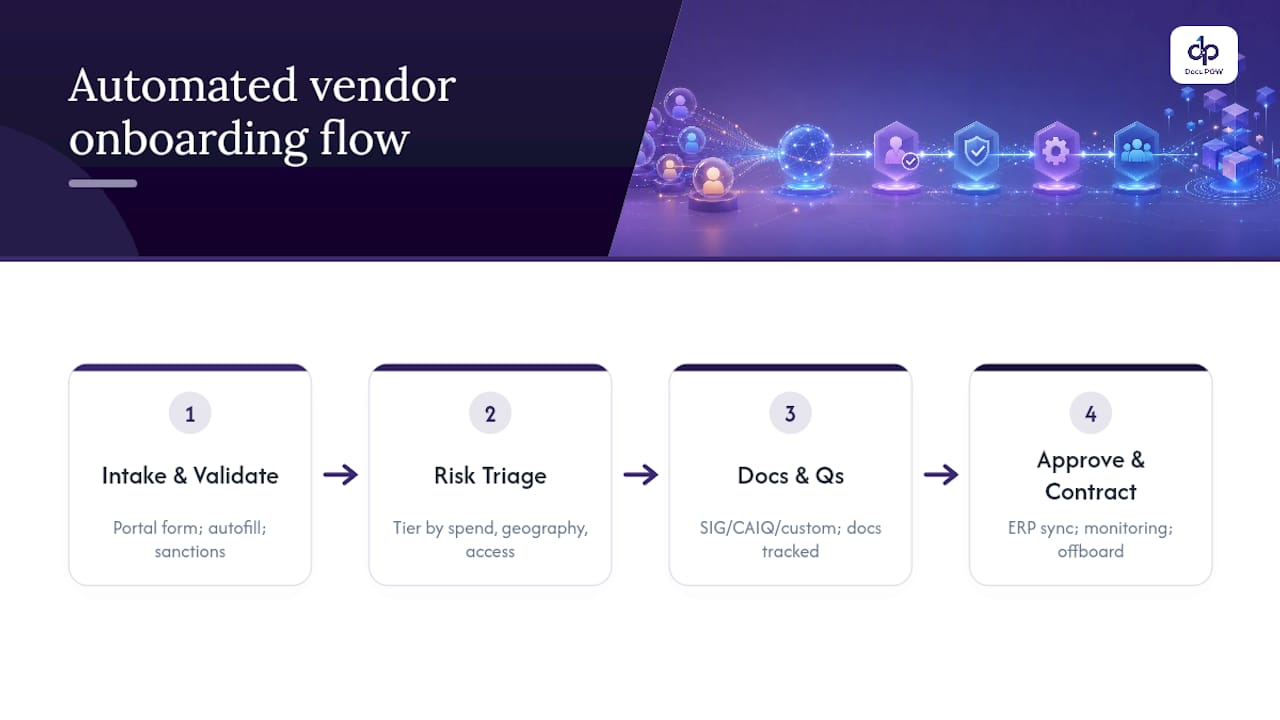
Stage 1: Intake and registration. The supplier receives a branded portal link and completes a structured intake form. Auto-fill pulls company data from public registries where available. The system captures legal entity name, tax ID, banking details, and contact information in one pass.
Stage 2: Automated validation and enrichment. The platform validates submitted data against sanctions lists (OFAC, UN, EU), verifies the legal entity, and enriches the record with external data. Mismatches trigger an exception flag rather than a manual email.
Stage 3: Risk tiering. Based on spend category, geography, data access, and initial screening results, the system assigns a risk tier. Low-risk vendors proceed to a lightweight approval path. Medium and high-risk vendors trigger deeper due diligence, including questionnaire dispatch.
Stage 4: Evidence collection and questionnaire. The platform sends the appropriate questionnaire (SIG Lite, CAIQ, or a custom version) with skip logic so suppliers only answer relevant questions. Document requests (certificates of insurance, SOC 2 reports, financial statements) go out automatically, and the system tracks receipt and expiry.
Stage 5: Approvals and contract creation. Completed packages route to the right approvers based on risk tier and spend category. Approval workflows can include procurement, legal, security, and finance in parallel or sequence. Contract templates trigger from the approval event where CLM integration exists.
Stage 6: ERP record creation and provisioning. On final approval, validated data writes directly to the ERP vendor master. Downstream provisioning (system access, payment terms, preferred status) triggers automatically. Automated supplier onboarding with direct ERP synchronization removes the manual re-entry step that causes most master data errors.
Stage 7: Continuous monitoring and alerts. Post-activation, the platform monitors for certificate expirations, sanctions list changes, adverse media, and financial distress signals. Alerts route to the vendor owner or risk team based on severity.
Stage 8: Offboarding triggers. Contract end dates, inactivity thresholds, or risk escalations trigger an offboarding workflow that deactivates the vendor record, revokes system access, and archives evidence.
Pro Tip: Build a simple flow diagram of this eight-stage process before your pilot kickoff and share it with every stakeholder. Procurement, security, legal, and finance all think they understand the process — they rarely agree on who owns stage 3. The diagram surfaces those disagreements before the tool does.
Roles to assign at each stage: procurement owns intake and approvals; security owns risk tiering and questionnaire review; legal owns contract creation; finance owns banking validation and ERP record; the vendor manager owns continuous monitoring alerts.
How to implement automation and choose the right solution
The phased roadmap
- Assess and baseline. Document your current process end-to-end. Measure average cycle time, error rate, and FTE hours per onboarding. This is your before state.
- Design. Map data fields, document types, and approver logic. Assign data owners. Define risk tiers and the criteria for each.
- Pilot (one to two lanes). Select a medium-risk, high-volume supplier class. Run the pilot for six to twelve weeks. Measure against your baseline.
- Integrate. Connect the platform to your ERP and any CLM or GRC tools. Validate data flows with your IT team before scaling.
- Scale and improve. Roll out to additional supplier classes. Use analytics to identify remaining bottlenecks and refine risk-tiering logic quarterly.
Selection criteria checklist
When evaluating platforms, buyers consistently prioritize ease of configuration, document handling quality, and integration depth. Use this list to structure your evaluation:
- Template-free or agent-based document extraction (no per-layout configuration)
- Native API integrations with your ERP and CLM
- SOC 2 Type II and ISO 27001 certifications
- Configurable risk-tiering logic without professional services dependency
- Analytics dashboard with cycle-time and exception reporting
- Vendor support model and implementation timeline
- Scalability to handle peak onboarding volumes without performance degradation
TPRM automation is most effective when paired with human accountability, so look for platforms that support human-in-the-loop review rather than fully black-box decisions.
Red flags to walk away from
- Systems that require professional services to add a new document type
- No audit trail or evidence repository
- Closed APIs that cannot connect to your ERP without custom middleware
- Vendors who quote implementation timelines longer than twelve weeks for a standard pilot
Pro Tip: Pair your automation rollout with a RACI matrix and a written exception-handling policy before go-live. The tool will surface edge cases your process design did not anticipate. Without a documented owner for exceptions, those cases land back in email.
Security, compliance, and TPRM specifics you cannot skip
Vendor onboarding is a primary attack surface for supply chain risk. Automation helps, but only if the platform itself meets the security controls you are requiring of your vendors.
Required controls in your platform:
- Centralized evidence repository with role-based access control
- Encrypted storage at rest and in transit
- Chain-of-custody audit logs for every document and approval action
- Retention policies aligned to your regulatory requirements
- Data residency options if you operate in regulated jurisdictions
TPRM capabilities to require:
- Risk-based tiering at intake (not a flat due-diligence process for all vendors)
- Continuous monitoring using external intelligence signals (adverse media, financial distress, sanctions updates)
- Fourth-party dependency capture for critical vendors
- Remediation tracking with SLA enforcement
Statistic callout: Automation standardizes repeatable TPRM work across onboarding, assessments, monitoring, remediation, and offboarding — and the playbook consistently recommends tiered due diligence paired with a central vendor inventory as the foundation.
Automation reduces human error in evidence collection by removing the discretion from the process. When a questionnaire dispatches automatically based on risk tier, every vendor in that tier gets the same questions. When document expiry triggers an alert automatically, no vendor slips through because an analyst forgot to check. For compliance documentation and audit readiness, that consistency is the point.
Security review checklist for procurement:
- Does the platform hold SOC 2 Type II and ISO 27001 certifications?
- Where does supplier data reside, and can you specify region?
- What are the role-based access controls for internal users?
- What is the vendor’s incident response SLA and notification timeline?
- How does the platform handle data deletion requests?
KPIs to track and how to build your ROI case
Primary KPIs
- Cycle time (days from request to approved vendor record): the single most important metric
- Percent of onboardings fully automated (no manual touchpoint required)
- FTE hours per onboarding (before and after)
- Number of evidence exceptions (missing or expired documents at approval)
- Time to ERP record creation (from final approval to live vendor master record)
- Compliance findings per audit cycle (open items related to vendor evidence)
Secondary KPIs
- Supplier satisfaction score (post-activation survey)
- Off-contract spend rate (proxy for delayed activations)
- Time to first invoice paid (for revenue-impacting vendors)
| KPI | Baseline example | Target range | Notes |
|---|---|---|---|
| Cycle time | a few weeks | about one week | Measure from request submission to approved status |
| % fully automated | a minority | a strong majority | Excludes high-risk vendors requiring manual review |
| FTE hours per onboarding | several hours | about one hour | Includes intake, validation, and ERP entry |
| Evidence exceptions at approval | a substantial portion of cases | a small portion | Tracks missing or expired documents |
| Time to ERP record creation | a few days post-approval | within a day | Measures integration latency |
A simple ROI calculation
If your team processes 400 vendor onboardings per year at an average of five FTE hours each, that is 2,000 hours annually. At a fully loaded cost of $75 per hour, the manual process costs $150,000 in labor alone. Reducing to 1.5 hours per onboarding cuts that to $45,000, a saving of $105,000 per year before accounting for error reduction, faster time-to-revenue, or avoided audit findings.
For revenue-impacting suppliers, calculate separately. If a vendor activation delay costs one day of revenue, and your average revenue-impacting vendor generates $10,000 per day, cutting cycle time by ten days per vendor across twenty such vendors per year is $2,000,000 in accelerated revenue recognition. That number tends to get a CFO’s attention.
Financial data extraction automation is one of the highest-ROI starting points because the ERP sync step alone eliminates the most error-prone manual transfer in the entire process.
How DocuPOW addresses real vendor onboarding challenges
The baseline challenge
A global manufacturer was onboarding suppliers across four regions using a combination of email intake, shared drives for document storage, and manual ERP entry. Average cycle time was 22 days. Audit preparation required a full week of analyst time per quarter because documents were scattered across inboxes and folders.
The DocuPOW intervention
DocuPOW’s agentic document automation platform replaced the email intake with a structured supplier portal. The platform’s template-free extraction engine processed certificates of insurance, W-9s, SOC 2 reports, and financial statements without requiring a field map for each layout. Extracted data validated automatically against master data rules before routing to the approvals workflow.

The ERP integration wrote validated vendor records directly to the supplier master on approval, eliminating manual re-entry. Human-in-the-loop review was preserved for high-risk vendors and exception cases, so the team retained oversight without handling routine cases manually.
Technical fit summary:
- Template-free extraction handled new document layouts without reconfiguration
- Human-in-the-loop audit review for high-risk and exception cases
- API integration with ERP for same-day vendor master creation
- Analytics dashboard tracking cycle time, exception rate, and approval SLAs
- Centralized evidence repository with role-based access and full audit trail
- Enterprise security certifications supporting SOC 2 and ISO 27001 evidence requirements
Implementation example
The pilot ran on the indirect materials supplier class (medium risk, high volume) over eight weeks. Procurement, IT, and security each assigned one stakeholder. Key integration points were the ERP vendor master and the existing CLM tool.
What I’ve learned from onboarding automation implementations
The gap between a successful implementation and a stalled one almost never comes down to the technology. It comes down to whether procurement, IT, and security agreed on who owns the risk-tiering logic before the platform went live.
The most common surprise: teams discover mid-pilot that their existing vendor data is far messier than anyone admitted. Duplicate records, missing tax IDs, inconsistent legal entity names. Automation surfaces this immediately because it tries to validate data that was never validated before. That is actually a feature, not a problem. But if you are not prepared for a data-cleanup sprint in weeks two and three of your pilot, it will feel like a crisis.
A few rules of thumb that hold across implementations:
- Start with the integration that causes the most pain, usually ERP sync, not the one that sounds most impressive
- Test your exception-handling workflow with real edge cases before go-live, not hypothetical ones
- Communicate the portal change to suppliers at least two weeks before launch with a clear FAQ; supplier confusion at intake is the most common cause of pilot delays
- Do not automate a process you do not understand; map it manually first, then automate the mapped version
Change management is underrated. The analysts who used to manage the email inbox are not obstacles to automation. They are the people who know where every exception lives. Involve them in the design phase and they will make the system better. Exclude them and they will find ways to route around it.
DocuPOW cuts vendor onboarding cycle time from weeks to days
Procurement teams that have spent months chasing certificates via email and re-keying data into ERP systems know exactly what the cost of that process is. DocuPOW’s agent-based platform addresses the core bottleneck directly: documents of any type, from any supplier, extracted and validated without template configuration.
Three capabilities that matter most for vendor onboarding: template-free extraction that handles new document layouts on first submission, direct ERP and CRM integration via API for same-day vendor master creation, and enterprise-grade security with SOC 2 and ISO 27001 evidence handling built in. The KYC and onboarding automation flow is purpose-built for identity and compliance document processing, which covers the most document-intensive part of any onboarding program.
Pilots typically run six to eight weeks on a single supplier class. To see how the platform fits your current ERP and document stack, request a demo at DocuPOW.
Useful sources and further reading
- Automating Third-Party Risk Management: Steps & Playbook (StrikeGraph) — vendor-neutral TPRM automation playbook covering tiered due diligence, central vendor inventory, and continuous monitoring
- How to Automate Supplier Onboarding for Faster Approvals (Opstream) — vendor blog with practical implementation guidance on structured intake, validation, and ERP sync
- Third-Party Risk Management Automation: Tools, Benefits, and Done-for-You Solutions (Workstreet) — vendor blog covering workflow automation, continuous monitoring, and evidence centralization
- 5 Challenges of Supplier Onboarding and How to Overcome Them (Veridion) — vendor blog focused on data enrichment, real-time validation, and API integration patterns
- 8 Supplier Onboarding Challenges (And How to Solve Them) (Dotfile) — vendor blog with ROI timelines and digital transformation responses to common bottlenecks
- Artificial Intelligence in Supplier Selection and Performance Monitoring (ResearchGate) — academic framework; peer-reviewed, vendor-neutral, covers AI methods for supplier risk and selection
FAQ
What is vendor onboarding automation?
Vendor onboarding automation replaces manual email intake, spreadsheet tracking, and re-keying with a structured digital workflow that captures supplier data, validates documents, applies risk-based routing, and syncs approved records to your ERP automatically.
How long does a vendor onboarding automation pilot typically take?
Most pilots run six to twelve weeks on a single supplier class.
What software is best for automating vendor onboarding?
The strongest platforms combine template-free document extraction, configurable risk-tiering, native ERP integration, and SOC 2 or ISO 27001 certification. DocuPOW’s agent-based platform covers all four, with human-in-the-loop review for high-risk cases and direct API integration with major ERP systems.
How does automated onboarding differ from employee onboarding automation?
Vendor onboarding automation focuses on third-party risk management, document validation (certificates, tax forms, compliance questionnaires), and ERP master data creation. Employee onboarding automation centers on HR system provisioning, policy acknowledgment, and identity management. The underlying workflow logic is similar, but the compliance controls and document types differ significantly.
How do you measure ROI for vendor onboarding automation?
Track cycle time (days from request to approved), FTE hours per onboarding, and evidence exception rate before and after implementation. A team processing 400 vendors per year at five hours each can reduce that to 1.5 hours with automation, converting the time saved directly into FTE-equivalent cost savings and faster time-to-first-invoice for revenue-impacting suppliers.
Recommended
See DocuPOW on your documents.
Stop building templates. Start extracting data.