Cut Customs Delays: Intelligent Document Processing for Logistics
Speed customs clearance and cut exceptions with intelligent document processing for logistics. Start with a 60–90 day human in the loop pilot.


Intelligent document processing (IDP) turns the logistics paperwork bottleneck into structured, machine-ready data so teams can cut manual processing and clear shipments faster. It reads invoices, bills of lading and customs forms, extracts the fields that matter and feeds them straight into a TMS or ERP, cutting exceptions and speeding customs clearance. The fastest way to prove it works is a narrow pilot tied to one KPI, such as invoice processing time or exception rate, before expanding to a full document set.
TL;DR:
- IDP is most effective when handling highly variable document formats, with a broad range of supplier, carrier, and customs documents, rather than fixed templates.
- Validation against specific layout rules, such as CBP’s CATAIR and CAMIR standards, is critical to prevent silent rejections during customs filings or manifest submissions.
- Running a 60 to 90 day pilot with human-in-the-loop review on a few document types ensures reliable accuracy and highlights edge cases before scaling.
- For workflows with low volume or highly standardized documents, OCR combined with RPA may offer a cheaper, faster solution but lacks scalability.
- The success of IDP projects depends on upstream data quality and integration readiness, with a focus on a narrow scope and clear KPIs from the outset.
Table of Contents
- What intelligent document processing actually does
- When OCR or RPA still make sense
- Benefits for logistics teams and the KPIs that prove it
- Logistics use cases: from invoice to customs clearance
- How to implement IDP: a pilot-to-scale checklist
- Integration and regulatory rules that trip up automation projects
- DocuPOW’s approach for logistics document workflows
- Timing and scope: when to pilot and when to hold off
- Try a focused pilot with DocuPOW
- Sources
- FAQ
What intelligent document processing actually does
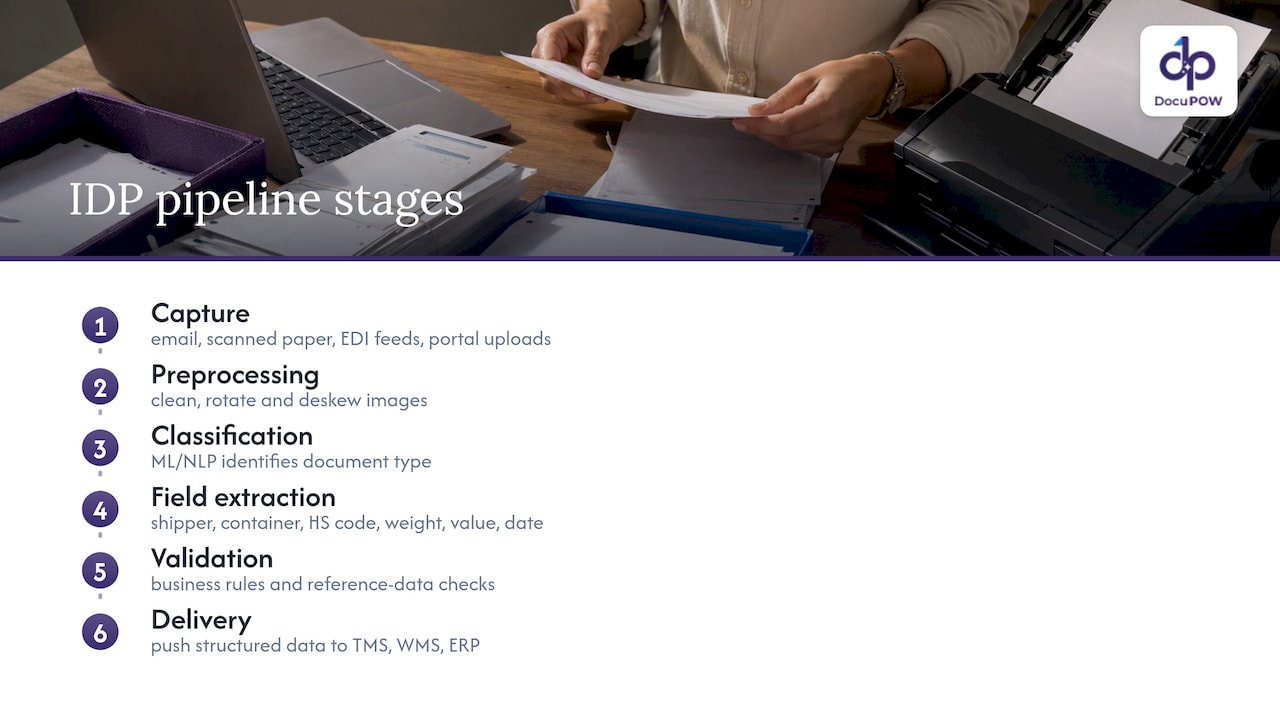
IDP is a pipeline, not a single tool. It starts with capture, pulling in documents from email, scanned paper, EDI feeds or portal uploads, then moves to preprocessing, where images are cleaned, rotated and deskewed so the text underneath is readable. From there, machine learning and natural language processing models classify the document type (invoice, bill of lading, certificate of origin) and extract the specific fields a logistics team needs: shipper name, container number, HS code, weight, value, date of issue.
The difference from plain OCR shows up at this stage. OCR converts an image into raw text, a wall of characters with no understanding of what any of it means. IDP goes further: it recognizes that a string of digits next to the word “container” is a container number, not a phone number, and it outputs that as a structured field a system can act on, not a line of text a person has to re-key. Academic prototypes that pair OCR with AI for customs declaration preparation illustrate this gap directly, showing measurable time savings when extraction feeds structured fields rather than raw text dumps.
Validation is the next layer. Extracted fields get checked against business rules (does this HS code exist, does this invoice total match the line items) and against reference data (is this carrier SCAC code valid). Only validated records move on to the final stage: delivery, where connectors push the structured data into a TMS for routing, a WMS for receiving, or an ERP for accounts payable.
For logistics decision-makers evaluating vendors, this pipeline is the real checklist. Ask how each stage handles your specific document mix, how classification performs on layouts the system has never seen, and how validation errors get routed for human review before anything touches your core systems.
When OCR or RPA still make sense
Not every workflow needs full IDP. If your documents follow one unchanging template and volume is low (a single customer sending the same invoice layout every week), basic OCR with a fixed template can do the job cheaply. Robotic process automation (RPA) still earns its place too, not for extraction, but for orchestration: once data is extracted, RPA bots can log into legacy systems, move files between folders or trigger downstream approvals.
The trade-off comes down to maintenance and scale. A templated OCR setup breaks the moment a supplier changes their invoice layout, and someone has to rebuild the template. IDP, especially template-free approaches, adapts to new layouts without that rework. The speed-to-value question is simple: if your document variety is low and static, OCR plus RPA may get you there faster and cheaper. If your document mix spans dozens of suppliers, carriers and customs formats, IDP is the investment that scales.
Benefits for logistics teams and the KPIs that prove it
The operational case for IDP in logistics rests on three things: fewer exceptions, faster cycle times and better visibility into where documents sit in a process. When extraction is accurate, invoices move through three-way match faster, bills of lading populate a TMS without manual re-entry, and customs paperwork reaches a broker complete instead of bouncing back for corrections. Each of those failures costs real time, and in customs, a rejected or incomplete filing can mean a container sitting in detention while fees accrue.
Academic and industry work on automating customs declaration preparation points to the same pattern: pairing OCR with AI to populate structured declarations shows profitability and measurable time savings in real logistics contexts, which supports treating faster clearance as a genuine cost lever, not just a convenience.
To know whether a pilot is working, track a short list of KPIs rather than a vague sense of improvement:
- Extraction accuracy: the share of fields correctly captured without human correction.
- Exception rate: how often a document fails validation and needs manual review.
- Processing time per document: from receipt to structured, validated output.
- Time-to-clearance: for customs-bound documents, how long from submission to cleared status.
- Cost per document: fully loaded, including any human review time.
Pro tip-style note aside, the real ROI levers worth modeling are concrete: fewer manual data-entry hours freeing staff for exception handling, faster invoice turnaround improving days payable outstanding, and fewer late or incomplete customs filings reducing detention and demurrage fees. None of these require guesswork. GAO’s review of freight data finds that public data sources often lack the scope needed for detailed operational planning, which is exactly why internally generated, validated document data, the kind IDP produces, matters more for forecasting your own exception rates and cycle times than any industry-wide average.
Logistics use cases: from invoice to customs clearance
Every logistics operation runs on a handful of document types, and each one has a different failure mode that IDP addresses differently.
- Supplier invoices and three-way match: IDP extracts line items, quantities, prices and PO numbers, then matches them against the purchase order and receiving record automatically, flagging only genuine mismatches for a human to resolve instead of routing every invoice through manual review.
- Bills of lading and manifests: extraction pulls shipper, consignee, container number, weight and routing details, feeding them directly into a TMS and, where relevant, into the data elements CBP’s manifest systems expect. Getting this mapping right matters because manifest records follow strict, non-negotiable formatting rules.
- Customs entry documents and PGA message sets: CBP’s CATAIR implementation guide defines exact data elements and submission methods for PGA filings, down to field order and record identifiers. An extraction system that outputs a field in the wrong format does not get flagged politely, it gets silently rejected downstream, so validation against these record layouts has to happen before data ever reaches a broker’s submission system.
- Proof of delivery (POD): a scanned or photographed POD triggers downstream workflows the moment it is captured, confirming delivery, closing out a shipment in the TMS and, where a claim is needed, starting the carrier claims process automatically instead of waiting for someone to notice a missing signature.
- Certificates, insurance documents and packing lists: these route differently depending on content. A certificate of origin might need to be matched against a trade agreement rule, an insurance certificate against a coverage threshold, and a packing list against the invoice it accompanies. IDP’s value here is less about volume and more about routing accuracy: getting the right document to the right compliance check without a person reading every page.
The common thread across these use cases is that structured extraction only pays off when the output format matches what the receiving system expects. Platforms built for supply chain document extraction are evaluated as much on how cleanly they map fields to TMS, WMS and ACE formats as on raw extraction accuracy.
A few patterns show up across all five use cases worth noting directly:
- Document variety (not just volume) is the real driver of IDP value over templated OCR.
- Validation rules specific to each document type catch errors before they become downstream rejections.
- Human review should concentrate on genuine exceptions, not on documents the system already extracted correctly.
How to implement IDP: a pilot-to-scale checklist
Treat the first ninety days as a controlled test, not a full deployment. Rushing straight to scale is the most common way these projects stall out.
- Inventory your documents before anything else: list every document type, its volume, who owns the process today and what “correct” output looks like for each one.
- Normalize and validate sample data: pull a representative batch of real documents, including messy ones, and define the validation rules the system needs to check against before any model training begins.
- Design a narrow pilot: pick one or two document types with clear volume and a defined owner, set your KPIs (accuracy, exception rate, processing time) up front, and run a human-in-the-loop audit on every extracted record for 60 to 90 days.
- Prioritize integrations deliberately: decide early whether you need direct API connections to your TMS, WMS or ERP, or whether a middleware layer is needed to handle legacy EDI formats and ACE-specific constraints.
- Operationalize before you scale: define SLAs for exception handling, assign staff to review flagged records, and build a change management plan so the people currently doing manual entry understand their new role in the process.
Pro Tip: Run the human-in-the-loop audit on every single extracted field for the full pilot window, not a sample. Silent errors that slip through in week two are the ones that compound by week ten.
Projects that skip the normalization step tend to fail quietly: the model looks accurate on clean test data, then falls apart on the first supplier invoice with an unusual layout. A short, deliberate normalization phase, paired with that human-in-the-loop audit, is what catches those edge cases before they reach production. Guidance on starting automated logistics systems echoes the same sequencing: define scope and data quality before chasing integration speed.
Integration and regulatory rules that trip up automation projects
Customs and manifest data are not forgiving formats. CBP’s CATAIR and CAMIR implementation guides define rigid record layouts, uppercase-only transmission rules, filler spaces and specific record identifiers that extracted data must match exactly before it reaches ACE. A field that is the right value but the wrong case, or missing a required filler space, does not get a helpful error message, it gets rejected without explanation.
This is where middleware earns its keep. Rather than asking an IDP system to output ACE-ready records directly, most teams build an adapter layer that enforces these legacy constraints (uppercase conversion, fixed field lengths, record sequencing) between extraction and submission. That adapter is also where you want your preflight checks to live.
Beyond customs filing, there is a separate opportunity worth understanding: the U.S. DOT’s Freight Logistics Optimization Works program. FLOW gives participating companies aggregated, anonymized feeds of purchase orders and asset-availability data to help forecast capacity, and the program had onboarded dozens of companies by its second anniversary. Joining FLOW is not a plug-and-play API call: it requires validated, anonymized data feeds and a structured onboarding process built around test files.
A few practical steps reduce the risk of these integration headaches:
- Validate extracted fields against CATAIR and CAMIR record layouts before any live transmission, not after a rejection.
- Build and test with sample files early, iterating with your customs broker on edge cases rather than discovering them in production.
- Treat FLOW-style data sharing as a separate workstream from transactional document processing, since the data preparation step often takes longer than the technical integration itself.
DocuPOW’s approach for logistics document workflows
DocuPOW takes a template-free, agentic approach to extraction: rather than relying on fixed templates per document layout, its autonomous agents interpret document context directly, which matters in logistics where supplier invoices, bills of lading and customs forms rarely share a format. That reduces the ongoing maintenance burden of rebuilding templates every time a new supplier or carrier format shows up.
The platform pairs extraction with human-in-the-loop audit review, real-time analytics and predictive insights, giving logistics and finance teams a way to catch exceptions before they become downstream rejections while building visibility into where documents are stalling. For teams considering a pilot, DocuPOW’s supply chain-specific capabilities are built around exactly this kind of document mix: invoices, shipping documents and compliance paperwork that do not follow one template.
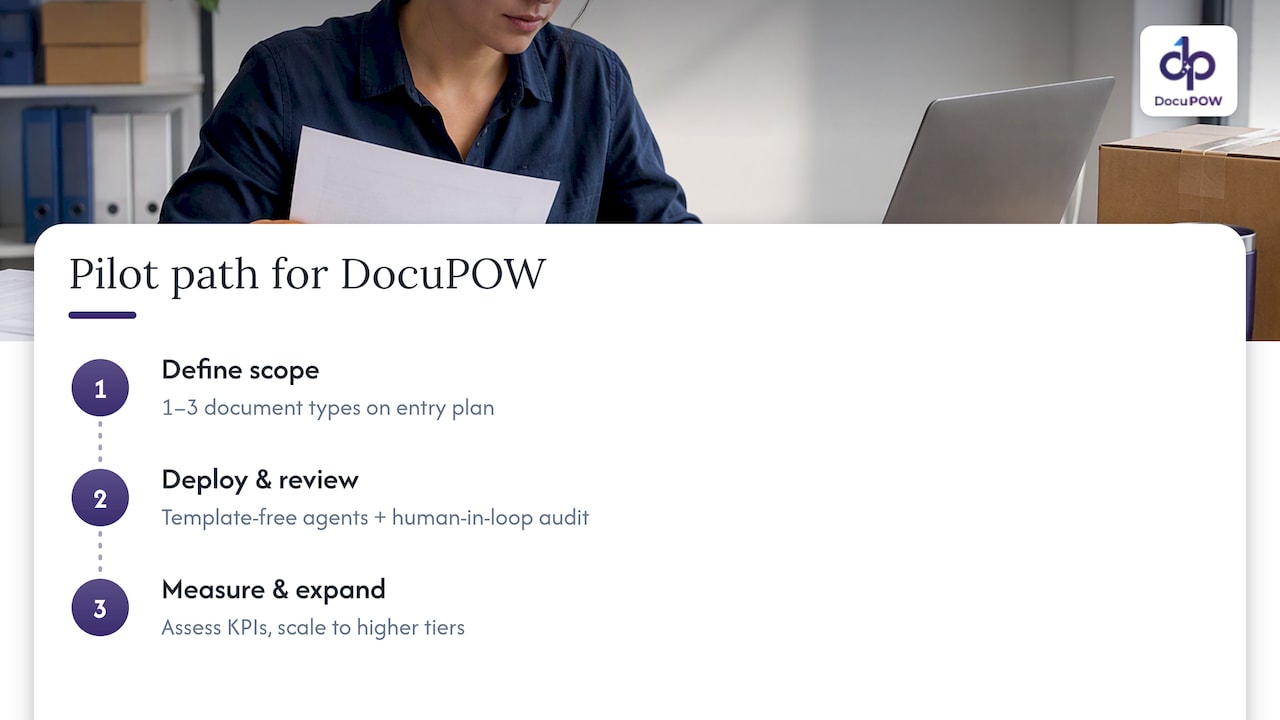
A practical pilot path starts narrow: a defined set of one to three document types on an entry-level plan, measured against the KPIs outlined earlier, with room to expand toward higher tiers as volume and document variety grow.
Timing and scope: when to pilot and when to hold off
Pilot now if your document volume is high enough that manual entry errors are recurring, and if you have the integration resources to connect extracted data to a TMS or ERP within the pilot window. Those two conditions together are what make a 60 to 90 day human-in-the-loop pilot worth running.
Hold off if your upstream data discipline is poor, meaning documents arrive in wildly inconsistent formats with no owner accountable for quality, or if nobody on your team can commit to building even a lightweight integration. IDP amplifies whatever data discipline already exists; it does not fix the absence of it. The safest starting point remains the same regardless of your timeline: a narrow, measurable pilot with a human reviewing every extracted record before you trust the system unsupervised.
— Syed Naveed Abbas
Try a focused pilot with DocuPOW
If you are weighing a pilot after reading through the implementation steps above, template-free extraction and human-in-the-loop auditing are practical approaches for the diverse document mix logistics teams deal with: invoices, bills of lading, customs forms and certificates that rarely follow the same layout twice. Instead of building and maintaining templates for every supplier and carrier, the platform’s agents adapt to new formats as they appear, and real-time analytics give you visibility into exception rates from day one.

A practical first step is to run a Starter plan pilot on one to three document types, the same narrow scope recommended earlier in this guide, before deciding whether to expand. Plans and current pricing, including Starter and Professional tiers, are listed on the DocuPOW pricing page.
- Start with the document types causing the most manual rework today, not the full catalog.
- Keep the human-in-the-loop audit running for the full pilot window before loosening review.
- Review the platform’s extraction pipeline to see how it maps to your existing TMS or ERP.
Visit the DocuPOW pricing page to compare plans and get started with a focused pilot.
Sources
Before building toward ACE or manifest automation, read the primary sources rather than relying on secondhand summaries, since formatting requirements change and small errors cause silent rejections.
- Biden-Harris administration announces new milestone for a first-of-its-kind supply-chain information exchange
- Freight transportation: Information on data sources and uses
- CATAIR – CPSC eFiling Beta Pilot Implementation Guide
- Artificial Intelligence in the Automation Process of Customs Declaration Preparation: A Case Study of an International Logistics Company
FAQ
What is the best intelligent document processing software for logistics?
The right choice depends on your document mix and integration needs rather than any single universal answer. Look for template-free extraction that handles varied layouts, human-in-the-loop audit capability and direct integration with your TMS, WMS or ERP, since these three factors determine whether a pilot actually reduces exceptions.
What are the most common documents used in logistics?
Logistics operations typically process supplier invoices, bills of lading and manifests, customs entry documents, proof of delivery records, and certificates such as certificates of origin or insurance. Each document type carries different fields and validation rules, which is why extraction accuracy varies by document type even within the same system.
What is the difference between OCR and intelligent document processing?
OCR converts a scanned image into raw text without understanding what that text means, so a person still has to interpret and re-key it. Intelligent document processing goes further, classifying the document type and extracting specific structured fields, like a container number or invoice total, that downstream systems can use directly.
What is the best AI software for logistics document automation?
There is no single best option for every operation, since the right platform depends on document variety, volume and the systems you need to integrate with. Platforms built around template-free extraction and human-in-the-loop review, such as DocuPOW’s supply chain tools, tend to fit logistics operations better than rigid, template-based systems because carrier and supplier document formats change constantly.
How long does an intelligent document processing pilot usually take?
Most practitioner guidance points to a 60 to 90 day pilot window with a human-in-the-loop audit reviewing every extracted record during that period. This timeframe is long enough to surface edge cases in document layouts while still keeping the pilot narrow and measurable.
Recommended
See DocuPOW on your documents.
Stop building templates. Start extracting data.