Process Optimization for Document Workflows: 2026 Guide
Unlock true efficiency with process optimization for document workflows. Learn to map, assess, and automate effectively—transforming workflows today!


TL;DR:
- Mapping workflows before automation prevents locking in inefficiencies and ensures measurable ROI.
- Implementing a structured, phased approach with pilot testing and security controls is crucial for successful, scalable document process optimization.
Successful process optimization for document workflows starts with one rule: map and fix the process before you automate anything. Organizations that skip this step automate their inefficiencies and lock them in. The practical sequence is assess, prioritize, pilot, then scale, with an AI-driven platform like DocuPOW handling extraction, orchestration, and integration once the workflow is clean. Automation can dramatically cut per-document processing time, reducing a lengthy manual task to just a fraction of the original duration at scale.
The short version: Map workflows first. Quantify hidden costs (waiting time, rework, audit failures). Run a focused 4–12 week pilot on a high-volume document type. Measure baseline before you touch anything. Then scale what works.
Table of Contents
- Why process optimization projects fail before they start
- What does a practical optimization roadmap look like?
- How does AI-driven document processing actually work?
- What metrics and ROI should you build your business case on?
- What security and compliance controls does your team need?
- Why DocuPOW fits enterprise document processing needs
- How do you run a low-risk pilot in 4–12 weeks?
- Key Takeaways
- What experienced implementers do differently
- Ready to validate this playbook with a DocuPOW pilot?
- Selected sources and further reading
- FAQ
Why process optimization projects fail before they start
The most common failure mode is not a bad tool choice. It is automating a broken process. Salesforce and Capgemini both emphasize that mapping and root-cause analysis must precede any automation investment, precisely because automation amplifies whatever is already in the workflow, good or bad.
Three patterns show up repeatedly in failed projects:
- Template dependence. Legacy OCR systems require a unique template for every document layout. When a supplier changes their invoice format, the template breaks and IT rebuilds it. That recurring maintenance burden is a hidden cost most ROI models ignore entirely.
- Undercounting hidden costs. Hidden costs of manual processing are typically 2.3x to 4.7x greater than visible labor costs. Waiting time between process steps, search and rework cycles, and audit remediation are the biggest offenders, and they rarely appear in the initial business case.
- Treating optimization as a project, not a program. Only 15% of IT leaders optimize processes continuously; 42% haven’t touched a process in the past year. One-and-done implementations drift back toward manual workarounds within months.
Pro Tip: Before any vendor conversation, pull three months of actual cycle-time data for your target document type. Separate active processing time from waiting time. In most organizations, waiting time accounts for a significant portion of total cycle time, and that is where the real ROI lives.
What does a practical optimization roadmap look like?
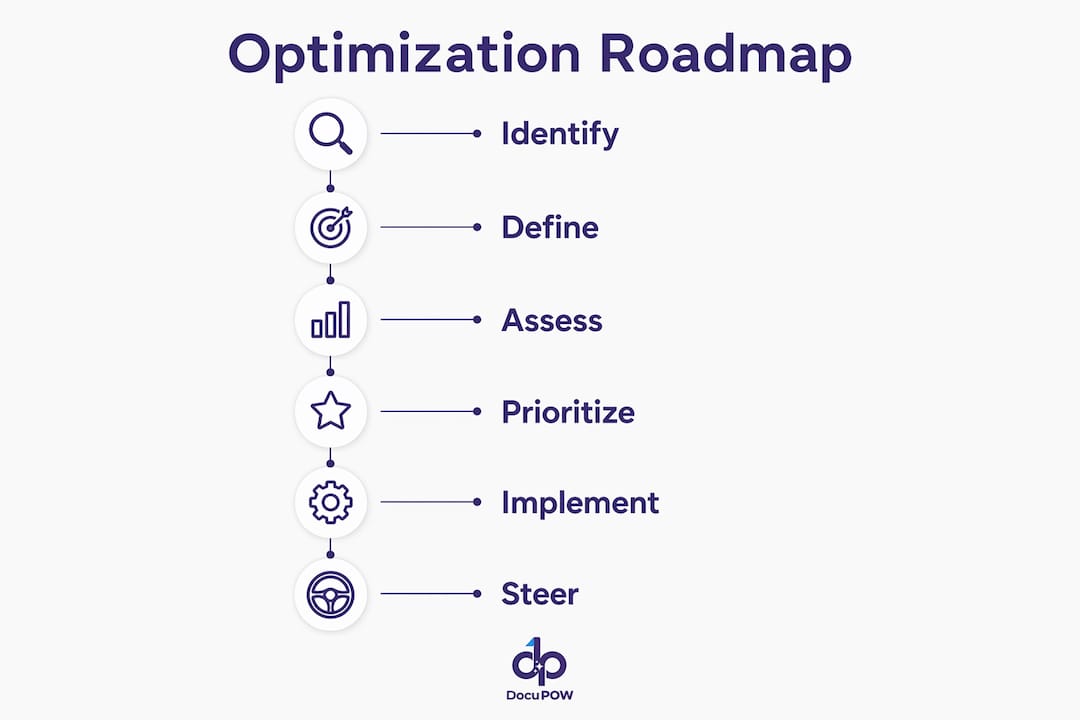
Capgemini’s six-phase framework (identify, define, assess, prioritize, implement, steer) maps cleanly onto a five-phase execution sequence for document workflows. The table below shows what each phase produces and how long it typically takes.
| Phase | Key Output | Typical Duration |
|---|---|---|
| Assess | Baseline metrics: cycle time, error rate, cost per document | Weeks 1–2 |
| Map | End-to-end workflow diagram with friction points annotated | Week 2 |
| Prioritize | Ranked list of document types by volume, complexity, and downstream impact | Week 2 |
| Pilot | Validated extraction model, integration test, ROI proof point | Weeks 4–12 |
| Scale | Governed rollout with SLAs, monitoring, and retraining schedule | Post-week 12 |
Before you hand anything to a vendor, gather: representative data samples (minimum 200–500 documents per type), current SLAs and exception-handling rules, security and data-residency requirements, and a named IT owner for integration access.
How does AI-driven document processing actually work?
Document automation is the missing link for ERPs and CRMs. Without structured extraction feeding those systems, you get fragmented visibility, duplicate records, and reporting you cannot trust. The technical patterns that make modern platforms reliable are worth understanding before you evaluate vendors.
Core patterns in Intelligent Document Processing (IDP):
- Template-free extraction uses large language models and computer vision to locate and pull fields from any document layout, with no pre-built template required.
- NLP classification routes documents to the correct workflow based on content, not filename or folder.
- Human-in-the-loop review flags low-confidence extractions for a human validator, then feeds that correction back into the model. Accuracy improves over time without IT involvement.
- Autonomous agents orchestrate multi-step workflows: extract, validate, enrich, route, and push to downstream systems in a single automated sequence.
- API integration delivers structured data directly into SAP, Oracle, Salesforce, or any ERP/CRM, eliminating manual re-entry. For a deeper look at connecting document automation to existing systems, the integration patterns are well-documented.
The contrast with legacy approaches is stark:
| Dimension | Template-based OCR | AI-driven IDP |
|---|---|---|
| Layout changes | Breaks; requires IT rebuild | Adapts automatically |
| New document types | Weeks of template work | Zero-shot extraction |
| Accuracy ceiling | around 80% without human review | above 95% with human-in-the-loop |
| IT maintenance | High (recurring) | Near-zero |
What metrics and ROI should you build your business case on?
Primary KPIs to track: time per document, throughput volume, error rate, automation rate, invoice cycle time, cost per document, and FTE-equivalent hours freed. Track all of them at baseline before the pilot starts.
Hidden cost categories most teams omit: waiting time between steps, search and retrieval time, rework after errors, audit remediation labor, and the opportunity cost of staff doing work a system should handle. These hidden costs are where the majority of the business case lives.
An ROI model for a mid-sized operations team processing a substantial volume of invoices per month shows labor savings leading to payback within several months under typical automation rates.
Practitioner data shows payback within 4–9 months when hidden costs are included. For a broader view of how to structure the business automation ROI calculation, independent frameworks confirm the same cost categories matter most.
Pro Tip: Measure your baseline for at least four weeks before the pilot. One week of data is almost always atypical. Four weeks captures end-of-month spikes, exception volumes, and the rework cycles that inflate true cost.
What security and compliance controls does your team need?
Enterprise document automation touches sensitive financial, legal, and operational data. The controls below are non-negotiable before any production deployment.
- Encryption in transit (TLS 1.2+) and at rest (AES-256 or equivalent)
- Role-based access control with least-privilege enforcement
- Immutable audit trails logging every extraction, validation, and routing decision
- Configurable retention and deletion policies aligned to your data governance framework
- SOC 2 Type II attestation (or equivalent) from the vendor
- Data-residency options if your organization operates under HIPAA, CCPA, or sector-specific regulations
Operational risks to mitigate: data leakage via poorly scoped API integrations, model drift as document layouts evolve, automated decision errors on edge cases, and vendor lock-in from proprietary data formats. AI governance controls built into the platform, rather than bolted on afterward, are the cleaner solution.
Human-in-the-loop review is not just an accuracy feature. It is a compliance control. Every low-confidence extraction that routes to a human validator creates a documented decision record. That record is what survives an audit.
IT teams own the governance layer here. For a detailed breakdown of why IT teams manage document automation rather than business units alone, the operational and security rationale is clear.
Why DocuPOW fits enterprise document processing needs
DocuPOW’s platform is built around the patterns that matter most for enterprise document workflows: template-free extraction via autonomous agents, human-in-the-loop review with continuous learning, multi-step workflow orchestration, real-time analytics and predictive insights, and ERP/CRM integration via API.
The subscription model (monthly or annual, usage-tiered) means no large upfront commitment. A pilot can start with a single document type, a defined data set, and a clear success metric. The platform’s capabilities cover the full IDP stack: extraction, classification, orchestration, search, and analytics in one environment.
For finance teams, automated three-way matching (PO, invoice, receipt) is a common first pilot because the volume is high, the ROI is measurable within weeks, and the downstream ERP integration is well-defined.
How do you run a low-risk pilot in 4–12 weeks?
Scope selection criteria: pick a document type with high monthly volume (100+ per month), predictable structure, and a clear downstream system that consumes the extracted data. Accounts payable invoices, purchase orders, and shipping documents are the most common starting points.

| Milestone | Week | Success Criteria |
|---|---|---|
| Data readiness | — | 200–500 labeled samples delivered; integration credentials confirmed |
| Model baseline | 2 | Extraction accuracy >85% on held-out test set |
| Human review threshold set | 4 | Confidence threshold defined; exception queue staffed |
| Integration cutover | 5–7 | Structured data flowing into ERP/CRM; zero manual re-entry |
| Pilot review | 10–12 | Automation rate, error rate, and cycle time vs. baseline |
For AI-powered workflow steps that align business and IT during implementation, the sequencing of data readiness before model tuning is the detail most pilots get wrong. Roll/fail criteria: if automation rate is below 60% at week 10, pause and investigate data quality before expanding scope.
Key Takeaways
Mapping workflows before automating is the single decision that separates successful process optimization programs from expensive failures.
| Point | Details |
|---|---|
| Map before you automate | Identify friction points and root causes before any tool selection or pilot begins. |
| Include hidden costs | Hidden processing costs are typically 2.3x–4.7x visible labor; omitting them understates ROI. |
| Pilot fast, measure baseline | Run a 4–12 week pilot on a high-volume document type; measure four weeks of baseline first. |
| Require enterprise security | Demand SOC 2, audit trails, encryption, and human-in-the-loop controls before production. |
| DocuPOW as pilot path | DocuPOW’s template-free, agent-based platform supports a low-risk pilot with measurable payback within 4–9 months. |
What experienced implementers do differently
The gap between a successful rollout and a stalled one usually comes down to change management, not technology. The teams that get this right do two things most don’t: they involve the people who handle exceptions in the pilot design, and they set realistic accuracy expectations before go-live.
A 90% automation rate sounds impressive until your AP team discovers the 10% exception queue is all the hard cases, and nobody trained them on the new review interface. The fix is straightforward: run a two-week shadow period where the system processes documents in parallel with the existing manual workflow. Staff see the outputs, flag disagreements, and build confidence before the cutover. That shadow period also surfaces edge cases the model hasn’t seen, which improves accuracy before it matters.
Continuous improvement means scheduling a quarterly review of automation rates, exception patterns, and new document types entering the workflow. Process optimization is not a deployment. It is a governance rhythm.
Ready to validate this playbook with a DocuPOW pilot?
The fastest way to prove the ROI case internally is a scoped, time-boxed pilot on your highest-volume document type. DocuPOW’s agent-based platform handles template-free extraction from day one, so you are not spending the first month building templates before you see a single result.
A pilot typically runs 4–12 weeks, produces measurable cycle-time and accuracy data against your own baseline, and requires no long-term commitment upfront. For operations and finance teams, the document process automation benefits are clearest when the numbers come from your own documents, not a vendor’s case study. Start with your highest-volume document type and a defined success metric, then explore the platform to see how DocuPOW scales from pilot to enterprise deployment.
Selected sources and further reading
- Salesforce: Process automation and the iterative optimization cycle — supports the mapping-first principle and continuous improvement framing
- Capgemini: Outlining the path to value from process optimization — source for the six-phase framework used in the roadmap section
- IBM: Four benefits of applying AI-led automation to document processing — ERP/CRM integration value and structured data dependency
- DocuExprt: The hidden cost of manual document processing — primary source for the 2.3x–4.7x hidden cost multiplier, 92% time reduction figure, and 4–9 month payback data
- Luce IT: The hidden cost of manual document management — template maintenance burden and IDP technical patterns
- Celonis: Process Optimization Report (IT Edition) — survey data on IT leader optimization frequency and continuous improvement gaps
- Bika.ai: How AI document automation improves quality, compliance, and brand consistency — governance and compliance controls in AI document systems
FAQ
What is the first step in process optimization for document workflows?
Map the current workflow end-to-end before selecting any tool. Identify where waiting time, rework, and exception handling consume the most time, since those friction points determine where automation delivers the highest return.
How long does a document automation pilot typically take?
A well-scoped pilot runs 4–12 weeks, from data readiness through integration cutover and results review. Payback typically follows within 4–9 months when hidden costs are included in the ROI model.
What hidden costs should an ROI model include?
Beyond visible labor, include waiting time between process steps, search and retrieval time, rework after data errors, audit remediation labor, and the opportunity cost of staff handling tasks that automation can own.
How does DocuPOW handle documents with changing layouts?
DocuPOW uses template-free extraction via autonomous agents, so layout changes do not break the system. The platform adapts without IT rebuilding templates, which removes the recurring maintenance cost that legacy OCR systems carry.
What security controls should you require before deploying document automation?
At minimum: TLS encryption in transit, AES-256 at rest, role-based access control, immutable audit trails, SOC 2 Type II attestation, and configurable data retention policies. Human-in-the-loop review adds a documented decision record that supports audit readiness.
Recommended
See DocuPOW on your documents.
Stop building templates. Start extracting data.