AI Knowledge Base for Enterprise Leaders: 2026 Guide
Discover how an AI Knowledge Base transforms document processing for enterprise leaders. Enhance efficiency with intelligent data extraction now!

TL;DR:
- An enterprise AI Knowledge Base extracts structured data from various documents without templates and makes it searchable for workflow integration. It relies on autonomous document processing and retrieval-augmented generation, with provenance and security controls being non-negotiable for vendors. Successful implementation depends on setting clear governance, accuracy targets, and federation across content stores to deliver measurable ROI quickly.
An enterprise AI Knowledge Base is a document intelligence platform that extracts structured data from any document type without templates, makes that data semantically searchable, and delivers workflow-ready knowledge to finance, procurement, operations, and IT teams. The industry term for the underlying architecture is intelligent document processing (IDP) combined with retrieval-augmented generation (RAG). For enterprise buyers, the short answer on vendor selection: require field-level provenance and explicit refused-generation behavior before any pilot begins.
Pro Tip: During vendor demos, submit a document the system has never seen and ask it to show the exact page and line number behind every extracted field. A vendor who cannot demonstrate that provenance in under 60 seconds is running template-matching under the hood, regardless of what the sales deck says.
Table of Contents
-
What capabilities must an enterprise AI Knowledge Base provide?
-
Which departments benefit most, and what ROI should you expect?
What capabilities must an enterprise AI Knowledge Base provide?
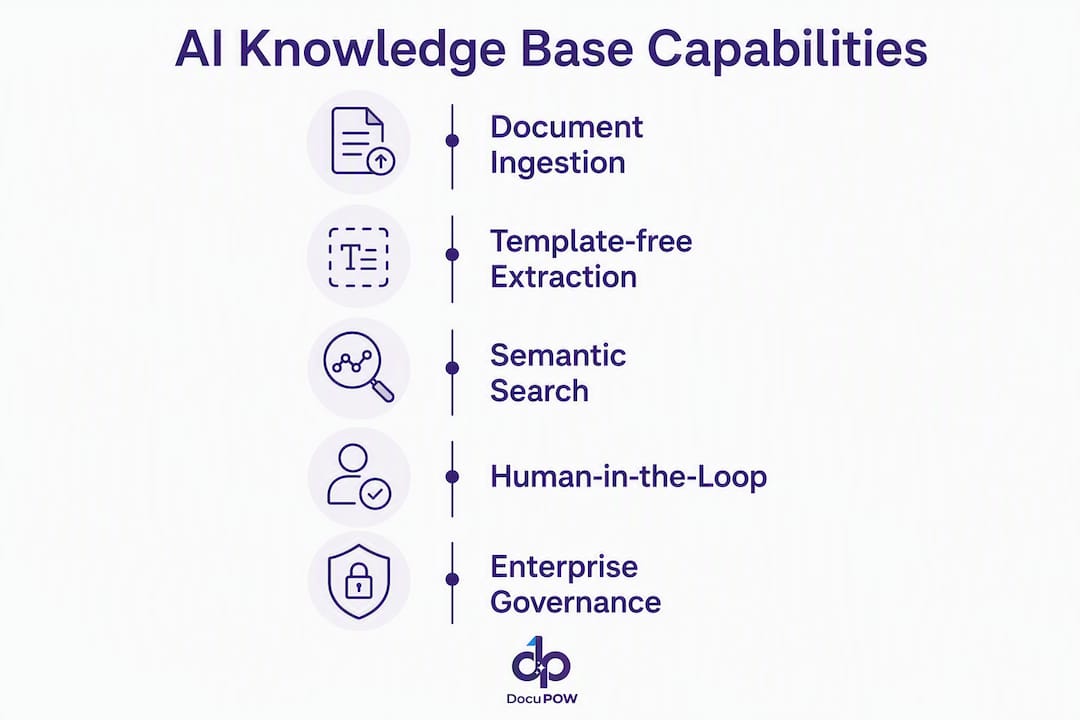
The gap between a genuine enterprise-grade system and a repackaged OCR tool comes down to six capabilities. Miss any one of them and you will be back at the RFP table within 18 months.
-
Template-free extraction with confidence scores. The system must pull field-level data from documents it has never seen before, attach a confidence score to each field, and link every value back to its source page and line. Human-in-the-loop routing for low-confidence rows is not optional for finance or legal workflows.
-
Semantic search with hybrid retrieval. Embeddings convert text to vectors so the system finds conceptually relevant content even when query wording differs from source documents. Hybrid BM25 plus vector search balances precision and recall better than either method alone.
-
Federation across content stores. The platform must search across SharePoint, S3, OneDrive, Box, Confluence, and similar stores while preserving source access control lists (ACLs). CIOs prioritizing permission-aware federated search are the ones breaking down cross-team data silos fastest.
-
Workflow orchestration. Extracted data should auto-route into downstream ERP, CRM, or approval workflows. Low-confidence extractions route to human reviewers; high-confidence ones proceed automatically.
-
Auditability and security controls. Role-based access, immutable audit logs, encryption at rest and in transit, and data residency controls are table stakes for SOX, HIPAA, and SOC 2 environments.
-
Open APIs and connectors. REST APIs, webhooks, and pre-built ERP/CRM connectors determine whether the platform fits your existing stack or creates a new integration burden.
| Capability | Minimum Requirement | Enterprise-Grade Signal |
|---|---|---|
| Extraction | Any document type, no template | Field-level confidence + provenance pointer |
| Search | Keyword + semantic | Hybrid BM25 + vector, knowledge graph support |
| Federation | 3+ content stores | Source ACL preservation, incremental sync |
| Workflow | Manual trigger | Auto-routing on confidence thresholds |
| Security | Encryption, RBAC | SOC 2 Type II, audit logs, data residency |
| Integration | REST API | Pre-built ERP/CRM connectors, change feed |
Why does an AI Knowledge Base matter for your bottom line?
A large portion of enterprise knowledge sits buried in unstructured documents — PDFs, scans, email attachments, and legacy contracts — that legacy keyword search cannot reach. That is not a storage problem. It is a decision-speed problem.

When finance teams manually key invoice data, procurement teams hunt through contract PDFs for obligation clauses, and operations teams re-read 200-page SOPs to answer a single maintenance question, the cost is measured in FTE hours, error rates, and delayed decisions. Up to 80% of enterprise data is unstructured, and AI-powered cognitive capture turns that backlog into searchable, analyzable content.
The business case typically rests on three levers:
-
Throughput. Processing hundreds of invoices or purchase orders per hour instead of dozens per day.
-
Error reduction. Eliminating manual keying errors in three-way matching, contract data entry, and audit pack preparation.
-
Cycle time compression. Faster accounts payable cycles, shorter contract review windows, and quicker audit responses directly affect cash flow and compliance posture.
Mapping technical accuracy metrics to business KPIs is what converts a pilot result into a CFO-ready investment case. A drop in manual review rate translates directly into FTE hours recovered and cost per processed document reduced.
Which departments benefit most, and what ROI should you expect?
| Department | Document Types | Primary KPIs | Example ROI Signal |
|---|---|---|---|
| Finance / AP | Invoices, remittance, POs | Invoice cycle time, error rate, cost per invoice | Reduced manual keying hours, faster payment cycles |
| Procurement | POs, contracts, supplier agreements | Obligation coverage, SLA breach rate | Fewer missed renewal dates, better spend control |
| Operations | SOPs, maintenance logs, warranty claims | MTTR, onboarding time, search-to-answer time | Faster technician resolution, reduced rework |
| Legal / Compliance | Contracts, policies, audit packs | Clause coverage, audit prep time | Faster regulatory response, lower outside counsel hours |
| HR | Offer letters, onboarding docs, certifications | Processing time, compliance rate | Reduced onboarding cycle, fewer compliance gaps |
Finance and procurement typically see the fastest payback because invoice and PO volumes are high, errors are costly, and the three-way matching workflow is well-defined enough to automate end-to-end. Operations and legal follow, with longer cycles but larger per-incident savings.
How do you evaluate vendors? A practical checklist
Start every vendor conversation with accuracy evidence, not a demo script.
-
Request field-level precision and recall data on a document set that resembles your own. Ask for sample size, document variety, and confidence band distribution.
-
Test connectors on live data. Ask whether the connector preserves source ACLs, supports incremental sync, and handles change feeds. Data engineering requirements around incremental ingestion and schema design are where most pilots stall.
-
Probe scalability. Ask for ingestion rates, query latency at your expected document volume, and whether the index is multi-tenant or per-tenant.
-
Verify security certifications. SOC 2 Type II, data residency options, encryption standards, and audit log retention periods.
-
Clarify the operational model. Support SLAs, onboarding assistance, human review workflow configuration, and total cost of ownership across year one and year three.
Red flags to walk away from:
-
Template-only extraction with no confidence scores
-
No provenance: the system cannot show which page and line produced a field value
-
Opaque generation behavior with no refuse-to-generate option for low-confidence answers
-
No incremental sync — full re-ingestion on every update
-
Vague SLAs with no accuracy commitments in the contract
What does a realistic implementation roadmap look like?
Pro Tip: Design governance into the pilot from day one. Define your provenance requirement and test human-in-the-loop routing on low-confidence extractions before you touch production data.
-
Weeks 0–2: Discovery and data mapping. Audit document types, volumes, and source systems. Define extraction fields, confidence thresholds, and human review rules. Identify pilot dataset (300–500 representative documents minimum).
-
Weeks 2–6: Pilot ingestion and validation. Ingest pilot dataset, measure field-level precision and recall, validate provenance pointers, and run human-in-the-loop routing tests. Set go/no-go accuracy targets before this phase begins.
-
Weeks 6–12: Workflow integration and automation. Connect extraction outputs to ERP/CRM. Configure auto-routing rules. Run parallel processing alongside existing manual workflows to compare outcomes.
-
Months 3–9: Scaling and governance. Expand document types and departments. Formalize data governance policies, role-based access, and audit log review cadence. Establish a feedback loop for continuous model improvement.
Roles matter as much as timeline. IT owns connector configuration and security controls. Finance or procurement owns accuracy validation and workflow rules. Legal or compliance owns provenance requirements and audit log policy. The vendor owns onboarding, model tuning, and SLA delivery.
For change management and user adoption, identify two or three early adopters per department who will champion the system, run short training sessions focused on the human review interface, and create a feedback channel for flagging extraction errors. Adoption stalls when users distrust outputs they cannot verify — provenance solves that problem directly.
How do you measure ROI and know when to scale?
| KPI | Typical Baseline | Target After Pilot |
|---|---|---|
| Manual review rate | A significant proportion of documents require manual review | Significantly reduced manual review |
| Cost per processed document | Higher with manual processing | Reduced with automation |
| Invoice cycle time | Multiple days | Much faster processing |
| Field extraction accuracy | Not applicable to manual process | High precision and recall |
| Time-to-answer (search) | Several minutes to half an hour | Substantially quicker responses |
A simple FTE conversion: if your team manually processes 5,000 invoices per month at 12 minutes each, that is 1,000 hours. At a fully loaded cost of $35/hour, that is $35,000 per month. Reducing manual handling to a small fraction of volume recovers a substantial monthly sum — before counting error-related rework.
Go/no-go thresholds for scaling: field-level accuracy above 95%, manual review rate below 20%, and at least one downstream workflow (AP, procurement, or compliance) running on extracted data without manual re-keying.
What risks and red flags should you watch for?
-
Template dependency creep. Vendors sometimes start template-free and quietly add templates for high-volume document types. Require contractual confirmation that no templates are used.
-
Missing provenance. Without page- and line-level source pointers, finance and legal teams cannot defend extracted values in audits. Make provenance a contract requirement, not a feature request.
-
Hallucination without guardrails. RAG architectures reduce hallucination by grounding responses in retrieved documents, but they do not eliminate it. Require explicit refused-generation behavior when confidence falls below your defined threshold.
-
Connector fidelity gaps. A connector that does full re-ingestion nightly instead of incremental sync will lag on high-volume document stores and miss intraday changes.
-
No exit guarantee. Require a data export clause that delivers your extracted data in a portable format if you switch vendors.
Pro Tip: Include three contract terms that most buyers skip: a minimum field-level accuracy SLA with a remediation clause, a refused-generation behavior specification, and a data export guarantee in a standard format (JSON or CSV) within 30 days of contract termination.
How does DocuPOW map to the enterprise checklist?
DocuPOW’s agent-based architecture addresses every item on the checklist above without templates. Its autonomous agents understand document context, extract field-level data with confidence scores, and attach provenance pointers to every value. Hybrid vector plus BM25 retrieval powers semantic search across federated content stores including SharePoint, S3, OneDrive, Box, and Confluence, with source ACL preservation intact.
Key feature mapping:
-
Template-free extraction with field-level confidence and provenance
-
Human-in-the-loop routing for low-confidence rows, configurable by threshold
-
Federation across major enterprise content stores with permission-aware search
-
Pre-built workflow orchestration for AP automation, three-way matching, and contract review
-
Real-time analytics and predictive insights for proactive decision-making
-
Enterprise-grade security: role-based access, audit logs, encryption, and compliance controls
-
REST API and ERP/CRM connectors for SAP, Salesforce, and similar systems
Organizations running DocuPOW pilots on invoice and procurement workflows typically report significant reductions in manual review rates and maintain high extraction accuracy on mixed document sets that include scanned legacy files alongside native PDFs.
The recommended pilot configuration involves a representative sample of invoices or POs from a single department, with human-in-the-loop routing active from day one. Measure field-level accuracy, manual review rate, and cycle time against your current baseline. Most teams have a go/no-go decision within six weeks.
Explore the DocuPOW platform to see the full feature set and integration options.
Key Takeaways
An enterprise AI Knowledge Base built on template-free extraction, semantic search, and human-in-the-loop governance delivers measurable ROI within a six-week pilot when accuracy, provenance, and connector fidelity are required from day one.
| Point | Details |
|---|---|
| Define it correctly | An AI Knowledge Base for enterprise is an IDP + RAG platform, not a help-center chatbot. |
| Provenance is non-negotiable | Every extracted field must link to its source page and line for audit defensibility. |
| Pilot design determines success | Start with 300–500 documents, set accuracy targets before ingestion, and test human review routing early. |
| ROI converts on three levers | Throughput, error reduction, and cycle time compression are the metrics that build the CFO case. |
| DocuPOW fits the checklist | Template-free extraction, federated search, human-in-the-loop routing, and enterprise security in one platform. |
The gap most enterprise AI projects fall into
There is a pattern worth naming. Most enterprise AI knowledge projects fail not because the technology is wrong but because the governance conversation happens too late. Teams spend weeks on model selection and almost no time defining what “correct” means for a given extracted field, who reviews a disputed value, and what happens when the system refuses to generate an answer.
The speed-versus-auditability trade-off is real, but it is not a binary choice. The teams that resolve it fastest are the ones that set confidence thresholds and human review rules before the first document is ingested, not after the pilot produces results that nobody trusts. Auditability is not a compliance checkbox you add at the end. It is the mechanism that makes the speed gains defensible to finance, legal, and regulators.
The other thing most articles understate: federation matters more than extraction accuracy for cross-team adoption. A system that extracts perfectly from invoices but cannot search across your contract repository and your SharePoint simultaneously will still leave knowledge workers running manual searches. The value compounds when the platform connects every content store under one permission-aware query layer.
DocuPOW delivers faster decisions from your documents
The difference between a six-week pilot that produces a CFO-ready ROI case and one that stalls in IT review usually comes down to one thing: whether the platform was built for auditability from the start or retrofitted for it after the fact.
DocuPOW is built for enterprise document workflows where provenance, accuracy, and governance are requirements, not features. Finance teams running AP automation recover processing hours within weeks. Procurement teams tracking contract obligations stop missing renewal dates. Operations teams searching SOPs get answers in under two minutes instead of 30.
Prepare three things before your demo: a sample of 50–100 documents from your highest-volume workflow, your current manual processing time per document, and your target accuracy threshold. That preparation turns a demo into a scoping session and cuts your evaluation timeline in half.
Start your pilot with DocuPOW or review high-volume processing best practices to scope your first deployment.
Useful sources and further reading
External research and technical references:
- Harnessing Generative AI and Semantic Search for Enterprise Knowledge Management — AWS Partner Network blog covering RAG architecture, semantic embeddings, and federated search design for enterprise deployments.
DocuPOW internal resources:
-
Document Intelligence: The 2026 Enterprise Guide — Deep-dive primer on document intelligence architecture, semantic search, and extraction pipelines. (Internal resource)
-
Intelligent Document Processing Explained for Decision-Makers — Covers human-in-the-loop patterns and pilot design for IDP deployments. (Internal resource)
-
Automate Financial Data Extraction: 2026 Guide — Finance-specific guide for AP automation and three-way matching pilots. (Internal resource)
FAQ
What is an enterprise AI Knowledge Base?
An enterprise AI Knowledge Base is an intelligent document processing platform that extracts structured data from any document type without templates, makes it semantically searchable, and routes it into business workflows. It differs from help-center knowledge bases in that it operates on internal enterprise documents, not customer-facing content.
How is semantic search different from keyword search?
Semantic search converts text to vector embeddings so the system finds conceptually relevant content even when query wording differs from source documents. Keyword search only matches exact terms, missing synonyms, paraphrases, and context-dependent meanings.
What accuracy should you require in a pilot?
Require field-level precision and recall above 95% on a representative sample of at least 300–500 documents, with confidence scores and provenance pointers on every extracted field. Set this threshold in writing before ingestion begins.
How does DocuPOW handle documents it has never seen before?
DocuPOW uses autonomous agents that understand document context rather than matching against fixed templates, so it extracts field-level data from new document types without requiring template configuration. Every extracted field carries a provenance pointer to its source page and line.
What compliance frameworks does an enterprise AI Knowledge Base need to support?
For U.S. enterprises, the most common requirements are SOC 2 Type II, SOX audit trail controls, HIPAA for healthcare-adjacent workflows, and data residency controls for regulated industries. Verify certifications and audit log retention policies before contract signature.
Recommended
See DocuPOW on your documents.
Stop building templates. Start extracting data.