Customer Onboarding Automation: A Manager’s 2026 Guide
Transform your customer onboarding process with automation. Streamline workflows, reduce admin tasks, and achieve faster time-to-value today.


Customer onboarding automation is the set of automated workflows, triggers, and integrations that move new customers from signed contract to first value faster, while freeing your team from repetitive admin. The single most useful thing you can do right now: map one complete onboarding journey, pick one customer segment to pilot, and measure your baseline KPIs before you touch a single tool.
Three priorities to act on immediately:
-
Map one journey end-to-end before selecting any software. Identify every handoff, every waiting period, and every manual task your team performs today.
-
Choose a pilot segment with enough volume to generate signal but narrow enough to control variables. Mid-market SaaS signups or a single product line work well.
-
Baseline your KPIs now. Time-to-first-value, 90-day activation rate, and CSM hours per new account are key numbers that will help prove or disprove your pilot’s success.
Vendor cohort data from US Tech Automations shows automated onboarding cohorts achieving an 18–35% lift in 90-day activation versus manual flows. Gartner identifies AI-driven personalization as one of the highest-value AI use cases for customer service and support, which makes onboarding a natural first investment. For document-heavy flows, DocuPOW’s agent-based extraction removes the manual bottleneck that stalls most KYC and contract verification steps.
Key Takeaways
Automated onboarding consistently outperforms manual processes on activation rate, time-to-first-value, and CSM capacity, but only when you map the journey first, measure a baseline, and pilot before scaling.
| Point | Details |
|---|---|
| Map before you build | Document every manual step and handoff before selecting any tool or configuring any trigger. |
| Pilot one segment first | Run a 4–6 week pilot on one customer segment and compare activation and CSM hours against baseline. |
| Track time-to-first-value | This single KPI correlates most directly with 90-day retention and should anchor every pilot report. |
| Keep human touchpoints | Automate admin tasks; protect kickoff calls, escalations, and high-ACV relationship moments. |
| DocuPOW for document-heavy flows | Template-free agentic extraction removes the manual bottleneck in KYC and contract-driven onboarding. |
Table of Contents
-
What customer onboarding automation actually does differently
-
Why the business case for automated onboarding is hard to argue against
-
Where onboarding automation is headed in the next 12–24 months
-
DocuPOW cuts document verification time for onboarding pilots
What customer onboarding automation actually does differently
Manual onboarding means a CSM sends a welcome email, chases a document, schedules a kickoff call, and manually updates the CRM, all for every new account. Automated onboarding replaces those repetitive steps with event-driven workflows: a trigger fires, a task executes, a record updates, and the CSM only sees the exception.
The practical difference shows up in two places: speed and consistency. A manual process depends on who’s working that day and how full their queue is. An automated process runs at 2 AM on a Sunday with the same accuracy as a Tuesday morning.
Common tasks that automation handles well:
-
Account provisioning and access grants after payment confirmation
-
Welcome email sequences with personalized product guidance based on signup data
-
Document collection requests and automated follow-up reminders
-
In-app guided tours triggered by first login events
-
Health-score calculations updated when customers complete or skip key milestones
-
Internal CRM and billing system updates when a customer status changes
-
Escalation alerts to CSMs when a customer goes quiet past a defined threshold
Where automation should step back: high-ACV enterprise accounts with custom implementation requirements, customers who flag complexity during discovery, and any moment where relationship trust is the actual deliverable. A high-value ARR account deserves a human kickoff call. Automation handles the paperwork before and after it.
Why the business case for automated onboarding is hard to argue against
Faster time-to-value, lower CSM overhead per account, and measurably better activation and retention are the core outcomes. The business case compounds quickly once you run the numbers on headcount leverage.
Key benefits and the metrics they move:
-
Time-to-first-value: Automated provisioning and guided setup cut the gap between signup and first meaningful product use, often from days to hours.
-
CSM capacity: When automation handles document chasing and routine check-ins, each CSM can manage a larger book of business without service quality dropping.
-
Churn reduction: Customers who complete onboarding milestones within the first 30 days retain at higher rates. Automation makes milestone completion more consistent.
-
Net Revenue Retention (NRR): Better activation feeds expansion revenue. A customer who reaches first value in week one is more likely to expand in month six.
-
Admin cost reduction: SHRM’s guidance on automation confirms that automating repeatable administrative tasks produces measurable cost savings across onboarding-adjacent workflows.
A rough ROI sketch: if your team spends an average of three unbilled hours on admin per new client, and OnboardMap’s analysis shows automation can reclaim roughly 70% of that time, a team onboarding a moderate volume of new accounts per month recovers substantial hours monthly. At a fully loaded CSM cost of $60–$80 per hour, that’s a meaningful return before you count activation lift or churn improvement.
Core components every automated onboarding system needs
An automated onboarding system has six components: a journey map, event triggers, an orchestration layer, integrations, content assets, and a monitoring setup. Every piece depends on the one before it.
The linear pattern looks like this: milestone reached → trigger fires → action executes → internal record updates → next milestone begins. For example: payment confirmed (milestone) → provisioning webhook fires (trigger) → account created and welcome email sent (action) → CRM status updated to “active” (record update) → first-login trigger armed (next milestone).
Required components and example triggers:
-
Journey map: A documented sequence of every milestone from contract to first value, with the owner and expected duration for each step.
-
Event triggers: Payment received, first login, document uploaded, inactivity threshold crossed, milestone skipped, support ticket opened.
-
Orchestration layer: The workflow engine that listens for triggers and routes actions. This can be a purpose-built onboarding platform, a CRM workflow builder, or an integration platform.
-
Integrations: CRM, billing system, product analytics, identity and access management, document extraction, and communication tools.
-
Content assets: Email templates, in-app tooltips, video walkthroughs, and checklist templates personalized by segment or product tier.
-
Monitoring and alerting: Dashboards that surface stuck accounts, broken triggers, and milestone completion rates in real time.
Pro Tip: For document-heavy onboarding, sequence provisioning before welcome messages. Sending a “get started” email before a customer’s account is actually ready creates immediate friction and a support ticket. Trigger the welcome sequence only after provisioning confirms success.
How to implement automated onboarding step by step
The minimal viable automation pilot every team should run: automate document collection and the first three milestone nudges for one customer segment over a 4–6 week window, then measure activation and CSM hours before expanding.
Implementation stages:
-
Discovery (weeks 1–2): Interview CSMs and customers. Map the current journey. Identify every manual task, every waiting period, and every point where customers go quiet.
-
Design (weeks 2–3): Define the automated flow: triggers, actions, content, and escalation rules. Decide which touchpoints stay human.
-
Build (weeks 3–5): Configure integrations, build templates, set up triggers in your orchestration layer. For document-heavy flows, connect your document extraction tool to the workflow.
-
Pilot (weeks 5–10): Run automation for one segment only. Keep manual processes running in parallel so you can compare outcomes.
-
Measure and iterate (weeks 10–12): Compare activation rate, time-to-first-value, and CSM hours against baseline. Fix broken triggers, adjust reminder cadence, and refine content.
-
Scale: Roll out to additional segments with lessons from the pilot baked in.
Roles and responsibilities:
For enterprise-scale rollouts, the enterprise automation services guide covers governance and change management in more depth.
KPIs to track and how to report them to leadership
Time-to-first-value is the single most important KPI for most onboarding programs. It measures how long it takes a new customer to complete the action that proves your product works for them, and it correlates directly with 90-day retention.
Core onboarding KPIs:
| Metric | Definition | How to Calculate | Sample Target |
|---|---|---|---|
| Time-to-first-value | Days from signup to first meaningful product use | Date of first key action minus signup date | Under 7 days for self-serve SaaS |
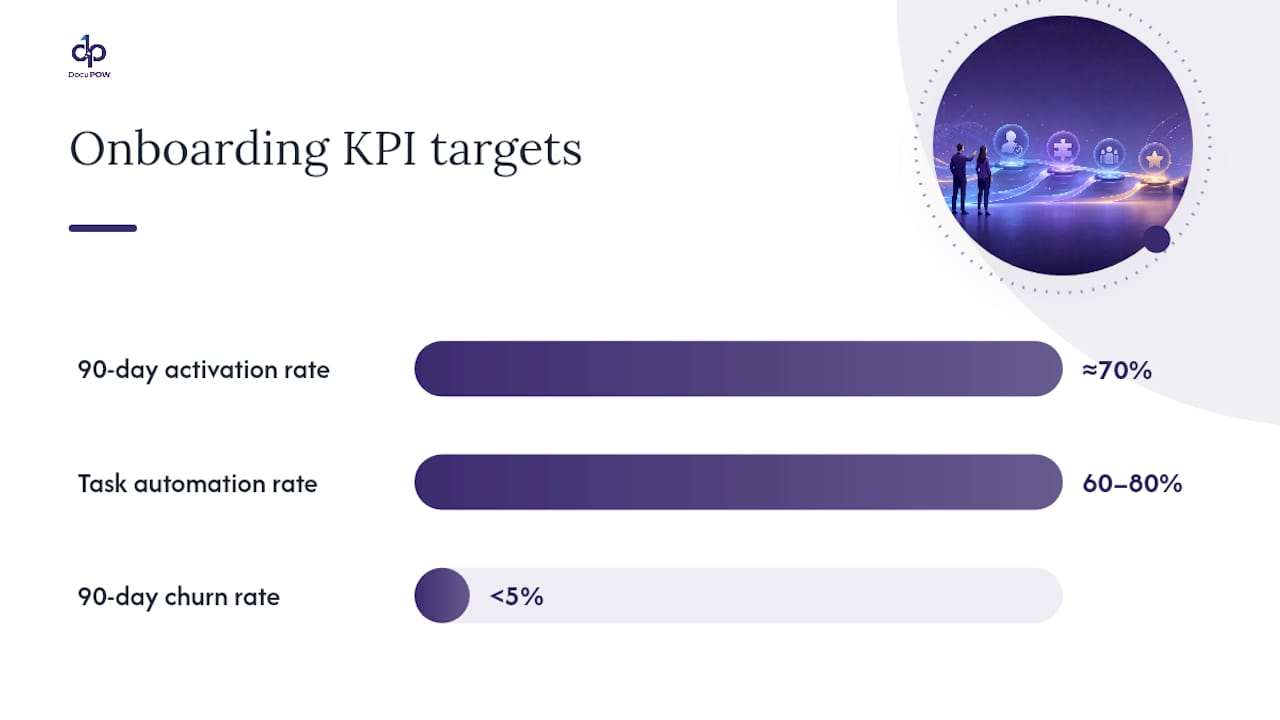
| 90-day activation rate | % of new customers completing core milestones within 90 days | Activated accounts ÷ total new accounts | Approximately 70% depending on product complexity |
| Task automation rate | % of onboarding tasks completed without manual CSM intervention | Automated tasks ÷ total tasks | 60–80% for mid-market SaaS |
| Funnel conversion rate | % of customers advancing through each milestone stage | Accounts at stage N ÷ accounts entering stage N | Varies by stage; flag significant drops |
| NPS/CSAT at day 30 | Customer satisfaction score collected at the 30-day mark | Standard NPS or CSAT survey | NPS above 40; CSAT above 4.0/5.0 |
| Churn rate (90-day) | % of new customers who cancel within 90 days | Churned accounts ÷ new accounts | Below 5% for well-designed flows |
Reporting checklist:
-
Weekly (CSM team): Stuck accounts, broken triggers, milestone completion by cohort. Source: orchestration layer dashboard.
-
Monthly (CS leadership): Activation rate trend, time-to-first-value average, CSM hours per account. Source: CRM + product analytics.
-
Quarterly (executive): NRR impact, churn rate by onboarding cohort, automation rate progress. Source: billing system + BI dashboard.
For building the reporting layer, automating operational reporting workflows covers dashboard setup and data source connections.
Vendor cohort benchmarks show that well-instrumented onboarding programs identify churn risk substantially earlier than programs relying on manual check-ins, giving CSMs time to intervene before a customer decides to leave.
What your tech stack needs and where compliance fits in
Every automated onboarding system needs six integration categories: CRM, billing, product analytics, identity and access management, document extraction, and workflow orchestration. Missing any one of them creates a gap where manual work sneaks back in.
Integration categories and why they matter:
-
CRM (Salesforce, HubSpot): The source of truth for customer data and the trigger point for many onboarding workflows. A closed-won opportunity should automatically kick off provisioning.
-
Billing system (Stripe, Zuora): Payment confirmation is the most reliable trigger for account creation. Webhook reliability here is non-negotiable.
-
Product analytics (Mixpanel, Amplitude): Tracks in-product behavior so triggers fire based on what customers actually do, not just what they say they’ll do.
-
Identity and access management: Handles user provisioning, SSO, and permission scoping. Errors here block customers from starting.
-
Document extraction: For KYC, contract review, and compliance-heavy onboarding, template-free extraction tools pull structured data from unstructured files without manual entry. See the KYC and onboarding document automation flow for a practical example.
-
Workflow orchestration: The engine that connects all of the above and routes actions based on trigger conditions.
Security and compliance considerations:
For U.S. customers, two regulatory requirements directly affect onboarding automation design. First, sanctions screening: any onboarding flow that involves financial transactions or regulated services must check customers against OFAC’s sanctioned party lists before account activation. This check should be automated and logged, not manual. Second, tax and identity documentation: IRS requirements govern which tax forms (W-9, W-8BEN, and others) must be collected and retained for certain customer types. Build these collection steps into the automated flow with defined retention periods.

Additional compliance requirements for document-heavy onboarding in fintech and banking are covered in this compliance-first onboarding guide.
Integration checklist:
-
Define required API endpoints and authentication methods for each system before build begins.
-
Design retry logic for every webhook: failed payment confirmations and document upload events must not silently drop.
-
Log every automated action with a timestamp and outcome for audit purposes.
-
Scope PII handling: define which fields are stored, where, and for how long, consistent with your privacy policy and applicable state laws.
How DocuPOW handles document-heavy onboarding
Agent-based, template-free document extraction reduces manual document handling and cuts verification time for onboarding flows that require KYC, contracts, or compliance documentation. The difference from template-based tools: DocuPOW’s autonomous agents read document context rather than matching fixed field positions, so they work on any document format without reconfiguration.
A realistic pilot scenario: A mid-market financial services company onboards new business clients who must submit articles of incorporation, beneficial ownership forms, and a signed service agreement before activation. Previously, a CSM manually reviewed each document, extracted key fields, and updated the CRM, taking an average of 45–90 minutes per client. With DocuPOW integrated into the onboarding workflow:
-
Uploaded documents trigger automatic extraction of entity name, ownership structure, and signatory details.
-
Extracted data populates the CRM record directly via API, with a human-in-the-loop review queue for exceptions.
-
OFAC screening runs automatically against extracted ownership data before the account activates.
-
The CSM receives a summary notification rather than a raw document stack.
Pilot success criteria to track:
-
Reduction in average document review time per account (target: 50%+ reduction from baseline)
-
Increase in accounts reaching “document verified” status within 48 hours of submission
-
CSM hours per new account in the pilot cohort versus the control group
-
Error rate on extracted fields versus manual entry baseline
DocuPOW connects to CRM and billing layers via API, slots into existing orchestration tools, and places human review at the exception level rather than the default. For organizations in fintech or banking, the fintech and banking solution page shows how compliance-heavy onboarding flows are structured.
Pro Tip: Place the human-in-the-loop review step after automated extraction, not before. Reviewers work faster when they’re confirming pre-populated fields than when they’re reading raw documents from scratch. This single sequencing change typically cuts review time by more than half.
Best practices that keep automation from feeling robotic
Automation should remove admin, not the human relationship. The most common failure mode is automating the wrong touchpoints, specifically the moments where a customer actually needs to feel heard.
Do this:
-
Personalize every automated message with at minimum the customer’s name, company, and the specific product or tier they purchased. Generic templates erode trust fast.
-
Keep a visible human fallback in every automated sequence. A “reply to this email to reach your CSM” line costs nothing and prevents customers from feeling trapped in a bot loop.
-
Sequence provisioning before welcome messages. A customer who can’t log in when they click your “get started” link will open a support ticket, not explore your product.
-
Batch reminder notifications. One well-timed reminder outperforms three reminders sent across 48 hours. OnboardMap’s research on automation mistakes identifies over-notification as one of the top five reasons automated onboarding feels robotic.
-
Test every trigger with a real account before going live. Broken triggers are invisible until a customer hits them.
Avoid this:
-
Automating the kickoff call for high-ACV accounts. The relationship value of that first human conversation outweighs any efficiency gain.
-
Sending automated check-ins that reference milestones the customer already completed. Stale data in your CRM creates embarrassing, trust-damaging messages.
-
Building flows without an escalation path. Every automated sequence needs a condition that hands off to a human when a customer goes quiet or signals frustration.
Troubleshooting the most common failure modes:
-
Missing data causing broken personalization: Audit your CRM fields before building templates. A merge tag that pulls a blank field sends “Hi {first_name}” to your customer.
-
Broken triggers after system updates: Webhooks break silently when APIs change. Set up monitoring alerts on every trigger endpoint.
-
Over-notification complaints: Review your full sequence end-to-end from the customer’s perspective. Count every touchpoint across every channel in a 7-day window.
For a broader view of what to automate and what to protect as human touchpoints, Flowla’s onboarding automation guidance offers a useful framework.
Where onboarding automation is headed in the next 12–24 months
AI-driven personalization and agentic document automation are becoming table stakes for document-heavy onboarding. Teams that pilot these capabilities now will have a measurable head start by the time the broader market catches up.
Three trends shaping the near term:
-
Agentic AI for document processing: Autonomous agents that read, classify, and extract from any document format without templates are moving from early-adopter to mainstream. Gartner’s research on AI use cases for customer service places AI-driven personalization among the highest-priority investment areas, and document-heavy onboarding is a direct beneficiary.
-
Real-time identity verification: Biometric and document verification that returns a result in seconds rather than hours is changing what “instant activation” means for regulated industries.
-
Privacy-preserving identity checks: As state-level privacy laws expand across the U.S., onboarding flows will need to handle PII with more granular consent and data-minimization controls built into the workflow, not bolted on afterward.
The strategic recommendation: invest in pilotable, composable automation rather than monolithic suites. A modular stack lets you swap components as the technology matures without rebuilding the entire flow. Cross-industry examples from banking and fintech, where compliance requirements force this kind of architectural discipline, are worth studying. The AI role in new client onboarding guide covers how these patterns are playing out across sectors.
DocuPOW cuts document verification time for onboarding pilots
Document-heavy onboarding has a specific bottleneck that generic automation tools don’t solve: unstructured files that don’t fit a template. DocuPOW’s agentic extraction reads any document format, pulls the fields your workflow needs, and routes exceptions to a human reviewer, without manual data entry as the default.
For teams running KYC, contract review, or compliance-driven onboarding, a scoped pilot with DocuPOW typically covers one document type, one customer segment, and a 4–6 week measurement window. Success metrics are defined upfront: document verification time, CSM hours per account, and activation rate versus the control group. The platform integrates with your existing CRM and orchestration layer via API, so there’s no rip-and-replace required.
To scope a pilot for your onboarding flow, explore DocuPOW’s AI workflow automation guide or visit Docupow to request a demo with your specific document types and volume in hand.
Sources
Authoritative resources for teams implementing automated onboarding in the U.S.:
FAQ
What is customer onboarding automation?
Customer onboarding automation is the use of event-driven workflows, triggers, and integrations to move new customers from signup to first value without manual CSM intervention for routine tasks. It covers provisioning, document collection, welcome sequences, milestone nudges, and CRM updates.
How long does it take to implement an automated onboarding pilot?
A focused pilot covering one customer segment typically runs 10–12 weeks from discovery through measurement: two weeks to map and design, three to five weeks to build and integrate, and four to six weeks to run the pilot and collect data.
Which KPI matters most for measuring onboarding automation success?
Time-to-first-value is the most direct indicator. It measures how quickly a new customer reaches their first meaningful product outcome, and it correlates strongly with 90-day retention and expansion revenue.
When should onboarding stay manual instead of automated?
High-ACV enterprise accounts with custom implementation requirements, customers who signal complexity during discovery, and any touchpoint where relationship trust is the primary deliverable should stay human. Automation handles the admin around those moments, not the moments themselves.
How does DocuPOW fit into an automated onboarding workflow?
DocuPOW’s template-free agentic extraction handles the document verification bottleneck in KYC and contract-driven onboarding, pulling structured data from any file format and routing exceptions to a human reviewer via API integration with your existing CRM and orchestration layer.
Recommended
See DocuPOW on your documents.
Stop building templates. Start extracting data.