HR Document Automation: A 2026 Guide for HR Teams
<p>Discover how HR Document Automation transforms your HR processes. Save time, ensure compliance, and streamline document management effectively.</p>


TL;DR:
- HR document automation uses digital tools to generate, route, sign, and retain HR documents, reducing manual work and compliance risk. It enforces deadlines, maintains audit-ready records, and improves accuracy, especially for critical forms like I-9 and W-4. Implementing full lifecycle automation enhances HR efficiency and legal compliance across organizational workflows.
HR document automation is the process of using digital tools to automatically create, route, sign, track, and retain critical HR documents, cutting manual work and compliance risk at the same time. Manual administrative tasks consume up to 57% of HR professionals’ time. That figure alone explains why automated HR paperwork has moved from a nice-to-have to a core operational requirement. Federal mandates like I-9, W-4, FMLA, and OSHA recordkeeping each carry their own retention deadlines and audit exposure. Automation enforces those deadlines automatically, so HR teams stop relying on calendar reminders and spreadsheet trackers to stay compliant.
What is HR document automation and why does it matter?
HR document automation covers the full document lifecycle: generation, distribution, signature collection, compliance tracking, and archiving. The industry term for this discipline is document workflow automation, and it goes well beyond simply digitizing paper forms. A true automated system routes documents to the right people in the right sequence, enforces completion deadlines, and stores records in audit-ready format.
The compliance stakes are concrete. I-9 violations carry fines from $288 to $2,861 per violation, and ICE audits can arrive with very short notice. W-4 forms must be retained for four years, ACA and FMLA records for three years, and OSHA logs for five years. Missing any of these windows creates direct legal exposure. Automation enforces destruction and retention schedules without requiring HR staff to track each document type manually.
Accuracy improves just as dramatically as speed. Manual offer letter creation produces errors 5–15% of the time. Automated generation drops that error rate to near zero by pre-populating fields from HRIS data and applying state-specific validation rules. The result is fewer corrections, fewer delays, and fewer compliance gaps.
What tools and features are essential for effective HR document automation?
The most common mistake HR teams make is treating e-signature software as a complete automation solution. E-signature platforms alone do not manage retention schedules, enforce compliance deadlines, or produce audit-ready exports. Those capabilities require a dedicated HR document workflow platform.
The table below outlines the functional categories every HR team should evaluate when selecting a platform.
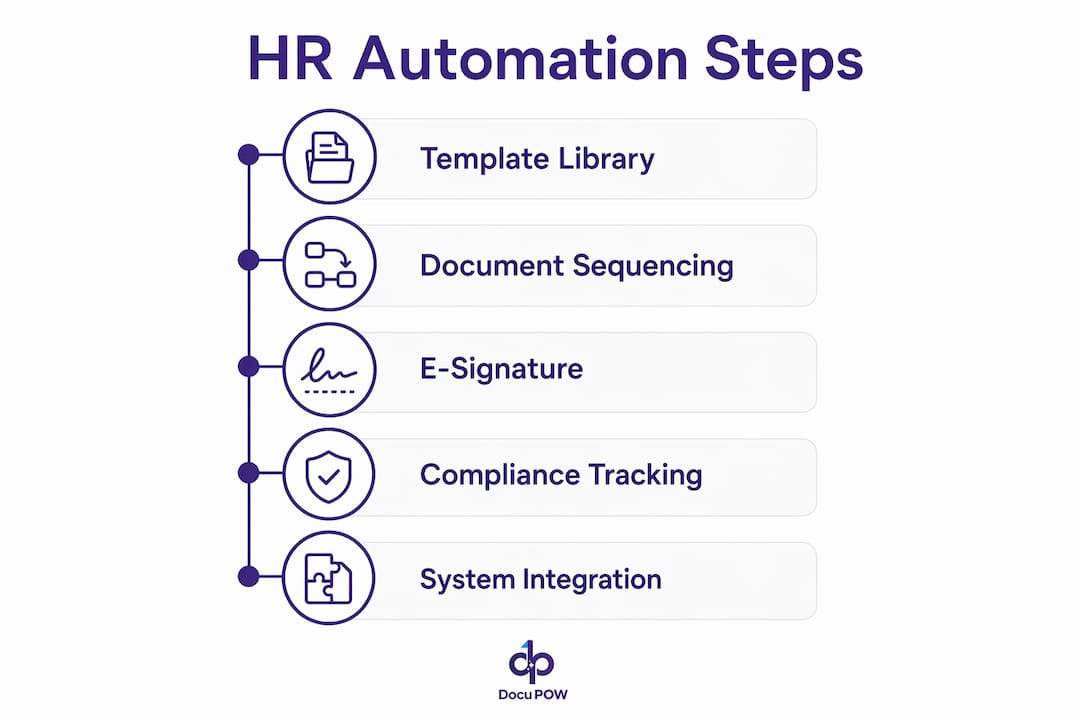
| Feature Category | What to Look For |
|---|---|
| Template library | Pre-built, legally reviewed templates for offer letters, I-9, W-4, and policy acknowledgments |
| Compliance enforcement | Automated deadline blocks, retention scheduling, and destruction alerts |
| E-signature integration | Native or API-connected signing with audit trail and timestamp |
| HRIS and ATS integration | Bi-directional data sync to pre-populate fields and reduce manual entry |
| Access controls | Role-based permissions, encrypted storage, and SOC 2 or ISO 27001 certification |
| Audit-ready exports | One-click compliance reports and document history logs |
| Exception handling | Escalation queues and manager alerts for incomplete or overdue documents |
HR-specific automation platforms sequence documents by dependency, meaning an employee cannot advance to benefits enrollment until their I-9 and W-4 are complete. Generic tools do not enforce that logic. Scalability also matters: a platform that works for 50 employees must handle 5,000 without requiring manual reconfiguration of every workflow.
Security is non-negotiable. HR documents contain Social Security numbers, compensation data, and medical information. Any platform you select must offer role-based access, encrypted storage, and a clear data residency policy.
Pro Tip: Choose platforms that include in-house legal review of their template libraries. A template built by a vendor’s legal team is far less likely to create jurisdiction-specific liability than one your HR team drafts from scratch.
Which HR document workflows should organizations prioritize for automation?
Not every HR process delivers equal return when automated. The workflows below produce the highest compliance and efficiency gains based on industry data, ranked by impact.
- New hire onboarding packets. Offer letters, I-9 Section 1 and 2, W-4, state tax forms, and policy acknowledgments. I-9 Section 2 must be completed within three business days of the start date, and W-4 must be processed before the first payroll run. Automation enforces both deadlines automatically.
- Annual policy acknowledgments. Employee handbooks, code of conduct, and harassment prevention policies. Automated reminders and escalations push completion rates above 95%, compared to 70–80% with manual email follow-up.
- Benefits enrollment and election confirmation. Open enrollment windows are short and non-negotiable. Automation sends timed reminders, captures elections, and archives confirmation documents before the window closes.
- Performance review documentation. Self-assessments, manager evaluations, and improvement plans. Routing logic sends each form to the right reviewer in sequence and timestamps every action.
- Leave of absence paperwork. FMLA certifications, state leave forms, and return-to-work clearances. Retention requirements differ by document type, and automation tracks each one separately.
- Disciplinary documentation. Written warnings, corrective action plans, and acknowledgment signatures. Timestamped records protect the organization in the event of a wrongful termination claim.
- Offboarding and separation agreements. Final pay acknowledgments, non-disclosure agreements, and COBRA election notices. Automation triggers the correct document set the moment a termination is recorded in the HRIS.
Manual workflows lose 10–25% of documents due to inefficiencies like email attachment errors, lost paper forms, and missed follow-ups. Automating the workflows above eliminates most of that loss at the source.
The KYC and onboarding automation tools built into platforms like DocuPOW handle I-9 and W-4 collection with built-in deadline enforcement, removing the most common compliance failure point in new hire processing.

How to design and implement a successful HR document automation workflow
A phased implementation produces better results than a full cutover. Follow these steps to build a workflow that holds up under audit and scales with headcount growth.
- Audit your current document inventory. List every HR document type, its source, its required signatories, and its retention period. Identify where documents are currently lost, delayed, or incorrectly filed.
- Map the document lifecycle. For each document type, define the trigger event (hire date, open enrollment start, termination), the routing sequence, the completion deadline, and the archive destination.
- Select and configure your platform. Choose a platform with the feature categories listed earlier. Configure templates using HRIS data fields so forms pre-populate on generation.
- Define compliance triggers and escalation steps. Set deadline alerts at 48 hours before due dates. Build escalation rules that notify managers when employees miss completion windows.
- Run a pilot with a single workflow. Start with new hire onboarding. Measure completion rates, error rates, and time-to-completion before expanding to other document types.
- Train HR staff and employees. HR teams need to understand exception handling and audit export procedures. Employees need a clear, simple interface for signing and submitting documents.
- Monitor, audit, and update. Review completion reports monthly. Update templates whenever federal or state law changes. Schedule an annual audit of retention schedules against current regulatory requirements.
HRIS and ATS integration is the single biggest time saver in this process. When your automation platform pulls employee data directly from your HRIS, offer letters, tax forms, and acknowledgments generate in seconds with no manual data entry.
Pro Tip: Build a dedicated exception queue that routes incomplete or flagged documents to a single HR administrator each morning. Unmanaged exceptions are the most common reason automation projects fail to sustain high completion rates.
What common challenges occur in HR document automation, and how do you fix them?
Even well-designed systems encounter problems. Knowing the most common failure points lets HR teams resolve them before they become compliance liabilities.
Incomplete signatures are the most frequent issue. The fix is automated reminder sequences with hard deadline blocks. If a document is not signed by the due date, the system should prevent the next workflow step from proceeding and alert the employee’s manager.
System integration mismatches occur when HRIS data fields do not map cleanly to document templates. The result is blank fields or incorrect data in generated documents. Resolve this during the pilot phase by running test documents against real employee records and correcting field mapping before full deployment.
Template drift is a slow-moving risk. Labor laws change at the federal, state, and local level every year. A template that was compliant in january may be non-compliant by october. Assign a specific HR team member to monitor regulatory updates and flag templates for legal review on a quarterly schedule.
The most underestimated risk in HR document automation involves AI-generated content. Public AI tools used for HR documents create discoverable records in litigation and lack attorney-client privilege protection. That exposure can directly harm an employer’s legal defense.
Using a public AI platform to draft an employee handbook or separation agreement means your prompts, the AI’s responses, and any personnel data you shared could be subpoenaed in litigation. These interactions carry no legal privilege. HR teams should use only private, enterprise-grade AI environments with documented data handling policies for any document that touches employment decisions.
Legal experts warn that AI-generated employee handbooks must be reviewed carefully for jurisdiction-specific compliance before distribution. The technology accelerates drafting. It does not replace legal review.
Understanding why IT teams manage document automation alongside HR is also worth examining. IT controls data security, integration architecture, and access permissions. HR controls content and compliance logic. Both functions must collaborate for an automation system to work correctly and securely.
Key Takeaways
HR document automation delivers measurable compliance and efficiency gains only when it covers the full document lifecycle, not just e-signatures.
| Point | Details |
|---|---|
| Automate the full lifecycle | True automation covers generation, routing, signing, retention, and audit exports, not just digital signatures. |
| Prioritize onboarding first | I-9 and W-4 deadlines carry direct financial penalties, making new hire workflows the highest-priority automation target. |
| Enforce retention schedules | W-4s require four years of retention; OSHA logs require five. Automated schedules prevent costly audit failures. |
| Avoid public AI for HR documents | Public AI interactions lack legal privilege and create discoverable records that can harm employer defenses in litigation. |
| Monitor completion rates monthly | Automated systems should sustain above 95% completion; rates below that signal a broken escalation or reminder sequence. |
Where I’ve seen HR automation actually change operations
The most impactful automation projects I’ve observed share one characteristic: they started with onboarding and built outward. Teams that tried to automate everything at once almost always stalled on integration problems and staff resistance. Teams that automated I-9 and W-4 processing first saw immediate, measurable results, which built the internal credibility to expand the program.
The harder truth is that most HR teams underestimate how much of their compliance risk lives in their templates, not their processes. A perfectly automated workflow built on a legally outdated offer letter template still creates liability. The technology is only as good as the content it distributes.
I’ve also seen organizations treat the 95% completion rate benchmark as a ceiling rather than a floor. The 5% of employees who don’t complete documents on time are almost always the same employees who create compliance problems later. Building escalation logic that reaches their managers within 24 hours of a missed deadline is not optional. It’s the difference between a clean audit and a corrective action plan.
The compliance complexity around state-specific labor law is accelerating. Pay transparency requirements, predictive scheduling laws, and expanded leave mandates are adding new document types every year. HR teams that build flexible, template-driven automation systems now will adapt to those changes far faster than teams still running manual processes.
— Sameer
How DocuPOW supports compliant HR document workflows
HR teams that need to move beyond manual paperwork and basic e-signature tools have a clear next step. DocuPOW’s AI-powered platform handles document generation, routing, compliance enforcement, and audit-ready archiving in a single environment. Its autonomous agents understand document context without relying on rigid templates, which means the system adapts as your document types and compliance requirements evolve.
DocuPOW connects directly with existing HRIS systems to pre-populate fields, enforce I-9 and W-4 deadlines, and produce one-click audit exports. For HR teams managing high volumes of employee documents, the document process automation benefits are immediate: fewer errors, faster onboarding cycles, and a compliance record that holds up under scrutiny. Explore the full platform at DocuPOW to see how it fits your organization’s document workflow needs.
FAQ
What is HR document automation?
HR document automation is the use of digital tools to generate, route, sign, track, and retain HR documents automatically. It replaces manual processes like email follow-up and paper filing with rule-based workflows that enforce deadlines and maintain audit-ready records.
How is HR document automation different from e-signature software?
E-signature software collects digital signatures but does not manage retention schedules, enforce compliance deadlines, or sequence documents by dependency. Full HR document automation handles all of those functions in addition to signature collection.
Which HR documents have the strictest compliance deadlines?
I-9 Section 2 must be completed within three business days of an employee’s start date. W-4 forms must be processed before the first payroll run. Missing either deadline can trigger federal fines and audit exposure.
Is it safe to use public AI tools to draft HR documents?
No. Public AI platforms do not protect HR data with attorney-client privilege, and those interactions can become discoverable records in litigation. Use only private, enterprise-grade AI environments for any document involving employment decisions.
What completion rate should automated HR document workflows achieve?
Well-configured automated systems achieve completion rates above 95% by combining deadline blocks, automated reminders, and manager escalation alerts. Manual email-based processes typically plateau at 70–80% completion.
Recommended
See DocuPOW on your documents.
Stop building templates. Start extracting data.