Zero Trust Document Access: A Practical Guide for US Teams
How to apply zero trust to documents: classify data, enforce per-session access, keep audit logs, and handle data residency in document AI workflows.

Zero trust document access means no one gets a file because of where they sit on the network. Every request is checked against identity, device health and the sensitivity of the document, and it is checked again for each session. The control moves from the folder or network to the document itself. This guide covers what that takes, where document AI fits, and how to think about data residency.
TL;DR
- Zero trust is a design approach, not a product. NIST SP 800-207 defines it around protecting resources, not network segments.
- Documents need persistent labels (sensitivity, type) so policy can follow the file wherever it goes.
- Access should be decided per session, with the ability to cut off view, download or print after a file is opened.
- Audit logs must record who, what, when, where, how and the allow/deny decision, not just a connection.
- Document AI is both a risk and a lever: it touches your most sensitive files, but it can also automate the classification that zero trust depends on.
Table of Contents
- What zero trust means for a document
- The data pillar: where documents live in the model
- Start with classification, because policy depends on it
- Per-session decisions, not one login
- Audit logs: the part auditors actually read
- Where document AI changes the picture
- Data residency for document AI
- Perspective: security belongs inside the workflow
- A rollout plan you can start this quarter
- Where DocuPOW fits
- FAQ
- Sources
What zero trust means for a document
Most zero trust content is about networks and logins. A document is different because it moves. It gets emailed, downloaded, attached to a ticket, dropped into a shared drive, and fed to software that extracts its contents. A folder permission protects none of that once the file leaves.
NIST’s Zero Trust Architecture publication frames the shift: location on the network is no longer a basis for trust, and the focus is on protecting resources. In the same document, authentication and authorization of both the user and the device happen before a session to a resource is established. For documents, that translates into four questions asked on every request:
- Who is asking, and how strongly have they proven it?
- What device are they on, and is it managed and compliant?
- How sensitive is this specific file?
- What is this person allowed to do with it: view, edit, download, print, share?
If any answer changes mid-session, the decision should change with it.
The data pillar: where documents live in the model
The CISA Zero Trust Maturity Model organizes zero trust into pillars. Documents sit in the data pillar. The NSA’s cybersecurity information sheet on the data pillar gives recommendations for maturing data security and enforcing access to data at rest and in transit, so that only authorized parties get in.
The practical capabilities that follow from that guidance:
- Discovery and classification. You cannot protect what you have not labeled.
- Encryption of data at rest and in transit.
- Granular rights management, such as restricting view, print and download.
- Continuous monitoring of how files are actually used.
The federal baseline is relevant even for private companies. If you handle controlled unclassified information for a federal customer, NIST SP 800-171 governs how that information is protected on nonfederal systems. Your contracts will tell you whether it applies to you.
Start with classification, because policy depends on it
Practitioners consistently call automated classification the hardest and most important step. An access policy that says “only finance can see invoices with bank details” does nothing if nobody knows which files are invoices with bank details.
The common failure is trying to tag millions of legacy files by hand. The NSA data pillar guidance points toward automated discovery and classification, starting with the highest-value, highest-risk datasets. A sensible order:
- Pick the document families where a leak would hurt most: contracts, payroll and HR records, patient or claims files, bank details on vendor paperwork, export-controlled drawings.
- Define a small label set. Three to five levels beat fifteen that nobody applies consistently.
- Classify automatically on ingestion, and route low-confidence results to a person.
- Store the label as metadata that travels with the file, not as a folder name.
We go deeper on how classification works in our practical guide to document classification.
Per-session decisions, not one login
A typical weakness is protecting the front door and nothing else. Once someone authenticates, they keep access until the session expires.
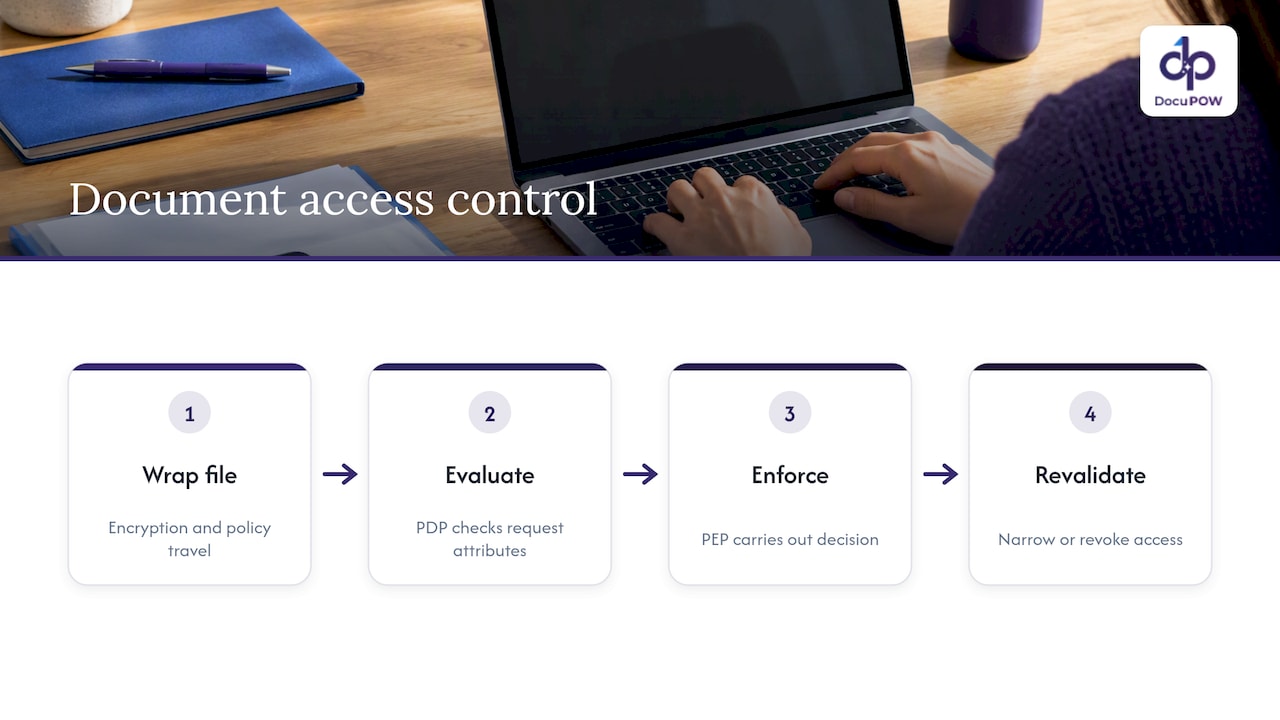
Zero trust architectures split the job in two. A policy decision point evaluates the request, and a policy enforcement point carries out the decision. The Kiteworks overview of the Trusted Data Format describes this data-centric approach: each file is wrapped with encryption and policy so protection travels with it, and each access attempt is re-validated against attributes. The practical payoff is revocation. If a contractor’s engagement ends, or a laptop falls out of compliance, access can be removed or narrowed, for example by blocking download, even for a file that is already open.
This is also what makes sharing safer, not slower. With attribute-based access control, a document can go to a partner or contractor because the policy goes with it. Security teams often assume zero trust will hurt productivity. Done at the document level, it can remove the reason to lock everything down.
Phishing-resistant MFA at the application layer
The CISA Zero Trust Architecture implementation report covers how federal agencies are progressing on their plans. Its themes are a useful checklist for any organization: strong authentication, enforcing it at the application layer, and not leaning on the network to do the work. For document systems, that means the repository, the viewer, and any AI tool reading the files each enforce their own authentication rather than trusting a shared network.
Audit logs: the part auditors actually read
Saying “we log access” is not enough. A connection log that shows an IP touched a server will not satisfy a HIPAA, CMMC or FedRAMP assessor. A log that supports zero trust should capture:
| Field | Why it matters |
|---|---|
| User identity | Ties the action to a person or service account |
| Specific file or record | Shows exactly what was touched |
| Timestamp | Builds the timeline |
| Location and IP | Flags impossible travel and unusual sources |
| Device status (managed or unmanaged) | Shows the posture at the time |
| Policy decision (allow or deny) | Proves the control actually fired |
The decision outcome is the field most teams miss, and it is the one that demonstrates the control is working. Logs should also be tamper-resistant. Done well, this replaces the scramble before an examination with continuous evidence. See our guide to document audit trails for compliance teams for how this maps to NIST and SEC expectations.
Where document AI changes the picture
Document AI creates a new access path. The system opens files, reads them, extracts fields, and may send content to a model. If you apply zero trust to people but not to this pipeline, you have left a hole.
Treat the AI platform as a non-person entity with its own identity and least-privilege rights. Ask these questions of any vendor, including us:
- Isolation. Is your data separated from other customers’ data?
- Encryption. Is it encrypted in transit and at rest?
- Model use. Are your documents used to train models for others? Get the answer in writing.
- Human review. Can a person audit and approve sensitive extractions before they reach downstream systems?
- Traceability. When the system answers a question about a document, can you see which source it came from?
- Integration scope. Do API credentials to your ERP or CRM follow least privilege?
Our seven NIST-aligned controls for secure AI processing page goes through these in more detail, and a broader overview sits in our document security guide.
Data residency for document AI
Residency questions come up fast once documents go to a cloud AI service. Where are files stored? Where is inference run? Where do logs, caches and backups live? And who are the subprocessors?
There is no single US residency law that covers all documents. What applies depends on your sector, your contracts and your data. Federal contractors may be bound by NIST SP 800-171, which requires FIPS-validated cryptography to protect CUI. Healthcare organizations should confirm requirements with their compliance officer and counsel. If you also handle personal data of people abroad, other jurisdictions’ transfer rules may apply, and your counsel should decide that, not a vendor brochure.
One analysis of AI data residency notes that major cloud AI platforms now offer region-pinned inference, zero-retention configurations and written residency commitments. It also describes a more controlled tier: dedicated single-tenant infrastructure in a chosen jurisdiction, with the customer holding the encryption keys. Use that as a vocabulary for your vendor questionnaire.
A residency checklist for any document AI vendor:
- Where is data stored at rest, and can you pin the region?
- Where does AI inference run?
- Are prompts, outputs and documents retained after processing, and for how long?
- Where are logs, caches and backups kept?
- Who are the subprocessors, and in which countries do they operate?
- Who holds the encryption keys?
- What happens to your data at contract end?
For DocuPOW’s specifics on hosting and controls, check our security page and ask us directly during a demo. Put the answers in your contract, not just in a sales call.
Perspective: security belongs inside the workflow
We build agent-based document automation, so we see the same pattern in many organizations. Security is bolted on at the repository, while documents are copied into email, spreadsheets and ERP fields by hand. Every manual copy is an access decision nobody made and nobody logged.
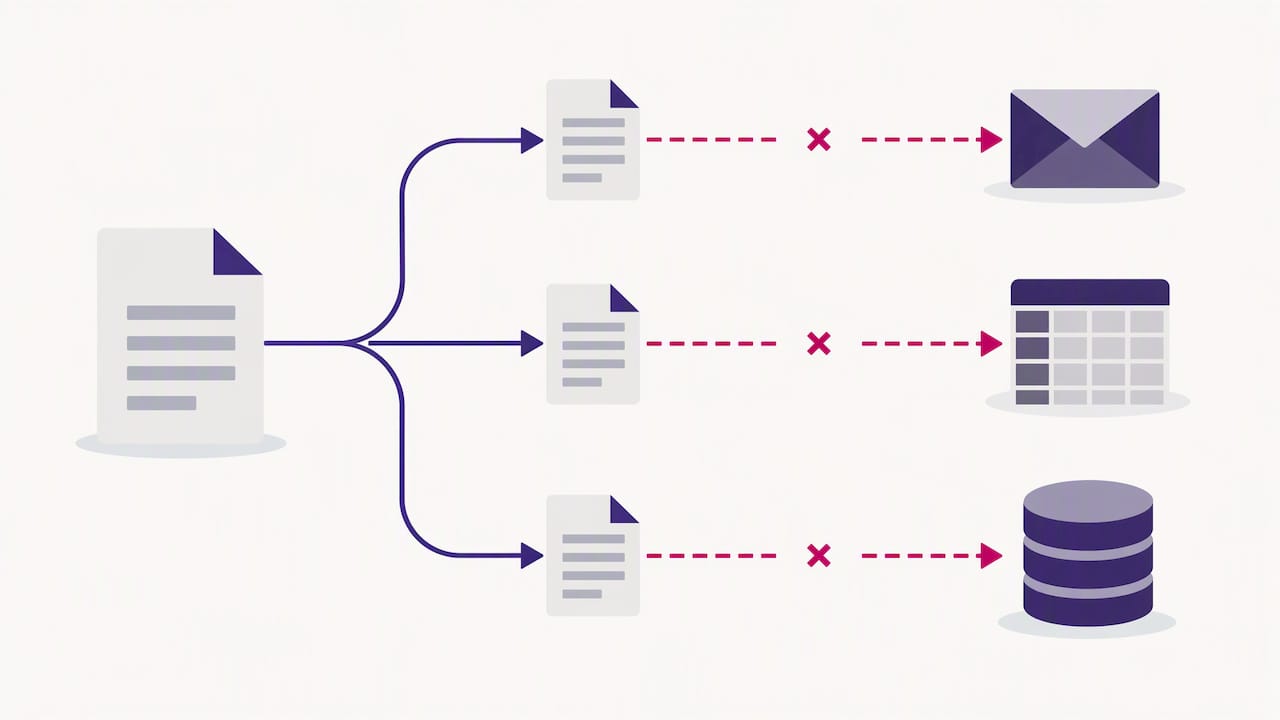
Our view is that automation done properly shrinks that surface. When an agent extracts data from an invoice, contract or claim without a template, the sensitive content moves through one governed pipeline rather than through ten inboxes. A human-in-the-loop audit step lets a reviewer confirm what the system read before anything posts to a downstream system. Source citations on document queries mean an answer can be traced to the page it came from.
We also hold a firm opinion on the buying side: zero trust is a design philosophy, not a feature a vendor can sell you in a box. Be skeptical of anyone who claims otherwise. What a vendor can do is support your design: encrypted infrastructure, clear identity and permission boundaries, reviewable outputs and logs you can export. Judge us on those, and make us prove them.
— Syed Naveed Abbas
A rollout plan you can start this quarter
You do not need to redesign everything at once. The NSA guidance points to starting with high-risk data, and that works.
- Inventory (weeks 1 to 2). List where your riskiest document types live: repositories, inboxes, shared drives, AI tools.
- Label (weeks 2 to 6). Define a small sensitivity scheme and automate classification on the highest-risk families first.
- Tighten access (weeks 4 to 8). Move from folder-level permissions to file-level rules based on label, role and device. Require phishing-resistant MFA.
- Add per-session checks. Make sure you can revoke or restrict access mid-session.
- Fix the logs. Capture identity, file, time, location, device status and decision outcome. Send them to your monitoring tools.
- Bring AI into scope. Give automation tools their own identities, least-privilege API access and human review for sensitive outputs.
- Review quarterly. Check denied requests, stale permissions and classification accuracy.
The timelines are our suggested pacing, not a standard. Adjust them to your team’s size and your regulatory deadlines.
Where DocuPOW fits
If your documents are mostly PDFs, forms and scans that people key into other systems, the fastest way to cut exposure is to stop the manual handling. DocuPOW extracts data from any document type without templates, orchestrates multi-step workflows, offers human-in-the-loop review, and connects to ERP and CRM systems through an API. Plans start at $99 per month for Starter and $499 per month for Professional, and Enterprise is priced on request. See the pricing page or explore the platform.
FAQ
Is zero trust the same as least privilege?
No, but they work together. Least privilege limits each user or system to the access it needs. Zero trust adds continuous verification of identity, device and context on each request, so even a permitted user can be denied when conditions change.
Can I buy zero trust document access as one product?
No. CISA and DoD guidance treat zero trust as an approach spanning identity, devices, networks, applications and data, not a single purchase. You assemble it from controls such as strong authentication, classification, encryption, policy enforcement and logging, and tools can support each part.
Does zero trust slow down document sharing?
It does not have to. When the policy travels with the file, you can share with partners and contractors under defined rights, such as view-only, and revoke access later. The friction you feel usually comes from coarse folder-level rules, not from zero trust itself.
What should I ask a document AI vendor about data residency?
Ask where files are stored, where inference runs, what is retained and for how long, where logs and backups live, who the subprocessors are, and who holds the encryption keys. Get the answers in the contract, and have your compliance officer or counsel confirm that they meet your sector’s rules.
Where should a small team start?
With classification of your highest-risk documents, then phishing-resistant MFA and file-level permissions for those documents. Fixing audit log quality comes next, because it shows whether the controls are working.
Sources
- NIST SP 800-207, Zero Trust Architecture
- NSA, Advancing Zero Trust Maturity Throughout the Data Pillar
- CISA, Zero Trust Maturity Model
- CISA, Zero Trust Architecture Implementation
- NIST SP 800-171, Protecting Controlled Unclassified Information
- Kiteworks, Trusted Data Format
- Petronella Cybersecurity, AI Data Residency
Recommended
See DocuPOW on your documents.
Stop building templates. Start extracting data.