Sales Order Data Extraction: From PDFs and Emails to Your ERP
How to extract sales order data from PDFs, emails and packing slips into your ERP: fields to capture, accuracy checks, rollout steps and pitfalls to avoid.

Sales order data extraction means pulling the fields of a customer order (customer, ship-to, part numbers, quantities, prices, dates, terms) out of the PDFs, spreadsheets and emails it arrives in, and delivering them as structured data your ERP or CRM can use. Done well, nobody re-keys anything, and people look only at the orders the system is unsure about. Done badly, you automate your errors and ship them faster.
This guide covers what to extract, how the main approaches differ, how to roll the project out without stalling, and where packing slips, order acknowledgments and invoice matching fit.
TL;DR
- Sales order extraction turns unstructured customer orders into ERP-ready records. The goal is a single pipeline for every channel, not one workflow per customer.
- Template-based tools break when a customer changes a layout. Template-free, agent-based extraction reads each document in context and handles layouts it has never seen.
- Clean your master data (product codes, price tables, ship-to addresses) before you switch automation on. Automation exposes bad data quickly.
- Start with the 80% of routine orders, route exceptions to a human reviewer, then widen the rules.
- The same approach covers purchase orders, packing slips, order acknowledgments and the documents behind invoice matching.
Table of Contents
- What sales order data extraction actually covers
- The fields worth capturing
- Four ways to extract order data, compared
- Why manual order entry costs more than the keystrokes
- One pipeline for every channel
- Fix your master data first
- Roll out progressively, not all at once
- Where packing slips, acknowledgments and invoices fit
- What to look for in a tool
- Our perspective
- How DocuPOW handles sales orders
- A 30-day starting plan
- FAQ
- Sources
What sales order data extraction actually covers
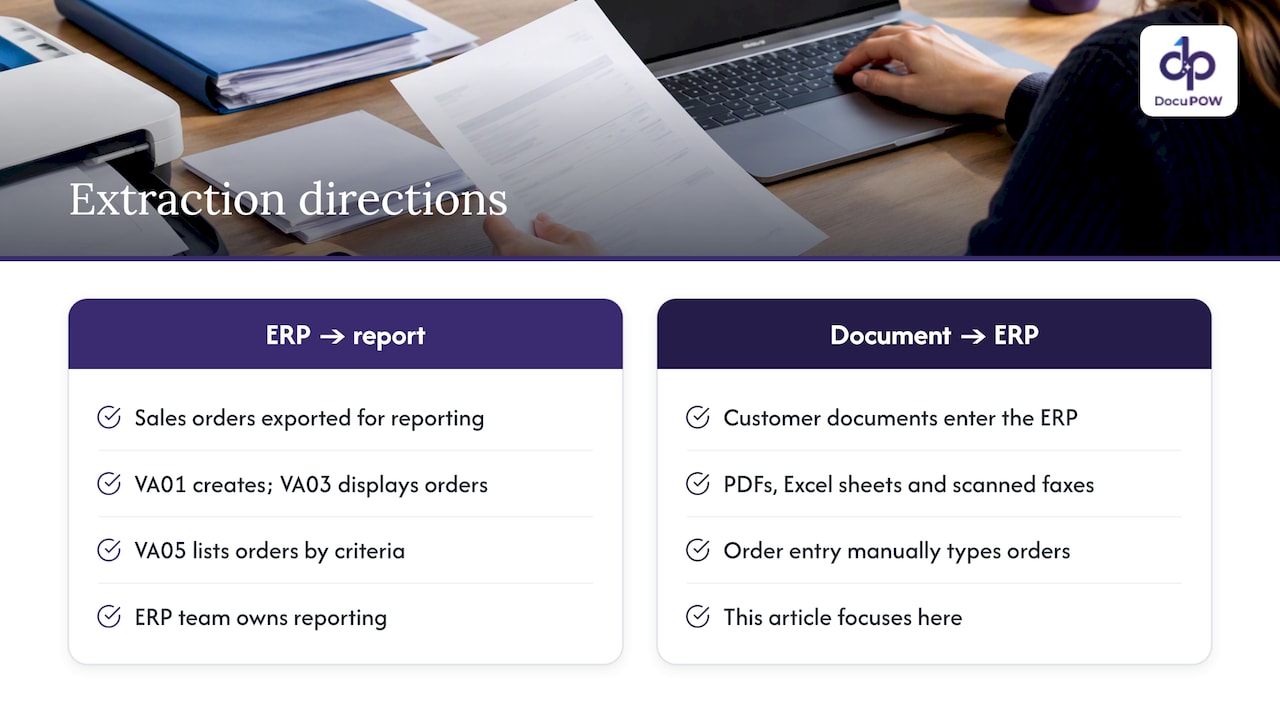
Most people searching this phrase mean one of two things. Some want to export sales orders out of an ERP such as SAP for reporting. Others want to get orders into the ERP from the messy documents customers send. They are opposite directions, and the tools differ.
Outbound extraction (ERP to report). In SAP, for example, VA01 creates a sales order, VA03 displays it, and VA05 lists orders by criteria such as sales organization, distribution channel and division. The header and item data sit in tables like VBAK and VBAP, and can be pulled through DataSources, BAPIs or ODP-based models, as SAP’s documentation on the sales order object describes. That is a reporting problem, and your ERP team owns it.
Inbound extraction (document to ERP). This is where the hours go. A customer emails a PDF purchase order. Another sends an Excel sheet. A distributor attaches a scanned fax. Someone in order entry reads each one and types it into the ERP. This article is mostly about that direction.
The fields worth capturing
A sales order is more than a line-item table. Missing the surrounding fields is what sends orders back to a human.
Header fields
- Customer name and account number
- Customer PO number and PO date
- Bill-to and ship-to addresses
- Requested delivery date and shipping method
- Payment terms and currency
- Tax or exemption references
Line-item fields
- Customer part number and your internal SKU
- Description and unit of measure
- Quantity and unit price
- Line-level delivery dates
- Notes, revision levels or special instructions
Fields people forget
- Handwritten or stamped notes on the page
- Terms and conditions attached to the order
- Partial-shipment permissions
- Contract or quote references that should match pricing
The last group is where templates fail. A fixed zone on the page cannot know that a margin note changes the delivery date.
Four ways to extract order data, compared
| Approach | Setup effort | Handles new layouts | Where it breaks |
|---|---|---|---|
| Manual keying | None | Yes (a person reads it) | Slow, error-prone, does not scale |
| Template-based OCR | High, per customer layout | No | A customer updates their PO format and the template fails |
| Rules and email parsers | Medium | Partly | Free-form PDFs, scans, mixed languages |
| Agent-based, template-free extraction | Low | Yes, including unseen layouts | Needs clean master data and clear exception rules |
Template approaches look cheap until you count maintenance. With 200 customers you may have 200 layouts, and each changes without warning. Our own approach at DocuPOW is template-free: autonomous agents read the document for context rather than matching positions on a page, so a new customer’s order does not need a setup project first.
Why manual order entry costs more than the keystrokes
Order entry kicks off a chain of downstream work: credit checks, inventory allocation, scheduling, shipping, billing. A Forbes Technology Council piece on manual sales order workflows makes the point that each touchpoint is a chance for inefficiency and error, especially when people carry the work.
In practice that looks like this:
- A quantity is mistyped, so the wrong amount is allocated.
- A ship-to address is picked from the wrong customer record, so the order goes to the wrong dock.
- A price is keyed from memory rather than the agreed price list, and the invoice gets disputed.
- A rush date in an email body is missed, and the customer calls.
None of these is dramatic. Together they eat margin and goodwill, and they are hard to see because they surface weeks later in disputes and credits.
One pipeline for every channel
Orders do not come from one place. Email attachments, EDI-adjacent portals, spreadsheets, scanned faxes and photos all show up in the same inbox. A common mistake is to build a separate workflow per channel or per large customer. Then you have silos again, with different data quality and no single view of order-to-cash.
The better design is to define one internal order model, usually what your ERP expects, and map every incoming format to it. You do not adapt your system to each customer’s preferred format. You adapt the extraction layer.
In practice:
- Ingest from email, upload, API and shared folders into the same queue.
- Classify the document (purchase order, quote acceptance, order acknowledgment, packing slip).
- Extract fields into the same schema regardless of source.
- Validate against ERP master data.
- Post the order, or route it to review.
Fix your master data first
This is the step most projects skip. Automation does not enforce company rules by magic. It exposes whatever was already wrong. If your product codes are duplicated, your customer price tables are stale, or one customer has five ship-to variants of the same address, a human order-entry clerk quietly compensates. An automated pipeline does not. It passes the error through at machine speed.
Before go-live, spend a week on this checklist:
- Deduplicate customer and ship-to records.
- Build a cross-reference of customer part numbers to your SKUs.
- Confirm that price lists and contract pricing are current and accessible by API.
- Standardize units of measure (each, case, pallet).
- Decide which fields are mandatory for an order to post.
This is dull work and it decides whether the project succeeds.
Roll out progressively, not all at once
Planning to automate every order scenario on day one is how projects stall. Split shipments, negotiated price tiers and custom configurations all create edge cases, and building logic for each before you have seen real volume creates complexity and maintenance cost you will not recover.
A sturdier sequence:
- Pick the routine majority. Identify the standard, high-volume orders from your top customers, which for many companies is the large share of volume. Automate those first.
- Set confidence thresholds. Orders where every field is extracted with high confidence and validates against the ERP post automatically. Anything below goes to review.
- Review exceptions. A person sees the original document beside the extracted fields, corrects what is wrong and approves. Their corrections become the evidence for improving rules.
- Expand. Add the next layer of cases, such as split shipments or blanket orders, only after the first layer runs cleanly.
- Measure. Track touchless rate, exception rate, time from receipt to posted order and downstream credit memos.
Handle negotiated exceptions without friction
Sales and operations often see automation differently. Salespeople worry that a rigid system will punish the custom terms they negotiated for valuable accounts. Operations wants discipline and consistency. Both are right. The system should flag a negotiated exception, such as a price that differs from the list or an unusual delivery term, for human review instead of rejecting the order. The account manager confirms the exception, and the order moves on.
Where packing slips, acknowledgments and invoices fit
The searches around sales order extraction tend to branch into neighboring documents. The same extraction engine handles them, but the logic after extraction differs.
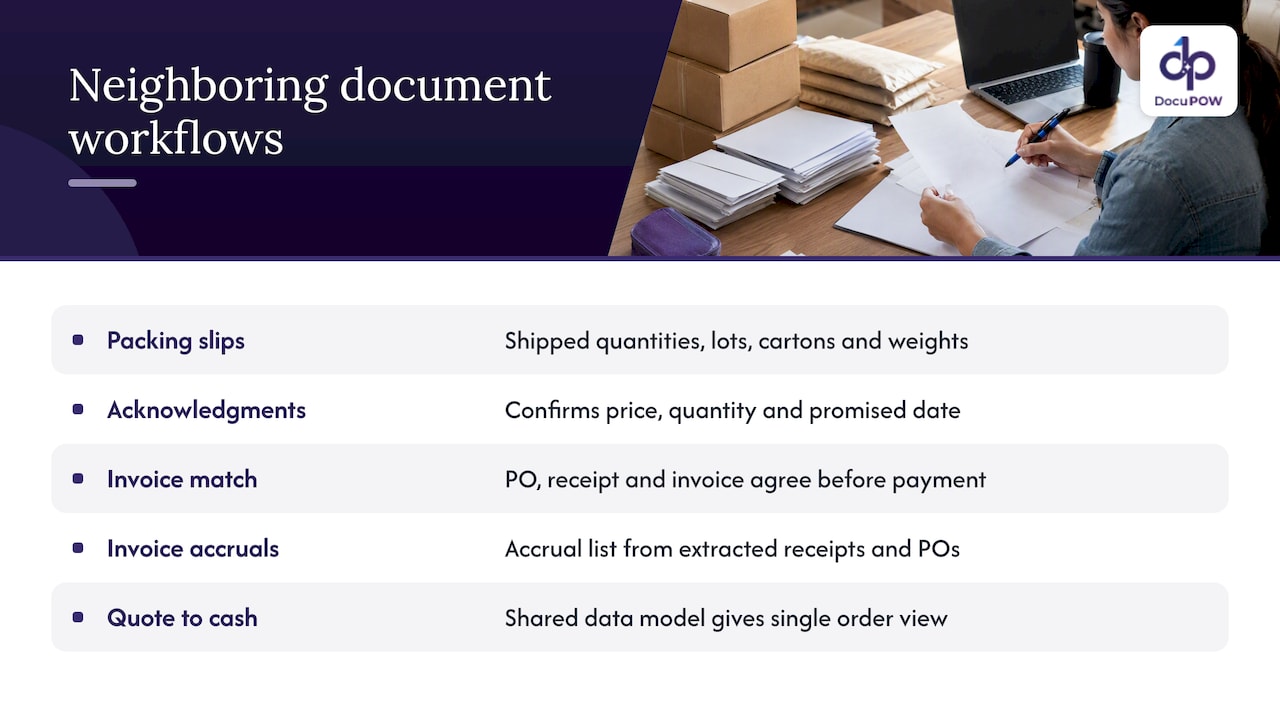
Packing slips and packing lists. These carry shipped quantities, lot or serial numbers, carton counts and weights. Extract them to confirm receipt against the purchase order, update inventory and trigger the invoice match. The challenge is variability: every supplier formats them differently, and many arrive as scans. This is where template-free reading earns its place.
Order acknowledgments. A supplier’s acknowledgment confirms price, quantity and promised date, and often quietly changes one of them. Extract the acknowledgment and compare it with your purchase order. Flag differences automatically so a buyer resolves them before the goods are late.
Supplier invoice matching. In a three-way match, the purchase order, the receiving document (often the packing slip) and the invoice must agree before payment. Extraction makes each document machine-readable. A workflow then compares quantities, prices and totals within tolerances you set, and sends mismatches to a person. For more on this side, see our guide to financial data extraction and our overview of procure-to-pay automation.
Invoice accruals. When goods are received but the invoice has not arrived, finance needs an accrual. If receipts and POs are already extracted into structured data, the accrual list can be generated from them rather than assembled in a spreadsheet at month-end.
Quote to cash. Quotes, order confirmations, shipping documents and invoices are one chain. Extracting each into the same data model gives you a single view of where an order stands, which is hard to get when each document lives in a different system.
What to look for in a tool
Whether you build or buy, test these things on your own documents, not a vendor’s demo set:
- Unseen layouts. Feed it orders from a customer it has never processed. Does accuracy hold without setup?
- Line-item tables. Multi-page tables, merged cells and wrapped descriptions are the usual failure point.
- Validation against your ERP. Extraction alone is half the job. The system should check part numbers, prices and customers against your data.
- Human review that is fast. The reviewer should see the source page and the extracted value side by side, with the reason an order was flagged.
- Audit trail. You should be able to show who changed what and when, which matters for compliance.
- Integration. API access to your ERP or CRM, and developer tools for custom steps.
- Security. Encryption and enterprise-grade controls, since orders contain pricing and customer data.
Our perspective
We built DocuPOW because we kept seeing the same pattern: teams buy extraction software, then spend their time maintaining templates and fixing the documents that do not fit. The extraction was never the hard part. The hard part is everything around it.
We think the right unit of automation is the process, not the page. An order arrives, an agent reads it in context, checks it against your systems, flags what looks wrong, asks a person only when needed and posts the result. That is why we pair template-free extraction with multi-step workflows and human-in-the-loop audit review, instead of selling extraction alone.
We also think teams should resist the urge to automate everything on day one. Start with the orders you see every day, clean the data they rely on, and let exceptions teach you what to build next. Automation that earns trust slowly lasts longer than automation that promises full autonomy and gets switched off after a bad week.
— Syed Naveed Abbas
How DocuPOW handles sales orders
DocuPOW reads purchase orders, order acknowledgments, packing slips and invoices without templates, orchestrates the steps that follow, and sends reviewers only the documents that need a human. You can query documents conversationally and get answers with source citations, and connect to ERP and CRM systems through the API.
Plans are published on our pricing page: Starter is $99 per month and Professional is $499 per month. Enterprise is priced on request. If you want to see how it works before choosing, start with how the platform works, or look at our pages for retail and wholesale and supply chain teams. Manufacturers can also read our guide to automating manufacturing document processing.
A 30-day starting plan
Week 1: Baseline. Pull a month of orders. Count volume by customer and channel, and time how long an order takes from receipt to posting. Note the five most common errors.
Week 2: Data cleanup. Work through the master data checklist above. Build the part-number cross-reference for your top customers.
Week 3: Pilot. Run your top customers’ orders through extraction in parallel with manual entry. Compare field by field. Set your confidence thresholds from what you see.
Week 4: Go live on the routine majority. Post high-confidence orders automatically, route the rest to review, and hold a short weekly meeting with sales and operations to look at exceptions together.
FAQ
What is the difference between OCR and sales order data extraction?
OCR converts an image of text into characters. Extraction goes further: it identifies which text is the PO number, which is a line item and which is a delivery date, and returns structured fields. Modern extraction also validates those fields against your ERP data.
How accurate does extraction need to be before I turn on automation?
There is no universal number, so set it by risk. Let orders post automatically only when every required field is extracted with high confidence and passes validation, and send everything else to review. Measure the exception rate and downstream credit memos for a few weeks, then adjust the thresholds.
Can the same system process packing slips and purchase orders?
Yes. The extraction layer reads any document type, and the workflow after it differs. A purchase order creates a sales order, while a packing slip confirms receipt and feeds the invoice match.
Do I need to replace my ERP?
No. Extraction sits in front of your ERP and sends clean, validated data into it through an API or integration. Your ERP stays the system of record.
Sources
- SAP Documentation: Sales Order
- Forbes Technology Council: The Cost of Manual Sales Order Management Workflows
Recommended
See DocuPOW on your documents.
Stop building templates. Start extracting data.