Employee Onboarding Automation for HR Leaders
Streamline your HR processes with employee onboarding automation, ensuring new hires are ready by Day 1 while reducing admin time and risks.


Employee onboarding automation uses event-driven workflows to connect your HRIS to downstream systems, so new hires are ready by Day 1 while HR admin time and compliance risk both drop. The immediate next step: pick one high-friction task, run a one-week pilot, and measure the result before scaling anything else.
Start here:
- Owner: HR ops lead or HRIS administrator
- Scope: One role type, one workflow (paperwork packet or IT provisioning)
- Success metric: Time from offer acceptance to completed task, compared to your current baseline
That single pilot gives you a real number to take to leadership and a tested template to copy across roles.
Key Takeaways
Automating onboarding paperwork and IT provisioning first, using a five-step framework anchored on your HRIS as the single source of truth, delivers the fastest compliance gains and the clearest ROI for HR teams.
| Point | Details |
|---|---|
| Start with one workflow | Automate paperwork or IT provisioning first; score candidates on frequency, compliance risk, and cross-team handoffs. |
| Use the five-step framework | Map, pick, connect, build, and refine; run a 4–6 week pilot before scaling to other roles. |
| Measure before and after | Baseline HR hours per hire, pre-boarding completion rate, and Day-1 readiness before launch to prove ROI. |
| Build compliance controls in | Automated I-9 timing, timestamped audit logs, and exception alerts are required, not optional, for US onboarding. |
| DocuPOW for document automation | DocuPOW’s template-free AI extraction validates onboarding documents and routes data to HRIS and payroll automatically. |
Table of Contents
- What does employee onboarding automation actually include?
- Which onboarding tasks are worth automating first?
- How do you decide what to automate first?
- The 5-step implementation framework: map, pick, connect, build, refine
- How should you connect your systems and test the integrations?
- Ready-to-adapt workflow templates for common onboarding scenarios
- What KPIs should you track to measure onboarding automation success?
- What US compliance requirements does automated onboarding need to support?
- What are the most common pitfalls in onboarding automation, and how do you avoid them?
- How DocuPOW accelerates onboarding paperwork and reduces compliance risk
- Which tool categories do you need, and what does each one do?
- What I have learned from watching onboarding automation go live
- DocuPOW cuts onboarding paperwork time from days to minutes
- Sources
- FAQ
What does employee onboarding automation actually include?
Employee onboarding automation is trigger-based orchestration anchored on a single source of truth, typically your HRIS. When a hire record is created or a status changes (offer accepted, start date confirmed), that event fans out to every downstream system that needs to act. No one manually emails IT to create an account. No one chases a new hire for a W-4 on Day 1.
The core components in a mature architecture:
- HRIS (Rippling, Gusto, BambooHR): the source of truth that fires the trigger
- Identity provider / IdP (Okta): provisions email, SSO, and app access
- Payroll system: receives tax form data and direct deposit details
- ITSM / procurement: creates equipment and software tickets
- LMS: assigns role-based training paths
- E-signature platform (DocuSign): routes offer letters, I-9s, W-4s, NDAs
- Document automation (DocuPOW): extracts and validates data from uploaded documents without rigid templates
- Communication tools: sends pre-boarding emails, Slack messages, calendar invites
A simplified data flow looks like this: HRIS fires an event → an orchestration layer (Workato, n8n, or native HRIS automations) routes it → identity, payroll, IT, and LMS each receive the fields they need → the employee experience layer (portal, email, calendar) surfaces tasks to the new hire.
Ownership typically splits across three teams. HR owns the process design, document collection, and compliance checkpoints. IT owns provisioning and equipment. Payroll owns tax form validation and direct deposit setup. The orchestration layer is the connective tissue that keeps all three in sync without manual handoffs.
Which onboarding tasks are worth automating first?
About 70% of administrative onboarding tasks are automatable across a typical six-phase arc. The six categories where teams consistently find the fastest wins:
- Paperwork and e-signatures: Offer acceptance triggers a pre-boarding portal that routes I-9, W-4, direct deposit authorization, and NDA for e-signature. Fully automatable; no human checkpoint needed until a document is rejected or flagged.
- Account and access provisioning: HRIS start date + role triggers Okta to create the account and assign app groups. Day-1 access is ready before the employee walks in. Fully automatable with a manager approval gate for elevated permissions.
- Equipment procurement: Role and location fields trigger an ITSM ticket (ServiceNow, Jira Service Management) for laptop, phone, and peripherals. Needs a human checkpoint for custom configurations or budget exceptions.
- Welcome communications: Offer acceptance triggers a pre-boarding email sequence: welcome message, portal login, Day-1 agenda, manager introduction. Fully automatable; personalize by role and location using merge fields.
- Training and LMS assignment: Role field triggers automatic enrollment in required courses (compliance training, role-specific modules). Completion deadlines and reminders run automatically. Fully automatable; manager review of completion is a good human checkpoint at 30 days.
- Scheduling and 30/60/90 check-ins: Start date triggers calendar invites for orientation, manager 1:1s, and pulse surveys at 30, 60, and 90 days. Fully automatable; the check-in conversation itself stays human.
Pro Tip: Paperwork and IT provisioning are commonly recommended as the starting points because they tend to be high-frequency, involve cross-team coordination, and are directly visible to new hires. Automate one end-to-end before touching the others.
How do you decide what to automate first?
Score candidate workflows on five criteria before committing to a build. This keeps the pilot focused and gives you a defensible rationale for stakeholders.
- Frequency: How many hires per month does this workflow touch? Higher volume = higher ROI per hour of build time.
- Time per hire: How long does this task take manually? Workflows that consume 30+ minutes per hire are the obvious targets.
- Compliance risk: Does a missed or late step create a legal exposure (I-9 timing, state new-hire reporting)? High-risk tasks justify automation even at lower volume.
- Cross-team handoffs: Does the task require coordination between HR, IT, and payroll? Manual handoffs are where errors and delays concentrate.
- Visibility gap: Would a new hire notice if this step was late or wrong? High-visibility failures damage the new-hire experience before Day 1 ends.
Score each candidate 1–5 on each criterion. Workflows that perform strongly across these factors are good pilot candidates, with paperwork and IT provisioning often among the top choices.
Pilot template (4–6 weeks):
- Weeks 1–2: Scope the workflow, map every field and handoff, identify the integration points, and build in a sandbox environment.
- Week 3: Run the flow with a test record. Include edge cases: a contractor, a remote employee, a rehire.
- Week 4: Run with a real hire (with manual backup in place). Measure time-to-completion against your baseline.
- Weeks 5–6: Fix exceptions, document the runbook, and present results to stakeholders before scaling.
Connecting HRIS to downstream systems for event-driven orchestration is the technical foundation that makes this pilot replicable across roles.
The 5-step implementation framework: map, pick, connect, build, refine
A five-step framework gives teams a repeatable path from “we should automate this” to a live, measured workflow.
-
Map: Bring HR, IT, payroll, and a hiring manager into one room. Walk the current process end-to-end. Document every task, owner, handoff, and wait time. You will find delays you did not know existed. This step takes one to two weeks and is not optional.
-
Pick: Apply the prioritization checklist from the section above. Select one workflow. Resist the urge to automate everything at once. Teams that start with a single paperwork or IT provisioning flow consistently deliver faster ROI and cleaner rollouts.
-
Connect: Designate the HRIS as the single source of truth. Define the trigger event (offer accepted, start date set), the data fields that flow downstream, and the systems that receive them. Document the API or integration method for each connection before writing a single workflow rule.
-
Build and test: Build in a sandbox. Use a “golden sample” hire record that covers your most common scenario, then test edge cases: a part-time employee, a remote hire, a contractor with a 1099. Include approval gates, exception routing, and automated reminders for incomplete tasks. Run a 4–6 week pilot with real hires before declaring success.
-
Refine: Pull the KPIs (time-to-productivity, pre-boarding completion rate, HR hours per hire). Collect new-hire feedback at Day 30. Fix what broke, document what worked, and copy the template to the next role or workflow. Scale incrementally, not all at once.
Pro Tip: Assign a single “automation owner” who is accountable for the workflow after launch. Without a named owner, exceptions pile up unresolved and the automation quietly degrades over months.
A governance cadence that works: weekly exception review during the pilot, monthly metric review for the first quarter, quarterly process audit thereafter.
How should you connect your systems and test the integrations?
The integration layer is where most onboarding automation projects stall. The question is not whether to integrate, but how. Three options exist:
- Native HRIS integrations: Rippling, Gusto, and BambooHR each offer pre-built connections to common tools. Fast to set up, limited in flexibility. Good for small teams with standard stacks.
- iPaaS / middleware: Workato, Make, or Zapier sit between systems and orchestrate multi-step flows with conditional logic, error handling, and retry rules. Better for complex, multi-system flows.
- Custom API integrations: Maximum flexibility, maximum maintenance burden. Reserve for cases where no pre-built connector exists.
The data that needs to flow, and where:
| Source field (HRIS) | Destination system | Action triggered |
|---|---|---|
| Employee ID + role | Okta (IdP) | Create user, assign app groups |
| Start date + location | ITSM (ServiceNow) | Open equipment ticket |
| Tax state + SSN | Payroll system | Initialize tax record |
| Role + department | LMS | Enroll in required courses |
| Offer letter status | DocuSign | Route documents for e-signature |
| Uploaded documents | DocuPOW | Extract and validate fields, push to HRIS/payroll |
Vendor examples by category: Rippling, Gusto, and BambooHR for HRIS; Okta for identity and access; DocuSign for e-signatures; Workato for orchestration; DocuPOW for document intelligence and extraction.
Testing playbook:
- Create a “golden sample” hire record with all standard fields populated.
- Run the full flow in a sandbox. Confirm every downstream system received the correct data.
- Test edge cases: a contractor (different tax forms), a remote employee (different state tax rules), a rehire (existing records in some systems).
- Define rollback rules before going live. If a provisioning step fails, what is the manual fallback and who is notified?
Pro Tip: Never promote a workflow to production until it has run cleanly on at least three edge-case records in the sandbox. One bad Day-1 experience from a provisioning failure costs more goodwill than the automation saves.
Orchestration platforms are often the practical core that lets HRIS events fan out to identity, payroll, ITSM, and LMS without fragile manual handoffs.
Ready-to-adapt workflow templates for common onboarding scenarios
These templates are designed to be copied into Workato, Make, Zapier, or your HRIS’s native automation builder. Each follows a trigger → actions → escalation structure.
Template 1: Offer acceptance → pre-boarding portal
- Trigger: Offer status changes to “accepted” in HRIS
- Actions: Send welcome email with portal link; assign paperwork packet (I-9, W-4, direct deposit, NDA) via DocuSign; set 48-hour completion reminder
- Escalation: If incomplete at 48 hours, notify HR coordinator and send a second reminder to the new hire
Template 2: Offer accepted → equipment procurement
- Trigger: Offer accepted + role and location fields confirmed
- Actions: Open ITSM ticket with equipment spec; notify IT manager; set expected delivery date based on start date minus five business days
- Escalation: If ticket unresolved at T-3 days, escalate to IT director and notify HR
Template 3: Role-based learning path assignment
- Trigger: Employee record created in LMS (synced from HRIS on start date)
- Actions: Enroll in mandatory compliance courses; assign role-specific modules; set 30-day completion deadline; schedule reminder at Day 15
- Escalation: If incomplete at Day 28, notify manager and HR
Template 4: Day-1 agenda and manager welcome sequence
- Trigger: Start date T-3 business days
- Actions: Send new hire Day-1 schedule; send manager a “your new hire starts Monday” checklist; create calendar blocks for orientation and first 1:1
- Escalation: None (informational sequence)
Template 5: 30/60/90 check-in cadence
- Trigger: Start date + 30, 60, 90 days (three separate scheduled triggers)
- Actions: Send pulse survey to new hire; send manager a structured check-in prompt; log responses to HRIS or people analytics tool
- Escalation: If survey not completed within 5 days, send one reminder
Trigger rule for workflow engines: Use “offer_status = accepted AND start_date IS NOT NULL” as the root condition for all pre-boarding flows. This prevents partial records from firing actions before a start date is confirmed, which is the most common source of duplicate or premature communications.
Well-executed automation can compress a multi-day onboarding into a one-day experience by running pre-boarding tasks before Day 1 and automating provisioning and document handling in parallel.
What KPIs should you track to measure onboarding automation success?
Baseline every metric before you launch. Without a pre-automation number, you cannot prove ROI or identify regressions.
| KPI | Definition | Data source | Measurement frequency |
|---|---|---|---|
| Time-to-productivity | Days from start date to full independent contribution | Manager survey / performance system | 90-day mark |
| Pre-boarding completion rate | % of new hires completing paperwork before Day 1 | HRIS / e-signature platform | Weekly (pilot), monthly (post-rollout) |
| HR hours per hire | Total HR admin time per onboarding cycle | Time tracking / HR ops log | Per cohort |
| Day-1 readiness score | % of new hires with access, equipment, and accounts ready on Day 1 | IT ticketing / provisioning log | Per hire |
| Onboarding NPS | New hire satisfaction score at Day 30 | Pulse survey | Monthly |
| 90-day retention rate | % of new hires still employed at 90 days | HRIS | Quarterly |
| Manager task completion rate | % of manager-assigned onboarding tasks completed on time | HRIS / task management tool | Weekly (pilot), monthly (post-rollout) |
Structured onboarding programs directly influence new-hire productivity and retention, which makes time-to-productivity and 90-day retention the two metrics most worth presenting to senior leadership.
One resource estimates HR admin per hire dropping from roughly 26 hours to under 3 hours with automation. That is the kind of number that funds the next phase of your automation roadmap.
Dashboard cadence: Weekly exception and completion rate reviews during the pilot. Monthly metric reviews for the first quarter post-rollout. Quarterly process audits to catch workflow drift and incorporate new role types.
What US compliance requirements does automated onboarding need to support?
Automation does not reduce compliance obligations. It makes them easier to meet consistently, but only if the workflow is built with the right controls from the start.
Required US onboarding documents and timing:
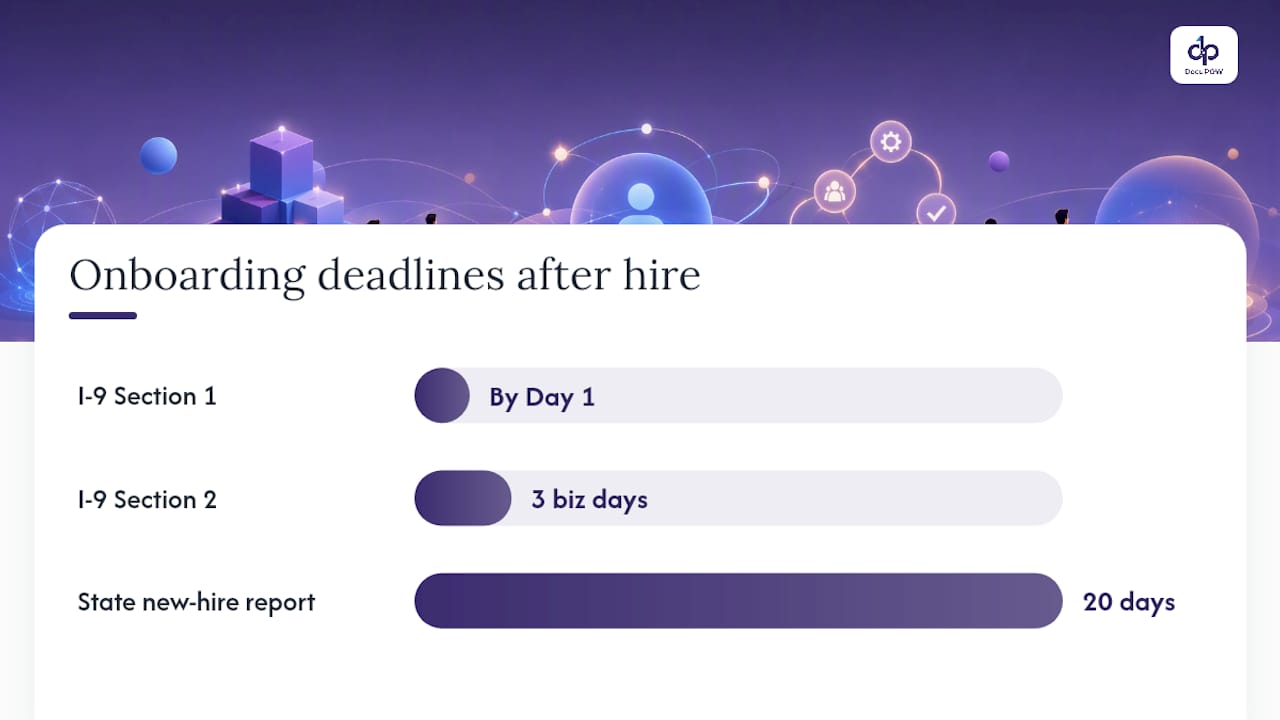
- Form I-9: Must be completed by the end of the employee’s third business day. Section 1 (employee) on or before Day 1; Section 2 (employer) within three business days. Automated reminders and timestamped completion records are non-negotiable.
- Form W-4: Collect before or on the first paycheck. Route via e-signature; validated fields flow to payroll automatically.
- State new-hire reporting: Most states require reporting within 20 days of hire. Automate the data submission or trigger a task for the payroll team.
- Direct deposit authorization: Collect during pre-boarding. Validate routing and account numbers before passing to payroll.
- Industry-specific certifications: Healthcare, finance, and construction roles may require license verification before Day 1. Build a conditional branch in the workflow for regulated roles.
- Benefits enrollment: ERISA requires specific notice timelines. Automate the enrollment window trigger and track completion.
Practical controls your automation must include:
- Encrypted storage for all documents (at rest and in transit)
- Role-based access controls so only authorized personnel can view sensitive documents
- Immutable, timestamped audit logs for every document action (sent, viewed, signed, rejected)
- Automated exception alerts when a required document is incomplete at T-1 day before the deadline
- A compliance dashboard that surfaces blocked or overdue items before Day 1
Vendor security checklist (ask every vendor):
| Question | Why it matters |
|---|---|
| SOC 2 Type II certified? | Confirms independent audit of security controls |
| Data residency in the US? | Required for some regulated industries |
| Encryption at rest and in transit? | Baseline for PII protection |
| Role-based access controls? | Limits exposure of sensitive employee data |
| Audit log immutability? | Required for I-9 and tax document compliance |
| Breach notification SLA? | Sets expectations for incident response |
For specialized compliance scenarios, DocuPOW’s fintech and banking onboarding flows show how document automation handles regulated identity verification and audit requirements at scale.
What are the most common pitfalls in onboarding automation, and how do you avoid them?
The failure mode that kills most onboarding automation projects is not technical. Teams automate a broken process and then wonder why the automated version is also broken, just faster.
Best practices that actually hold up:
- Standardize before you automate. If your current process has five different paperwork packets for five managers, pick one and enforce it before building a workflow around it.
- Start with one role, one workflow. Scope creep is the primary reason pilots miss their deadlines.
- Keep human touchpoints for relational moments. The manager’s first call, the team lunch, the 30-day check-in conversation. Automate the scheduling; never automate the conversation itself.
- Personalize by role, not just by name. A sales rep and a software engineer need different training paths, different equipment, and different Day-1 agendas. Merge fields and conditional branches handle this without manual intervention.
- Build feedback loops. Pulse surveys at Day 30 and Day 90 surface problems the workflow metrics miss.
Pitfalls to avoid:
- Automating without a named exception owner. Blocked hires pile up silently.
- Ignoring mobile-first design. Mobile-first onboarding flows increase completion rates for hourly and seasonal hires. Design forms completable in 10–15 minutes on a phone.
- Skipping manager training. Managers who do not understand the automated flow create shadow processes that undermine it.
- Failing to monitor exceptions after launch. Set a weekly exception review for the first 90 days.
Pro Tip: *Before launch, send every manager a one-page “what changes for you” summary.
How DocuPOW accelerates onboarding paperwork and reduces compliance risk
The paperwork phase of onboarding is where most compliance risk concentrates and where HR teams spend the most manual time. DocuPOW addresses this directly with template-free document extraction that uses autonomous AI agents to read and validate any document type without requiring pre-configured templates.
A typical DocuPOW-powered paperwork workflow:
- Candidate accepts offer → pre-boarding portal opens → new hire uploads ID documents and signs I-9, W-4, and NDA via e-signature
- DocuPOW agents extract and validate fields from uploaded documents (government IDs, tax forms, certifications) without template dependency
- Validated data flows automatically to the HRIS employee record and payroll system
- Audit records with timestamps are stored immutably for compliance review
- Exceptions (unreadable document, mismatched fields) surface in a human-in-the-loop review queue before the record is promoted
Integration touchpoints: DocuPOW connects to HRIS platforms via API to write validated employee data directly to the record. Payroll systems receive tax data fields. Procurement systems receive equipment receipt data for asset tracking.
Benefit summary:
- Faster pre-boarding completion: paperwork processed in minutes rather than days
- Lower HR hours per hire: extraction and validation happen without manual data entry
- Automated audit trail: every document action is timestamped and stored for I-9 and tax compliance
- Reduced error rate: AI validation catches field mismatches before they reach payroll
[Insert Syed Naveed Abbas’s professional bio or credentials here.]
[Insert case studies demonstrating DocuPOW’s effectiveness.]
[Insert client testimonials validating DocuPOW’s solutions.]
[Insert internal performance or usage data for DocuPOW.]
For a practical look at how HR document automation connects to broader HR workflows, DocuPOW’s 2026 guide covers the integration patterns and ROI benchmarks in detail.
Which tool categories do you need, and what does each one do?
No single platform covers every onboarding automation need. Most organizations assemble a stack across six to seven categories. Here is what each category does and where example vendors fit:
- HRIS (source of truth): Stores employee records and fires the trigger events that start every downstream workflow. Rippling, Gusto, and BambooHR are common choices for US teams ranging from small businesses to mid-market.
- Orchestration / iPaaS: Routes events from the HRIS to every downstream system, handles conditional logic, retries, and exception alerts. Workato is a strong enterprise option; Make and Zapier work well for simpler stacks.
- Identity and access management (IdP): Provisions email, SSO, and application access on the start date. Okta is the dominant enterprise choice.
- E-signature: Routes offer letters, I-9s, W-4s, and NDAs for legally binding electronic signature. DocuSign is the standard for US compliance requirements.
- LMS: Assigns and tracks required training. Cornerstone, Docebo, and Workday Learning are common enterprise options; TalentLMS fits smaller teams.
- Procurement / ITSM: Manages equipment and software requests. ServiceNow and Jira Service Management handle ticket creation and tracking.
- Document automation: Extracts and validates data from any document type without templates, routes validated fields to HRIS and payroll, and maintains an audit trail. DocuPOW handles this layer with AI-powered extraction and workflow automation that connects to the rest of the stack via API.
Starter stack for small teams (under 50 hires per year): BambooHR or Gusto + DocuSign + a lightweight LMS + DocuPOW for document extraction. Orchestration can start with native HRIS automations or Zapier.
Enterprise pattern (200+ hires per year): Rippling or Workday as HRIS + Workato for orchestration + Okta for identity + DocuSign for signatures + Cornerstone for LMS + ServiceNow for ITSM + DocuPOW for document intelligence. This stack handles parallel provisioning, conditional role branches, and exception escalation at scale.
What I have learned from watching onboarding automation go live
The gap between a clean demo and a live workflow is always wider than the project plan suggests. A few patterns show up repeatedly.

Manager adoption is the first real test. The workflow runs perfectly in the sandbox, then a manager approves an equipment request three days late because they did not realize the ticket was in their queue. The fix is not a better workflow. It is a two-minute video walkthrough sent to every manager before the first real hire goes through the system.
Data mismatches surface in week two. A preferred name field in the HRIS does not match the legal name field the IdP needs. A state tax code is formatted differently in payroll than in the HRIS. These are not edge cases. They are the norm. Build a data validation step before the trigger fires, not after.
Contractors and rehires break almost every assumption. A contractor may already have an Okta account from a previous engagement. A rehire may have a payroll record that conflicts with the new one. Test both scenarios in the sandbox before launch, and build explicit conditional branches for each.
The wins worth celebrating after a pilot: the first hire who completes all paperwork before Day 1 without a single HR follow-up email. The IT ticket that closes two days before the start date. The manager who says “I didn’t have to do anything.” Those moments are the proof points that fund the next phase.
Quick rollback matters more than people think. If a provisioning step fails for a real hire, you need a manual fallback that takes under 15 minutes to execute. Document it before launch, not after the first failure.
DocuPOW cuts onboarding paperwork time from days to minutes
The biggest time sink in most onboarding workflows is not the process design. It is the document handling: collecting, reading, validating, and routing forms that arrive in different formats from different sources.
DocuPOW eliminates that bottleneck. Its AI agents extract data from any document, whether it is a government-issued ID, a tax form, or a certification, without requiring a pre-built template. Validated fields flow directly to your HRIS and payroll system via API, and every action is logged with a timestamp for compliance. For HR teams running high-volume hiring, that means paperwork that used to take days of back-and-forth is processed in minutes, with an audit trail already in place.
The integration is straightforward: DocuPOW connects to the orchestration layer you already use, whether that is Workato, native HRIS automations, or a custom API setup. It fits into the stack you are building, not the other way around.
To see how DocuPOW handles document extraction and validation in an onboarding workflow, explore the product or request a demo directly.
Sources
- How to Automate Onboarding Process — G2 Learn
- Employee Onboarding Automation: From 1 Week to 1 Day (2026) | US Tech Automations
- Builts
- Automated Employee Onboarding: ROI, Workflows, and How to Start | OnboardSwift
- Getting new hires up to speed quickly — MIT Sloan Management Review
FAQ
What is automated onboarding?
Automated onboarding uses trigger-based workflows, anchored on an HRIS, to complete administrative tasks like document collection, account provisioning, and training assignment without manual intervention. The goal is a new hire who is compliant, equipped, and productive by Day 1.
How do you automate the onboarding process?
Start by mapping your current workflow end-to-end, then apply the five-step framework: map, pick, connect, build, and refine. Pick one high-friction task (paperwork or IT provisioning), connect your HRIS to the relevant downstream systems, and run a 4–6 week pilot before scaling.
What is the best software for employee onboarding?
No single platform covers every need. Most teams assemble a stack: an HRIS (Rippling, Gusto, or BambooHR) as the source of truth, an orchestration tool (Workato) for multi-system flows, Okta for identity, DocuSign for e-signatures, and DocuPOW for document extraction and validation.
What are the 5 C’s of employee onboarding?
Definitions vary across frameworks, but a widely cited version covers Compliance, Clarification, Culture, Connection, and Confidence. Automation handles Compliance and Clarification most directly; Culture, Connection, and Confidence require human touchpoints that should be scheduled, not replaced, by automation.
How much time does onboarding automation actually save?
One estimate puts HR admin per hire dropping from roughly 26 hours to under 3 hours with automation. The actual savings depend on your current process, hire volume, and which workflows you automate first, which is why baselining before launch is the single most important measurement step.
Recommended
See DocuPOW on your documents.
Stop building templates. Start extracting data.