4–8 Week Pilot to Automate Logistics Data Entry
Evidence backed, practitioner-first roadmap to automate logistics data entry. Run a 4–8 week pilot, measure error rate and throughput, and fix integration...


Automated logistics data entry reliably cuts error rates and speeds up order and shipment processing when it pairs document capture with system integration and clear governance. The main approaches are OCR and intelligent document processing (IDP), robotic process automation (RPA), AI agents, and ERP or API connectors. Teams that deploy them well typically track error rate, orders processed per hour, and time-to-acknowledgement as proof the shift is working.
TL;DR:
- Setting a baseline for error rate, throughput, and time-to-acknowledgement is essential before scaling automation to identify actual improvements.
- Integration with existing systems and data sharing with partners are the primary barriers to scaling logistics automation, not the extraction technology itself.
- Template-free, AI-driven document processing handles layout variation across carriers better than fixed-template OCR methods, with human-in-the-loop review ensuring governance.
- Connection to ERP, WMS, and TMS systems via API and other automation patterns is crucial for seamless data flow and scaling automation efforts.
- Pilots should focus on a single document type, run for four to eight weeks, and include clear acceptance criteria to ensure measurable results before expansion.
Table of Contents
- Why accurate data entry matters for order and shipment processing
- Market scale and measured benefits: survey and research evidence that justify investment
- Technology options: OCR/IDP, RPA, AI agents, and integration patterns
- How to implement automated data entry: a pilot-to-scale roadmap for logistics teams
- Real-world patterns: how RPA and AI combine to automate logistics document workflows
- Adoption checklist and change management: governance, roles, and controls to avoid rollout failures
- How DocuPOW’s agentic, template-free platform maps to logistics needs
- The gap between automation’s promise and its practice
- Where DocuPOW fits once you are ready to automate
- FAQ
- Sources
Why accurate data entry matters for order and shipment processing
A single mistyped SKU or transposed quantity on a purchase order can send the wrong pallet to the wrong dock. Manual transcription from email attachments, spreadsheets, or scanned bills of lading introduces exactly these errors, and logistics operations absorb the cost in three ways: rework to correct the record, customer service time spent fielding status queries, and delayed shipments when exceptions stall a load before it moves. None of these show up as a single line item, which is part of why they persist unnoticed for years.
The fix starts with measurement, not software. Before changing any process, operations managers need a baseline for the KPIs that automation is supposed to move:
- Error rate: the share of orders or shipment records containing at least one incorrect field after manual entry.
- Throughput: orders or shipments processed per hour per person, which shows where capacity is actually lost.
- Time-to-acknowledgement: how long between document receipt and confirmed, system-of-record entry, a number that directly drives customer-facing promise dates.
Partner data-sharing gaps, not a shortage of extraction tools, are usually the real obstacle to eliminating this manual re-entry, according to analysis from Brookings. That matters for how you scope a fix: capturing data accurately inside your own four walls solves only part of the problem if your carriers, forwarders, or customers still send incompatible formats.
Market scale and measured benefits: survey and research evidence that justify investment
Operations leaders are not experimenting at the margins anymore. PwC’s 2025 Digital Trends in Operations survey finds teams deploying coordinated AI agents across procurement, logistics tracking, and forecasting specifically to resolve bottlenecks before they cascade into missed shipments.
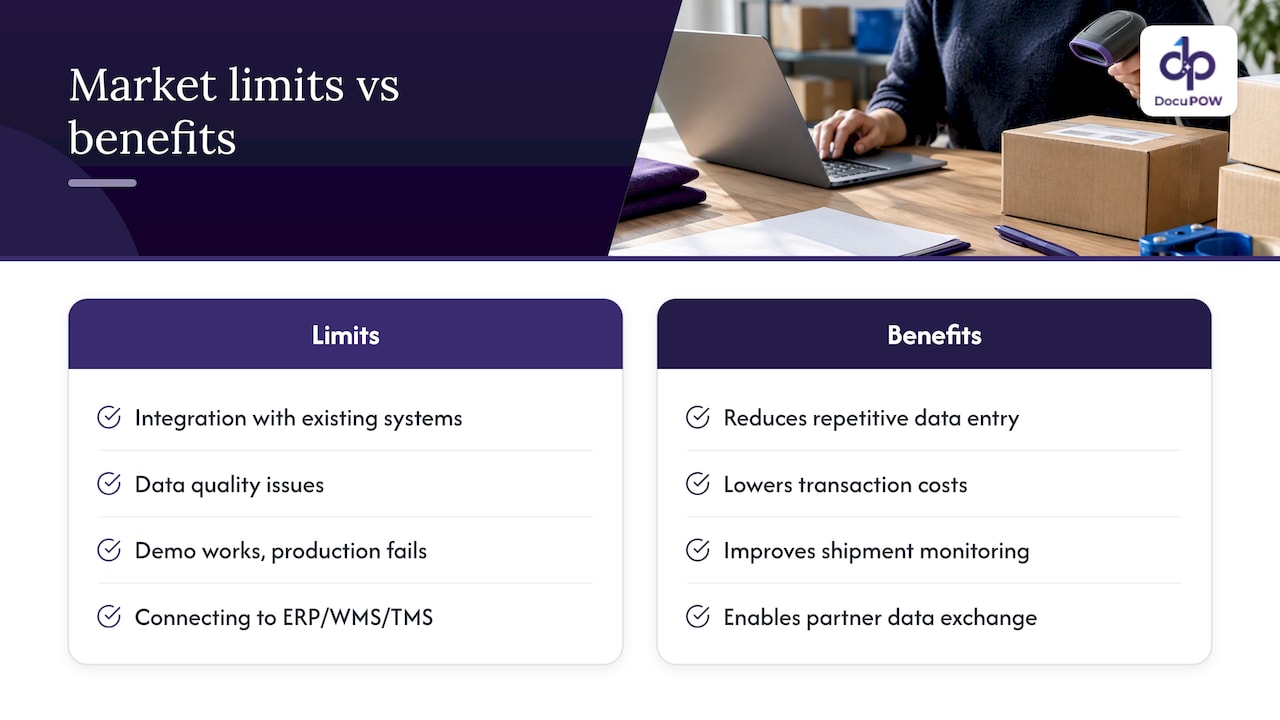
Integration and data quality, not technology availability, are what actually limit scaling. PwC’s survey reports that a significant share of operations leaders cite integration with existing systems as a top obstacle, and a notable portion cite data quality issues, even as adoption of AI and automation tools spreads quickly. This is the gap most pilots underestimate: the extraction technology works in a demo, but connecting it cleanly to an ERP, WMS, or TMS and trusting the output enough to automate downstream actions is a separate, harder problem.
The pattern holds outside general operations surveys too. Research on digitalization in maritime chartering documents that adopting electronic bills of lading reduces repetitive data entry and enables end-to-end digital document chains, which lowers transaction costs and improves shipment monitoring. The U.S. Department of Transportation’s Electronic Freight Management initiative reached a similar conclusion nearly two decades earlier: a service-oriented, web-services architecture that lets partners exchange shipment data without a central repository reduces redundant entry and improves visibility without forcing anyone to rip out legacy systems. The lesson across both is consistent: the architecture of data sharing matters as much as the extraction method itself.
Technology options: OCR/IDP, RPA, AI agents, and integration patterns
Four technology categories do most of the work in logistics data entry automation, and they are not interchangeable.
Template-based OCR reads text from a fixed layout. It works well when every bill of lading from a given carrier looks identical, and it breaks the moment that carrier changes its form or you onboard a new one. Template-free, agentic IDP instead reads a document for context, meaning it can extract shipper, consignee, and line-item data from a freight invoice it has never seen before, without a human building a template first. That difference matters enormously in logistics, where document layouts vary by carrier, forwarder, and customs broker.
RPA excels at repetitive, rules-based actions once clean data exists: copying a validated field from one screen into another, triggering a status update, or filing a confirmation. It struggles the moment a document deviates from the expected pattern, because RPA has no understanding of what it is looking at, only instructions to follow. AI agents fill that gap by making judgment calls, flagging ambiguous fields, routing exceptions, and adapting to variation that would stop an RPA bot cold.
Getting extracted data into the systems that run your operation requires one of a few types of logistics process automation: integration patterns such as API and ERP connectors that enable smooth, automated data flow.
- API and ERP connectors push validated records directly into your system of record, closing the loop without manual re-keying.
- EDI transactions remain the standard for high-volume carrier and customer exchanges, particularly in customs and freight billing.
- Portal and email ingestion covers the long tail of smaller partners who still send documents as PDFs or scanned attachments.
Customs workflows add their own layer of structure. U.S. Customs and Border Protection’s ACE CATAIR documentation specifies exact record formats, including QP10 and QP30 message types, for manifest and bill of lading transmissions, which means any automation touching customs data has to map to those fields precisely rather than guess at a generic structure.
How to implement automated data entry: a pilot-to-scale roadmap for logistics teams
Automation projects that skip baseline measurement tend to produce impressive demos and disappointing rollouts. A disciplined path from pilot to full deployment looks like this:
- Map your document sources and formats. List every channel documents arrive through, email, shared spreadsheets, customer portals, EDI feeds, and note the format and volume for each.
- Record your baseline KPIs. Capture current error rate, throughput, and time-to-acknowledgement for at least two to four weeks before any change, so improvement is measurable rather than assumed.
- Scope a narrow pilot. Pick one document type and one partner segment, often freight invoices or purchase orders from your top five suppliers, to keep volume manageable and results interpretable.
- Set acceptance criteria up front. Define the error rate and throughput thresholds the pilot must hit before expansion, typically run over four to eight weeks to capture enough volume variation.
- Build in human-in-the-loop checkpoints. Route low-confidence extractions to a reviewer instead of auto-posting them, and set an error budget that defines how much residual error is acceptable before scaling further.
- Connect to ERP, WMS, or TMS. Validate that extracted, approved data flows into the system of record without a manual handoff, since this integration step is where most scaling friction appears.
- Expand in stages and monitor continuously. Add document types and partner segments one at a time, reviewing KPI trends monthly rather than assuming the pilot’s results hold indefinitely.
Pro Tip: Run your pilot against the messiest document source you have, not the cleanest, since that is where automation either proves its worth or reveals its limits early.
Real-world patterns: how RPA and AI combine to automate logistics document workflows
Most working implementations follow the same basic architecture regardless of industry vertical: capture the document, classify what type it is, extract the relevant fields, validate those fields against business rules, and post the result to the appropriate system.
Applied to logistics, that architecture takes a few recognizable shapes:
- Order entry: a purchase order arrives by email or portal, gets classified automatically, has line items and delivery terms extracted, and posts directly into the order management system once validated.
- Freight invoice processing: an invoice is matched against the original rate quote and bill of lading, with discrepancies flagged for human review rather than paid automatically.
- Bills of lading: shipment details are extracted and cross-checked against the original booking, reducing the manual reconciliation that historically happened at the dock.
- Customs documentation: fields are mapped to required formats like those specified in ACE CATAIR, with low-confidence extractions routed to a compliance reviewer before submission.
The error-handling layer is what keeps service-level agreements intact. A well-designed workflow does not simply flag an error and stop. It routes the exception to the right reviewer based on document type and confidence score, logs the correction so the system can improve, and keeps the rest of the batch moving so one bad invoice does not delay an entire shipment’s processing.
Adoption checklist and change management: governance, roles, and controls to avoid rollout failures
Technology failures are rare in these rollouts. Governance failures are common. Clear ownership prevents both.
Operations should own the day-to-day process design and KPI targets, IT should own system integration and security review, and compliance should own audit requirements for customs and regulated documents. Procurement typically manages vendor selection and contract terms. Without one accountable owner who can make tradeoff decisions, pilots stall in committee.
A practical adoption checklist covers:
- Audit trail and confidence logging: every extracted field needs a logged confidence score and change history so compliance teams can triage review by threshold rather than checking everything manually.
- SLA and exception design: define upfront how long an exception can sit before it escalates, and to whom.
- Phased training: roll out to a small team first, gather feedback on false positives and false negatives, then expand.
- Ongoing ROI tracking: revisit error rate, throughput, and time-to-acknowledgement monthly, not just at launch, since drift happens as document mix changes.
Pro Tip: Assign one person to review flagged exceptions daily during the first month of any rollout. That single habit catches configuration problems before they become a backlog.
Security deserves its own line of attention. Logistics documents often carry customer pricing, banking details for payment, and regulated customs data, so any automation platform handling them needs encryption in transit and at rest, role-based access controls, and a clear data retention policy that matches your compliance obligations.
How DocuPOW’s agentic, template-free platform maps to logistics needs
DocuPOW applies autonomous, context-aware agents to extract data from freight invoices, bills of lading, and customs paperwork without requiring a template for every carrier format, which matters directly for the layout variation described above. Human-in-the-loop audit review lets teams set the same confidence-based checkpoints the adoption checklist calls for, while API and ERP connectors handle the integration step that PwC’s research identifies as the top scaling obstacle. Real-time analytics give operations teams the KPI visibility a pilot needs to prove results before expansion. DocuPOW’s logistics solution page details the specific document types supported.
The gap between automation’s promise and its practice
The conventional pitch around logistics automation oversells the extraction step and undersells everything after it. Reading data off a document accurately is now a solved problem for most document types. What actually determines whether a project succeeds is whether the organization built the integration, governance, and exception-handling layers around that extraction, and most do not plan for those until the pilot stalls.
If you take one thing from the evidence here, prioritize mapping your partner data-sharing gaps before you evaluate any extraction technology. Brookings’ analysis and the EFM initiative’s findings both point the same direction: the hardest part of this work is rarely reading the document correctly. It is getting your carriers, forwarders, and customers to send data your system can actually use, and building the human checkpoints that let you trust automation enough to act on it without review every time.
— Syed Naveed Abbas
Where DocuPOW fits once you are ready to automate
If the roadmap above matches where your team is headed, DocuPOW’s template-free extraction means you are not stuck rebuilding configurations every time a carrier changes its invoice format, a real cost for logistics teams juggling dozens of partner document types. Human-in-the-loop audit review and confidence-score logging give you the governance controls this article walks through, out of the box rather than as a custom build.

The platform connects to ERP, WMS, and TMS systems through API integrations, so validated data moves into your system of record without a manual handoff. Plans range from the Starter tier at $99 per month to the Professional tier at $499 per month, with Enterprise pricing available on request for larger document volumes. You can review plan details and start a pilot on your own highest-volume document type through the pricing page.
FAQ
What are some examples of automation in logistics?
Common examples include automated extraction of freight invoices and bills of lading, AI-driven classification of incoming customer orders, and connector-based posting of validated shipment data into ERP or TMS systems. Electronic bills of lading and EDI transactions for carrier and customs communication are also widely used automation patterns, as documented in research on maritime digitalization.
What are the 7 C’s of logistics?
Definitions vary by source, but a common version lists the 7 C’s as the right customer, product, quantity, condition, place, time, and cost, representing the core service standard logistics operations aim to meet. This framework is a general operations principle rather than a measured research finding, so treat it as a planning heuristic.
Is AI replacing logistics?
AI is not replacing logistics operations; it is changing how routine document and data tasks within them get done. PwC’s 2025 survey finds operations leaders deploying coordinated AI agents to resolve bottlenecks proactively, but integration and data quality remain the leading obstacles to scaling that work, which means human oversight stays central to the process.
What is the best software for automating data entry tasks?
The right choice depends on your document variety and integration needs: template-based OCR suits fixed-format documents, while template-free, agentic platforms like DocuPOW handle the layout variation common across carriers and forwarders without manual template building. For logistics teams processing invoices, bills of lading, and customs paperwork from many partners, a template-free approach with human-in-the-loop review and ERP connectors, as described on DocuPOW’s logistics page, tends to scale better than rigid, template-dependent tools.
How long does a typical automation pilot take?
Pilots scoped to a single document type and partner segment typically run four to eight weeks, enough time to capture realistic volume variation and measure error rate, throughput, and time-to-acknowledgement against acceptance criteria. Projects that skip baseline measurement or scope too broadly tend to take longer and produce less reliable results.
Sources
- 2025 Digital Trends in Operations survey: PwC
- A data-sharing approach for greater supply-chain visibility — Brookings
- The digitalisation in chartering business: role of e-bill of lading — PMC
- The Electronic Freight Management (EFM) Initiative — FHWA
- Customs and Trade Automated Interface Requirements (CATAIR) Implementation Guide — CBP
Recommended
See DocuPOW on your documents.
Stop building templates. Start extracting data.