Start Document First Logistics Workflow Automation Without Templates
Run a 4 to 8 week document first IDP pilot on invoices and bills of lading. Use template free extraction and workflow orchestration to cut errors and...


Logistics workflow automation uses software to extract data from freight and warehouse documents, route it through approval and matching steps, and trigger the next action without someone retyping information. Done well, it speeds up receiving, settlement, and claims while cutting data entry errors. The first move is simple: audit where documents enter your operation, then run a small intelligent document processing pilot on your highest-volume, highest-error flow.
TL;DR:
- Automating invoice matching and bill of lading reconciliation offers the fastest ROI due to high volume and error-prone workflows.
- Semantic understanding through agentic, template-free document processing handles diverse layouts and reduces recurring setup failures.
- Pilots should focus on processes affecting cash flow, like carrier settlement and invoice matching, and be designed with clear success metrics.
- Measuring processing time, error rate, and cost per document provides tangible evidence of automation benefits for scaling decisions.
- Success depends on starting with high-volume, error-prone flows, engaging cross-departmental input, and maintaining human oversight during initial phases.
Table of Contents
- Which documents and processes should you automate first?
- What technologies power an automated logistics stack?
- Where does automation deliver the fastest results?
- How do you plan a pilot that actually scales?
- How do you measure whether automation is working?
- A practical path from pilot to scale with agentic extraction
- What logistics teams get wrong about automation
- Try template-free document automation on your next pilot
- FAQ
- Sources
Which documents and processes should you automate first?
Most logistics operations run on a stack of recurring documents that still get touched by hand somewhere in the chain. Bills of lading, proofs of delivery, carrier invoices, rate sheets, and customs paperwork all show up at different points, often in different formats from different partners, which is exactly why they cause friction.
These documents feed processes that stall when data is trapped in PDFs or scanned images:
- Receiving: inbound shipments require matching a bill of lading against a purchase order before putaway can start.
- Claims: proof-of-delivery discrepancies need fast document retrieval to resolve disputes with carriers or customers.
- Carrier settlement: invoices must be reconciled against contracted rate sheets before payment goes out.
- Customs clearance: cross-border shipments depend on accurate, time-stamped documentation for audits.
The friction comes from unstructured inputs. A rate sheet from one carrier rarely looks like the next, exceptions are common, and a single shipment can generate paperwork in three or four different formats before it reaches a dock.
What technologies power an automated logistics stack?
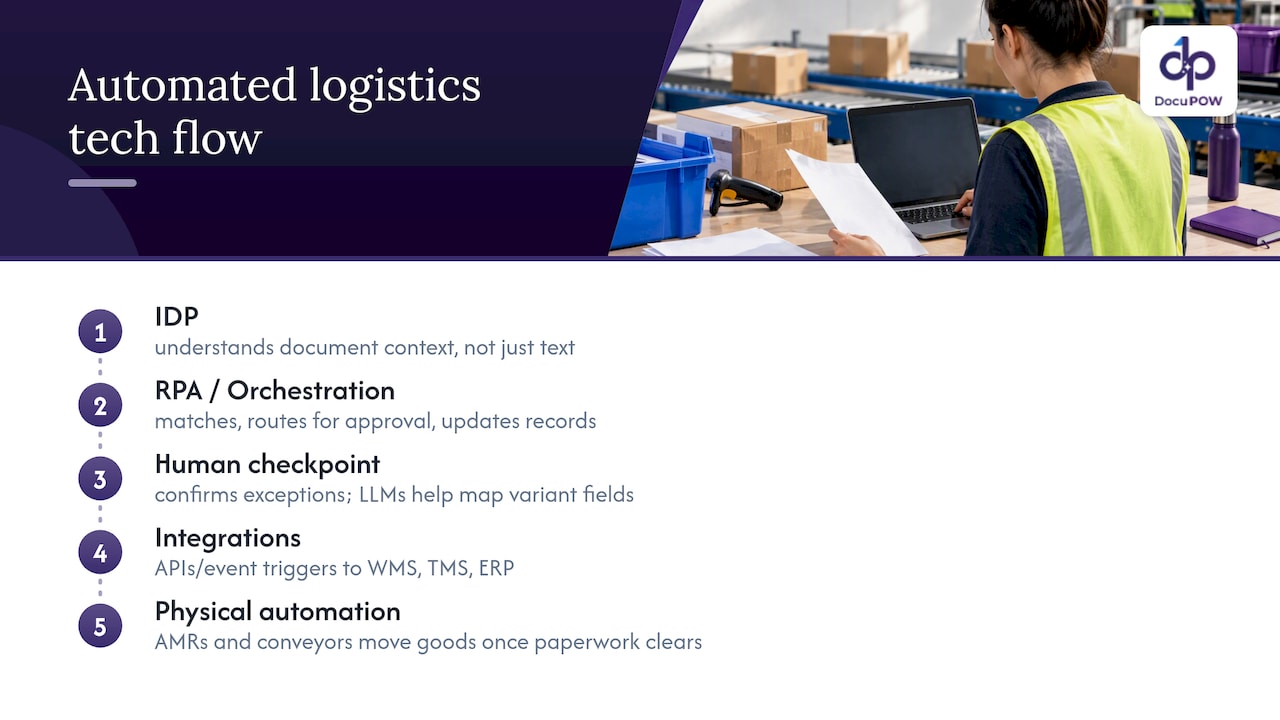
Intelligent document processing (IDP) goes beyond basic optical character recognition by understanding context, not just characters. Traditional OCR reads text; IDP interprets what that text means on a given document, including line items on an invoice or a weight field on a bill of lading, even when the layout has never been seen before. That semantic, zero-shot approach matters because logistics documents rarely follow one template.
Robotic process automation (RPA) and workflow orchestration take the extracted data and move it through the next steps: matching, routing for approval, or updating a record. Human-in-the-loop checkpoints catch the exceptions, flagging a mismatched quantity or an unreadable field for a person to confirm before it moves forward.
None of this works in isolation. Integration with warehouse management systems, transportation management systems, and ERP platforms happens through APIs and event-driven triggers, so a confirmed receipt in a WMS can fire off an invoice match automatically. Physical automation, including autonomous mobile robots and conveyor systems, complements the document side by handling the physical movement once the paperwork clears.
Large language models now handle the harder exceptions: mapping a field labeled “freight charges” on one carrier’s invoice to “transportation cost” on another, without a human writing a rule for every variation.
Pro Tip: Start your integration mapping with the system that already holds your cleanest data, usually your TMS, and build outward from there.
Where does automation deliver the fastest results?
Some workflows pay back faster than others because they combine high volume with high error rates. Prioritize these:
- Invoice matching against rate sheets, which catches billing discrepancies before payment instead of after.
- Bill of lading reconciliation against purchase orders, cutting the manual lookup that slows receiving.
- Proof-of-delivery capture for claims, so disputes get resolved with a document pull instead of a phone chain.
- Inbound receiving and putaway confirmation, where a scanned document can trigger a warehouse task automatically.
- Returns processing, which often involves the messiest, least standardized paperwork in a warehouse.
- Cross-border customs synchronization, producing audit-ready digital records as compliance rules tighten. Mexico’s 2026 customs law reform, for instance, pushed Fr8Tech to launch automated SAT synchronization for digital customs document lifecycle management.
- Order-to-cash and carrier settlement, where faster document turnaround shortens the whole payment cycle.
How do you plan a pilot that actually scales?
Start by scoring your document flows on three factors: volume, error rate, and business impact. A process that is high-volume but low-error is a weaker candidate than one with moderate volume and frequent costly mistakes.
Build a small governance group before you pick software. Operations, IT, finance, and compliance each see different risks, and skipping one of them tends to surface problems after launch rather than before.
Design the pilot with clear boundaries:
- Define success metrics up front: processing time, error rate, and cost per document.
- Decide what data the pilot needs and where it will come from.
- Set human-in-the-loop rules for which exceptions require review versus automatic approval.
- Map integration points, security requirements, and compliance touchpoints before building anything.
Commercial models like robotics- and software-as-a-service lower the upfront capital barrier for mid-market operators, which is part of why pilots are easier to justify now than they were a few years ago. Operations teams piloting adjacent technology, such as AI dispatching, use a similar approach: narrow scope, clear metrics, fast iteration.
Expect phases rather than a single rollout: a scoping phase, a pilot of 4 to 8 weeks, then a scale decision gated on whether the pilot hit its targets. Training and change management matter as much as the technology, since a system nobody trusts gets routed around.
How do you measure whether automation is working?
Track a small set of KPIs instead of a long dashboard nobody checks:
- Processing time per document, from receipt to completed action.
- Error rate, measured against the manual baseline before automation started.
- Cost per document, including labor and exception handling.
- Throughput, or documents processed per period.
- SLA compliance, especially for carrier settlement and claims deadlines.
Collect a baseline before you launch anything, since “faster” only means something against a known starting point. ROI typically comes from three places: labor hours reclaimed, error-related costs avoided, and faster cash collection from quicker invoice turnaround. Report progress to stakeholders on a fixed cadence, monthly works for most teams, so the pilot’s case for scaling is backed by numbers rather than impressions.
A practical path from pilot to scale with agentic extraction
Traditional IDP tools rely on templates, which means a new carrier format or a redesigned invoice breaks the system until someone rebuilds the template. We built DocuPOW around agentic, template-free extraction instead, so our platform adapts to a document layout it has never seen without manual setup or maintenance.
Human-in-the-loop auditing stays part of the process, giving compliance teams a review checkpoint before data moves downstream, and real-time analytics surface exceptions as they happen rather than at month-end. For logistics teams starting out, the clearest entry point is usually carrier invoice and rate sheet matching, a high-volume flow where template rigidity causes the most recurring breakage. From there, the same document automation and workflow orchestration extends naturally into bill of lading and proof-of-delivery handling.
What logistics teams get wrong about automation
The common mistake is treating automation as a technology purchase instead of a documents-and-process decision. Teams buy a platform, point it at everything, and wonder why exceptions pile up. The teams that succeed pick one painful, high-volume document flow, measure it honestly before and after, and resist the urge to automate everything in the first quarter.
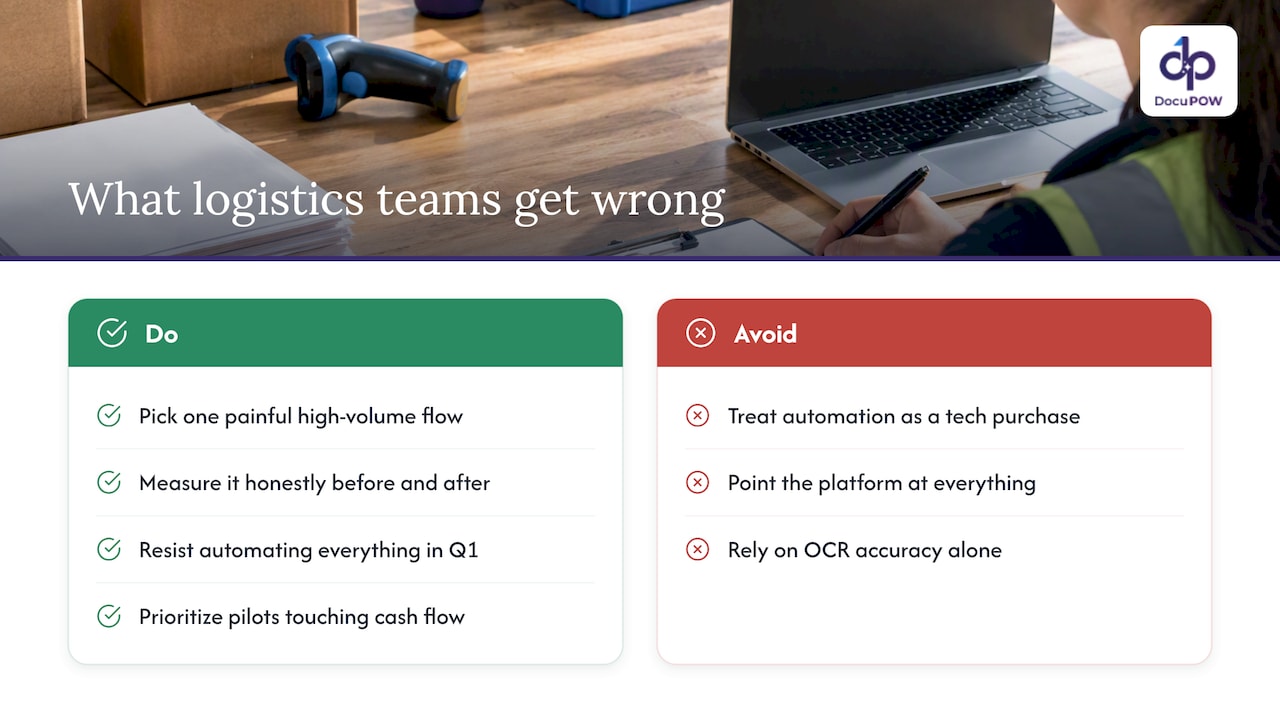
The other overrated idea is that OCR accuracy alone solves the problem. Reading text correctly is table stakes. The harder, more valuable work is semantic understanding: knowing that a field means “weight” or “freight charge” regardless of where it sits on the page or what the carrier calls it. That is where template-based tools keep failing and where newer, context-aware extraction earns its keep.
If you take one thing from this guide, prioritize the pilot that touches cash flow, usually invoice matching or carrier settlement, over the one that looks the most impressive in a demo.
— Syed Naveed Abbas
Try template-free document automation on your next pilot
We built our platform so logistics teams can skip template setup entirely: point our agents at a bill of lading, invoice, or customs document and extraction starts working without configuration, while workflow orchestration handles the matching and routing behind it.

Check our pricing page to compare the Starter and Professional plans, or explore how the platform works before you request a demo.
FAQ
What are the 7 C’s of logistics?
The 7 C’s are a planning framework covering the right customer, product, condition, quantity, cost, time, and place, used to evaluate whether a logistics operation is delivering value consistently. They work as a checklist for diagnosing gaps rather than a measurement standard with fixed figures.
What are some examples of logistics automation?
Examples include intelligent document processing for invoices and bills of lading, autonomous mobile robots for warehouse picking, and automated carrier settlement that matches invoices against contracted rates. Warehouse automation growth in North America is being driven largely by e-commerce volume and labor shortages, with AMRs identified as the fastest-growing segment.
What is a logistics workflow?
A logistics workflow is the sequence of steps a shipment, document, or order moves through, from receiving and putaway to settlement and delivery confirmation. Automating a workflow means software handles the data capture and handoffs between those steps instead of a person doing it manually.
What are examples of workflow automation?
Common examples include routing an extracted invoice for approval without manual entry, triggering a warehouse putaway task once a receipt is confirmed, and automatically flagging a proof-of-delivery mismatch for review. Template-free extraction platforms like DocuPOW extend this further by letting the same workflow adapt to new document formats without reconfiguration.
How much does logistics workflow automation software cost?
Pricing varies by platform and usage. Our own plans start at $99 per month for the Starter tier and $499 per month for the Professional tier, with Enterprise pricing available on request.
Sources
- North America Warehouse Automation Market Analysis, 2026 – 2033
- Fr8Tech press release: DODA Smart launch (SEC filing)
Recommended
See DocuPOW on your documents.
Stop building templates. Start extracting data.