Bill of Lading Extraction: How It Works and How to Automate It
Learn how bill of lading extraction turns scans and PDFs into structured shipment data, which fields to capture, and how to validate, integrate and audit it.


Bill of lading extraction is the process of reading a BOL, whether it is a scan, a photo or a PDF, and turning its shipper, consignee, cargo and freight details into structured fields your TMS, ERP or accounting system can use. Done well, it replaces retyping with a review step: software reads the document, flags what it is unsure about, and a person confirms only the exceptions. This guide covers what gets extracted, how OCR and AI differ, how to validate the output, how to connect it to your systems, and what to watch for on security and record-keeping in the US.
TL;DR
- BOL extraction pulls parties, locations, cargo, weights, references and terms from a document into fields. The goal is clean data in your systems without manual keying.
- Plain OCR reads characters. Modern AI also understands layout and context, so it copes with new carrier formats without a template for each one.
- Reliable automation is not fully touchless. Per-field confidence, rules, and a human review queue for exceptions are what keep bad data out of your system of record.
- Integration matters as much as accuracy: extracted data should flow into your TMS or ERP through an API, with an audit trail of every edit.
- Keep the original image, since carriers and shippers may need to produce bills of lading and supporting records on request.
Table of Contents
- What bill of lading data extraction actually captures
- Why bills of lading are hard for older tools
- How OCR and AI turn a document into structured data
- Automating the whole BOL workflow, not just the reading
- Validating extracted data and handling odd layouts
- Integrating extraction with your TMS and ERP
- Benefits and limits to expect
- Security, audit and US record-keeping
- Perspective: why we build for variety, not for templates
- Try it on your own bills of lading
- FAQ
- Sources
What bill of lading data extraction actually captures
A bill of lading is the receipt a carrier issues for goods it has taken to move, and it also serves as the contract of carriage. For US for-hire motor carriers, the federal rules on what a bill of lading must contain include the names of the consignor and consignee, the origin and destination points, and the number of packages. Real documents carry much more.
A practical extraction schema usually has three layers.
Header fields
These identify the shipment and the parties:
- BOL number, PRO number, booking or reference numbers, and purchase order numbers
- Shipper (consignor), consignee and notify party, with addresses
- Carrier name, vessel or trailer details, and seal numbers where they apply
- Ship date, origin and destination, ports of loading and discharge on ocean documents
- Freight terms such as prepaid or collect, and Incoterms on international moves
Line items
The line table is where most extraction projects struggle. For each line you typically want piece count, packaging type, description of goods, weight, dimensions, freight class or NMFC code, and hazardous-material flags. Descriptions can run across several rows, and the table may continue on a second page.
Signatures, stamps and notations
Delivery receipts and signed BOLs carry the proof of pickup or delivery: signature presence, date, printed name, and exception notes such as “damaged” or “short 2 cartons.” These are the details that drive claims and billing disputes, so they deserve fields of their own rather than being ignored as image noise.
Why bills of lading are hard for older tools
No single standard layout exists. Every carrier, freight forwarder and shipper prints its own form, and many shippers generate their own. Pages arrive skewed, faxed, photographed on a phone, stapled with a delivery receipt, or stamped over the text you need. Tables nest. Handwriting appears in the very boxes that matter.
Template-based tools handle this by requiring a template per layout. That works for the first ten formats and falls apart at the hundredth, because every new carrier or revised form means someone builds and maintains another template. The cost shows up as ongoing setup work and exceptions that land back on a clerk’s desk.
How OCR and AI turn a document into structured data
The path from a paper or PDF to a clean record has several stages. Understanding them helps you judge any tool, including ours.
- Capture. A scan, email attachment, driver photo or EDI-adjacent PDF comes in. Image quality at this stage sets the ceiling for everything after it.
- Preprocessing. Deskewing, de-noising, rotation correction and page splitting prepare the image. Multi-document packets are separated into individual BOLs, delivery receipts and invoices.
- Text recognition (OCR). Characters are read from the image, including handwriting in more capable systems.
- Layout and context understanding. This is where AI separates itself from basic OCR. A model works out which block is the consignee, which table is the line items, and which number is the BOL number rather than a PO number, even when the form has never been seen before.
- Normalization. Dates, units, weights and addresses are converted into consistent formats, and party names are matched against your master data.
- Confidence scoring and routing. Each field receives a confidence value. Clean documents continue automatically, uncertain ones go to review.
- Delivery. Approved data is written to the TMS, ERP, or accounting system.
The key distinction is between reading text and understanding a document. OCR alone returns a stream of characters and positions. An agent-based approach interprets what those characters mean in context, which is why it can handle a layout it has not encountered. That template-free capability is the core of how we built DocuPOW’s logistics document automation.
Automating the whole BOL workflow, not just the reading
Extraction is one step. The real saving comes from automating the path from intake to approved record. A practical flow looks like this:
- Intake from email inboxes, shared folders, portals, or driver apps, with metadata such as sender and receipt time attached.
- Quality gate that rejects or holds unreadable files before they waste anyone’s time.
- Extraction into header and line fields with per-field confidence.
- Validation against rules, master data and related documents.
- Exception queue where a clerk sees the original image beside the extracted fields and fixes what the system flagged.
- Staging, then writeback to the system of record only after checks pass.
- Analytics on volumes, error rates and turnaround time to find where documents still stall.
One architecture write-up from a logistics consulting firm recommends a fail-closed design of this kind: capture metadata, quality gating, layout detection, per-field confidence, TMS matching, exception queues and human confirmation, with staging before anything is written back. We agree with the principle. A pipeline that guesses silently is worse than one that asks.
If you want to see how this kind of multi-step flow is organized in practice, our shipping document automation pilot walks through a template-free approach for logistics paperwork.
Validating extracted data and handling odd layouts
Accuracy claims mean little until you decide what happens to the fields the system gets wrong or cannot read. These practices are what separate a demo from a production workflow.
Set thresholds per field, not per document
A blurry shipper address is a nuisance. A wrong weight or a mismatched BOL number can cause a billing error or a misrouted shipment. Set stricter confidence thresholds on the fields that carry financial or compliance risk, and let low-risk fields pass at a lower bar.
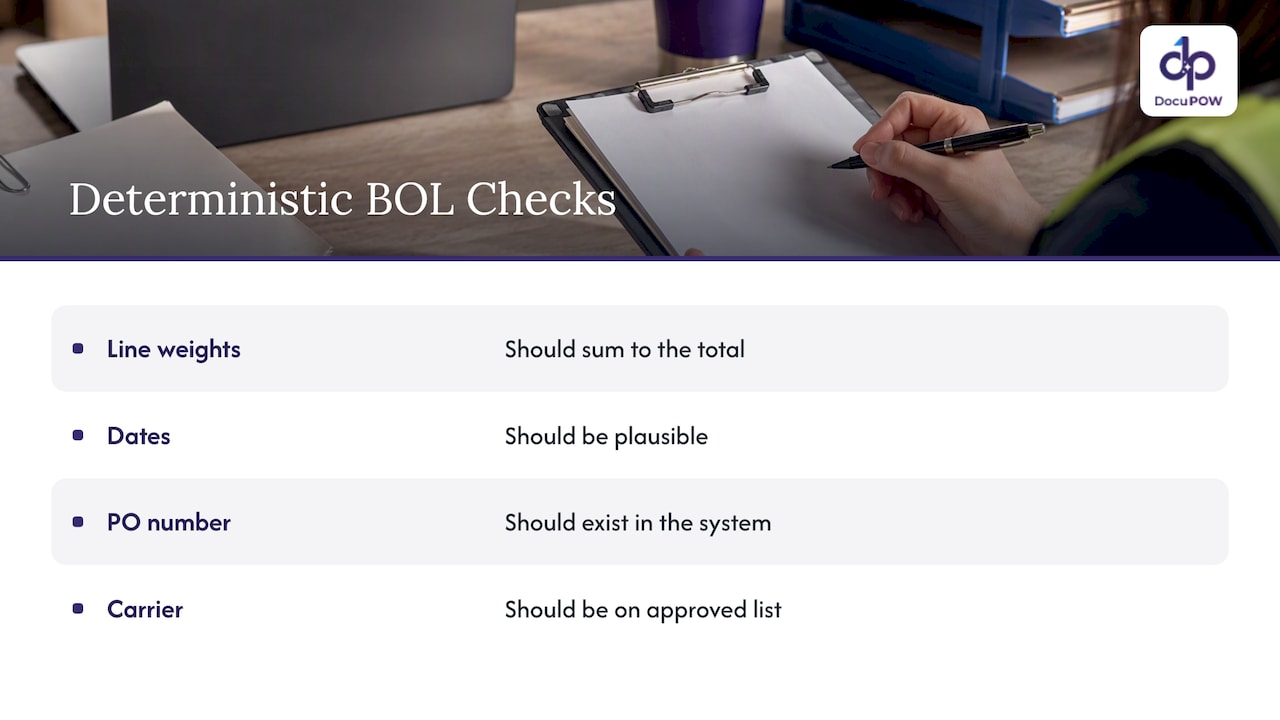
Layer deterministic rules on top of AI
Simple checks catch a surprising amount: line weights should sum to the total, dates should be plausible, a PO number should exist in your system, and a carrier should be on your approved list. The same consulting source advises using per-field confidence, required-field thresholds, deterministic rules and cross-document reconciliation, with fuzzy matching used narrowly and only where justified.
Never let unresolved names create new records
If the consignee on a scan does not match your master data, the right outcome is a review task, not a new customer record. Duplicate parties are expensive to clean up later. Identity conflicts, missing regions, stamp or signature problems, and line mismatches should all route to a person.
Reconcile across documents
A BOL rarely lives alone. Matching it against the purchase order, the rate confirmation, the delivery receipt and the carrier invoice exposes shortages, duplicate billing and rate discrepancies that no single-document check would catch.
Keep the human edit trail
Show the reviewer the original image next to the fields, and record every change: who edited what, when, and what the original value was. This is the human-in-the-loop audit review we build into DocuPOW, and it is what lets finance and compliance trust the result.
Integrating extraction with your TMS and ERP
Extracted data that sits in a spreadsheet only moves the retyping step. The value arrives when it reaches your systems automatically.
In one published case, a services firm integrated extracted bill-of-lading data directly with a carrier’s TMS to create real-time shipment data, replacing manual entry. The same case reports thousands of documents processed daily, with benefits in reduced delays and better shipment visibility, though results of course depend on a company’s volumes and starting point.
The U.S. Federal Highway Administration, describing electronic freight-management architectures, points to benefits that apply here too: less redundant data entry, better visibility, uniform data dictionaries, authenticated and authorized users, and encryption of data in transit.
When you evaluate integration, ask these questions:
- Is there a documented API for pushing approved data and pulling status?
- Can field mappings be configured to your TMS or ERP schema without custom code each time?
- Can the system write to a staging area first, so errors never hit production data?
- Does it support ERP and CRM connections for the downstream steps, such as invoice matching and freight audit?
Teams that also process carrier invoices alongside BOLs can pair this with invoice data capture so freight bills are matched against the shipping paperwork.
Benefits and limits to expect
The benefits are concrete. Less manual keying means fewer typos and faster posting. Faster posting means earlier visibility into where freight is and what it costs. Clerks stop transcribing and start resolving exceptions. In the Day & Ross case above, the reported gains included reduced manual entry and delays, improved real-time shipment visibility and shorter driver wait times.
The limits matter too:
- Input quality still counts. Crumpled, faxed or partially covered pages will produce more exceptions.
- Handwriting and stamps remain the hardest cases. Expect a review queue, especially at the start.
- Not every decision should be automated. The consulting perspective cited earlier holds that touchless processing should remove retyping on clean documents, not remove people from financial or exception decisions. We share that view.
- Rollout takes tuning. Master data matching and routing rules need attention in the first weeks.
For general guidance on handling large volumes without losing control, see our high-volume document processing best practices.
Security, audit and US record-keeping
Bills of lading are business and sometimes regulated records, so the automation layer should be treated like any system that touches them.
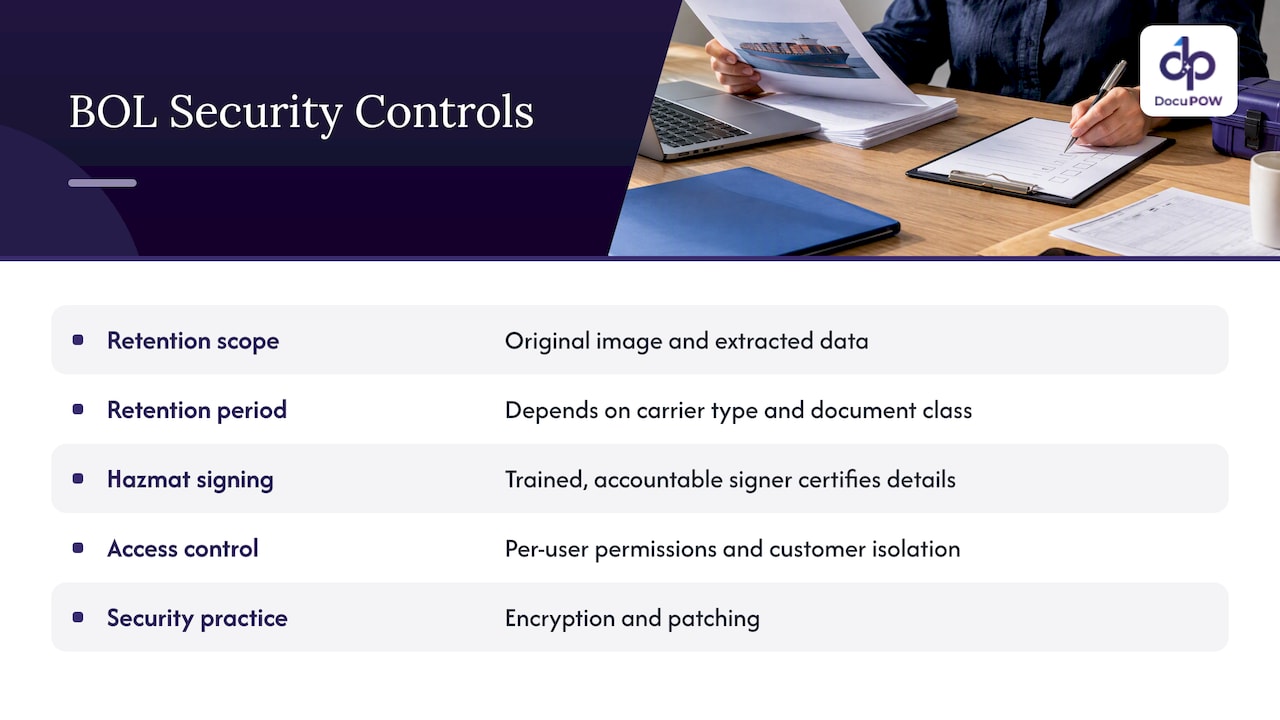
Record retention. FMCSA notes that investigators may request bills of lading and related supporting documents, which motor carriers should keep as the FMCSRs require. Its household-goods enforcement page also lists 49 CFR Part 379, Preservation of Records. Your retention schedule should cover the original image as well as the extracted data. Confirm exact periods with your compliance counsel, since they depend on carrier type and document class.
Hazardous materials. If your shipments include hazmat, accuracy on the shipping paper has legal weight. In a November 2024 interpretation, PHMSA said a third-party agent may prepare and sign a hazardous-material shipping paper when authorized, but the signer must be properly trained and certifies the classification, description, packaging, marking, labeling and condition. Extraction can pre-fill and check these fields. It should not replace a trained, accountable signer.
Access control and tenant isolation. Document tools are software, and software has vulnerabilities. A recent NIST entry describes an open-source AI interface flaw that let an authenticated user reach another user’s file. When evaluating any platform, ask about per-user permissions, isolation between customers, encryption in transit and at rest, and patching practice.
Perspective: why we build for variety, not for templates
We have seen the same pattern across logistics and manufacturing teams: the first dozen document formats are easy and the long tail is what hurts. Templates turn every new carrier into a small project. That is why we built DocuPOW around agents that read a document the way a person would, using context to find the consignee or the line table on a layout they have never seen, and then explain where each value came from.
We also hold a firm view on automation limits. Extraction should be fast and mostly invisible on clean documents, but a person should see the original page whenever confidence drops or a rule fails. Every edit should be logged. Speed that cannot be audited is a liability, particularly for finance and compliance teams.
Finally, extraction by itself is not the finish line. Value comes when approved data moves through the workflow: matched, routed, posted and analyzed. Treat the BOL as the start of a process, and judge any tool by how much of that process it can carry.
— Syed Naveed Abbas
Try it on your own bills of lading
The quickest way to judge extraction is to run your messiest real documents through it. DocuPOW handles template-free extraction, multi-step workflows, human-in-the-loop review and ERP or CRM integration through an API. Plans start with Starter at $99 per month and Professional at $499 per month, and Enterprise is available with pricing on request. See the details on our pricing page.

If you want to see how the platform moves a document from intake to finished process, start with how DocuPOW works.
FAQ
What information is typically extracted from a bill of lading?
Most teams capture the BOL and reference numbers, shipper, consignee and carrier, origin and destination, ship date, and freight terms. They also pull line-level detail such as pieces, packaging, description, weight and freight class, plus signatures and exception notes. The exact schema depends on whether you handle domestic trucking or ocean documents.
Is OCR enough for bill of lading processing?
OCR reads characters, but it does not know which number is the BOL number or where the line table starts. For a handful of fixed formats it can work with templates. For many carriers and changing layouts, AI that understands document context needs far less setup and maintenance.
Can bill of lading extraction be fully automated?
Clean documents can often pass with no touch, but a sound workflow still routes low-confidence fields, identity conflicts and failed rule checks to a person. That keeps errors out of your TMS or ERP and gives you an audit record. The aim is to remove retyping, not accountability.
How does extracted BOL data get into a TMS or ERP?
Usually through an API or configured integration that maps extracted fields to your system’s schema. Many teams write to a staging area first and release data to the system of record after validation passes.
Do I have to keep the original document?
Yes, plan to. FMCSA says bills of lading and supporting documents may be requested during investigations and should be kept as the regulations require. Store the original image alongside the extracted data and confirm retention periods with your compliance advisor.
Sources
- eCFR, 49 CFR Part 373: Receipts and Bills
- Computer Vision and Multimodal Document Intelligence in Logistics (Strong Tower Consulting)
- Day & Ross AI document automation case study (Pythian)
- U.S. Federal Highway Administration, electronic freight management
- FMCSA, HOS compliance behavior analysis
- FMCSA, Regulations and Enforcement
- PHMSA interpretation 24-0085
- NIST NVD, CVE-2026-54009
Recommended
See DocuPOW on your documents.
Stop building templates. Start extracting data.