API-Driven Document Automation: How It Works and How to Build It
How API-driven document automation works: the pipeline stages, a reference architecture, best practices for errors, review and security, and where to start.

API-driven document automation connects your systems to a document processing service through API calls. Files go in, validated structured data comes out, and your ERP, CRM or accounting system receives it without anyone retyping a field. The API is only one piece. A reliable setup also needs asynchronous jobs, validation, human review for uncertain results, security controls and monitoring. This guide walks through each piece, with a concrete reference architecture and the practices that keep it running at volume.
TL;DR
- An API-driven approach treats documents as a service your systems call, rather than a task people do in a screen. Upload, extract, validate, route and store all happen programmatically.
- A production pipeline has five stages: ingest, classify and extract, validate, review exceptions, and deliver to downstream systems. A single API call covers only one of them.
- Use asynchronous jobs, confidence thresholds with a human review path, centralized retries and logging, and least-privilege access. Follow NIST’s risk-based guidance for API security.
- Template-free extraction cuts the maintenance that usually makes document automation brittle when a vendor changes an invoice layout.
Table of Contents
- What API-driven document automation actually means
- The five stages of an API-based document workflow
- A worked example: invoice intake from a shared mailbox
- Common business uses
- Best practices for integrating a document processing API
- Handling errors, human review and monitoring
- Securing the API and meeting US compliance expectations
- Our perspective: templates are the hidden cost
- Build or buy: choosing your approach
- Where DocuPOW fits
- A practical rollout plan
- FAQ
- Sources
What API-driven document automation actually means
The phrase covers two related things. The first is document processing: reading invoices, purchase orders, contracts, bills of lading or forms and turning them into structured fields. The second is document workflow: what happens to that data afterward, such as matching an invoice to a purchase order, routing an exception to an approver, or posting a record to your ERP.
When both are exposed through an API, your own software starts the work. A mailbox listener, a portal upload, an EDI feed or a scheduled job submits a file. The service returns a job identifier, does the extraction in the background, and notifies your system when results are ready. Nobody logs in to drag a PDF into a window.
This is different from UI automation, which mimics clicks and keystrokes on a screen. API automation works at the service layer, sending structured requests directly between systems, as SS&C Blue Prism’s guide to API automation describes. That makes it faster to run, easier to monitor and far less likely to break when someone moves a button.
Why teams choose the API route
- Volume. Humans do not scale to thousands of documents a day. A queue and a set of parallel workers do.
- Integration. The data lands where it is needed, in the format the target system expects, with a traceable record of how it got there.
- Control. You decide thresholds, validation rules and who sees exceptions. Those rules live in code and configuration, not in someone’s habits.
- Auditability. Every request, result and correction can be logged and retrieved later.
The five stages of an API-based document workflow
Nearly every implementation, whatever the vendor, follows the same arc. Thinking in stages keeps you from treating the extraction call as the whole project.
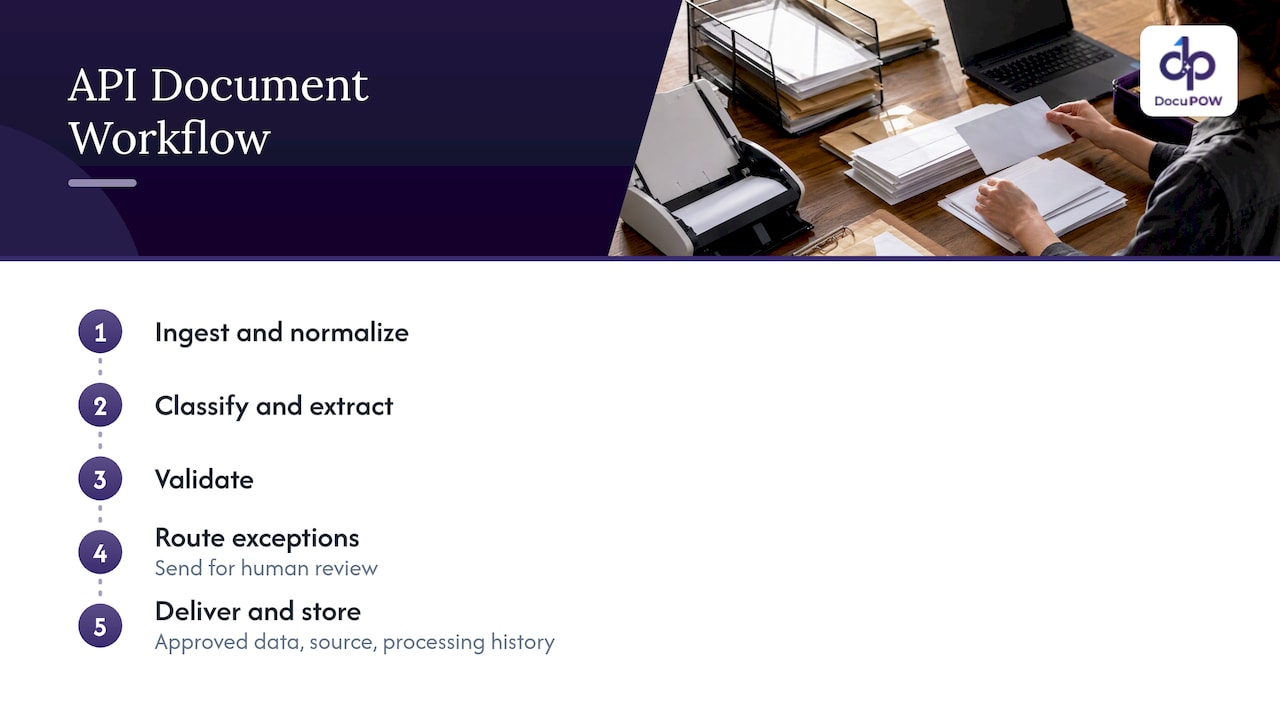
1. Ingest
Documents arrive from email inboxes, SFTP drops, supplier portals, scanners, mobile uploads or other systems. The ingest layer normalizes them: file type checks, virus scanning, deduplication, and attaching metadata such as sender, received time and the business process they belong to. This is also where you create a correlation ID, a single identifier that follows the document through every later step so you can trace it in logs.
2. Classify and extract
The service decides what kind of document it is, then pulls out the fields and, where needed, line items. Older systems depend on templates: one per vendor, per layout. When a supplier changes its invoice format, the template breaks and someone has to rebuild it. Agent-based, template-free extraction reads the document in context, so an unseen layout does not need prior setup. That is the approach DocuPOW takes, and it is the main reason maintenance drops over time.
3. Validate
Extraction output is a proposal, not a fact. Validation checks it against rules: do line items add up to the total, does the tax ID match the vendor master, is the date plausible, does the PO number exist? Schema validation confirms that every required field is present and typed correctly before anything moves on.
4. Review exceptions
Results that fail validation, or come back with low confidence, go to a person. The reviewer sees the source document next to the extracted data, corrects what is wrong and approves. Corrections should flow back into your metrics so you can see which document types and fields cause trouble.
5. Deliver and store
Approved data is posted to the ERP, CRM, data warehouse or case system through its own API. The original file and the structured output are stored together, with their confidence scores and processing history, so an auditor can later ask how a number got into the ledger and get a complete answer.
A worked example: invoice intake from a shared mailbox
A published cloud reference architecture shows how these stages fit together in practice. In this secure document automation design, controlled mailbox polling ingests documents, a workflow tool creates context for each one, and a secured OAuth 2.0 gateway invokes an asynchronous extraction service. The extracted data is validated and persisted, originals are stored with identity-controlled access, and durable orchestration handles retries, logging and downstream integrations.
Strip away the specific products and the pattern is portable:
- A poller reads the accounts payable mailbox and picks up attachments.
- Each attachment gets a correlation ID and a metadata record.
- A gateway authenticates the call and submits the file to the extraction API as an asynchronous job.
- A callback or queue message signals completion; the result is validated against vendor and PO data.
- Clean records post to the ERP. Exceptions land in a review queue.
- The original and the output are archived together.
The same shape works for purchase orders in manufacturing, shipping paperwork in supply chain, or loan packets in fintech and banking. Only the schema and validation rules change.
Common business uses
Document automation APIs show up wherever documents drive a transaction:
- Accounts payable: invoice capture, three-way matching against purchase orders and receipts, and posting to the ledger. See our guide to automating financial data extraction.
- Procure-to-pay: supplier onboarding documents, purchase orders and order confirmations, covered in our procure-to-pay article.
- Logistics: bills of lading, customs forms and delivery receipts feeding shipment visibility.
- Sales operations: quotes, order forms and contract terms moving into the CRM.
- Real estate and construction: leases, agreements, change orders and permits, where each file carries obligations that need tracking. See our pages for real estate and construction.
- Back office in general: HR records, claims, onboarding forms and compliance paperwork.
If your goal is broader than extraction, our overview of back office automation with agentic AI shows how these pieces connect.
Best practices for integrating a document processing API
The practices below recur across published reference designs. They are what separate a demo from a system your finance team will trust.
Use asynchronous jobs for anything long-running
Multi-page documents and batches take time. Submit a job, receive an ID, and pick up the result by callback, webhook or polling. Holding a synchronous connection open invites timeouts and lost work. Microsoft’s sample pipeline uses durable orchestration and queue-triggered batch processing, with parallel document workflows, classification, and schema-constrained extraction.
Carry a correlation context
Give every document one identifier at ingest and pass it through every call, log line and database row. When a document goes missing or a number looks wrong, you can follow it from mailbox to ledger in minutes instead of hours.
Validate at every step
Do not wait until the end. Check file type on ingest, schema on extraction, business rules after, and target-system constraints before posting. Cheap checks early prevent expensive cleanups later.
Make retries and logging central
Scatter retry logic through ten scripts and you will never be sure what happened. Put retries, logging and auditing in one orchestration layer, as the secure design above does. Use idempotency keys so a retried request does not create a duplicate invoice.
Keep originals and intermediate artifacts
Store the source document, intermediate artifacts, final structured output, confidence scores, schema mappings and processing history. Microsoft’s architecture guidance keeps these specifically so results can be audited and retrieved later.
Do not depend on one API call
The design perspective that runs through these references is that sensitive document automation should combine private networking, identity-based access, asynchronous processing, durable orchestration and centralized observability. One call to an extraction endpoint is not an architecture.
Handling errors, human review and monitoring
No extraction system is perfect, and the goal is not to pretend otherwise. The goal is to know when a result is doubtful and to route it to the right person.
Set confidence thresholds with a purpose. Confidence scores only help when they are tied to an explicit action. Results above the threshold flow through; results below it trigger an alert or human review. The Microsoft sample pairs confidence scoring with thresholds, schema validation, review and telemetry for exactly this reason. Start conservative, then loosen as you see real accuracy data by document type.
Make review quick. A good review screen shows the source document and the structured data side by side, lets the reviewer correct a field, add a comment and save. In Microsoft’s content-processing architecture, users review structured JSON, correct inaccuracies and save validated results. The same design feeds success rates, document-type distributions, confidence trends and correction patterns into operational analytics.
Watch the right numbers. Track straight-through rate (documents needing no human touch), exception rate by document type and by field, review time, and end-to-end latency. Correction patterns are the most useful signal: if reviewers keep fixing the same field from the same supplier, you have found a rule to add. Our piece on document processing analytics goes deeper on metrics.
Instrument everything. Logs, metrics and traces should be collected in one place. OpenTelemetry is a common standard for this and the Microsoft sample uses it for monitoring.
Securing the API and meeting US compliance expectations
Documents carry bank details, employee records, health information and contract terms. The API that handles them is part of your attack surface.
The US reference point is NIST SP 800-228, Guidelines for API Protection for Cloud-Native Systems. It addresses API risks across the development and runtime lifecycle, and recommends basic and advanced controls before and during runtime through an incremental, risk-based approach. In practice that means you do not need every control on day one, but you should know which risks you are accepting and why.
The secure reference design shows what those controls look like when assembled: private endpoints, network isolation, security groups for access, a secured gateway, durable retries, centralized logging and auditing. A practical checklist for your own build:
- Authenticate every call with short-lived tokens (OAuth 2.0 is the common choice) rather than shared static keys.
- Give each integration only the permissions it needs, and separate read from write.
- Restrict network paths so the extraction service is not reachable from the open internet where avoidable.
- Encrypt documents in transit and at rest, and set retention rules for originals.
- Log who submitted, viewed and corrected each document.
- Keep a review trail so compliance teams can show auditors how a value was approved.
Specific obligations depend on your industry: healthcare organizations should involve their privacy officer on HIPAA questions, and public companies should ask internal audit how document controls feed financial reporting. Your counsel or compliance lead decides what applies; the architecture simply needs to make the evidence easy to produce.
Our perspective: templates are the hidden cost
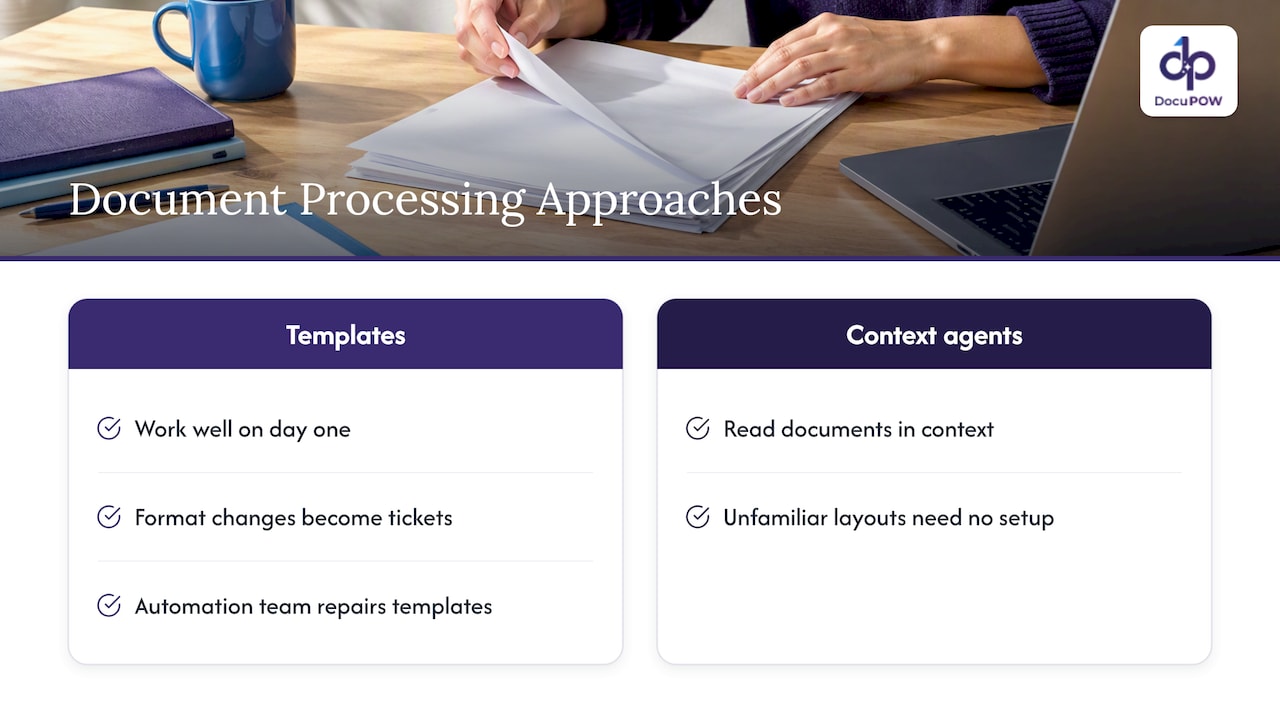
Most teams we talk to are not stuck on whether an API can read a document. They are stuck on the maintenance. Template-based tools work well on day one, then degrade as suppliers, customers and regulators change their formats. Each change becomes a ticket, and the automation team slowly turns into a template-repair team.
We built DocuPOW around agents that read documents in context, so an unfamiliar layout does not need setup before it can be processed. We think that is the right default for API-driven work, because an integration is only as good as its upkeep.
We also think automation should not remove people from the loop where judgment matters. Human-in-the-loop review, with the source shown beside the extracted value, is how you get speed without giving up accountability. And extraction alone is not the finish line: the value comes when data triggers the next step in the process, whether that is a match, an approval or a posting to your ERP.
Finally, ask any vendor to show where an answer came from. If a system cannot point to the source text for a value, your reviewers and auditors cannot trust it either.
— Syed Naveed Abbas
Build or buy: choosing your approach
Some teams assemble a pipeline from cloud building blocks: a queue, an orchestrator, an extraction service, a database and a review app. That gives control and costs engineering time, and you own retries, monitoring, schema management and security reviews. Others adopt a platform that bundles extraction, workflow orchestration, review and analytics behind one API.
A few questions help decide:
| Question | Leans toward building | Leans toward a platform |
|---|---|---|
| How many document types? | One or two stable types | Many types, changing layouts |
| Who maintains it? | A dedicated engineering team | A small ops or IT team |
| Review and audit needs? | Light | Heavy, with traceable corrections |
| Time to first value? | Months are acceptable | Weeks matter |
| Downstream systems? | One target | ERP, CRM and several others |
Whichever way you go, insist on the same fundamentals: asynchronous processing, validation, a review path, security controls and logs you can query.
Where DocuPOW fits
DocuPOW is an agent-based document automation platform. It extracts data from any document type without templates, orchestrates multi-step workflows, offers human-in-the-loop audit review, provides real-time analytics and semantic search, and integrates with ERP and CRM systems through an API, with developer tools and enterprise-grade security.
Published plans are Starter at $99 per month and Professional at $499 per month, plus an Enterprise plan with no published price. You can compare them on the pricing page.

To see the stages above in a real product, read how the platform works, or review the platform overview if you are weighing integration options for IT.
A practical rollout plan
- Pick one process. Choose a document type with clear volume and a measurable pain, such as supplier invoices.
- Map the stages. Write down where documents arrive, what rules validate them and where data must land.
- Define the schema. List required fields, types and validation rules before touching an API.
- Run in shadow mode. Process documents in parallel with the current method and compare results.
- Set thresholds. Use the shadow data to choose confidence cutoffs and exception paths.
- Go live with review on. Keep people in the loop at first, then raise straight-through rates as accuracy data supports it.
- Monitor and expand. Watch correction patterns, fix rules, then add the next document type.
For high-throughput environments, our notes on high-volume document processing best practices cover queueing and scaling in more detail, and the operations benefits guide helps you build the business case.
FAQ
What is a document automation API?
It is an interface that lets your software send documents to a service and receive structured data or generated output back. Depending on the product, it can classify files, extract fields, validate results, route exceptions and trigger downstream actions. Your systems call it directly, so no one has to work in a separate screen.
Can you give an example of API-based document automation?
Invoice intake is the classic case. A poller picks up attachments from a shared mailbox, submits each to an extraction API as an asynchronous job, validates the result against vendor and purchase order data, and posts clean records to the ERP. Doubtful results go to a reviewer, and the original is archived with the output.
What are the best practices for a document processing API?
Use asynchronous jobs, attach a correlation ID to every document, validate at each step and centralize retries and logging. Flag low-confidence results for human review and store originals securely with their processing history. Restrict network access and permissions so each integration can only do what it needs.
How do I secure a document automation API?
Start with NIST SP 800-228, which recommends a risk-based, incremental set of controls across development and runtime. In practice that means token-based authentication, least-privilege permissions, network restrictions, encryption and audit logs. Ask your security and compliance leads which industry rules apply to your documents.
Do I still need people if the process is automated?
Yes, for exceptions. Confidence thresholds decide which results pass straight through and which need a person to check the source and correct a value. Over time, correction patterns show which rules to add so fewer documents need review.
Sources
- SP 800-228, Guidelines for API Protection for Cloud-Native Systems (NIST)
- Secure intelligent document processing reference architecture
- AI document processing pipeline sample using durable orchestration
- Automate document processing architecture guide
- Extract and map information from unstructured content
- API automation guide (SS&C Blue Prism)
Recommended
See DocuPOW on your documents.
Stop building templates. Start extracting data.