Document Processing Analytics: Metrics That Matter
Which document processing analytics to track: straight-through rate, field accuracy, exceptions, drift and AP metrics, plus how to build a dashboard that drives action.

Document processing analytics is the practice of measuring how well your document workflows actually run: how many documents finish without a human touching them, how accurate each extracted field is, where work stalls, and which sources keep causing exceptions. If you only track volume, you will know how busy the system is but not whether it is working. The metrics below tell you the second thing.
This guide covers the core metrics, how to read them together, how to set up a dashboard, and what to add for accounts payable. It also covers how to keep AI-driven extraction accountable in a U.S. compliance setting.
TL;DR
- Track extraction accuracy and straight-through processing (STP) rate separately. They answer different questions, and blending them hides the real problem.
- Exceptions are your best data. Log the document type, vendor, field and root cause for every manual touch, then fix the top few causes first.
- Watch for drift. Document layouts change, so accuracy that was fine in March can slip by September without anyone noticing.
- For accounts payable, add touchless invoice rate, cycle time, cost per invoice and duplicate or mismatch catches.
- Keep a documented human review path for low-confidence and high-risk documents, and record the results.
Table of Contents
- What document processing analytics actually measures
- The metrics to track, and how to read them
- Exceptions are where the insight is
- Drift: the metric most teams forget
- Building a document processing dashboard
- Accounts payable analytics
- Keeping humans in the loop, and keeping a record
- Our perspective: analytics should change what you do on Monday
- What to look for in a tool with strong analytics
- How DocuPOW fits
- A 30-day plan to get started
- FAQ
- Sources
What document processing analytics actually measures
Intelligent document processing (IDP) goes beyond legacy OCR. OCR turns characters on a page into text. IDP uses computer vision, natural language processing and large language models to understand context, pull structured data out of unstructured formats such as invoices or contracts, and orchestrate business workflows. That difference matters for analytics. A system that only reads text has one thing to measure: character accuracy. A system that classifies, extracts, validates, routes and posts to an ERP has a pipeline, and every stage can fail in its own way.
Good analytics therefore cover four layers:
- Intake: how many documents arrive, from which channels, in which formats and at what quality.
- Understanding: whether each document was classified correctly and each field was read correctly.
- Flow: how long documents take, where they wait, and how many leave the automated path.
- Outcome: what the data did downstream, such as invoices paid on time, contracts filed or claims closed.
Most teams instrument layers one and three because their tools report them by default. The value sits in layers two and four.
The metrics to track, and how to read them
| Metric | What it tells you | How to calculate it |
|---|---|---|
| Field-level accuracy | Whether specific values (total, date, PO number) are read correctly | Correct fields divided by total fields checked, per field and per document type |
| Confidence score distribution | How sure the system was, and whether that matches reality | Share of fields in each confidence band, compared with audited correctness |
| Straight-through processing rate | How many documents finish with no human touch | Documents completed automatically divided by documents received |
| Exception rate | How many documents leave the automated path | Documents routed to review divided by documents received |
| Workflow latency | Time from receipt to posted data | Median and 90th percentile, tracked against your SLA |
| Review time per exception | The real labor cost of the exceptions | Average minutes a reviewer spends per flagged document |
| Correction rate | How often reviewers change what the system produced | Corrected fields divided by fields reviewed |
| Classification accuracy | Whether documents reach the right extraction logic | Correctly typed documents divided by total |
Accuracy and STP are not the same thing
This is the most common mistake in IDP reporting. Extraction accuracy tells you how often fields are read correctly. STP rate tells you how often a document completes without anyone intervening. You can have high accuracy and a low STP rate: the fields are right, but a validation rule rejects the document because, say, a purchase order has not yet been entered in the ERP. The reverse is also possible. A high STP rate with weak accuracy means errors are flowing through unchecked, which is worse.
Report both, side by side, and when they diverge, ask which stage is responsible.
Confidence scores only help if you calibrate them
Confidence scores decide which documents go to a person. If a field is marked 97% confident but is wrong 10% of the time, your routing threshold is meaningless. Each month, pull a random sample from each confidence band, have a reviewer check it, and compare. Where the score and the truth disagree, move the threshold or retrain. This sampling is also the evidence an auditor will want to see.
Latency needs percentiles, not averages
An average processing time of a few seconds can hide a tail of documents that sit in a review queue for two days. Track the median and the 90th percentile, and track queue wait separately from machine time. Your SLA breaches live in the tail.
Exceptions are where the insight is
A throughput chart tells you how much happened. An exception log tells you why the rest did not. For each document that leaves the automated path, capture:
- The document type and source (vendor, customer, plant, branch)
- The field or rule that triggered the exception
- The root cause: poor scan, new layout, missing reference data, failed validation, or genuine ambiguity
- The resolution and how long it took
Over a few weeks, patterns appear. Practitioners point to exception patterns and root cause attribution as what moves a team from watching its dashboard to improving its process. Typically a small number of vendors or document types create a disproportionate share of manual work. Fixing the cause upstream (asking a supplier for a machine-readable PDF, adding a missing master-data record, tightening a validation rule) is cheaper than reviewing the same exception every week.
A worked example
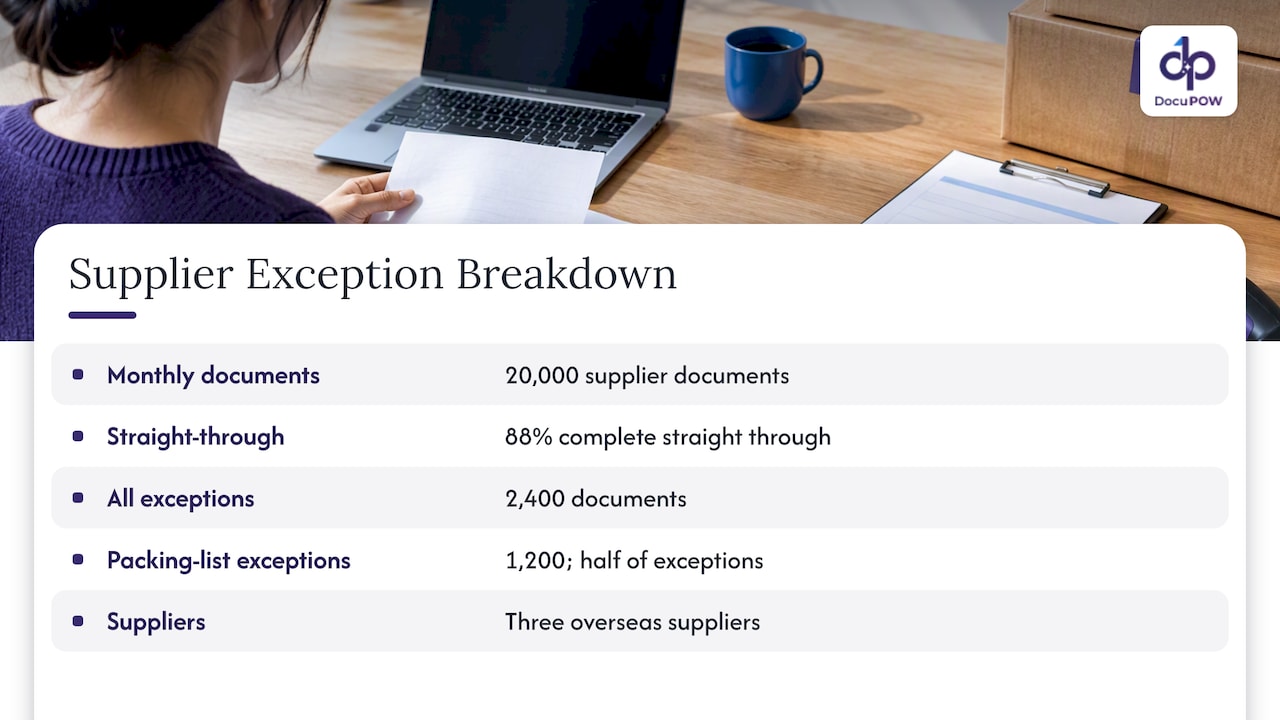
Imagine a manufacturer processing 20,000 supplier documents a month. The dashboard shows 88% of documents completing straight through. That sounds healthy until the exception breakdown shows that half of the remaining 2,400 exceptions come from one category: packing lists from three overseas suppliers whose layouts changed. This is an illustrative scenario, not a customer result. The action is clear: review those three suppliers’ formats, confirm the system handles the new layouts, and measure the STP rate for that segment alone. Without the breakdown, the team would only see a number stuck at 88%.
Drift: the metric most teams forget
Many businesses expect 100% accuracy from AI on day one. In practice, STP rates are built iteratively. Strong teams monitor accuracy drift as document variations evolve, and use predictive signals to trigger retraining or prompt and rule updates before performance falls below SLA.
A practical drift watch looks like this:
- Plot weekly field accuracy and STP rate by document type, not in aggregate.
- Alert when a rolling four-week average drops by a set margin, for example two percentage points.
- Track the count of “new layout” documents, meaning ones the system has not seen from that sender before.
- Review the lowest-confidence fields every month, even if the overall number looks fine.
Template-based systems make drift painful because every new layout means a new template. AWS technical guidance describes the shift from fragile template pipelines to intelligence-based extraction that handles document variations, and advises designing for adaptable models rather than perfect templates. Analytics are how you confirm that adaptability is holding up in production.
Building a document processing dashboard
One dashboard rarely serves everyone. Build three views from the same data.
Executive view
Four to six numbers, trended monthly: STP rate, cost or labor hours per document, SLA attainment, and the dollar value of documents processed. Leadership wants to know whether the program is paying for itself.
Operations view
The working screen for the team lead: queue depth, oldest item in the queue, exceptions by cause, review time per exception, and volume by source. This is the view that gets checked daily.
Model quality view
For whoever owns extraction quality: field-level accuracy, confidence calibration, classification accuracy, drift charts and the audited sample results. This is the view that gets checked weekly and before any change.
Setup steps
- Define the document types in scope. Start with the two or three that drive the most volume or pain.
- Establish a baseline. Measure the manual process first: minutes per document, error rate, cycle time. Without it you cannot quantify improvement.
- Create a ground-truth sample. Have a reviewer verify a few hundred documents per type. This becomes your accuracy yardstick.
- Log every touch. Each human intervention needs a reason code, or exceptions turn into an unreadable pile.
- Set thresholds and owners. Every metric needs a target and a named person who acts when it is missed.
- Review on a schedule. Weekly for operations, monthly for quality, quarterly for leadership.
Accounts payable analytics
Accounts payable is where many teams first apply IDP, because invoices are high volume, varied in layout and tied directly to cash. AP dashboards add business metrics on top of the processing metrics above:
- Touchless invoice rate: invoices that go from receipt to approved posting with no manual touch. It is the AP version of STP.
- Invoice cycle time: days from receipt to payment, tracked against terms so you can see missed early-payment discounts and late fees.
- Cost per invoice: total AP labor and overhead divided by invoices processed. Compute it yourself from your own baseline rather than borrowing an industry average.
- Match rate: the share of invoices that pass two-way or three-way matching against purchase orders and receipts on the first attempt.
- Exception reasons: price variance, quantity variance, missing PO, duplicate invoice, unknown vendor.
- Duplicate and anomaly catches: how many suspicious invoices the system flagged before payment.
- Vendor scorecards: exception rate by supplier, so procurement can ask the worst offenders to fix their formats.
The last item is underused. A vendor scorecard turns analytics into a conversation with the supplier and often removes a recurring exception completely. For more on this workflow, see our guide to automating financial data extraction and our page on automated invoice processing.
Keeping humans in the loop, and keeping a record
A sound IDP design uses the machine for the high-volume first pass and reserves people for low-confidence fields and high-risk documents. This follows a long-standing finding that human and machine recognition have complementary strengths and weaknesses, a conclusion from NIST’s evaluation of form-recognition systems.
For analytics, this means measuring the review step itself:
- What share of documents go to review, and is it falling as the system learns?
- How often do reviewers overturn the machine’s answer? A very low overturn rate suggests the threshold is too cautious and wasting time. A high one suggests the opposite.
- Do reviewers agree with each other? Sampling the same documents across two reviewers exposes unclear rules.
In the U.S., there is no single federal rule for AI-driven document processing, but many enterprises use the NIST AI Risk Management Framework as voluntary guidance to map, measure and manage AI risks, including accuracy, bias and privacy. It points organizations toward documenting methodology, characterizing the data and recording validation results. Your analytics history, with its audited samples, threshold changes and exception logs, is much of that documentation. If you operate in a regulated field such as healthcare, financial services or government contracting, ask your compliance or legal team which specific rules apply to your documents. The framework does not replace them.
Our perspective: analytics should change what you do on Monday
We built DocuPOW around a simple belief: the point of reading a document is to act on what it says, and the point of measuring the reading is to improve it. Many document programs fail quietly. They launch, the headline number looks fine, and the team spends the next year absorbing exceptions nobody categorizes.
Three convictions shape how we think about analytics.
First, template-free extraction changes what you measure. When a platform handles unseen layouts without a template per supplier, the maintenance burden shifts from building and repairing templates to watching quality. That is a better problem to have, but only if you can see quality clearly.
Second, human review is a feature, not a failure. A human-in-the-loop audit step gives compliance teams evidence and gives you labeled corrections. Measure it, trend it and make it shrink where it can.
Third, answers need sources. When someone queries a document set conversationally, they should see the passage the answer came from. Citations let a finance or legal reviewer verify in seconds, and they turn “the AI said so” into something auditable.
If your dashboard cannot tell you which vendor, document type and field caused last week’s manual work, it is a report, not a tool. Fix that before you buy anything else.
— Syed Naveed Abbas
What to look for in a tool with strong analytics
When you evaluate document automation software, check the analytics as carefully as the extraction. Types of alternatives differ here:
- Cloud AI services from large providers give powerful building blocks, but you usually assemble the dashboards, review queues and routing yourself.
- Legacy capture suites often report volumes well but rely on templates, so analytics tend to show template maintenance rather than learning.
- Workflow or RPA tools track bot runs, not field-level data quality.
- Agent-based document platforms combine extraction, workflow, review and reporting in one place, so a corrected field and its effect on STP live in the same system.
A short checklist for demos:
- Can I see accuracy per field and per document type, not just a global number?
- Are confidence scores exposed, and can I compare them to audited results?
- Does every exception carry a reason code?
- Can I trace any extracted value back to its place in the source document?
- Can I export metrics through an API to my own BI tool?
- Is there a review workflow with a record of who changed what?
Bring a messy sample of your own documents to the demo. Clean vendor samples prove little.
How DocuPOW fits
DocuPOW is an agent-based document automation platform: template-free extraction from any document type, multi-step workflow orchestration, human-in-the-loop audit review, real-time analytics, predictive insights, and semantic search with source citations. It connects to ERP and CRM systems through an API. You can see how the pieces fit on the platform page or the product overview, and learn how teams use it in operations and manufacturing.
Plans start at $99 per month for Starter and $499 per month for Professional, and Enterprise is priced on request. Details are on the pricing page.
A 30-day plan to get started
- Week 1: Pick one document type. Measure the current manual time, error rate and cycle time.
- Week 2: Build a ground-truth sample and run it through your process. Record field-level accuracy and STP.
- Week 3: Add reason codes for every exception and review the top five causes.
- Week 4: Set targets and owners, schedule the weekly operations review and the monthly quality sample, and decide which upstream fix to try first.
For broader context on throughput gains, read how document automation improves throughput.
FAQ
What is the most important document processing metric?
Straight-through processing rate is usually the headline number, because it shows how much work needs no human touch. Pair it with field-level accuracy, though, since a high STP rate with poor accuracy means errors are passing through unchecked.
How is IDP analytics different from OCR reporting?
OCR reporting mostly measures character recognition quality. IDP analytics cover the whole pipeline: classification, field extraction, validation, routing, review and downstream outcomes. That is why exception causes and drift matter far more than raw volume.
How often should I audit extraction accuracy?
Sample monthly at minimum, and after any change to documents, models, rules or thresholds. Draw the sample from each confidence band so you can check that your routing thresholds still match reality.
What should an AP analytics dashboard show?
Touchless invoice rate, cycle time against payment terms, first-pass match rate, exception reasons, duplicate catches and exception rate by vendor. Calculate cost per invoice from your own labor and overhead baseline.
Sources
- AWS: Intelligent document processing with generative AI
- AWS: Accelerate intelligent document processing with generative AI on AWS
- NIST: Design, integration, and evaluation of form-based handprint and OCR systems
- NIST: Artificial Intelligence Risk Management Framework (AI RMF 1.0)
Recommended
See DocuPOW on your documents.
Stop building templates. Start extracting data.