Prove Template Free Enterprise AI Powered File Management in 4–8 Weeks
See how agentic template free AI extracts invoices, applies human in the loop validation, and proves ROI in a 4–8 week enterprise pilot.

AI-powered file management, in the enterprise sense, means agent-based software that reads any invoice, purchase order, or contract without a preset template, pulls out the structured data, and routes it straight into your ERP or CRM. Some platforms build on this model, aiming to reduce manual entry, speed three-way matching, and provide an audit trail that is easy to follow. Analysts tracking this category note that orchestration and validation, not extraction alone, decide whether a rollout actually works.
TL;DR:
- AI-powered document management interprets document structure and content without fixed templates, enabling adaptation to layout changes from suppliers.
- Core platform capabilities include classification, semantic search, workflow orchestration with validation, API integration into enterprise systems, and real-time analytics.
- Accurate table extraction with hierarchical relationships and validation layers is essential to avoid errors that compromise automation quality.
- High-volume, repetitive tasks like invoice processing, contract management, and supply chain documentation benefit most, often achieving up to 90% time savings.
- A successful rollout begins with a short pilot on one document type, measuring accuracy and throughput before expanding and integrating into existing workflows.
Table of Contents
- What Does “AI-Powered File Management” Mean for Enterprise Teams?
- What Core Capabilities Should You Expect From an Enterprise Platform?
- Why Table Extraction and Data Quality Make or Break the Rollout
- Which Enterprise Use Cases See the Biggest Impact?
- How Should Procurement Score Vendors During an RFP?
- How Do You Roll Out AI File Management Without Disrupting Operations?
- How Does the AI Model Keep Learning After Launch?
- Can It Handle Multilingual and Nonstandard Documents?
- What Data Privacy Questions Should Enterprise Buyers Ask?
- Why Agentic Automation Beats the Alternatives in Practice
- Ready to Pilot Template-Free Document Automation?
- Sources
- FAQ
What Does “AI-Powered File Management” Mean for Enterprise Teams?
Forget the desktop apps that rename your downloads’ folder. In an enterprise context, AI-powered file management refers to agent-based systems that classify incoming documents, extract data without a fixed template, and hand structured output to downstream systems automatically. That distinction matters because template-based intelligent document processing (IDP) breaks the moment a supplier changes their invoice layout, while an agentic approach interprets the document’s structure and content the way a trained analyst would.
Enterprise teams need more than extraction. They need semantic search across millions of stored files, workflow orchestration that routes exceptions to the right person, and API connections that push clean data into SAP, NetSuite, Salesforce, or a procurement system without a developer rebuilding the pipeline every quarter. The payoff shows up in three places: extraction accuracy climbs, document cycle times shrink, and every transformation gets logged for audit purposes.
What Core Capabilities Should You Expect From an Enterprise Platform?
A serious platform in this category earns its budget line by covering five capability areas, not just one.
- Classification and template-free extraction: the system identifies document type on the fly and pulls key-value pairs and nested tables without a preconfigured layout.
- Semantic search and conversational access: teams query stored documents in plain language instead of hunting through folders, similar to how partner tools like AmmarAI’s document analyzer let users chat directly with a document set.
- Workflow orchestration with human-in-the-loop validation: exceptions get routed to a reviewer, not buried in an inbox, and every override is captured.
- ERP/CRM connectors and structured API delivery: extracted fields land in the systems finance and procurement already use, in formats those systems expect.
- Real-time analytics and predictive insights: dashboards flag bottlenecks in accounts payable or contract renewal before they become quarter-end fire drills.
Any vendor missing two or more of these is selling extraction, not file management.
Why Table Extraction and Data Quality Make or Break the Rollout
Enterprise documents live and die by their tables: line items on an invoice, nested cost breakdowns on a purchase order, indented clauses in a contract. Document processing is genuinely three separate problems: text extraction, structural interpretation, and workflow orchestration, and most failed deployments collapse one of those into another.
The architecture that holds up under enterprise volume separates concerns. OCR and layout analysis locate where content sits on the page. A semantic interpretation layer figures out what a cell means in context, not just what it says. A validation layer then reconciles extracted values against master data before anything posts to the general ledger. Skip that last layer and you get confident, well-formatted, wrong numbers, which is worse than no automation at all.
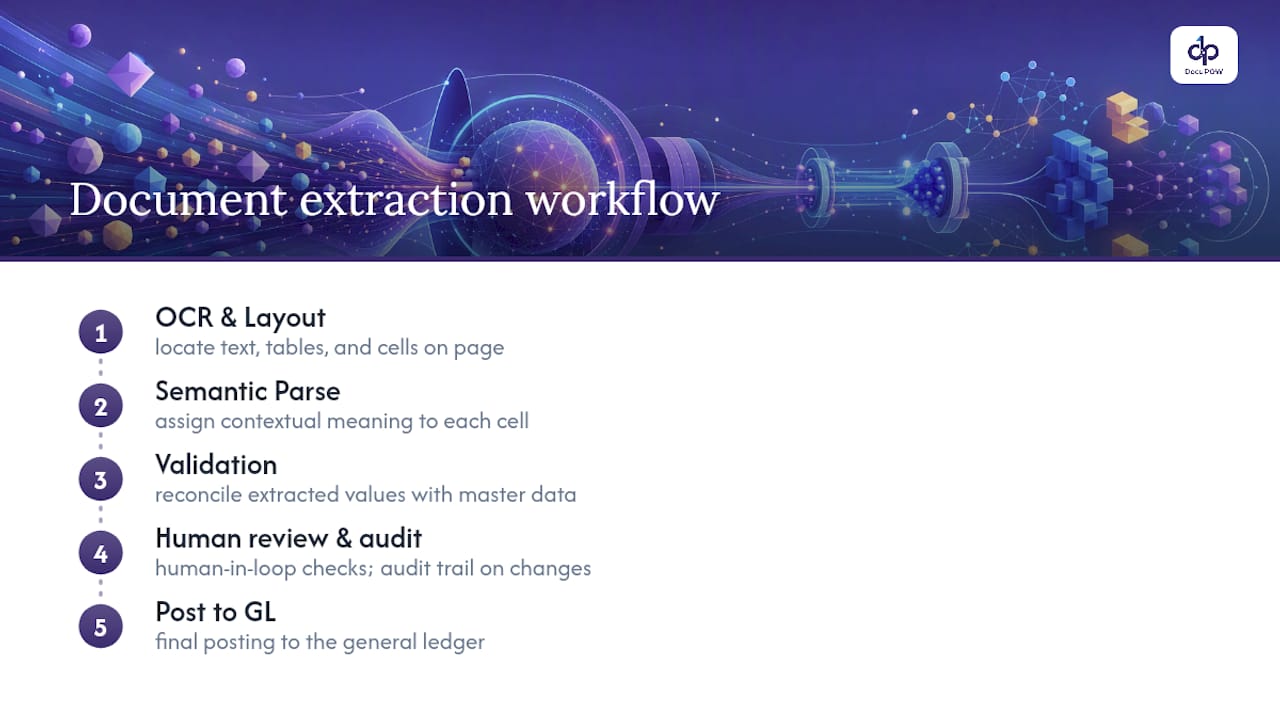
Parent-child relationships deserve particular attention. A purchase order with sub-line items, or a contract with nested obligations under a single clause, only works downstream if those hierarchies survive extraction intact. Human-in-the-loop review, paired with an audit trail on every field change, is what keeps a system honest at scale rather than merely fast.
Which Enterprise Use Cases See the Biggest Impact?
The clearest wins show up wherever high document volume meets a repetitive manual task.
- Accounts payable: invoice capture feeds directly into three-way matching against purchase orders and receipts, with mismatches routed automatically for exception handling.
- Procurement: incoming POs and new supplier documentation get parsed on intake, cutting onboarding time from weeks to days.
- Legal: contract repositories become searchable by clause, so obligation tracking and renewal deadlines stop living in a spreadsheet someone forgot to update.
- Operations and supply chain: bills of lading, certificates of conformity, and order confirmations get logged and reconciled without a warehouse team retyping serial numbers.
Manufacturing and distribution firms tend to see the fastest payback simply because their document volume is highest. SEW-EURODRIVE’s automation program reported time savings as high as 90% on document-centric workflows once the system reached production scale, an example of the significant improvements achievable when volume and process maturity line up.
How Should Procurement Score Vendors During an RFP?
Buyers who skip a structured checklist tend to pick the vendor with the best demo, not the best fit. Score every candidate against four categories, in this order:
- Business fit: document volumes per month, document types in scope, required SLAs, and the specific KPI the pilot must move.
- Technical fit: the actual connector list for your ERP and CRM, supported API formats, and whether extraction handles nested tables, not just flat forms.
- Operational fit: how human-in-the-loop review works day to day, how corrections feed back into the model, and who owns governance once it’s live.
- Commercial fit: what drives pricing (volume, seats, document types), how the pilot is scoped, and a realistic estimate of integration effort.
Pro Tip: Ask every vendor to run their extraction engine live on your five messiest real documents during the demo, not a curated sample. That single test tells you more than a week of sales calls.
Templated tools frequently fail once business-unit-specific document variations show up at scale, so weight the technical-fit category heavily if your document set spans multiple regions or subsidiaries.
How Do You Roll Out AI File Management Without Disrupting Operations?
Start narrow. A four to eight week pilot on one high-value document type, at 2,000 to 5,000 documents monthly from a single supplier or invoice category, gives you a clean read on accuracy and throughput before you touch a single ERP integration.
- Pilot: define target extraction accuracy and touchless-processing rate up front, then measure against them weekly.
- Expand: connect the validated workflow to your general ledger or ERP, automate exception routing, and tune the validation rules that caused the most reviewer overrides.
- Scale: formalize governance, set a retraining cadence, and stand up a small center of excellence to own new document types as they arrive.
Track extraction accuracy, time-to-post, reduction in manual touches per document, and cost-per-document at each stage. No-code modeling tools shorten the time between “we found a new document type” and “it’s in production,” which is where a lot of legacy IDP projects stall for months.
How Does the AI Model Keep Learning After Launch?
A model that never improves after go-live is a model quietly losing accuracy as your document mix drifts. Continuous learning in this category works through the human-in-the-loop queue itself: every correction a reviewer makes gets fed back as a labeled example, tightening extraction on that document type without a data science team rebuilding a pipeline.
Retraining cadence should be scheduled, not ad hoc. Weekly or biweekly reviews of override patterns catch drift early, whether that’s a supplier who changed invoice formats or a new contract template legal started using last quarter. Governance around this matters as much as the model itself: role-based access to review queues and defined retention rules keep the feedback loop auditable rather than a black box someone in IT half remembers configuring two years ago.
The practical test of a mature system isn’t perfect accuracy on day one. It’s whether accuracy on a new document type climbs measurably within the first few weeks of exposure, and whether that improvement is visible in a dashboard rather than anecdotal.
Can It Handle Multilingual and Nonstandard Documents?
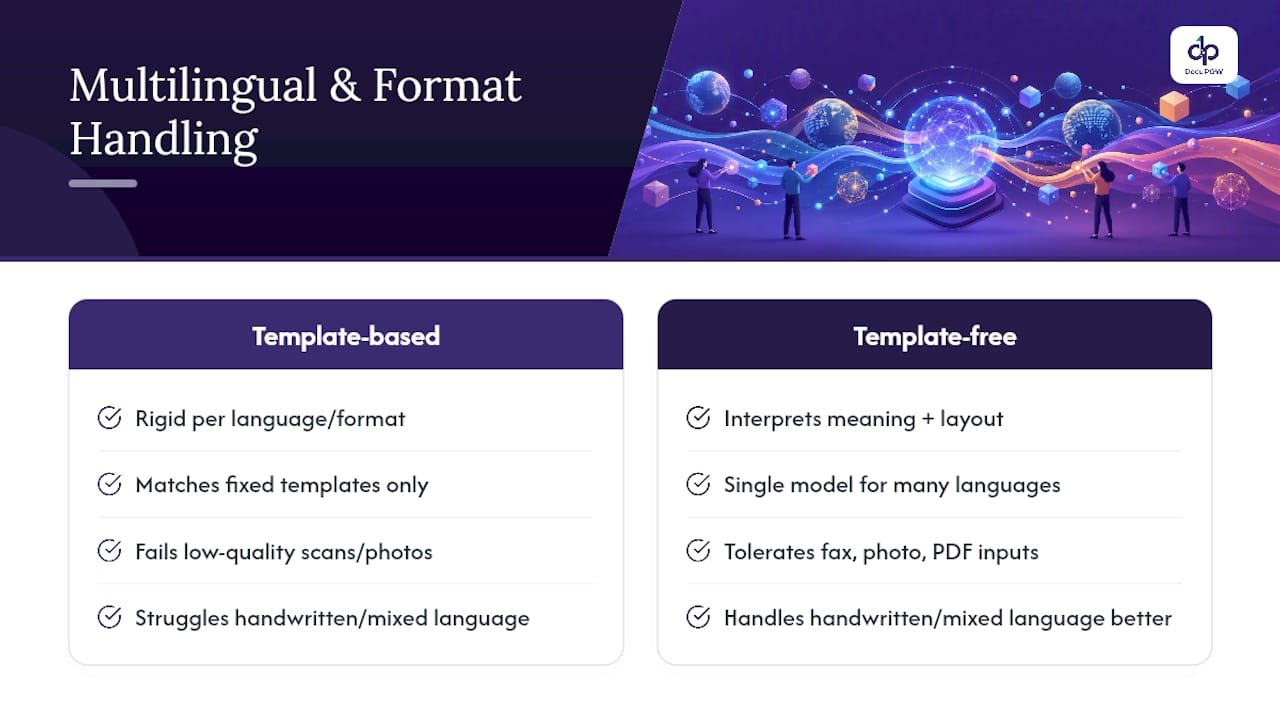
Global operations rarely deal in one language or one format, and this is where template-based tools show their age fastest. An invoice from a German supplier, a bill of lading from a Southeast Asian freight forwarder, and a contract drafted in French all need to land in the same structured output, mapped to the same fields.
Agentic, template-free extraction handles this better than rigid systems because it interprets meaning and layout together rather than matching against a fixed template per language or format. A purchase order scanned as a low-resolution fax, a native PDF contract, and a photographed delivery receipt from a mobile device all need to clear the same OCR and layout-analysis stage before semantic interpretation can do its job.
The practical requirement for enterprise buyers: confirm language coverage and document-format tolerance during the pilot, not after signing a multi-year contract. Ask specifically about handwritten fields, low-quality scans, and mixed-language documents, since those are where extraction accuracy drops fastest and where the human-in-the-loop layer earns its keep.
What Data Privacy Questions Should Enterprise Buyers Ask?
Document AI touches sensitive data by default: vendor banking details, employee records buried in HR contracts, customer information in service agreements. Before extracted fields ever reach a database, ask where documents are stored, how long raw files are retained, and whether data is used to train models shared across other customers.
Redaction rules matter as much as encryption. A platform that can mask or exclude specific field types (Social Security numbers, banking details) before they hit a review queue reduces exposure for every reviewer who touches that document, not just the systems downstream. Role-based access to human-in-the-loop queues should be table stakes, not an enterprise add-on tier.
Why Agentic Automation Beats the Alternatives in Practice
The workflow-complexity problem is real, and most vendors underestimate it because extraction demos look impressive while orchestration failures only show up at scale, three months into production. What convinces me template-free extraction is worth the switching cost isn’t the accuracy number on a spec sheet. It’s that the model adapts when a supplier changes an invoice format without anyone filing a change request. An agent-based approach treats adaptability as the baseline, not a premium feature, which is exactly where this category needs to go.
— Syed Naveed Abbas
Ready to Pilot Template-Free Document Automation?
Some document automation platforms are built around the architecture this article just walked through: agent-based extraction that skips rigid templates, human-in-the-loop review baked into the workflow, and direct API delivery into existing ERP and CRM systems. No document mapping project, no six-month template library to maintain before you see a single processed invoice.

If you’re weighing a pilot, the smartest first move is picking one high-volume document type, one supplier or invoice category, and a clear accuracy target, the same scoped approach outlined earlier in this piece. DocuPOW’s document intelligence platform is designed for exactly that kind of proof-of-value run before any larger rollout. Start with a demo request to see how template-free extraction handles your own messiest documents, not a vendor’s curated sample set.
Sources
- Document processing is not one problem; it is three
- The real complexity of document AI, and why easy solutions fall short
- Four benefits of applying AI-led automation to document processing | IBM
FAQ
What Is Agentic, Template-Free Document Extraction?
It’s an AI approach that interprets a document’s structure and content directly, without matching it against a preconfigured template, so it adapts automatically when a supplier or format changes.
How Long Does a Typical Pilot Take?
Most enterprise pilots run four to eight weeks on a single document type, processing roughly 2,000 to 5,000 documents monthly before expanding scope.
What ROI Can Enterprises Realistically Expect?
Results vary by document volume and integration maturity, but reported case studies show time savings as high as 90% with multi-hundred-percent ROI once a program reaches full production scale.
Does This Replace My ERP or CRM?
No. AI-powered file management platforms like DocuPOW extract and structure document data, then deliver it into your existing ERP or CRM through API connectors rather than replacing those systems.
How Does Human-in-the-Loop Review Work?
Exceptions or low-confidence extractions route to a human reviewer for correction, and those corrections feed back into the model to improve accuracy on future documents of the same type.
Recommended
See DocuPOW on your documents.
Stop building templates. Start extracting data.