Automated Data Capture: A 2026 Business Guide
Discover how Automated Data Capture boosts accuracy and efficiency for your business. Learn the benefits for invoices, forms, and more!


TL;DR:
- Automated data capture uses AI to extract, validate, and route data from digital documents into business systems. It achieves 99.83% accuracy and significantly reduces error rates compared to manual entry, especially for high-volume workflows. Proper exception handling and workflow integration are essential for reliable automation and long-term success.
Automated data capture is defined as the software-driven, AI-enhanced process of extracting, validating, and routing data from documents and digital sources into business systems without manual entry. The industry term for the most advanced form of this process is intelligent data capture, which combines optical character recognition (OCR), machine learning, and structured output schemas to replace repetitive human input. Automated form-to-system workflows achieve 99.83% accuracy compared to 95.8% for manual keyboard entry. That gap translates directly to fewer billing errors, cleaner customer records, and faster financial closes. For any business processing high volumes of invoices, forms, or reports, the difference between those two accuracy rates is the difference between a functional operation and a costly one.
How does automated data capture work?
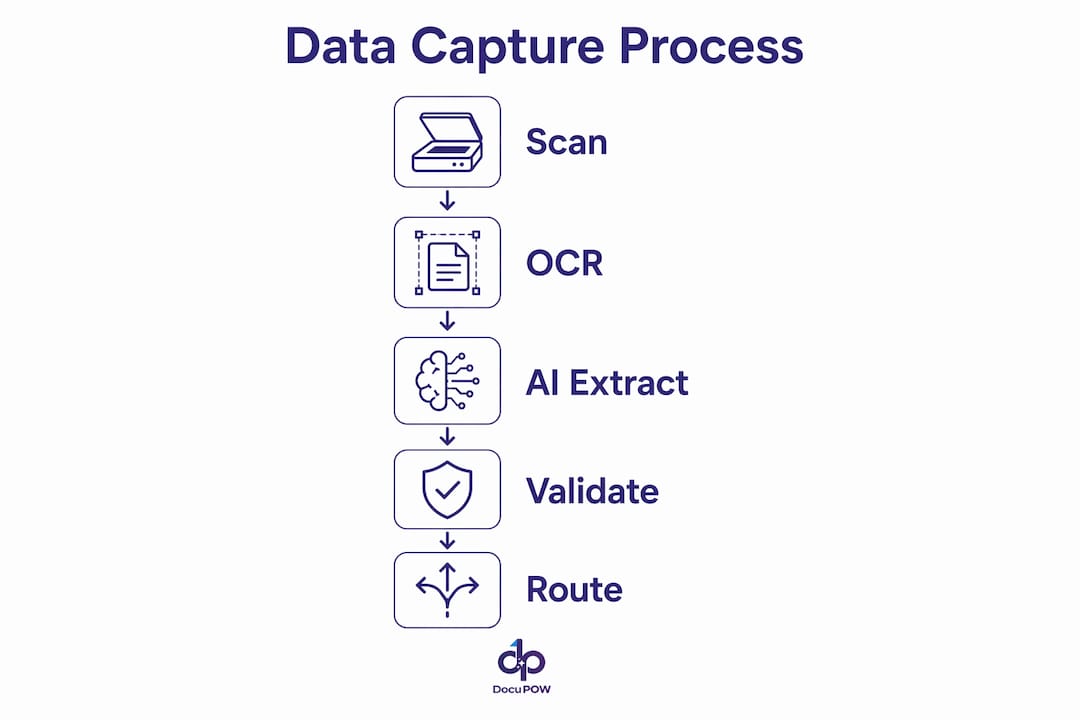
Automated data capture follows five key stages: ingestion, extraction, validation, routing, and exception handling. Each stage builds on the last, and skipping any one of them breaks the entire workflow.
-
Ingestion collects raw inputs from web forms, email attachments, API calls, and file uploads. The system accepts PDFs, scanned images, spreadsheets, and structured data feeds without requiring a human to sort or pre-process them.
-
Extraction applies AI models and OCR to pull specific fields from unstructured documents. The system maps extracted values to a predefined output schema, such as vendor name, invoice number, line items, and total amount.
-
Validation checks each extracted value against business rules and confidence scores. A field flagged below a set confidence threshold, or one that fails a rule like “invoice total must match line item sum,” does not pass through automatically.
-
Routing writes validated data directly to the target system. Pre-built integrations with HubSpot, Salesforce, NetSuite, and QuickBooks handle most enterprise routing tasks without custom development.
-
Exception handling escalates low-confidence or failed records to a human reviewer. This is the stage most businesses underestimate, and it is the one that determines whether the whole system holds up under real-world conditions.
Pro Tip: Set your confidence threshold at the validation stage before going live. A threshold that is too low passes bad data; one that is too high creates unnecessary manual review queues. Start at 90% and adjust based on your first two weeks of output.
What accuracy improvements does data capture automation deliver?
The accuracy gap between automated and manual entry is not marginal. Manual data entry carries a 4.2% error rate, while automated systems bring that down to 0.17%. For a business processing 10,000 invoices per month, that difference means roughly 400 fewer errors every single month.
Common error types that automation eliminates include transpositions (entering “1,234” as “1,243”), omissions (missing a required field entirely), and formatting inconsistencies (dates entered as MM/DD vs. DD/MM). These errors are small individually, but they compound into reconciliation nightmares at month-end.
Automated systems produce consistent error patterns, which means IT teams can identify the root cause and retune the system quickly. Random human errors, by contrast, have no pattern and are far harder to diagnose or prevent systematically.
Consistent automated errors allow faster systemic fixes than the scattered, unpredictable mistakes that come from manual input. This is one of the least-discussed advantages of automation. You are not just reducing errors. You are making the errors that do occur much easier to fix permanently.
One important limitation: OCR achieves 97–99% accuracy on typed text, but handwriting recognition drops to 87–92%. Businesses processing handwritten forms should account for this range when designing their validation and exception workflows.
What technologies power automated data collection?
Several core technologies work together in modern data capture automation. Understanding each one helps you evaluate platforms and set realistic expectations.

OCR for data capture converts scanned images and PDFs into machine-readable text. Modern OCR engines handle multi-column layouts, tables, and rotated text with high reliability on printed documents.
AI-powered extraction goes beyond OCR by understanding context. An AI model can identify that “Net 30” in a document refers to payment terms, not a product quantity, and route it to the correct field in your ERP.
Webhook and API connectivity enables real-time data capture from web forms, e-commerce platforms, and third-party applications. When a customer submits a form, the data flows directly into your CRM within seconds, with no human in the middle.
The most common automation categories businesses deploy include:
- Form-to-system transfers: Web form submissions written directly to a CRM or database
- Email-to-record creation: Inbound emails parsed for key fields and converted into support tickets or sales leads
- Invoice processing: PDF invoices extracted, validated, and posted to accounting systems
- Inter-system data sync: Records updated across multiple platforms when a change occurs in one
Pro Tip: When evaluating platforms for AI-powered data extraction, prioritize those that offer pre-built connectors for your existing ERP and CRM. Custom API development adds months to your deployment timeline and ongoing maintenance costs.
Up to 90% of manual data entry tasks in SMBs are fully automatable with current technology. That figure covers form-to-system transfers, invoice processing, and email record creation. Most businesses are not close to that ceiling yet, which means the opportunity is large.
Where do businesses apply automated data entry in practice?
The business applications for data entry automation span every department that handles documents or forms at volume. The gains are most visible in four areas.
Accounting and finance benefit most immediately. Automated invoice capture reads vendor invoices, extracts line items and totals, matches them against purchase orders, and posts approved entries to the general ledger. For teams processing hundreds of invoices weekly, this eliminates days of manual work. DocuPOW’s invoice data capture capabilities are built specifically for this workflow, handling multi-format invoices without rigid templates.
Sales and customer service use automated data collection to keep CRM records current. When a prospect fills out a web form, the system creates a contact record, assigns it to the right sales rep, and triggers a follow-up sequence. No one copies and pastes from an email.
Supply chain and logistics teams capture shipping confirmations, customs documents, and supplier invoices automatically. DocuPOW’s supply chain data extraction handles the document variety that makes this category difficult for template-based tools.
HR and compliance departments automate the capture of employee forms, onboarding documents, and regulatory filings. The validation layer checks that required fields are complete before a record is accepted.
Employees using automation report working 74% faster and spending more time on high-value tasks. That productivity shift is not just about speed. It changes what your team is actually doing each day, moving them from data entry to analysis, relationship management, and decision support.
What are the biggest pitfalls in deploying data capture automation?
The most common failure in automated data capture deployments is treating AI extraction as a standalone solution. Effective AI data entry requires structured schemas, validation layers, and integration, not just transcription. Businesses that skip validation and routing end up with fast but unreliable data flows.
The second most common mistake is insufficient exception handling. Every AI model produces low-confidence outputs on some percentage of inputs. Without a clear escalation path, those records either fail silently or get posted with errors.
Best practices for a reliable deployment:
- Define your output schema first. Know exactly which fields you need, in what format, before configuring extraction.
- Set validation rules at the field level. Date fields should reject non-date values. Amount fields should reject text strings.
- Build your exception queue before go-live. Assign a reviewer, set a review SLA, and track how often records escalate.
- Monitor error patterns weekly for the first 90 days. Consistent extraction errors on a specific document type signal a tuning opportunity, not a fundamental flaw.
- Iterate on confidence thresholds. Your initial settings will not be optimal. Adjust based on real throughput data.
Pro Tip: Treat your first month of automated data capture as a calibration period, not a finished deployment. The system learns from corrections, and your team learns which document types need closer attention. Build that expectation into your rollout plan.
For businesses processing high volumes, real-time data extraction adds another layer of value by surfacing data the moment a document arrives, rather than in batch cycles.
Key Takeaways
Automated data capture reduces error rates from 4.2% to 0.17%, but only when validation, exception handling, and system integration are built into the workflow from the start.
| Point | Details |
|---|---|
| Accuracy gap is significant | Automated systems achieve 99.83% accuracy vs. 95.8% for manual entry, per industry benchmarks. |
| Five stages are non-negotiable | Ingestion, extraction, validation, routing, and exception handling must all be present for reliable output. |
| Exception handling is the weak link | Skipping human-in-the-loop review for low-confidence records is the leading cause of automation failures. |
| OCR has limits on handwriting | Typed text reaches 97–99% OCR accuracy; handwriting recognition drops to 87–92%. |
| Productivity gains are real | Employees using automation report working 74% faster, shifting time to higher-value work. |
Why exception handling is the part nobody talks about
I have watched businesses invest heavily in AI extraction tools and then wonder why their data quality did not improve. Almost every time, the answer is the same: they built the ingestion and extraction stages carefully, then treated exception handling as an afterthought.
The uncomfortable truth is that no AI model is perfect on every document it sees. A vendor invoice formatted differently from the training data, a scanned form with a coffee stain over a key field, a PDF generated by an older system with non-standard encoding. These edge cases are not rare. They are a normal part of any real document workflow.
What separates a reliable automation deployment from a frustrating one is not the AI model. It is the discipline around what happens when the model is uncertain. A well-designed exception queue, with a clear reviewer, a defined SLA, and a feedback loop back into the system, turns those edge cases into tuning data rather than silent failures.
The businesses I have seen get the most from intelligent document processing treat the first 90 days as a learning period. They track which document types escalate most often, they adjust their validation rules, and they retrain or reconfigure extraction for those specific cases. The system gets measurably better over time because they built the feedback loop in from the start.
The other shift worth noting is what happens to the people who used to do the manual entry. When repetitive data work disappears, teams do not shrink. They redirect. The accounts payable clerk who spent three hours a day entering invoices now spends that time on vendor relationship management and exception resolution. That is a better use of their skills, and it shows up in retention numbers too.
— Sameer
DocuPOW brings AI-powered data capture to your existing workflows
DocuPOW is built for businesses that need reliable, high-volume document automation without rebuilding their existing systems. Its AI agents understand document context without rigid templates, which means they handle the format variation that breaks rule-based tools.
DocuPOW connects directly to the ERPs and CRMs your team already uses, with validation and exception handling built into every workflow. For operations teams managing large document volumes, the document process automation capabilities translate directly into faster closes, fewer errors, and better financial visibility. If you are ready to move from manual entry to a fully automated pipeline, the AI automation services guide is the right place to start.
FAQ
What is automated data capture?
Automated data capture is the process of using software and AI to extract, validate, and route data from documents and digital sources into business systems without manual entry. It replaces repetitive human input with structured, rules-driven workflows.
How accurate is automated data entry compared to manual entry?
Automated form-to-system workflows achieve 99.83% accuracy, compared to 95.8% for manual keyboard entry, reducing the error rate from 4.2% to 0.17%.
What is the most common reason automated data capture fails?
The leading cause of failure is insufficient exception handling. Without a human-in-the-loop review process for low-confidence or mismatched records, errors pass through undetected and compound over time.
What types of documents can automated data capture process?
Current systems handle PDFs, scanned images, web forms, emails, invoices, receipts, and structured data feeds. OCR accuracy on typed text runs 97–99%; handwriting recognition ranges from 87–92%.
How long does it take to deploy an automated data capture system?
Deployment timelines vary by platform and integration complexity, but most businesses treat the first 30–90 days as a calibration period, adjusting confidence thresholds and validation rules based on real throughput data before considering the system fully optimized.
Recommended
See DocuPOW on your documents.
Stop building templates. Start extracting data.