CRM Document Automation Integration: A Salesforce Guide
How to connect document automation to Salesforce: what to automate, integration methods, contract extraction review, security, and what to check before you buy.

CRM document automation integration means that documents arriving in your business (contracts, quotes, purchase orders, invoices, forms) are read automatically, their data is written to the right Salesforce records, and the original file stays attached as evidence. Done well, nobody retypes a contract value or renewal date into an opportunity again. This guide covers what to automate, how the connection works, how to review extracted contract data, how to keep it secure, and what to check before you choose a tool.
TL;DR
- Document automation for a CRM has three jobs: capture the file, extract structured data from it, and write that data back to Salesforce objects with the file linked to the record.
- Most integrations run through the Salesforce APIs, with an authenticated callout or middleware moving files and fields between systems. Start with one document type and one object.
- Contract extraction is only as good as its review step. Route low-confidence fields to a person and keep a link from every value back to its source passage.
- Treat inbound documents and forms as untrusted input. Limit what any AI agent can do, and require human approval for consequential actions.
- Judge tools on layout flexibility, field mapping, audit trail, security and the effort to maintain them, not on a feature checklist.
Table of Contents
- What document automation in a CRM actually means
- Which document workflows are worth automating in Salesforce
- How the Salesforce connection works
- A practical setup in seven steps
- Salesforce contract extraction: how to review and validate what comes out
- Security and compliance in an integrated workflow
- What to evaluate when choosing Salesforce document automation
- Our perspective: extraction is the easy half
- Where DocuPOW fits
- Beyond the connector: who owns the CRM process
- Common mistakes to avoid
- FAQ
- Sources
What document automation in a CRM actually means
Two different things get called “CRM document automation,” and mixing them up leads to buying the wrong tool.
The first is document generation: filling a template with CRM data to produce a quote, proposal or order form. Data flows out of Salesforce into a file.
The second is document processing: reading an incoming file and pushing its contents into Salesforce. Data flows into the CRM from a file that someone else created, such as a customer’s signed agreement, a vendor’s quote, or a purchase order in a format you have never seen before.
This article is about the second one, and the integration around it. It is where most of the manual work hides. A sales operations analyst opens a PDF, finds the term length and the payment terms, and types them into custom fields. Multiply that by hundreds of contracts a quarter and you have a slow, error-prone process that nobody put on a roadmap.
The typical flow looks like this:
- A document arrives by email, upload, portal or a Salesforce record action.
- The automation platform classifies it and extracts the fields you care about.
- A rule or a reviewer validates the values.
- The platform writes the values to Salesforce through its API and attaches the original file.
- Downstream steps fire: an approval, a task, a renewal reminder, a sync to your ERP.
Which document workflows are worth automating in Salesforce
Not every document deserves automation. Pick the ones with volume, a clear destination in the CRM, and a cost when someone gets a field wrong.
| Document | Data worth extracting | Where it lands in Salesforce |
|---|---|---|
| Customer contracts and amendments | Parties, effective date, term, renewal terms, payment terms, liability and termination clauses | Contract, Opportunity or custom contract object |
| Customer purchase orders | PO number, line items, quantities, prices, ship-to address | Order, Opportunity products |
| Vendor quotes and proposals | Item pricing, validity dates, delivery terms | Quote, custom procurement objects |
| Onboarding forms and KYC packets | Legal name, tax ID, addresses, signatories | Account, Contact, Case |
| Insurance or service claims paperwork | Policy number, claimant, amounts, dates | Case, custom claim objects |
| Invoices and statements | Invoice number, totals, due date | Account-level financial fields, or the ERP |
A useful filter is to ask three questions of each candidate. How many arrive per month? How many different layouts exist? What happens when a number is wrong? High volume with many layouts is where template-based tools struggle and where template-free extraction pays off. We cover the underlying approach in our guide to AI data extraction for business professionals.
If your documents are forms rather than free-form contracts, see how AI form processing handles structured and semi-structured inputs.
How the Salesforce connection works
There is no single “Salesforce integration.” There are several patterns, and the right one depends on volume, latency and who will maintain it.
Pattern 1: API-based push from the document platform
The document platform extracts data, then calls the Salesforce REST API to create or update records and upload the file. In Salesforce, files are stored as content records linked to a parent record, so the original contract can sit on the Opportunity or Account next to the extracted fields. This is the most flexible pattern and the one we see as the default for template-free extraction, because the platform controls the whole sequence: extract, validate, write, attach.
Pattern 2: Salesforce-initiated callout
A user clicks a button, or a Flow or Apex process fires when a file is attached, and Salesforce calls the document platform’s API. On Salesforce’s side, credentials for that callout are best stored in its managed credential features rather than hard-coded, so secrets stay out of code. The result comes back asynchronously and updates the record. This works well when the trigger is a human action inside the CRM.
Pattern 3: Middleware or no-code connectors
An integration platform sits between the two systems and maps fields visually. It is the fastest way to a pilot and a reasonable choice for low volume. The trade-off is that field mapping lives in a third tool, and each extra hop is one more place for a failure to hide.
Pattern 4: Event-driven sync
For teams that already use event messaging in Salesforce, completed extractions can be published as events that Flows or other systems subscribe to. This suits cases where a single processed document should trigger several actions at once, for example updating the opportunity, notifying legal and creating an ERP order.
Technical requirements to settle early
- Authentication. A dedicated integration user with a narrowly scoped permission set, not a shared admin login.
- Field mapping. A written list of each extracted field, its Salesforce object and field API name, its data type and what happens when it is empty.
- Record matching. How the integration decides which Account or Opportunity a document belongs to. Match on a stable key (PO number, contract ID, account ID in the filename or email), never on fuzzy names alone.
- Limits and retries. Salesforce enforces API and storage limits that depend on your edition. Plan for batching, retries and a dead-letter queue for failed writes.
- Sandbox first. Build and test against a sandbox with realistic, anonymized documents before production.
If you are also connecting to an ERP, the same data often has to land in both systems. Our overview of AI integration for business document workflows explains how that coordination is usually structured.
A practical setup in seven steps
- Choose one document type and one outcome. For example: signed customer contracts, with term, renewal date and payment terms populated on the Opportunity.
- Collect 30 to 50 real examples, including the ugly ones: scans, amendments, documents from your biggest customers’ legal teams.
- Define the field list and the Salesforce destination for each field, including picklist values you need to normalize (for instance “net 30” and “30 days” both mapping to one value).
- Set up the integration user, credentials and a sandbox connection.
- Run the examples through extraction and measure field-level accuracy, not document-level. A document with 19 of 20 fields correct still needs a human.
- Add rules and a review queue. Required fields, date logic (an end date after a start date), and a confidence threshold below which a person confirms.
- Launch to one team, watch for two to four weeks, fix mapping issues, then add the next document type.
The discipline here is scope. Teams that start with “all documents, all objects” spend months in mapping meetings. Teams that start with one contract type usually have something running within a sprint or two and learn what the second one needs.
Salesforce contract extraction: how to review and validate what comes out
Contract extraction is the use case people ask about most, and the one where blind trust costs the most. A wrong renewal date can mean a missed notice window. A wrong liability cap can mislead a deal desk.
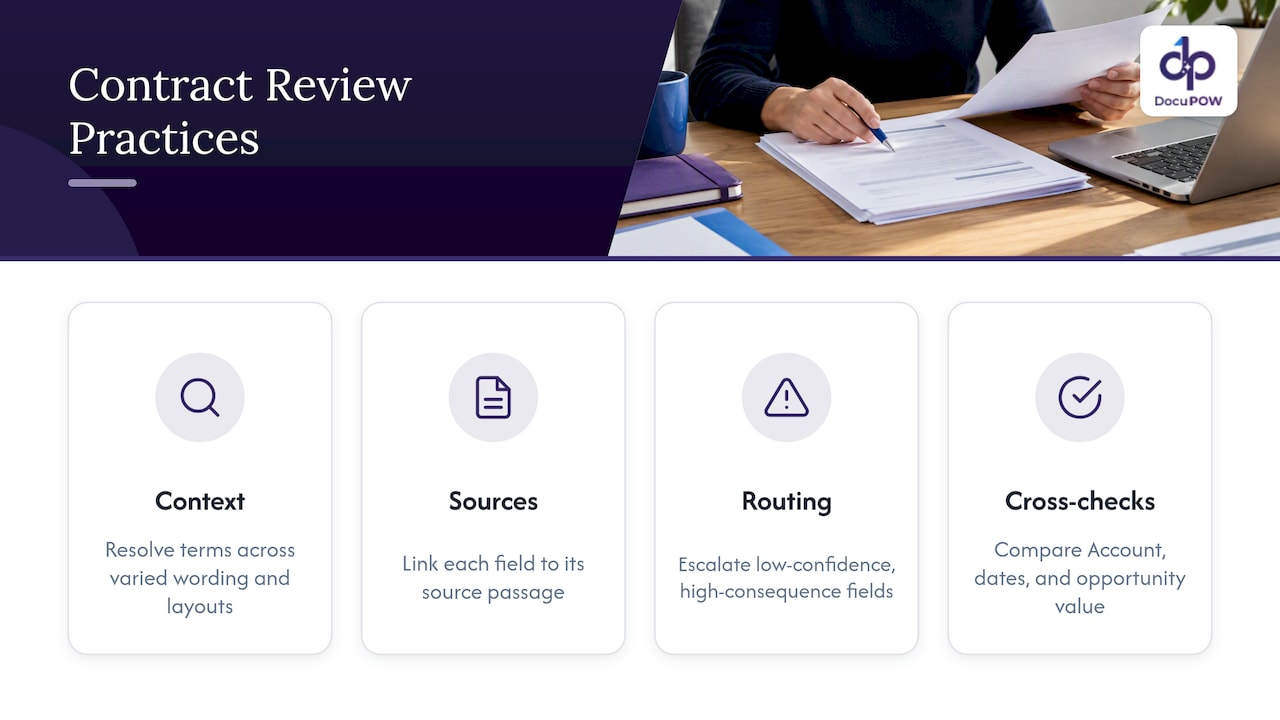
Reliable contract extraction rests on four practices.
Extract with context, not position. Contracts do not put the term in the same place twice. Template-based tools expect a field at a coordinate or next to a fixed label, so every new layout means a new template. Agent-based, template-free extraction reads the document the way a person does, so “this agreement shall continue for thirty-six months” and a table row reading “Term: 3 years” both resolve to the same field. That is the core of how we built DocuPOW.
Keep a source link for every value. A reviewer should be able to click a field and see the passage it came from. This turns validation from re-reading the contract into a five-second check. It also gives auditors a trail.
Route by confidence and by consequence. Not every field needs the same scrutiny. A mailing address can pass at moderate confidence. Termination rights, auto-renewal, indemnity and payment terms should go to a person whenever confidence is low, and perhaps always for large contracts.
Validate against what you already know. Compare the extracted counterparty with the Account it is attached to. Check that the effective date is not in the future when the contract is already signed. Flag a contract value that is wildly different from the opportunity amount. These cross-checks catch errors a model cannot see from the document alone.
This is what a human-in-the-loop audit step is for. The person is not retyping. They are confirming or correcting a short list of flagged fields, and their corrections are logged.
Security and compliance in an integrated workflow
An integration widens the surface where data moves, and AI-enabled workflows add a new risk: the document itself can be hostile.
CSO Online reported in April 2026 that researchers demonstrated form-based prompt injection against Salesforce’s Agentforce, and that Salesforce pointed to layered mitigations including instruction isolation, tool-use restrictions and human oversight. The lesson for any document workflow is the same, whatever the vendor: text inside a submitted form or file can try to give instructions to an AI system.
In practice, that means:
- Treat every inbound document as untrusted input. Extraction should return data, not follow instructions found in the file.
- Apply least privilege. The integration user can create and update only the objects and fields in your mapping. It cannot delete records or change permissions.
- Restrict what agents can do. An extraction agent that can only read a document and propose field values is far safer than one that can also send email or modify arbitrary records.
- Require approval for consequential actions. Updating a contract’s financial terms or triggering a payment should pass a person first.
- Encrypt in transit and at rest, and log everything. Keep an audit record of who or what changed which field, and when.
- Check regulatory fit by document type. Healthcare documents, financial records and employee files each carry their own rules, so involve your compliance or legal team before connecting those sources.
What to evaluate when choosing Salesforce document automation
Feature lists look alike. These criteria separate tools in practice.
| Criterion | What to ask |
|---|---|
| Layout flexibility | Does it handle a document layout it has never seen without a new template? How long does onboarding a new supplier’s format take? |
| Scope of automation | Does it stop at extraction, or can it orchestrate multi-step workflows such as validation, approval and system updates? |
| Review and audit | Is there a human review queue, with source citations and a change log? |
| Salesforce fit | Does it write to standard and custom objects, attach files to records, and handle record matching? |
| Other systems | Can it also feed your ERP and other tools through an API? |
| Security | Encryption, access controls, role separation, and a clear answer on how documents are used and retained |
| Maintenance | Who fixes the integration when a field changes in Salesforce? What breaks when layouts drift? |
| Pricing model | Is pricing by usage tier or by seat, and what happens when you exceed your allowance? |
Tools tend to fall into a few types: document generation and e-signature add-ons that live inside the CRM, template-based capture products, general-purpose integration platforms, and agent-based intelligent document processing. The first type is excellent for creating documents and not designed to read incoming ones. Template-based capture works if your layouts are stable. Integration platforms move data but do not understand documents. Agent-based processing is the best fit when your documents vary and you want extraction, review and downstream workflow in one place.
Implementation effort deserves its own line in your evaluation. Ask for a pilot on your own documents, not a demo on theirs. The share of fields correct on your real files, and the time to get there, tell you more than any brochure.
Our perspective: extraction is the easy half
We built DocuPOW around a simple observation: the hard part of document automation is not reading a PDF, it is making the result trustworthy and useful where work happens. For a Salesforce team, that means three commitments.
First, no templates. Documents from customers and vendors rarely look the same twice, and a system that needs a new template for each layout becomes a maintenance project. Our agents work zero-shot on layouts they have not seen, so setup stays small and upkeep stays low.
Second, a human stays in the loop where it matters. Compliance-sensitive fields are worth a reviewer’s glance, and every extracted value should be traceable to the passage that produced it. Automation should make audit easier, not harder.
Third, the data should keep moving. Writing a value to a Salesforce field is a midpoint. The same document may need to update an ERP, trigger an approval, or answer a question later. That is why we pair extraction with workflow orchestration, real-time analytics and conversational querying with source citations.
If you take one thing from this guide, make it this: pilot on one document type, measure field-level accuracy on your own files, and put review where the risk is.
— Syed Naveed Abbas
Where DocuPOW fits
DocuPOW is an agent-based document automation platform with template-free extraction, multi-step workflow orchestration, human-in-the-loop audit review, and ERP and CRM integration through an API, plus developer tools for custom connections. You can see the flow from raw document to finished process on our How It Works page.
Plans are published on the pricing page: Starter is $99 per month, Professional is $499 per month, and Enterprise is priced on request. Start with a trial or demo on your own contracts and see the field-level results before you commit.
Beyond the connector: who owns the CRM process
A document integration succeeds or fails on the process around it. Someone in sales operations should own the field definitions, someone in legal or finance should own the review rules, and someone in IT should own credentials and monitoring. If your Salesforce team is also rethinking lead routing, follow-up sequences and reporting, specialist CRM and sales automation services can help line up those pieces with the document work, so extracted data feeds a process that is ready to use it.
For the wider picture of how connected automations fit together across departments, our guide to AI-powered workflows is a good next read, and the operations solutions page shows how teams apply it day to day.
Common mistakes to avoid
- Automating before defining the field list. If nobody can say what the “renewal date” field means, automation will make the ambiguity faster.
- Matching records on names. “Acme Inc” and “Acme, Incorporated” are the same company to a person and two different strings to a system.
- Measuring document-level accuracy. Ninety-five percent of documents “mostly right” can still mean thousands of wrong values.
- Giving the integration user admin rights. It is convenient on day one and a liability on day ninety.
- Skipping the exception path. Decide what happens to unreadable scans, password-protected files and documents of an unknown type before launch.
- Forgetting the files themselves. Extracted fields are useful, but the original document attached to the record is what legal, finance and auditors will ask for.
FAQ
Can I automate Salesforce document processing without writing code?
Often, yes, for a first pilot. Middleware connectors and Salesforce Flow can handle simple mappings and triggers. Once you need record matching, retries, review queues and several document types, an API-based integration with a platform built for document processing is easier to maintain.
How accurate is contract extraction, and who checks it?
Accuracy depends on your documents, so test on your own files and measure it field by field. A good setup scores each extraction, sends low-confidence or high-risk fields to a reviewer, and shows the source passage for each value so checking takes seconds.
What is the difference between document generation and document processing in Salesforce?
Generation creates documents from CRM data, such as quotes and proposals. Processing reads documents that arrive from outside and writes their data into Salesforce. Many companies need both, and they are usually solved by different tools.
Is it safe to let AI read customer documents connected to my CRM?
It can be, with controls. Treat incoming files as untrusted, give the integration least-privilege access, limit what any agent can do, and require human approval for consequential changes. Involve your security and compliance teams for regulated data such as health or financial records.
Sources
Recommended
See DocuPOW on your documents.
Stop building templates. Start extracting data.