Enterprise Content Management: A Practical 2026 Guide
Unlock the power of Enterprise Content Management in 2026. Streamline workflows, boost compliance, and enhance efficiency with smart automation.


Enterprise content management (ECM) is the discipline and technology stack that captures, governs, and delivers a company’s documents, records, and digital assets across their entire lifecycle, from creation to disposal. The payoff shows up fast: less time searching for files, tighter compliance, and workflows that run without a human chasing down approvals. The biggest shift heading into 2026 is automation that actually understands documents. Platforms like DocuPOW use autonomous agents to pull structured data out of unstructured files without relying on rigid templates, which changes what “capture” means for an ECM program.
What ECM delivers when it’s done right:
-
Faster retrieval: employees stop hunting across shared drives, inboxes, and file cabinets.
-
Lower compliance risk: retention rules and access controls apply automatically, not by memory.
-
Fewer manual touches: workflows route, approve, and archive content without repetitive data entry.
-
A foundation for AI: clean, governed content is what makes agentic automation trustworthy instead of risky.
Key Takeaways
Enterprise content management succeeds when governance-by-default and measurable pilots come before large-scale AI automation, not after it.
| Point | Details |
|---|---|
| Define ECM clearly | ECM governs content across capture, manage, store, deliver, and retire, distinct from DMS, CMS, and DAM. |
| Build the truth layer first | Clean metadata, deduplication, and version control must precede agentic AI investment to avoid unreliable automation. |
| Start with one measurable pilot | Invoice processing or a similarly document-heavy process proves ROI fastest and builds momentum for wider rollout. |
| Automate governance, not just workflow | Applying retention and access rules automatically prevents the workarounds that undermine compliance later. |
| Choose template-free extraction | DocuPOW’s agent-based approach adapts to document format changes without manual template maintenance. |
Table of Contents
What Is Enterprise Content Management, Really?
ECM covers the full lifecycle of business content: capture, manage, store, deliver, and eventually retire. Most confusion around the term comes from people treating it as a single product category when it’s actually an umbrella over several overlapping disciplines, each with its own job.
The lifecycle breaks down into five stages:
-
Capture — scanning, email ingestion, form uploads, and API feeds pull content into the system.
-
Manage — metadata, version control, and workflow routing keep content moving and traceable.
-
Store — a repository (cloud, on-premises, or hybrid) holds the content with appropriate redundancy and access rules.
-
Deliver — search, portals, and integrations get the right content to the right person or system.
-
Retire — retention schedules and legal holds determine when content gets archived or destroyed.
Here’s where the acronyms get confused in practice:
-
DMS vs. ECM: A document management system handles storage, versioning, and check-in/check-out for files. ECM includes DMS functionality but adds records management, workflow automation, and governance across the whole organization, not just one department’s file library.
-
CMS vs. ECM: A content management system, like a website CMS, publishes and formats content for public or internal consumption. ECM manages the underlying business records that a CMS might reference but rarely governs.
-
DAM vs. ECM: Digital asset management specializes in rich media, images, videos, brand files, with heavy metadata for search and rights tracking. It’s often a component of a broader ECM strategy rather than a replacement for it.
-
Knowledge management vs. ECM: Knowledge management focuses on capturing institutional expertise and making it findable. ECM provides the governed repository that knowledge management tools often sit on top of.
Modern platforms increasingly break away from the old monolithic ECM suite model. Content services platforms use an API-first architecture, meaning content and workflow capabilities get exposed as services that other systems (CRM, ERP, collaboration tools) can call directly, rather than forcing everything into one walled-off application.
What Capabilities Should an ECM Platform Include?
A capable ECM platform needs six functional pillars, and skipping any one of them tends to show up as a gap later, usually during an audit or a compliance review when it’s expensive to fix.
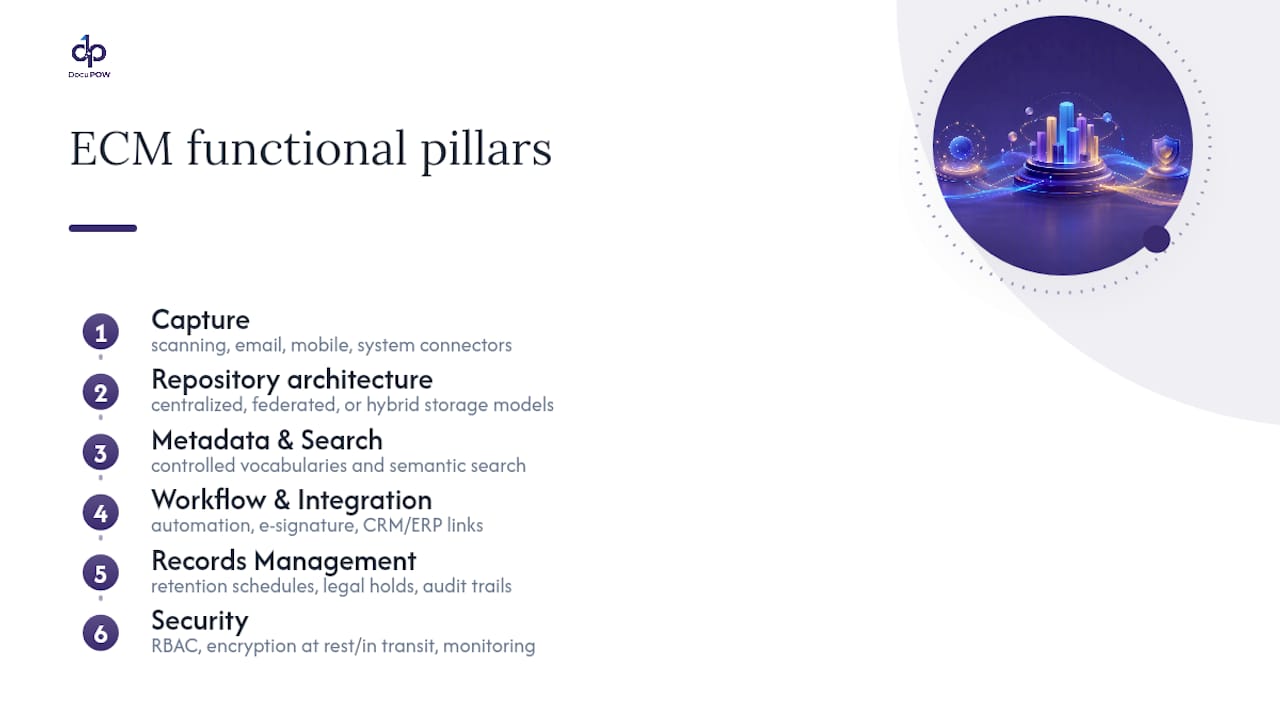
Capture. This is where content enters the system: scanning stations, dedicated email ingestion addresses, mobile capture apps, and connectors to line-of-business systems. Automation here matters enormously. Template-free extraction removes the brittleness of older optical character recognition tools that break the moment a vendor changes an invoice layout.
Repository architecture. Centralized repositories give you one source of truth but can create bottlenecks at scale. Federated models distribute storage across systems while maintaining a unified index. Most enterprises land on a hybrid: sensitive records centralized, high-volume operational content distributed closer to where it’s generated.
Metadata, taxonomy, and search. Content without metadata is a filing cabinet with the labels torn off. Consistent tagging, controlled vocabularies, and semantic search let people find a contract by describing what it’s about rather than remembering what folder someone dropped it in three years ago.
Workflow and integration. Automated routing, e-signature capture, and approval chains cut the handoffs that used to require someone physically walking a folder between desks. Integration points with CRM and ERP systems matter as much as the workflow engine itself.
Records management. Retention schedules, legal holds, and audit trails aren’t optional add-ons. They’re what makes content defensible when a regulator or opposing counsel comes asking.
Security. Role-based access control, encryption at rest and in transit, and continuous activity monitoring protect content from both external breaches and internal misuse.
Pro Tip: Before evaluating vendors, write down which of these six pillars your current setup actually handles well. Most organizations are strong on repository and weak on metadata, which is exactly the gap that makes search painful.
Why Does Enterprise Content Management Matter for the Bottom Line?
The business case for ECM rests on three measurable levers: time, risk, and error rate. Skip the vague productivity talk. Here’s what actually moves.
Search time. Employees spend a meaningful chunk of their week just locating files, approvals, and past correspondence. A governed repository with real metadata collapses that time from minutes of digging to seconds of querying, and that compounds across a workforce doing it dozens of times a day.
Compliance and audit readiness. When retention rules and access permissions apply automatically instead of relying on individual judgment, audit prep stops being a fire drill. Legal holds get placed instantly instead of via a scramble through email threads.
Operational cost. Manual data entry is expensive and error-prone, and errors compound downstream, in mismatched invoices, delayed shipments, or contract terms that get missed entirely.
The trust gap is real: 88% of organizations report ongoing data accuracy or integrity challenges, and 53% admit staff use public AI tools without any acceptable-use policy for sensitive content. That’s the exact failure mode a governed ECM program with defined access rules is built to close.
To set a baseline, measure these before touching any new platform:
-
Average time to locate a specific document or record.
-
Percentage of records with complete, accurate metadata.
-
Number of manual re-keying steps in your top three document-heavy processes.
-
Audit prep time for your last compliance review.
Track the same four numbers 90 days after rollout. The delta is your ROI case, and it’s a far stronger argument to a CFO than any vendor’s promised percentage improvement.
Where Does ECM Deliver the Most Value Across Departments?
ECM isn’t a finance tool or a legal tool. It’s infrastructure that different departments lean on for very different reasons, and the highest-value pilots usually come from picking the function with the most document friction, not the one with the biggest budget.
Finance teams use automated invoice capture and three-way matching (purchase order, receipt, invoice) to cut processing time and build a clean audit trail for every payment. This is often the single best pilot process because the ROI is easy to quantify in dollars and days.

Legal departments rely on contract lifecycle management to track obligations, renewal dates, and amendments, plus defensible legal hold processes that survive scrutiny in litigation.
HR teams need secure, access-controlled storage for onboarding paperwork, benefits elections, and performance records, with retention schedules that align to employment law requirements.
Customer support benefits from knowledge activation: turning scattered product documentation and past ticket resolutions into searchable answers that cut resolution time.
Marketing groups depend on digital asset management for brand governance, making sure the right logo, the current pricing sheet, and approved messaging are what actually goes out the door.
Operations teams use document orchestration for supplier contracts, compliance certificates, and shipment paperwork, often the highest-volume, highest-error-rate content in the entire company.
A practical rollout sequence looks like this:
-
Identify the department with the most manual document handling and the clearest cost of error.
-
Pilot one process end-to-end (capture through archive), not the whole department’s document universe.
-
Measure the baseline metrics before rollout and again 60 to 90 days after.
-
Use the results to build the business case for the next department.
How Do You Actually Implement ECM Without It Failing?
Most ECM rollouts don’t fail because of bad software. They fail because nobody planned for the humans who have to change how they work. Deployment specialists consistently point to change management as the deciding factor, not the platform’s feature list.

Step 1: Pick a high-impact pilot with a clear success bar. Invoice processing is a common starting point because it’s measurable and painful in nearly every organization. Define what success looks like in numbers before you start, not after.
Step 2: Build governance-by-default from day one. This is the difference between a program that scales and one that quietly falls apart within a year. Retention schedules, access permissions, and metadata tagging should apply automatically as content enters the system, not depend on an employee remembering to classify it correctly. Governance-by-default removes the option to skip the rules under deadline pressure, which is when most workarounds get created and never get undone.
Step 3: Map your integrations before you map your workflows. Most enterprises have content scattered across five to ten different systems already, and the practical path to usable ECM runs through integration and connectors, not through forcing everyone into one new interface. Prioritize connectors to your CRM, ERP, and Microsoft 365 environment first, since that’s where the highest volume of content already lives.
Step 4: Treat this as a change-management project, not a software rollout. Name executive sponsors who will visibly use the new system themselves. Train department leads before training their teams. Roll out in phases, department by department, rather than flipping a switch company-wide on day one.
Step 5: Define your KPIs and reporting cadence before launch. Search-time reduction, error rate, and audit-prep time are the three metrics worth tracking monthly for the first two quarters.
Pro Tip: Assign one person, not a committee, as the governance owner for each content type. Committees are where retention policy decisions go to die.
Where do most organizations get integration mapping wrong? They try to connect everything at once. Prioritizing the two or three systems with the highest document volume first gets you a working proof of concept in weeks instead of a stalled project that never leaves the planning phase.
How Does Template-Free AI Change Document Automation?
The core limitation of older document automation was rigidity. Optical character recognition tools built around fixed templates broke the moment a vendor changed an invoice layout or a supplier switched formats, which meant IT teams spent as much time maintaining templates as the automation saved in labor.
DocuPOW’s approach uses autonomous agents that understand the context and structure of a document rather than matching it against a fixed layout, which means extraction keeps working even when the source document changes shape entirely.
That matters most for organizations dealing with high document variability:
-
Global manufacturers working with hundreds of suppliers, each issuing invoices and packing slips in different formats, see operational efficiency and accuracy gains once manual re-keying stops being the bottleneck.
-
Finance teams get faster financial visibility because extracted data feeds directly into downstream systems instead of sitting in a queue waiting for someone to type it in.
-
Operations leaders shift from reactive firefighting to proactive planning once real-time analytics and predictive insights surface bottlenecks before they cause a shipment delay.
The pattern across these deployments is consistent: the value isn’t just faster processing, it’s fewer errors compounding downstream, which is where the real cost of manual document handling usually hides.
What ECM Trends Actually Matter Going Into 2026?
Not every trend deserves budget. Three are worth taking seriously, and one sequencing decision determines whether they succeed or quietly fail.
Agentic workflows. AIIM’s research points to a real shift: information management is moving from passive storage toward agents that execute tasks directly, approving routine requests, routing exceptions, flagging anomalies. Human roles shift toward governance and architecture rather than manual processing.
Semantic search and RAG. Retrieval-augmented generation lets AI tools answer questions by citing the actual source document, not by guessing from training data. That verifiability is what makes AI-assisted search usable in a compliance-sensitive environment.
Self-healing knowledge bases. AI-powered content health monitoring can flag duplicate, outdated, or contradictory content automatically, cutting down the “redundant, outdated, trivial” (ROT) content that causes AI systems to hallucinate confident-sounding wrong answers.
Here’s the sequencing that matters more than any single feature: build the truth layer, clean metadata, deduplication, version control, before layering agentic AI on top. The knowledge management software market is projected to reach $26.4 billion by the end of 2026, and most of that spend will be wasted on organizations that skip straight to agents without fixing the data underneath them first.
What I’d Prioritize if I Were Running This Rollout
Governance-by-default is the decision that separates ECM programs that scale from ones that quietly rot within eighteen months. It costs more upfront and slows the initial rollout. That trade-off is worth making every time.
On buy versus build: buy the platform, build the governance rules yourself, because nobody else knows your retention obligations or risk tolerance better than your own compliance team. For the first 90 days, track exactly three things: search time, error rate, and audit-prep time. Everything else is noise until those three move.
— Syed Naveed Abbas
Where DocuPOW Fits in Your ECM Program
DocuPOW is the answer to the piece of ECM that trips up most rollouts: getting clean, accurate data out of documents in the first place, without months of template configuration before you see any value. Instead of forcing your team to build extraction rules for every supplier invoice format or contract layout, autonomous agents read the document’s actual structure and pull the data out correctly the first time, and every time the format changes after that.

That template-free approach pairs directly with the governance-by-default principle covered above: extracted data flows into your workflows with real-time analytics attached, so operations and finance teams see predictive insights instead of a backlog of unreviewed files. For manufacturers and other document-heavy organizations juggling supplier formats that never stay consistent, that’s the difference between an ECM pilot that proves itself in weeks and one that stalls waiting on IT to maintain templates. If you’re mapping out your first pilot process, the AI workflow automation guide walks through how to structure it, and you can schedule a demo to see how the extraction engine handles your own document types before committing to a broader rollout.
Sources
-
Transforming information management with AI copilot agents — AIIM
-
6 enterprise content management best practices for deployment — TechTarget
-
Enterprise Content Management (ECM): Complete Guide | M-Files
FAQ
What Does Enterprise Content Management Mean?
Enterprise content management is the set of strategies and technologies used to capture, govern, store, and deliver an organization’s business content, from creation through retention and eventual disposal.
What Is the Difference Between DMS and ECM?
A document management system handles storage, versioning, and file organization. ECM includes those capabilities plus records management, workflow automation, and organization-wide governance across every content type, not just documents in one repository.
What Is Enterprise Content Management Software?
ECM software is the platform layer that provides capture tools, a governed repository, metadata and search, workflow automation, and records management, often extended today with AI agents like DocuPOW that extract data without rigid templates.
Is ECM the Same as a CRM?
No. A CRM manages customer relationships and sales data, while ECM manages the underlying documents and records, contracts, invoices, HR files, that a CRM might reference but doesn’t govern on its own.
How Long Does an ECM Implementation Typically Take?
Timelines vary by scope, but a focused pilot on a single process, such as invoice capture, can show measurable results within 60 to 90 days, which is the window most organizations use to build the business case for broader rollout.
Recommended
See DocuPOW on your documents.
Stop building templates. Start extracting data.