4 Capabilities for Audit Ready AI Powered Compliance Teams
A deployment first playbook for compliance teams. Learn the four core AI capabilities, why governance and an audit trail matter, and where to start your...


AI-powered compliance uses natural language processing, machine learning, and generative drafting to monitor regulatory change, extract obligations, and map them to internal controls, cutting the manual review time that eats up most compliance budgets. It doesn’t replace a compliance officer’s judgment. It replaces the hours spent reading, tagging, and routing documents so people can spend that time interpreting what actually matters, with human review still required before anything touches an audit file.
TL;DR:
AI-powered compliance is most effective when starting with high-volume tasks like regulatory change monitoring, which can automate relevance classification and draft impact assessments.
Governance should be prioritized from the beginning, with ongoing model validation, audit trails, and clear ownership to prevent backtracking and ensure compliance.
Implement a staged rollout starting with narrow domains and high-confidence automation, gradually increasing autonomy based on confidence scores and performance gates.
Risks such as data gaps, automation bias, and model drift require continuous validation, responsible data handling, and regular review of system outputs.
Measuring ROI involves tracking time saved, change coverage, and override rates, with a focus on building audit-ready documentation from the outset.
Table of Contents
What Does AI-Powered Compliance Actually Do?
Four capabilities do most of the work. Optical character recognition (OCR) turns scanned filings, contracts, and PDFs into machine-readable text. Natural language processing then classifies that text against regulatory taxonomies, flagging a new capital requirement or a data-retention clause the moment it appears. Machine learning models score confidence on those classifications, learning from reviewer corrections over time. Generative drafting tools take the flagged item and produce a first-pass impact assessment, summarizing what changed and which business units it likely touches.
Agentic workflows tie these pieces together. Instead of a person manually pulling a document, running it through a classifier, and forwarding results, an autonomous agent ingests the filing, classifies it, drafts the summary, and routes it to the right control owner without waiting on a human at each handoff. Capco’s regulatory intelligence work applies transformer models to sort roughly 193,000 regulatory and legislative releases a year down to the subset that’s actually relevant to a given firm. That’s not a task a compliance team can do by hand at any reasonable staffing level.
The limits matter just as much. Confidence scores degrade when regulatory language is ambiguous or novel. Models trained on historical filings struggle with genuinely new obligation types. And every one of these capabilities is only as good as the data feeding it:
-
OCR accuracy drops sharply on poor scans or non-standard document formats
-
NLP classification quality depends on how well the regulatory taxonomy is maintained
-
Generative drafts require human review before they inform any real decision
-
Agentic routing needs a clean control library to route to in the first place
Where Should Compliance Teams Deploy AI First?
Not every compliance function is equally ready for automation. Some deliver value almost immediately; others need more groundwork. Here’s a rough order of what to tackle first.
-
Regulatory change monitoring. This is the highest-volume, most mechanical task in most compliance programs, and it’s where AI pays off fastest. Automated feeds ingest new rules, classify relevance, and draft a preliminary impact assessment. Thomson Reuters notes that real-time monitoring only works when the underlying automation is used responsibly, with humans validating the output before it shapes a decision.
-
Obligation extraction and control mapping. Once a change is flagged, the next question is which controls it affects. Onspring’s guidance on regulatory change management describes AI summarizing long regulatory documents, mapping the relevant sections to existing controls, and auto-populating fields that used to require manual data entry.
-
Continuous control testing. Instead of quarterly sampling, AI can run control tests continuously and route exceptions to the right owner as soon as a threshold is breached.
-
Document analysis for due diligence. Contracts, vendor filings, and third-party disclosures get ingested and scored for risk indicators, giving due diligence teams a prioritized queue instead of a flat pile of PDFs.
Start with change monitoring. It has the clearest volume problem and the least ambiguity about what “correct” looks like.
How Do You Govern AI in a Regulated Compliance Function?
Governance is where most AI-powered compliance projects succeed or fail, and it’s the part vendors talk about least. The NIST AI Risk Management Framework is the closest thing to a shared standard here, and it’s worth building your internal controls around its four functions: govern, map, measure, and manage.
The first decision is how much autonomy to grant a given workflow. Not every task deserves the same level of human involvement:
-
Human-in-the-loop (HITL): every output requires sign-off before it’s used. Appropriate for anything touching a regulatory filing, a customer-facing disclosure, or a finding that could trigger enforcement action.
-
Guided autonomy: the system acts automatically on high-confidence classifications and escalates anything below a set threshold. Appropriate for routine document intake and low-stakes control testing.
-
Autonomous operation: reserved for narrow, well-validated tasks like formatting or internal routing, where an error is cheap to catch and correct.
Model validation needs to be ongoing, not a one-time sign-off. That means testing for drift as regulatory language and data patterns shift, and documenting explainability so a reviewer can see why a model flagged something, not just that it did. SureCloud’s work on agentic regulatory change management recommends confidence-scored mappings precisely so low-confidence items surface for human review instead of sliding through unnoticed.
Every audit log should capture four things: the input document, the model version that processed it, the output produced, and the reviewer who signed off. Skip any one of those four and you can’t reconstruct what happened when a regulator asks.

Pro Tip: Assign a single senior owner for AI governance decisions, not a committee. Committees are great at reviewing policy and terrible at approving the next model version on a Tuesday afternoon.
How Do You Implement AI-Powered Compliance Step by Step?
Rolling this out well is less about picking software and more about sequencing. Here’s the order that avoids the most common failure mode, which is automating on top of bad inputs.
-
Audit your regulatory feed coverage first. Capco’s analysis makes the scale problem obvious: at nearly 200,000 releases a year, a missing feed is an invisible gap you won’t notice until an examiner asks about a rule you never saw. Canonicalize your source list before you turn on any automation.
-
Build or refine your control library. Every obligation needs a control it maps to, and every control needs a named owner. AI can’t route intelligently against a library that’s incomplete or stale.
-
Start with high-confidence automation. Ingestion, classification, and routing are safe to automate early. Interpretation of what a change means for your business stays human, at least until your model’s confidence scores earn trust over a few quarters of production use.
-
Integrate with your existing GRC and tasking tools. A standalone AI tool that doesn’t feed your governance, risk, and compliance (GRC) platform just creates another system of record to reconcile.
-
Define SLAs and performance gates before scaling. Set a false-positive threshold, a review turnaround time, and a minimum confidence score required before a workflow moves from pilot to production.
Pro Tip: Run your pilot on one regulatory domain, not one business unit. A narrow, deep pilot in something like data privacy surfaces feed gaps and control mapping issues faster than a shallow rollout across five departments.
For teams evaluating platforms at this stage, DocuPOW’s guide to AI workflow automation walks through pilot design in more detail.
What Are the Real Risks of AI-Powered Compliance?
The risks aren’t hypothetical, and most of them trace back to one root cause: treating the model’s output as a finished answer instead of a draft.
-
Data and feed gaps. An incomplete regulatory feed produces confident, wrong silence, not an error message. Audit feed coverage quarterly, not annually.
-
Automation bias. Reviewers start rubber-stamping AI output once it’s been right for a few months, eroding the human check that made the system safe in the first place. Rotate reviewers and periodically inject known edge cases to test whether the review step still catches problems.
-
Data security and privacy exposure. Any workflow touching protected health information falls under HIPAA safeguards, and consumer data used in AI-driven decisioning can trigger HIPAA cybersecurity requirements alongside FTC and Fair Credit Reporting Act (FCRA) obligations around adverse-action notices and data accuracy. Where AI touches medical device records or submissions, FDA guidance on AI in regulatory filings applies as well.
-
Model drift. Regulatory language shifts, and a model trained on last year’s filings degrades quietly. Set a retraining cadence tied to measurable accuracy drops, not a fixed calendar date.
How Do You Measure ROI on AI-Powered Compliance?
Three numbers tell most of the story: time-to-impact (how fast a regulatory change gets classified and assigned), change coverage (the percentage of relevant updates actually captured by your feeds), and the override rate (how often a human reviewer overturns the model’s output).
Deloitte’s research on “friction-finder” AI tools found they can locate process bottlenecks and cut inefficient manual steps, which is a useful proxy for where automation is actually saving time versus just moving it around.
For audit readiness, keep every impact assessment draft, reviewer sign-off log, and model version history on file. A rough ROI formula: hours saved multiplied by the loaded cost per hour, plus the cost of remediation findings avoided by catching gaps earlier.
Why Governance Gets Skipped, and Why That’s Backwards
Most compliance teams I’ve watched approach AI adoption get the sequence exactly backwards. They evaluate tools on extraction accuracy and speed, then bolt governance on afterward as a compliance checkbox. That ordering guarantees a painful retrofit six months in, once an auditor asks for a log that was never designed to be produced.
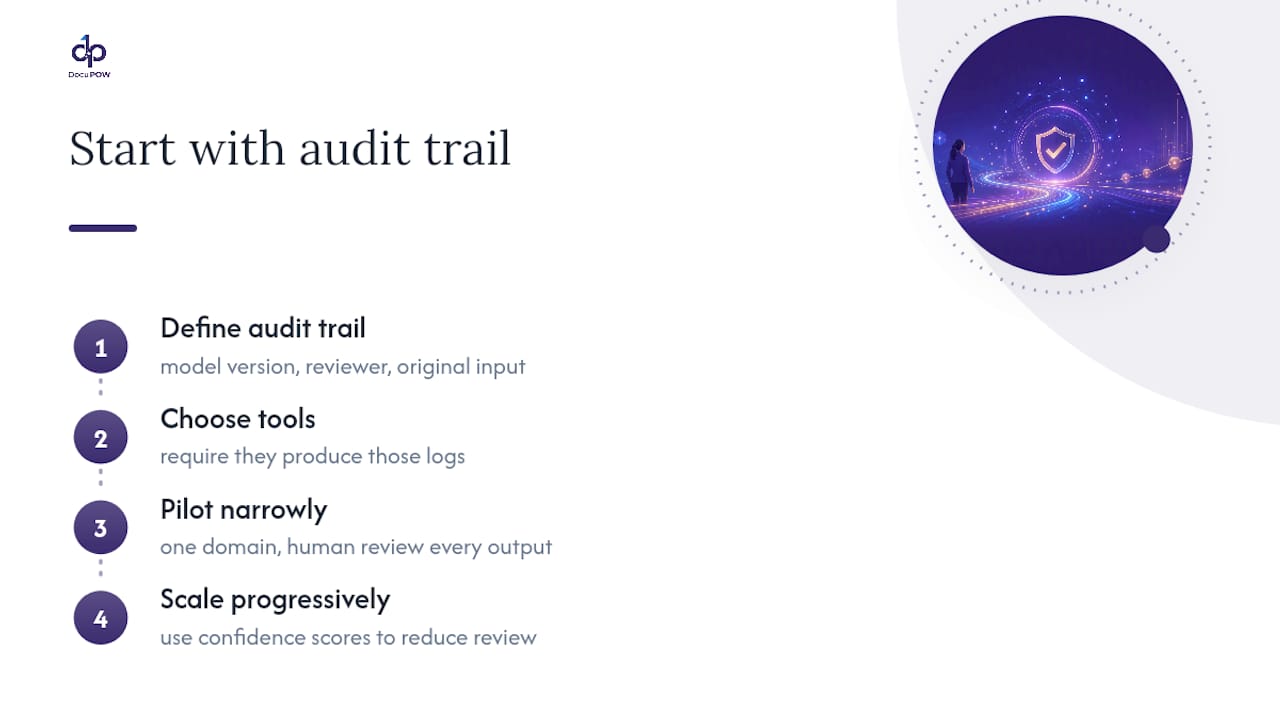
The teams that get this right start with the audit trail requirement and work backward into tool selection. If a system can’t tell you which model version processed a document, who reviewed it, and what the original input looked like, it doesn’t matter how good its extraction accuracy is. That’s not a hypothetical standard. It’s what the NIST AI Risk Management Framework is built around, and it’s the same discipline DocuPOW applies to its own document automation, using autonomous agents that extract data without rigid templates while preserving the input, model version, and reviewer trail an audit actually needs.
That’s also why the staged pilot approach matters more than which vendor you pick first. Start narrow, in one regulatory domain, with human review on every output, and let the confidence scores earn their way toward more autonomy. Teams that skip the staging and go straight to broad automation usually end up walking it back once the first bad output reaches a regulator’s desk. DocuPOW’s approach to operational document automation reflects that same staged philosophy: template-free extraction paired with audit-ready documentation from day one, not retrofitted after the fact.
— Syed Naveed Abbas
Get Your Compliance Documents Audit-Ready
The gap between reading about AI-powered compliance and actually running it usually comes down to one thing: whether your document intake can handle the mess of real regulatory filings, vendor contracts, and internal policies without a rigid template for every format. DocuPOW closes that gap with autonomous agents that extract data from any document type, whether it’s a scanned filing or a native PDF, and route it into a workflow with the reviewer trail an auditor will actually accept.

If you’re planning a pilot along the lines described above, here’s where to start:
-
Request a demo focused on your highest-volume document type, whether that’s contracts, filings, or vendor disclosures
-
Run a feed and format audit against DocuPOW’s template-free extraction approach to see what your current process misses
-
Review the enterprise workflow automation guide for a staged rollout plan that matches the pilot structure covered above
Start with a scoped demo on one document type. That’s the fastest way to see whether the extraction quality and audit trail hold up before committing to a broader rollout.
Sources
FAQ
How Is AI Used in Compliance?
AI is used to monitor regulatory changes, extract obligations from filings and contracts, map those obligations to internal controls, and draft preliminary impact assessments, with human reviewers validating output before it’s used in decisions.
What Is the 30% Rule in AI?
There isn’t a single, universally recognized “30% rule” specific to AI compliance; the phrase gets used inconsistently across sources, so treat any specific figure attached to it with caution rather than as an established standard.
What Is the Best AI Tool for Regulatory Compliance?
The right tool depends on whether your bottleneck is document intake, regulatory change monitoring, or control mapping. Platforms like DocuPOW that combine template-free extraction with human-in-the-loop review and audit logging fit teams that need traceability alongside automation, rather than speed alone.
What Are the Compliance Requirements for AI Use?
Requirements vary by sector and data type, but generally include model governance aligned to frameworks like NIST’s AI Risk Management Framework, safeguards for regulated data such as HIPAA protections for health information, and, for consumer-facing decisions, FTC and FCRA obligations around fairness and adverse-action notices.
Does AI Replace Human Compliance Reviewers?
No. AI accelerates classification, extraction, and drafting, but interpretation of what a regulatory change means for a specific business still requires a human reviewer, particularly for anything that could inform a filing or enforcement response.
Recommended
See DocuPOW on your documents.
Stop building templates. Start extracting data.