Logistics Pilot: Template Free Shipping Document Automation Before ACE
Run a 4–8 week pilot to validate template free, agentic IDP for bills of lading, invoices, and manifests. Includes CBP ACE readiness, KPI targets, and...


Shipping document automation uses AI-powered intelligent document processing to extract, validate, and route bills of lading, invoices, packing lists, and manifests so operations teams move shipments faster and with fewer errors. The core technologies are optical character recognition, machine learning, and natural language processing, which together read documents without rigid templates. We built our platform around an agentic, template-free approach that adapts to new layouts instead of breaking on them.
TL;DR:
- House bills of lading are often the strongest first pilot because their volume and format variability are high, while key fields remain well defined.
- Set a four to eight week pilot for one document type, defining target exception rate, key field accuracy, and a decision point before launch.
- Compare template based and semantic extraction on the same document batch, especially its messiest carrier formats, before choosing an approach for broader use.
- Cross check extracted fields against live ERP, TMS, or WMS records, and route mismatches to human reviewers instead of silently approving or rejecting them.
- During discovery, include real edge cases and confirm API or EDI access to TMS and WMS; late integration gaps can delay execution.
Table of Contents
- How AI-powered document processing extracts and validates shipping data
- Which shipping documents to automate first
- What success looks like: benefits and the KPIs that prove it
- Pilot-to-scale roadmap for shipping document automation
- Integration patterns and data formats to plan for
- CBP modernization and manifest automation: what operations must know
- DocuPOW’s approach to shipping document automation
- Three recommendations for operations teams starting out
- Start a DocuPOW pilot for your shipping documents
- FAQ
- Sources
How AI-powered document processing extracts and validates shipping data
Shipping documents arrive from everywhere: email attachments, carrier portals, scanned paper, EDI feeds. A working automation setup starts by centralizing that intake, then runs image cleanup and optical character recognition to turn scans and PDFs into machine-readable text before any field gets pulled.
From there, three extraction approaches compete for the job. Template-based tools match documents against a fixed layout and break the moment a new forwarder or carrier changes a form. Machine learning models generalize better but still need retraining as document populations shift. Semantic, zero-shot extraction reads a document the way a person would, identifying a consignee or container ID by context rather than position on the page, which matters most for operations juggling dozens of carrier formats.
Once fields are pulled, validation checks them against existing records in the ERP, TMS, or WMS: does the purchase order number match an open order, does the HS code fall within an expected range, does the declared weight align with the shipment history. Rule engines catch obvious mismatches automatically, while genuine exceptions route to a human reviewer rather than getting silently approved or silently rejected.
The last step is action: populating downstream systems, triggering the next workflow step (release for customs filing, flag for freight audit), and notifying the people who need to know.
- Capture consolidates every intake channel into one processing queue.
- Extraction turns unstructured documents into structured, field-level data.
- Validation cross-checks extracted fields against live system records.
- Actioning pushes clean data into ERP, TMS, or WMS and notifies stakeholders.
Pro Tip: Run a side-by-side test of template-based and semantic extraction on the same document batch before committing to either approach; the gap shows up fastest on your messiest carrier formats.
Which shipping documents to automate first
Not every document deserves pilot status. The right starting point is usually the document type with the highest volume and the highest exception rate, since that combination produces the clearest before-and-after numbers and the fastest payback on setup time.
- Bills of lading (master and house): capture consignee, notify party, SCAC code, BL number, and container IDs, the fields that most often cause downstream matching errors.
- Packing lists and packing slips: pull SKU-level counts, weights, and dimensions, which feed directly into warehouse receiving and freight audit.
- Commercial and freight invoices: extract HS codes, declared value, currency, and incoterms, since errors here trigger duty disputes and payment delays.
- Manifests, air waybills, and proofs of delivery: capture timestamps and signatures that serve as the evidentiary backbone for customs and claims.
For most logistics operations, house bills of lading make the strongest first pilot: volume is high, variability across forwarders is high, and the fields that matter are well defined. A narrower starting scope, rather than an attempt to automate every document type at once, keeps the first project small enough to finish and measure.
What success looks like: benefits and the KPIs that prove it
Automation earns its budget line through measurable operational gains, not a general sense of improvement. The KPIs that matter most to logistics operations are documents processed per hour, exception rate (the share of documents a human has to touch), time-to-clearance for customs-bound shipments, and invoice days payable or receivable.
Fewer manual touches on a document also means fewer disputes: a correctly extracted weight or SKU count reduces repacking requests and invoice corrections that otherwise consume a specialist’s afternoon. Faster, cleaner data also tightens the link between a shipment leaving the dock and the invoice landing in the right queue.
- Track docs per hour processed before and during the pilot, same document type, same team.
- Measure exception rate weekly to see whether the model is learning or plateauing.
- Log time-to-clearance separately for automated versus manually processed shipments.
- Watch invoice days payable or receivable as a downstream signal of cleaner data.
One of the clearest signals in a short pilot is a falling exception rate week over week, since a stable or rising rate usually points to a document type that is too variable for the current configuration rather than a tooling failure.
A realistic 4 to 8 week pilot sets success criteria before day one: a target exception rate, a minimum accuracy threshold on key fields, and a clear go or no-go decision point rather than an open-ended trial.
Pilot-to-scale roadmap for shipping document automation
A pilot that skips discovery tends to stall in integration. The sequence below keeps each phase short and each decision reversible.
- Discovery (1 to 2 weeks): inventory document volumes by type, map system endpoints (ERP, TMS, WMS), pull a representative sample set including messy edge cases, catalog recurring exception types, and name the stakeholders who sign off on go-live.
- Pilot (4 to 8 weeks): scope one document type, agree on success metrics in advance, collect a clean baseline of current manual processing time, then run the automation against live or recent documents while comparing output to the manual result.
- Iteration: tune extraction models against the exceptions the pilot surfaced, tighten validation rules, build out the exception-handling workflow so a flagged document reaches the right reviewer, and define service-level agreements for turnaround time.
- Scale: add governance (who owns model performance, who approves rule changes), stand up monitoring dashboards against the KPIs from the pilot, and run change management and training so the wider team trusts the new workflow instead of working around it.
The most common pitfalls are a sample set that excludes the messy, real-world documents the system will actually face, and an integration plan that assumes a system endpoint exists when it has to be built. Both surface fastest during discovery, which is why that phase is worth protecting even when the pressure is to start the pilot immediately.
Pro Tip: Ask your IT team to confirm API or EDI access to the TMS and WMS before the pilot start date, not during week one of execution; integration gaps found late cost the most time.
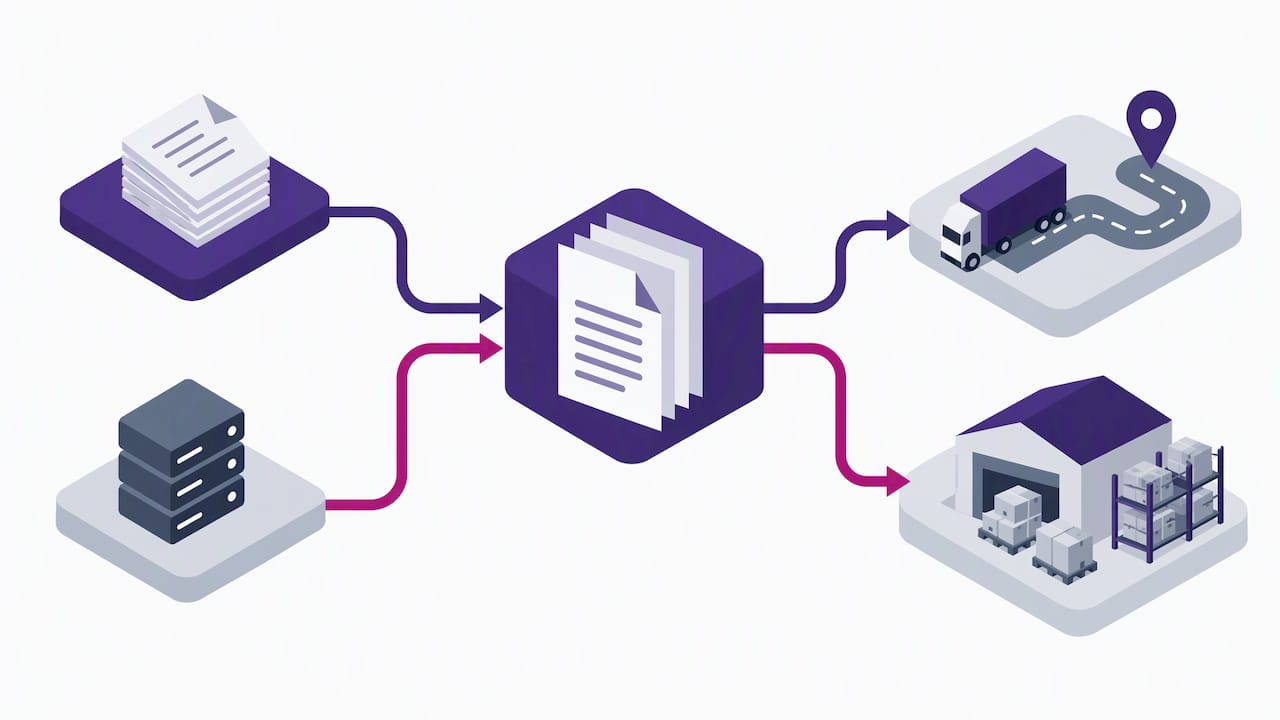
A 4 to 8 week pilot structure built around one document type gives a team a clean, comparable before-and-after instead of a sprawling, hard-to-measure rollout.
Integration patterns and data formats to plan for
Extracted data is only useful once it lands correctly in the systems that run daily operations: the ERP for financial records, the TMS for movement tracking, the WMS for inventory, and the customs broker’s own filing system. Each of these expects its own field names and formats, so mapping work happens before go-live, not after.
Shipping data still moves heavily through EDI, particularly ANSI X12 transaction sets, alongside XML, REST APIs, and plain CSV for simpler integrations. Manifest-specific formats, including X12 309 transactions, have their own field and record requirements that an automation layer needs to translate rather than bypass.
- Webhooks suit near-real-time needs, pushing extracted data the moment a document clears validation.
- Batch imports suit end-of-day reconciliation, where volume matters more than immediate delivery.
- An EDI translation layer bridges modern APIs with legacy X12 partners who are not moving off EDI soon.
- Role-based access, encryption in transit and at rest, audit logs, and defined retention periods are baseline requirements, not optional extras, given the financial and customs data involved.
Getting these choices right early avoids a second integration project six months after the first one ships.
CBP modernization and manifest automation: what operations must know
Manifest filing is shifting from paper and ad hoc electronic formats toward a single standard. U.S. Customs and Border Protection is piloting an Electronic Export Manifest to collect pre-departure manifest data electronically, with the eventual goal of mandatory electronic submission through ACE across multiple transport modes.
That shift has concrete implications for document automation projects. CBP’s own materials describe the EEM and ACE integration as a way to eliminate redundant data elements and improve accuracy and timeliness, which in practice means fewer duplicate filings and less amendment work once a shipment’s data is captured correctly the first time.
- Map required manifest fields against the ACE development and deployment schedule, which lists portal features and automated validation steps affecting cargo release.
- Treat X12 309 and CATAIR record structures as a technical and regulatory checklist together, since mapping to them often surfaces missing operational data that has to be collected upstream.
- Build in time for ACE integration testing rather than assuming a direct pass-through from your current system.
- Where eligible, participate in CBP pilot programs directly to get ahead of mandatory electronic submission timelines.
**CBP’s own guidance frames EEM and ACE integration as a way to cut redundant filings and improve accuracy, which is the regulatory tailwind behind manifest automation projects generally, not a vendor claim.
DocuPOW’s approach to shipping document automation
Our platform is built around agentic, zero-shot extraction: documents get read and understood without a pre-built template, which supports logistics operations juggling dozens of carrier and forwarder formats that never stay still. Every extracted field can pass through human-in-the-loop auditing to ensure flagged mismatches reach a reviewer instead of silently entering the record.
We apply this approach to the document types that create the most friction for global manufacturers and high-volume shippers: customs clearance paperwork, high-volume invoice reconciliation, and the day-to-day flow of bills of lading and packing lists across a manufacturing supply chain.
- We reduce manual entry by using extraction models that adapt to unseen layouts without requiring new templates for every new carrier.
- We aim to improve financial visibility by facilitating faster entry of clean invoice and shipment data into finance systems.
- We support faster, data-driven decisions by shortening the gap between document arrival and data usability.
Our supply chain solutions page outlines these capabilities in more depth for teams evaluating a pilot.
Three recommendations for operations teams starting out
Pick a high-volume, high-exception document for the first pilot: house bills of lading or packing lists usually give the clearest signal fastest. Secure IT integration resources and a representative sample set, edge cases included, before the pilot clock starts, not after. Define your success metrics and governance model (who approves model changes, who owns the exception queue) before day one, since a pilot without a predefined finish line tends to drift.
— Syed Naveed Abbas
Start a DocuPOW pilot for your shipping documents
We offer a 4 to 8 week pilot built around one document type to provide a clean before-and-after comparison instead of a sprawling rollout with no clear finish line. Expect sample document collection, agreed KPIs up front, and a working demo against your own data by the end of the pilot window, not a generic sandbox.

Current pricing details including plan costs are available on our pricing page. For teams managing freight risk alongside document volume, a transportation-focused broker like Geneva Insurance Group is worth a parallel conversation. When you are ready to scope a pilot, our logistics data entry automation page walks through what to expect.
FAQ
What are some examples of document automation?
Common examples include extracting fields from bills of lading, invoices, and packing lists, routing proofs of delivery for signature verification, and auto-populating ERP or TMS records from scanned manifests. Document automation also covers exception routing, where a mismatched field goes to a human reviewer instead of blocking the whole batch.
What is shipping automation and how does it work?
Shipping automation applies optical character recognition, machine learning, and natural language processing to read shipping documents, validate the extracted fields against existing system records, and push clean data into the systems that run day-to-day logistics. Human review handles exceptions the validation rules flag rather than letting them through unchecked.
What is the fastest way to ship a document?
For physical document delivery, direct carrier services and electronic transmission (EDI, API, or secure email) are both faster than postal mail, with electronic transmission typically the quickest when the receiving system accepts digital submissions. DOT guidance permits electronic records and signatures for many regulatory requirements, which removes the need for physical delivery in those cases.
How do I automate a documentation process?
Start with discovery: inventory document volumes, map the systems the data needs to reach, and pull a representative sample set including messy edge cases. Run a short pilot, typically 4 to 8 weeks, on one document type with clear success metrics, then iterate on validation rules and exception handling before scaling to additional document types.
Sources
- Export Manifest — U.S. Customs and Border Protection
- Electronic Documents and Signatures — U.S. Department of Transportation
Recommended
See DocuPOW on your documents.
Stop building templates. Start extracting data.