SOX Documentation Automation: A Practical Guide for 2026
How to automate SOX documentation: what Section 404 requires, where manual evidence breaks, the 14-day PCAOB deadline, and where human review stays.

SOX documentation automation means using software to collect, organize and check the evidence behind your internal controls, so your team stops rebuilding it by hand every quarter. It works best on the unstructured part of the job: PDFs, policies, approvals, reconciliations and screenshots that live outside your ERP. It does not replace the control owner’s judgment or the auditor’s. This guide covers what the law expects you to document, where manual processes fail, how new audit deadlines raise the stakes, and how to automate without creating a new risk.
TL;DR
- Section 404 requires management to document the design and the operating effectiveness of internal control over financial reporting, every year, whether or not an auditor attests.
- The biggest cost is not writing narratives. It is finding, matching and packaging evidence from documents that arrive in different layouts.
- New PCAOB rules shorten the window for assembling final audit documentation from 45 days to 14 for audits under the updated standard effective December 15, 2026.
- Automate extraction, matching and packaging. Keep humans on judgment calls, exceptions and sign-off.
- Any AI output used as evidence needs a visible source and a reviewer, or it is only a draft.
Table of Contents
- What SOX actually asks you to document
- Where manual SOX documentation breaks
- The 14-day clock is the new pressure point
- What to automate, and what to leave to people
- Our perspective: documents are the data layer of your controls
- A rollout plan you can run this quarter
- Security and governance questions to settle first
- How DocuPOW fits
- What good looks like after six months
- FAQ
- Sources
What SOX actually asks you to document
Section 404 puts a standing duty on management. You must establish and maintain internal control over financial reporting (ICFR), assess it each year, and keep enough evidence for someone else to verify your conclusion. The SEC’s interpretive guidance on management’s report says that documentation of the design of controls is an integral part of the assessment, and that management needs evidence of how it concluded the controls operate effectively.
That guidance also makes a point many teams miss. Exemption from the auditor attestation requirement under 404(b) does not remove management’s own 404(a) obligation. A smaller public company still has to document design and operating effectiveness. Asking people whether a control ran is not enough. The documentation has to be detailed enough that an independent party can follow the evidence to the conclusion.
The SEC’s final rule on management’s report frames it the same way: the assessment must rest on evidential matter, including documentation, covering both the design of controls and the testing behind them.
In practice, that gives you two layers of documentation:
- Design documentation. Process narratives, flowcharts, risk and control matrices, policies, and the mapping from each control to the financial statement risk it addresses.
- Operating evidence. The proof that each control actually ran: approvals, reconciliations, review sign-offs, system reports, invoices, contracts and the samples your testers pulled.
Both layers are made mostly of documents. That is why this is a document processing problem as much as a compliance one.
Where manual SOX documentation breaks
Most teams do not fail because they lack controls. They fail because the proof is scattered and the process of gathering it is slow.
Evidence arrives in too many shapes
A single revenue control might depend on a signed contract, a customer purchase order, a shipping document, an invoice and an approval email. Each vendor and customer formats these differently. Traditional template-based capture needs a new template for every layout, so teams fall back on spreadsheets and copy and paste.
The swivel-chair work piles up
KPMG’s paper on the changing SOX landscape describes manual processes, endless spreadsheets and constant back and forth with control owners as no longer sufficient. The repetitive tasks are easy to name: populating test workpapers, retrieving samples, chasing owners for screenshots, and checking that every required attribute is present.
Check-the-box documentation looks fine until it is tested
Practitioners describe a gap between documentation that is management-ready and ICFR that is attestation-ready. The first shows a control exists. The second proves, with evidence, that it operated through the period. A document produced in a rush at year end tends to describe how a control should work, not how it did.
The advisory firm Connor Group makes a related point in a comment letter to the SEC: self-assessment alone can drift into formalism, especially at smaller companies with thin finance staffs and legacy systems. Automation should be judged on whether it makes the evidence more rigorous, not only whether it makes it faster.
The 14-day clock is the new pressure point
The PCAOB has changed the timing of audit documentation. Under the updated version of AS 1215, effective December 15, 2026, the auditor must assemble a complete and final set of audit documentation within 14 days of the report release date. The earlier standard allowed 45 days. The PCAOB explained in a statement on the proposal that electronic documentation takes much less time to compile than paper.
This is the auditor’s deadline, not yours. But it flows downstream. Auditors will want your support schedules, control evidence and sample populations earlier and in cleaner form, because they cannot wait for stragglers after the report goes out. Late additions are documented with who made them and why, which invites inspection attention.
The standard’s test for sufficiency is also worth keeping in mind when you design your own evidence. Documentation must let an experienced auditor with no prior connection to the engagement understand the nature, timing, extent and results of the procedures performed, as set out in the AS 1215 text. Apply the same test to your own files: could a stranger follow this without calling the control owner?
A team that assembles evidence by email chains and shared drives at the end of the quarter will feel the squeeze first. A team whose evidence is indexed, tagged and linked to controls as it arrives will not.
What to automate, and what to leave to people
Not every part of SOX documentation benefits equally. Here is a practical split.
| Task | Good candidate for automation? | Why |
|---|---|---|
| Extracting fields from invoices, contracts, POs, approvals | Yes | High volume, rule-bound, layouts vary |
| Matching evidence to the control and period it supports | Yes | Pure lookup and comparison |
| Checking that required attributes are present in each sample | Yes | Completeness checks are repetitive |
| Formatting evidence into standard tables for reviewers | Yes | Removes copy and paste |
| Drafting first-pass control narratives from policies and transcripts | With review | Useful as a draft, never as final |
| Concluding that a control is effective | No | Management judgment |
| Assessing deficiencies and their severity | No | Requires expertise and context |
| Final sign-off on evidence | No | Accountability stays with a named person |
The pattern is consistent. Let software do the reading, matching and packaging. Let people decide.
Norman Marks, a long-time internal audit voice, argues in a piece on AI in SOX programs that the real value of AI is not speed but detection: spotting anomalies, unusual payment patterns and material errors. The goal, as he frames it, is to move from annual, reactive testing toward continuous risk sensing. Documentation automation is the foundation for that, because you cannot monitor continuously what you cannot read.
The pitfall: unreviewed AI output
The most common mistake is treating AI output as evidence. AI can read a pile of policies and transcripts and produce a decent first draft of a narrative or flowchart. That draft is still a draft. Auditors must be able to understand the nature, source and reliability of the evidence you hand them, which is the heart of AS 1215.
Three safeguards make AI-assisted documentation defensible:
- Source citation on every extracted value. A reviewer should click from a number to the page and region of the document it came from.
- Human review on exceptions. Low-confidence fields, mismatches and missing attributes go to a named reviewer, and the decision is logged.
- An audit trail. Who approved what, when, and what changed.
Our perspective: documents are the data layer of your controls
We build document automation, so we see the same pattern in finance and compliance teams. The controls are designed well. The proof lives in documents nobody has structured. A purchase order arrives as a scan, a contract as a 40-page PDF, an approval as a forwarded email. Someone has to read each one, type the key facts into a spreadsheet, and then do it again next quarter.
Two things follow from that.
First, template-based capture does not scale to control evidence. Evidence comes from hundreds of counterparties and the layouts keep changing. We built DocuPOW around agents that read documents in context, without per-layout templates, so a layout the system has never seen does not mean a new setup project.
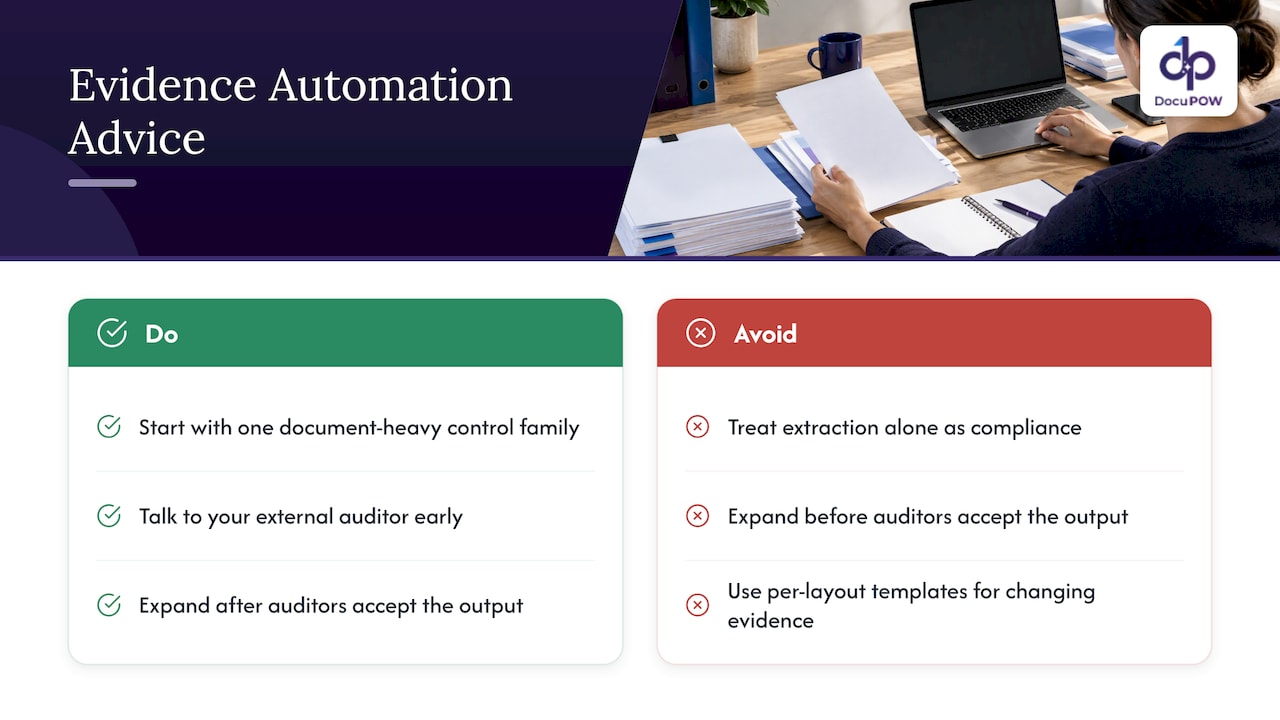
Second, extraction alone is not compliance. An extracted number is only useful in an audit when the reviewer can trace it to its source and a person has confirmed the exceptions. That is why we pair extraction with human-in-the-loop review, source citations when you query documents, and multi-step workflows that carry evidence from intake to the point where it supports a control.
Our advice is to start narrow. Pick one control family with heavy document load, such as procure-to-pay or revenue, automate evidence intake and matching there, and expand once your auditors have seen the output and accepted it. Talk to your external auditor early about how evidence will be presented. Automation that the auditor trusts is worth more than automation that is merely fast.
— Syed Naveed Abbas
A rollout plan you can run this quarter
- Inventory your key controls and the documents behind them. List each key control, its owner, its frequency and the document types that prove it ran. You will usually find a handful of document types account for most of the volume.
- Define the evidence standard per control. Write down which attributes must be present: approver, date, amount, system of record, period. This is your completeness checklist and becomes the rule set for automation.
- Set up intake. Route invoices, contracts, approvals and reports to one place instead of inboxes and drives. Extraction should run on arrival, not at quarter end.
- Extract and match. Pull the fields, link each document to its control and period, and flag anything missing or inconsistent.
- Route exceptions to reviewers. Keep a named person accountable for each control’s evidence, with their decisions logged.
- Package for testers and auditors. Produce standardized tables and index each item to its source document, so a sample request is answered in minutes instead of days.
- Review with your auditor. Walk them through one control end to end before you scale.
- Connect upstream and downstream systems. Feed extracted data to your ERP or GRC tooling through APIs so there is one version of the facts.
If you are earlier in the journey, our audit preparation checklist and timeline shows how accounting teams sequence the work, and our guide to compliance documentation covers what an audit-ready file looks like. For financial documents specifically, see how to automate financial data extraction.
Security and governance questions to settle first
SOX evidence contains vendor pricing, payroll detail and unreleased financial information. Before sending it through any AI system, ask where data is stored, how it is encrypted, who can see it, and whether your documents are used to train shared models. Record the answers in your own vendor risk file, because your auditors may ask.
Our write-up on secure AI document processing and NIST-aligned controls lays out the questions compliance teams should put to any vendor. If your compliance team is building a broader program, four capabilities of audit-ready, AI-powered compliance shows how document intelligence fits in.
How DocuPOW fits
DocuPOW is an agent-based document automation platform. It extracts data from any document type without templates, orchestrates multi-step workflows, adds human-in-the-loop audit review, lets you query documents in plain language with source citations, and connects to ERP and CRM systems through an API. Enterprise-grade security and compliance features sit underneath.
For teams that want to test it on real control evidence, the pricing page lists the Starter plan at $99 per month and the Professional plan at $499 per month. Enterprise pricing is not published. Revenue-critical controls and large document volumes are a good place to begin.
What good looks like after six months
You will know the effort is working when a few things change. Sample requests from testers are answered from an index, not an inbox search. Control owners are asked only about exceptions, not for routine screenshots. Your external auditor receives evidence in a consistent format with a source link on every line. And the quarter-end scramble moves earlier, into the normal rhythm of the month, which matters more once the shorter audit documentation window applies.
The longer-term shift is the one KPMG describes: moving from manual documentation toward orchestrated agents doing more of the end-to-end work, while people focus on assurance. KPMG also notes that the limit on adoption is now audit standards and professional norms rather than technology. That is a reason to bring your auditors along from the start and to keep humans visibly in the loop.
FAQ
Does SOX require a specific tool for documentation?
No. The SEC guidance asks for sufficient evidential matter supporting management’s assessment, not a particular system. What matters is that the documentation covers design and operating effectiveness and that an independent party can follow it. Software is a way to meet that standard more consistently.
Is a company exempt from 404(b) also exempt from documenting controls?
No. Exemption from the auditor attestation requirement does not remove management’s own 404(a) duty to assess ICFR and support the conclusion with documentation. Confirm your specific filer status with your securities counsel or external auditor.
Can AI-generated control narratives be used as audit evidence?
Treat them as drafts. Auditors must understand the nature, source and reliability of the evidence behind your assertions, so a domain expert should validate any AI-produced narrative or flowchart and the source documents should be traceable.
What should we automate first?
Start with a control family where documents are numerous and repetitive, such as procure-to-pay or revenue. Automate intake, field extraction, matching and packaging, and keep exception review with a named person. Show the output to your auditor before expanding.
Sources
- SEC interpretive release on management’s report on ICFR
- SEC final rule on management’s report, Release 33-8238
- KPMG paper on the changing SOX landscape
- Connor Group comment letter to the SEC
- PCAOB AS 1215, effective December 15, 2026
- PCAOB statement on the proposal to modernize standards
- PCAOB AS 1215: Audit Documentation
- How Can You Use AI in a SOX Compliance Program?
Recommended
See DocuPOW on your documents.
Stop building templates. Start extracting data.