Document Routing With AI: How It Works and How to Set It Up
AI document routing reads each file, pulls out its data, checks it and sends it to the right person or system. See how it works, where it fits and how to roll it out.


AI document routing reads an incoming file, works out what it is, extracts the fields that matter, checks them against your rules and sends the result to the right person, queue or system. It replaces the inbox shuffle where someone opens each PDF, decides who should see it and retypes the data. Done well, only the documents that are uncertain or risky reach a human.
This guide explains what the technology does, which documents suit it, how to plan a rollout, how it connects to your ERP and approval tools, and what to watch for on accuracy, security and compliance.
TL;DR
- AI routing is a chain of steps: classify, extract, validate, decide, route. Routing on validated data beats routing on a loose summary of the text.
- It goes further than OCR. OCR turns pixels into text, while routing decides what the document is and where it goes next.
- Start with one high-volume document type, such as invoices, and write down the routing rules and exception paths before you configure anything.
- Keep people in the loop for low-confidence extractions, failed checks and high-risk changes, and measure the exception rate over time.
- Treat privacy and security as part of the design: US rules such as HIPAA, GLBA and CCPA can apply depending on the data you route.
Table of Contents
- What AI document routing actually means
- How an AI routing pipeline works, step by step
- Which documents and workflows suit AI routing
- How to plan and implement an AI routing workflow
- Handling exceptions and human review
- Integrating with ERP, CRM and approval tools
- Accuracy, security and compliance
- Our perspective
- Try it on your own documents
- Common mistakes to avoid
- FAQ
- Sources
What AI document routing actually means
A routing workflow answers one question for every file that arrives: what happens to this next? A supplier invoice goes to accounts payable. A signed contract goes to legal and the contract repository. A bill of lading goes to the logistics team and updates a shipment record. A new-hire form goes to HR.
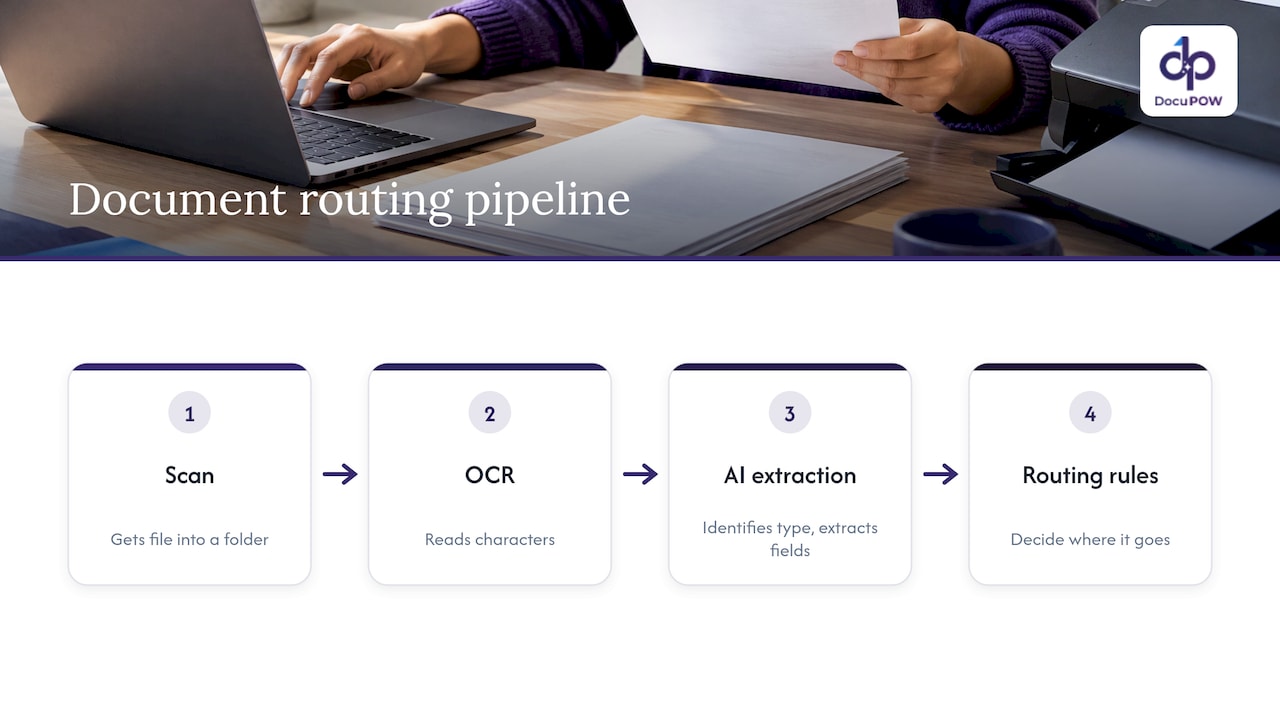
Basic scanning gets the file into a folder. OCR reads the characters. Neither decides anything. Rule-based capture adds a layer, but it usually depends on templates: a fixed position for the invoice number, a fixed layout per vendor. When a supplier changes its format, the template breaks and someone fixes it.
AI routing works on meaning instead of position. A model recognizes that a document is an invoice even when the layout is new, reads the supplier, the total and the purchase order number, and passes the structured result to the rules that decide where it goes. That is the practical difference: the decision is based on what the document says, not where the words sit on the page.
Routing versus extraction
Extraction produces data. Routing uses that data to act. In practice they are two halves of one pipeline, and the quality of the second depends on the first. If the total is misread, the approval threshold is applied to the wrong number and the invoice lands with the wrong approver.
How an AI routing pipeline works, step by step
Most production designs follow the same sequence. One workflow guide lays it out as ingest, extract, classify, extract into a strict schema, summarize for reviewers, validate, then route. It also recommends routing on validated structured data rather than on a free-text model summary.
- Ingest. Documents arrive by email, upload, portal, scanner or API. Everything is normalized so later steps see a consistent input.
- Classify. The system decides the document type: invoice, purchase order, contract, claim, ID, form. Classification picks the processing path for what follows.
- Extract. The system pulls fields into a fixed schema, for example supplier, invoice number, date, line items, tax and total. A strict schema means every record has the same shape, which makes downstream rules simple.
- Validate. Checks run on the extracted data: required fields present, formats correct, numbers consistent, values matching your master data.
- Decide. A confidence threshold and business rules decide whether the record is approved automatically or needs review.
- Route. Approved records go to the database, ERP, ticketing system or approval queue. Uncertain or invalid items go to an exception queue, with enough context for a person to resolve them quickly.
Validation does most of the work
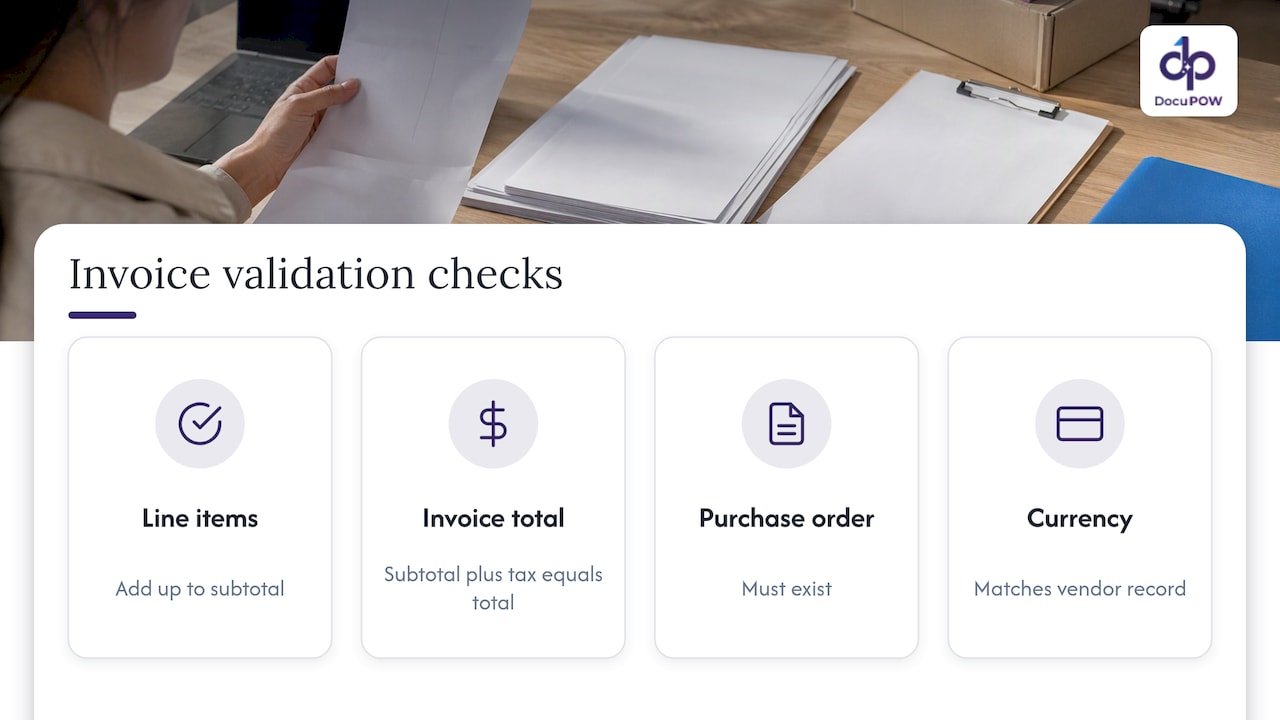
The model is only one part of the pipeline. Many errors are caught by plain checks: do the line items add up to the subtotal, does subtotal plus tax equal the total, does the purchase order exist, does the currency match the vendor record. These checks are cheap, deterministic and easy to explain to an auditor. Build them early.
Which documents and workflows suit AI routing
The best candidates share three traits: high volume, variable formats and a clear next step. Common examples:
| Document type | Typical routing decision | Team involved |
|---|---|---|
| Supplier invoices | Match to PO, send to approver by amount or cost center, post to ERP | Accounting, procurement |
| Purchase orders and quotes | Route to buyer or sales owner, update the order record | Procurement, sales |
| Contracts and amendments | Send to legal review, flag non-standard clauses, store in repository | Legal |
| Bills of lading, packing lists, customs forms | Update shipment status, notify the coordinator | Logistics, supply chain |
| Insurance claims and policy documents | Assign to adjuster or underwriter by type and value | Insurance operations |
| Patient intake and records | Send to the right clinical or billing queue under access controls | Healthcare administration |
| Onboarding forms and employee records | Send to HR, payroll and IT in sequence | HR |
| Transaction documents in property deals | Route agreements to the right reviewer and closing checklist | Real estate teams |
If you are choosing a first project, pick the one where people currently spend the most time opening, sorting and retyping. Invoices are the usual starting point because the fields are well understood and the downstream action, posting to the books, is concrete. Our automated invoice processing flow shows what that looks like end to end.
Industry fit varies in the details. Teams in logistics, supply chain, construction, fintech and banking, healthcare and real estate each handle different document mixes, but the pipeline underneath is the same.
How to plan and implement an AI routing workflow
1. Map the current flow
Follow ten real documents from arrival to final action. Note who touches each one, what they decide, what they retype and where it stalls. This map becomes your list of routing rules.
2. Write the rules in plain language
For each document type, state the decision: “Invoices over a set amount go to the finance manager. Invoices without a matching PO go to procurement. Anything with a changed bank account goes to a person.” Rules written this way are easy to review with the business and easy to turn into configuration.
3. Define the schema
List the fields you need per document type and which are mandatory. Keep it short at first. Every extra field is one more thing to validate.
4. Set thresholds and exception paths
Decide what happens when the system is unsure. A good exception queue shows the document, the extracted fields, which check failed and a suggested action, so the reviewer fixes one field rather than rereading the whole file.
5. Test on real, messy documents
Use a sample that includes bad scans, odd layouts, multi-page files and documents that do not belong. Compare the results with what your team would have done. Adjust rules, not just thresholds.
6. Run in parallel, then switch over
Let the automated flow run alongside the manual one for a few weeks. When the outputs match closely, move the routine documents over and keep humans on exceptions.
7. Monitor continuously
Track these numbers weekly:
- Straight-through rate: the share of documents that reach their destination with no human touch.
- Exception rate and reasons: which checks fail most often, which tells you what to fix upstream.
- Correction rate: how often reviewers change an extracted field.
- Cycle time: from arrival to final action.
- Misroutes: documents that landed in the wrong queue and had to be moved.
A rising exception rate on one vendor or document type usually points to a specific cause, such as a new format or a changed rule, and is easy to fix once you can see it.
Handling exceptions and human review
Human review is a feature of a well-built routing system, not a sign it failed. The aim is to spend people’s time on the cases that need judgment.
Send a document to review when:
- Extraction confidence is below your threshold.
- A validation check fails, such as totals that do not add up.
- The document type is not recognized.
- The content is high risk. A changed bank account on an invoice should always be looked at by a person, whatever the confidence score, because it is a common fraud pattern.
Show reviewers only what they need: the flagged fields next to the source image, with one-click accept or correct. Log every correction. Those logs are your best evidence for tuning rules and for audit trails.
Integrating with ERP, CRM and approval tools
Routing only pays off when the result lands where work happens. Plan for three connection types:
- System of record. Push validated data to your ERP, CRM or database by API, so nobody rekeys it.
- Approval workflow. Hand records that need sign-off to your approval tool or queue, with the document and extracted data attached.
- Notifications and tickets. Alert the owner in the channel they already use, and open a ticket when something needs fixing.
Before you start, ask your IT team for the API access, authentication method and field mappings for each target system. Agree on what happens when a target is unavailable: queue and retry, never drop. Our platform overview and operations solution page describe how multi-step workflows connect to ERP and CRM through APIs.
Accuracy, security and compliance
Automation raises the stakes on three things.
Accuracy. A wrong extraction that routes automatically spreads quickly. Layer your defenses: schema checks, business-rule checks, confidence thresholds and sampled human audits of auto-approved items.
Security. Documents contain bank details, personal data and contracts. Look for encryption in transit and at rest, role-based access, audit logs and clear data retention. Our security page covers how we approach this.
Compliance. US law law-firm guidance points to CCPA, HIPAA, GLBA and state-specific AI laws as considerations, and recommends vendor audits covering data security and hallucination prevention, plus a playbook for evaluating new AI tools, according to Stoel Rives. Which rules apply depends on your data: health information, consumer financial data and California residents’ personal information each trigger different obligations. Ask your counsel or compliance lead to confirm what applies to your documents before you go live.
For a structured way to think about AI risk, the NIST AI Risk Management Framework offers voluntary guidance that many US organizations use to organize governance, mapping and measurement.
Our perspective
We built DocuPOW on a simple view: routing fails when it depends on templates. A template works until a supplier changes a layout, and then someone has to rebuild it. That is why we focus on template-free, zero-shot extraction that adapts to document layouts it has not seen before, so setup and maintenance stay light.
We also think routing should not stop at extraction. The value comes when validated data moves into the core systems and the next step starts without anyone retyping it. That is what multi-step workflow orchestration is for.
And we believe people belong in the loop where it counts. Human-in-the-loop audit review lets your team confirm the uncertain cases and keeps a record of who decided what, which matters for compliance. Conversational querying with source citations means anyone can ask a question of the document set and see where the answer came from.
Our advice: start with one document type, make the rules explicit, and let the exceptions teach you what to automate next.
Syed Naveed Abbas
Try it on your own documents
DocuPOW is a cloud platform for template-free extraction, workflow orchestration, human review and integration with ERP and CRM through API. Plans on our pricing page start with Starter at $99 per month and Professional at $499 per month. Enterprise pricing is not published, and you can talk to us about it.
If you want to see routing on your own invoices, contracts or forms, start at the DocuPOW home page and pick the plan or demo that fits your volume.
Common mistakes to avoid
- Automating everything at once. Begin with one document type and expand.
- Routing on an unvalidated summary. Route on structured, checked fields.
- No exception owner. Every queue needs a named person and a target response time.
- Ignoring the downstream system. A perfect extraction is wasted if the ERP mapping is wrong.
- Skipping measurement. Without a baseline, you cannot show the improvement.
For teams processing large volumes, our notes on high-volume document processing best practices go deeper on scaling and monitoring.
FAQ
What is the difference between OCR and AI document routing?
OCR converts an image of a page into text. AI document routing goes further: it identifies the document type, extracts and validates specific fields, and sends the result to the right person or system. OCR is usually one input to the routing pipeline, not a replacement for it.
Do I need templates for each document type or vendor?
Not with a template-free approach. Zero-shot extraction reads the document by its content, so a new layout does not require a new template. You still define the fields you want and the rules that decide where each document goes.
Will AI routing remove the need for human review?
No, and it should not. Low-confidence extractions, failed validation checks and high-risk changes such as new bank details should go to a person. The goal is to cut the routine handling so reviewers focus on exceptions.
Which document should I automate first?
Choose the one with the highest volume and a clear next step. For most finance teams that is supplier invoices. Operations teams often start with shipping documents, and HR teams with onboarding forms.
How do I know the routing is working?
Track the straight-through rate, exception rate, correction rate, cycle time and misroutes against your pre-automation baseline. If exceptions cluster around one vendor or rule, fix that cause first.
Sources
- AI Document Automation Workflow Guide
- Business Considerations in the Use of AI, Stoel Rives LLP
- AI Risk Management Framework, NIST
Recommended
See DocuPOW on your documents.
Stop building templates. Start extracting data.


