Data Normalization From Documents: A Practical Guide
How to normalize data from documents: what it means, which fields to standardize, how to catch document data drift, and how to validate before anything reaches your ERP.


Data normalization from documents is the step that turns what an extractor read off a page (“Aug 28, 2026”, “$1,200.00”, “Acme Corp.”) into one consistent, machine-ready form your systems can compare, validate and post. Extraction finds the values. Normalization makes them usable. The teams that get it right treat it as a governed part of the workflow, with a fixed schema, validation after every transformation and a human review path for exceptions, not as a cleanup script run at the end. That is how we build document automation at DocuPOW.
TL;DR
- Normalization from documents means standardizing extracted values (dates, amounts, units, names, IDs) into one representation. It is not the same as database normalization, which restructures tables.
- Run it right after extraction and before validation: normalize first, validate after.
- The main production risk is silent drift: layouts, models or schemas change and fields quietly go missing or wrong. Monitor field completeness and validation failure rates.
- Treat extraction as a proposal, not a write. Validate against rules and your system of record, and route exceptions to a reviewer who sees the source page.
- A template-free platform with schema validation and human-in-the-loop review keeps this work off your team’s plate.
Table of Contents
- What normalization means when the source is a document
- Why raw extraction output is not enough
- The common transformations, field by field
- The order of operations: normalize first, validate after
- Document data drift: how normalization quietly breaks
- Validate, then treat extraction as a proposal
- Posting to ERP and CRM without creating new problems
- What to expect: benefits and realistic scope
- Doing this with DocuPOW
- Our perspective
- FAQ
- Sources
What normalization means when the source is a document
The phrase carries three meanings, and search results mix them. Only one is the subject here.
Extraction normalization converts data from different structures, formats or conventions into one consistent representation. ScrapeCrew’s glossary describes it as standardizing dates, field names, currencies, phone numbers, categories, units, identifiers and nested records before data reaches a database or export. It sits between raw capture and downstream use.
Database normalization is a design discipline: organizing tables and dependencies into first, second and third normal forms to reduce redundancy and update anomalies. The same glossary separates it from extraction normalization. If you searched for 1NF, 2NF and 3NF, that is a database design topic, and most of the top-ranking pages cover it.
Statistical normalization, such as min-max scaling for machine learning inputs, is a third and unrelated idea.
It also helps to separate normalization from its neighbors in the document pipeline:
| Step | What it does | Example |
|---|---|---|
| OCR | Turns pixels into characters | Reads “28/08/2026” from a scanned invoice |
| Extraction | Finds and labels the values | Labels it as the invoice date |
| Normalization | Standardizes the representation | Writes it as 2026-08-28 |
| Validation | Checks the value is correct and consistent | Confirms the date is real and not after the due date |
| Posting | Writes the approved record to ERP or CRM | Creates the payable in your accounting system |
OCR and extraction answer “what does the page say?” Normalization answers “how should every page’s answer be written so that two documents can be compared?”
Why raw extraction output is not enough
Imagine three vendors invoice you on the same day. One writes 28/08/2026, one writes 2026-08-28 and one writes Aug 28, 2026. ScrapeCrew’s example unifies exactly these into ISO 8601, the international date standard. Without that step, a due-date report sorts them as text, an aging report miscounts, and a duplicate check misses a match.
The same problem shows up everywhere documents cross a boundary:
- Finance and accounting: “1,200.00”, “$1200” and “1.200,00” for the same amount, plus different tax and total labels per vendor.
- Procurement and supply chain: units (case, CS, 12-pack), part numbers with or without leading zeros or dashes, and vendor names that differ by punctuation.
- Sales and legal: party names, effective dates and renewal terms in contracts, each phrased a different way.
- HR and healthcare: phone numbers, addresses and identifiers entered in different styles across forms.
- Insurance and real estate: policy and parcel identifiers, addresses and dollar figures spread across long packets.
If any of this reaches a core database unnormalized, the damage is quiet. Reports still run. They are just subtly wrong.
The common transformations, field by field
A practical normalization layer is a short list of rules per field type. The Neural Base’s field normalization course gives a useful reference set: dates to ISO format, phone numbers to E.164 (the international phone format), currency to integer cents, addresses to title case and whitespace collapsed. It also covers less obvious fields: booleans, enumerations such as turning a long job title into a standard abbreviation, and IDs with leading zeros or dashes.
Here is how that looks as a working specification:
| Field type | Raw examples | Normalized form | Watch for |
|---|---|---|---|
| Date | 28/08/2026, Aug 28, 2026 | 2026-08-28 | Day-month vs. month-day ambiguity on 03/04/2026 |
| Amount | $1,200.00, 1200 USD | 120000 (cents) plus currency code | Decimal and thousands separators that differ by country |
| Phone | (415) 555-0100 | +14155550100 | Extensions and missing country codes |
| Address | 12 main st., Suite 4 | 12 Main St Suite 4 | Unit numbers, PO boxes, abbreviations |
| Identifier | 00123-45 | Keep exactly as issued, as text | Stripping leading zeros destroys the ID |
| Category | Sr. Vice President | Your approved list value | Unmapped values need review, not a guess |
| Unit | CS, case, 12-pk | One unit of measure plus quantity per unit | Conversion factors must come from reference data |
Two judgment calls matter more than the formats themselves.
Decide what must never be altered. Identifiers, legal names as printed on a contract and anything used as a match key should keep their source text alongside the normalized value. Normalize for comparison, never overwrite evidence.
Decide what is ambiguous. A date like 03/04/2026 cannot be normalized correctly without context such as the vendor’s country or the document’s other dates. A good pipeline flags it rather than choosing silently.
The same discipline applies to text. The e-discovery community, in its guidance on text extraction, describes case normalization, diacritical normalization (resumé and résumé both become resume), Unicode normalization and time-zone normalization so that email timestamps from different US time zones line up on one timeline. The principle holds for any document set: pick a canonical form, apply it everywhere, and keep the original.
The order of operations: normalize first, validate after
The Neural Base course puts the sequence in four words: normalize first, validate after. Validation rules are far simpler to write against one format than against twelve. A rule such as “invoice date must not be later than due date” only works once both are in the same date form.
A sound sequence looks like this:
- Capture and keep the original. Store the source file unchanged, with a stable document ID.
- Extract into a fixed schema. Define each field’s type, format, whether it is required and what values are allowed.
- Normalize. Apply the transformation rules, and keep the raw text and page location next to each normalized value.
- Validate. Check dates are real, line items add up to totals, currencies are consistent, identifiers pass format checks and the document is not a duplicate.
- Decide. Accept, reject or send to a reviewer.
- Post. Write to your ERP or CRM only after approval.
The weak point in most manual and template-based setups is step 2. Template-based OCR assumes a vendor’s layout never changes. When it does, fields shift or vanish. We built DocuPOW around template-free, zero-shot extraction, so an unseen layout does not require a new template before its values can be mapped into your schema.
Document data drift: how normalization quietly breaks
“Document data drift” describes a pipeline that worked last quarter and is slightly wrong this quarter, with no error message. It has several causes: a vendor redesigns its invoice, a model update changes what gets extracted, or a downstream system adds a required field.
Fiddler’s cookbook on agentic document extraction lists the failure modes to expect:
- Schema drift: the model starts omitting fields it used to extract reliably.
- Numeric hallucination: amounts that do not match the source.
- Date format inconsistency: the exact problem normalization is meant to remove.
- Math errors: totals that do not equal subtotal plus tax.
- Silent degradation: accuracy falling gradually after a model update, with no hard errors to trigger alerts.
The cost of missing it is concrete. The Neural Base’s intermediate course describes a team extracting 10,000 records with a missing tax field before noticing it had become required. At that volume, nobody can find the problem by eye.
What to monitor
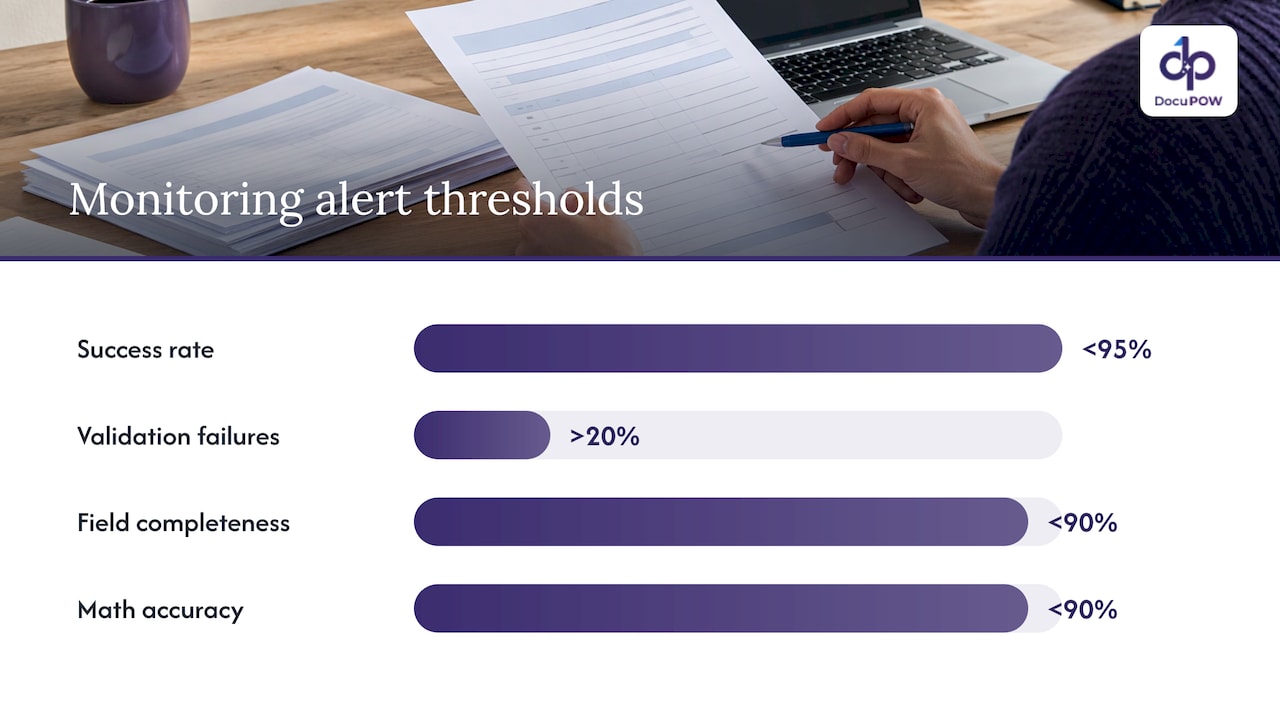
Track a few rates over rolling windows rather than inspecting documents one by one. Fiddler’s cookbook suggests alerting when the success rate falls below 95%, validation failures exceed 20%, field completeness drops below 90% or math accuracy drops below 90%. Treat those as starting thresholds and tune them to your document mix and risk.
The Neural Base suggests logging missing and unexpected fields over time, alerting when a field is missing in more than five consecutive extractions and, at 100 or more extractions a day, when a previously populated field falls below 80% coverage.
Two more practices are worth adopting regardless of tooling:
- Keep a small reference set. A versioned handful of documents that humans have already validated, re-run after any model, rule or schema change, shows right away whether results moved.
- Watch the human correction rate. If reviewers start overriding one field more often, that field is drifting even if the system reports no errors.
Changing a schema safely
When the downstream world changes, resist editing the production schema in place. The same course outlines a cautious path: add the new field as optional, log samples for 48 hours, update and deploy a new schema version, then monitor for a week before making the field required. Version your schemas the way you version software.
Validate, then treat extraction as a proposal
Normalized data is cleaner, not automatically correct. A tidy 2026-08-28 can still be the wrong date. The safest mental model is that extraction proposes a value and your rules and records decide whether it can become a record.
Practical controls that hold up in finance and operations:
- Deterministic checks first. Date validity, totals reconciliation, tax arithmetic, identifier formats and currency consistency are rules, not model opinions.
- Check against your system of record. Does the vendor exist? Does the purchase order match? Is this invoice number already posted?
- Do not rely on one confidence cutoff. A blanket “above 90% is fine” rule ignores that confidence behaves differently by field and document type. Measure accuracy on representative documents before allowing straight-through processing, and limit it to a defined document class and low-risk fields.
- Show reviewers the evidence. The reviewer should see the source page beside the proposed and current values, not a bare field list.
- Keep a trail per field. Store the normalized value, the source text, page location, schema version, validation results and the final decision.
This is where human-in-the-loop review earns its place. Our platform enforces strict schema validation and routes exceptions to human-in-the-loop audit review, so a conflicting or missing value is resolved by a person with the source in front of them before it reaches your database.
Posting to ERP and CRM without creating new problems
Integration is where a normalization mistake becomes a business problem. A few habits keep it contained:
- Stage before you post. Write to a staging record, re-check required fields, then post.
- Make retries safe. Use an idempotency key (a unique identifier tied to the document) so a retried post cannot create a duplicate payable.
- Record the response. Save the ERP’s response ID and status, and keep failed posts visible and retryable instead of asking someone to re-upload.
- Limit access. Give services only the permissions they need, and separate the people who configure rules from those who approve high-risk exceptions.
- Handle bank-detail changes separately. Route payment-instruction changes through their own verified process.
These are operating practices, not legal requirements. Healthcare, legal and financial teams should also apply the regulations that govern their own records, with their compliance or counsel involved. DocuPOW connects to ERP and CRM systems through an API and offers developer tools, which gives IT a defined integration point rather than a pile of scripts.
What to expect: benefits and realistic scope
Teams that normalize at the point of capture generally gain in four places: reports and reconciliations built on consistent values, fewer exceptions caused by format differences, search and analytics that work across vendors and document types, and a cleaner audit trail. The scope question is where to start. Pick one document class with measurable volume, such as vendor invoices or purchase orders, define the schema, write the rules for its ten or so most important fields and measure the exception rate. Expand once the numbers are stable.
If your documents are high volume, our guide to high-volume document processing best practices covers how to scale that approach.
Doing this with DocuPOW
Normalization, validation, review and posting are separate steps in most stacks, and the seams between them are where drift hides. DocuPOW is an agent-based document automation platform that extracts data from any document type without templates, orchestrates multi-step workflows, applies strict schema validation, includes human-in-the-loop audit review and delivers results to your ERP or CRM through an API. It also offers real-time analytics and conversational document querying with source citations, so a figure can be traced back to its page.
Plans are published on our pricing page: Starter is $99 per month and Professional is $499 per month, with Enterprise available through the same page. You can see how the pieces fit on the platform overview.
Our perspective
Most normalization projects fail at the seams, not in the rules. A team writes a date parser, then a currency parser, then a spreadsheet of exceptions, and a year later nobody can say which version of which rule touched a given record.
We think the answer is to treat the whole path as one governed workflow. Extraction that adapts to unseen layouts means a vendor’s redesign is not an emergency. Schema validation means a value either fits your definition or it does not. Human-in-the-loop review means the hard cases are decided by a person with the source page in view, and every decision stays attached to the record.
That is why we built DocuPOW as an operating system for documents rather than a single extraction step. The value is not only that data arrives in your database. It is that you can show where each value came from and why it was accepted.
Syed Naveed Abbas
FAQ
What is data normalization from documents?
It is the process of converting values extracted from documents into a single consistent format, such as writing every date as ISO 8601 or every amount as integer cents plus a currency code. It happens after extraction and before validation and storage. It is different from database normalization, which restructures tables.
How is it different from OCR and data extraction?
OCR converts an image of text into characters, and extraction identifies which characters are the invoice number, date or total. Normalization then standardizes how those values are written so they compare correctly across documents and vendors. Each step depends on the one before it.
What is document data drift?
It is the gradual change in extraction results over time, caused by new document layouts, model updates or schema changes. Typical signs are fields going missing, totals no longer matching and more human corrections. Monitoring field completeness, validation failure rates and the correction rate catches it early.
Should extracted data go straight into the ERP?
Only for a defined document class and low-risk fields, after you have measured accuracy on representative samples. Otherwise stage it, validate it against rules and your records, and route exceptions to a reviewer. Using idempotency keys prevents duplicates when a post is retried.
Sources
- Data Normalization, ScrapeCrew glossary
- Text, Metadata and Image Extraction, EDRM
- Field normalization, Document AI Beginner Course, The Neural Base
- Why schemas change over time, The Neural Base
- Agentic Document Extraction, Fiddler docs
Recommended
See DocuPOW on your documents.
Stop building templates. Start extracting data.


