Document AI Model Retraining: When, How and How to Check It
A practical guide to retraining a document AI model: when it is needed, what data to label, how to test for regressions, and how to roll out a new version safely.


Retrain a document AI model when new layouts keep appearing, when accuracy slips after a template or business-rule change, or when the model moves to a new department, vendor group or region. Before you do, rule out the process around the model. Retraining is a full release cycle: curate and label examples, freeze a baseline test set, compare old and new versions field by field, roll out to a small slice of documents, and keep a way back. Done well, it is a few weeks of careful work. Done badly, it makes extraction worse. We built DocuPOW around template-free, zero-shot extraction so that a new vendor layout is not a retraining project in the first place.
TL;DR
- Retrain for a reason you can name: new layouts, changed fields or rules, or measured drift. Do not retrain on a calendar alone.
- Check first whether the model failed or the process failed. Bad scans, routing errors and strict validation rules can look like model errors.
- Freeze a labeled baseline of real documents, then compare the old and new versions field by field before anything goes live.
- Release gradually, watch the exception queue, and keep the previous version ready to restore.
- Every retraining cycle costs labeling and testing time. Template-free extraction with human review is designed to cut how often you need one.
Table of Contents
- What retraining a document model actually means
- Rule out the process before you retrain
- Choose a retraining trigger
- What to collect and label
- Protect sensitive data while you retrain
- Measure whether it worked
- Release gradually and watch
- The retraining cycle in six steps
- Where retraining effort goes in the first place
- What this looks like with DocuPOW
- How different teams should apply this
- FAQ
- Sources
What retraining a document model actually means
A document AI model reads a page and returns fields: invoice number, total, party names, line items, dates. Retraining means feeding it new, corrected examples so it reads those fields better on the documents you really receive.
The Thomson Reuters Labs framework for monitoring and retraining deployed models names three main reasons to do it: data drift (the inputs change), concept drift (what a correct answer looks like changes) and the steady accumulation of new data. It also separates reactive retraining, triggered by monitoring warnings, from proactive retraining on newly collected data even when no drift is visible.
In plain terms for a finance, operations or procurement team:
- Data drift: a supplier redesigns its invoice, a new carrier sends bills of lading in a different format, or scans start arriving as phone photos.
- Concept drift: you add a required field, change a coding rule, or the definition of a “valid” PO changes.
- New data: you have months of human-corrected records that the model has never learned from.
A practical write-up from DatabossTech lists the same signals in business terms: new layouts appear regularly, extraction quality slips after template changes, key fields or rules change, or the model expands to a new department, vendor group or geography. If none of those is true, you probably do not need a new version.
Rule out the process before you retrain
The most expensive retraining is the one that was never needed. DatabossTech’s Dorian Sanders describes teams that retrained three times when the real fix was stopping sideways phone photos of crumpled receipts. Routing, scan quality and overly strict validation rules can all imitate model failure.
Before you open a retraining ticket, sort a sample of 50 to 100 failed documents into buckets:
| Symptom | Likely cause | Fix |
|---|---|---|
| Fields blank on one vendor only | New layout the model has not seen | Add examples from that vendor, or use an extractor that handles unseen layouts |
| Random errors on rotated or blurry pages | Image quality or orientation | Fix capture, deskew, set upload standards |
| Correct values rejected downstream | Validation rule too strict | Loosen or correct the rule |
| Documents land in the wrong queue | Classification or routing | Fix routing logic |
| Right value, wrong field name | Schema or mapping change | Update the schema mapping |
| Consistent errors on one field across vendors | Real model gap | Retrain candidate |
Only the last two rows are about the model. Counting the buckets takes an afternoon and often saves weeks.
Choose a retraining trigger
The Neural Base’s document AI course frames the trigger as the central decision: retraining too often wastes compute and causes instability, while retraining too rarely leaves a degrading model in service. The same course warns that retraining on biased error samples, for example only the documents that failed, can hurt overall accuracy.
A workable trigger has three parts:
- A metric per field. Track error rate for the fields that drive money or compliance (totals, tax IDs, dates, account numbers) rather than one blended accuracy number.
- A threshold and an evidence window. Edilec advises defining retraining triggers with a minimum evidence window, so one bad week from one supplier does not start a release.
- An owner. One named person decides whether the trigger fired and approves the retrain.
Also decide where human effort goes. The same Neural Base course argues the real design question is whether to retrain on all errors or only high-impact fields, because collecting errors, reviewing them and retraining each carry different costs. For most finance and operations teams, starting with the fields that stop a payment or an audit is the sensible answer.
What to collect and label
The quality of the examples decides the quality of the new model. DatabossTech recommends collecting real documents your team cares about:
- high-volume standard documents
- troublesome vendor or form layouts
- older formats still in circulation
- poor-quality scans and mobile photos
- handwritten notes and stamps
- examples that previously caused downstream workflow failures
Label the expected output for each one, clearly and consistently, so every model version can be measured against the same truth set.
Store each correction as a record
If reviewers already correct extractions, those corrections are your best training material, but only if they are captured with context. TFSF Ventures suggests storing each human correction as a discrete record with the original input, the model’s output, the corrected output, a category, the operator, a timestamp and the model version. The version field matters most: it lets you see whether a pattern of errors belongs to one specific model state.
Do not train on raw feedback
Edilec’s guidance is not to retrain automatically on raw user feedback: feedback must be validated and governed before it becomes training data. The Neural Base course adds a concrete safeguard, requiring two annotators to agree on a correction before it enters the set, and inspecting the corrections for label noise and class imbalance. One tired reviewer fixing a field the wrong way, repeated 500 times, becomes a bug in the next model.
Protect sensitive data while you retrain
Training sets are copies of your real documents, which means copies of invoices with bank details, contracts with pricing, HR files and patient records. Treat the training set with the same controls as production:
- Minimize. Include only the pages and fields the model needs. Redact or mask what it does not.
- Restrict access. Limit who can see labeled sets, and log every access.
- Encrypt everywhere. Data at rest, in transit and in any staging or annotation tool.
- Separate environments. Keep development, test and production apart so a test run never touches live records.
- Set retention. Delete training copies when the cycle ends unless a policy says otherwise.
If your documents contain protected health information, involve your privacy or compliance officer and your counsel before any record is reused for training, because what a vendor or internal team may do with that data depends on the agreements and policies that govern it. The same applies to contracts with a legal hold or customer confidentiality terms.
Measure whether it worked
This is the step most teams skip, and the one that decides whether retraining helped.
Freeze a baseline before you start
DatabossTech recommends freezing a baseline test set of real documents, including messy scans and edge cases, before retraining, and then running both the old and new versions against the same labeled truth set, field by field. The test set must never be used for training. If it leaks into the training data, your score is meaningless.
Compare field by field
A single accuracy number hides regressions. A new version can gain two points overall by getting better at descriptions while quietly dropping on invoice totals. Build a comparison like this:
| Field | Old version | New version | Decision |
|---|---|---|---|
| Invoice number | measured | measured | ship, hold or fix |
| Total amount | measured | measured | ship, hold or fix |
| Due date | measured | measured | ship, hold or fix |
| Line items | measured | measured | ship, hold or fix |
Set the rule in advance: any critical field that gets worse blocks the release, whatever the average does.
Plan the way back
The Neural Base course advises that you do not deploy a retrained model that lowers validation accuracy, restore the previous version, and investigate the corrections for noise. Its advanced material also suggests saving every retrain under a timestamped name so a known-good model is always one step away. Whatever tooling you use, versioned artifacts and a tested restore procedure are the minimum.
Release gradually and watch
Once the new version passes the baseline, do not switch everything at once.
DatabossTech recommends routing a limited slice of documents through the new model, comparing outcomes, watching the exception queue and then expanding, with separate dev, test and production environments and approved releases. Kriv AI describes a similar roadmap in its safe-retrain article: drift tests, a validation harness, human sign-off, a 5 to 10 percent canary release compared against baseline targets, then promotion or automated rollback, with an audit trail of approvals.
For teams that want a staged pattern, Tian Pan describes shadow testing on copied live traffic, a canary of roughly 3 to 10 percent, and full cutover after 24 to 72 hours of stable metrics, keeping the old endpoint live for another observation window. In a document workflow, that means the new model reads a share of incoming invoices or claims while the old one remains the system of record.
Watch these after release:
- exception-queue volume and the share of documents sent to human review
- per-field error rates against the baseline
- schema validation failures
- processing time and cost per document
- downstream rejections in your ERP or CRM
Edilec also notes that application rollback matters as much as model rollback: a parser, prompt or contract change can be the cause, so version those too. Human review belongs at the point where a wrong value has a consequence, such as a payment, a contract term or a patient record, and not only during the pilot.
The retraining cycle in six steps
- Diagnose. Sort failures into model, capture, routing and rule problems.
- Confirm the trigger. New layouts, changed fields or measured drift, over an evidence window.
- Curate and label. Real, varied documents, double-checked corrections, versioned records.
- Freeze a baseline. Keep it separate from training data.
- Train and compare. Field by field against the old version; block on any critical regression.
- Release in a slice, monitor, keep a rollback. Expand only when the exception queue and field errors hold.
Each pass takes labeling hours, reviewer time, engineering time and approvals. If you receive documents from hundreds of vendors, that cost recurs every time layouts change.
Where retraining effort goes in the first place
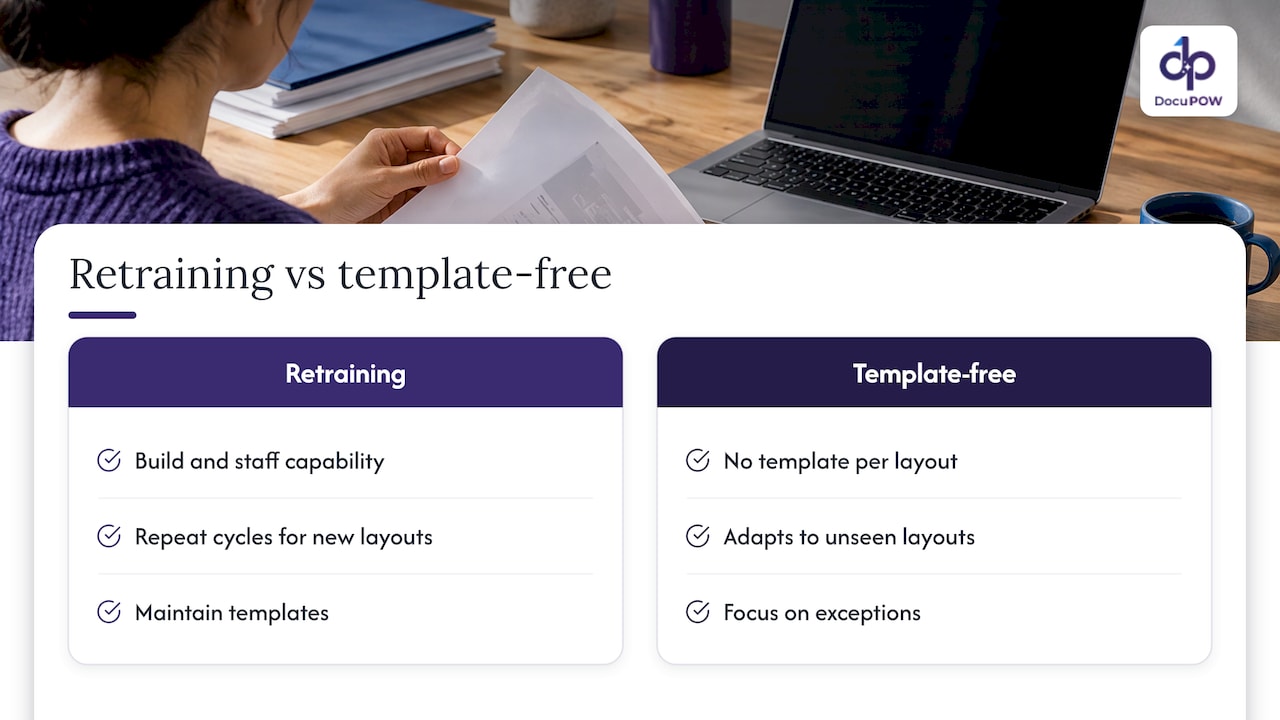
A model trained on templates or fixed samples has a boundary: documents inside what it learned process correctly, and documents outside it fail. That is why teams that rely on trained extractors spend so much time on cycles like the one above. Each new supplier, form revision or acquisition widens the gap.
There are two ways to deal with it. You can build the retraining capability and staff it. Or you can choose extraction that does not depend on a template for each layout, so that fewer new layouts turn into failures. For mid-size and enterprise teams whose job is closing the books, shipping orders or processing claims, not running a model lab, the second path removes most of the recurring work.
Our view on retraining
We built DocuPOW on a simple observation: the best retraining project is the one you never have to schedule. Our agentic, template-free extraction is designed to adapt to document layouts it has not seen before, which minimizes setup and maintenance when a vendor changes its invoice or a new document type enters the workflow.
Where a person still needs to decide, we put the person in the loop. Human-in-the-loop audit review lets your team confirm or correct values at the point where they matter, and every value can be traced back to its source in the document. That is the discipline the retraining guidance above asks for, applied inside the workflow instead of as a separate project.
The work does not stop at extraction. Our platform orchestrates multi-step workflows and delivers validated data into ERP and CRM systems through an API, with schema validation, encryption and a cloud-native architecture built for high-volume environments. Your finance, operations and compliance teams spend their time on exceptions, not on maintaining templates.
Syed Naveed Abbas
What this looks like with DocuPOW
DocuPOW is an agent-based document automation platform: template-free data extraction from any document type, multi-step workflow orchestration, human-in-the-loop audit review, real-time analytics, and conversational document search with source citations. Plans are published on the pricing page: Starter is $99 per month and Professional is $499 per month, and Enterprise is available through the team.
To see how the pieces fit together, start with the platform overview. If your volume is the main concern, our guide to high-volume document processing best practices covers how to structure queues, review and throughput, and the processing throughput guide explains what to measure. Teams that need documents flowing into systems in minutes can read about real-time data extraction from documents.
How different teams should apply this
Finance and accounting. Prioritize totals, tax amounts, due dates and vendor identifiers. Keep the baseline weighted toward your highest-spend suppliers and your ugliest scans.
Procurement and supply chain. New suppliers are the main source of new layouts. Track exception rates by supplier, and review the share of documents from vendors onboarded in the last quarter.
Legal and compliance. Your risk is a wrong clause or date treated as right. Keep human sign-off at the consequence boundary and keep audit lineage of who approved what, and when.
Healthcare and insurance. Retraining sets contain personal data. Minimize, restrict, log and involve your privacy officer before reuse.
IT. Own the environments, versioning and rollback. Make sure the model, parser and mapping versions are recorded together so any release can be reversed.
FAQ
How often should you retrain a document AI model?
There is no universal schedule. Retrain when a measured trigger fires: a layout change, a rule change, or field error rates that stay above baseline over an evidence window. Calendar-only retraining can waste effort or add instability, so tie each cycle to a reason you can document.
How much data do you need to retrain?
The amount depends on the model and the gap you are closing, so there is no honest single number. What matters more is variety and label quality: real documents from the troublesome vendors and scan types, with consistent corrections, and a separate frozen test set that is never used for training.
Can the model get worse after retraining?
Yes, which is why you compare the old and new versions field by field on a frozen baseline before release. Block the release if any critical field regresses, roll out to a small slice first, and keep the previous version available to restore.
Do human corrections automatically improve the model?
Not safely on their own. Corrections should be validated, ideally confirmed by a second reviewer, and stored with the model version that produced the original output before they are used as training data. Human review is also valuable for the work itself: it catches exceptions where a wrong value would have consequences.
How do you avoid retraining every time a vendor changes a layout?
Use extraction that does not rely on a fixed template per layout, and keep review in the workflow for the exceptions. DocuPOW’s template-free approach is designed for this: it adapts to unseen layouts and minimizes the setup and maintenance that layout changes would otherwise create.
Sources
- A Framework for Monitoring and Retraining Language Models in Real-World Applications (Thomson Reuters Labs, arXiv)
- How to Version and Retrain a Custom Document Model Safely (DatabossTech)
- Continuous model improvement (The Neural Base)
- Closed-Loop Learning: Letting Human Corrections Actually Retrain Agents (TFSF Ventures)
- Fine-Tuning for AI Automation: Data, Evaluation, Release (Edilec)
- Model Drift Monitoring, Safe Retrain, Canary Release, Rollback (Kriv AI)
- Continuous Deployment for AI Models: Your Rollback Signal (Tian Pan)
Recommended
See DocuPOW on your documents.
Stop building templates. Start extracting data.


