Up to 70% Faster: Document Automation Without Templates for Operations
Practical checklist to choose and pilot document automation. Learn when template free agent extraction can cut processing time by up to 70% and how to run...


Business documentation automation replaces manual data entry and paper-based routing with software that extracts, generates, and moves documents through approval chains automatically. For organizations processing high volumes of contracts, invoices, or claims, the payoff shows up fast: intelligent document processing tools report processing time reductions of 60 to 70 percent and error reductions of up to 90 percent. The sections below walk through how the technology works, what it costs, and how to pick the right approach for your document volume and complexity.
TL;DR:
- Template-based generation works best for standardized outbound documents with fixed formats, but fails when inbound documents vary in layout or language.
- Ensuring high accuracy requires human-in-the-loop systems that incorporate exception handling and reliable integration with existing enterprise systems like ERPs and CRMs.
- Most organizations see a return on investment of 200 to 300 percent within the first year, mainly through labor saving, faster revenue recognition, and fewer compliance issues.
- High-variability inbound documents in industries like manufacturing and supply chain benefit most from agent-based, template-free extraction solutions that interpret context directly.
- A successful implementation begins with a baseline audit, a focused pilot, and fixes workflow inefficiencies beforehand to prevent automating broken processes.
Table of Contents
- What Is Business Documentation Automation, Exactly?
- The Technical Layers Behind Every Automated Document Workflow
- Benefits and ROI: What the Numbers Actually Show
- Which Workflows Should You Automate First?
- How to Evaluate a Document Automation Platform
- Rolling Out Document Automation: From Pilot to Enterprise Scale
- Security Risks and How to Mitigate Them
- Comparing Document Automation Approaches Without the Vendor Hype
- Where Document Automation Is Headed Next
- Why Template-Free Extraction Is the Approach That Scales
- Ready to Move Past Manual Document Entry?
- Sources
- FAQ
What Is Business Documentation Automation, Exactly?
Two very different technologies get lumped under “document automation,” and mixing them up is the fastest way to buy the wrong tool. The first is template-based generation: software that fills in pre-built document templates (contracts, offer letters, proposals) with data pulled from a CRM or database. It’s outbound. You’re creating documents from structured data you already have.
The second is intelligent document processing, or IDP. IDP works in reverse. It reads incoming documents, whether a scanned invoice, a signed lease, or a handwritten claim form, and pulls structured data out of them using optical character recognition, natural language processing, and machine learning. It’s inbound. You’re extracting data from documents other people send you.
Here’s the decision rule that actually matters: if your documents are standardized and you control the format, template generation wins on speed and cost. Around 80 percent of mid-to-large organizations already use templated solutions for routine forms and invoices. But if incoming documents vary in layout, vendor, or language, template tools break constantly, and IDP becomes the only approach that scales.
- Template generation: fast, cheap, ideal for outbound contracts and standardized forms
- IDP/AI extraction: slower to configure, but essential for variable inbound documents
- Hybrid stacks: most mid-size and enterprise operations end up running both
The Technical Layers Behind Every Automated Document Workflow
A document automation platform isn’t one feature. It’s a stack, and weak links anywhere in that stack show up as errors, delays, or compliance gaps downstream.
- Capture and OCR/IDP — the system reads the raw document, whether scanned, photographed, or born digital, and converts it into machine-readable text.
- Classification — the platform identifies what kind of document it’s looking at (invoice, purchase order, lease amendment) before it tries to extract anything.
- Extraction — data fields get pulled out: amounts, dates, vendor names, line items, signatures.
- Business rules — extracted data gets validated against logic (does this invoice total match the PO, is this discount within policy).
- Orchestration — the document and its data move to the next human or system in the workflow.
- E-signature and storage — final approval, signing, and archiving with version history.
- Analytics and audit — dashboards track cycle time and exceptions, while an audit trail logs every touchpoint for compliance.
A complete document workflow stack needs all seven functional layers: capture and OCR/IDP, classification, extraction, business rules, orchestration, e-signature, and audit, working together, not bolted on separately.
The accuracy layer deserves special attention. No IDP system hits 100 percent extraction accuracy on messy real-world documents out of the gate. The better platforms use a human-in-the-loop model: a person reviews and corrects low-confidence extractions, and the system learns from those corrections over time, gradually needing less human review. Integration matters just as much as extraction. Native connectors matter less than most buyers assume; what matters is whether the platform maintains reliable, bi-directional sync with your ERP, CRM, or HRIS so data doesn’t get stuck in a one-way pipe.
Pro Tip: Ask any vendor to show you their exception-handling workflow, not just their happy-path demo. How a platform handles a document it can’t confidently read tells you more about production readiness than any accuracy percentage on a slide.
Benefits and ROI: What the Numbers Actually Show
The financial case for documentation automation is one of the stronger ones in enterprise software, and it’s backed by consistent figures across independent reports.
Organizations implementing document automation commonly report ROI in the 200 to 300 percent range within the first year, with per-document processing costs dropping to low levels at scale once volume justifies the setup investment.
That ROI shows up in a few concrete ways:
- Labor recovered: staff who spent hours on manual data entry shift to exception handling and higher-value review work
- Faster revenue recognition: contracts and invoices that used to sit in approval queues for days close in hours
- Fewer compliance penalties: automated audit trails catch missing signatures or approval gaps before they become fines
- Lower error-correction cost: with error reductions up to 90 percent on well-tuned IDP deployments, rework and downstream corrections drop sharply
None of that is guaranteed, though. The gains fall short most often when integration work gets underestimated, teams treat the rollout as a one-time IT project instead of an ongoing process, or change management gets skipped and staff quietly route around the new system. Enterprise investment in automation keeps climbing, with analysts projecting continued growth in adoption through 2026, which raises the competitive cost of standing still.
Which Workflows Should You Automate First?
Not every document workflow deserves equal priority. The best pilot candidates share three traits: high volume, repetitive structure, and a clear, measurable bottleneck.
- Sales agreements and proposals: trigger on deal-stage change in the CRM, auto-generate the contract, route for e-signature, update the CRM on completion. Owner: sales operations. KPI: time from quote to signed contract.
- Accounts payable invoice intake: trigger on email or portal receipt, extract vendor and line-item data, match against purchase orders, flag discrepancies for review. Owner: finance/AP. KPI: cost per invoice processed and days payable outstanding.
- HR onboarding paperwork: trigger on offer acceptance, generate the packet, route for background-check and tax-form completion, sync to the HRIS. Owner: HR operations. KPI: time to first productive day.
- Procurement approvals: trigger on requisition submission, apply approval-threshold rules, route to the right approver tier automatically. Owner: procurement. KPI: approval cycle time.
- Claims and service tickets: trigger on inbound submission, extract claim details, classify severity, route to the right adjuster or agent. Owner: operations/service. KPI: first-response time and resolution rate.
Pick one, run it for eight weeks, and measure it before adding a second workflow.
How to Evaluate a Document Automation Platform
Skip the vendor comparison charts for a minute and focus on what actually predicts success: fit between the platform’s architecture and your document reality.
- Integration depth over integration count. A platform with fifty shallow connectors is worse than one with five that sync bi-directionally and reliably with the systems you actually run.
- Template flexibility versus extraction intelligence. If your inbound documents vary in format, ask specifically how the platform handles a document layout it has never seen before.
- Accuracy and the human-in-the-loop workflow. Ask for real accuracy figures on documents similar to yours, not vendor-wide averages, and ask how corrections feed back into the model.
- Throughput and scale. A tool that works cleanly for 500 documents a month can choke at 50,000. Ask about performance at your projected volume, not your current one.
- Security and compliance posture. Confirm SOC 2 status, audit-trail granularity, and data residency options before you get attached to a platform’s interface.
- Analytics and reporting depth. Dashboards should show cycle time, exception rates, and bottlenecks, not just document counts.
On the procurement side, define your proof-of-concept success metrics in writing before you start (target accuracy, target cycle time, integration test cases), and calculate total cost of ownership including implementation and ongoing model tuning, not just the subscription line.
The most common cause of a failed rollout isn’t a bad product. It’s a mismatch between document complexity and tool capability: teams pick a template tool for genuinely variable inbound documents, hit a wall at scale, and have to migrate mid-project.
Pro Tip: Run your proof-of-concept on your ugliest documents, not your cleanest ones. Any platform can handle a pristine invoice template. The one that handles your worst vendor’s handwritten purchase order is the one worth buying.
Rolling Out Document Automation: From Pilot to Enterprise Scale
Most failed automation projects fail before a single document gets processed, because nobody measured the baseline. Here’s a rollout sequence that avoids that trap.
- Week 0: baseline audit. Measure current document volume, average cycle time, and error rate for the workflow you’re targeting. Without this, you can’t prove ROI later.
- Weeks 1 to 3: map and configure. Identify every data source feeding the workflow, then build the template or train the extraction model on a representative sample of real documents, not clean sample data.
- Weeks 4 to 6: test with production-like volume. Run the configured workflow against real historical documents and compare outputs against known-correct answers.
- Weeks 7 to 8: limited live pilot. Route a subset of live documents through the new system alongside the old process, with a person checking both.
- Post-pilot: scale and govern. Add template version control, define exception-routing rules for documents the system can’t confidently process, and set up monitoring dashboards before expanding to a second workflow.
A frequent mistake at the audit stage is automating a broken process instead of fixing it first. If your approval chain has three redundant sign-offs today, automating it just moves the redundancy faster instead of removing it. Fix the workflow, then automate it. For teams scaling past a single department, structured strategies for sustainable growth apply just as much to document operations as to any other part of the business.
Security Risks and How to Mitigate Them
Documentation automation systems handle sensitive data at volume, which makes them a meaningful attack surface if security gets treated as an afterthought.
The biggest risk isn’t exotic. It’s overly broad access. When every employee who touches a workflow has full visibility into every document flowing through it, a single compromised account exposes far more than it should. Role-based access control, scoped to the specific document types and fields a person actually needs, closes most of that gap.
Data residency and retention are the second concern, especially for organizations handling financial or healthcare-adjacent documents. Confirm where extracted data physically lives, how long it’s retained, and whether it can be purged on request before you sign a contract, not after.
Third, watch integration points. APIs and webhooks connecting your document platform to your ERP or CRM are common targets, since a poorly secured connector can leak data even when the core platform is locked down tight. Insist on encrypted connections, scoped API keys, and logged access for every integration point.
Finally, audit trail integrity matters as much as audit trail existence. A log that can be edited or deleted after the fact isn’t a real audit trail. Confirm the platform’s logs are immutable and time-stamped, and that SOC 2 or equivalent compliance certification actually covers the document-handling components, not just the hosting infrastructure.
Comparing Document Automation Approaches Without the Vendor Hype
Rather than ranking specific products, it helps to compare document automation platforms by architecture category, since that’s what actually determines fit.
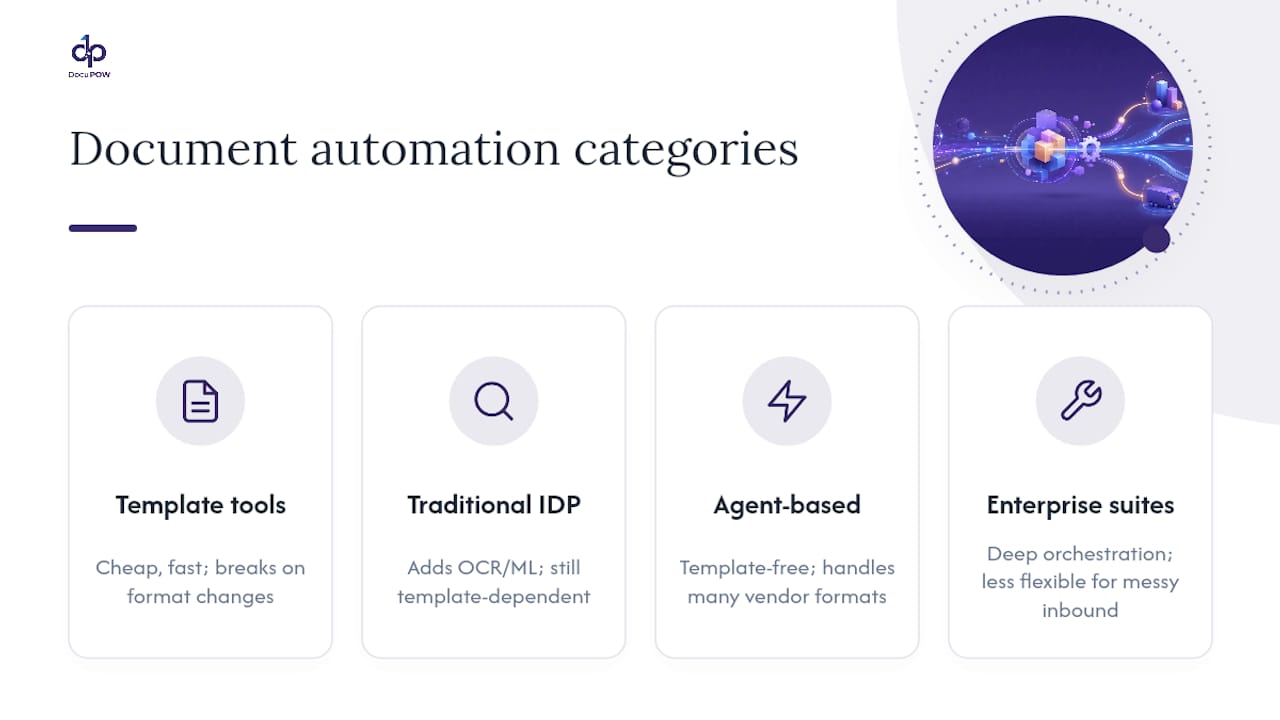
Entry-level template tools handle standardized outbound documents well: contracts, offer letters, standard forms. They’re cheap and fast to configure, but they break the moment document format varies, and they offer little for inbound processing.
Traditional IDP platforms add OCR and machine learning for inbound extraction, but many still depend on pre-built templates matched to specific document layouts. That works fine until a new vendor sends an invoice in a format the template has never seen, at which point accuracy drops and someone has to manually build a new template.
Agent-based, template-free extraction platforms represent the newer category. Instead of matching documents against a template library, autonomous agents interpret document context and structure directly, extracting data without needing a pre-built layout match. This matters most for organizations receiving documents from hundreds of different vendors, partners, or geographies, where building and maintaining a template for every format is a losing game.
Enterprise workflow suites bundle document automation into broader business-process platforms, offering deep orchestration but often at the cost of extraction flexibility for genuinely messy inbound documents.
The right category depends entirely on document variability, not brand reputation. A construction company processing subcontractor invoices in forty different formats has a fundamentally different need than a company generating standardized internal HR forms.
Where Document Automation Is Headed Next
The next wave of documentation automation is moving from “extract and route” to “extract, understand, and predict.” Real-time analytics layered on top of extracted data already let finance and operations teams spot cash-flow patterns or vendor risk before a human would notice them in a spreadsheet. Predictive insights, flagging a likely invoice dispute or an approval bottleneck before it happens, are becoming a standard feature rather than a premium add-on.
Agentic AI is the bigger shift. Instead of software that follows a fixed extraction template, autonomous agents are starting to handle multi-step reasoning: reading a contract, checking it against policy, flagging the specific clause that deviates, and routing it to the right reviewer, all without a human pre-defining every rule. That reduces the brittle template maintenance that has plagued IDP for years.
Semantic search across document repositories is also maturing fast. Instead of searching by filename or exact keyword, teams can query “show me every vendor contract with a termination clause under 30 days” and get a real answer, because the system understands document meaning, not just text strings.
Expect deeper integration with predictive financial modeling next, where document-extracted data feeds directly into forecasting rather than sitting in a static database waiting for someone to run a report.
Why Template-Free Extraction Is the Approach That Scales
Most document automation vendors will tell you templates are a feature. I’d argue they’re a liability that hasn’t caught up to how variable real-world documents actually are. A template works great until the eleventh vendor sends an invoice in a format nobody anticipated, and then someone on your team is back to manual entry or building yet another template to maintain.
DocuPOW’s agent-based approach skips that entirely. Instead of matching documents against a template library, autonomous agents interpret document context directly, which means a global manufacturer receiving purchase orders from six hundred suppliers in a dozen formats doesn’t need six hundred templates. It needs a system that actually reads the document the way a person would.
This isn’t the right fit for every organization. If your document volume is low and your formats are genuinely standardized, a simpler template tool will cost less and do the job. But for high-variability inbound documents, especially in manufacturing, construction, and supply chain operations, template-free extraction is the only approach that doesn’t degrade as your vendor list grows.
— Syed Naveed Abbas
Ready to Move Past Manual Document Entry?
If your team has spent this article recognizing your own invoice pile or contract backlog, the checklist above should feel less like theory and more like a shopping list. DocuPOW is built specifically around the item most vendors struggle with: template-free extraction that handles document variability instead of breaking on it.

The platform combines agent-based extraction, API-first integrations with your ERP and CRM, real-time analytics, and full audit trails, the same criteria the evaluation checklist above walks through, in one system rather than five stitched together. For operations teams managing high document volume, the operational benefits map directly to measurable outcomes: fewer manual touches, faster cycle times, and a compliance trail that holds up to scrutiny.
If you’re managing document volume in real estate, construction, or supply chain operations specifically, start with a scoped proof of concept on your messiest current workflow. Request a demo and bring your worst vendor invoice. That’s the real test.
Sources
- Document Automation Software: A Practical Guide for Businesses (2026)
- Document Automation at Scale: Why Most Tools Fail
- Intelligent Document Processing Statistics and Facts (2026)
- Document Workflow Automation: A Complete Guide
- Document Generation Automation Statistics and Trends for 2026
FAQ
What Are Some Examples of Document Automation?
Common examples include auto-generated sales contracts, AI-extracted invoice data for accounts payable, automated HR onboarding packets, and claims processing that classifies and routes incoming forms without manual sorting.
What Are the Four Types of Automation?
Documentation-focused automation generally falls into template-based generation, IDP/AI extraction, workflow orchestration and routing, and e-signature/approval automation, each addressing a different stage of the document lifecycle.
What Is the Best Document Automation Software?
The right platform depends on document variability: standardized outbound documents favor template tools, while high-variability inbound documents favor agent-based, template-free extraction platforms like DocuPOW that don’t require a pre-built layout match.
What Are the Top Document Management Systems Businesses Use?
Most businesses now choose between traditional document management systems built for storage and retrieval, and modern documentation automation platforms that add extraction, workflow orchestration, and analytics on top of storage rather than treating it as the end goal.
How Long Does It Take to Implement Document Automation?
A focused pilot on a single workflow typically runs six to eight weeks from baseline audit to live testing, with enterprise-wide scaling following in phases after the pilot proves out accuracy and ROI.
Recommended
See DocuPOW on your documents.
Stop building templates. Start extracting data.