2026: 4 Steps to Process Intelligence Readiness With Document Data
A 4 step 2026 readiness plan: use process intelligence to avoid automating broken work and close document driven blind spots before you deploy AI.

Process intelligence turns execution data into a live, continuously updated map of how work actually happens, not how the flowchart says it should happen. It exists so teams can find the exact bottlenecks, rework loops, and manual workarounds draining ROI from automation and AI. Everything below covers how it works, what it delivers, and how to evaluate a platform before you buy one.
TL;DR:
- Process intelligence combines system logs, desktop activity, and document data to provide a real-time view of how work actually flows across multiple tools and knowledge work environments.
- It follows a continuous cycle of capturing execution data, reconstructing process maps, analyzing bottlenecks, and testing fixes before full deployment to ensure ongoing process improvement.
- Platforms with diverse data coverage and quick deployment are essential, and vendors should demonstrate functionality using actual customer data rather than curated demos.
- Integrating document extraction, especially for heavy paperwork roles like claims or procurement, fills a critical gap where traditional log-based process maps fall short.
- Evaluating a process intelligence platform requires assessing data sources, integration capability, privacy measures, modeling features, and ease of deployment, with a focus on aligning with existing systems.
Table of Contents
- What Is Process Intelligence, and How Does It Differ From Process Mining?
- How Does Process Intelligence Work, Step by Step?
- What Are the Biggest Benefits and Use Cases of Process Intelligence?
- Why Does Process Intelligence Matter for Automation and AI?
- How Do You Evaluate a Process Intelligence Platform?
- How Do You Design a Process Intelligence Pilot?
- What Are the Common Challenges With Process Intelligence?
- How Do Leading Process Intelligence Platforms Compare?
- What’s Next for Process Intelligence Technology?
- Publisher Perspective: Document Intelligence Fills a Real Gap
- See How Document Data Fits Into Your Process Intelligence Picture
- Sources
- FAQ
What Is Process Intelligence, and How Does It Differ From Process Mining?
Process intelligence is the broader discipline. It pulls together system event logs, desktop-level activity, and document data to build a near-real-time picture of how work moves across tools and people, not just through one application. Process mining is a subset of that: it works strictly from structured event logs, the timestamped digital trail that ERP, CRM, and ticketing systems leave behind. Task mining, meanwhile, watches what happens on someone’s screen, capturing clicks, copy-paste steps, and switches between applications that never show up in a system log.
Here’s how the three relate in practice:
- Process mining reconstructs workflows from clean, structured system logs. It’s strong where data volume is high and consistent.
- Task mining captures desktop-level behavior missing from those logs, including manual data entry and cross-app copying.
- Process intelligence combines both, then layers in document-based signals to cover knowledge work that touches spreadsheets, PDFs, and email alongside core systems.
Process mining works best when logs are clean and high-volume. Process intelligence fits better for multi-tool, document-heavy workflows where the real bottleneck lives outside the system of record entirely.
How Does Process Intelligence Work, Step by Step?
Process intelligence follows a repeatable cycle: capture, reconstruct, analyze, act. Each phase feeds the next, and the loop never really closes because processes keep drifting the moment you stop watching them.
- Capture. The platform pulls system event logs, deterministic desktop telemetry, and document extraction data. This is the raw material: every click, every field entry, every approval stamp.
- Reconstruct. Raw signals get assembled into an actual process map, showing every path a case took and every variant that deviated from the intended design.
- Analyze. The platform surfaces bottlenecks, rework loops, and the outcomes tied to specific variants, often correlating a slow step with a root cause like a missing field or a manual handoff.
- Act. Teams run fixes, launch targeted automation, and re-measure to confirm the change actually worked, rather than assuming it did.
This four-phase loop is what separates process intelligence from a one-time audit: it keeps measuring after the fix ships. Pro Tip: Run the “act” phase as a controlled test on one variant before rolling a fix out enterprise-wide. Process intelligence platforms with simulation features let you model the change before committing budget to it.
The reconstruction phase is where most of the surprises happen. Teams routinely discover that the “standard” process they documented years ago is actually a dozen different paths, and the slowest one is often the one leadership assumed was fastest.
What Are the Biggest Benefits and Use Cases of Process Intelligence?
The core payoff breaks into five areas: visibility into how work actually flows, targeted automation instead of blanket automation, lower cost per transaction, stronger governance and compliance evidence, and a continuous improvement loop, instead of a one-time project monitored over time.
- Order-to-cash: spot where invoices stall between approval and payment, and which customer segments trigger the most exceptions.
- Claims processing: identify which claim types loop back for rework and why, often tracing delays to missing documentation rather than adjuster error.
- Finance and accounting: find manual reconciliation steps hiding inside a “standardized” close process.
- Customer service: correlate ticket resolution time with the number of system switches an agent has to make.
- HR onboarding: track how many approval hops a new-hire form actually takes versus the documented three.
Because process intelligence continuously monitors execution rather than sampling it once, teams get standing KPIs to track: cycle time by variant, error rate by handoff point, and cost per transaction by process path. Those three numbers, watched over a full quarter, tend to expose more waste than any single audit ever will.
Why Does Process Intelligence Matter for Automation and AI?
Automating a broken process just makes the mess run faster. That’s the risk industry analysts point to directly: organizations that skip process intelligence often automate existing flaws and never see the AI return they budgeted for. Process intelligence supplies the operational context an AI agent needs before it can act safely, showing which variant is the exception, which step is a compliance checkpoint, and which handoff actually has a human reason behind it.
Governance is the other half of this. Mature process intelligence platforms support conformance checking and simulation, so teams can test a proposed automation against real variant data before deployment, plus audit trails and human-in-the-loop review points for anything touching regulated data.
Pro Tip: Before automating any step, ask how many distinct variants feed into it. If the answer is more than three, you’re not ready to automate. You’re ready to redesign.
How Do You Evaluate a Process Intelligence Platform?
Vendor evaluation comes down to five practical questions, and most procurement teams skip at least two of them.
- Data coverage: Does it capture system logs, desktop telemetry, and document data, or just one of the three?
- Deployment effort: What’s the realistic time to first insight? Traditional manual process mapping takes weeks; some process intelligence platforms deliver an initial map in days.
- Privacy model: Does capture happen privacy-first, with PII masking and anonymization options built in, or is that bolted on later?
- Integration depth: Can it connect directly to your ERP, CRM, and HRIS through native connectors and open APIs, or does it need custom middleware?
- Measurement and simulation: Can it model a proposed fix and estimate the ROI before you commit resources, per ARIS’s evaluation criteria?
Ask every vendor to show you these features live in a demo against your own sample data, not a canned dataset. A platform that handles a vendor’s curated demo cleanly can still fall apart against your actual document mix, especially if a meaningful share of your process runs through PDFs, scanned forms, or email attachments the log-based tools never see.
How Do You Design a Process Intelligence Pilot?
Start narrow. A pilot that tries to map the entire enterprise at once produces a wall of data nobody acts on.
- Pick one process with a known pain point — a claims queue, an AP cycle, an onboarding flow — and define two or three success metrics up front (cycle time, error rate, cost per case).
- Assign cross-functional owners: a process owner who knows the workflow, an IT lead who can grant data access, a compliance reviewer for anything touching regulated data, and an analyst to interpret the output.
- Set a realistic timeline. Expect an initial process map within one to two weeks and enough analysis for a first set of fixes by week four.
- Measure, then roll out. Compare post-fix metrics against your baseline before expanding scope to a second process.
Quick wins tend to show up fastest in high-volume, high-variant processes, exactly where manual mapping would have taken months to surface the same insight.
What Are the Common Challenges With Process Intelligence?
Data fragmentation is the most persistent problem. Most enterprises run processes across a patchwork of systems, spreadsheets, email, and paper or PDF documents that never generate a clean event log. A platform that only reads structured logs will miss a large share of the actual work, which means the process map it produces looks complete but isn’t.

Privacy concerns come next, especially with desktop telemetry. Capturing screen-level activity raises legitimate questions about employee monitoring and PII exposure. The fix is a privacy-first capture model with built-in masking and clear data governance policies, agreed on before deployment, not retrofitted after employees start asking questions.
Change management is underrated as a limitation. A process map that reveals uncomfortable truths, like a manager’s pet workaround adding two days to every case, tends to meet resistance. Bringing process owners into the analysis phase early, rather than presenting findings as a fait accompli, heads off a lot of that friction.
Data quality and integration overhead round out the list. Connecting a process intelligence platform to legacy ERP or homegrown systems can take longer than vendors advertise, particularly when those systems lack modern APIs. Budgeting extra time for integration, and prioritizing systems of record with the cleanest data first, keeps a pilot from stalling in its first month.
Finally, plenty of teams treat process intelligence as a one-time audit instead of a standing capability. The value compounds only when the capture, analyze, and act cycle keeps running after the first project wraps.
How Do Leading Process Intelligence Platforms Compare?
Platforms in this category generally split into three tiers, and the right fit depends more on your data mix than on brand reputation.
Enterprise process mining suites excel at high-volume, structured-log environments, think large-scale manufacturing or logistics operations with clean ERP data. They’re strong on statistical rigor and conformance checking but weaker on anything that happens outside a system log, like document-based approvals or manual desktop work.
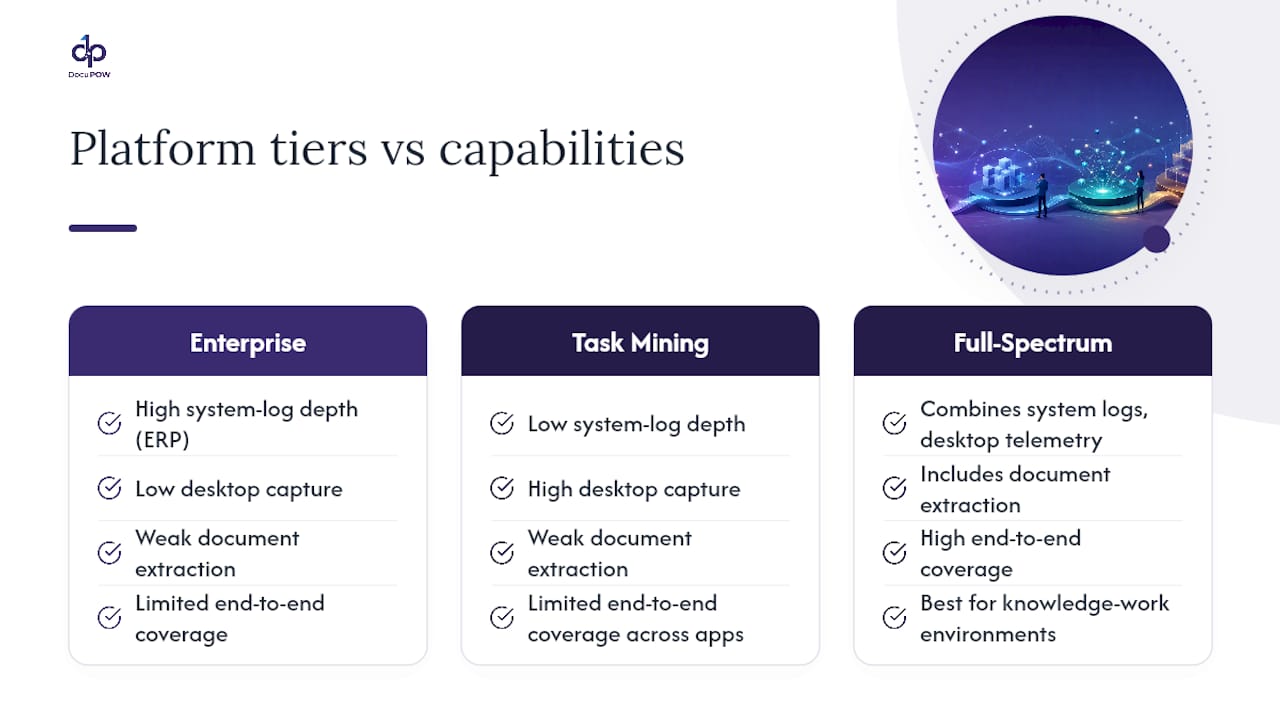
Task mining specialists focus on desktop-level capture, which is valuable for understanding knowledge-worker behavior, but they often lack the system-log depth to reconstruct end-to-end processes spanning multiple applications.
Full-spectrum process intelligence platforms combine system logs, desktop telemetry, and document extraction into one view. This category tends to serve knowledge-work environments best, where a single case might touch a CRM, a shared drive, three email threads, and a scanned contract before it closes.
The honest evaluation question isn’t which category sounds most advanced. It’s which one matches your actual document mix and integration landscape. A manufacturer with clean, high-volume ERP transactions has different needs than a professional services firm where half the process lives in unstructured documents. Ask any vendor for a coverage breakdown of your own systems before assuming their strength in one industry translates to yours.
What’s Next for Process Intelligence Technology?
The clearest trend is convergence: platforms that used to specialize narrowly in process mining or task mining are adding the other capability, plus document extraction, because customers keep asking for one unified view instead of stitching three tools together.
AI-native analysis is the second shift. Instead of a human analyst manually spotting a bottleneck in a process map, generative models are starting to flag anomalies, suggest root causes, and draft automation recommendations directly from the reconstructed map. That doesn’t remove the human reviewer. It just moves them from search to verification.
Simulation is becoming a standard feature rather than a premium add-on. Being able to model a proposed fix against historical variant data before deploying it, rather than after, cuts the cost of a bad automation decision considerably.
Expect tighter integration with agentic AI systems too. As more organizations deploy AI agents to execute steps in a workflow, those agents need the operational context process intelligence provides to know which variant they’re handling and when to escalate to a human. Document-heavy industries, insurance, healthcare, financial services, will likely see the fastest adoption, since that’s where the gap between “what the system log shows” and “what actually happened” is widest.
Publisher Perspective: Document Intelligence Fills a Real Gap
Most process intelligence platforms read logs well but treat documents as an afterthought, even though document-heavy steps often hide the worst bottlenecks. Agentic, template-free extraction can pull structured data straight out of invoices, contracts, and forms without a rigid template, surfacing manual steps that never show up in a system log. That’s the missing layer in a lot of process maps: not another dashboard, but visibility into the paperwork underneath.
— Syed Naveed Abbas
See How Document Data Fits Into Your Process Intelligence Picture
If your process maps keep hitting a wall at “document received” and picking back up at “document processed,” that gap often represents a significant source of hidden cost. DocuPOW uses agent-based, template-free extraction to pull structured data out of invoices, contracts, claims forms, and any document type your team touches, without the manual re-keying that skews cycle-time metrics in the first place.

That matters most in operations where paperwork drives the workflow: procurement approvals, claims intake, financial close, HR files. Pairing DocuPOW with a process intelligence initiative means your capture phase finally accounts for the documents your system logs never saw, giving analysts a complete picture instead of a partial one. Teams running high-volume paperwork should look at best practices for high-volume document processing before scoping a pilot, and construction and real estate operations with heavy document loads can start with DocuPOW’s construction or real estate solution pages. Request a demo to scope a pilot against your own document mix.
Sources
For deeper technical grounding, review Salesforce’s explainer on process intelligence, Insightful’s breakdown of process mining versus task mining, and ARIS’s guide to evaluation criteria. For AI readiness ahead of a pilot, Pattrn Data’s AI readiness assessment offers a useful starting checklist, and Sonance AI’s research on automation ROI covers metrics worth tracking post-deployment.
FAQ
What Is Process Intelligence?
Process intelligence is the discipline of combining system event logs, desktop telemetry, and document data into a continuously updated view of how work actually happens, so teams can find and fix real bottlenecks rather than assumed ones.
What Is the Difference Between Process Mining and Process Intelligence?
Process mining works only from structured system event logs, while process intelligence combines those logs with desktop telemetry and document data for a fuller view of knowledge work spanning multiple tools.
What Are the Four Steps in the Process Intelligence Cycle?
The core cycle is capture, reconstruct, analyze, and act: gather execution data, build a real process map, identify bottlenecks and variants, then implement fixes and re-measure.
Why Do You Need Process Intelligence Before Automating With AI?
Without it, organizations risk automating a process’s existing flaws instead of fixing them, which undermines the ROI automation and AI investments are supposed to deliver.
How Does Document Automation Fit Into Process Intelligence?
Document-heavy steps like invoice approvals or claims intake often sit outside standard system logs entirely. Platforms like DocuPOW extract that document data directly, closing a capture gap that log-based process intelligence tools typically miss.
Recommended
See DocuPOW on your documents.
Stop building templates. Start extracting data.