Invoice Line Item Extraction: A Practical Guide for Finance Teams
Learn how invoice line item extraction works, which fields to capture, how to validate results and how to post clean data to your ERP or accounting system.

Invoice line item extraction is the automated process of reading each individual row on an invoice (description, quantity, unit price, amount, tax) and turning it into structured data your accounting or ERP system can use. Header fields like vendor and total tell you what you owe. Line items tell you what you bought, which is what you need for three-way matching, cost coding and spend analysis. This guide covers how extraction works, which fields matter, how to handle messy layouts, and how to check results before anything is posted.
TL;DR
- Line item extraction pulls every row of an invoice into structured fields: description, quantity, unit price, amount, discounts and taxes.
- Modern extraction reads layouts it has never seen, so you do not need a template per vendor.
- Schema validation only proves the data has the right shape. You still have to check extracted facts against the source document.
- Post to your ledger only after validation, and keep the original invoice, since the IRS expects electronic records to be complete and retrievable.
- Route low-confidence rows to a human reviewer instead of letting them flow through unchecked.
Table of Contents
- What invoice line item extraction actually means
- Which fields to capture from each line
- How automated line item extraction works
- Handling PDFs, scans and unfamiliar layouts
- Validating extracted line items before posting
- Sending line items to your ERP, accounting and procurement systems
- Our perspective on line item extraction
- Security and recordkeeping for invoice data
- Where to go from here
- Try it on your own invoices
- FAQ
- Sources
What invoice line item extraction actually means
When someone asks what it means for an invoice to be “extracted,” they usually mean this: software has read the document and converted its content into fields a system can store and query. Extraction at the header level captures the invoice number, date, vendor and total. Extraction at the line level goes further and captures the table of goods or services itself.
The idea of a line is well defined in invoicing standards. The GOBL invoice schema describes a line as a single row in an invoice, which can include quantity, item details and price, a calculated sum, discounts, charges, taxes and a total. That is a useful mental model: each row is a small record of its own, and extraction should return it as one.
Why does this matter? Invoices contain the purchase date, product description, quantity, unit price and tax deductions, and they are necessary for accounting and tax purposes. A total alone cannot support a purchase order match, a GL split across cost centers, or a sales tax review. The rows can.
Which fields to capture from each line
Start with the smallest set that supports your process, then add fields as your workflows need them. A typed schema in a public invoice-processing example from Agno defines invoice-level fields plus a repeated line item object with description, quantity, unit price and amount. That is a sensible baseline.
In practice, finance teams usually extend it depending on what happens downstream:
| Field | Why it matters | Typical downstream use |
|---|---|---|
| Description | Identifies what was purchased | Cost coding, spend categorization |
| SKU or item number | Links the row to your catalog or PO | PO matching, inventory receiving |
| Quantity | Confirms what arrived | Three-way match against receipts |
| Unit of measure | Prevents unit mismatches (each vs. case) | Price variance checks |
| Unit price | Compares to contracted price | Price variance review |
| Line amount | Checks quantity times price | Arithmetic validation |
| Discount or charge | Explains differences from list price | Rebate and freight tracking |
| Tax | Supports tax treatment by line | Sales and use tax review |
| GL code or cost center | Assigned after extraction | Posting to the ledger |
The last row is not usually printed on the invoice. It is the result of a coding step that runs after extraction, and it is where line-level data pays off most.
How automated line item extraction works
Most pipelines follow the same sequence, whatever tool is behind them.
- Ingest. The document arrives by email, upload, API or a shared folder, as a native PDF, a scan or a phone photo.
- Read. The system converts the page into text and layout. For scans and images this includes optical character recognition (OCR). For digital PDFs it can read the embedded text directly.
- Locate the table. The system finds where the line items live on the page, including tables that continue across several pages.
- Map columns to fields. Headers such as “Qty,” “Quantity” and “Units” all need to resolve to the same field.
- Return structured output. Each row becomes a record with typed fields, usually as JSON.
- Validate. Totals, tax and required fields are checked, and uncertain rows are flagged.
- Deliver. Clean data goes to the ERP, accounting system or procurement tool.
The step that separates older tools from newer ones is step four. Template-based OCR needs a configured zone for every vendor layout, so a new supplier or a redesigned invoice breaks the setup. Template-free approaches use language and layout understanding to work out what each column means, which is what lets them handle documents they have not seen before.
Handling PDFs, scans and unfamiliar layouts
The hard cases are not the clean PDFs from your top ten vendors. They are the long tail. Here is what to plan for.
Native PDFs. These are the easiest, because the text is already machine-readable. The challenge is table structure: merged cells, wrapped descriptions and subtotal rows can all be mistaken for line items.
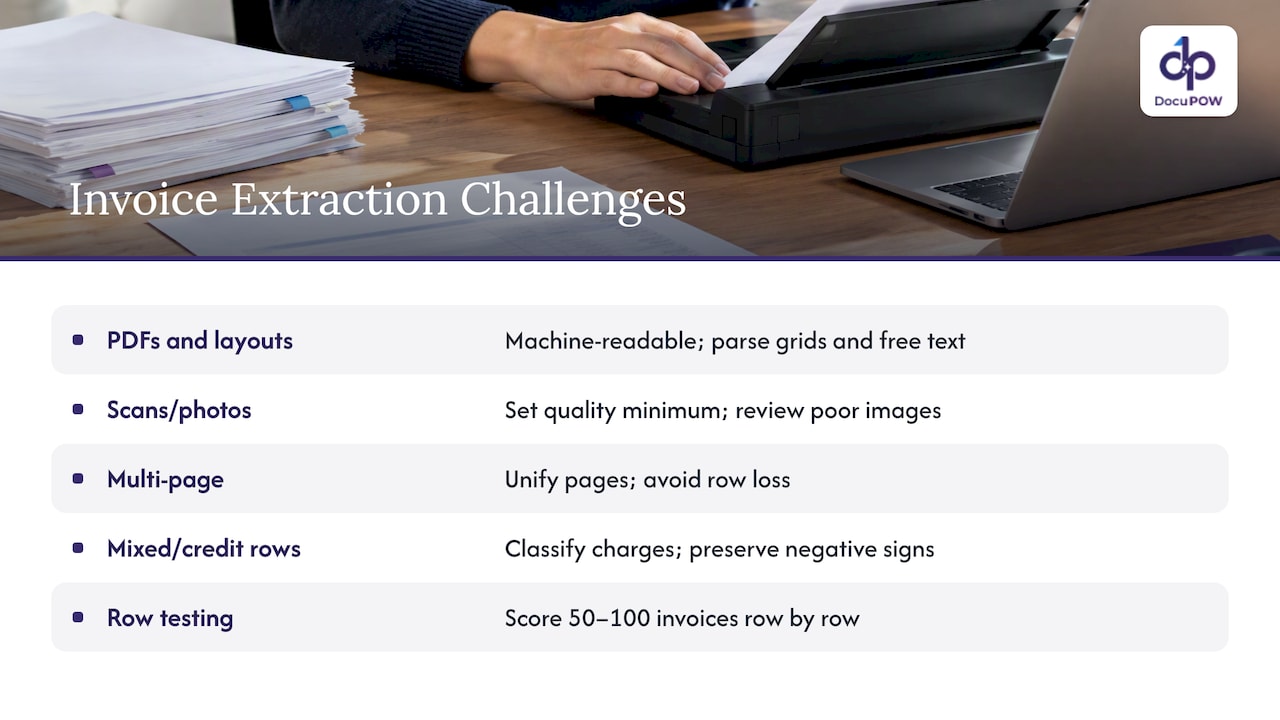
Scans and photos. Skew, shadows, fax artifacts and low resolution all reduce read quality. Set a minimum quality standard at intake and route anything below it for review rather than guessing.
Multi-page invoices. Line items often continue on a second or third page, with repeated headers and running subtotals. Your extraction should treat them as one table and avoid duplicating or dropping rows at page breaks.
Non-table layouts. Some suppliers, such as contractors and small shops, send invoices that look more like letters, with items in free text. Here the system has to read the content rather than the grid.
Mixed content. Freight, fuel surcharges, deposits and credit lines show up as rows that are not products. Decide in advance how each should be classified, because they affect matching.
Credit notes. Negative quantities and amounts must stay negative through extraction and posting.
A useful test before you commit to any approach is to gather 50 to 100 real invoices from your own inbox, deliberately including your ugliest vendors, and score the output row by row. Published research on invoice extraction stresses that results should be evaluated against defined accuracy metrics rather than trusting OCR output as automatically correct. Row-level accuracy on your documents is the number that matters, not a headline figure on a clean benchmark.
Validating extracted line items before posting
Extraction without validation just moves the error from a keyboard to a database. Good validation has two layers, and they do different jobs.
The Agno documentation draws the distinction clearly: schema validation checks shape and constraints, while extracted facts have to be verified against the source document separately. A row can have a numeric quantity, a numeric price and a valid date, and still be wrong because the number was misread or a row never existed.
Layer one: structural checks
- Every required field is present and has the right type.
- Quantity times unit price equals the line amount, within a rounding tolerance.
- The sum of lines, plus tax and charges, equals the invoice total.
- Dates are plausible and currency codes are consistent.
- The invoice number has not been processed before.
Layer two: factual checks
- Do the values match what is printed on the page? Show the reviewer the source image next to the extracted row.
- Do quantities and prices agree with the purchase order and the goods receipt?
- Does the vendor exist in your master data, and do the payment details match what you have on file?
Two habits prevent the worst errors. First, Agno recommends representing absent fields explicitly as null and prohibiting invented line items before results reach an accounts-payable ledger. A missing tax field should come back empty, never filled with a plausible guess. Second, give reviewers a fast path: show the flagged row, the source snippet and a one-click correction, so exceptions take seconds and the corrections can be fed back to improve results.
Payee details deserve their own check, since a clean line item table says nothing about whether the bank account on the invoice belongs to the supplier. Reading about bank account ownership verification methods is a good way to see how that step fits alongside extraction in a payment control process.
Sending line items to your ERP, accounting and procurement systems
Extraction is only valuable if the data lands where people work. There are three common patterns:
- Direct API posting. The extraction service writes a bill and its lines straight to the ERP or accounting system once validation passes.
- Webhook or queue. Results are pushed to a middleware layer that applies your coding rules, then forwards them.
- File export. A CSV or JSON file is picked up by an import job. This is the slowest option but the simplest to start with.
Whichever pattern you use, design for line collections of unpredictable size. Billing platforms show how this works: Stripe’s invoice API returns a lines property with a count and an initial subset, plus a URL to retrieve the complete paginated collection of line items. If your integration assumes an invoice has five lines, it will quietly truncate the one that has fifty.
Also plan for the identifiers. Keep the original document ID, the extraction run ID and the target system’s bill ID together, so an auditor can walk from a ledger entry back to the page it came from.
Our perspective on line item extraction
Most teams we talk to do not have a reading problem. They have a maintenance problem. A template-based setup works for a month, then a vendor changes its invoice layout and someone has to rebuild it.
That is why we built DocuPOW around template-free, agentic extraction. Our agents are designed to read an unfamiliar invoice the way an experienced AP clerk would: find the table, work out what each column means and return structured rows, without a template for each supplier.
We also believe extraction is the start of the job, not the end. Our platform pairs extraction with strict schema validation, human-in-the-loop review for the rows that need a person, and workflow orchestration that carries approved data into your ERP or CRM through our API. Reviewers see answers with their source, so a correction takes seconds and leaves an audit trail.
If you are choosing an approach, judge it on your own worst invoices and on what happens after the data is read. That is where the hours are saved.
Syed Naveed Abbas
Security and recordkeeping for invoice data
Invoices carry vendor banking details, pricing agreements and sometimes employee or customer information, so the extraction pipeline deserves the same controls as the rest of your finance stack: encryption in transit and at rest, role-based access, and logs of who viewed or changed what.
For U.S. businesses, the IRS frames invoices as supporting documents. It says they should be kept in an orderly, safe place, and that electronic records must meet the same basic recordkeeping principles as hard-copy records. The same IRS page notes that invoices and paid bills support entries in your books and tax returns, and refers to Publication 583, which says an electronic system must be able to index, store, preserve, retrieve and reproduce a complete and accurate record that the IRS can access.
In practical terms:
- Store the original file alongside the extracted data, never just the data.
- Make sure you can retrieve any invoice and its rows by vendor, date or number.
- Keep the correction history, so you can show what the system read and what a person changed.
- Limit who can edit posted data, and separate the people who approve from those who pay.
If you want to see how we approach these controls, our pages on platform security and secure AI document processing cover the details.
Where to go from here
If you are building your process, these pages go deeper on adjacent steps: invoice data extraction for finance teams covers catching errors before posting, touchless invoice processing looks at benchmarks beyond OCR, and our receipt data extraction guide handles the smaller, messier cousin of the invoice.
A simple rollout plan looks like this:
- Collect a representative sample of invoices, including the difficult ones.
- Define the line fields you need, and which ones are optional.
- Run extraction and score it row by row against a hand-checked set.
- Set validation rules and confidence thresholds for review.
- Connect posting to a test environment, then to production for a single vendor group.
- Widen the scope as the exception rate falls.
Try it on your own invoices
DocuPOW’s automated invoice processing flow extracts line items from any invoice layout without templates, validates them against your schema, sends exceptions to a reviewer and passes approved data to your systems. Plans start at $99 per month for Starter and $499 per month for Professional, with Enterprise available on request. See the pricing page for what each plan includes.
If you would rather see it work first, bring a handful of your most awkward invoices and start from our platform page.
FAQ
What is invoice extraction?
Invoice extraction is the process of reading an invoice and converting its content into structured data. Header extraction captures fields like vendor, date and total, while line item extraction captures each row of purchased goods or services. The result is data your accounting system can match, code and post without retyping.
What does it mean when an invoice is extracted?
It means software has read the document and stored its contents as fields rather than as an image or a block of text. Each value, such as a quantity or unit price, can then be validated, searched and sent to another system. The original file should still be kept as the record of truth.
Do I need a template for each vendor?
Not with template-free extraction. Template-based tools need a configured layout for every supplier, and they need rework when a layout changes. Template-free approaches read the page and infer what each column means, which is why they suit long vendor lists and one-off suppliers.
How accurate does line item extraction need to be?
That depends on your risk tolerance, but measure it row by row on your own invoices rather than relying on a single headline number. Pair extraction with arithmetic checks and a human review step for low-confidence rows, so a misread value is caught before it reaches the ledger.
Can extracted line items go straight into my ERP?
Yes, usually through an API or an import job. Validate first, handle invoices with many lines so none are truncated, and keep a link between the ledger entry and the source document for audit purposes.
Sources
- Line – GOBL invoice schema
- Invoice Information Extraction: Methods and Performance
- Invoices and receipts – Agno documentation
- Retrieve an invoice’s line items – Stripe API Reference
- What kind of records should I keep – Internal Revenue Service
- Bank Account Ownership Verification: Methods That Actually Work
Recommended
See DocuPOW on your documents.
Stop building templates. Start extracting data.