Multilingual Document Processing: How to Get It Right
How multilingual document processing works, why accuracy drops across scripts and scans, and how to test it on your own invoices, contracts and forms.


Multilingual document processing means pulling reliable, structured data out of documents written in many languages and scripts, without building a separate pipeline for each one. The approach that holds up in practice is template-free extraction against a schema, with validation and human review for the fields that matter. DocuPOW’s agents are built that way: they read unseen layouts without templates and validate output against a strict schema.
TL;DR
- Multilingual OCR only turns images into characters. Multilingual document processing adds language and script detection, field extraction, validation and routing.
- Accuracy falls most on non-Latin scripts, photographed pages and tables, so test on your own documents, not a vendor demo.
- Template-free extraction avoids writing a new template for every supplier, country or layout.
- Treat confidence per field: a total or account number gets reviewed, a free-text note does not.
- Build a small evaluation set by language, script, document type and image quality before you commit.
Table of Contents
- What multilingual document processing actually covers
- How a system reads mixed languages and scripts
- Where accuracy drops
- Why templates fail across languages
- Validation and review: the part that protects your books
- How to test any multilingual document solution
- Questions to ask when comparing providers
- Search across languages, not just extraction
- Our perspective
- Put it to work on your own documents
- FAQ
- Sources
What multilingual document processing actually covers
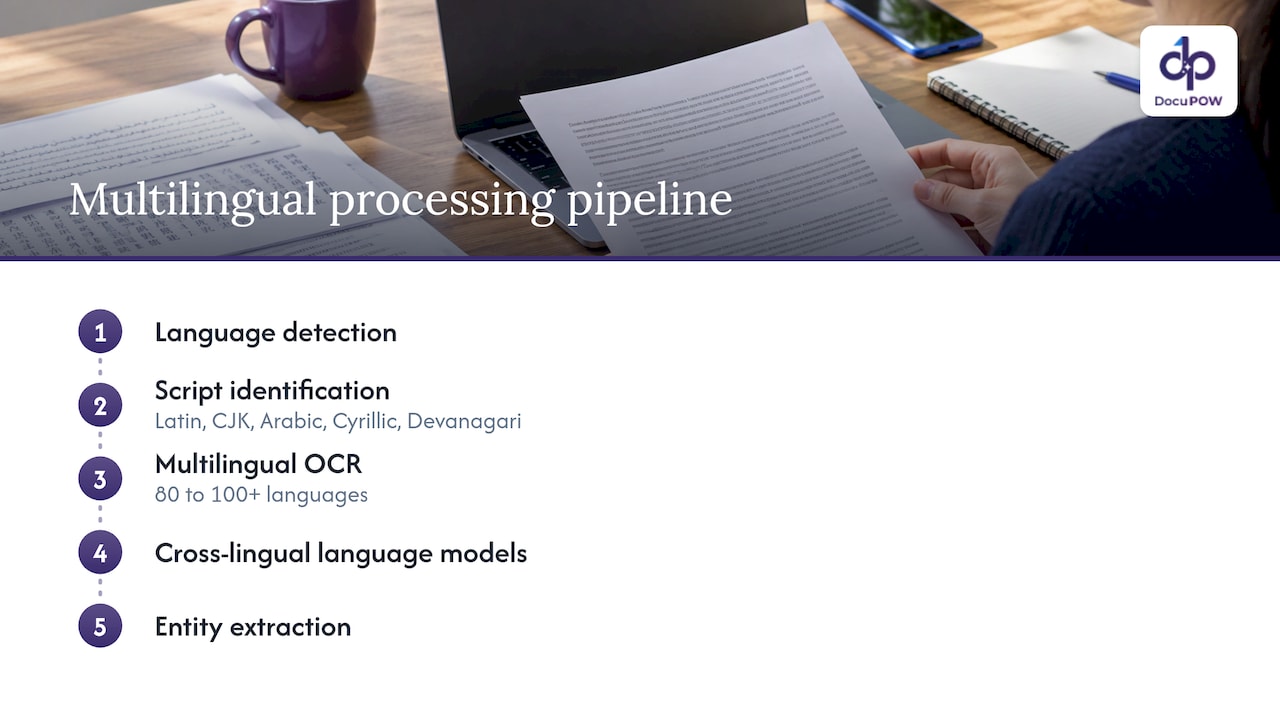
OCR (optical character recognition) reads text from an image. Multilingual OCR does that for several languages. One AI Wiki guide describes the full pipeline as language detection, script identification (Latin, CJK, Arabic, Cyrillic, Devanagari), multilingual OCR across 80 to 100+ languages, cross-lingual language models and entity extraction. The goal is to treat documents consistently whatever their language, instead of maintaining one pipeline per language.
That distinction matters for a finance or operations team. An invoice from a German supplier, a Japanese packing list and a Spanish purchase order all need the same outcome: a vendor, a date, line items and a total in your ERP, in the format your system expects. Characters on a screen do not get you there.
Gartner’s 2025 Magic Quadrant for Intelligent Document Processing describes IDP as tools that go beyond OCR, using AI and contextual cues to map content to data schemas rather than fixed templates, and it lists extraction from content in multiple languages as a core capability.
How a system reads mixed languages and scripts
Real documents rarely stay in one language. A bill of lading may carry English headings, Chinese party names and a stamp in another script. A 2025 survey in Artificial Intelligence Review explains that script identification works in three steps: image preprocessing, feature extraction and classification. It groups nearly 300 scripts into six writing systems. It also notes that mixed typesetting now needs identification at line, word and character level, and that similar pairs such as Japanese and Chinese, or Telugu and Tamil, are especially hard to tell apart.
An earlier sequence-to-label paper describes a classic design: find text lines, pick a script-specific OCR model among 30 scripts, transcribe to Unicode, then use layout analysis, where low recognition confidence signals that a box was not really text.
What this means in practice:
- Language should be detected per region, not once per file.
- Reading order and position should be preserved, so a number stays attached to its label.
- Stamps, footnotes and signatures deserve their own checks.
One OCR testing guide adds that when an engine accepts only one language per request, pages or cropped regions need to be routed separately. That is extra plumbing your team would own.
Where accuracy drops
The research is consistent: multilingual does not mean equal.
| Factor | What the evidence shows |
|---|---|
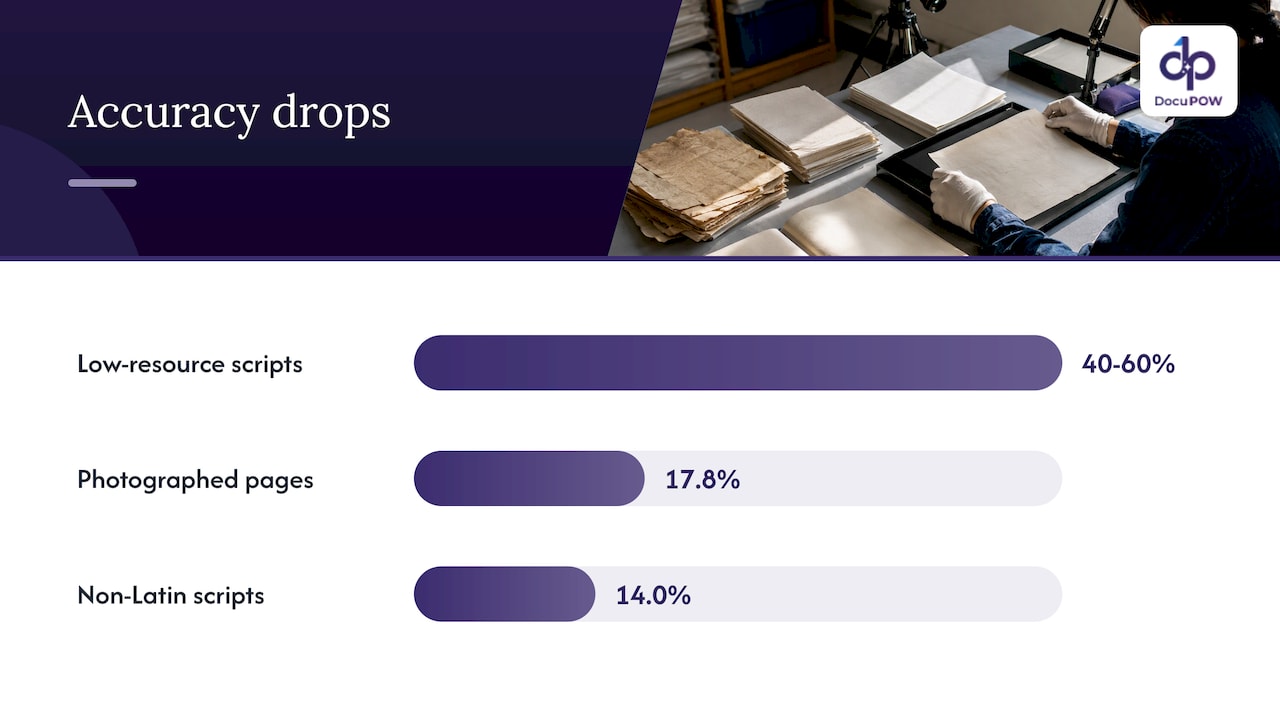
| Low-resource scripts | DocAtlas, a 2026 study covering 82 languages, found 40 to 60% accuracy drops |
| Tables | The same study found structured extraction plateaus at about 73% TEDS (a table-structure score) regardless of language |
| Photographed pages | MDPBench, 3,400 images in 17 languages, found an average 17.8% drop for open-source models on photographed documents |
| Non-Latin scripts | The same benchmark found an average 14.0% drop for open-source models |
Two lessons follow. First, scan quality is as much a variable as language: a phone photo of a Thai receipt is a harder problem than a clean PDF of a French one. Second, the tail errors are often not misread letters but number formats. The OCR guide cited above lists wrong decimal marks, dates and currency symbols among the errors to track. A total of 1.234,56 in Germany is 1,234.56 in the US, and a system that reads the characters perfectly can still post the wrong amount.
This is why we normalize values after extraction. Our guide to data normalization from documents covers dates, currencies and units in detail.
Why templates fail across languages
Template-based extraction maps fixed zones on a page to fields. Every new supplier, country or form revision needs a new template, and every layout change silently breaks an old one. Multiply that by dozens of languages and the maintenance becomes the project.
Template-free, zero-shot extraction takes a different route: the system reads the document, understands what each value means and returns it against your schema, even for a layout it has not seen. That is how DocuPOW’s zero-shot extraction works. Because the schema, not the page layout, defines the output, a Portuguese invoice and a Korean one produce the same fields in the same format.
For manufacturers, logistics and supply chain teams, where each partner sends its own paperwork, this is the difference between onboarding a supplier in minutes and onboarding it in weeks. See how this plays out in manufacturing and logistics workflows.
Validation and review: the part that protects your books
Extraction is only half the pipeline. A documented multilingual pipeline follows a pattern worth copying: ingest, extract against a JSON schema, validate against business rules, send uncertain items to human reviewers, then catalog the results.
The OCR guide also warns against treating a provider’s confidence score as a universal probability of correctness, and suggests separate thresholds per field. Uncertain descriptive text may be fine for search. An uncertain account number or invoice total should be held for review.
That is the model we build on. DocuPOW enforces strict schema validation and includes human-in-the-loop audit review, so the exceptions a multilingual set produces land in front of a person instead of in your ledger. Our guide to document exception handling shows how to route, review and resolve them.
How to test any multilingual document solution
Do not judge by a demo in English. Build a small evaluation set, as the OCR guide advises:
- Cover every language and script you actually receive. Include the awkward ones: mixed-language pages, stamps, handwriting.
- Include each document type. Invoices, contracts, customs forms and ID documents behave differently.
- Mix quality levels. Clean PDFs, low-resolution scans and phone photos.
- Measure at field level. Track per-field accuracy, language misclassification, missing or duplicated lines, reading-order errors and wrong decimal marks, dates or currency.
- Calibrate confidence against your own reviewed examples. Set review thresholds per field.
Gartner’s quadrant makes a related point about a major cloud OCR service: OCR language coverage is broad, but higher-level extraction of forms and tables needs thorough testing per language and document type. Check language support at the level you will use, not the OCR headline number.
Questions to ask when comparing providers
When you evaluate which providers support multi-language document sets, look past the language count:
- Does it extract fields without per-layout templates?
- Does it return a consistent schema across languages?
- Are there validation rules and a review step for low-confidence fields?
- Can it push data into your ERP or CRM through an API?
- Does it meet your security and compliance requirements?
On the last point, security architecture matters as much as accuracy when documents hold financial or patient data. Our security overview and the guide to NIST-aligned controls for secure AI processing explain how we approach encryption and access.
Integration is the other common stumbling block. A 2025 IEEE study of a cloud-based multilingual IDP system, combining multiple OCR engines with retrieval-augmented generation for semantic search, noted that serverless cold starts can hinder real-time tasks. Latency under load is worth testing too.
Search across languages, not just extraction
Many teams also want to ask questions of a multilingual archive: find every contract with an auto-renewal clause, whatever language it is in. This needs a searchable layer on top of extraction. If you are designing the cloud architecture for such a workflow, this overview of AI document discovery is a useful starting point. DocuPOW provides conversational document querying with source citations, so an answer points back to the page it came from.
Our perspective
We built DocuPOW on a simple belief: language should not decide how much manual work a document creates. When a team receives invoices, contracts and forms from fifty countries, the burden is rarely reading the characters. It is the templates, the exceptions and the cleanup after a wrong value gets through.
That is why our agents read documents the way a human expert would, work without templates, and check output against a strict schema before it goes anywhere. Where a field is uncertain, a person reviews it, and the audit trail stays intact.
Our advice to any team starting out: pick your hardest ten percent of documents first, the photographed ones, the mixed-script ones, and run them through. If the process handles those, the rest is easy.
Syed Naveed Abbas
Put it to work on your own documents
DocuPOW is an agent-based document automation platform with template-free extraction, multi-step workflow orchestration, human-in-the-loop review and ERP/CRM integration through an API. Plans on our pricing page start with Starter at $99 per month and Professional at $499 per month; Enterprise is quoted on request. You can see the full platform to find the setup that fits your document volume.
FAQ
Is multilingual OCR the same as multilingual document processing?
No. Multilingual OCR converts image text into characters across languages. Document processing continues from there: it detects language and script, extracts the fields you need, validates them and routes exceptions. For business workflows you need the whole chain.
Does accuracy differ by language?
Yes. Research shows larger drops for low-resource and non-Latin scripts, and for photographed rather than scanned pages. Test with your own language mix and image quality before rolling out.
Do I need a separate setup for each language?
Not with a template-free approach. The extraction is defined by your schema, so the same fields come back whatever the document language. Layout and language changes do not require new templates.
How should I handle documents that mix languages?
Detect language by region rather than per file, keep reading order and coordinates, and check stamps and footnotes separately. Send uncertain fields, such as totals or account numbers, to human review.
Sources
- Multi-Language Document Processing Guide, AI Wiki
- Magic Quadrant for Intelligent Document Processing, Gartner 2025
- Script identification in multilingual environment: a survey, Artificial Intelligence Review
- Sequence-to-Label Script Identification for Multilingual OCR, arXiv
- Multilingual OCR API: Testing and Workflow Guide
- DocAtlas: Multilingual Document Understanding Across 80+ Languages, arXiv
- MDPBench, GitHub
- Multilingual Document Processing Pipeline with Human-in-the-Loop Validation, ZenML
- A Multilingual Intelligent Document Processing System, IEEE
- AI Document Discovery, Collett Systems
Recommended
See DocuPOW on your documents.
Stop building templates. Start extracting data.