Prior Authorization Document Extraction: What to Capture and How
How prior authorization document extraction works: which fields to capture, how to validate them, how to connect them to EHRs, and which HIPAA safeguards apply.


Prior authorization document extraction means turning faxes, referral letters, clinical notes, lab reports and payer forms into structured, validated data that a request can be built from, without anyone retyping it. The approach that works is template-free extraction, checks against a fixed schema, a human review step for the uncertain fields, and an API connection to the systems that need the result. DocuPOW is built around that sequence: our agents read documents they have never seen before, enforce schema validation, and route exceptions to a human auditor.
This guide is for operations, IT, compliance and finance leaders at healthcare organizations and insurers who need to understand what the work involves before they design it.
TL;DR
- A prior authorization request is rejected or pended when essential fields are missing, wrong or illegible, so extraction accuracy decides how fast approvals come back.
- Extract two kinds of data: administrative identifiers (member ID, NPI, CPT/HCPCS codes) and clinical support (diagnosis, severity, failed therapies, supporting notes).
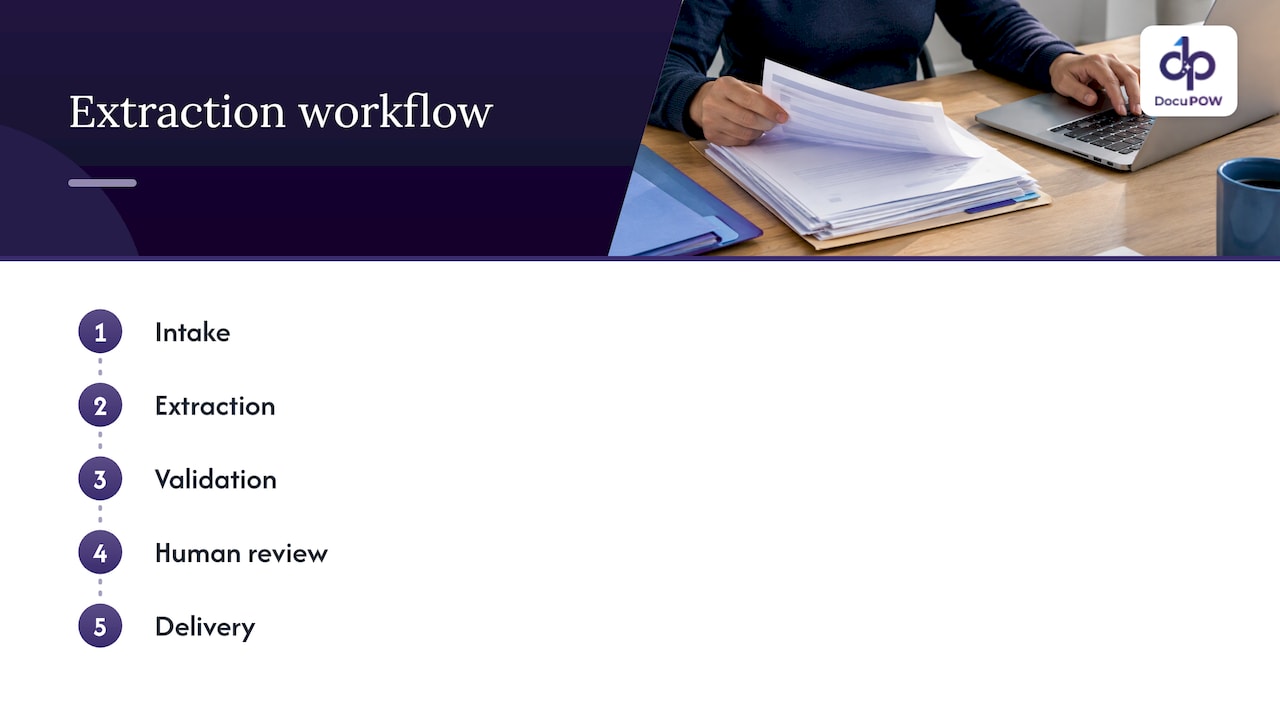
- Build the workflow in five stages: intake, extraction, validation, human review of exceptions, and delivery to the EHR, payer portal or claims system.
- CMS requires certain payers to have a Prior Authorization API in place by January 1, 2027, which makes structured data more valuable than scanned pages.
- Any system touching patient data must meet HIPAA Security Rule safeguards and have a business associate agreement with the vendor.
Table of Contents
- Why prior authorization is a document problem
- What to extract from a prior authorization packet
- Why template-based OCR struggles here
- A five-stage extraction workflow
- Submission channels and where extracted data goes
- What the CMS rule changes for extraction
- Security and HIPAA safeguards
- How to measure whether extraction is working
- Perspective: capture once, validate always
- Where DocuPOW fits
- FAQ
- Sources
Why prior authorization is a document problem
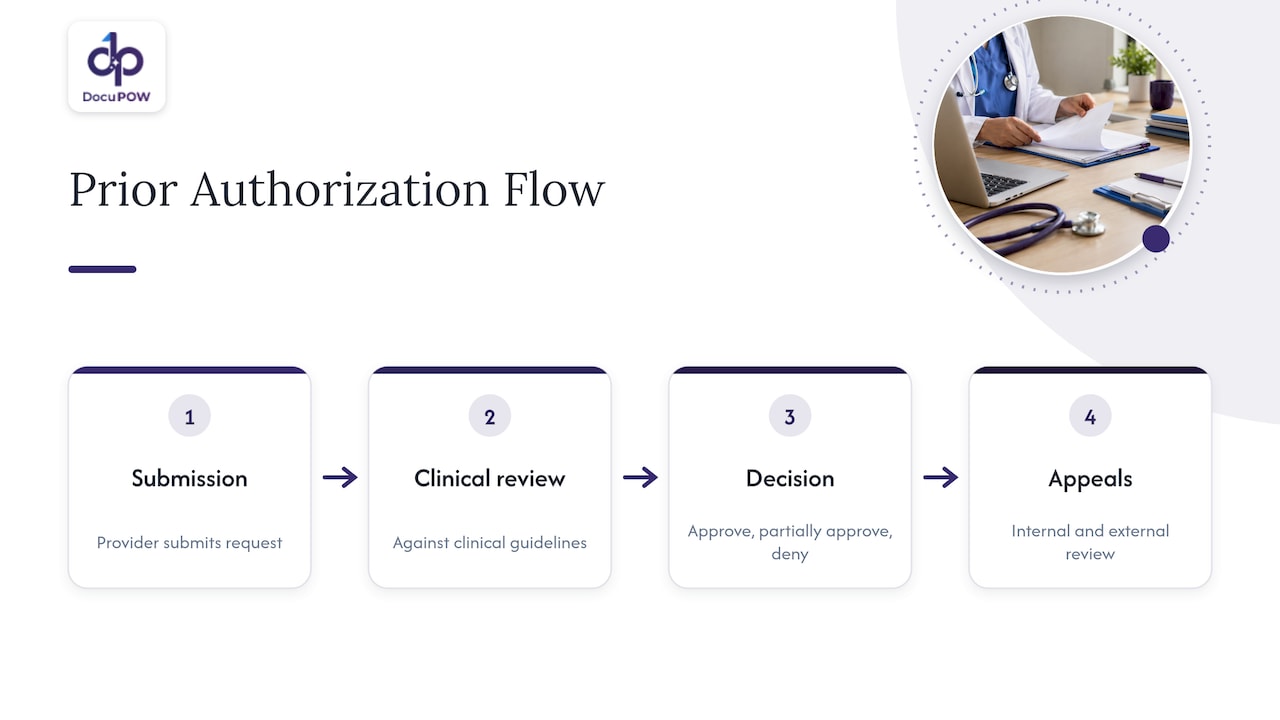
Prior authorization (PA) is the step where an insurer confirms, before care is delivered, that a service or drug is covered, appropriate, medically necessary, safe and cost-effective. The NAIC’s December 2025 white paper describes a four-step flow: the provider submits, the insurer reviews against clinical guidelines, a decision is made (approve, partially approve or deny), and appeals follow through internal and external review. The same paper notes the process has been criticized for burdening providers and delaying care for patients.
Most of that burden is paper. According to AHIP’s prior authorization FAQs, the treating physician requests authorization with supporting documentation, typically a letter of medical necessity and medical records, often sent by fax. A reviewer then decides, and a medical-necessity denial must come from a physician reviewer and include a clinical rationale and appeal instructions.
So every request depends on someone finding the right facts in a pile of mixed documents and entering them correctly, once for the payer form and again for the EHR. Extraction automation targets that step.
What to extract from a prior authorization packet
Think of the data in two layers. Missing the first layer gets a request returned. Missing the second layer gets it denied.
Administrative fields
Texas Medicaid’s claims administrator publishes a submission guide for its provider portal that lists the essential fields: client name, program number, date of birth, provider name, NPI or Atypical Provider Identifier, CPT or HCPCS code, and quantity of service units. It states that requests with missing, incorrect or illegible essential fields are returned. Different payers use different field names, but the pattern holds everywhere:
| Field | Where it usually lives | Typical extraction risk |
|---|---|---|
| Patient name, date of birth, member ID | Referral, intake form, insurance card scan | Handwriting, transposed digits |
| Ordering provider and NPI | Order or referral letter | Name variants, group versus individual NPI |
| CPT/HCPCS code and units | Order, superscript on a superbill, procedure note | Code buried in free text |
| Diagnosis codes | Clinical notes, problem list | Code stated in prose rather than a field |
| Payer name and plan | Card scan, eligibility response | Multiple plans on one document |
Clinical support
The harder layer is clinical. A 2024 peer-reviewed overview of the PA process recommends that a first submission state the indication, prior failed therapies, clinical support for the requested test or medication, safety concerns and untried inferior alternatives. That includes how and when the diagnosis was made, disease severity using accepted staging descriptors, and treatment failures. The authors argue that documentation quality at first submission is what prevents denials, which is more effective than reacting once a request is pended.
AHIP explains that medical-necessity criteria generally ask whether a service is consistent with accepted standards, clinically appropriate in type, frequency, extent, site and duration, effective for the patient’s condition, and not primarily for convenience. Those criteria are why a simple form reader is not enough. The extraction has to find the clinical detail that answers each criterion, even when it appears as a sentence in a progress note.
TMHP’s guide also says clinical documentation such as medical records, progress notes and lab reports must be attached. The extraction system should therefore classify each page in a packet, not just pull values from it, so the right attachments travel with the right request.
Why template-based OCR struggles here
Traditional OCR tools depend on templates: you define where each field sits on a known layout. Prior authorization packets break that assumption. A single case can include a faxed referral from one clinic, a lab report from another system, a hospital discharge summary and a payer-specific form, and each source changes its layout over time. Every new layout means someone builds and maintains another template.
DocuPOW takes a different approach. Our zero-shot extraction is template-free and adapts to document layouts it has not seen before, which minimizes setup and maintenance. You can read more about how that works on our zero-shot extraction page and in our guide to real-time data extraction from documents.
A five-stage extraction workflow
Here is the routine, with where each stage tends to fail and what we do about it.
1. Intake
Packets arrive by fax, email, portal download, scan and EHR export. The goal is one queue. The failure point is fragmentation: when each channel has its own handling, pages get separated from their case. DocuPOW accepts any document type, so you do not need to preprocess by format before it enters the workflow.
2. Extraction
The system reads each page, identifies what kind of document it is, and pulls the fields from the two layers above. The failure point is variable layout. Because our extraction does not rely on templates, a new clinic’s referral format does not require a project to support it.
3. Validation
Extracted values must be checked before they go anywhere. TMHP’s guide describes the pattern on the payer side: the portal validates required fields, then procedure and diagnosis codes, and invalid data produces an error that must be corrected before submission proceeds. Validating the same way on your side means catching a malformed NPI or a missing unit count before the payer does. DocuPOW enforces strict schema validation, so a record that does not meet the schema is flagged rather than passed on. Our guide to data normalization from documents covers how dates, codes and names are put in a consistent form.
4. Human review of exceptions
Some fields will always be uncertain: a smudged fax, an ambiguous medication name, a conflict between two documents. A human-in-the-loop audit step lets a staff member confirm or correct only those fields while everything else moves ahead. DocuPOW includes human-in-the-loop audit review for this reason, and our document exception handling guide describes how to route, review and resolve these cases.
5. Delivery
The validated record has to reach the EHR, a payer portal, or a case-management system. Our platform integrates with ERP and CRM systems through an API and offers developer tools, and it orchestrates multi-step workflows so the extracted data moves to the next system on its own rather than waiting in a spreadsheet.
Submission channels and where extracted data goes
The American Academy of Family Physicians’ practice management guide compares how requests are sent today. Fax and phone require hand-filled, plan-specific forms with no independent proof of submission. Electronic PA with EHR integration uses the ASC X12 278 standard for medical services and NCPDP SCRIPT for prescriptions, but the guide says it is not yet widely available and payer processing is often not real-time. Single-payer portals require manual re-entry of EHR data and multiple logins. Multi-payer prescription portals centralize submissions.
The practical consequence: whichever channel a payer requires, the data entered is the same set of validated fields. If extraction produces clean structured data once, it can feed any of those channels. Manual re-entry is what multiplies the error rate.
For other back-office paperwork the logic is identical. Teams that have automated their invoices will recognize the pattern in this accounts payable automation guide: capture once, validate against rules, and send exceptions to a person.
What the CMS rule changes for extraction
The federal direction is toward structured data. CMS’s electronic prior authorization overview says that starting January 1, 2027, certain CMS-regulated health plans must implement five APIs, including a Prior Authorization API that lets providers learn whether authorization is required, identify documentation requirements, exchange requests and receive decisions from within their EHR or other health IT systems. CMS lists the benefits as faster decisions, standardized structured documentation with discrete data fields, and less reliance on manual, portal-based and fax workflows. It also urges providers to test FHIR APIs with their EHR vendor and payer partners.
The technical layer is the HL7 Da Vinci set of implementation guides, which CMS’s workflow document describes in three parts: Coverage Requirements Discovery tells providers whether PA is required, Documentation Templates and Rules communicates the payer’s documentation requirements, and Prior Authorization Support transmits requests and decisions through a FHIR API. The Prior Authorization Support guide adds that an intermediary can convert FHIR to X12 when a payer still uses it, then convert the response back. The Documentation Templates and Rules guide specifies that questionnaires pull existing EHR information, prompt for what is missing, and work out which questions still need answers.
What this means for you:
- Payers will ask for discrete data, not pages. An organization that already holds validated, structured fields is positioned to answer a documentation question automatically.
- Not everything lives in the EHR. Outside referrals, scanned records and faxed lab results still arrive as documents. Extraction is the bridge that turns them into the structured data the API workflow expects.
- Standards references matter for IT. The ONC health IT framework in 45 CFR Part 170 covers the Core Data for Interoperability, API standards and certification conditions your EHR vendor works to, so involve them early.
CMS-0057-F also sets decision timeframes and denial-reason requirements for covered payers. Check the CMS pages above for the current requirements that apply to your plans.
Security and HIPAA safeguards
Prior authorization packets are full of protected health information, so the extraction layer is part of your HIPAA scope. NIST’s Security Rule resource guide, SP 800-66r2, maps the rule’s safeguards into three groups:
- Administrative: risk analysis and risk management, security incident response and reporting, a contingency plan with backup and disaster recovery, and written business associate contracts.
- Physical: facility access controls, and workstation use and security.
- Technical: access control with unique user identification and an emergency access procedure, plus automatic logoff and encryption as addressable specifications.
In practice, that gives you a short list to take into any vendor conversation: a signed business associate agreement, unique user logins, encryption in transit and at rest, a documented incident process and a backup plan. DocuPOW runs on encrypted, cloud-native infrastructure built for high-volume environments. Our HIPAA-compliant document processing guide goes through what it takes, and our healthcare solutions page shows how the platform applies to patient documents.
Consult your own compliance officer or privacy counsel to confirm how these safeguards map to your organization.
How to measure whether extraction is working
Pick measures tied to outcomes, and track them per payer and per document source:
- Return rate: the share of requests sent back for missing or illegible essential fields. This should fall as validation catches errors before submission.
- Touch time per request: minutes of staff time from intake to submission, split between review and re-entry.
- Field-level exception rate: how many fields go to human review. A falling rate means the system is handling more of the variety on its own.
- First-pass denial rate for documentation reasons: denials where the clinical support was present in the chart but missing from the request.
DocuPOW provides real-time analytics on workflows, so these counts can be read from the platform rather than rebuilt in a spreadsheet.
Perspective: capture once, validate always
We built DocuPOW on a simple observation: the expensive part of administrative work is rarely the decision, it is the retyping before the decision. Prior authorization is a clear example. The facts a payer needs usually already exist somewhere in the packet.
The usual fix, template-based OCR, works until the next clinic changes its referral layout. Our agents read documents the way a person would, so a new layout is not a new project. They then check every field against a strict schema, and anything uncertain goes to a human reviewer instead of silently into a submission.
We also think extraction should not end at a data table. The value comes when validated data moves into the next system through an API, and when you can ask questions of your documents and get answers with source citations. As payers move toward structured, API-based exchange, the organizations that already hold clean data will move fastest.
Syed Naveed Abbas
Where DocuPOW fits
If your team handles prior authorization packets from many sources, DocuPOW’s healthcare solution covers the five stages above on one platform: template-free extraction, schema validation, human review, workflow orchestration and API delivery. Plans are published on our pricing page: Starter is $99 per month and Professional is $499 per month, and Enterprise pricing is arranged with us directly.
If you are mapping your own workflow first, our product overview shows how extraction, review and integration connect.
FAQ
What is the difference between OCR and prior authorization document extraction?
OCR converts a page image into text. Document extraction goes further: it identifies which values matter (member ID, NPI, CPT code, diagnosis), validates them and outputs structured data. For prior authorization, the clinical detail inside notes matters as much as the form fields, so reading text alone is not enough.
Which fields cause the most returned requests?
Payer guides point to essential identifiers. TMHP states that requests with missing, incorrect or illegible essential fields, such as the member number, NPI, procedure code and units, are returned. Validating these before submission is the highest-value check.
Do I still need people in the loop?
Yes, for uncertain fields and for clinical judgment. The aim is for staff to review only the exceptions, such as an illegible fax or conflicting documents, rather than retype every packet. DocuPOW’s human-in-the-loop audit step is designed for that.
Does electronic prior authorization make extraction unnecessary?
No. CMS’s API requirement for certain plans, effective January 1, 2027, moves requests into structured exchange, but outside referrals, scanned records and faxed results still arrive as documents. Extraction turns them into the discrete data those workflows use.
What security should I require from an extraction vendor?
Start with the HIPAA Security Rule safeguards: a written business associate agreement, unique user identification, access controls, encryption, incident response and a contingency plan. NIST’s resource guide lists them with their rule citations.
Sources
- NAIC Prior Authorization White Paper
- AHIP Prior Authorization FAQs
- TMHP Prior Authorization on the Portal Submission Guide
- An Overview of the Challenging Process of Prior Authorization (PMC)
- AAFP FPM: A Guide to Relieving Administrative Burden: Prior Authorization
- CMS Electronic Prior Authorization overview
- CMS Prior Authorization API workflow (CMS-0057-F)
- HL7 Da Vinci Prior Authorization Support Implementation Guide
- HL7 Da Vinci Documentation Templates and Rules Implementation Guide
- eCFR 45 CFR Part 170
- NIST SP 800-66r2 HIPAA Security Rule resource guide
Recommended
See DocuPOW on your documents.
Stop building templates. Start extracting data.