90% Confidence Template Free PDF Extraction for Enterprises
Enterprise guide to template free, agent based PDF extraction. Research backed RFP must haves, per field accuracy, 90% auto post threshold, and pilot steps.


The best approach for businesses handling high volumes of PDFs is a template-free, agent-based document-AI pipeline: one that preserves layout, extracts to schema-driven JSON with field-level confidence scores, and routes low-confidence fields to human review before posting downstream. DocuPOW builds on this model with autonomous agents that read documents contextually rather than matching them to rigid templates. Done right, the payoff is auditable extraction at scale and faster financial and operational decisions, a gap that benchmarks like ExtractBench and analysis from Thoughtworks show most rigid, template-based tools cannot close.
TL;DR:
- Rigid, template-based extraction tools often fail on complex layouts, schemas larger than 12 fields, or poor-quality scans, making autonomous, context-aware agents more reliable.
- Per-field accuracy testing and confidence scoring are essential, with about a 90% confidence threshold used to determine automatic posting versus human review.
- A phased rollout involving scope definition, pilot testing, scale validation, and ongoing monitoring ensures high-volume PDF pipelines maintain accuracy and efficiency.
- Handling sensitive data requires field-level classification, strict access controls, and encryption, with retention policies tailored to document types to ensure compliance.
- Hardware acceleration and caching are underutilized strategies that can significantly boost throughput and reduce latency in enterprise-scale PDF processing systems.
Table of Contents
- What Does an Enterprise PDF Extraction Pipeline Look Like?
- Why Do High-Volume PDF Projects Fail at Scale?
- How Do You Measure Extraction Accuracy at Scale?
- What Should Be in Your PDF Automation RFP?
- How Do You Roll Out PDF Automation From Pilot to Production?
- How Does DocuPOW Handle High-Volume PDF Extraction?
- How Should You Handle Sensitive Data in High-Volume PDFs?
- What’s the Right Storage Strategy for High-Volume PDF Archives?
- How Do You Manage Errors in High-Volume PDF Processing?
- How Do You Monitor a High-Volume PDF Pipeline?
- How Do You Optimize Performance for High-Volume PDF Workloads?
- Governance and Timelines: What to Expect Long-Term
- Ready to Pilot Template-Free PDF Extraction?
- Sources
- FAQ
What Does an Enterprise PDF Extraction Pipeline Look Like?
A production-grade pipeline for processing large PDF files runs through six stages, and skipping any one of them is where most projects lose accuracy.
Ingestion comes first: documents arrive from email, scanned inbound mail, ERP exports, or vendor portals, and each needs normalization, page splitting, and deduplication before anything else touches it. Poor ingestion is the most common root cause of downstream failures, according to Thoughtworks, which is why deskewing, denoising, and resolution control belong at the front of the line, not as an afterthought.
From there, the pipeline has to decide how to read the page. OCR-first processing is cheaper and fast enough for clean, text-native PDFs, but multimodal, layout-aware models earn their cost on scanned contracts, handwritten annotations, or documents with mixed columns and embedded images.
The remaining stages build on that foundation:
- Classification and routing sorts documents into type-specific paths, since an invoice, a lease, and a compliance report each need different extraction logic.
- Extraction to schema-driven JSON pulls structured fields and attaches confidence metadata to each one, not just the document as a whole.
- Validation and human-in-the-loop review sends anything below a set confidence threshold to an exception queue with a full audit trail.
- Export and integration posts verified data through message queues or APIs, using synchronous calls for real-time lookups and asynchronous batches for high-volume runs.
Storing that output as JSON alongside relational or graph databases makes the extracted facts queryable for analytics later, not just archived.
Why Do High-Volume PDF Projects Fail at Scale?
Document processing at scale is not one problem. It is three: text and layout parsing, table structure extraction, and image or diagram understanding, and each one breaks differently, according to Thoughtworks. Treating them as a single “PDF extraction” task is the single most common design mistake enterprises make.
Three failure patterns show up repeatedly:
- Layout confusion. Multi-column layouts, nested headers, and merged table cells trip up naive OCR, scrambling reading order and mixing up columns that were never meant to touch.
- Schema breadth collapse. Frontier models degrade sharply as schemas grow larger. Baseline tests on a 369-field financial reporting schema produced 0% valid output, a stark reminder that “the model can read PDFs” says nothing about whether it can extract 300 fields correctly.
- Cascading ingestion errors. A blurry scan or wrong page orientation at intake corrupts everything downstream, no matter how good the extraction model is.
Specialized, multi-pass parsing pipelines correct for a lot of this, since general-purpose OCR plus a naive language model can hallucinate content or flatten structure entirely, a pattern The Verge has documented across mainstream AI tools.
Pro Tip: Run OCR as the default path for every document, and escalate only low-confidence or layout-heavy files to a multimodal model. This hybrid pattern keeps per-document cost under control without sacrificing accuracy on the documents that actually need it.
How Do You Measure Extraction Accuracy at Scale?
Aggregate accuracy scores hide the failures that matter most. A pipeline can report 95% overall accuracy while silently mangling every invoice total, because ninety other easy fields dragged the average up.
Schema-driven, per-field scoring solves this by grading each field type differently: exact match for identifiers, numeric tolerance for quantities and totals, semantic equivalence for free text. This is the methodology behind ExtractBench, and it is the only honest way to know whether a pipeline is production-ready for a 300-field contract schema versus a 12-field receipt.
Four metrics belong on every operations dashboard:
- Straight-through processing rate (STP%): the share of documents that post with no human touch.
- Exception rate: how often fields fall below the confidence threshold and get routed for review.
- Mean time to resolve: how long exceptions sit in the queue before a person clears them.
- Cost per document: all-in cost including compute, review labor, and correction cycles.
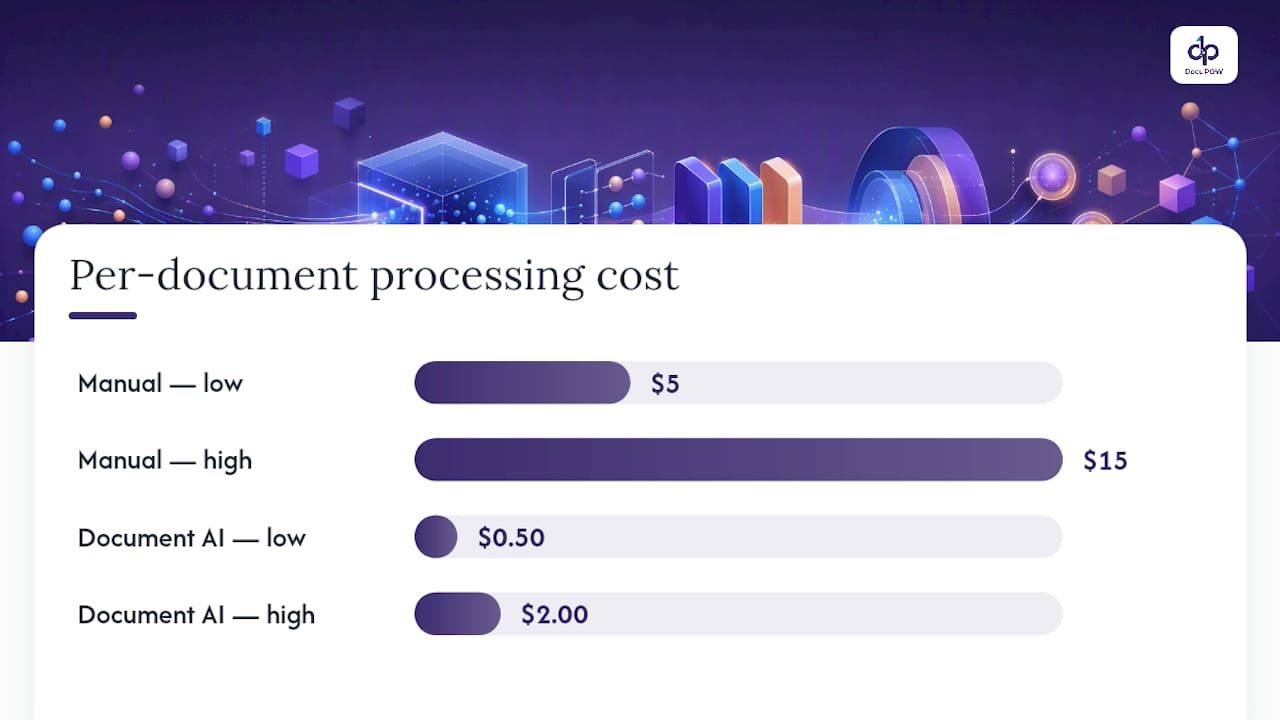
Manual invoice processing typically runs $5 to $15 per invoice, while document AI can push that down to roughly $0.50 to $2.00, often paying back the investment within 6 to 12 months.
A confidence threshold of roughly 90% for auto-posting, the pattern used in SAP’s Document AI reference architecture, gives teams a defensible line between what ships automatically and what a human confirms. Build a pilot corpus that mirrors your real document mix, not a cherry-picked sample, and re-benchmark it quarterly to catch model or format drift before it shows up in your general ledger.
What Should Be in Your PDF Automation RFP?
Procurement teams evaluating bulk PDF processing tools need a checklist that separates real capability from a good demo.
Non-negotiable technical requirements:
- Template-free, zero-shot extraction that handles a new document layout without a rebuild cycle.
- Table and layout fidelity across nested headers, merged cells, and multi-column pages.
- A human-in-the-loop workspace with field-level confidence scores, not just a document-level flag.
- API access for ERP and CRM integration, plus documented security controls for data in transit and at rest.
Pilot acceptance should be measured, not assumed. Set a minimum per-field pass rate before go-live, verify throughput against your actual document volume, and require a working integration proof-of-concept, not a slide deck describing one.
| Evaluation area | What good looks like |
|---|---|
| Extraction accuracy | Per-field pass rate meets threshold on your own document sample |
| Table handling | Correct reading order on nested/merged tables |
| Integration | Working API or queue-based POC to your ERP/CRM |
| Audit trail | Full field-level history, reviewer identity, and timestamp logged |
| Pricing model | Transparent per-document or per-seat cost, no hidden review fees |
Red flags to reject outright: vague accuracy claims with no per-field data, extraction tied to rigid templates, or pricing that hides the true cost of manual post-processing.
How Do You Roll Out PDF Automation From Pilot to Production?
Scaling automating PDF workflows safely means treating it as a staged rollout with hard gates, not a single big-bang deployment.
- Stage 0: Define scope. Write the extraction schema, collect a representative document sample, and set target KPIs (STP%, cost per document, exception rate) before any code runs.
- Stage 1: Pilot. Stub the integration, run the sample corpus through the full pipeline, and measure per-field accuracy against your acceptance thresholds.
- Stage 2: Scale testing. Push real volume through the system, tune batch sizing, confirm rate-limit handling, and verify the pipeline meets its SLA under load.
- Stage 3: Production. Turn on monitoring, assign schema ownership, and build feedback loops so exception patterns feed back into model tuning, not just a growing backlog.
Organizational readiness matters as much as the technology. Someone needs to own schema changes when a vendor updates an invoice layout, and exception-queue reviewers need real training, not a five-minute walkthrough. The DocuPOW blog’s real-world deployment examples show how different teams staged this rollout across industries.
Pro Tip: Budget extra review capacity for the first two weeks of production, not the pilot. Volume and document variety both spike once real business users start feeding the system, not the curated test set you validated against.
How Does DocuPOW Handle High-Volume PDF Extraction?
The platform uses autonomous agents that read documents contextually instead of matching them against a rigid template library, so a new invoice format or contract layout does not require an engineering rebuild before it can be processed. That template-free, agentic zero-shot approach is DocuPOW’s stated advantage over legacy extraction tools.
The platform pairs that extraction layer with:
- Human-in-the-loop audit review for compliance-sensitive fields before data posts downstream.
- Multi-step workflow orchestration that carries a document from ingestion through extraction to export without manual handoffs.
- API integration with ERP and CRM systems, so extracted data lands where finance and operations teams already work.
- Real-time analytics and predictive insights, which customers report improve financial visibility and speed up data-driven decisions.
If you are evaluating a demo, come with your hardest documents, not your cleanest ones. Bring a nested-table contract, a multi-column report, and ask to see the audit log and a live integration proof-of-concept, since that combination is what separates a real pipeline from a polished sales demo.
How Should You Handle Sensitive Data in High-Volume PDFs?
PDFs moving through an enterprise pipeline routinely carry personal data, financial account numbers, and health information, often mixed into the same document as routine operational fields. That mix is what makes PDF document management a compliance question, not just an engineering one.
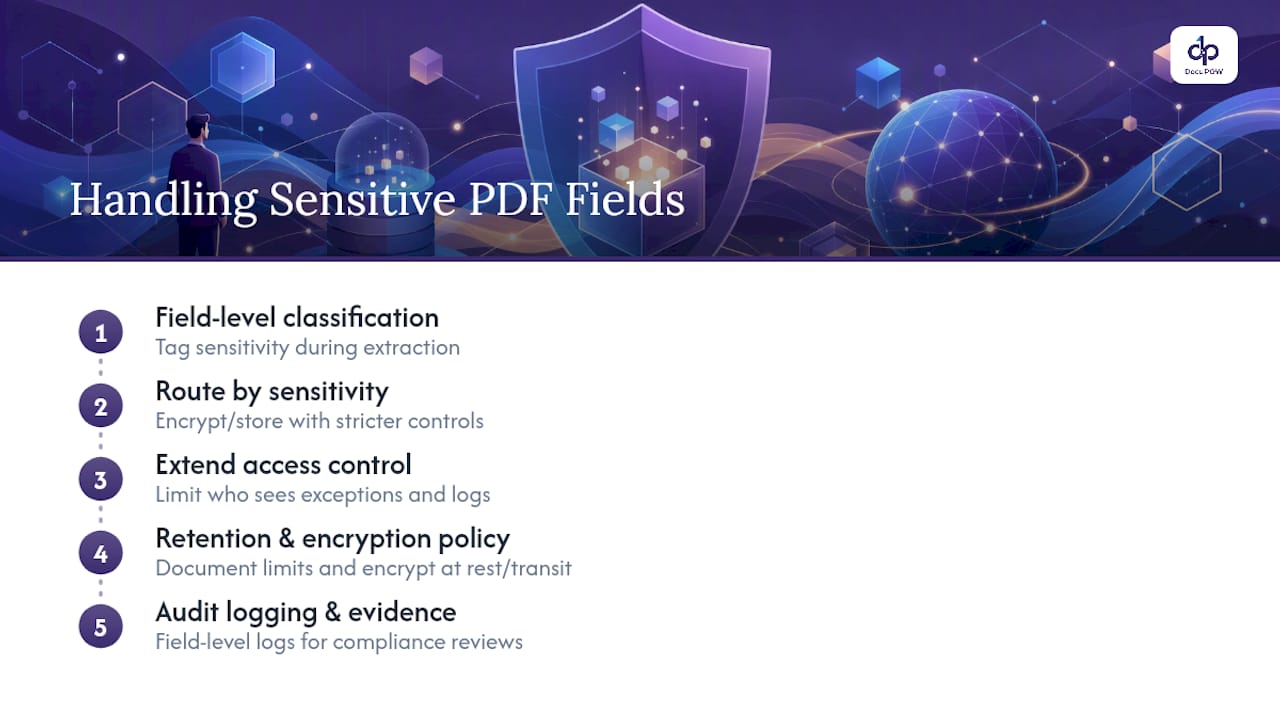
Field-level classification matters here as much as extraction accuracy. A pipeline that tags a social security number or a patient identifier at the moment of extraction can route it through stricter handling, encryption at rest, restricted access, shorter retention, than a purchase order line item. Treating every field the same way, regardless of sensitivity, is how a document workflow ends up out of step with regulations like the EU’s GDPR or the United States’ HIPAA framework for health data.
Access control needs to extend past the extraction step. Who can view an exception queue containing a scanned government ID? Who can export raw extraction logs, and are those logs themselves scrubbed of sensitive values before they land in a general-purpose analytics dashboard? These questions belong in the pilot design, not in a post-incident review.
Encryption in transit and at rest is table stakes, but the harder work is process: defining which fields trigger stricter handling, documenting retention limits for sensitive categories, and making sure human reviewers in the audit workflow only see what their role requires. A platform with enterprise-grade security controls and field-level audit logging gives compliance teams the evidence they need when a regulator or auditor asks how a specific data point was handled.
What’s the Right Storage Strategy for High-Volume PDF Archives?
Storage decisions for large PDF volumes come down to three questions: where the original document lives, where the extracted structured data lives, and how long both need to be retrievable.
The source PDF itself typically belongs in object storage, cheap, durable, and built for exactly this kind of static file at volume. But the structured output, the JSON with field-level values and confidence scores, belongs somewhere queryable. Many enterprises pair JSON extraction outputs with relational or graph databases specifically so analytics teams can query across thousands of documents without re-parsing a single PDF.
Retention policy should be tied to document type, not applied as one blanket rule. A signed contract might need seven years of retention for legal reasons; a routine shipping notice might not need more than eighteen months. Building that distinction into the archiving strategy from day one avoids a costly re-architecture later, when someone realizes the system is storing everything indefinitely at unnecessary cost, or worse, purging something a compliance team still needed.
Version control matters too, particularly for contracts and compliance documents that get amended. The archive should preserve which version of a document a given extraction ran against, so an audit six months later can trace a disputed number back to the exact source page it came from, not just the current version of the file.
How Do You Manage Errors in High-Volume PDF Processing?
Exception handling is what separates a pipeline that scales from one that quietly accumulates a backlog nobody notices until a quarter-end close goes sideways.
The core mechanism is confidence-based routing. Every extracted field gets a score, and anything below the auto-post threshold, commonly around 90% in reference architectures like SAP’s, lands in a human review queue instead of flowing straight to your ERP. That threshold is not arbitrary; it is the line between documents accurate enough to trust unattended and ones that need a second set of eyes.
Not every exception is the same kind of problem, though, and treating them identically wastes reviewer time. A blurry scan needs re-ingestion, not a manual field correction. A genuinely ambiguous field, two possible totals on a poorly formatted invoice, needs a person to make a judgment call. Building validation rules directly into the schema, including tolerances and canonicalization logic, and automating downstream reconciliation like three-way PO, goods-receipt, and invoice matching cuts the exception volume dramatically before it ever reaches a human.
The queue itself needs structure: priority tagging so a $200,000 invoice exception jumps ahead of a $40 office supply receipt, clear ownership so exceptions don’t sit unassigned, and a full audit log showing who resolved what and when. Without that log, you cannot answer the question every compliance audit eventually asks: how did this number get corrected, and who approved it?
How Do You Monitor a High-Volume PDF Pipeline?
A pipeline processing thousands of documents a day fails quietly long before anyone notices, unless monitoring is built in from the start, not bolted on after the first outage.
Three categories of health metrics matter. Throughput metrics track documents processed per hour against expected volume, catching a stalled queue before it becomes a two-day backlog. Accuracy metrics track the STP rate and exception rate over time, since a sudden jump in exceptions often signals a new document format the model hasn’t seen, not a system failure. Latency metrics track how long documents sit at each pipeline stage, flagging bottlenecks between OCR and extraction, or between extraction and the human review queue.
Alerting needs to be tiered, not uniform. A single failed document should log and retry automatically. A complete pipeline stall needs to escalate immediately, since every hour of downtime is a growing backlog that someone eventually has to clear manually.
Dashboards should be role-specific. Operations leaders need STP% and cost per document. Engineering needs latency and error-rate breakdowns by pipeline stage. Compliance needs audit log completeness and exception resolution times. A single generic dashboard trying to serve all three audiences usually ends up serving none of them well.
How Do You Optimize Performance for High-Volume PDF Workloads?
Throughput at scale comes down to three levers: caching, parallelization, and hardware acceleration, and most high-volume PDF operations underuse all three.
Caching applies more often than teams expect. If a vendor sends the same invoice template hundreds of times a month with only the numbers changing, caching layout analysis for that document type avoids redundant processing on the parts of the page that never change. Classification results can be cached too, particularly for recurring document sources.
Parallel processing is where batch versus near-real-time trade-offs actually show up. Overnight batch runs can fan documents out across many workers simultaneously, since nothing needs an instant response. Near-real-time processing, like validating a document at the moment a customer uploads it, needs a different architecture, one that prioritizes low latency on a single document over maximum aggregate throughput. Message queues are the standard pattern for decoupling these two needs, letting synchronous, latency-sensitive requests and asynchronous, bulk batch jobs run on separate paths without competing for the same resources.
Hardware acceleration matters most at the OCR and multimodal-model stages, where GPU processing can cut per-document latency significantly compared to CPU-only inference. That said, hardware spend should follow the hybrid pattern already covered: reserve GPU-accelerated multimodal processing for the low-confidence and layout-heavy documents that actually need it, and let cheaper OCR handle the bulk of the volume.
Governance and Timelines: What to Expect Long-Term
Extraction is not a one-time build. It is an ongoing engineering lifecycle, and treating it as a shipped project instead of a maintained system is how accuracy quietly erodes over eighteen months. Assign clear schema ownership, set labeling policies, and put SLA responsibilities in writing with every downstream team that consumes the data.
Expect diminishing returns as you push accuracy higher. The last five points, the genuinely ambiguous documents, cost far more per point of accuracy gained. Budget for that curve instead of promising a stakeholder 99% automation on day one.
— Syed Naveed Abbas
Ready to Pilot Template-Free PDF Extraction?
If your team is still manually keying data from PDFs or maintaining a brittle library of extraction templates, the fix isn’t more templates. It’s removing the need for them entirely. DocuPOW’s agent-based platform reads document context directly, so a new vendor invoice layout or an amended contract clause doesn’t trigger a maintenance ticket before it can be processed.

A strong pilot starts with a checklist: bring your three hardest document types (a nested-table contract, a multi-column report, a scanned form), define your target STP% and per-field accuracy thresholds up front, and ask to see the audit log alongside a working integration proof-of-concept. Most teams see measurable time-to-value within the first pilot cycle, not a multi-quarter rollout. Review the high-volume PDF processing best practices guide before your first meeting, and check the Starter, Professional, and Enterprise plans to see which tier matches your document volume. Teams building out the surrounding data infrastructure often pair this work with a partner like Bitrupt’s AI and data engineering services for production pipeline design. Book a demo and bring your worst documents, not your best ones.
Sources
- Document processing isn’t one problem — it’s three | Thoughtworks United States
- ExtractBench: A Benchmark and Evaluation Methodology for Complex Structured Extraction
- Why is AI so bad at reading PDFs? | The Verge
FAQ
What Is Template-Free PDF Extraction?
It’s an approach where AI agents read a document’s context and structure directly instead of matching it against a pre-built template, letting the system handle new or unseen layouts without manual reconfiguration.
How Accurate Is AI-Based PDF Data Extraction?
Accuracy varies sharply by schema size and document complexity. Benchmarks like ExtractBench show some frontier models producing zero valid output on schemas with hundreds of fields, which is why per-field, schema-driven testing matters more than a single aggregate accuracy number.
What Confidence Threshold Should Trigger Human Review?
Many reference architectures, including SAP’s, use roughly 90% confidence as the line for auto-posting, routing anything below that threshold to a human review queue.
How Much Does DocuPOW Cost?
DocuPOW offers a Starter plan at $99 per month and a Professional plan at $499 per month, with Enterprise pricing available on request based on volume and integration needs.
How Long Does a PDF Automation Pilot Typically Take?
Most pilots run a defined sample corpus through the full pipeline, measure per-field accuracy against set thresholds, and verify an integration proof-of-concept before moving to scale testing, a process most teams complete well within a single quarter.
Recommended
See DocuPOW on your documents.
Stop building templates. Start extracting data.