HITL Document Processing: How to Design Human Review
How HITL document processing works: confidence thresholds, review queues, side-by-side screens and audit trails, plus how to keep review from becoming a bottleneck.

Human-in-the-loop (HITL) document processing is a workflow in which software extracts data from documents automatically and sends only the uncertain or high-risk results to a person, who confirms or corrects them before the data moves on. Done well, people review a small share of documents, not all of them, and every correction is recorded. Done badly, reviewers become a slow second extraction system. This guide covers how to set it up so it does the first and not the second.
TL;DR
- HITL is a routing rule, not a safety blanket: the system auto-approves what it is sure about and queues the rest for a person.
- Three design choices decide whether it works: where you set confidence thresholds, what the reviewer sees on screen, and what gets logged.
- Reviewers need the original document next to the extracted value. Without that, review is guesswork.
- Corrections should feed back into the process, so the review queue shrinks over time instead of staying flat.
- Treat review as part of risk management, with named owners, not as a checkbox.
Table of Contents
- What HITL means in document processing
- Why a human checkpoint still matters
- How a HITL workflow runs, step by step
- Setting thresholds without guessing
- What the reviewer sees decides the speed
- Routing and queues: avoiding the bottleneck
- Audit trail and governance
- Measuring whether HITL is working
- Our perspective: review should shrink, not stay
- Choosing a HITL-ready platform
- Where DocuPOW fits
- A practical starting plan
- FAQ
- Sources
What HITL means in document processing
Intelligent document processing (IDP) goes beyond OCR. OCR only converts images of text into machine-readable text, while IDP uses machine learning to extract, classify, validate and interpret data, and it can route documents into automated workflows. HITL adds a deliberate checkpoint to that chain.
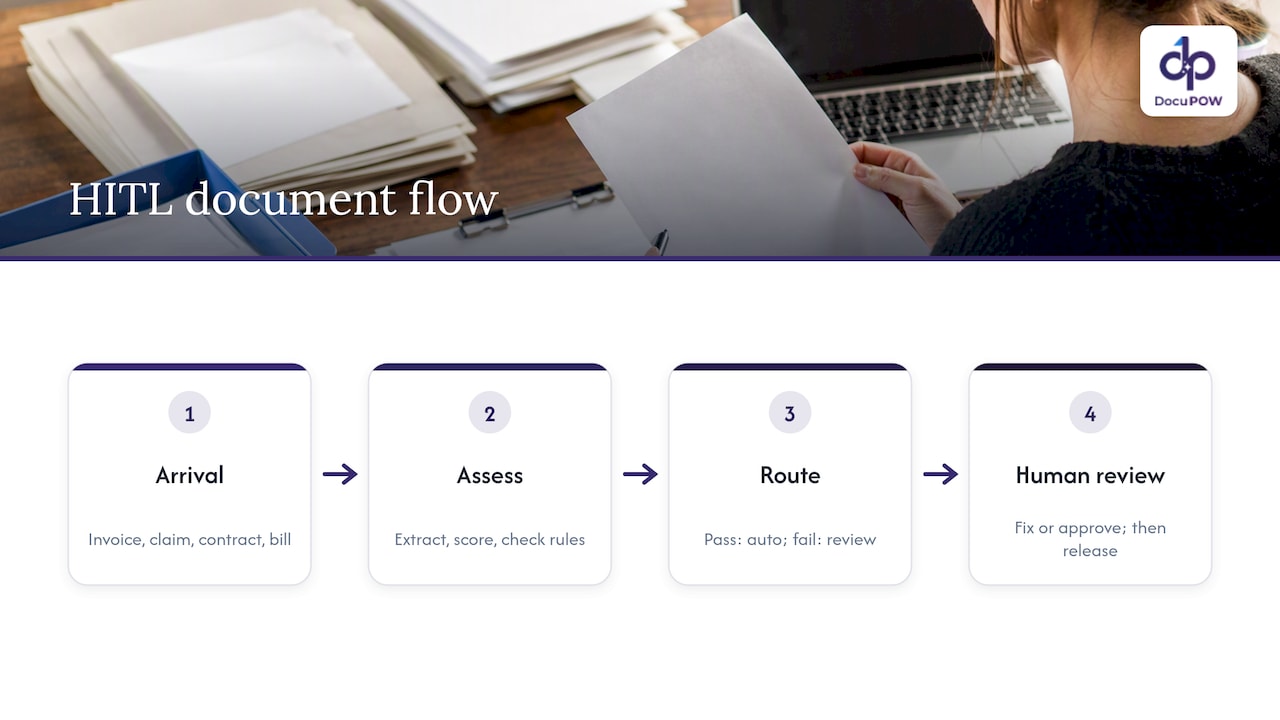
In practice the checkpoint looks like this. An invoice, claim form, contract or bill of lading arrives. The system extracts fields, scores its own certainty for each one, and checks the values against rules (does the total equal the sum of the line items, does the PO number exist in your ERP). Anything that passes goes straight through. Anything that fails or scores low lands in a review queue, where a person looks at it, fixes it or approves it, and releases it.
Some vendors frame HITL as an admission that the AI is not good enough. That misreads it. The strongest systems process most documents with no human touch, and use people for the exceptions and for the decisions where a wrong value is expensive. The point is to put human attention where it changes the outcome.
Why a human checkpoint still matters
Two reasons stand out: accuracy on the long tail, and accountability.
Accuracy on the long tail. Extraction models are very good on clean, common layouts. Trouble comes from the smudged scan, the handwritten annotation, the supplier who changes their invoice format, the contract with an unusual clause. The U.S. Government Accountability Office notes that AI outputs can be inaccurate and that people may over-rely on them, and that including human review in AI systems can mitigate those risks. The same report points to quality assurance testing and making outputs traceable to source documents as ways to prevent systematic error.
Accountability. When extracted data drives a payment, a claim decision or a compliance filing, someone has to be able to show what was checked and by whom. One expert submission to the SEC describes well-designed oversight as turning residual blame into structured responsibility: the provider answers for provenance and logging, the deployer for threshold configuration and workflow integration, and the reviewer only for what they explicitly signed off. That division is a useful way to think about who owns what in your own deployment.
How a HITL workflow runs, step by step
The pattern is similar across platforms, and it is worth mapping before you buy or build anything.
- Ingest and classify. Documents arrive by email, upload, API or shared folder. The system identifies the type (invoice, purchase order, certificate of insurance, lease).
- Extract. Fields and tables are pulled out, each with a confidence score.
- Validate. Business rules run: totals reconcile, dates are plausible, vendor and PO numbers match records in your systems.
- Route. Items that clear both the confidence threshold and the rules go straight to the destination. The rest go to a review queue.
- Review. A person sees the document and the extracted values together, corrects what is wrong, and approves.
- Release and log. Approved data flows to the ERP, CRM or database. The system records the automated steps and the human ones.
- Learn. Corrections are analyzed to find which document types and fields cause the most trouble, and the process or prompts are adjusted.
Cloud document AI tools use the same logic. For example, a walkthrough of Google’s Document AI human review feature describes checking confidence scores against configured thresholds and sending anything below the line to a review queue. The tuning knob is the same everywhere: a lower threshold means fewer reviews and more risk, a higher one means more reviews and more safety.
Setting thresholds without guessing
The most common mistake is picking one global confidence number, such as 90%, and leaving it. Different fields carry different costs when they are wrong.
| Field type | Cost of an error | Suggested approach |
|---|---|---|
| Invoice total, bank account, tax ID | High: wrong payment or fraud exposure | Strict threshold, plus rule checks against PO or vendor master |
| Invoice date, document number | Medium: reconciliation noise | Moderate threshold |
| Free-text description, notes | Low | Loose threshold or sample-based review |
| Contract clauses such as termination, liability, renewal | High: legal exposure | Always route to a reviewer, with the clause highlighted |
| Patient or claimant identifiers | High: privacy and compliance | Strict threshold, restricted reviewer access |
These are working defaults, not standards. Start strict, measure how often reviewers change a value they were shown, and loosen thresholds only where reviewers almost never make a correction. If a field is corrected 1 time in 200, you are paying people to confirm what the system already got right. If it is corrected 1 time in 5, the problem is upstream: the extraction setup, the document quality or the rules.
Sampling helps here. Even for auto-approved documents, pull a small random sample into review each week. It tells you whether the system is drifting, for instance after a major supplier changes its template.
What the reviewer sees decides the speed
Review screens are where most HITL projects quietly fail. A builder guide on AWS describes the principle bluntly: show a side-by-side view with the original document segment highlighted, because otherwise reviewers rely on memory or guess and become a slow second extraction system instead of a quality gate. The same guide stresses inline editing, which speeds up corrections and produces clean, labeled data you can use to improve the system.
A good review screen has these traits:
- Source highlighting. Click a value and the matching spot on the page lights up.
- Reason for the flag. “Low confidence on total” or “vendor not found in master data” tells the reviewer where to look first.
- Inline edit and one-key approve. No separate forms, no re-keying.
- Field-level actions. Approving three fields and fixing one should be a single pass.
- Context. Related documents (the PO, the contract) visible without leaving the screen.
- Prioritization. Oldest, highest-value or deadline-bound items first.
Routing and queues: avoiding the bottleneck
A review queue is a small operations system and needs the same care as any other. Three habits keep it healthy.
Route by skill, not just by volume. Invoice coding goes to accounts payable, contract exceptions to legal or contract managers, claims to adjusters. A generalist who has to guess at policy language is slow and unreliable.
Set service levels. If a flagged invoice sits for five days, you lose early-payment discounts or trigger late fees. Track time in queue as a metric alongside accuracy.
Escalate cleanly. Give reviewers a way to reject a document, ask for a second opinion, or send it back to the sender, with reasons recorded.
Audit trail and governance
HITL pays off in regulated work only if you can reconstruct what happened. At minimum, log for each document: the original file, the extracted values and confidence at each step, rules triggered, who reviewed it, what they changed, and when it was released. That record lets you answer an auditor, resolve a vendor dispute, or investigate a bad payment.
For wider governance, the NIST AI Risk Management Framework is the usual U.S. reference. Its guidance, as summarized for this article, is that human oversight should not be bolted on as a stand-alone checklist: it belongs inside enterprise-wide risk management, with clear executive accountability for high-risk systems, continuous monitoring, and varied stakeholder input during design. (The link goes to NIST’s Japanese translation of AI RMF 1.0; the English original is published by NIST as AI 100-1.) In practical terms: name an owner for each automated process, review the exception rate on a schedule, and decide in advance what happens if accuracy drops.
If your documents contain health, financial or personal data, involve your compliance or legal team when you define who can see what in the review queue. Reviewer access should follow the same least-privilege rules as any other system holding that data.
Measuring whether HITL is working
Track a handful of numbers monthly:
- Straight-through rate: the share of documents that need no human touch. It should rise as you tune.
- Correction rate per field: where the system is weakest.
- Reviewer time per document: if this is high, the screen or the routing is the problem.
- Queue age: how long items wait.
- Escaped errors: mistakes found downstream after approval, from sampling or from complaints.
Be wary of vendor claims about cost reduction. Figures like “up to 70%” circulate in marketing pages, but your results depend on document mix, quality and how you set thresholds. Measure your own baseline for a few weeks before you automate, so you can compare honestly.
Our perspective: review should shrink, not stay
At DocuPOW we think of human review as a feedback loop, not a permanent tax. Our platform extracts data without fixed templates, so a new layout from a supplier does not mean a developer has to build a new template before documents flow. That changes what reviewers do: they spend less time on routine layout failures and more on genuine judgment calls.
We also think review has to be built into the process, not placed after it. That is why our workflows combine multi-step orchestration with human audit review, so a flagged item pauses one step, gets resolved, and continues, instead of ending up in a spreadsheet someone emails around. And because document queries return answers with citations to the source, a reviewer or auditor can see where a value came from.
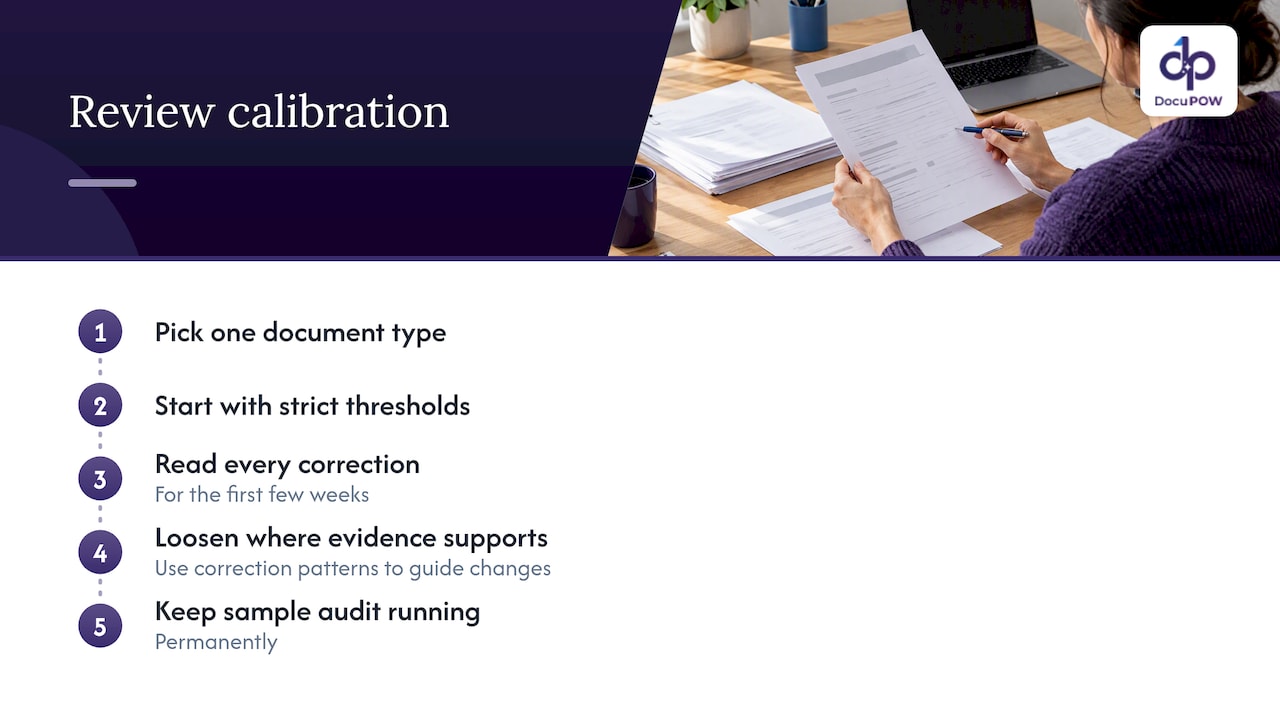
Our advice to any team starting out: pick one document type, start with strict thresholds, and read every correction for the first few weeks. The pattern of corrections tells you more about your process than any benchmark. Then loosen the thresholds where the evidence supports it, and keep a sample audit running permanently.
— Syed Naveed Abbas
Choosing a HITL-ready platform
Whether you build or buy, check for these capabilities:
| Question | Why it matters |
|---|---|
| Can thresholds be set per field and per document type? | One global number wastes reviewer time or lets errors through |
| Does the reviewer see the source highlighted next to the value? | Prevents guesswork and speeds approval |
| Does it work on unseen layouts without template building? | Controls setup and maintenance when suppliers change formats |
| Is every automated and human action logged? | Supports audits and dispute resolution |
| Can it write to your ERP or CRM through an API? | Approved data has to land where work happens |
| Can you export corrections and review statistics? | Lets you find systemic problems |
| Are encryption and access controls enterprise-grade? | Review queues expose raw documents to people |
For background on the technology behind this, see our explainer on intelligent document processing for decision-makers, and for a view of the full path from file to finished process, how DocuPOW works. If your documents are forms, our guide to AI form processing for enterprise workflows covers the specifics.
Where DocuPOW fits
DocuPOW is an agent-based document automation platform with template-free extraction, multi-step workflow orchestration, human-in-the-loop audit review, real-time analytics and API integration with ERP and CRM systems. Teams in industries such as insurance use it to turn claim and policy paperwork into structured data with review where it counts.
Published plans start at $99 per month for Starter and $499 per month for Professional, with Enterprise available on request. You can compare them on the DocuPOW pricing page, or look at the product overview first to see whether the workflow matches yours.
A practical starting plan
- Pick one document type with real volume and a clear cost of errors, such as supplier invoices.
- Baseline it. Record current handling time, error rate and who touches each document.
- Define the rules that must always pass: totals, vendor matching, required fields.
- Set strict thresholds on high-impact fields and always-review rules for high-risk content.
- Train reviewers on the screen and on the escalation path, and agree on service levels.
- Run for four to six weeks and study corrections by field and by sender.
- Adjust thresholds and rules, add sampling of auto-approved items, then expand to the next document type.
FAQ
What does HITL stand for in document processing?
HITL stands for human in the loop. It describes a workflow where automated extraction handles documents on its own until a result is uncertain or high-risk, at which point a person reviews and approves it. The reviewer’s decision is recorded, so the process stays auditable.
Does HITL mean the AI is not accurate enough?
No. Even highly accurate systems meet unusual scans, new layouts and ambiguous values, and some decisions carry enough financial or legal weight that a person should sign off. HITL lets you automate the bulk of documents while keeping human judgment where an error would cost the most.
How do I decide which documents go to a reviewer?
Combine three signals: the model’s confidence for each field, business rules such as totals matching or vendors existing in your master data, and the risk of the document type. Start with strict settings and loosen them only where reviewers rarely change what they are shown.
What should a review screen include?
Show the extracted values next to the original document with the relevant region highlighted, let reviewers edit inline, and explain why the item was flagged. That avoids forcing reviewers to hunt through pages, and it creates clean corrections you can use to improve the process.
How is HITL different from simple manual data entry?
In manual entry, a person types everything. In HITL, software does the extraction and a person handles only the exceptions and the high-stakes checks. The workload shifts from keying data to making judgments, and the volume that needs a person falls as the process is tuned.
Sources
- OCR vs. IDP: What’s the difference? (TechTarget)
- GAO-26-107828, Artificial Intelligence: Uses and Risks for Small Business Contracting and Innovation Research
- Frame Infrastructure for AI, Vol. 3: Expert Oversight (SEC comment file)
- Building a Human-in-the-Loop Review System for AI Document Extraction (AWS Builder Center)
- Artificial Intelligence Risk Management Framework (AI RMF 1.0), NIST
Recommended
See DocuPOW on your documents.
Stop building templates. Start extracting data.