Part Number Extraction: How to Pull Part Numbers from Documents
Learn how to extract part numbers from PDFs, scans and drawings, validate them against master data, and route uncertain matches to review before they hit your ERP.


Part number extraction means finding the identifier for a part on a purchase order, invoice, packing list, quote or drawing, and turning it into a clean field your ERP can use. Simple pattern matching handles tidy text. Real documents are not tidy: formats vary by supplier, scans add noise, and one wrong character orders the wrong part. The approach that holds up is template-free AI extraction, strict validation against your item master, and human review for uncertain matches. That is how DocuPOW is built to work.
TL;DR
- A part number identifies a design, not a single unit, so extraction must separate it from serial numbers, lot numbers and quantities.
- Regex and fixed templates break when suppliers change layouts or when scans add noise.
- Validate every extracted value against your master data (length, case, separators, existing items) before it is saved.
- Route low-confidence matches to a person, and keep a record of who approved what.
- DocuPOW extracts without templates, enforces schema validation, supports human-in-the-loop audit review, and connects to ERP and CRM systems through an API.
Table of Contents
- What counts as a part number
- Where part numbers appear and what they look like
- Why patterns and templates fail
- How to extract part numbers reliably: step by step
- Validate and normalize against your item master
- Sending part numbers into ERP and procurement workflows
- Put it to work with DocuPOW
- Our perspective
- FAQ
- Sources
What counts as a part number
Before you extract anything, decide what you are looking for. A part number is shared by every identical unit and is used for ordering and cataloging. A serial number is unique to one unit and is used for warranty, service and recalls, while a lot or batch number ties a unit to its production run, as NPI Corp. explains. Your documents often carry all three side by side, so an extractor that grabs “the long alphanumeric string” will mix them up.
Two more distinctions matter for purchasing documents:
- Internal (home) part number. It identifies your own item and often ties to a warehouse location.
- Manufacturer (source) part number. It identifies the supplier’s specification and catalog entry. Because different manufacturers can reuse the same number, you need both the manufacturer name and the number to identify a part uniquely.
The same field goes by many names: SKU, item number, product code, P/N, MPN. In the Epicor ERP guidance, the part number is the primary index of the part table, and there should be one and only one part number per stocked item. Your extraction target is therefore not “any identifier” but a specific field in your schema: internal part number, supplier part number, or both, plus the supplier they belong to.
Where part numbers appear and what they look like
Part numbers show up on far more than bills of materials:
- Purchase orders and order confirmations
- Supplier invoices and packing slips
- Quotes and RFQs
- Certificates of conformance and inspection reports
- Engineering drawings and title blocks
- Shipping and customs paperwork
The formats are just as varied. US shops commonly use simple serialization (00001), weldment letter suffixes (00003-A), job-number prefixes (2401-0001), and aerospace dash numbers, and some use intelligent numbers that encode type, material and size. MIL-STD-100G, the DoD standard practice for engineering drawings, formally defines a part number in the same source.
Some companies prefer category-prefixed schemes. One open-source parts guide suggests a layout of category prefix, sequential number and variation code, separated by dashes, because a period can be misread as a decimal point when a BOM is opened as a spreadsheet. Others argue for plain sequential numbers over formatted ones because they are shorter and less error-prone.
The lesson for extraction: your own numbering is the one format you control, and even that has legacy exceptions. Supplier numbers arrive in every style imaginable, sometimes within the same document.
Why patterns and templates fail
The usual first attempt is a regular expression, or a template that says “the part number sits in column two, at this position.” It works on the first supplier and breaks on the second.
- Layout drift. A supplier moves a column, adds a line, or sends a different PDF generator’s output. A positional template fails silently or reads the wrong cell.
- Look-alike strings. A part number, a lot number and a date code can all match “letters, dashes and digits.” A pattern cannot tell them apart without context such as the column header or nearby label.
- Scan noise. OCR confuses 0 and O, 1 and I, 5 and S. In a number where letters and digits are mixed, a single swap yields a plausible but wrong part.
- Wrapped and split values. Long numbers break across lines or are separated by spaces. Spaces matter: the Epicor guidance notes that its system treats ‘ABC’, ‘ABC ’ and ‘A BC’ as different part numbers, so a stray space creates a different item.
- Embedded noise. Drawings pack part numbers into title blocks, balloons and notes among dimensions and revision marks.
Drawings are a case in point. A 2024 Swedish thesis combining object detection with OCR to extract metadata from legacy 2D technical drawings reported 99.3% OCR precision in its evaluation. It shows that extraction from drawings is feasible, but it also shows the approach requires a purpose-built pipeline rather than a text search.
How to extract part numbers reliably: step by step
This is the routine we recommend for any team processing part numbers at volume.
1. Define the target fields
Write down what you need from each document: supplier, supplier part number, internal part number, description, quantity, unit of measure, unit price, revision. Decide which field is mandatory. This becomes your schema, and everything downstream checks against it.
Where it goes wrong: teams extract “part number” as one field and later discover they need the supplier’s number and their own mapped number separately. Define both up front.
2. Read the document by meaning, not position
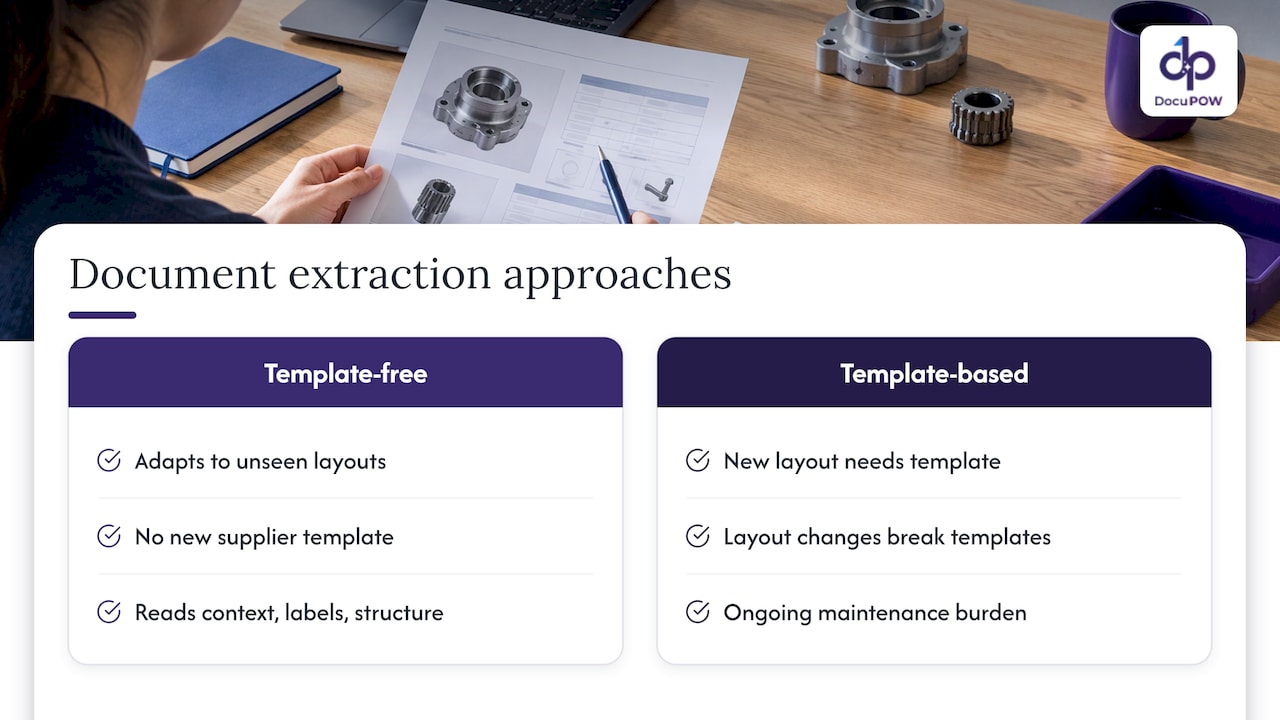
The extractor has to understand that a value belongs to a column labeled “Mfr P/N” or “Your Item #,” whatever the page looks like. DocuPOW uses agentic, template-free extraction that adapts to document layouts it has not seen before, so a new supplier does not mean a new template to build and maintain. Our system reads documents the way a human expert would: by context, label and structure.
Where it goes wrong with other approaches: every new supplier layout needs a new template, and every layout change breaks an old one. The maintenance becomes a job in itself.
3. Separate part numbers from look-alikes
Tell the system which identifiers you want and which to ignore: serial numbers, lot numbers, PO numbers, dates. Context does most of the work. A string in the “Lot” column is not a part number, even if it matches your pattern.
4. Normalize the value
Strip stray spaces, standardize case and separators, and keep the original string alongside the cleaned one so reviewers can see what the document actually said. Our guide to data normalization from documents covers the approach in more detail.
5. Validate against master data
This is where most extraction projects are won or lost. See the next section.
6. Review the exceptions
No extraction is perfect on a blurry fax of a faded packing slip. The question is what happens to the uncertain ones. DocuPOW supports human-in-the-loop audit review, so a person confirms the doubtful values while clean ones flow through. For how to structure that queue, see our guide on document exception handling.
7. Post to your systems
Once validated, the data should land in the ERP, procurement or inventory system without retyping. DocuPOW integrates with ERP and CRM systems through an API and has developer tools for building the connection.
Validate and normalize against your item master
Extraction gives you a candidate. Validation decides whether to trust it. The Epicor guidance recommends enforcing part-number rules with a validation step on the part update process that checks for no spaces, correct length, correct letter case and dashes in the correct positions before a number saves. The same logic applies to incoming documents.
A practical set of checks:
| Check | What it catches |
|---|---|
| Format rules (length, case, separators) | Dropped characters, OCR swaps, stray spaces |
| Match against item master | Numbers that do not exist in your catalog |
| Supplier plus part number pair | Same number used by two manufacturers |
| Cross-check with description and price | A valid number attached to the wrong line |
| Duplicate detection | The same line posted twice |
A match tier works well in practice. An exact match to the master posts automatically. A near match (one character off, or a known alias) goes to review with the suggested item shown. No match at all becomes a new-item request, not a guess. DocuPOW enforces strict schema validation on extracted data, which is the foundation for these rules. Our piece on data accuracy explains why validation matters more than raw extraction speed.
A word on catalogs: if you also publish product data online, the same clean identifiers feed your listings. Examples of AI in eCommerce show how consistent product data supports that side of the business.
Sending part numbers into ERP and procurement workflows
Extraction that ends in a spreadsheet only moves the retyping. The goal is a clean handoff:
- Map fields once. Match each extracted field to the ERP field it fills: item, vendor, quantity, price.
- Post through an API. This avoids copy-and-paste steps where numbers get mangled.
- Keep the audit trail. Record the original document, the extracted value, any correction and who approved it.
- Protect the data. Purchase documents contain pricing and supplier terms. DocuPOW uses bank-grade encryption and a cloud-native architecture designed for high-volume environments. Details are on our security page.
If your documents are mainly manufacturing paperwork, see how to automate manufacturing document processing. For invoice lines that carry part numbers, our guide to invoice line item extraction covers the finance side.
Put it to work with DocuPOW
DocuPOW is a subscription platform for template-free document extraction, workflow orchestration and audit review. Starter is $99 per month and Professional is $499 per month. Enterprise is priced by arrangement, and plan details are on the pricing page. You can see how the extraction and workflow layers fit together on the platform page.
Our perspective
Part numbers look like the easiest field on a document and turn out to be the most expensive to get wrong. One bad character becomes a wrong shipment, a stalled production line or a mismatched invoice.
That is why we do not treat extraction as a text-search problem. Our agents read a document the way an experienced purchasing clerk does: they use the label, the column, the supplier and the surrounding lines to decide what a string means. That is what lets DocuPOW handle layouts it has never seen, without a template for each supplier.
Extraction alone is not the finish line. Values are checked against a strict schema, uncertain ones go to a person through human-in-the-loop review, and clean ones move into your ERP through the API. Automation does the repetitive work. People keep the final say where it counts.
If your team still retypes part numbers from PDFs, the first thing to measure is how many of those lines already match your item master. In most workflows that is where the time is.
Syed Naveed Abbas
FAQ
What is the difference between a part number and a serial number?
A part number is shared by every identical unit and is used for ordering and cataloging. A serial number is unique to one unit and is used for warranty, service and recalls. Extraction rules should treat them as separate fields.
Can I extract part numbers with a regular expression?
A regular expression works on consistent, clean text from a single source. It struggles when suppliers use different layouts, when scans swap similar characters, or when lot numbers and part numbers share a pattern. At volume, template-free extraction with validation is more dependable.
How do I handle part numbers that do not match my item master?
Send near matches to a reviewer with the suggested item displayed, and treat unmatched numbers as new-item requests instead of guessing. This keeps bad data out of the ERP. DocuPOW supports human-in-the-loop audit review for this step.
Does extraction work on scanned documents and drawings?
Yes, with the right pipeline. Research on legacy technical drawings combining object detection and OCR has reported high precision for extracting metadata. Scans of poor quality are the cases where a review step earns its keep.
Which DocuPOW plan fits a part number workflow?
Starter is $99 per month and Professional is $499 per month, with Enterprise available for larger needs. The pricing page lists what each plan includes.
Sources
- Part Numbering Recommendations, Epicor ERP white paper
- What Is a Product Identifier? NPI Corp.
- Defining and using purchased parts, BuyPLM
- Part Numbering, Brenner Software
- Part Numbering, Aligni documentation
- partnumbers.md, git-plm parts
- 3D Spare Parts Catalogs thesis, DiVA portal
Recommended
See DocuPOW on your documents.
Stop building templates. Start extracting data.