How to Automate Expense Reports From Receipt to Reimbursement
Automate expense reports end to end: capture receipts, extract data without templates, enforce policy, keep IRS-ready records and post clean entries to your ERP.


To automate expense reports, you need to fix the part that eats the hours: turning receipts, invoices and card statements into clean, validated data that lands in your accounting system without anyone retyping it. Approval routing and reimbursement are the easy half. Reading the documents correctly is the hard half. DocuPOW reads any document type without templates, validates what it extracts against your schema, and sends the result to your ERP through an API, so finance staff review exceptions instead of keying in totals.
This guide is for finance, accounting, operations and IT teams at mid-size and larger companies. It walks through the workflow, the controls the IRS expects, and what to look for in expense document processing software.
TL;DR
- Automating expense reports means automating the whole chain: capture, extraction, policy checks, approval, posting to the ERP and retention. Skipping a link leaves manual work behind.
- Extraction quality decides the result. Template-free reading handles the receipts that arrive as crumpled photos, emailed PDFs and foreign-language invoices.
- Published studies of expense automation report faster report completion, faster reimbursement and fewer errors. Details are below.
- Keep IRS substantiation (amount, date, place, business purpose) and an audit trail in the design from day one.
- Start with one expense type and a human review step, then widen the scope.
Table of Contents
- Why manual expense reports break down
- What the automated workflow looks like
- Step 1: Map your expense documents and volume
- Step 2: Choose extraction that does not depend on templates
- Step 3: Turn your expense policy into validation rules
- Step 4: Put a person on the exceptions, not on everything
- Step 5: Know the IRS rules your records must satisfy
- Step 6: Connect to your ERP and keep the audit trail
- Step 7: Pilot small, then widen
- What to look for in expense document processing software
- Where this fits beyond expenses
- Perspective
- Getting started with DocuPOW
- FAQ
- Sources
Why manual expense reports break down
An expense report looks simple until you count the touchpoints. An employee photographs a receipt, retypes the amount, picks a category, attaches the file and submits. A manager approves without seeing the policy. Accounting rechecks the amounts, chases missing receipts and keys the entry into the ledger. Every handoff is a place for a typo, a lost file or a duplicate.
The cost is measurable. A PYMNTS and Airbase survey of 225 SaaS executives, run in May and June 2022, found that 47% of firms face data entry errors when managing non-payroll spending, and that accounts payable teams average 17 hours a week processing expense reports and collecting receipts. Those are survey results from one group of companies, but they match what most finance leads describe: the time goes to chasing and retyping, not to judgment.
The same survey carries a useful warning. Firms with a consolidated spend system spent 13% of AP time on manual tasks, against 24% for firms without one. Automating one step in isolation helps less than putting capture, validation and posting into a single flow.
What the automated workflow looks like
A complete automated expense process has seven stages. Most teams already have the last three in some form. The first four are where the savings are.
- Capture. Employees photograph, email or upload receipts. Corporate card feeds and travel bookings arrive as data or PDFs.
- Extraction. Software reads each document and pulls out vendor, date, amount, tax, currency and line items.
- Validation. Extracted values are checked against rules: required fields, duplicate detection, amount thresholds, allowed categories.
- Exception review. Anything uncertain goes to a person, with the source document next to the extracted values.
- Approval. Managers approve clean reports with the policy flags visible.
- Posting. Approved entries go to the ERP with the original document attached.
- Retention and reporting. Records are stored, searchable and ready for an audit.
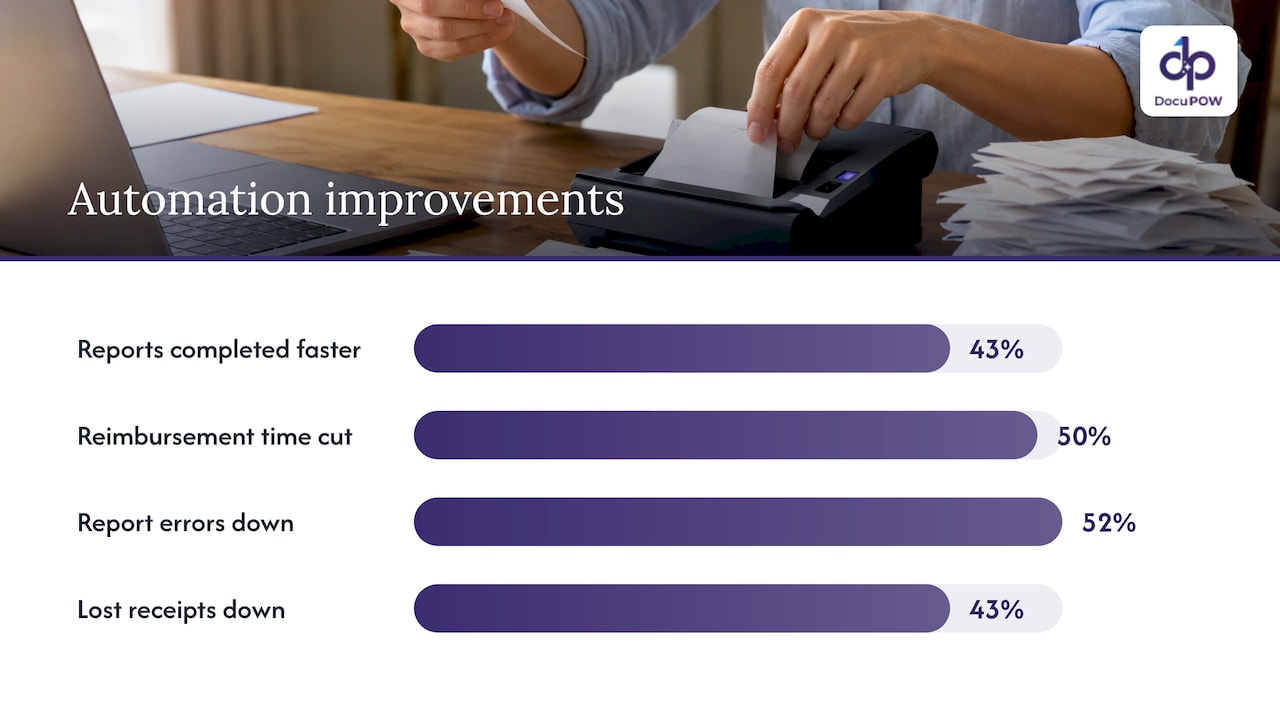
An IDC business value paper based on interviews conducted in September 2021 and published in 2022 reported what organizations gained from automating this kind of flow with a large expense platform: expense reports completed 43% faster (1.3 hours down to 0.7), reimbursement time cut 50% (3.6 weeks to 1.8), report errors down 52% and lost receipts down 43%. The report credits automatic card-charge import and receipt matching for much of the gain. Treat the figures as one study’s findings, not a promise, but the direction is consistent across the research.
A Forrester Total Economic Impact study from June 2024 modeled a composite organization and found 1,800 hours a year recovered from managing business expenses (50 cardholders each saving 3 hours a month) and 480 hours a year saved on core finance and accounting tasks.
Step 1: Map your expense documents and volume
Before you pick anything, list what actually arrives. Typical sources:
- Phone photos of restaurant, taxi and parking receipts
- Emailed PDF receipts and airline itineraries
- Hotel folios with multiple line items
- Vendor invoices submitted as reimbursements
- Card statements and mileage logs
Count monthly volume by type, and note the share that arrives as photos or in unusual layouts. That number tells you how much template-based reading would cost you in setup. Template-based OCR needs a configured layout per vendor, and it breaks when a vendor redesigns a receipt. Expense documents are the worst case for templates, because the long tail of merchants is endless.
Step 2: Choose extraction that does not depend on templates
This is the decision that shapes everything downstream. DocuPOW’s agentic, zero-shot extraction adapts to layouts it has never seen, which means a receipt from a new merchant needs no setup and no maintenance. Our multi-agent system is designed to read and validate documents the way a human expert would, rather than matching a fixed layout.
What to extract for expense reports:
- Merchant name and location
- Transaction date
- Total, subtotal, tax and tip
- Currency
- Payment method (last four digits when shown)
- Line items, where lodging or meals need splitting
Our receipt data extraction guide covers where OCR errors tend to appear on receipts and how they relate to IRS requirements. For the broader picture of where extraction sits among finance tools, see types of financial document automation tools.
Step 3: Turn your expense policy into validation rules
A policy that lives in a PDF gets ignored. A policy that runs as validation gets enforced on every report. Convert the common rules into checks:
| Policy rule | Automated check |
|---|---|
| Receipt required above a threshold | Flag any line over the limit with no attached document |
| No duplicate submissions | Compare vendor, date and amount across reports and card feeds |
| Approved categories only | Reject or reroute lines coded outside the allowed list |
| Meals need attendees and purpose | Require the fields before submission |
| Per-diem or lodging caps | Compare extracted amounts with the cap for the city |
| Report filed within a set number of days | Flag late submissions |
DocuPOW enforces strict schema validation on extracted data, so a record that fails a required field or format check does not flow onward. Schema checks are what stop a misread “1,000.00” from becoming a posted entry.
Step 4: Put a person on the exceptions, not on everything
Full automation is the wrong target. The right target is that people only see what needs judgment. A human-in-the-loop review step sends low-confidence extractions and rule failures to a reviewer, who sees the original document beside the extracted fields, corrects it and releases it.
DocuPOW includes human-in-the-loop audit review for exactly this reason: it keeps a person accountable for uncertain items and gives you a record of who changed what. Your clean reports go through untouched, and your reviewers spend their time on the 5% to 15% that deserve it.
Step 5: Know the IRS rules your records must satisfy
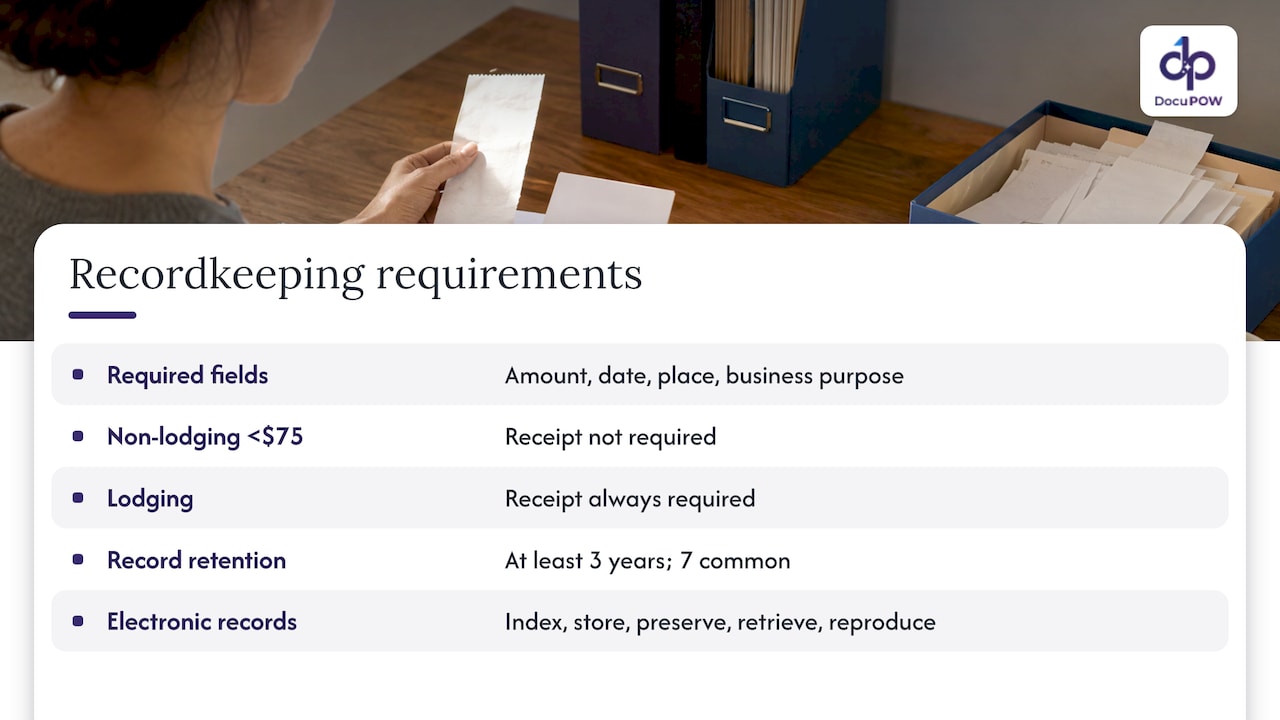
Automation does not change what a tax examiner expects to see. According to LegalClarity’s April 2026 audit guide, which summarizes IRS Publication 463, travel, meals and similar expenses must be substantiated by amount, date, place and business purpose, and receipts are not required for non-lodging expenses under $75. Lodging always needs a receipt. Check the current text of Publication 463 with your tax adviser, since thresholds and rules for specific categories can change.
The same guide notes that records should generally be kept at least three years from filing, with a seven-year policy common in practice, and that electronic record systems must meet IRS Revenue Procedure 97-22. That procedure is the IRS’s guidance for maintaining books and records in an electronic storage system: the system must be able to index, store, preserve, retrieve and reproduce records.
In design terms, this means your extraction output needs four things on every line: amount, date, place and business purpose. If the business purpose is missing from the receipt (it nearly always is), your workflow must capture it from the employee before approval. Build that as a required field, not a hope.
Step 6: Connect to your ERP and keep the audit trail
Extraction that ends in a spreadsheet is half a project. The value arrives when approved entries post to the ledger automatically. Design principles from integration practice:
- Treat the ERP as the system of record, and post only approved entries.
- Keep the original document and source transaction ID with each posted entry.
- Use scoped, least-privilege credentials for the integration account.
- Log every event: who did what, when, and the values before and after.
- Separate the people who request, approve and pay.
These come from an ERP integration guide that cites NIST SP 800-92 for log content and recommends signed webhooks and dedicated integration roles. Its point is blunt: integrations that are reliable but not auditable will still fail an audit.
DocuPOW integrates with ERP and CRM systems through an API and ships developer tools for IT teams. Our workflow orchestration executes the transactional data stream into the core database, so approved data does not pass through a manual export step. Read more in our guide to connecting documents to your ERP, and on designing multi-step document workflows.
Step 7: Pilot small, then widen
Pick one high-volume, low-risk category first, such as domestic travel receipts, and run it in parallel with the manual process for a month or two. Compare:
- Percentage of lines extracted correctly with no edits
- Time from submission to approval
- Time from approval to reimbursement
- Exceptions per hundred reports
When the numbers hold, add the next category: international travel, mileage, vendor invoices submitted for reimbursement. A short automation checklist for small businesses shows the same pilot-then-scale pattern applied to another function, and the logic carries over: define the outcome, automate one process, measure, then expand.
For change management, tell employees what changes for them. The main change is simple: they submit a photo and confirm a few fields, and they get reimbursed sooner. That benefit is the best argument for adoption.
What to look for in expense document processing software
When evaluating tools, test them against your own worst documents, not a vendor demo set. Use this checklist:
| Capability | Why it matters |
|---|---|
| Template-free extraction | New merchants and layouts need no setup |
| Schema validation | Bad values are stopped before posting |
| Human review with source view | Exceptions are fixed quickly and traceably |
| API integration with ERP/CRM | Approved data posts without re-entry |
| Multi-step workflow orchestration | Routing, approvals and posting run as one flow |
| Audit trail and encryption | Supports IRS recordkeeping and internal controls |
| Search with source citations | Auditors and staff find the document behind any number |
| Analytics | Spending visibility by team, vendor and category |
DocuPOW covers each of these: template-free extraction from any document type, schema validation, human-in-the-loop audit review, workflow orchestration, ERP and CRM integration via API, real-time analytics, AI-powered semantic search with source citations, and encryption on a cloud-native architecture built for high volumes.
The PYMNTS and Airbase survey adds a caution worth remembering when you scope a project: only 23% of automated firms actually saw fewer errors, against 31% of non-automated firms that expected to. Automation reduces errors when validation and review are built in, which is why Steps 3 and 4 matter as much as extraction.
Where this fits beyond expenses
The same engine that reads a hotel folio reads a supplier invoice, a purchase order or a contract. Teams that start with expense documents often extend to invoice processing next. See our pages on invoice data extraction and touchless invoice processing, and our playbook on reducing manual data entry. One platform for several document types means one set of controls to audit.
Perspective
Most expense automation projects fail at the same place: the document. Teams buy a workflow for approvals and then discover that someone still has to read every receipt and type it in.
We built DocuPOW on the view that reading is the work. A template-free, agentic system that understands a receipt the way an accountant does removes the typing, and strict schema validation plus human-in-the-loop review keeps the result trustworthy enough to post straight to the ERP.
The practical advice we give finance leaders: start with the documents, put your policy into validation rules, keep a person on the exceptions, and insist on an audit trail from the first day. Do that, and expense reports stop being a monthly scramble and become a background process.
Syed Naveed Abbas
Getting started with DocuPOW
DocuPOW is a subscription platform. The Starter plan is $99 per month and the Professional plan is $499 per month; Enterprise pricing is arranged with us directly. Extra credits are available on Starter and Professional. Plans, credits and details are on our pricing page, and you can see how the pieces fit on the platform page.
If your expense reports are mostly receipts and invoices in assorted layouts, that is the case the platform is built for.
FAQ
What is the first thing to automate in an expense report process?
Start with data capture from receipts and invoices, because retyping is where most time and most errors come from. Once extraction and validation work, routing, approvals and ERP posting build on clean data. Pilot with one common expense type before widening.
Do I still need to keep receipts if everything is digital?
Yes, you need the records, in electronic form if the system meets IRS Revenue Procedure 97-22. Per IRS Publication 463 as summarized by LegalClarity, receipts are required for lodging and for other travel and meal expenses of $75 or more, and every expense needs amount, date, place and business purpose. Confirm your retention period with your tax adviser.
How is expense document processing software different from an expense app?
An expense app mainly collects reports and routes approvals. Document processing software reads the underlying documents, validates the data and posts it to your systems. Finance teams that handle receipts, invoices and statements in many formats benefit most from template-free document reading.
Can automation handle receipts in unusual formats?
Template-free extraction is designed for this. DocuPOW’s zero-shot approach adapts to layouts it has not seen, so a new merchant’s receipt does not need a configured template. Low-confidence items go to a human reviewer.
How long does it take to see results?
That depends on volume and how many systems you connect. Studies report gains in report completion time, reimbursement speed and error rates, for example in the IDC paper cited above, but results vary by organization. A one-category pilot gives you your own numbers within a few weeks.
Sources
- PYMNTS and Airbase survey, Financial Performance Quandary (September 2022)
- IDC business value paper on travel and expense operations (2022)
- Forrester Total Economic Impact study (June 2024)
- LegalClarity: How to Audit Expenses (April 2026)
- IRS Revenue Procedure 97-22 on electronic records
Recommended
See DocuPOW on your documents.
Stop building templates. Start extracting data.