Employee Efficiency: A Manager’s Guide to Measurable Results
Unlock the secret to higher Employee Efficiency. Discover how to boost quality output and minimize wasted resources in your team today!


What is employee efficiency and why does it matter more than productivity?
Employee efficiency is the ability to produce high-quality work while minimizing wasted time, energy, and resources. It’s not the same as productivity, which simply measures how much output someone generates. A team can be highly productive and deeply inefficient at the same time, cranking out volume while burning through budget, redoing work, and missing the point entirely.
The distinction matters because efficiency requires doing tasks right, not just doing more of them. A call center rep who closes many tickets a day but generates a high callback rate is productive by volume and a liability by efficiency. The goal is quality output per unit of input, not raw throughput.
Here’s what separates efficiency from productivity in practice:
- Output quality: Efficiency tracks error rates, revision frequency, and rework costs. Productivity tracks units completed.
- Resource use: Efficient teams accomplish goals without overspending time or budget. Productive teams may hit targets while burning excess resources.
- Strategic alignment: Efficiency applied to the wrong task is still a failure. Doing the wrong thing faster doesn’t help.
- Business impact: Improved efficiency reduces costs, raises customer satisfaction, and builds competitive advantage. Productivity gains alone can lead to burnout and quality decline.
- Measurement depth: Efficiency KPIs include utilization rate, error rate, and task completion quality. Productivity KPIs stop at volume.
Two types of efficiency shape organizational health. Static efficiency means refining existing processes and products to reduce waste within current conditions. Dynamic efficiency means continuously developing new approaches so that profitability improves over time. The strongest teams pursue both.
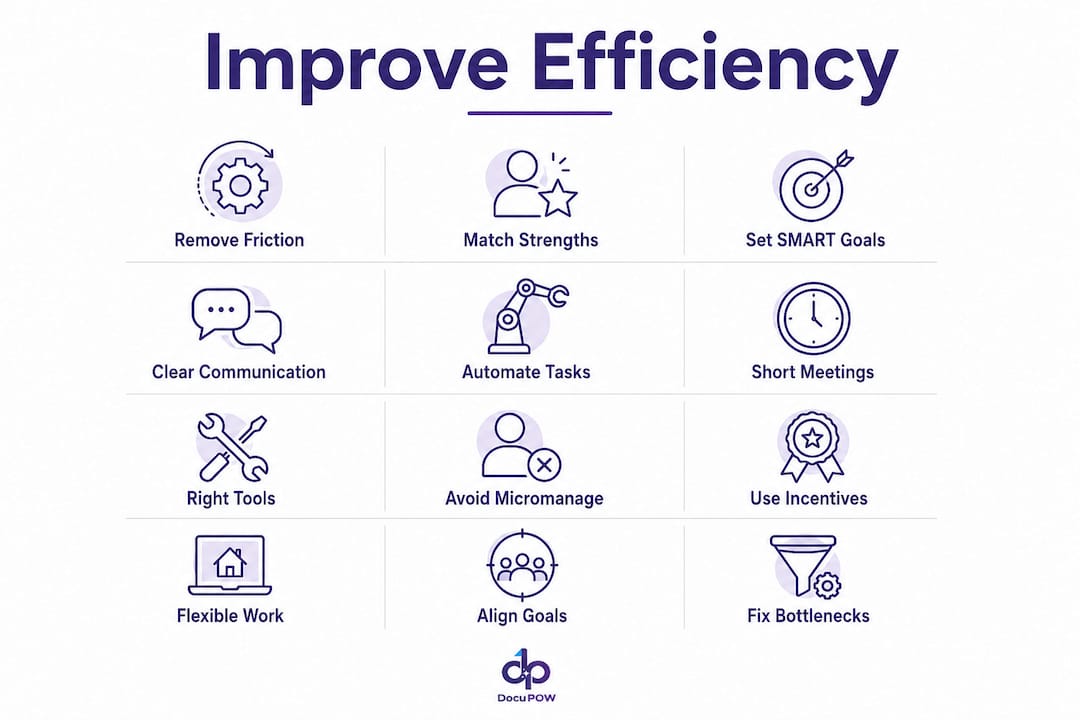
12 proven strategies to improve employee efficiency at work
1. Build a work environment that removes friction
Physical and digital clutter slows people down before they even start a task. Audit your team’s workspace for unnecessary interruptions, fragmented tools, and unclear processes. When employees spend time hunting for files, switching between disconnected apps, or waiting on approvals, that’s friction you can eliminate. Integrated platforms that centralize communication and data cut context-switching fatigue and let people focus on execution.
2. Match tasks to individual strengths
Assigning work based on availability rather than skill fit is one of the most common efficiency killers. When people work in their areas of strength, they complete tasks faster, make fewer errors, and stay more engaged. Use performance data and regular one-on-ones to understand where each team member genuinely excels, then allocate accordingly. Data-driven task assignment puts the right people on the right work without guesswork.

3. Set SMART goals and clear expectations
Vague goals produce vague results. SMART goals (Specific, Measurable, Achievable, Relevant, Time-bound) give employees a clear target and a way to know when they’ve hit it. Automating repetitive workflows and setting SMART goals are among the most direct levers for focusing employee effort. Every task should have a defined outcome, a deadline, and a quality standard attached to it.
4. Establish clear communication channels
Poor communication generates rework, missed deadlines, and duplicated effort. Set explicit norms for when to use email, chat, or a meeting. Real-time collaboration tools reduce the volume of status-update meetings and keep information accessible without requiring someone to ask for it. Transparent workflows mean fewer surprises and faster handoffs between teams.

5. Automate repetitive tasks
Routine data entry, status updates, and report generation don’t require human judgment. They do require human time, and that’s time taken away from strategic work. Top-performing teams prioritize automating routine data processes as a primary efficiency lever because removing inefficiencies often yields bigger gains than simply working faster. Start with the tasks your team repeats most often and automate from there.
6. Run shorter, more purposeful meetings
Meetings without agendas are productivity sinkholes. Every meeting should have a stated purpose, a defined list of attendees, and a clear outcome. If a decision can be made asynchronously, make it that way. Reducing redundant meetings frees up focused work time and signals to your team that their time is respected.
7. Provide the right tools and training
Employees working with outdated software or without proper training spend more time compensating for tool limitations than doing actual work. Audit your tech stack annually. Identify where people are working around tools rather than with them. Targeted training on the tools your team already uses often delivers faster efficiency gains than adopting new platforms.
8. Stop micromanaging
Micromanagement signals distrust and kills autonomy, two things that directly reduce engagement and output quality. When managers hover over every decision, employees stop taking initiative and wait for approval before acting. Set clear expectations, define the outcome, and then get out of the way. Psychological safety, the confidence that people can take smart risks without punishment, is a prerequisite for the kind of creative and strategic work that drives real efficiency.
9. Use incentives and give regular feedback
Incentivizing positive behavior with bonuses, paid time off, and raises reinforces the work patterns you want to see more of. Feedback should be specific, timely, and tied to observable outcomes rather than general impressions. Annual reviews are too infrequent to change behavior. Monthly or even weekly check-ins on specific goals keep people calibrated and motivated.
10. Offer flexible work arrangements
Rigid 9-to-5 schedules don’t account for the fact that people have different peak performance windows. Policies focused on output rather than presence let employees work during their most productive hours. Flexibility builds trust and reduces the low-grade stress that comes from forcing high-focus work into low-energy time slots.
11. Align individual work to organizational goals
When employees can draw a direct line from their daily tasks to the company’s broader objectives, their motivation increases and wasted effort on low-impact work decreases. Goal alignment ensures efficiency gains translate into business success rather than just local optimization. Make the connection explicit in team meetings and performance conversations.
12. Track and eliminate workflow bottlenecks
Bottlenecks don’t always look like bottlenecks. They often show up as high revision rates, missed handoffs, or tasks that consistently take longer than estimated. Tracking estimated versus actual task time variance reveals where the real friction lives, whether that’s unclear instructions, poor tooling, or a process step that no longer makes sense. Fix the system, not the person.
How to measure employee efficiency accurately
Measuring efficiency requires more than counting completed tasks. True efficiency measurement captures quality alongside quantity, tracks trends over time, and distinguishes between time spent working and time spent producing value.
Key metrics to track:
- Utilization rate: The percentage of working time spent on billable or productive tasks. Delivery roles often benchmark at 75–80% as a healthy target.
- Task completion rate: The percentage of assigned tasks completed on time and within scope.
- Error and revision rates: How often work requires correction before it meets quality standards.
- Time on non-work activities: Time spent on personal email, social media, or other non-work tasks during scheduled hours.
- Employee Net Promoter Score (eNPS): A proxy for engagement, which correlates with sustained efficiency over time.
- Realized Project Value (RPV): Calculated by dividing the percentage of work completed by the approved project budget, this flags efficiency problems that pure productivity metrics miss.
Three formulas for calculating efficiency:
Calculating employee efficiency uses the ratio of productive or task-focused time to total time at work. Three formulas cover different angles:
| Metric | Formula | Example |
|---|---|---|
| Productive Time Efficiency | (Total Productive Time / Total Time at Work) × 100 | 6 hrs / 8 hrs × 100 = 75% |
| Task Time Efficiency | (Total Time Spent on Tasks / Total Time at Work) × 100 | 5 hrs / 8 hrs × 100 = 62% |
| Task Assignment Efficiency | (Assigned Task Time / Total Time at Work) × 100 | 7 hrs / 8 hrs × 100 = 88% |
Single-point measurements give you a snapshot. The real value comes from longitudinal tracking over months and quarters, where you can see whether efficiency ratios improve as you retain strong performers, refine processes, and address training gaps. A one-time calculation tells you where you are. A trend line tells you whether what you’re doing is working.
Pro Tip: Establish baseline standards before you start tracking. Create separate benchmarks for every role and project type, because a 75–80% utilization rate is healthy for delivery and service roles, while targets may differ for creative versus data-entry functions.
How skills management drives team efficiency
Skills management is the practice of identifying what your people are genuinely good at and building workflows around those strengths rather than around org-chart titles. It’s one of the most underused efficiency levers available to managers.
When employees work in roles and on tasks that match their competencies, they complete work faster, produce fewer errors, and stay more engaged over time. Mismatched assignments create the opposite: slower output, higher revision rates, and the kind of quiet frustration that eventually becomes turnover.
Practical approaches that work:
- Regular performance reviews with a skills lens: Go beyond “met targets” and ask which tasks each person completed with the least friction and the highest quality. That’s where their real strengths live.
- Tailored task assignment: Use what you learn in reviews to deliberately route work toward people’s strengths. This isn’t just good for efficiency; it’s good for morale.
- Cross-training for resilience: When only one person knows how to do a critical task, you have a bottleneck waiting to happen. Cross-training builds redundancy and exposes skills you didn’t know existed on your team.
- Skills gap analysis: Compare what your team can do today against what your goals require. The gap tells you where to invest in training and where to hire.
The connection between skills management and goal alignment is direct. When people work in their areas of strength on tasks tied to meaningful objectives, efficiency gains compound. They’re not just working faster; they’re working on the right things in the right way.
Common pitfalls that quietly destroy employee efficiency
Most efficiency problems aren’t caused by lazy employees. They’re caused by management practices and system design that create friction, misalignment, or the wrong incentives.
The most common traps:
- Measuring activity instead of outcomes: Tracking keystrokes, login times, and email volume tells you how busy people look, not how much value they produce. Outcome-based performance management is more effective than activity surveillance for driving real efficiency.
- Surveillance overreach: Monitoring that feels invasive decreases morale and increases turnover, particularly among the creative and strategic workers who are hardest to replace. Track workflow friction points like high revision rates, not individual keystrokes.
- Goal misalignment: Efficiency applied to the wrong task is waste with extra steps. If your team is executing brilliantly on work that doesn’t move the company’s priorities forward, you have an alignment problem, not an efficiency win.
- Poor communication: Unclear instructions generate rework. Rework is one of the most expensive and invisible efficiency drains in any organization.
- Ignoring bottlenecks: When a process step consistently produces delays or errors, the instinct is often to push harder. The better move is to examine the step itself. Estimated versus actual task time variance is one of the clearest signals that a bottleneck exists.
- Data without context: Raw numbers mislead. A high task completion rate means nothing if the tasks completed were low priority. Always pair efficiency metrics with context about what was actually accomplished.
- Micromanagement: Beyond the morale damage, micromanagement creates a decision bottleneck at the manager level. Every approval that has to flow through one person is a delay.
The fix for most of these pitfalls is the same: shift from monitoring inputs to measuring outcomes, give people clear goals and the autonomy to pursue them, and fix the systems that create friction before blaming the people working within them.
How AI and automation transform employee efficiency in modern workplaces
Automation’s biggest efficiency contribution isn’t speed. It’s removing the category of work that requires human time but not human judgment. Data entry, document processing, status updates, report generation, and routine approvals all fall into this category. When those tasks are automated, employees redirect their attention to work that actually requires thinking.
AI goes further by adding intelligence to the automation layer. Rather than simply executing predefined rules, AI-powered tools can forecast demand, flag anomalies, prioritize tasks based on deadlines and dependencies, and surface bottlenecks before they become visible to a manager. That shift from reactive to proactive management is where the real efficiency gains live.
Where AI-driven automation delivers the most impact:
- Intelligent document processing: Extracting data from invoices, contracts, and forms manually is slow and error-prone. AI agents that understand document context eliminate manual entry and reduce processing errors. DocuPOW’s AI-driven document automation exemplifies this, using autonomous agents to extract data without rigid templates, giving operations teams real-time financial visibility.
- Workflow management: Automated routing assigns work to the right person based on skills, capacity, and priority rather than whoever happens to be available.
- Forecasting and load balancing: AI-driven forecasting helps balance workloads to prevent burnout while avoiding overstaffing, one of the more expensive inefficiencies in knowledge work.
- Bottleneck identification: Real-time dashboards flag where work is stalling before delays cascade downstream.
- Decision fatigue reduction: Standardized, automated processes give teams a clear path for recurring work, cutting the mental overhead of deciding how to handle routine situations.
Before deploying AI tools in your workflows, it’s worth thinking carefully about how they’re introduced. Enterprises should consider how to think about agentic AI before it enters workflows to ensure smooth adoption and maximize efficiency gains. Enterprises adopting agentic AI need clear governance frameworks that respect employee autonomy and maintain transparency about what is being monitored and why. Automation that employees understand and trust gets used. Automation that feels opaque or threatening gets worked around.
DocuPOW’s approach to back-office automation is built on this principle: AI agents handle the extraction and processing work, while employees focus on the decisions and relationships that require human judgment.
How employee well-being and work-life balance affect efficiency
Sustained efficiency requires sustained energy. Teams that consistently operate beyond their capacity don’t just slow down; they produce lower-quality work, make more errors, and eventually leave. The relationship between well-being and output quality is direct and well-documented.
Burnout is the most visible symptom of a well-being problem, but it’s rarely the first sign. Watch for rising revision rates, increasing absenteeism, and declining eNPS scores. These metrics often signal a well-being issue before anyone names it as one.
Flexible work arrangements address one of the most common well-being friction points: the mismatch between when people are required to work and when they actually perform best. Output-focused policies that measure results rather than hours worked let employees manage their energy, not just their schedule. The efficiency gains from this shift are real because people doing focused work during their peak hours produce better output in less time than people grinding through low-energy periods.
Recovery time matters too. Teams that take adequate breaks, use their vacation time, and have reasonable workloads maintain higher efficiency over quarters and years than teams running at maximum capacity every sprint. Sustainable productivity comes from smart systems, not from individuals consistently working beyond their limits.
How leadership style shapes employee efficiency
The manager is the single biggest variable in team efficiency. Not the tools, not the process, not the office layout. The manager. Research consistently shows that engaged managers who connect with their teams and focus on outcomes produce more efficient teams than managers who monitor inputs and enforce compliance.
Leaders who focus on quantity of work rather than quality create operational waste despite high activity levels. They optimize for looking busy rather than producing value. The shift to outcome-based evaluation, where success is defined by results rather than hours logged or tasks completed, is the most direct leadership change available to most managers.
Psychological safety is the other critical leadership variable. When people feel safe raising problems, admitting mistakes, and proposing new approaches without fear of punishment, they surface bottlenecks earlier and solve problems faster. Teams without psychological safety hide inefficiencies until they become crises.
Specific leadership practices that improve team efficiency:
- Define success clearly before work begins, not after.
- Remove obstacles rather than adding oversight.
- Give feedback on outcomes, not methods.
- Treat errors as system signals, not individual failures.
- Delegate decisions to the level closest to the work.
The command-and-control management style that dominated 20th-century workplaces is a direct efficiency tax in knowledge work environments. Every decision that has to escalate to a manager is a delay. Every employee who waits for approval before acting is a bottleneck.
Which technology and software tools actually improve efficiency?
Technology improves efficiency when it reduces friction, automates low-value work, and gives managers better data for decisions. It creates inefficiency when it adds complexity, requires constant maintenance, or generates data that no one acts on.
The most impactful categories of tools for workforce efficiency:
Time tracking and workflow visibility: Tools that capture how time is actually spent, across tasks, projects, and non-work activities, give managers the data they need to identify bottlenecks and reallocate resources. The key is using this data to fix systems, not to surveil individuals.
Project and task management platforms: Centralized platforms for assigning tasks, setting deadlines, and tracking progress reduce the coordination overhead that eats into focused work time. When everyone can see what’s in progress and what’s blocked, handoffs happen faster and fewer things fall through the cracks.
Communication and collaboration tools: Platforms like Slack, Microsoft Teams, and Google Workspace reduce email volume and make information accessible without requiring someone to ask for it. The efficiency gain comes from setting clear norms about which channel to use for what, not from adopting the tool itself.
Performance management software: Tools that connect individual goals to team and organizational objectives, track progress, and facilitate regular feedback cycles keep employees aligned and give managers early warning when someone is off track.
AI-powered document processing: For organizations handling high volumes of invoices, contracts, or forms, document process automation eliminates the manual extraction work that consumes hours of staff time weekly. DocuPOW’s platform uses autonomous AI agents to process documents without templates, reducing both processing time and error rates.
The selection principle is simple: choose tools that reduce the work required to do work. If a tool requires more administration than it saves, it’s not an efficiency gain.
Real-world examples of successful efficiency improvements
Manufacturing: Eliminating manual data extraction
A global manufacturer was processing hundreds of supplier invoices weekly through manual data entry. Staff spent hours per day keying figures into ERP systems, with error rates that required additional review cycles. By deploying AI-powered document processing, the team eliminated the manual entry step entirely. Processing time dropped, error rates fell, and the staff previously doing data entry shifted to exception handling and vendor relationship management, higher-value work that the business had been underinvesting in.
Professional services: Cutting meeting overhead
A mid-size consulting firm tracked how its project teams spent time and found that roughly a third of the workweek was consumed by internal status meetings. The firm implemented a policy requiring all status updates to be posted asynchronously in a shared project management platform before any meeting could be scheduled. Within two months, meeting volume dropped substantially and project completion rates improved, not because people worked more hours, but because they had more uninterrupted time to do the work.
Operations: Fixing a bottleneck through variance analysis
A logistics company noticed that certain shipment documentation tasks consistently ran over their estimated completion time. Rather than assuming the staff were underperforming, the operations manager ran an estimated-versus-actual variance analysis and found that the delays traced back to a single approval step that required a specific manager’s sign-off. Redistributing that approval authority to two additional team members cut the average task completion time significantly and removed a recurring source of downstream delays.
These examples share a common thread: the efficiency gain came from fixing a system, not from pushing people harder. That’s the pattern worth replicating.
Key Takeaways
Employee efficiency, the ability to produce high-quality output while minimizing wasted time and resources, drives cost reduction, customer satisfaction, and competitive advantage more directly than raw productivity volume.
| Point | Details |
|---|---|
| Efficiency vs. productivity | Efficiency measures quality output per unit of input; productivity measures volume. Tracking both gives the full picture. |
| Three efficiency formulas | Productive Time, Task Time, and Task Assignment Efficiency all divide focused time by total time at work, then multiply by 100. |
| Utilization rate benchmark | Delivery roles typically target a 75–80% utilization rate as a healthy efficiency KPI. |
| Biggest leadership lever | Shifting from activity-based to outcome-based evaluation removes waste and improves strategic work quality. |
| Automation’s core value | Automating routine data extraction and repetitive workflows frees employees for higher-value work, not just faster execution. |
FAQ
What is the meaning of employee efficiency?
Employee efficiency is the ability to produce high-quality work while using the minimum necessary time, energy, and resources. It differs from productivity, which measures raw output volume, by accounting for quality, waste, and whether the work actually needed to be done.
How do you measure employee efficiency?
The standard formula divides productive or task-focused time by total time at work, then multiplies by 100. For example, six productive hours out of an eight-hour shift equals a 75% efficiency rate. Multi-dimensional KPIs, including error rates, revision frequency, and task completion rates, give a more complete picture than time-based calculations alone.
How do you improve employee efficiency?
The highest-impact actions are setting SMART goals, automating repetitive tasks, eliminating redundant meetings, matching work to individual strengths, and shifting performance evaluation from activity monitoring to outcome measurement. Fixing workflow bottlenecks through estimated-versus-actual task time analysis often delivers faster gains than any motivational intervention.
What is the average efficiency rate for an employee?
There is no universal benchmark because efficiency targets vary by role, industry, and task type. For delivery and service roles, a utilization rate in the 75–80% range is commonly cited as a healthy target. The more useful question is whether your team’s efficiency rate is improving over time relative to your own baseline.
Does micromanagement hurt employee efficiency?
Yes. Micromanagement creates decision bottlenecks at the manager level, reduces employee autonomy, and damages the psychological safety that enables creative and strategic work. Surveillance-style monitoring also increases turnover, which is one of the most expensive efficiency losses an organization can absorb.
Recommended
See DocuPOW on your documents.
Stop building templates. Start extracting data.