Document Data Lineage for RAG: Trace Each Answer to Its Source
Track each document from source file to parser, chunk, vector, and AI answer. This practical RAG checklist supports reproducibility, audits, and debugging.


Document Data Lineage for RAG: Trace Each Answer to Its Source

Document data lineage is the traceable path from a raw document through every parsing, cleaning and chunking step to the final JSON, embeddings or AI answers it produces. Teams need it for auditability, reproducibility and fast root-cause debugging. We build on the OpenLineage model and on NIST guidance, and AWS documents the same capture idea for governed pipelines.
TL;DR:
Assign every document a permanent ID before processing, then record parser, model, and code versions at each run; these details are hardest to reconstruct later.
Link each chunk to its parent document, its embedding ID, and any downstream answer or extracted field; dataset level records cannot identify a source PDF.
Use runtime events as the primary record, add static parsing for jobs that cannot emit them, and label manual declarations clearly.
Pilot one document class through the full pipeline, then reconcile recorded lineage with actual runs and replay sample documents to catch gaps before expanding.
Table of Contents
What does document data lineage actually cover?
Document lineage follows one document, and the pieces cut from it, across its whole life. It starts at the raw source: an S3 bucket, a Google Drive folder, an email attachment. It then covers the transformations, such as parsing, cleaning and chunking, and ends at the outputs, such as extracted JSON, vector embeddings and the answers an AI system gives. AWS describes this lifecycle as inputs, transformations (the job or code version that processed the file) and outputs, and treats it as a basic requirement for governed document processing in regulated industries.
The word that matters is “item.” Classic data lineage works at the dataset or table level: this table was built from those two tables. That is useful for analytics, but it tells you nothing about which PDF produced which chunk. Document lineage works at the item level, linking a raw unstructured file to the specific extracted chunks, the parsing strategy used and the versioned code that ran. If you track only where the file sits in S3 and ignore which parser version touched it, you cannot reproduce the result.
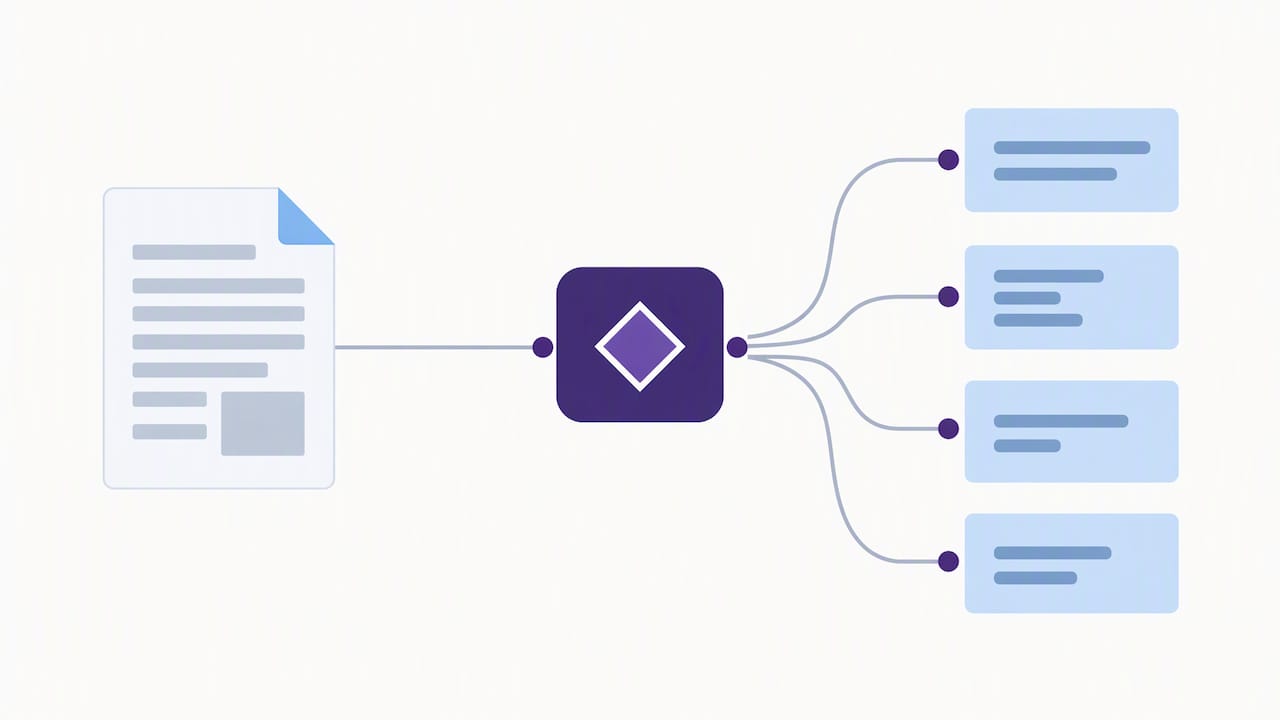
A quick contrast makes this concrete. Dataset-level lineage might say “the invoices table was loaded from the landing bucket on Tuesday.” Item-level lineage says “a scanned PDF from the vendor portal was parsed by a particular parser version, split into chunks, and one chunk became the vector that supported this answer.” The second statement is what an auditor or a debugging engineer needs.
Here is the minimal set of metadata a document registry should hold to support that traceability:
-
Stable document ID: a provenance ID that never changes, even if the file moves.
-
Source location and version: the bucket, folder or mailbox, plus the object version ID where the store supports it.
-
Content hash: a fingerprint that proves the bytes you processed are the bytes you registered.
-
Acquisition details: how and when the document arrived, and from whom.
-
Parser and method: the parser name, its version and any OCR settings.
-
Chunk IDs: one identifier per chunk, linked back to the parent document.
-
Embedding or vector IDs: the link from each chunk to its stored vector.
-
Run identifier and code version: the run that produced each artifact and the commit hash behind it.
-
Owner and timestamp: who is accountable and when each step happened.
None of these fields is exotic. The discipline is in recording all of them for every document, every time, and in keeping them connected through stable IDs rather than file paths.
Which types of lineage should you build, and for whom?
Lineage is not one thing. Different people ask different questions, and each question needs a different view of the same flow. Mapping stakeholders to the right scope keeps you from building one oversized graph that nobody trusts.
-
Technical lineage: the engineer-facing trace. It follows code, SQL, columns and files, and answers “which job wrote this output and from what inputs?” Developers use it to debug a broken transform or to see what breaks when a schema changes.
-
Business lineage: the steward-facing view. It maps technical assets to business terms and shows how a reported figure was derived, so an analyst can see that “net invoice amount” comes from a specific extracted field and a specific tax calculation.
-
Operational lineage: the run-state view for operations and site reliability teams. It records when jobs ran, which failed, how long they took and what runtime metadata they emitted. It answers “did last night’s batch finish, and which documents were skipped?”
-
Document and item-level lineage: the view for unstructured content. It ties each individual file to its chunks, parser settings, embeddings and downstream outputs.
The fourth type needs different instrumentation because unstructured content has no schema to lean on. A table has named columns, and a SQL parser can infer how one column feeds another. A scanned contract has no columns. The “transformation” is an OCR engine, a layout model or a chunking rule, and its behavior depends on version, language and settings. If those details are not captured at the moment of processing, they are gone, and you cannot rebuild them from the file alone.
In practice, these types share one backbone. The same run events can feed an engineer’s debugging view, an operations dashboard and an auditor’s report, as long as the events carry stable identifiers and enough facets. The mistake we see most often is treating item-level tracking as a later add-on. Retrofitting chunk IDs and parser versions onto months of processed documents is painful, so decide early that every document gets an ID and every transformation records its version.
How does lineage get captured, and which method should you trust?
There are several common capture techniques. Each has blind spots, which is why most mature teams combine them.
-
Runtime event capture. The orchestration layer emits lineage events while jobs execute. The OpenLineage design records metadata for a job in execution and defines events for the Run lifecycle, with transports for http, Kafka and file output. For Airflow, the apache-airflow-providers-openlineage integration collects task input and output metadata, run-level metadata and job-level metadata through hooks and listeners, then sends events to your configured backend. Because the events come from the thing that actually ran, they stay current when pipelines change.
-
Static parsing of code and SQL. Tools read pipeline definitions or queries and infer which inputs feed which outputs. This is helpful for planning and for covering jobs you cannot instrument at runtime. Its blind spot is dynamic behavior: a path built from a variable, a branch that only runs on certain files, or a parser chosen at runtime will not show up in static analysis.
-
Log and query parsing. Warehouse query logs and application logs can be mined after the fact to reconstruct relationships. This works well for structured data already in a database. It is weak for documents, because a parsing step that never touches a SQL engine leaves no query to read, and logs rarely carry chunk IDs or parser versions.
-
Manual declaration. A person writes down the flow in a spreadsheet, wiki or catalog form. It is quick for a small pilot and fine for documenting an external system you cannot instrument. The cost is maintenance: every pipeline change needs a human update, and the record quietly drifts from reality.
The reason runtime capture matters so much is accuracy. Practitioners writing for AWS put it plainly: observability is the goal of lineage, and lineage graphs that are not programmatically linked to the execution environment are likely to be inaccurate or incomplete. Automatic capture by the orchestration layer is what makes lineage trustworthy.
Runtime signals from other tools can strengthen this. If you already instrument services with traces, the application observability plan using OpenTelemetry shows how to collect runtime telemetry alongside your lineage events, so that a slow or failing parse step can be tied to the trace that explains it.
A hybrid pattern usually wins. Use runtime events as the primary source of truth, add static parsing to catch jobs that cannot emit events, and keep manual declarations only for the few systems outside your control, clearly labeled as manual. Then reconcile the three on a schedule so gaps show up as alerts rather than surprises.
Pro Tip: Capture stable IDs and the parser or model version first. If you can only record two things on day one, record a permanent document ID and the exact version of whatever processed it, because those two fields are the hardest to reconstruct later.
What belongs in the lineage model for documents?
The most practical starting point is the OpenLineage model, then extend it with document-specific facets. OpenLineage defines three core entities: a dataset (a thing that is read or written), a job (a process that does the work) and a run (one execution of that job). Everything else is enrichment through facets.
For documents, you can map the entities like this: a raw file or a chunk collection is a dataset, a parsing or embedding task is a job, and a single processing pass over a batch is a run. Facets are additive and extensible, so you can attach as much detail as you need without changing the core. Per the OpenLineage specification, facets are additive, and re-emitting a facet with the same name replaces the previous instance, which keeps the latest state clean.
Standard facets worth including:
-
schema: the structure of the output, for example the fields in your extracted JSON.
-
dataSource: where the data lives, such as the object store bucket.
-
lifecycleStateChange: whether a dataset was created, overwritten or dropped.
-
version: a pointer to the exact version of the dataset.
-
columnLineage: how output fields derive from input fields, useful for extracted values.
-
ownership: who is responsible for the asset.
On top of those, we recommend a custom set of document-specific facets:
-
Source path: the original location of the file.
-
Parser name and version: the exact tool and release that processed it.
-
OCR or extraction method ID: which method and settings were used.
-
Chunk ID: the identifier of each chunk, tied to its parent document.
-
Embedding ID: the vector or index entry created from the chunk.
-
Run commit hash: the code version that produced the artifact.
-
Timestamp: when the step completed.
-
Owner: the team or person accountable.
Versioning deserves its own decision, because “which version of the input?” has several valid answers. OpenLineage’s own examples mention snapshot identifiers such as Iceberg snapshot IDs for table formats. For files in object storage, use the store’s object version ID plus a content hash, so you detect changes even if the version feature is off. For code and models, use the commit hash and, where you ship containers, the image tag. Recording the data version, the code version and the model version is what turns a lineage graph into a reproducible recipe.
Why does document lineage matter to the business?
Lineage earns its budget when you can name the specific moments it saves you. Several use cases come up repeatedly, in roughly this priority order.
-
Auditability and compliance. When a reported figure is questioned, you can trace it from the number back through each transformation to the original document. This is the capability regulators and internal reviewers ask for, and it is hard to fake after the fact. Our guide to standards-first document audit trails shows how those controls map to the metadata described above.
-
Faster troubleshooting. When a bad extraction or an odd RAG answer appears, lineage lets you follow the output to the source chunks and the parser version that created them. Instead of guessing whether the model hallucinated or the parser mangled a table, you look at the chunk and see.
-
Reproducibility. Preserving the exact input and transform metadata means you can rerun a result and get the same one, or explain why you cannot. For AI systems this matters twice: once for debugging a model, and once for proving to a reviewer what the system saw.
-
Impact analysis. Before you change a parser, a model or a source location, lineage tells you which downstream documents, chunks and reports depend on it. You can plan a re-processing run instead of discovering the damage in production.
The common thread is time. Without lineage, each of these questions becomes an investigation that pulls in several people for days. With item-level lineage, it is a query. That difference is the honest case to make when you ask for investment: the first audit or incident that you can answer in minutes pays for much of the instrumentation.
How do you instrument a document pipeline step by step?
Use this checklist to move from nothing to end-to-end lineage. It follows the flow register, parse, emit, store, query.
-
Register every incoming document. Create an entry in a document registry and assign a stable provenance ID. Record the source location, object version, content hash, acquisition method, timestamp and owner. Do this before any processing, so the ID exists for every later step to reference.
-
Capture preprocessing and parser metadata. For each parse, record the parser name, its version, the parameters and any OCR settings. These values explain why two runs over the same file can differ, and they are the details most often lost.
-
Create chunk-level records. Give each chunk its own ID linked to the parent document, then map each chunk to its embedding or vector ID and to any downstream artifact, such as an extracted field or a retrieved passage.
-
Emit lineage events at run boundaries. Use an OpenLineage-compatible client or a custom transport (http, Kafka or file) to send start and complete events for each job run. If you orchestrate with Airflow, the provider integration handles much of this automatically.
-
Record code and model versions in run facets. Attach commit hashes, container image tags and model identifiers to the run, so the code that produced each artifact is always known.
-
Store and expose lineage for operations and auditors. Keep the events in a queryable backend, save common lineage queries and visualizations for the people who need them, and schedule validation and reconciliation jobs that compare recorded lineage against what actually ran.
A note on event-driven designs: if your pipeline reacts to file arrivals rather than running on a schedule, the same checklist applies, and emitting an event at each stage is natural. Our write-up on event-driven document processing without templates walks through that pattern.
Pro Tip: Start with one document class, such as vendor invoices, and run the full six steps on it before widening scope. A narrow pilot exposes missing facets cheaply, while a broad rollout buries them.
What goes wrong, and how do you keep lineage honest?
Most lineage failures are quiet. The graph still renders, but it no longer matches reality, and nobody notices until an audit or an incident.
The classic failure is lineage drift. It happens when the physical flow of data changes, say a new source folder or a rerouted path, but the metadata registry is not updated. AWS practitioners call this out as a common operational pitfall and note that coupling metadata collection to the orchestration layer avoids it. The symptom is a lineage record that confidently points to a path nobody uses anymore.
A second failure is missing transformation detail. If you store the location of a document but not the parser version, you cannot reproduce an extraction, and you cannot tell whether a changed answer came from new data or a new tool. Incomplete facets cause the same problem in smaller doses: a run with no commit hash, a chunk with no parent ID.
Controls that work:
-
Couple capture to orchestration so lineage is produced by the same system that runs the job, not by a separate manual step.
-
Run periodic reconciliation jobs that compare recorded lineage with actual job runs and storage contents, then flag mismatches.
-
Alert on missing facets such as an absent parser version or commit hash, so gaps surface the day they appear.
-
Add lightweight end-to-end tests that push a known sample document through the pipeline and assert that the expected chain of IDs comes out the other side.
-
Run daily completeness checks that count documents processed against documents with full lineage.
-
Replay a random sample on a regular schedule, rerunning a handful of documents from their recorded metadata and confirming the outputs match.
The sample replay is the strongest check, because it tests the one claim lineage exists to support: that you can rebuild the result from what you recorded.
Which standards should your lineage follow?
You do not need to invent a metadata vocabulary. A few references cover much of what a document pipeline needs.
-
OpenLineage. It supplies the event model and the Airflow integration. It defines the dataset, job and run entities, supports http, Kafka and file transports, and has integrations for systems including Apache Airflow, Flink, Hive, Spark, dbt, Feast, Great Expectations, SQL and Trino. The Airflow provider automates event capture through hooks and listeners, which is why we recommend it as the backbone for runtime capture.
-
NIST documentation guidance. The NIST generative AI profile recommends documenting the origin and history of training and generated data and adopting documentation templates to support provenance tracking. It includes actions to establish transparency policies and processes for documenting data provenance, versioning and ownership. Those three words, provenance, versioning and ownership, line up neatly with the registry fields and facets above.
-
MILD. Minimal Item-Level Documentation prescribes a small set of item-level properties, including content hash, item metadata, acquisition method and source information, so training data can be identified and disclosed without publishing the full dataset. It complements runtime provenance: OpenLineage tells you what ran, and MILD-style records tell you exactly what each item was.
A practical mapping between these standards and our document facets:
-
Content hash and acquisition method (MILD) map to the registry’s hash and acquisition fields.
-
Provenance, versioning and ownership (NIST) map to the document ID, version facets and ownership facet.
-
Dataset, job and run (OpenLineage) map to files or chunk sets, parse and embed tasks, and processing passes.
-
Parser name and version, chunk ID and embedding ID are our custom facets, attached through OpenLineage’s extensibility.
Adopting all three gives you an auditable record, a runtime event stream and a transparent item description, each covering a gap the others leave open.
Notes from the field: how we suggest rolling this out
We have found that the teams who succeed start small and stay honest about what they capture. Pick one document class that matters, such as supplier invoices or contracts, and instrument the full register, parse, emit, store, query path for it. Look at what your first audit question or debugging session wanted that the facets did not provide, add those facets, and only then widen to the next class. Trying to cover every document type on day one tends to produce a large graph full of empty fields.
Several of our platform features line up with the lineage needs described here. Our template-free extraction processes documents without per-layout templates. Our human-in-the-loop audit review leaves a trail of who checked and corrected what. Our platform also supports document processing.
If you want to see how others have structured their rollouts, our real-world examples of AI document processing factories show several approaches, and our NIST-aligned controls for secure AI processing are a good companion for governance teams. Reach out if you would like related case-study material.
What should you prioritize before anything else?
Most advice on lineage starts with tools: pick a catalog, buy a visualizer, build a graph. I think that gets the order backward for document pipelines. The graph is the least important part. What decides whether your lineage is useful is whether every document has a permanent ID and every transformation recorded its version at the moment it ran. A beautiful visualization built on missing parser versions is a confident-looking guess.
The conventional wisdom also undersells how much the unstructured case differs from tables. Teams reuse their warehouse lineage playbook and then discover that a chunk of a scanned PDF has no column to point at. Item-level records are not a nice extra for RAG systems. They are the only way to answer “where did this sentence in the answer come from?”
So prioritize in this order: stable IDs, parser and model versions, chunk-to-embedding links, then runtime event capture, then visualization. Start by handling the highest-priority items for one document class, and you will already be able to answer questions that most teams cannot.
— Syed Naveed Abbas
How does DocuPOW make lineage easier to get right?
Lineage breaks down at the manual steps: someone maps a layout, someone forgets to log a parser change. We built our platform to remove those steps. Our agent-based, template-free extraction reads each document in context instead of through a hand-built template, so there is far less mapping to maintain, and the parsing details are recorded where the work happens. Human-in-the-loop review adds an audit trail on top, so you can show who validated a value.

A sensible next step is a small pilot. Pick one document class, run it through our platform, and check the resulting records against the registry fields listed earlier. If you want to see how that fits your volumes, our pricing page lists the Starter plan at 99 USD per month and the Professional plan at 499 USD per month, and Enterprise pricing is available on request. For a closer look at how we approach extraction, read our AI data extraction guide, then request a demo and bring your trickiest documents.
FAQ
What is a lineage document?
A lineage document is a record that shows where a piece of data came from, what happened to it, and where it went. For document pipelines, it lists the source file, each processing step with its version, and the outputs produced. OpenLineage formalizes this with datasets, jobs and runs.
What is an example of data lineage?
Take a scanned invoice stored in S3. It is parsed by a specific parser version, split into chunks, turned into embeddings, and one chunk then supports an AI answer. The lineage records every link in that chain, so you can trace the answer back to the original file.
What is the best data lineage tool?
The right choice depends on your stack, so start with the standard rather than the product. An OpenLineage-compatible setup gives you portable events, and its Airflow provider automates capture for Airflow users. Pick tooling that emits and stores those events and lets you add document-specific facets.
What is data lineage?
Data lineage is the traceable history of data as it moves from its origin through transformations to its final use. It records inputs, the jobs that changed them and the outputs they created. Good lineage makes data auditable, reproducible and easier to debug.
Sources
Recommended
See DocuPOW on your documents.
Stop building templates. Start extracting data.