Cut Litigation Response to Days with Enterprise Information Management
Enterprise-focused, practice-first coverage of the information lifecycle: governance, retention and legal-hold steps, ERP/CRM integration, and metrics to...

Information management is the practice of organizing, protecting, and enabling trusted use of information across its lifecycle, from the moment it’s created to the moment it’s deleted. Done well, it gives organizations faster, better-informed decisions, lower legal and security risk, and real operational savings from cutting duplicate work. The rest of this guide breaks down that lifecycle, the governance structures that hold it together, and the concrete steps for building a program that works.
TL;DR:
- Without metadata tagging at creation, organizations risk losing critical information and making future retrieval and governance impossible.
- A lifecycle-based program must clearly define responsibilities and controls for each stage, especially archiving and disposition, to prevent unmanageable accumulation.
- Building a successful information management program begins with an inventory and a governance committee rather than immediately investing in technology.
- Embedding metadata standards and retention rules directly into ERP and CRM workflows ensures governance policies are actively enforced where data is created.
- Utilizing autonomous document processing agents can accelerate inventory, extraction, and integration of large volumes of unstructured data, supporting AI readiness.
Table of Contents
- What Are the Key Benefits of Information Management?
- What Are the Stages of the Information Lifecycle?
- How Is Information Management Different From Data or Knowledge Management?
- How Do You Implement Information Management? Best Practices
- What Should a Retention Policy and Legal Hold Process Include?
- What Jobs and Skills Does Information Management Require?
- Where Can You Find Authoritative Information Management Resources?
- What Do Effective Information Management Programs Look Like in Practice?
- How Do You Measure Information Management Success?
- How Should Information Management Connect to ERP and CRM Systems?
- What Leaders Get Wrong First
- Where DocuPOW Fits Into Your Information Management Program
- Sources
- FAQ
What Are the Key Benefits of Information Management?
Ask a records manager why information management matters and you’ll get a version of the same answer: because nobody can act on information they can’t find, trust, or legally use. That’s the practical core of it. When information is tagged, stored consistently, and tied to a known source of truth, people stop re-creating spreadsheets that already exist somewhere else and start making decisions based on data they can actually verify.
The payoff shows up in four places.
- Better decisions. Findable, authoritative information means fewer decisions made on stale or duplicate data.
- Operational efficiency. Centralized, well-tagged repositories cut the time employees spend hunting for files, and eliminate redundant data entry.
- Lower risk. Organizations with lifecycle-based programs are measurably more prepared for audits, mergers, and litigation, because they know what they have and where it lives.
- AI and analytics readiness. Machine learning models and analytics dashboards are only as good as the inputs feeding them, and poorly governed data produces outputs nobody trusts.
That last point deserves emphasis. AI initiatives frequently stall not because the model is weak but because the underlying information wasn’t structured or governed well enough to trust in the first place. A predictive model built on inconsistent naming conventions and orphaned spreadsheets will produce forecasts nobody should act on.
Lifecycle-based information management programs also produce something harder to quantify but easy to feel during a crisis: preparedness. Organizations that manage information through its full lifecycle report improved availability of authoritative records and measurably reduced risk exposure during audits and legal disputes, precisely because they aren’t scrambling to reconstruct a document trail after the fact. That’s the difference between a two-day response to a litigation hold and a two-month one.
What Are the Stages of the Information Lifecycle?
The information lifecycle follows five stages that most enterprise frameworks agree on: creation/capture, storage/access, usage/analytics, archiving/retention, and disposition. The NIST Computer Security Resource Center treats this five-stage model as the standard reference point, and it holds up whether you’re managing a shared drive or a global ERP rollout.
Each stage has its own owner, its own controls, and its own failure modes if skipped.
| Stage | Primary owner | Core activities | Key controls |
|---|---|---|---|
| Creation/capture | Content creators, IT | Drafting, scanning, ingesting data from forms or systems | Metadata tagging at point of origin, format standards |
| Storage/access | IT, records management | Housing files, assigning access permissions | Role-based access control, encryption, version control |
| Usage/analytics | Business units, data teams | Reporting, dashboards, decision support | Data quality checks, audit trails, source validation |
| Archiving/retention | Records management, legal | Moving inactive records to long-term storage | Retention schedules, immutability where required |
| Disposition/deletion | Legal, compliance, records management | Secure deletion or destruction of expired records | Certificate of destruction, legal hold checks |
Skip the metadata step at creation, and you pay for it at every later stage. A contract scanned without a client name, effective date, or department tag becomes nearly impossible to retrieve six months later, no matter how good the search tool is. That’s why the AIIM framing matters: modern information management has to cover paper and electronic formats alike, and it has to manage that information consistently regardless of where it originated or which system eventually stores it.
The archiving and disposition stages are where most programs fall apart, mainly because nobody wants to own the decision to delete something. But a lifecycle plan without a disposition step isn’t really a lifecycle. It’s just accumulation. Retention schedules give you the rule; legal hold procedures give you the exception when litigation or an active investigation requires that a record be preserved past its normal expiration date, regardless of what the schedule says.
- Creation/capture determines whether everything downstream is searchable at all.
- Storage/access determines who can see what, and whether sensitive data stays contained.
- Usage/analytics determines whether the business trusts the numbers it’s looking at.
- Archiving/retention determines how long you keep paying (in storage and risk) for information you rarely touch.
- Disposition determines whether you’re defensible when a regulator or opposing counsel asks what happened to a specific record.
For a deeper walk through governance controls at each stage, DocuPOW’s document lifecycle management playbook covers retention triggers and access policy design in more detail than fits here.
How Is Information Management Different From Data or Knowledge Management?
Data, information, and knowledge aren’t interchangeable, and confusing them is one of the most common reasons IM programs underperform. Data is the raw material, unlabeled numbers, timestamps, and fields. Information is data that has been organized and given context. Knowledge is what a person builds from that information through experience and judgment. Information management is the bridge between the first two; it doesn’t try to replace human expertise, it makes sure the material that expertise depends on is organized, findable, and trustworthy.
Document management, information management, and knowledge management get lumped together constantly, but they answer different questions.
- Document management asks: where does this specific file live, who can edit it, and what version is current?
- Information management asks: is this piece of information tagged, retained appropriately, and accessible to the right people across every system it touches?
- Knowledge management asks: how do we capture what our best people know, so it survives when they leave?
Treating information management and knowledge management as the same discipline is a documented mistake in the field. Research on the relationship between the two disciplines argues that conflating them reduces the value of both; IM has to exist as its own program with its own metrics before it can meaningfully support knowledge capture. If you build a knowledge base on top of ungoverned, duplicate-riddled source documents, you’ve just made bad information more visible.
Practically, this means picking the right KPI for the right project. A document management rollout should be judged on retrieval speed and version accuracy. An information management program should be judged on data quality, metadata completeness, and retention compliance. A knowledge management initiative should be judged on whether expertise actually transfers, measured through things like reduced onboarding time or fewer repeat support tickets.
How Do You Implement Information Management? Best Practices
Most information management programs fail for the same boring reason: they start with a technology purchase instead of a governance decision. Fix the sequence and the technology choice gets easier, not harder.
- Secure executive sponsorship and form a governance committee. Without a named executive sponsor and a cross-functional information governance committee (IT, legal, records management, and a business unit representative), retention decisions get made by whoever complains loudest.
- Run an information inventory. Answer five questions for every major repository: What do we have? Where is it stored? Who owns it? Why do we keep it? How long must it be retained? Skipping this step means building taxonomy on top of guesswork.
- Design a taxonomy and metadata standard. Decide on a controlled vocabulary for document types, departments, and retention categories before you migrate anything. Retrofitting metadata onto ten thousand existing files is far more expensive than defining the standard first.
- Pick authoritative sources. For every category of information (customer records, financial data, contracts), name one system as the system of record. Every other copy becomes a reference, not a source of truth.
- Centralize and minimize duplication. Consolidate overlapping repositories, and set up automated backups tied to your retention schedule, not a generic nightly snapshot.
- Train, pilot, and measure. Roll out to one department first, measure retrieval time and error rates, then expand. Skipping the pilot is how you find out about metadata gaps after they’ve spread everywhere.
Pro Tip: Start your first information management project by tying it to one measurable business outcome, like reducing average contract retrieval time or cutting support ticket resolution time, rather than launching a general “content cleanup.” A vague cleanup project has no finish line and rarely survives its first budget review.
Realistic sequencing matters more than ambition here. A committee that tries to inventory the entire enterprise in one pass usually stalls after month three. Departments that pilot one repository, prove the retention rules work, and then expand tend to actually finish.
What Should a Retention Policy and Legal Hold Process Include?
A retention schedule assigns a specific retention period to every category of record based on legal requirements, operational need, and risk tolerance, and it’s the single document that makes disposition defensible. Building one starts with classifying records by type (financial, HR, contractual, communications) and then applying the longest applicable requirement across every relevant regulation, contract term, or statute of limitations that touches that category.
Legal holds work differently, and they override the schedule. The moment litigation is reasonably anticipated, or a regulator opens an investigation, any record that might be relevant has to be preserved regardless of what its normal retention date says. A workable legal hold process needs three things: a clear trigger definition (who decides litigation is “reasonably anticipated” and how fast that notice goes out), a preservation notice that reaches every custodian who might hold relevant records, and a monitoring system that flags attempted deletion of anything under hold.
- Retention criteria typically weigh legal minimums, contractual obligations, tax requirements, and genuine business value, in that order of priority.
- Legal hold notices should specify the exact scope of records covered. Overly broad holds paralyze operations; overly narrow ones create gaps.
- Contracts with vendors and third parties handling your data need their own retention and destruction clauses, matched to your internal schedule.
- Monitoring systems should log every access, modification, and deletion attempt on records under an active hold.
An effective lifecycle management program of this kind delivers a specific, measurable payoff: better availability of authoritative information and reduced legal exposure during exactly the moments (audits, mergers, litigation) when scrambling costs the most. For the standards side, ARMA’s retention guidance, ISO 15489 for records management, and NIST’s information lifecycle terminology are the three references most legal and compliance teams end up citing. When a retention question touches an active regulatory inquiry or pending litigation, that’s the point to bring in outside counsel rather than resolving it internally.
What Jobs and Skills Does Information Management Require?
Information management supports a specific set of roles, and the titles vary by industry even when the underlying work looks similar. A records manager owns retention schedules and disposition. An information governance lead chairs the cross-functional committee and sets policy. A data steward owns data quality for a specific domain, like customer or financial records. A content strategist focuses on how information gets structured for findability and reuse.
The skills employers actually screen for split into two buckets.
- Technical: metadata design, taxonomy development, familiarity with enterprise content management platforms, basic SQL or data querying, and search/UX fundamentals.
- Nontechnical: retention policy literacy, enough legal grounding to recognize a hold trigger, stakeholder negotiation, and change management.
Certifications from ARMA (the Information Governance Professional designation) and AIIM’s content management credentials are common entry points, alongside graduate programs in information science. These skills transfer directly into data governance and knowledge management roles, which is why career paths in this field rarely stay linear. Someone who starts as a records manager often ends up leading enterprise data governance five years later.
Where Can You Find Authoritative Information Management Resources?
Building real fluency in this field means going past blog posts to primary standards. NIST’s information lifecycle terminology, AIIM’s foundational materials on information management, and ARMA’s practitioner guidance on retention are the three most cited references in the field, and all three are free to read.
For a practical next move, three checklists matter more than any framework diagram: run an information inventory this quarter, form a governance committee with named owners this month, and pilot a taxonomy on one repository before touching the rest. DocuPOW’s own guides on enterprise content management and document intelligence walk through the storage and analytics stages in more operational detail, and the knowledge management roadmap is useful once your information layer is stable enough to support it.
What Do Effective Information Management Programs Look Like in Practice?
A mid-size manufacturer consolidating five regional ERP systems into one platform typically hits the same wall: identical part numbers tagged inconsistently across plants, making cross-plant inventory reporting unreliable. The fix isn’t a bigger database. It’s a shared taxonomy applied at the point of data entry, so “Part 4471-A” means the same thing whether it’s entered in Ohio or in a supplier’s portal in Mexico.

Healthcare systems face a sharper version of the same problem, layered with regulatory stakes. A hospital network merging patient records from three acquired clinics has to reconcile inconsistent record formats while meeting strict retention and access requirements simultaneously, and a single mistagged record can mean a missed legal hold during a malpractice review years later.
Financial services firms lean hardest on the retention and audit side. A regional bank preparing for a regulatory exam needs to produce a complete, provable record of every customer communication tied to a loan decision, going back years. Firms that already run lifecycle-based retention schedules can usually pull that record in days; firms without one often spend weeks reconstructing it from scattered inboxes and shared drives, sometimes missing the exam deadline entirely.
Construction and engineering firms managing multi-year projects hit a different variant: contracts, permits, and change orders scattered across email, shared drives, and paper files, with no single system tracking which version is current. The projects that avoid disputes over change orders are almost always the ones that centralized document control from day one, not the ones that tried to reconstruct a paper trail after a dispute started.
How Do You Measure Information Management Success?
The metrics that matter fall into four categories, and the mistake most programs make is picking only one.
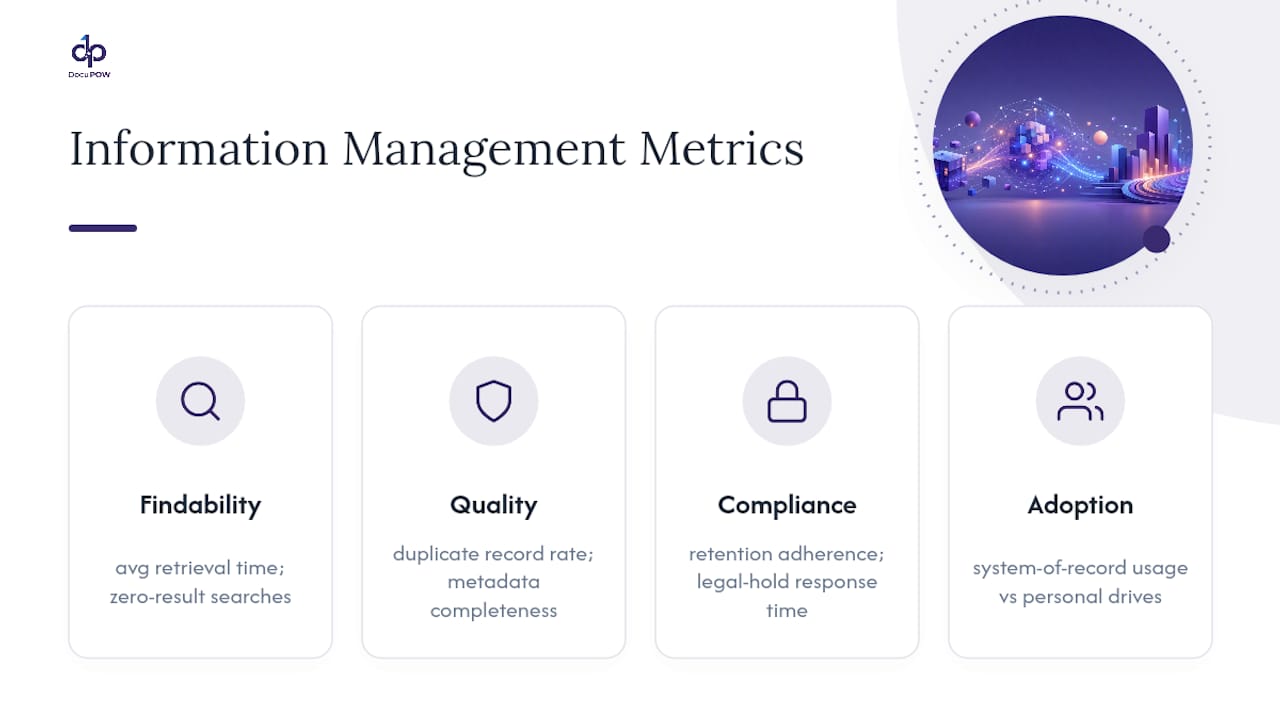
Findability metrics track average time to locate a document or dataset, and the percentage of searches that return zero relevant results. If that second number is climbing, your taxonomy has drifted.
Quality metrics track duplicate record rates, metadata completeness percentage, and how often the “authoritative source” flag actually gets respected instead of ignored.
Compliance metrics track retention schedule adherence, the percentage of records properly disposed of on schedule, and legal hold response time, meaning how fast you can suspend deletion across every affected system once a hold notice goes out.
Adoption metrics track how many employees are actually using the designated system of record versus falling back on personal drives or email attachments, which is often the most honest signal of whether governance policy matches how people actually work.
None of these numbers mean much in isolation. Programs that track all four together tend to catch problems before they become audit findings, because a slipping adoption metric usually predicts a quality problem two quarters before it shows up anywhere else.
How Should Information Management Connect to ERP and CRM Systems?
Information management fails quietly when it lives outside the systems people actually use every day. An ERP platform generates purchase orders, invoices, and inventory records constantly; a CRM generates contact records, deal notes, and support tickets. If your governance policies exist in a separate binder nobody opens, none of it applies to where the real volume of information is being created.
The practical fix is embedding metadata standards and retention rules directly into ERP and CRM workflows, rather than treating governance as a downstream cleanup activity. That means field-level validation at data entry (so a customer record can’t be saved without a required tag), automated retention flags tied to record type, and audit logging that captures who touched what, when. A structured enterprise information strategy explicitly treats data, records, and analytics as one connected system rather than separate silos, which is exactly the posture that keeps ERP and CRM data usable instead of becoming yet another disconnected repository.

This also matters for anyone evaluating broader IT tooling decisions around these integrations. A useful outside reference for weighing platform and integration choices is this corporate IT decision-making guide, which covers governance and architecture tradeoffs that apply directly to ERP and CRM integration planning.
What Leaders Get Wrong First
The most common failure isn’t a bad taxonomy. It’s skipping governance to chase a tool, then discovering the tool has nothing trustworthy to work with. Start with an inventory and a named committee before any software decision. Expect the first ninety days to feel slow. Readers wanting concrete automation examples will find useful proof points in resources available on document intelligence.
— Syed Naveed Abbas
Where DocuPOW Fits Into Your Information Management Program
Most information management programs stall at the same point: the inventory step, when someone has to actually open thousands of contracts, invoices, and forms to figure out what’s inside them. There are agent-based platforms built to address exactly that bottleneck by reading documents without rigid templates, extracting data with context awareness, and routing it through human review before integration into systems of record.

That matters most for global manufacturers and any operations team drowning in scattered paper and PDF records across regional systems. Instead of manually tagging thousands of legacy files to fit a new taxonomy, autonomous agents can extract structured, metadata-ready data automatically, feeding ERP or CRM systems directly rather than sitting in a separate silo. Teams get real-time analytics and predictive insights on top of extracted data, which supports AI readiness that governance committees often aim for but rarely achieve on their own.
If your organization is sitting on years of unstructured contracts, invoices, or field reports, that inventory step is exactly where to start. Explore high-volume document processing best practices to see how the extraction and audit workflow actually runs, or request a demo to see DocuPOW work against your own documents before your next governance committee meeting.
Sources
- NIST Computer Security Resource Center — Information life cycle
- What Is Information Management & Its Importance — Syracuse iSchool
- What is Information Management? — AIIM
- Effective lifecycle management — ARMA magazine (Dmytrenko & Dederer)
FAQ
What Do You Mean by Information Management?
Information management is the practice of organizing, securing, and enabling trusted access to information across its full lifecycle, from creation through disposition, so organizations can make faster, better-supported decisions.
What Jobs Can I Get With an Information Management Background?
Common roles include records manager, information governance lead, data steward, and content strategist, with career paths often moving into broader data governance or enterprise knowledge management leadership.
What Skills Are Needed for Information Management?
The core skills split between technical work like metadata design, taxonomy development, and content management platforms, and nontechnical skills like retention policy literacy, legal awareness, and stakeholder negotiation.
Is Information Management a Good Career Path?
It’s a strong path for people who like structured problem solving with real stakes: the skills transfer directly into data governance, compliance, and knowledge management roles, and demand tends to grow as organizations adopt more AI and automation that depend on well-governed data.
How Is Information Management Different From Document Management?
Document management focuses narrowly on where a specific file lives and who can edit it, while information management covers tagging, retention, and access across every system that information touches, not just one repository.
Recommended
See DocuPOW on your documents.
Stop building templates. Start extracting data.