AI Form Processing for Enterprise Document Workflows
Discover how Form Processing enhances enterprise document workflows with AI. Automate data extraction and validation for efficient operations.


TL;DR:
- Form processing in enterprises involves AI-powered extraction, validation, and routing of data from various forms into business systems. It improves accuracy, speed, and compliance by handling diverse document layouts and low-quality inputs without relying on rigid templates. Successful deployments require scoped problems, built-in governance, human-in-the-loop training, and seamless ERP integration.
What form processing actually means in an AI-driven enterprise
Form processing, in its modern enterprise context, is the automated extraction, validation, and routing of structured data from digital and physical forms into downstream business systems. The industry term for the broader discipline is Intelligent Document Processing (IDP), and it sits at the intersection of OCR, natural language processing, and machine learning. What separates today’s AI-driven approach from legacy rule-based systems is contextual understanding: the AI reads a supplier invoice the way a trained analyst would, not the way a barcode scanner would.
The core technologies at work:
- Optical Character Recognition (OCR): Converts printed or handwritten text into machine-readable data, including low-quality scans and photographed documents.
- Natural Language Processing (NLP): Interprets field meaning and document context, not just character strings, enabling accurate extraction even when layouts vary.
- Machine learning models: Learn from corrections and exceptions over time, continuously improving extraction accuracy without manual rule updates.
- ERP and CRM integration: Validated data flows directly into SAP, Oracle, Salesforce, or similar platforms via AI-powered integration, eliminating manual re-entry.
The forms enterprises process most frequently include sales orders, supplier invoices, purchase orders, bills of lading, customs declarations, HR onboarding packets, and compliance certificates. Each carries structured data that, when trapped in a PDF or paper form, creates bottlenecks across finance, operations, and procurement.
DocuPOW approaches this differently from template-dependent platforms. Its autonomous agents understand document context without requiring rigid field mappings, which means a supplier who changes their invoice layout does not break the extraction pipeline.
Table of Contents
- Why enterprise form processing keeps failing without AI
- Best practices that separate successful AI deployments from stalled ones
- What enterprises actually gain from automating form processing at scale
- What AI-driven form processing looks like in production
- DocuPOW turns complex document workflows into a competitive advantage
- FAQ
- Key Takeaways
Why enterprise form processing keeps failing without AI
Most enterprises underestimate how many distinct failure modes exist in document workflows. The problems compound each other, and fixing one without addressing the others produces limited gains.
The most common challenges, and what AI actually does about them:
- Diverse document layouts: A single enterprise may receive invoices from hundreds of suppliers, each formatted differently. Legacy OCR and rule-based RPA systems break when a template changes. AI models trained on variable layouts adapt contextually rather than failing silently.
- Poor master data quality: Extracted data is only as useful as the master data it validates against. Mismatched vendor IDs, inconsistent cost center codes, and duplicate material numbers cause downstream errors that no extraction engine can fix on its own.
- Manual validation bottlenecks: When exceptions pile up in a shared inbox, the throughput gains from automation evaporate. Human reviewers become the constraint.
- Handwritten and low-quality scans: Warehouse receiving logs, field inspection sheets, and signed approval forms often arrive as poor-quality images. Modern AI models handle these; most legacy OCR engines do not.
- Governance and compliance gaps: Regulated industries require full audit trails, sensitivity labeling, and access controls on every document that passes through the system. Bolting these on after deployment is expensive and unreliable.
- Integration complexity: Connecting a document processing layer to an ERP system that was not designed for real-time API calls requires careful architecture. Many projects stall here.
The deeper issue with legacy approaches is that rule-based RPA treats every document as a known template. The moment reality diverges from the template, the process breaks and someone gets an alert at 2 AM. AI-driven form data extraction handles variance as a normal operating condition, not an exception.
Best practices that separate successful AI deployments from stalled ones

The enterprises that move from pilot to production fastest share a few habits that have nothing to do with technology selection.
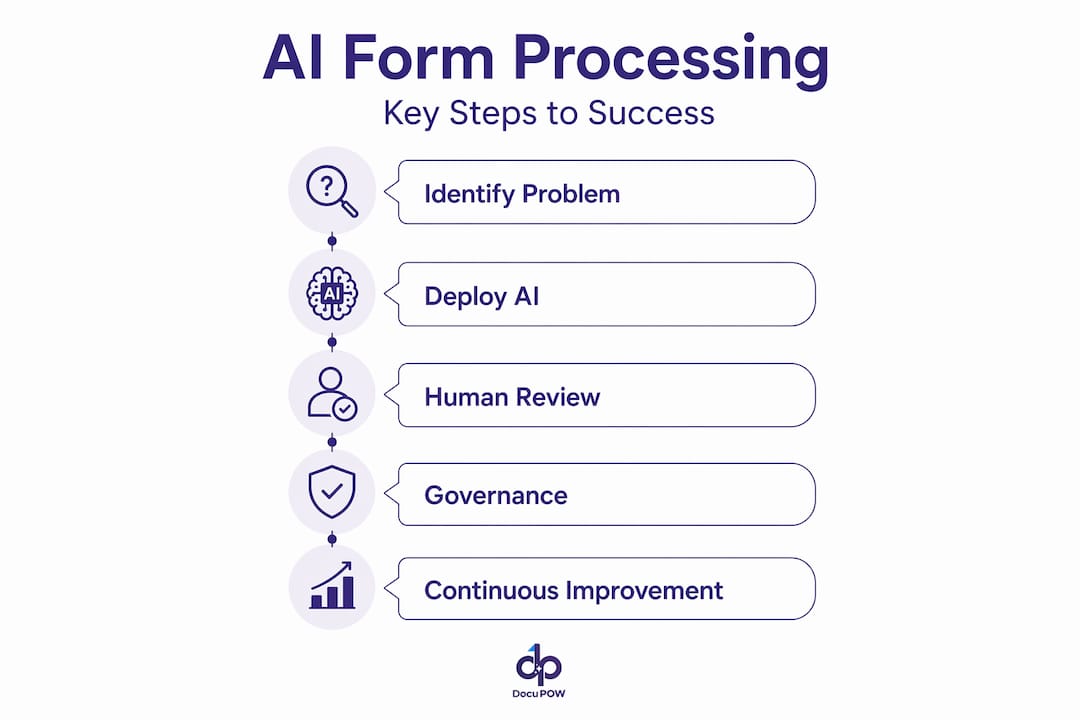
Start with a funded, measurable problem. Broad AI initiatives with vague ROI targets stall. The projects that reach production anchor on a specific process: supplier invoice automation for a business unit processing 10,000 invoices per month, or sales order intake for a product line with high manual rework rates. A funded, scoped problem gives the team a clear definition of success and a budget owner who cares about the outcome.
Do not wait for perfect data. The instinct to clean up master data before deploying AI is understandable but counterproductive. Starting without perfect data surfaces the actual quality issues faster than any data audit would. The AI’s exception queue becomes a diagnostic report on where your business rules are inconsistent.
Build governance in from day one. Permissions, metadata tagging, and sensitivity labeling are not features to add in phase two. Built-in governance controls prevent data leakage and build the trust of finance and compliance teams who will otherwise block the rollout.
Use native platform capabilities. Custom-built extraction pipelines take months to stabilize. Platforms with prebuilt connectors to SAP, Oracle, and Salesforce compress deployment timelines significantly.
Design human-in-the-loop checkpoints deliberately. Every exception that a human reviewer resolves is a training signal. Human-in-the-loop exception management is not a fallback for when AI fails; it is the mechanism by which the AI gets better.
Pro Tip: Treat your first document automation deployment as a diagnostic tool. The exceptions it surfaces will tell you more about your master data and business rule inconsistencies than any internal audit has.
What enterprises actually gain from automating form processing at scale
The operational improvements from AI-driven form processing are measurable, and the metrics that matter most are throughput, accuracy, and labor cost.
- Accuracy: AI models trained on enterprise document types consistently outperform manual data entry on error rates, particularly for high-volume, repetitive forms like purchase orders and invoices.
- Throughput: Automated workflows integrated directly with ERP systems process documents in minutes rather than days. The queue does not grow overnight.
- Labor reallocation: Finance and operations teams stop spending hours on data entry and exception chasing. That capacity shifts to analysis and vendor relationship management.
- Compliance and audit readiness: Every extraction is logged, timestamped, and traceable. Audit preparation that previously took weeks can be completed in hours.
- Scalability: Volume spikes, such as month-end close or a supplier onboarding wave, do not require temporary headcount. The system scales with the workload.
One production deployment documented in SAP Insider achieved a 90% reduction in manual effort per order, with over 70% of sales orders processed automatically without human intervention. Those numbers represent a structural change in how the operations team spends its time, not a marginal efficiency gain.
DocuPOW’s prebuilt Order-to-Pay automations address exactly this use case, with financial workflow templates that reduce configuration time and deliver accuracy improvements from the first week of operation.
Enterprises that automate high-volume document processing also gain a compounding advantage: as the AI model accumulates more corrected examples, accuracy improves and the exception rate drops, which further reduces labor costs over time.
What AI-driven form processing looks like in production
Global manufacturer, sales order automation: A manufacturer receiving thousands of customer purchase orders per month across email, EDI, and portal submissions deployed an AI extraction layer connected to SAP S/4HANA. Within 60 days, the team processed the majority of orders without manual touch, with exceptions routed to a review queue that averaged under 30 seconds per item. The finance team gained real-time visibility into order status without waiting for end-of-day batch updates.
Financial services, supplier invoice processing: A financial services firm processing invoices across multiple legal entities and currencies used AI-driven extraction to validate invoice data against purchase orders and goods receipts before posting. The three-way match, previously a manual process prone to delays, ran automatically for the majority of invoices. Discrepancies flagged by the AI were resolved faster because the reviewer saw the extracted data alongside the source document, not a transcribed summary.
Manufacturing compliance documentation: A manufacturer subject to ITAR and RoHS requirements deployed AI document extraction to process incoming supplier certificates. The system flagged restricted substances and controlled components in real time, reducing compliance findings during audits. Compliance teams shifted from reactive document review to proactive exception management.
These deployments share a common pattern: the AI handles the volume, humans handle the judgment calls, and the system learns from every judgment call made.
DocuPOW turns complex document workflows into a competitive advantage
Most enterprises spend more time managing document exceptions than they realize. The hours are invisible because they are scattered across inboxes, spreadsheets, and manual ERP entries, but they add up to a measurable drag on throughput and financial close cycles.
DocuPOW eliminates that drag by deploying autonomous AI agents that read documents the way your best analyst would, without templates, without brittle rules, and without the maintenance overhead that comes with rule-based automation. The platform connects directly to your existing ERP and CRM systems, so extracted data lands where it belongs from the first day of operation. For enterprises managing AI workflow automation across finance, procurement, and operations, DocuPOW’s prebuilt flows for Order-to-Pay and financial document processing mean you are not starting from scratch.
The concrete difference: your team stops chasing paper and starts making decisions with real-time data. See how DocuPOW fits your document workflows at docupow.ai.
FAQ
What is form processing in an enterprise context?
Form processing is the automated extraction, validation, and routing of structured data from business forms, such as invoices, purchase orders, and compliance documents, into ERP or CRM systems. AI-enhanced platforms handle variable layouts and handwritten inputs that legacy OCR cannot.
How does AI improve form data extraction accuracy?
AI models trained on enterprise document types use NLP and machine learning to understand field context, not just character patterns, which allows them to extract data accurately even when document layouts change or scan quality is poor.
What forms do enterprises typically automate first?
High-volume, high-value forms deliver the fastest ROI: supplier invoices, sales orders, purchase orders, and compliance certificates are the most common starting points because errors in these documents carry direct financial and regulatory consequences.
How does DocuPOW handle documents without fixed templates?
DocuPOW uses autonomous agents that understand document context rather than matching fields to a predefined template. This means a supplier who reformats their invoice does not break the extraction pipeline or require manual rule updates.
What governance controls are needed for AI form processing?
Built-in permissions, metadata consistency, and sensitivity labeling are required from day one to prevent data leakage and satisfy audit requirements. Governance added after deployment is significantly harder to enforce and creates compliance gaps.
Key Takeaways
AI-driven form processing delivers measurable enterprise ROI only when governance, human-in-the-loop design, and ERP integration are built in from the start, not added later.
| Point | Details |
|---|---|
| AI technologies at the core | OCR, NLP, and machine learning enable accurate extraction from variable layouts, including handwritten and low-quality scans. |
| Start with a funded problem | Scoped deployments with measurable financial targets reach production faster and avoid stalled initiatives. |
| 90% manual effort reduction | One production case achieved a 90% reduction in manual effort per order, with over 70% of orders processed automatically. |
| Governance from day one | Built-in permissions and sensitivity labeling prevent data leakage and build compliance team trust before rollout. |
| DocuPOW’s approach | DocuPOW uses template-free autonomous agents and prebuilt Order-to-Pay flows to deliver accuracy and ERP integration from week one. |
Recommended
See DocuPOW on your documents.
Stop building templates. Start extracting data.