Semantic vs Keyword Search: How to Choose for Documents
Semantic search matches meaning, keyword search matches exact terms. See how each works, where each fails, and why hybrid wins for contracts and business documents.


Keyword search finds documents that contain the words you typed. Semantic search finds documents that mean what you asked, even when the wording differs. Neither is better across the board. Keyword search wins on exact identifiers such as invoice numbers, part codes and clause references. Semantic search wins when people describe a concept in their own words. For most business document collections, the strongest setup uses both, which is called hybrid search.
This guide explains how each method works, where each one breaks, what the research says about combining them, and how to judge a document search tool before you buy one.
TL;DR
- Keyword search (lexical retrieval, usually BM25) matches surface words. It is precise for IDs, names and rare terms, and it fails when the query and the document use different vocabulary.
- Semantic search (dense retrieval) compares embeddings, so it handles synonyms and intent. It can also surface text that sounds related but is not what you needed.
- Hybrid search combines both and, in published studies, outperformed either method alone on technical documentation.
- For contracts, invoices and compliance records, also test permissions, citations and audit trails. Those decide whether a search tool is safe to use, not only whether it is clever.
Table of Contents
- What keyword search actually does
- What semantic search does differently
- Semantic vs keyword search side by side
- Why hybrid search usually wins
- When search is the wrong tool: extraction
- What to check before you choose a document search tool
- Our perspective: search is the last step, not the first
- Where DocuPOW fits
- FAQ
- Sources
What keyword search actually does
Keyword search, also called lexical search, builds an index of the words in your documents. When you type a query, it looks for documents containing those words and ranks them by signals such as how often a term appears and how rare it is across the collection. The classic ranking function is BM25, and lexical models like BM25 remain a strong baseline for high-precision exact matching after decades of use.
That makes it the right tool when you know what you are looking for:
- A purchase order number, serial number or case number.
- A specific party name in a contract archive.
- A rare technical term, such as a part designation that no general language model has seen often.
- A quoted phrase that must appear verbatim, such as a defined term in a master services agreement.
Its weakness is the vocabulary mismatch problem. The same CMU paper notes that exact matching fails when query and document use different terminology, such as synonyms. Search a contract folder for “termination for convenience” and you will miss the agreement that says “either party may cancel without cause on 60 days’ notice.” Nothing is wrong with the index. The words simply do not overlap.
What semantic search does differently
Semantic search converts text into embeddings, which are lists of numbers that place a passage in a shared vector space. A query is converted the same way, and the system returns the passages whose vectors sit closest to the query vector. Because the vectors encode meaning and context, dense retrieval can match softly beyond the exact words on the page.
In practice, a question like “which supplier agreements let us cancel early?” can retrieve the clause about cancellation without cause, even though it never uses the word “early.” That is the behavior people mean when they search for semantic document search.
It also has real failure modes:
- Plausible but wrong results. The CMU authors note that dense retrieval can elevate tangential or misleading content when retrieval is not well calibrated. A clause about early payment discounts may look close to a clause about early termination.
- Weak handling of identifiers. An embedding of “PO-448213” carries little meaning. Exact IDs are where lexical search shines.
- Jargon gaps. In specialized fields, pre-trained models often struggle. A ScienceDirect study on industrial maintenance text found that good semantic retrieval frequently needs domain-specific tuning or ontologies to capture unique terminology.
Semantic vs keyword search side by side
| Criterion | Keyword (BM25) | Semantic (embeddings) | Hybrid |
|---|---|---|---|
| Matches on | Exact words and word stems | Meaning and context | Both |
| Best query type | IDs, names, quoted phrases, rare terms | Natural-language questions, concepts | Mixed real-world queries |
| Handles synonyms | Poorly | Well | Well |
| Handles exact identifiers | Very well | Poorly | Well |
| Typical failure | Misses relevant text with different wording | Returns related but wrong passages | Needs tuning of how scores are merged |
| Explainability | Easy: you can see the matched words | Harder: similarity scores are opaque | Moderate |
| Setup cost | Low | Needs an embedding model and vector store | Highest, but most robust |
Why hybrid search usually wins
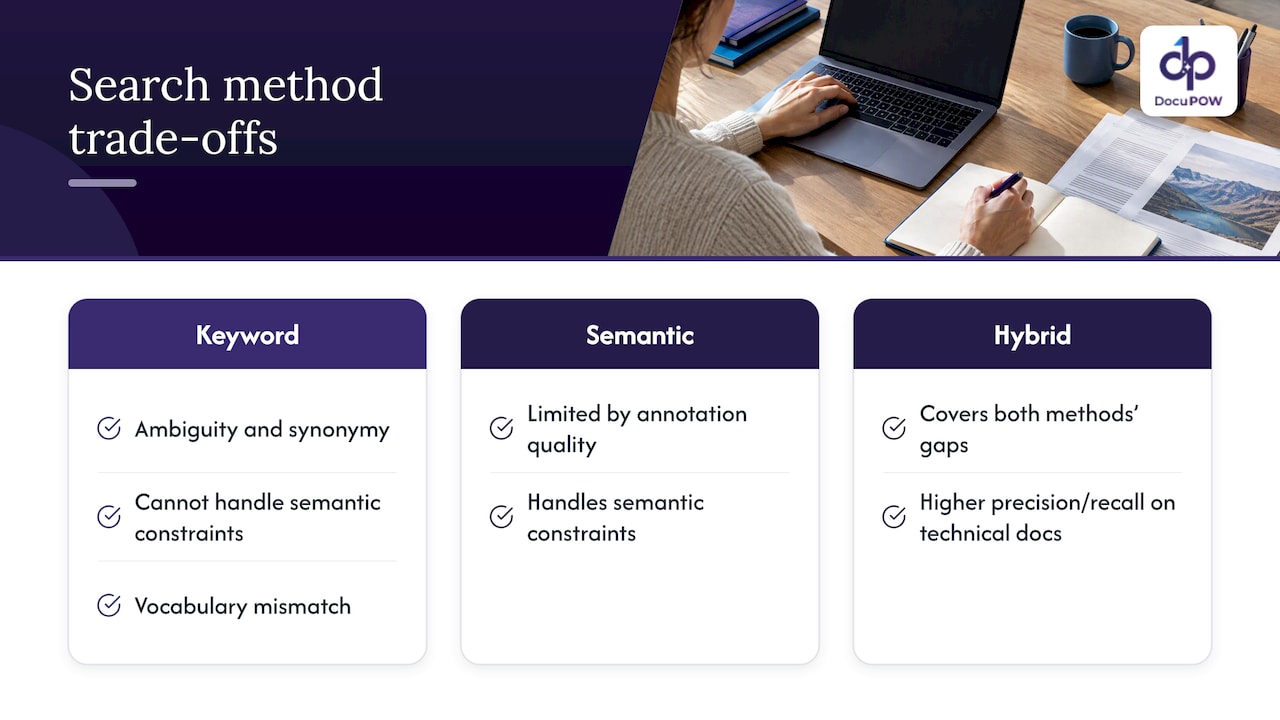
The two methods fail in opposite directions, so combining them covers the gaps. The HyKSS research from BYU describes how keyword search suffers from ambiguity, synonymy and an inability to handle semantic constraints, while semantic search is limited by the quality of its annotations. In that line of work, hybrid search outperformed both keyword and pure semantic search on precision and recall for large collections of technical and maintenance documentation.
A 2023 paper in ACM Transactions on Information Systems explains why the fusion step matters. Lexical search is simple and efficient, but susceptible to the vocabulary mismatch problem. The paper analyzes the functions used to blend lexical and semantic scores, which is the part of a hybrid system that most often needs tuning.
There is a second reason to care, and it matters if you use AI assistants over your documents. A 2025 arXiv paper on legal GenAI argues that retrieval quality, more than the language model, drives the quality of answers in retrieval-augmented generation. Many errors labeled as hallucinations start as retrieval errors: the model was handed the wrong passage. The same paper points toward multi-method retrieval rather than a single approach, since no one method wins on every query type.
A worked example with contracts
Imagine a legal or procurement team with 4,000 supplier contracts and three typical questions:
- “Find every contract with Acme Industrial Supply.” Keyword search handles this instantly. Semantic search might also return contracts with similar suppliers, which is noise.
- “Which agreements let us walk away without cause?” Semantic search finds the cancellation clauses however they are phrased. Keyword search needs you to guess every phrasing.
- “Show liability caps above $1 million in agreements governed by Texas law.” This needs both: semantic matching for the concept of a liability cap, and exact matching for “Texas” and the dollar figures. It is also a structured question, which is where extraction beats search, as the next section explains.
The example is illustrative, not data from a study. It shows why a contract semantic search tool that offers only one method will frustrate someone within a week.
When search is the wrong tool: extraction
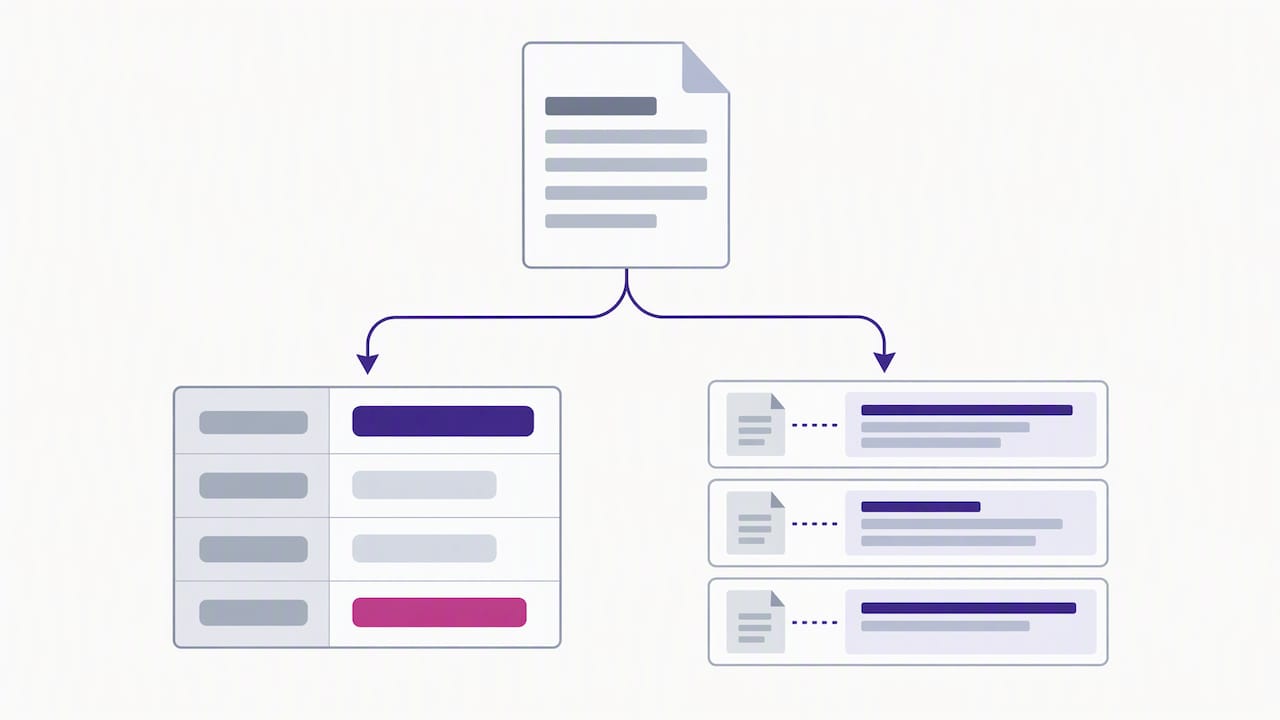
Search returns passages. Many business questions need fields: invoice total, payment terms, renewal date, ship-to address. If you find yourself searching for the same data point across hundreds of files, you are doing extraction by hand.
Extraction turns each document into structured records once, and then you query the records. Search and extraction complement each other: extraction answers “what is the value?”, search answers “where does it say that, and what else is relevant?” Our guide to AI data extraction for business professionals covers where that line falls, and our information retrieval technical guide goes deeper on ranking models for practitioners.
What to check before you choose a document search tool
Ranking quality is only part of the decision. For contracts, HR files, patient records and financial documents, these checks matter just as much.
Permissions at the retrieval layer
Do not rely on an AI model to hide restricted content. GS Consulting’s guidance on secure RAG for government contractors says security trimming must happen at the retrieval layer: the system verifies who is asking, resolves their permissions and filters results before anything reaches the model. Ask any vendor how this works, and ask for a demonstration with two users who have different access.
Citations and an audit path
The same source warns that companies often neglect the audit path. Every answer should trace back to a specific source document, because without transparent citations a system lacks defensibility in law, finance and government work. If a search tool gives you an answer with no page or clause reference, a reviewer cannot verify it.
Treat embeddings as sensitive data
It is tempting to think vectors are anonymous numbers. The OWASP RAG security cheat sheet says otherwise: text can be reconstructed from embeddings through inversion attacks, so organizations should encrypt embeddings at rest, limit similarity search exposure and apply the same access controls as the source repository. Your security team should ask where the vector store lives and who can query it.
Retrieved text is untrusted input
Microsoft’s zero-trust guidance on AI treats retrieved passages as data, not trusted instructions, and says they should be inspected and authorized before they influence the model. See its section on input, context and retrieval hygiene. A poisoned or malicious document in your repository should not be able to steer an assistant. For a fuller control list, see our piece on NIST-aligned controls for secure AI processing.
A quick evaluation method
You do not need a research lab to compare tools. Build a test set from your own files:
- Collect 30 to 50 real questions your team asks, and tag each as identifier-style, concept-style or mixed.
- For each, note the document and passage that is the correct answer.
- Run every candidate tool on the set and record whether the right passage appears in the top three results.
- Check the failures by type. If misses cluster on IDs, the tool lacks strong lexical search. If they cluster on paraphrases, it lacks semantic strength.
- Repeat with two user accounts to test permissions.
The same discipline applies outward. If you publish content and want to know how AI systems surface it, measuring AI search visibility with a set of test prompts follows the same logic of testing with real queries instead of trusting claims.
Our perspective: search is the last step, not the first
We build document automation, and what we see again and again is that teams ask for “better search” when the real problem is that their data is trapped in files that were never structured. Swapping keyword search for semantic search helps, but it does not change the fact that someone still has to open the PDF and read it.
Three convictions shape how we think about this:
Hybrid is the honest default. Anyone selling pure semantic search as a replacement for exact matching is skipping the cases where your finance and legal teams live: invoice numbers, part numbers, defined terms. Meaning and exactness both matter.
An answer without a source is a liability. Conversational querying is only useful in regulated work if every answer points back to the document it came from, so a person can check it. That is why we pair semantic querying with source citations and human-in-the-loop review for audit-sensitive steps.
Extract first, then search. When the platform understands a document’s content and structure without rigid templates, you get fields you can filter and total, plus passages you can search. Search over structured, validated data is far more reliable than search over a pile of scans. This is also the idea behind our work on hybrid GraphRAG and document knowledge graphs, where relationships between documents, parties and terms become queryable.
None of this makes search less important. It makes search the layer you build on top of data you can trust.
— Syed Naveed Abbas
Where DocuPOW fits
DocuPOW is an agent-based document automation platform. It extracts data from any document type without templates, orchestrates multi-step workflows, keeps a human in the loop for audit review, and lets your team query documents in natural language with source citations. It integrates with ERP and CRM systems through an API.
If your team is stuck between “search is not finding things” and “we are retyping data from PDFs,” it is worth seeing both problems handled in one place. Plans are published on our pricing page: Starter is $99 per month, Professional is $499 per month, and Enterprise is available with custom pricing on request. For a broader view of the category, read our enterprise search buying guide for IT leaders.
FAQ
Is semantic search better than keyword search?
Not universally. Semantic search is better when people phrase questions in their own words, and keyword search is better for exact identifiers and rare terms. Studies of hybrid approaches found that combining the two beat either alone on technical documentation, which is why most production systems use both.
What is the difference between vector search and BM25?
BM25 scores documents by how well their words overlap with the query, weighting rare terms more heavily. Vector search compares embeddings, so it can match passages with no shared words. BM25 is simpler, cheaper and easy to explain, while vector search captures meaning but needs an embedding model and a vector store.
Do I need semantic search to use an AI assistant on my documents?
In most cases you need some form of retrieval, and retrieval quality largely determines answer quality. Research on legal GenAI suggests that many apparent hallucinations are retrieval failures. Whatever method you choose, require citations so reviewers can verify each answer.
Is semantic search safe for confidential contracts?
It can be, if permissions are enforced at the retrieval layer and embeddings are protected like the source files. OWASP notes that embeddings are not anonymous. Your security and legal teams should review the vendor’s architecture before any confidential repository is connected.
Can semantic search work on specialized jargon?
Sometimes, but not out of the box. Research on industrial maintenance text found that domain tuning or ontologies are often needed for specialized vocabulary. Test any tool on your own documents and terminology before you commit.
Sources
- Complement Lexical Retrieval Model with Semantic Residual Embeddings (CMU)
- HyKSS: Hybrid Keyword and Semantic Search (BYU)
- An Analysis of Fusion Functions for Hybrid Retrieval (ACM TOIS)
- Enhancing semantic search using ontologies for industrial text (ScienceDirect)
- Legal GenAI retrieval paper (arXiv 2512.08078)
- Secure RAG Architecture for GovCon (GS Consulting)
- RAG Security Cheat Sheet (OWASP)
- Input, Context, and Retrieval Hygiene (Microsoft Learn)
- Measure AI Search Visibility With 40–150 Prompts
Recommended
See DocuPOW on your documents.
Stop building templates. Start extracting data.