Vector Database for Documents: How It Works and What to Check
A vector database stores document passages as embeddings so you can search by meaning. Learn how it works, how to chunk, secure it and when it falls short.


A vector database for documents stores the meaning of your text as numbers (embeddings), so you can search contracts, invoices, policies and reports by what they say rather than by the exact words they use. Google Cloud describes it as a database that stores, indexes and queries vector embeddings, the numerical form of unstructured data such as text, images or audio. For business documents, that means a question like “when can the supplier cancel?” can find the termination clause even if it never uses the word “cancel.”
This guide explains how documents get into a vector database, which choices decide whether answers are good, what security controls to require, and where a vector database is not enough on its own.
TL;DR
- A vector database stores document passages as embeddings and returns the ones closest in meaning to a query, not just the ones sharing keywords.
- Quality depends less on the database brand than on parsing, chunking, the embedding model and metadata.
- Security needs access control at retrieval time, tenant isolation, encryption and query logging.
- Vector search finds passages. It does not validate fields, post transactions or replace your system of record.
- If your goal is working document automation rather than infrastructure, a platform that bundles extraction, search and review can save months.
Table of Contents
- What a vector database does with documents
- From file to searchable passage: the pipeline
- Chunking and embedding choices that decide quality
- How a vector database differs from the databases you already have
- Connecting a vector database to business data and AI
- Security: what to require before documents go in
- Limits and trade-offs to plan for
- Our perspective: documents need more than retrieval
- A checklist for choosing your approach
- See it on your own documents
- FAQ
- Sources
What a vector database does with documents
A traditional database matches values: a row where the invoice number equals 48213. A vector database answers a different question: which stored passages mean something similar to this one?
To do that, an embedding model converts each passage into a list of numbers. Microsoft Learn explains that these vectors have a fixed number of dimensions and are clustered by similarity, unlike rows and columns in a relational database. Passages with similar meaning land close together.
The practical effect is semantic retrieval. Microsoft Azure’s example is a search for “password help” surfacing “How to reset my password,” even though the words differ. In a document setting, the same mechanism lets a legal team look for clauses, obligations or termination terms across large contract collections, which is how one enterprise content guide frames it.
What a document vector actually is
A document vector is the embedding of a document or, more often, of a piece of it. MathWorks notes that dense embeddings capture semantic meaning, word order and context, while sparse embeddings are better for finding specific keywords. Hybrid search combines both. That matters for business files, where a person searching for part number “HX-4410” needs an exact match and a person asking about “late delivery penalties” needs meaning.
If you want the deeper trade-off between the two approaches, our guide on semantic versus keyword search for documents walks through when each wins.
From file to searchable passage: the pipeline
A vector database is one component in a pipeline. Blckalpaca’s architecture walkthrough describes the flow, and it is a useful mental model:
- Load. Connectors pull files in with stable IDs and metadata (owner, department, date, permissions).
- Parse. PDFs, scans and spreadsheets are converted into structured text.
- Chunk. Text is split into retrievable units.
- Embed. An embedding model turns each chunk into a vector.
- Index. Vectors go into the database, typically with an HNSW index.
- Query. The question is embedded with the same model and compared against chunk vectors. Metadata filters remove what the user may not see, a reranker picks the best hits, and the result is passed to a language model with source citations.
AWS describes the index layer as k-nearest neighbor indexes built with algorithms such as HNSW and IVF, plus data management, fault tolerance, authentication, access control and a query engine.
Step one is usually the hardest: parsing
Every later step inherits the quality of the text going in. A scanned invoice with a skewed table, a contract with a two-column layout or a form with checkboxes can turn into scrambled text, and no database fixes that afterward. Teams that struggle with document search often discover the problem is upstream, in extraction. Our piece on high-volume document processing best practices covers how to keep that stage reliable at scale.
Chunking and embedding choices that decide quality
Chunking is the decision with the biggest effect on what evidence the model sees. Actian’s enterprise guide explains the balance: smaller chunks improve targeting but can fragment causal context, while larger chunks keep narrative continuity but reduce retrieval granularity. Its example is vivid: store a 50-page report as one chunk and the system retrieves it as broadly relevant, but the context handed to the model is coarse and unfocused.
Practical starting points
| Document type | Typical question | Chunking lean |
|---|---|---|
| Contracts, policies | “What is the notice period?” | Clause or section-based chunks, so each obligation stays whole |
| Invoices, purchase orders | “Which PO matches this invoice?” | Extract fields first; embed only free-text parts such as notes |
| Technical manuals | “How do I reset the controller?” | Small, procedure-level chunks |
| Long reports | “Why did margins fall?” | Larger chunks or paragraph plus section-level embeddings |
These are working heuristics built on the trade-off above, not fixed rules. For sizes, one published rule of thumb is 200 to 800 tokens with 10 to 20 percent overlap. EnterpriseDB recommends content-aware chunks of around 200 to 300 tokens with modest overlap, and keeping both sentence-level and paragraph-level embeddings so retrieval can choose the right granularity. Its broader point is the useful one: chunking should fit the content, not only the model’s limits.
Pick the embedding model first
The model sets a hard ceiling. LLM.co warns that one common small model caps input at 256 tokens, and longer chunks are silently truncated with no error, which can produce confident wrong answers for months. Choose the model, read its input limit, then set chunk size beneath it.
Two more rules from the same pipeline guidance: use the same model for ingestion and for queries, otherwise the vectors are not comparable, and test retrieval on real questions from your own team before you scale.
How a vector database differs from the databases you already have
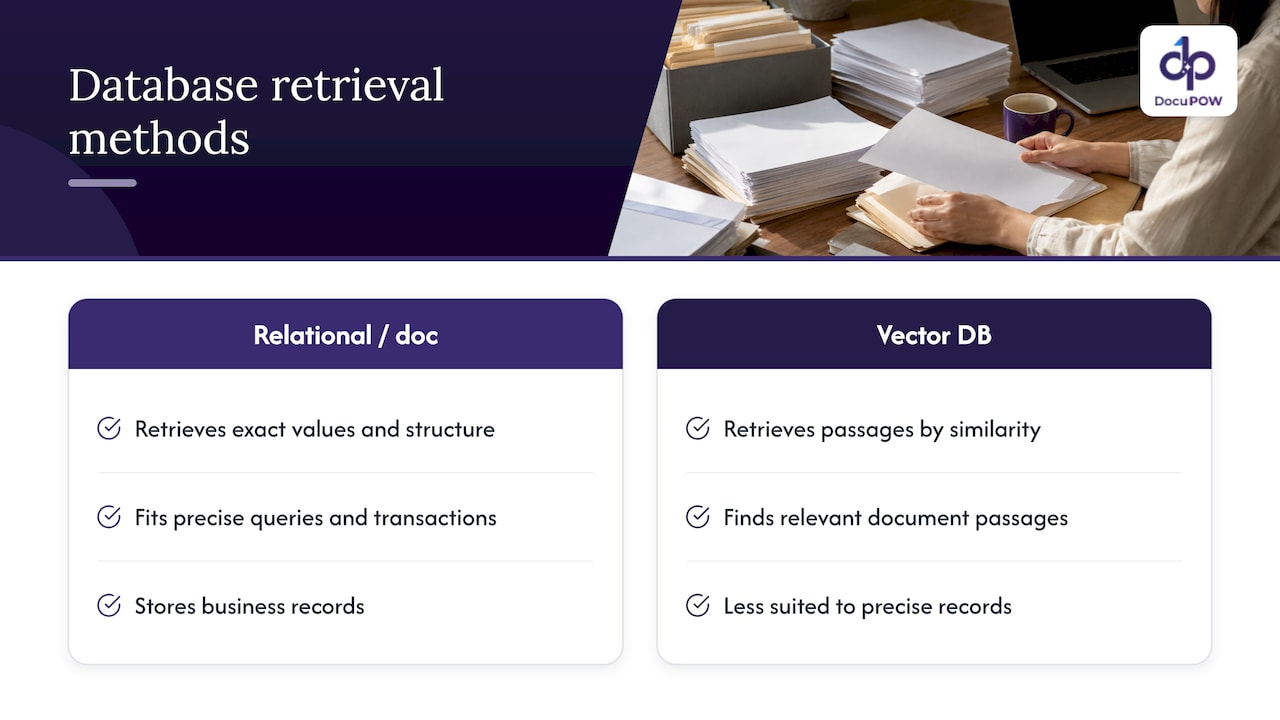
The short version: a relational or document database retrieves by exact values and structure, and a vector database retrieves by similarity. IT Pro quotes an analyst saying that this semantic design makes it fundamentally different from relational databases, key-value stores or search engines.
That does not make the older databases obsolete. Patsnap notes that vector databases are less suited to highly structured queries on precise values, transactions or business records. You will usually run both: the vector store to find the right passage, and your ERP, CRM or accounting system as the authority for amounts, vendors and statuses.
Some teams keep vectors next to relational data to avoid extra services. Microsoft’s pattern for SQL databases in Fabric stores embeddings in a vector column alongside source text and relational metadata, so one query can filter by attributes and rank by similarity. Others use a dedicated vector store. Either can work; the right choice depends on volume, your team’s skills and how much filtering you need.
Modern engines also blend methods. Elastic’s overview says modern vector databases combine dense, sparse and keyword (BM25) search in a single query, which tends to be more accurate than any one method alone.
Connecting a vector database to business data and AI
Most document use cases pair the database with retrieval-augmented generation (RAG). AWS Prescriptive Guidance lays out the process: embed internal documents into a vector database, accept a natural-language query, have an orchestrator run a similarity search and add the results to the prompt, then send both to the language model. Its component list is a handy build checklist: connectors, data processing, embeddings, a vector database, a retriever, a foundation model and guardrails. Connectors can reach structured sources like transactional databases and unstructured ones like object stores and SaaS platforms.
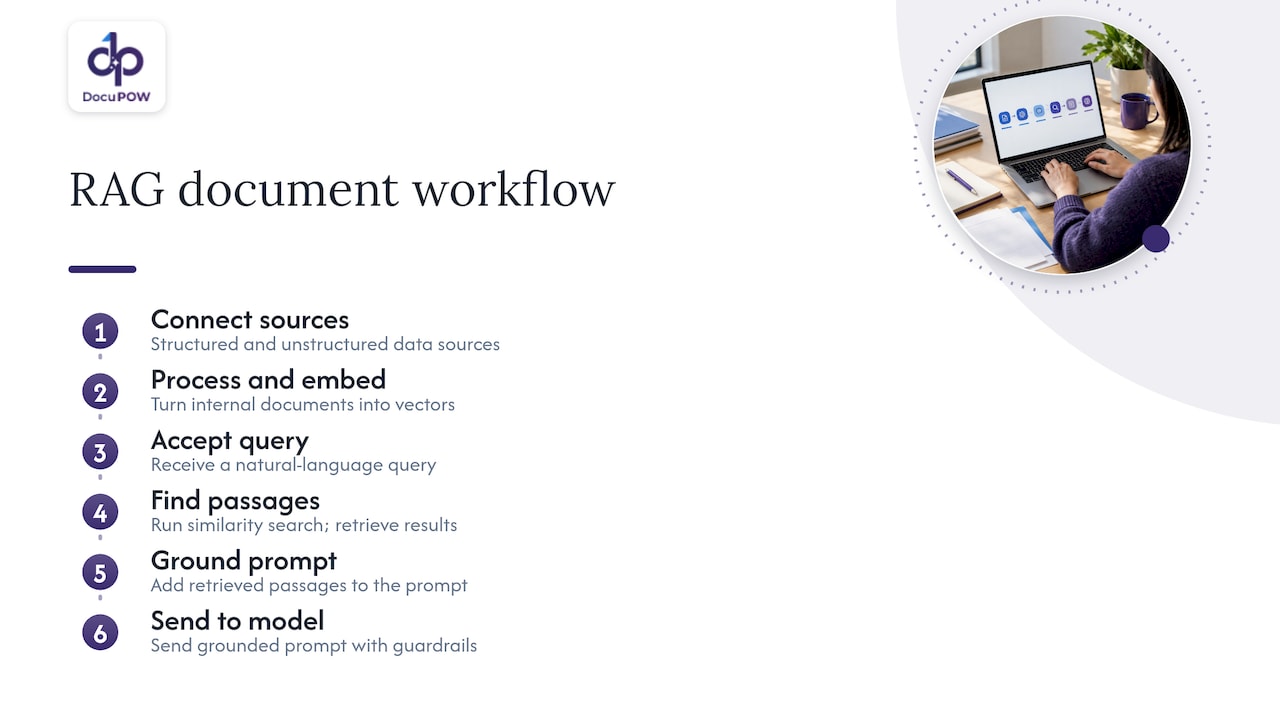
The benefit is grounding. A vector database commonly serves as an external knowledge base the model can query to ground answers in trusted data and reduce hallucination risk. Answers that cite the source passage let a reviewer verify in seconds.
If your real aim is to push document data into ERP or CRM systems, the vector layer is only half of it. See how we approach AI integration for business document workflows.
Security: what to require before documents go in
Business documents carry salaries, contracts, patient details and bank data. Embeddings are derived from that content, so treat the vector store as sensitive.
The OWASP RAG Security Cheat Sheet gives a clear baseline:
- Store access-control metadata (classification, owner, permitted roles, permitted tenants) with every chunk.
- Enforce access checks at retrieval time, not just at ingestion, because permissions may change after a document is indexed.
- Isolate tenants, so one tenant’s chunks are never returned to another’s queries.
- Log every retrieval with the user’s identity and the metadata of the chunks returned.
On infrastructure, TechTarget’s CISO guide recommends encrypting vector data at rest and in transit, enforcing strong authentication and least-privilege access, restricting network and administrative access, and logging queries and administrative activity. It also advises starting before the database: classify source data and avoid embedding sensitive information that does not need to be there.
Do not assume encryption is built in. A Cisco security guide points out that many vector databases do not support encryption, and suggests choosing ones that do or adding application-level encryption. And OWASP’s LLM Top 10 added a category for vector and embedding weaknesses in 2025 precisely because RAG systems can leak document permissions.
For regulated teams in healthcare, finance or legal, add these to your vendor questionnaire and confirm the answers with your compliance officer.
Limits and trade-offs to plan for
Good planning treats these as design inputs, not surprises.
- Recall versus speed. Redis reports that on one benchmark, raising recall from 0.8 to 0.95 raised HNSW latency by about 31% and roughly tripled IVF latency. Tune for the accuracy your use case needs, not the maximum.
- Memory and sync. The same source lists high memory demands and the work of keeping vectors synchronized with changing source files.
- Embedding drift. Models and data change over time. Queries still return results, only worse ones, so keep a set of test questions with known answers and rerun it regularly.
- Lost context. Writer’s analysis notes that splitting text into small pieces can separate related facts. Overlap, section-aware chunking and reranking reduce this.
- Garbage in, garbage out. Retrieval inherits the quality of the documents it holds. Clean, validated source data produces better answers.
The pattern across all five: the database is rarely the weak point. Preparation, evaluation and governance are.
Our perspective: documents need more than retrieval
We built DocuPOW around a simple observation: finding the right passage is useful, but most document work does not end at finding. An invoice has to be validated and posted. A contract clause has to be flagged and reviewed. A claim has to be routed.
That is why we pair AI-powered semantic search and query with template-free extraction, multi-step workflow orchestration and human-in-the-loop audit review. Our conversational document querying is designed to return answers with transparent source citations, so a reviewer can check the passage behind every answer.
For teams weighing a build against a platform, we would ask one question: is your goal to operate retrieval infrastructure, or to get documents into your ERP and CRM accurately and on time? If it is the second, we think an agentic platform that handles extraction, validation, search and integration through an API is the shorter path.
Syed Naveed Abbas
A checklist for choosing your approach
Before you commit, answer these in order:
- What questions will people ask? Lookup by meaning, exact field retrieval, or both? Both usually means hybrid search plus structured extraction.
- How clean is your input? Scans, handwriting and odd layouts need strong extraction before any embedding.
- Who may see what? Define roles and tenants first, then confirm they are enforced at query time.
- How will you measure quality? Build 30 to 50 real questions with known answers and rerun them after every model or data change.
- Where does the answer go next? If it must land in an ERP, CRM or approval flow, plan the integration and review steps now.
- Who maintains it? Index tuning, drift checks and sync jobs are ongoing work.
The Document Intelligence enterprise guide expands on the extraction and governance side of this list.
See it on your own documents
If you would rather not assemble parsing, embeddings, a vector store and review tooling yourself, DocuPOW gives you template-free extraction, semantic search and query, workflow orchestration and audit review in one cloud platform.
Plans are published on our pricing page: Starter is $99 per month, Professional is $499 per month, and Enterprise is priced on request. You can also look at the platform overview to see how the pieces fit.
FAQ
Which is the best vector database for documents?
There is no single winner. The right choice depends on your document volume, filtering needs, security requirements and whether you want vectors beside relational data or in a dedicated store. Evaluate candidates on your own documents and questions, and weigh encryption, access control and logging as heavily as speed.
Are vector databases secure for business documents?
They can be, if you configure them that way. Encrypt data at rest and in transit, enforce least-privilege access, check permissions at retrieval time, isolate tenants and log queries, as the OWASP and TechTarget guidance above recommends. Do not assume these are on by default, since some products lack native encryption.
Do I need a vector database if I only process invoices?
Not necessarily. Invoices are mostly structured fields, which are best handled by accurate extraction and validation against your ERP. Semantic search helps most with free text such as contracts, emails, policies and notes. Many teams use both.
What is the difference between a vector database and a document database?
A document database stores flexible JSON-style records and retrieves them by field values and queries. A vector database stores embeddings and retrieves by similarity of meaning. Some document databases now add vector search, so the line is blurring, but the retrieval logic remains different.
Sources
- What is a vector database & how does it work? (Google Cloud)
- Understanding Vector Databases (Microsoft Learn)
- What is a vector database? (Microsoft Azure)
- AI-Powered Search for Enterprise Content Management
- Information Retrieval with Document Embeddings (MathWorks)
- RAG Architecture: Ingestion, Retrieval, Generation (Blckalpaca)
- What is a Vector Database? (AWS)
- Vector Databases for Enterprise AI (Actian)
- Omni-Data AI on Postgres (EnterpriseDB)
- How to Build a Secure Enterprise RAG Pipeline (LLM.co)
- What is a vector database? (IT Pro)
- What is a Vector Database? A Practical Guide for Business Leaders (Patsnap)
- Use SQL Database in AI Applications (Microsoft Fabric)
- What is a Vector Database? (Elastic)
- AWS Prescriptive Guidance: Retrieval Augmented Generation options
- RAG Security Cheat Sheet (OWASP)
- CISO’s guide to vector database security (TechTarget)
- Securing Vector Databases (Cisco)
- Common vector database challenges (Redis)
- The limitations of vector retrieval for enterprise RAG (Writer)
Recommended
See DocuPOW on your documents.
Stop building templates. Start extracting data.


