Multi-Step Document Workflows: How to Design and Automate Them
A multi-step document workflow moves a file from intake to recordkeeping. Learn the stages, where automation pays off first, and how to orchestrate them end to end.


A multi-step document workflow is the chain of stages a document passes through, from the moment it arrives to the moment its data is posted, approved and archived. The way to automate one is to treat it as a single orchestrated process, not a set of separate tasks: read the document without templates, validate it against your rules, route exceptions to a person, and write the result straight into your ERP or CRM. DocuPOW is built around that model, with template-free extraction, multi-step workflow orchestration and human-in-the-loop review in one platform.
TL;DR
- A multi-step document workflow has five stages: intake, extraction, validation, routing and approval, and posting with recordkeeping.
- Automation pays off first where volume is high and rules are clear: intake, data capture, validation against reference data, and posting to core systems.
- Orchestration means one system owns the whole chain, so a document never waits in someone’s inbox between steps.
- Exceptions are the design problem. Plan a review path for them before you automate the happy path.
- Measure results per document type and per field, and keep an audit trail for every decision.
Table of Contents
- What a multi-step document workflow actually is
- The five stages every workflow shares
- Which stages benefit most from automation
- Where this plays out by team
- How to automate a multi-step document workflow
- Handling exceptions without losing control
- Security, compliance and audit readiness
- Orchestration versus point automation
- Our perspective
- Start with one workflow
- FAQ
- Sources
What a multi-step document workflow actually is
Every document-heavy process, whether it is an invoice, a purchase order, a claim, a contract or an onboarding packet, follows the same shape. A document comes in, someone works out what it says, someone checks it, someone decides, and the result lands in a system of record. Each of those handoffs is a step. A workflow becomes “multi-step” the moment more than one person or system has to touch the document before it is finished.
The pain is rarely in any one step. It sits in the gaps: the attachment that waits in a shared mailbox, the spreadsheet where someone retypes figures, the approval that stalls because the approver never saw the request. Manual handoffs add delay and errors at each gap, and the more steps you have, the more gaps you carry.
Document workflow orchestration is the fix for the gaps. Instead of automating one step at a time, a single layer coordinates all of them: it knows where each document is, what has been checked, what is still pending, who needs to act and what happens if something fails. Think of it as the difference between hiring a faster typist and building an assembly line.
The five stages every workflow shares
Whatever your industry, you can map your process onto these five stages. Mapping it this way is the first practical step, because it shows where time and errors accumulate.
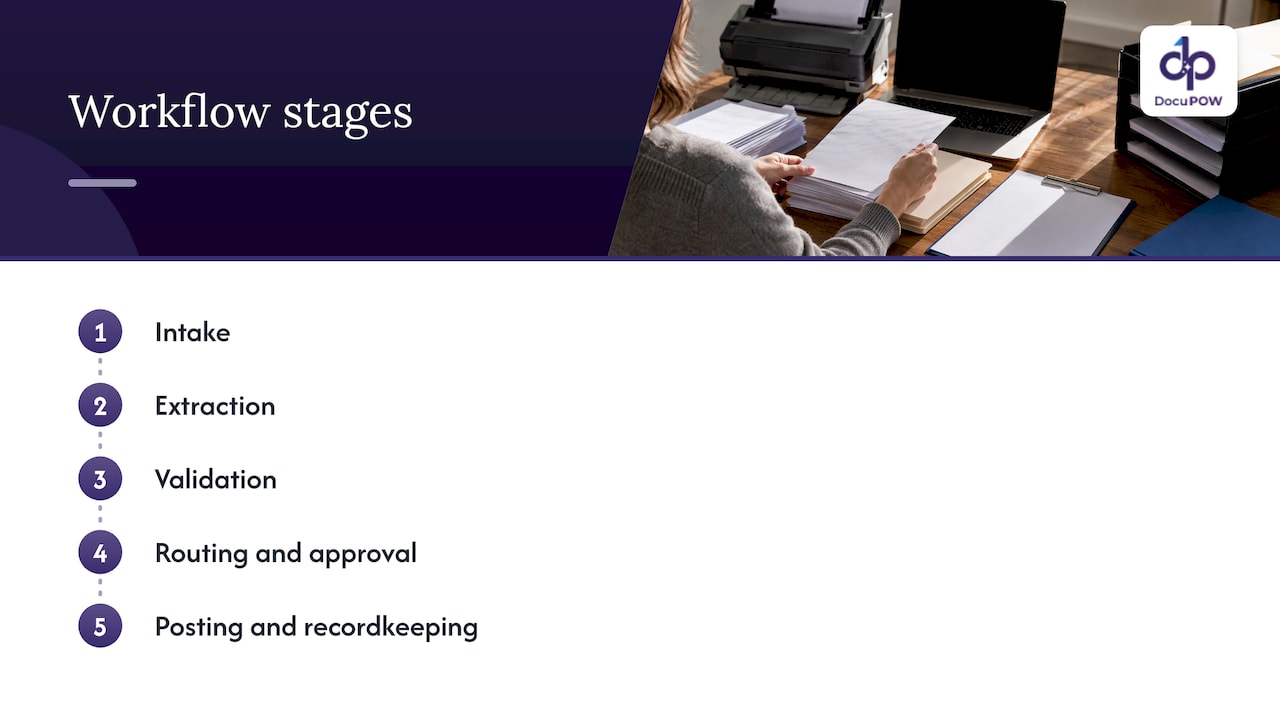
1. Intake
Documents arrive by email, upload, portal, scanner, EDI or API. Intake is where you decide what counts as a valid submission, how you identify the document type, and how you log the arrival. A common failure is that the same document class arrives through six channels and each channel has its own habits.
2. Extraction
The system reads the document and pulls out the fields you need: vendor, dates, line items, totals, parties, clauses. Older optical character recognition (OCR) tools depend on templates, meaning a fixed layout map for each document format. They work until a supplier changes its invoice layout, and then someone has to rebuild the template. Template-free extraction reads a document the way a person would, using context instead of coordinates, so a layout the system has never seen still gets read.
3. Validation
Extracted data is only useful if it is right. Validation checks it against a schema (the required fields and formats), against reference data such as vendor master records or purchase orders, and against business rules such as tolerance limits. This is the stage where finance teams reduce manual errors, because mismatches are caught before they reach the ledger.
4. Routing and approval
Clean documents move straight on. Documents that fail a check, exceed a threshold or need a signature go to the right person, with the evidence they need to decide. Approval routing is where a lot of cycle time hides, since a document that sits in a queue for three days costs the same as one that takes three days to process.
5. Posting and recordkeeping
Approved data is written into the ERP, CRM, accounting system or case system, and the original document and its history are stored. This is also where compliance lives: you need to show what was received, what was extracted, what was changed and who approved it.
For a deeper look at the approval stage specifically, see our guide to document approval workflow design, steps and controls.
Which stages benefit most from automation
Not every stage gains equally. A useful rule: automate first where the work is repetitive, the rules are explicit and the volume is high.
| Stage | Typical manual pain | Automation payoff |
|---|---|---|
| Intake | Documents scattered across inboxes and folders | High: classification and logging happen on arrival |
| Extraction | Retyping fields from PDFs and scans | Very high: this is usually the largest block of manual hours |
| Validation | Eyeballing totals, matching to POs by hand | High: rules run on every document, every time |
| Routing and approval | Chasing approvers, lost requests | High: routing rules and reminders remove the idle time |
| Posting and records | Rekeying into ERP, filing by hand | High: direct integration removes the last retype |
Extraction and posting are the two stages teams usually tackle first, because they are the most mechanical. But automating only those two leaves the middle untouched, and the middle is where exceptions pile up. The biggest gains come from connecting all five.
The scale of the problem is why this matters. Industry analysts value the market for intelligent document processing, the category of software that reads and classifies business documents, in the billions of dollars and growing quickly. One market estimate puts it at $2.30 billion in 2024, projected to reach $4.31 billion by 2026. Treat it as a sign of direction, not a benchmark for your own results: your return depends on your volumes, document mix and current error rates.
Where this plays out by team
The stages are the same everywhere, but the documents differ.
- Accounting and finance: invoices, remittances, bank statements and expense reports. The payoff is fewer keying errors and faster close.
- Procurement: purchase orders, vendor onboarding forms, receiving documents. Validation against PO and receipt data is the key step.
- Sales: quotes, proposals and contracts. Routing speed and clause visibility matter most.
- Operations, manufacturing and logistics: bills of lading, packing lists, certificates and compliance documents. Real-time visibility into where each document sits is the main gain.
- HR: onboarding packets, IDs, benefits forms and records.
- Legal and compliance: contract review, audit evidence, retention. Traceability is the requirement.
- Healthcare and insurance: patient records, claims and policy documents, where secure handling is non-negotiable.
For a closer look at operations scenarios, read about the benefits of document process automation for operations, and for logistics see our logistics solutions page.
How to automate a multi-step document workflow
Here is the sequence we recommend. Each step shows what it takes and where it usually goes wrong.
Step 1: Map the process as it really runs
Walk one document class from arrival to archive. Write down every handoff, every system touched and every place the document waits. Use real documents, not the process chart on the wall. The usual mistake is mapping the official process and missing the workarounds, such as the spreadsheet a clerk keeps because the ERP lacks a field.
Step 2: Pick one document class with volume and clear rules
Start with something like vendor invoices or purchase orders. Choose a class where you can state the validation rules in a sentence. Trying to automate every document type at once is the fastest way to stall.
Step 3: Replace templates with template-free extraction
This is where DocuPOW takes work off your hands. Our extraction is template-free and zero-shot, which means it adapts to layouts it has not seen before, so you are not building and maintaining a template for each supplier or form. Details are on the zero-shot extraction page. If you do the same job with template-based tools, every new layout becomes a maintenance ticket.
Step 4: Define validation rules and a schema
Spell out the required fields, formats, reference-data matches and tolerances. DocuPOW enforces strict schema validation, so a document that does not meet the rules does not slip through into your database. The common failure here is rules that live only in one clerk’s head. Write them down first.
Step 5: Design the exception path before you go live
Some documents will always need a person: a blurred scan, a missing PO number, an amount over a limit. Decide who reviews what, with what evidence in front of them, and what happens next. DocuPOW includes human-in-the-loop audit review, so a person sees the flagged document and decides within the same workflow. Our guide on how to route, review and resolve document exceptions covers the patterns in detail.
Step 6: Connect the output to your systems
Automation that ends in a CSV export just moves the retyping. The goal is to post validated data directly into your ERP or CRM. DocuPOW integrates with ERP and CRM systems through an API, and offers developer tools for IT teams that need to fit it into existing architecture. The usual failure is treating integration as a final task. Involve IT from the first week, because field mappings and authentication drive the schedule.
Step 7: Run in parallel, then cut over
Process a batch both ways and compare results field by field. Fix rules, adjust routing, and only then retire the manual path.
Step 8: Measure and keep improving
Track straight-through rate (the share of documents that need no human touch), exception rate, cycle time from arrival to posting, and error rate after posting. Measure by document class and by field. A single overall accuracy figure hides the fact that one critical field, such as total amount, may behave differently from a minor one. DocuPOW provides real-time analytics and predictive insights so you can see these numbers without building your own reporting.
Handling exceptions without losing control
Exceptions decide whether an automated workflow earns trust. If the system pushes questionable data straight into the ledger, finance stops relying on it. If it routes everything to review, you have built a more expensive manual process.
The balance is a routing policy: clean and matching documents pass automatically, documents that miss a rule go to a named reviewer with the source page and the extracted value side by side, and every reviewer action is logged. Over time, you tighten rules based on what reviewers keep correcting, and the straight-through rate rises.
This is also where conversational querying helps. Instead of hunting through folders, a reviewer or auditor can ask a question about a document set and get an answer with a citation back to the source page. DocuPOW offers AI-powered semantic search and query with transparent source citations, which supports review and retrieval without extra tooling.
Security, compliance and audit readiness
A document workflow touches sensitive data: bank details, patient information, contracts, personal records. Controls have to run through every stage, not just storage.
What auditors generally want is a reconstructable history. Federal guidance on electronic records points the same way. The National Archives, summarizing a NIST report, recommends policies for how electronic records are represented, transferred, accessed and permanently stored. On audit trails specifically, the U.S. Department of Education’s standard, written for its own contractors and systems, requires protected audit information, restricted administration of logs and time-correlated audit trails. These are public-sector requirements, not rules for every private business, but they are a sound model for what a well-run audit trail contains.
In practice, design for these questions:
- Can you show the original document as received?
- Can you show what the system extracted, and what a person changed?
- Can you show who approved it and when?
- Can you restrict who sees sensitive fields and who can change rules?
- Do you know your retention period for each document class, and does the system enforce it?
If your industry has its own regime, such as HIPAA in healthcare, confirm your obligations with your compliance officer or counsel and map them to workflow controls. DocuPOW runs on cloud-native infrastructure with bank-grade encryption and enterprise-grade security and compliance features, built for high-volume environments.
Orchestration versus point automation
Many teams begin with a point tool: an OCR step here, an approval form there. Each solves one gap and creates a new seam. Data gets exported from one tool and imported into the next, and nobody owns the whole chain.
Orchestration changes three things. First, there is one record of each document’s journey, so you can answer “where is it?” instantly. Second, rules and routing are defined once and applied at every stage. Third, failures are handled by design: a failed posting retries or escalates instead of vanishing.
DocuPOW’s approach is end-to-end process automation beyond data extraction. The platform combines document intelligence with DocuPOW Flow for workflow orchestration. You can read how that fits together on the platform page, and our enterprise guide to AI workflow automation services goes further into planning.
Our perspective
Most teams we talk to believe their problem is data entry. Usually it is the handoffs. Typing is the visible cost, but the invisible cost is the document that waits, the field nobody validated and the approval nobody saw.
That is why we built DocuPOW as an operating system for documents, not a scanner with extras. Agents read and understand documents the way an expert would, check them against your schema, send the doubtful ones to a person with the evidence attached, and write the result to your core systems. One chain, one record.
We think template-free extraction is the foundation. When a new supplier layout does not require a new template, setup and maintenance shrink, and your team spends its time on exceptions that matter instead of on keeping the machinery alive. Human-in-the-loop review then keeps accountability where it belongs, with your people.
Our advice: pick one document class, define the rules in plain language, design the exception path first, and measure by field. Do that, and a multi-step workflow stops being a series of delays and becomes a single process you can see.
Syed Naveed Abbas
Start with one workflow
DocuPOW is sold as a subscription. The Starter plan is $99 per month and the Professional plan is $499 per month, and Enterprise is available with pricing on request through the pricing page. A good first project is one document class, such as vendor invoices, taken from intake to ERP posting with a human review path for exceptions.
If you want to see how that looks with your own documents, the DocuPOW platform page explains how extraction, validation and orchestration work together.
FAQ
What is document workflow orchestration?
It is one system coordinating every stage of a document’s journey: intake, extraction, validation, routing, approval and posting. It tracks each document’s status, applies the same rules at every step and handles failures automatically. The result is a single process instead of disconnected tasks.
How can businesses automate multi-step document workflows?
Map the real process, choose one document class with clear rules, and use template-free extraction to read documents. Add schema validation, route exceptions to a reviewer, and post approved data directly into your ERP or CRM. Run in parallel with the manual process before cutting over.
Which workflow stages benefit most from automation?
Extraction and posting are usually first, since they are the most repetitive and mechanical. Validation and routing follow, because rules and reminders remove errors and idle time. Connecting all stages delivers more than automating any single one.
How do you keep automated document workflows audit-ready?
Keep the original file, the extracted values, any human corrections and the approver’s decision, each with a timestamp and a user. Restrict who can change rules or view sensitive fields, and enforce retention periods by document class. For industry-specific rules, confirm requirements with your compliance officer or counsel.
What should you measure after launch?
Track straight-through rate, exception rate, cycle time from arrival to posting and post-posting error rate. Measure by document class and by key field, not with one blended accuracy number.
Sources
- Standards for Long-Term Storage of Electronic Records, National Archives
- IT System Audit and Accountability (AU) Standard, U.S. Department of Education
- AI Document Processing 2026 statistics
Recommended
See DocuPOW on your documents.
Stop building templates. Start extracting data.


