Author: Naveed Abbas

  • AI for Back Office Operations: What Actually Delivers ROI

    AI for Back Office Operations: What Actually Delivers ROI

    AI cuts manual document work and shortens transactional close cycles when it’s aimed at high-volume, repeatable back-office processes, not deployed as a general-purpose fix. Organizations planning generative AI expected a 41% productivity increase alongside a 55% jump in process augmentation, concentrated in finance and HR workflows like source-to-pay and record-to-analyze. That’s a meaningful number, but it’s an expectation, not a guarantee.

    The single move that separates a real result from a stalled pilot: pick one high-volume, measurable process, such as invoices from a single supplier cohort, and run agentic document automation against it for 60 to 90 days before scaling anything.

    • Start narrow: one process, one team, one clear baseline.

    • Measure before you automate anything, not after.

    • Treat a platform like DocuPOW as a solution class worth evaluating for template-free extraction and agent orchestration, not a silver bullet.

    Key Takeaways

    Back-office AI works best when applied to a single high-volume, document-heavy process with clear baseline metrics before any system-wide rollout begins.

    Point Details
    Start with one process Pilot a narrow, high-volume workflow like single-cohort invoice processing before scaling anything.
    Expect conditional ROI IBM’s research points to a 41% productivity estimate, but Gartner found only 28% of AI use cases fully meet ROI targets.
    Govern from day one Apply NIST’s GOVERN, MAP, MEASURE, and MANAGE functions before deployment, not after a problem surfaces.
    Prioritize integration and data quality Poor ERP integration and messy source data cause most underperforming pilots.
    Evaluate template-free platforms like DocuPOW DocuPOW’s agent-based extraction and human-in-loop review fit directly into procure-to-pay and reconciliation pilots.

    Table of Contents

    Where AI for Back Office Operations Delivers Real Value First

    Not every back-office task deserves AI investment in year one. Some processes are simply better candidates because of volume, structure, and how expensive the manual version already is.

    1. Source-to-pay and invoice processing. Extraction, three-way matching, and routing consume enormous manual hours in accounts payable. AI reads invoices regardless of layout, validates against purchase orders, and routes exceptions to a human reviewer instead of a queue.

    2. Record-to-analyze and reconciliation. Auto-matching transactions and flagging discrepancies before month-end shortens the reporting cycle. This is where days-to-close improvements tend to show up first.

    3. Expense management. Zero-input expense capture paired with anomaly detection catches policy violations before they hit the general ledger, not after an audit.

    4. HR self-service and payroll. Routine requests, like PTO balances or benefits questions, get resolved without a ticket, freeing HR staff for judgment calls machines shouldn’t make.

    5. Contracts and sourcing. Extracting obligations and flagging renewal or price-change triggers from long, inconsistent contract documents used to require a paralegal’s afternoon. Agentic AI does it in minutes.

    Agentic AI and template-free intelligent document processing (IDP) matter most where documents are messy: multi-page contracts, non-standard invoice formats, or scanned records with no consistent layout. That’s exactly where rule-based automation historically broke down.

    Pro Tip: Rank candidate processes by volume times error cost, not by which department complains loudest. The math usually points somewhere unexpected, like vendor onboarding instead of invoicing.

    What ROI Should You Actually Expect From Back-Office AI?

    The headline numbers are real but conditional. IBM’s research points to a 41% expected productivity increase from generative AI in back-office functions, while Deloitte frames the opportunity as extending beyond task speed into better decision-making and risk mitigation. Neither number is automatic. Gartner found that only 28% of infrastructure and operations AI use cases fully meet ROI expectations, and a notable share fail outright.

    Track these KPIs from day one, not after the pilot ends:

    • Cycle time per transaction (invoice, expense report, contract review)

    • Error rate before and after automation

    • Days-to-close for monthly financial reporting

    • Cost-per-transaction, including exception handling labor

    • FTE hours reallocated to higher-value work

    Underperforming pilots usually trace back to three causes: poor data quality feeding the model, integration gaps with the ERP, and governance that gets bolted on after launch instead of built in from the start.

    Building the Pilot: Data, Integration, and Governance Checklist

    A pilot succeeds or fails based on groundwork most teams skip. Use this sequence before you sign anything.

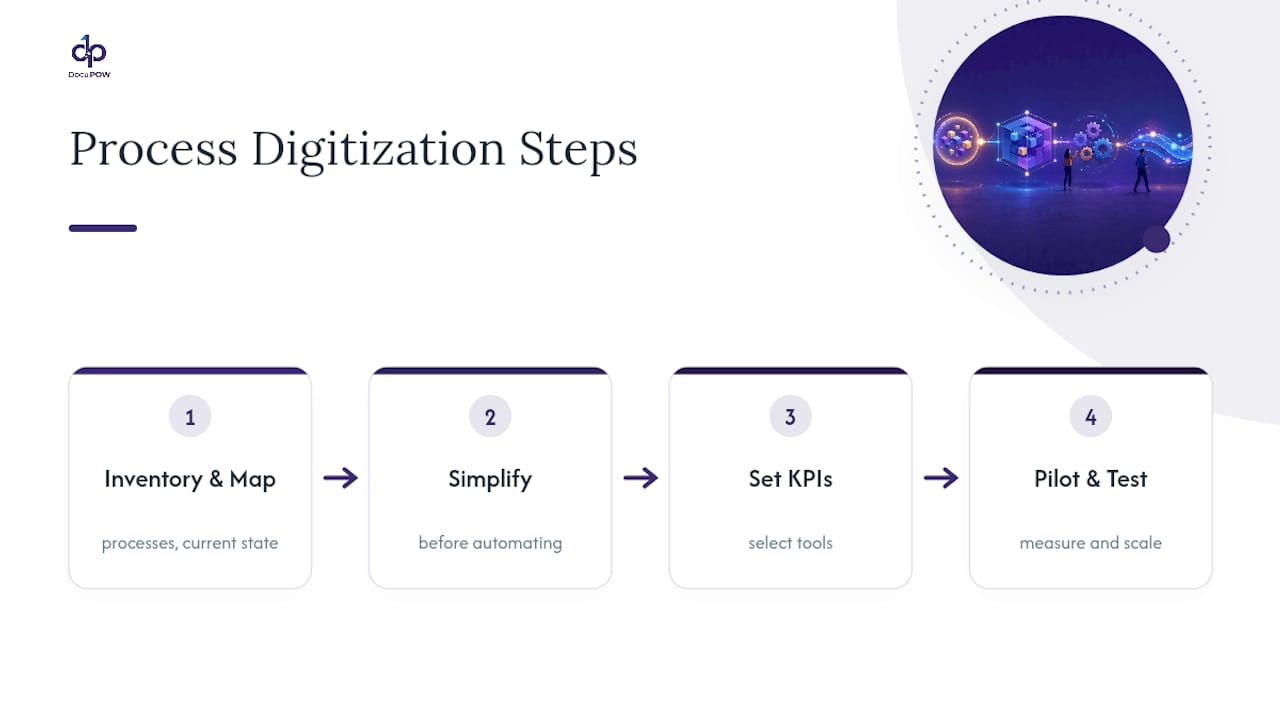
    1. Inventory your documents. Catalog document types, volume, and how many currently require manual touches. This becomes your baseline.

    2. Map fields to ERP masters. Know exactly which extracted fields need to land in which system fields before extraction begins.

    3. Check data quality. Inconsistent vendor names, missing PO numbers, or duplicate records will undermine even the best extraction engine.

    4. Choose API-first integration. Favor event-driven connectors over batch exports; they surface exceptions in near real time instead of overnight.

    5. Design human-in-loop gates. Every financial workflow needs a review checkpoint, an audit trail, and clear escalation rules for exceptions.

    6. Set a tight timeline. Eight to twelve weeks is enough to validate or kill a pilot. Longer timelines tend to drift into scope creep.

    7. Define success criteria before launch. Agree on the exact cycle-time and error-rate targets that justify scaling, in writing, before the pilot starts.

    Operating-model design matters as much as the technology choice here. Leaders who redesign workflows alongside the rollout see better adoption than those who bolt AI onto an unchanged process.

    How Agentic Document Automation Actually Works

    Template-free extraction doesn’t rely on a fixed layout the way older OCR tools did. It uses semantic parsing and context-aware agents that read a document the way a trained analyst would, understanding that “Net 30” means a payment term regardless of where it sits on the page or what font surrounds it.

    Autonomous agents then orchestrate the full sequence: extract data, validate it against source systems, post it to the ERP, and reconcile the result, with a human reviewing exceptions rather than every transaction. That’s the practical difference between agentic AI and older robotic process automation, which broke the moment a vendor changed its invoice template.

    • Multi-page contracts get parsed for obligations and renewal dates without manual tagging.

    • Financial visibility improves because data lands in the system in near real time instead of after a batch job.

    • Predictive insights surface patterns, like a vendor’s invoices trending toward late payment terms, before they become a cash-flow problem.

    DocuPOW’s how-it-works overview walks through this extract-validate-post-reconcile sequence in more detail.

    Pro Tip: Ask any vendor to show you how their system handles a document it has never seen before. That single test reveals more about template-free capability than any spec sheet.

    Managing AI Risk: Applying the NIST Framework to Back-Office Systems

    Governance isn’t optional for financial and HR workflows, and the NIST AI Risk Management Framework gives operations leaders a structure that doesn’t require a compliance department to interpret.

    • GOVERN: Build an inventory of every AI system in use, assign clear ownership, and write acceptable-use policies before deployment, not after.

    • MAP: Define each system’s intended purpose, who it affects, and what happens if it’s wrong.

    • MEASURE: Establish testing, evaluation, validation, and verification (TEVV) practices and set ongoing monitoring metrics, a step NIST’s generative AI profile treats as non-optional for GAI systems specifically.

    • MANAGE: Write an incident response playbook before you need one, and revisit it on a fixed cadence.

    Third-party compliance tooling, like platforms built around the NIST AI RMF, can help operationalize these functions without building a governance program from scratch.

    How Do You Choose the Right Back-Office AI Solution?

    Selection comes down to a short list of criteria that separate a working system from a demo that never scales.

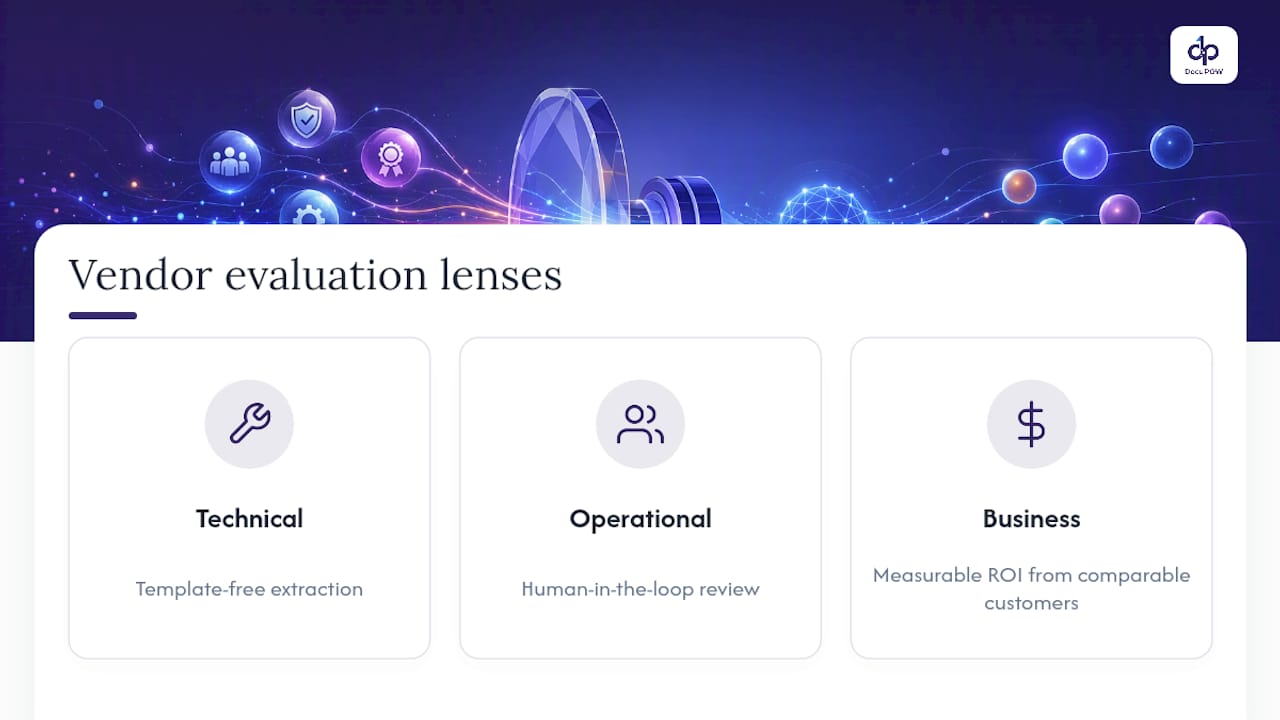
    1. Test extraction accuracy on your own documents, not the vendor’s curated samples.

    2. Confirm integration depth with your specific ERP, not a generic “we integrate with everything” claim.

    3. Verify human-in-loop controls exist for exception handling, with a visible audit trail.

    4. Check security certifications and data residency against your compliance requirements.

    5. Ask for real pilot metrics from existing customers, including failure cases, not just wins.

    6. Confirm the system scales without a re-architecture as document volume or process count grows.

    Red flags worth walking away from: vendors who describe their extraction as a “black box,” can’t produce a single real customer metric, or have no articulated plan for exception handling. If a vendor can’t explain what happens when the AI gets something wrong, that’s the answer.

    A Practical Note From the Field

    Sequence matters more than tooling: get people and process aligned before the technology, or the technology just automates the wrong steps faster. Most stalled pilots I’ve seen fail on data quality, not model capability. Start with a boring, high-volume process and a real baseline. Skip that step and the results will look impressive on a slide and nowhere else.

    — Syed Naveed Abbas

    DocuPOW: Matching Agentic Automation to Your Pilot Requirements

    Everything covered above, template-free extraction, agent orchestration, human-in-loop review, ERP integration, maps directly to what DocuPOW builds for global manufacturers and enterprise finance teams. Instead of forcing documents into rigid templates, DocuPOW’s autonomous agents read context the way an experienced analyst would, then extract, validate, and route data without a rules engine that breaks the moment a vendor changes an invoice format.

    DocuPOW

    The strongest starting points mirror the use cases above: procure-to-pay, invoice processing, and financial reconciliation, all high-volume, high-error-cost processes where a narrow pilot proves value fast. Real-time analytics surface exceptions as they happen instead of at month-end, giving finance leaders the visibility to shift from reactive reporting to proactive decisions.

    If you’re scoping a pilot along the lines described in this guide, the enterprise workflow automation guide walks through orchestration design in more detail, and you can request a demo scoped to your own document volume and ERP setup.

    Sources

    FAQ

    Will AI Replace Back-Office Jobs?

    AI automates repetitive tasks like data entry and matching, but human review remains essential for exceptions, judgment calls, and audit oversight. Most organizations see role shifts toward exception handling and analysis rather than outright headcount elimination.

    What Is the 30% Rule in AI?

    This isn’t a recognized standard in AI research or the frameworks covered here; definitions of a “30% rule” vary by source and context, so treat any specific claim about it with caution.

    Which Jobs Are Most Exposed to AI Automation?

    Highly repetitive, rules-based roles, like manual invoice keying, basic reconciliation matching, and routine data entry, face the most exposure, since these are precisely the tasks agentic document automation targets first.

    What Is the Best AI Approach for Operations Management?

    There’s no single best tool for every organization, but platforms built for template-free extraction and agent orchestration, like DocuPOW, tend to outperform rigid rule-based automation on messy, high-volume document workflows such as invoice processing and reconciliation.

    How Long Should a Back-Office AI Pilot Run?

    Eight to twelve weeks gives enough time to validate cycle-time and error-rate improvements against your baseline without letting scope creep delay a scale decision.

  • Enterprise Content Management: A Practical 2026 Guide

    Enterprise Content Management: A Practical 2026 Guide

    Enterprise content management (ECM) is the discipline and technology stack that captures, governs, and delivers a company’s documents, records, and digital assets across their entire lifecycle, from creation to disposal. The payoff shows up fast: less time searching for files, tighter compliance, and workflows that run without a human chasing down approvals. The biggest shift heading into 2026 is automation that actually understands documents. Platforms like DocuPOW use autonomous agents to pull structured data out of unstructured files without relying on rigid templates, which changes what “capture” means for an ECM program.

    What ECM delivers when it’s done right:

    • Faster retrieval: employees stop hunting across shared drives, inboxes, and file cabinets.

    • Lower compliance risk: retention rules and access controls apply automatically, not by memory.

    • Fewer manual touches: workflows route, approve, and archive content without repetitive data entry.

    • A foundation for AI: clean, governed content is what makes agentic automation trustworthy instead of risky.

    Key Takeaways

    Enterprise content management succeeds when governance-by-default and measurable pilots come before large-scale AI automation, not after it.

    Point Details
    Define ECM clearly ECM governs content across capture, manage, store, deliver, and retire, distinct from DMS, CMS, and DAM.
    Build the truth layer first Clean metadata, deduplication, and version control must precede agentic AI investment to avoid unreliable automation.
    Start with one measurable pilot Invoice processing or a similarly document-heavy process proves ROI fastest and builds momentum for wider rollout.
    Automate governance, not just workflow Applying retention and access rules automatically prevents the workarounds that undermine compliance later.
    Choose template-free extraction DocuPOW’s agent-based approach adapts to document format changes without manual template maintenance.

    Table of Contents

    What Is Enterprise Content Management, Really?

    ECM covers the full lifecycle of business content: capture, manage, store, deliver, and eventually retire. Most confusion around the term comes from people treating it as a single product category when it’s actually an umbrella over several overlapping disciplines, each with its own job.

    The lifecycle breaks down into five stages:

    1. Capture — scanning, email ingestion, form uploads, and API feeds pull content into the system.

    2. Manage — metadata, version control, and workflow routing keep content moving and traceable.

    3. Store — a repository (cloud, on-premises, or hybrid) holds the content with appropriate redundancy and access rules.

    4. Deliver — search, portals, and integrations get the right content to the right person or system.

    5. Retire — retention schedules and legal holds determine when content gets archived or destroyed.

    Here’s where the acronyms get confused in practice:

    • DMS vs. ECM: A document management system handles storage, versioning, and check-in/check-out for files. ECM includes DMS functionality but adds records management, workflow automation, and governance across the whole organization, not just one department’s file library.

    • CMS vs. ECM: A content management system, like a website CMS, publishes and formats content for public or internal consumption. ECM manages the underlying business records that a CMS might reference but rarely governs.

    • DAM vs. ECM: Digital asset management specializes in rich media, images, videos, brand files, with heavy metadata for search and rights tracking. It’s often a component of a broader ECM strategy rather than a replacement for it.

    • Knowledge management vs. ECM: Knowledge management focuses on capturing institutional expertise and making it findable. ECM provides the governed repository that knowledge management tools often sit on top of.

    Modern platforms increasingly break away from the old monolithic ECM suite model. Content services platforms use an API-first architecture, meaning content and workflow capabilities get exposed as services that other systems (CRM, ERP, collaboration tools) can call directly, rather than forcing everything into one walled-off application.

    What Capabilities Should an ECM Platform Include?

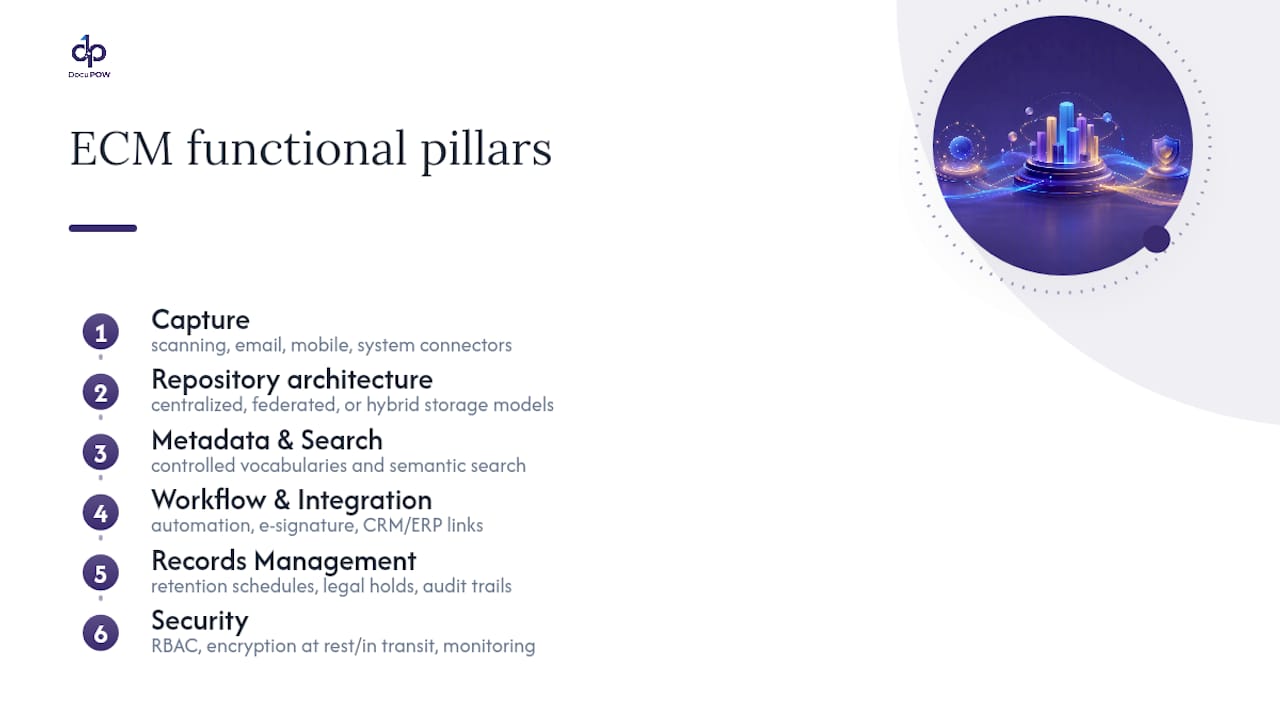
    A capable ECM platform needs six functional pillars, and skipping any one of them tends to show up as a gap later, usually during an audit or a compliance review when it’s expensive to fix.

    Diagram of six ECM capabilities

    Capture. This is where content enters the system: scanning stations, dedicated email ingestion addresses, mobile capture apps, and connectors to line-of-business systems. Automation here matters enormously. Template-free extraction removes the brittleness of older optical character recognition tools that break the moment a vendor changes an invoice layout.

    Repository architecture. Centralized repositories give you one source of truth but can create bottlenecks at scale. Federated models distribute storage across systems while maintaining a unified index. Most enterprises land on a hybrid: sensitive records centralized, high-volume operational content distributed closer to where it’s generated.

    Metadata, taxonomy, and search. Content without metadata is a filing cabinet with the labels torn off. Consistent tagging, controlled vocabularies, and semantic search let people find a contract by describing what it’s about rather than remembering what folder someone dropped it in three years ago.

    Workflow and integration. Automated routing, e-signature capture, and approval chains cut the handoffs that used to require someone physically walking a folder between desks. Integration points with CRM and ERP systems matter as much as the workflow engine itself.

    Records management. Retention schedules, legal holds, and audit trails aren’t optional add-ons. They’re what makes content defensible when a regulator or opposing counsel comes asking.

    Security. Role-based access control, encryption at rest and in transit, and continuous activity monitoring protect content from both external breaches and internal misuse.

    Pro Tip: Before evaluating vendors, write down which of these six pillars your current setup actually handles well. Most organizations are strong on repository and weak on metadata, which is exactly the gap that makes search painful.

    Why Does Enterprise Content Management Matter for the Bottom Line?

    The business case for ECM rests on three measurable levers: time, risk, and error rate. Skip the vague productivity talk. Here’s what actually moves.

    Search time. Employees spend a meaningful chunk of their week just locating files, approvals, and past correspondence. A governed repository with real metadata collapses that time from minutes of digging to seconds of querying, and that compounds across a workforce doing it dozens of times a day.

    Compliance and audit readiness. When retention rules and access permissions apply automatically instead of relying on individual judgment, audit prep stops being a fire drill. Legal holds get placed instantly instead of via a scramble through email threads.

    Operational cost. Manual data entry is expensive and error-prone, and errors compound downstream, in mismatched invoices, delayed shipments, or contract terms that get missed entirely.

    The trust gap is real: 88% of organizations report ongoing data accuracy or integrity challenges, and 53% admit staff use public AI tools without any acceptable-use policy for sensitive content. That’s the exact failure mode a governed ECM program with defined access rules is built to close.

    To set a baseline, measure these before touching any new platform:

    • Average time to locate a specific document or record.

    • Percentage of records with complete, accurate metadata.

    • Number of manual re-keying steps in your top three document-heavy processes.

    • Audit prep time for your last compliance review.

    Track the same four numbers 90 days after rollout. The delta is your ROI case, and it’s a far stronger argument to a CFO than any vendor’s promised percentage improvement.

    Where Does ECM Deliver the Most Value Across Departments?

    ECM isn’t a finance tool or a legal tool. It’s infrastructure that different departments lean on for very different reasons, and the highest-value pilots usually come from picking the function with the most document friction, not the one with the biggest budget.

    Finance teams use automated invoice capture and three-way matching (purchase order, receipt, invoice) to cut processing time and build a clean audit trail for every payment. This is often the single best pilot process because the ROI is easy to quantify in dollars and days.

    Stop at Scanning, and You Stall | Build an Automated Content Workflow

    Legal departments rely on contract lifecycle management to track obligations, renewal dates, and amendments, plus defensible legal hold processes that survive scrutiny in litigation.

    HR teams need secure, access-controlled storage for onboarding paperwork, benefits elections, and performance records, with retention schedules that align to employment law requirements.

    Customer support benefits from knowledge activation: turning scattered product documentation and past ticket resolutions into searchable answers that cut resolution time.

    Marketing groups depend on digital asset management for brand governance, making sure the right logo, the current pricing sheet, and approved messaging are what actually goes out the door.

    Operations teams use document orchestration for supplier contracts, compliance certificates, and shipment paperwork, often the highest-volume, highest-error-rate content in the entire company.

    A practical rollout sequence looks like this:

    1. Identify the department with the most manual document handling and the clearest cost of error.

    2. Pilot one process end-to-end (capture through archive), not the whole department’s document universe.

    3. Measure the baseline metrics before rollout and again 60 to 90 days after.

    4. Use the results to build the business case for the next department.

    How Do You Actually Implement ECM Without It Failing?

    Most ECM rollouts don’t fail because of bad software. They fail because nobody planned for the humans who have to change how they work. Deployment specialists consistently point to change management as the deciding factor, not the platform’s feature list.

    Blog | Peakflo - Finance Automation Insights

    Step 1: Pick a high-impact pilot with a clear success bar. Invoice processing is a common starting point because it’s measurable and painful in nearly every organization. Define what success looks like in numbers before you start, not after.

    Step 2: Build governance-by-default from day one. This is the difference between a program that scales and one that quietly falls apart within a year. Retention schedules, access permissions, and metadata tagging should apply automatically as content enters the system, not depend on an employee remembering to classify it correctly. Governance-by-default removes the option to skip the rules under deadline pressure, which is when most workarounds get created and never get undone.

    Step 3: Map your integrations before you map your workflows. Most enterprises have content scattered across five to ten different systems already, and the practical path to usable ECM runs through integration and connectors, not through forcing everyone into one new interface. Prioritize connectors to your CRM, ERP, and Microsoft 365 environment first, since that’s where the highest volume of content already lives.

    Step 4: Treat this as a change-management project, not a software rollout. Name executive sponsors who will visibly use the new system themselves. Train department leads before training their teams. Roll out in phases, department by department, rather than flipping a switch company-wide on day one.

    Step 5: Define your KPIs and reporting cadence before launch. Search-time reduction, error rate, and audit-prep time are the three metrics worth tracking monthly for the first two quarters.

    Pro Tip: Assign one person, not a committee, as the governance owner for each content type. Committees are where retention policy decisions go to die.

    Where do most organizations get integration mapping wrong? They try to connect everything at once. Prioritizing the two or three systems with the highest document volume first gets you a working proof of concept in weeks instead of a stalled project that never leaves the planning phase.

    How Does Template-Free AI Change Document Automation?

    The core limitation of older document automation was rigidity. Optical character recognition tools built around fixed templates broke the moment a vendor changed an invoice layout or a supplier switched formats, which meant IT teams spent as much time maintaining templates as the automation saved in labor.

    DocuPOW’s approach uses autonomous agents that understand the context and structure of a document rather than matching it against a fixed layout, which means extraction keeps working even when the source document changes shape entirely.

    That matters most for organizations dealing with high document variability:

    • Global manufacturers working with hundreds of suppliers, each issuing invoices and packing slips in different formats, see operational efficiency and accuracy gains once manual re-keying stops being the bottleneck.

    • Finance teams get faster financial visibility because extracted data feeds directly into downstream systems instead of sitting in a queue waiting for someone to type it in.

    • Operations leaders shift from reactive firefighting to proactive planning once real-time analytics and predictive insights surface bottlenecks before they cause a shipment delay.

    The pattern across these deployments is consistent: the value isn’t just faster processing, it’s fewer errors compounding downstream, which is where the real cost of manual document handling usually hides.

    Not every trend deserves budget. Three are worth taking seriously, and one sequencing decision determines whether they succeed or quietly fail.

    Agentic workflows. AIIM’s research points to a real shift: information management is moving from passive storage toward agents that execute tasks directly, approving routine requests, routing exceptions, flagging anomalies. Human roles shift toward governance and architecture rather than manual processing.

    Semantic search and RAG. Retrieval-augmented generation lets AI tools answer questions by citing the actual source document, not by guessing from training data. That verifiability is what makes AI-assisted search usable in a compliance-sensitive environment.

    Self-healing knowledge bases. AI-powered content health monitoring can flag duplicate, outdated, or contradictory content automatically, cutting down the “redundant, outdated, trivial” (ROT) content that causes AI systems to hallucinate confident-sounding wrong answers.

    Here’s the sequencing that matters more than any single feature: build the truth layer, clean metadata, deduplication, version control, before layering agentic AI on top. The knowledge management software market is projected to reach $26.4 billion by the end of 2026, and most of that spend will be wasted on organizations that skip straight to agents without fixing the data underneath them first.

    What I’d Prioritize if I Were Running This Rollout

    Governance-by-default is the decision that separates ECM programs that scale from ones that quietly rot within eighteen months. It costs more upfront and slows the initial rollout. That trade-off is worth making every time.

    On buy versus build: buy the platform, build the governance rules yourself, because nobody else knows your retention obligations or risk tolerance better than your own compliance team. For the first 90 days, track exactly three things: search time, error rate, and audit-prep time. Everything else is noise until those three move.

    — Syed Naveed Abbas

    Where DocuPOW Fits in Your ECM Program

    DocuPOW is the answer to the piece of ECM that trips up most rollouts: getting clean, accurate data out of documents in the first place, without months of template configuration before you see any value. Instead of forcing your team to build extraction rules for every supplier invoice format or contract layout, autonomous agents read the document’s actual structure and pull the data out correctly the first time, and every time the format changes after that.

    DocuPOW

    That template-free approach pairs directly with the governance-by-default principle covered above: extracted data flows into your workflows with real-time analytics attached, so operations and finance teams see predictive insights instead of a backlog of unreviewed files. For manufacturers and other document-heavy organizations juggling supplier formats that never stay consistent, that’s the difference between an ECM pilot that proves itself in weeks and one that stalls waiting on IT to maintain templates. If you’re mapping out your first pilot process, the AI workflow automation guide walks through how to structure it, and you can schedule a demo to see how the extraction engine handles your own document types before committing to a broader rollout.

    Sources

    FAQ

    What Does Enterprise Content Management Mean?

    Enterprise content management is the set of strategies and technologies used to capture, govern, store, and deliver an organization’s business content, from creation through retention and eventual disposal.

    What Is the Difference Between DMS and ECM?

    A document management system handles storage, versioning, and file organization. ECM includes those capabilities plus records management, workflow automation, and organization-wide governance across every content type, not just documents in one repository.

    What Is Enterprise Content Management Software?

    ECM software is the platform layer that provides capture tools, a governed repository, metadata and search, workflow automation, and records management, often extended today with AI agents like DocuPOW that extract data without rigid templates.

    Is ECM the Same as a CRM?

    No. A CRM manages customer relationships and sales data, while ECM manages the underlying documents and records, contracts, invoices, HR files, that a CRM might reference but doesn’t govern on its own.

    How Long Does an ECM Implementation Typically Take?

    Timelines vary by scope, but a focused pilot on a single process, such as invoice capture, can show measurable results within 60 to 90 days, which is the window most organizations use to build the business case for broader rollout.

  • AI-Powered Business Records Management: A Decision-Maker’s Roadmap

    AI-Powered Business Records Management: A Decision-Maker’s Roadmap

    AI can materially automate and improve records management, but only when you pair hybrid ingestion, explicit governance, and human-in-the-loop review. Skip any of those three and you get a demo that impresses a board room and fails an audit six months later.

    The upside is real: faster classification, faster e-discovery, and search that actually finds what someone is looking for instead of a folder full of near-misses. Automating classification, retention scheduling, and metadata tagging cuts the manual grind that eats records teams alive, and semantic search shortens the time between “legal needs this” and “here it is.”

    The next move isn’t a company-wide rollout. It’s a scoped pilot with measurable gates:

    • Pick one high-volume, lower-risk document type (invoices, service contracts, inspection reports)

    • Require template-free extraction accuracy above a set threshold before scaling

    • Build in human review checkpoints from day one, not as an afterthought

    • Evaluate a platform like DocuPOW that handles unstructured documents without rigid templates

    Key Takeaways

    AI-powered records management succeeds when hybrid ingestion architecture, ARCS/ISO-aligned governance, and human-in-the-loop review operate together rather than in isolation.

    Point Details
    Pilot before scaling Test on one high-volume, lower-risk document type with defined KPIs before expanding company-wide
    Hybrid ingestion is non-negotiable Combine layout OCR, table extractors, and vision-language models rather than relying on one general model
    Governance maps to ARCS and ISO TS 25280-1 Classify AI outputs, assign custody, and log attestation before treating outputs as official records
    Watch for structural failure modes Ingestion-time parsing and idempotent agent actions prevent the most common production breakdowns
    DocuPOW handles template-free extraction Its autonomous agents process varied document types and integrate extracted data into existing ERP and CRM systems

    Table of Contents

    What AI-Powered Business Records Management Actually Delivers

    Vendors love to talk about “intelligence.” Decision-makers need numbers. AI-based records automation platforms earn their budget through four measurable capabilities, not vague promises of efficiency.

    1. Automated classification and metadata tagging. Documents get sorted, labeled, and routed without a person opening each one, which is where most of the labor cost in legacy records management actually lives.

    2. Semantic search with citation-backed retrieval. Instead of matching keywords, the system understands intent and returns the specific clause or figure, with a traceable link back to the source document.

    3. Retention automation tied to legal-hold discoverability. Records age out on schedule automatically, but anything under litigation hold gets flagged and frozen before deletion runs.

    4. Continuous accuracy monitoring. Extraction and classification models get scored against sampled human review, not just trusted blindly.

    Pro Tip: Track four KPIs from week one of any pilot: FTE hours saved, time-to-respond for an audit request, extraction accuracy against a human-reviewed sample, and search success rate (the proportion of queries that return the right document on the first try). If a vendor can’t report these, that’s your answer.

    AI-driven records management materially speeds audit responses and e-discovery, largely because semantic indexing replaces the folder-by-folder manual search that used to define legal preparedness.

    How Does the Technical Pipeline Actually Work?

    The architecture question decides whether your rollout survives contact with real documents. Enterprise records aren’t clean text files. They’re scanned PDFs with tables bleeding across pages, engineering drawings with embedded callouts, and contracts with nested clauses that a single-model approach flattens into mush.

    That’s why document processing isn’t one problem, it’s three: text extraction, figure and diagram understanding, and structural parsing each demand a different specialized tool. Production-grade systems combine them rather than betting on one general-purpose model.

    A reliable pipeline typically includes:

    • Layout-aware OCR that preserves table structure and heading hierarchy instead of dumping everything into a flat text blob

    • Table and figure extractors that treat diagrams as first-class searchable content

    • Vision-language models for interpreting scanned drawings, stamps, or handwritten annotations

    • An embeddings-based semantic index layered with citation fields (source URL, page, title) for provenance

    • Version control so you can trace which model version processed which document, and when

    Rate limits, batching strategy, and idempotent processing (so a retried job doesn’t duplicate records) belong in the design phase, not the post-mortem. DocuPOW’s real-world processing examples show what this looks like across varied document types at scale.

    Pro Tip: Ask any vendor how they handle a two-column table split across a page break. Their answer tells you more about production readiness than any feature list.

    What Governance Rules Apply to AI-Generated Records?

    Records managers who treat AI outputs as exempt from existing retention rules are setting up a defensibility problem. If an AI system’s output gets relied upon for a business decision, it’s a record, full stop, and it needs the same lifecycle discipline as anything else in your inventory.

    The ARCS standard gives the clearest framework for this, defining governance controls across five practical areas: classification, custody, retention, propagation, and attestation. ISO/AWI TS 25280-1 complements this with principles specific to records management in AI-enabled environments, applicable regardless of organization type.

    ARCS Control Area Practical Action
    Classification Tag AI outputs and interaction logs by record type, distinguishing transitory drafts from relied-upon final outputs
    Custody Assign clear ownership for who maintains the AI system’s output once it becomes a record
    Retention Apply shorter schedules to prompts and draft outputs, standard schedules to final relied-upon records
    Attestation Log model version, timestamp, and human reviewer sign-off for anything entering the official record

    Retention schedules need explicit updates to capture AI outputs, prompts, and interaction logs, with transitory AI artifacts held to shorter retention than the finished, relied-upon record. Legal-hold procedures need the same update: your hold process has to know how to freeze an AI-generated summary the same way it freezes an email.

    What Does an Implementation Roadmap Look Like?

    A defensible rollout moves through gates, not a single big-bang launch.

    1. Select a bounded use case. Pick something high-volume and lower-risk, like invoice processing or standard contract intake, where mistakes are cheap to catch.

    2. Design the pilot around real documents. Use actual messy samples, not clean demo files, and build the hybrid parsing stack around what you’ll actually receive.

    3. Set human-in-the-loop rules before launch. Decide which document types get automatic approval and which always route to a reviewer.

    4. Define scaling gates. Custody mapping, attestation logging, and retention posture all need sign-off before you expand beyond the pilot.

    5. Assign named owners. Records and information management (RIM), legal, IT, operations, and a vendor integration lead all need a seat at the table, not just IT.

    Pro Tip: Build backoff and retry logic before your first production batch, not after your first failed one. Practical pilot lessons consistently point to rate limits and batching as the thing teams underestimate until it breaks a rollout.

    Why Do AI Document Systems Fail in Production?

    Most failures are architectural, not conceptual. Teams build something that works beautifully on ten sample PDFs, then watch it degrade against the messy reality of a real document inventory.

    • Flattened structure. Deferring parsing to query time instead of ingestion time strips tables and headings of their meaning before the system ever gets a chance to use them.

    • Uncontrolled agent loops. Agents that retry without idempotency protection create duplicate records, duplicate approvals, and audit trails nobody trusts.

    • Model-only extraction. A single general-purpose model with no traceability produces answers nobody can verify, which fails the first real audit.

    • No human checkpoint. Full automation with zero review sounds efficient until a misclassified contract triggers the wrong retention timeline.

    Agent-ready workflows need identity-bound actions and idempotent execution inside the system of record, not freeform drafting that happens to look plausible.

    Where Do Organizations See ROI First?

    Audit preparedness moves fastest. When retention and classification run on autopilot, e-discovery response time drops because the search actually works.

    • Legal and audit: faster response to discovery requests, defensible deletion schedules

    • Finance: automated invoice and contract extraction with fewer reconciliation errors

    • Operations and engineering: parsing nested tables and technical drawings for maintenance schedules and SLA tracking

    • Records teams: audit-ready workflows that hold up under external review, not just internal sign-off

    Semantic search meaningfully shortens the time between an audit request and a defensible answer, which is usually the first metric a finance leader asks about after a pilot launches.

    Where DocuPOW Fits the Roadmap

    DocuPOW builds the parts of this roadmap that most platforms treat as an afterthought. Its autonomous agents extract data from documents without rigid templates, which matters when your records inventory includes contracts, inspection reports, and invoices that never look quite the same twice.

    • Template-free extraction handles document variation instead of breaking on it

    • Hybrid ingestion with human-in-the-loop audit review supports the governance posture ARCS and ISO TS 25280-1 call for

    • Real-time analytics and predictive insights turn records data into something operations can act on, not just archive

    • API integrations connect extracted data directly into ERP and CRM systems

    Manufacturers using this approach report tighter financial visibility and faster decision cycles once trapped document data starts flowing into existing systems. DocuPOW’s workflow automation services outline how a pilot typically gets structured for teams evaluating this path.

    Pro Tip: Start any evaluation with your worst documents, not your best ones. A platform that struggles with your best-case contracts won’t survive your actual archive.

    Security and Privacy: What Changes With AI in the Loop

    Records security has always meant access control and encryption. AI-powered systems add a layer most legacy tools never had to handle: the model itself becomes a potential exposure point, not just the document store.

    Fortinet unveils Secure AI Data Centre to protect large models

    Every extraction pipeline touches sensitive data before it ever reaches a person, so encryption in transit and at rest is table stakes, not a differentiator. The harder question is where processing happens. On-premises or private-cloud deployment keeps sensitive records inside a controlled boundary, while third-party API calls to general-purpose models can send document content outside your governance perimeter entirely. That distinction should be a procurement question, not an afterthought.

    Access control needs to extend past “who can see this folder” to “which agent action touched this record, and under whose identity.” Frameworks like NIST SP 800-53 give a baseline for access control and audit logging controls that map cleanly onto AI processing pipelines, and a SOC 2 attestation from a vendor tells you whether their security posture has actually been independently checked, not just claimed in a sales deck.

    Data minimization matters more here than in traditional storage. If a model doesn’t need personally identifiable information to classify a document, don’t feed it that data. Redaction before ingestion, rather than after, closes a gap that a lot of pilots leave wide open. And every vendor contract should specify data retention and deletion terms for anything processed through a third-party model, not just for the records stored in your own system.

    How Should This Connect to ERP, CRM, and Content Management?

    A records platform that lives in isolation creates a new silo instead of eliminating one. The real value shows up when extracted data flows directly into the systems where decisions actually get made.

    API-based integration is the standard approach, and it works best when the records platform pushes structured, validated data rather than raw extracted text. An invoice processed through an AI pipeline should land in the ERP as a coded transaction, not as a PDF attachment someone still has to open and key in manually. The same logic applies to CRM: a signed contract’s key terms (renewal date, payment terms, liability caps) should populate CRM fields automatically, not sit buried in a document library.

    Content management systems present a slightly different integration challenge. Most legacy content management platforms were built around folder structures and manual tagging, so an AI layer needs to either enrich that metadata automatically or bypass it with its own semantic index. Both approaches work, but mixing them without a clear owner creates duplicate, conflicting metadata across systems.

    The practical test for any integration: can a finance analyst find a specific reconciled invoice from inside the ERP without ever opening the records platform directly? If the answer is no, the integration is incomplete, regardless of how good the underlying extraction is. Integration owners should map every downstream system that consumes records data before a pilot expands, because retrofitting API connections after the fact costs more than designing them in from the start.

    How Do You Get Staff to Actually Adopt This?

    The technology rarely kills a rollout. The change management does. Records staff who’ve spent years mastering a filing taxonomy don’t automatically trust a system that reclassifies everything based on semantic understanding they can’t see inside.

    Recommended Image

    Training needs to start before the pilot, not after launch. Show the records team exactly how classification decisions get made and give them a clear path to flag and correct mistakes, because a system that feels like a black box gets quietly worked around rather than embraced. Human-in-the-loop review isn’t just a governance control. It’s also the training mechanism that builds trust, since reviewers watch the system improve in real time as their corrections feed back into it.

    Middle management adoption matters as much as end-user adoption. A records manager who sees the platform as a threat to their team’s headcount will find reasons the pilot isn’t working. Frame the rollout around what the team stops doing (manual filing, repetitive classification) and what they start doing instead (exception handling, quality review, policy design), because that reframing determines whether the pilot gets internal advocates or internal resistance.

    Change management for this rollout should include a documented escalation path for disputed classifications, regular office hours during the pilot window, and a visible feedback loop showing staff that their corrections actually changed system behavior. Skip any of those three and adoption stalls regardless of how accurate the underlying model is.

    Can This Scale to Enterprise Volume?

    A pilot that processes a few thousand documents a month behaves nothing like a system processing millions. Performance at scale comes down to architecture decisions made early, not infrastructure thrown at the problem later.

    Batching and rate-limit management matter more as volume grows, not less. Systems that queue documents intelligently, process in parallel where possible, and apply backoff logic during peak load avoid the bottlenecks that turn a working pilot into a production embarrassment. High-volume processing requires deliberate batching strategy built into the pipeline from day one, not patched in after the first slowdown.

    Index performance is the other scaling constraint people underestimate. A semantic search index that returns results in half a second at ten thousand documents can slow to a crawl at ten million unless the underlying vector database and indexing strategy were designed for that scale from the start. Sharding, caching frequently accessed records, and archiving cold records out of the hot index all become necessary rather than optional.

    Observability is what tells you scaling is going wrong before users notice. Tracking extraction accuracy, processing latency, and error rates by document type, rather than in aggregate, surfaces problems specific to one document category before they contaminate the whole pipeline. A system that’s 98% accurate overall but 60% accurate on a specific contract type needs that granularity to catch it.

    What’s Next for AI in Records Management?

    Generative AI’s next contribution to records management isn’t drafting documents. It’s summarizing and cross-referencing them at a scale no human review team could match, surfacing connections between contracts, invoices, and compliance filings that would otherwise take a dedicated analyst days to find manually.

    Blockchain’s role here is narrower than the hype suggests, but genuine where it applies: immutable timestamping for attestation records gives auditors a tamper-evident log of exactly when a record was created or modified, which matters for regulated industries facing strict chain-of-custody requirements. It’s a complement to ARCS-style attestation controls, not a replacement for them.

    Agentic workflows, where AI systems take multi-step actions across a document lifecycle rather than just extracting data from a single file, represent the biggest architectural shift coming. That shift raises the stakes on the governance controls covered earlier: identity-bound actions and idempotent execution stop being nice-to-haves and become the only thing standing between an agent and a duplicated, undocumented record.

    The Governance Gap Nobody Wants to Own

    Most records management advice still treats AI adoption as a technology decision. It isn’t. It’s a governance decision wearing a technology costume, and the article’s own evidence backs that up: the platforms that fail in production don’t fail because the model was bad. They fail because nobody decided, in advance, who owns custody of an AI-generated summary once it becomes a relied-upon record.

    The conventional advice, “start small, iterate fast,” isn’t wrong, but it skips the part that actually determines success: define the attestation and retention posture before the pilot, not after it proves useful. Teams that wait until scale-up to answer the ARCS custody question end up retrofitting governance onto a system already trusted by three departments, and retrofitting is always more expensive than designing it in.

    If there’s one thing to prioritize first, it’s this: pick the use case where a governance mistake is cheapest to catch, not the one with the flashiest ROI story. Audit trail discipline, not extraction accuracy, is what determines whether this rollout survives its first real legal challenge.

    Ready to Pilot AI-Powered Records Management?

    DocuPOW is built for the exact gap this roadmap describes: the space between a records pilot that works on clean sample files and a production system that holds up against real, messy enterprise documents. Its autonomous agents extract data without depending on rigid templates, which means the platform doesn’t break the first time it encounters a contract or inspection report that doesn’t match a predefined format.

    That template-free approach is the practical difference for teams tired of maintaining brittle extraction rules every time a vendor changes their invoice layout. Combine that with human-in-the-loop audit review, real-time analytics, and direct ERP and CRM integration, and you get a system built around the same governance-first principles this article has walked through, not one you have to bolt controls onto later.

    If you’re managing records across manufacturing, finance, or operations and the volume has outgrown manual review, start with a scoped evaluation. Check out DocuPOW’s enterprise workflow automation guide to see how a pilot typically gets structured, or explore template-free document extraction directly to see the capability in action.

    Sources

    FAQ

    Can AI Actually Do Records Management?

    Yes, when paired with hybrid ingestion architecture and governance controls. AI systems can automate classification, retention scheduling, and metadata tagging, but they need explicit oversight to remain audit-defensible rather than fully autonomous.

    What Is the 30% Rule in AI?

    There’s no single, widely recognized “30% rule” specific to AI records management, and definitions of this term vary across contexts. Focus instead on the measurable pilot gates covered in this roadmap, like extraction accuracy thresholds and human review checkpoints.

    Which AI Approach Works Best for Business Records Management?

    The most effective approach combines hybrid ingestion (layout OCR, table extractors, semantic indexing) with human-in-the-loop review rather than relying on a single general-purpose model. DocuPOW’s template-free extraction approach is built specifically for this kind of document variability.

    What Are the Four Types of Records Management?

    Common frameworks distinguish administrative, financial, legal, and operational records, though categorization schemes vary by organization and industry. What matters more than the label is whether your retention schedule explicitly accounts for AI-generated outputs within whichever categories you use.

    How Long Does a Records Management AI Pilot Usually Take?

    Pilot timelines vary by document volume and complexity, but most organizations scope an initial pilot around one document type with defined KPIs before expanding further. Custody mapping and attestation logging should be in place before any scaling decision.

  • Document Lifecycle Management: A Governance Playbook

    Document Lifecycle Management: A Governance Playbook

    Document lifecycle management is the enforceable governance of a document from the moment it’s created to the moment it’s defensibly destroyed. That’s the whole definition, but the value shows up in three places auditors and executives both care about:

    • Compliance defensibility — you can prove, on demand, who approved a document, when it was reviewed, and why it was retired.

    • Cost control — you stop paying to store, search, and litigate over documents nobody needs anymore.

    • Fewer audit findings — transitions between draft, approved, and obsolete states are enforced by the system, not by someone’s memory.

    Regulated industries already treat this as table stakes. 21 CFR Part 11 governs electronic records and signatures for FDA-regulated work, and ISO 13485 requires documented control of medical device records throughout their life. Platforms like DocuPOW are built around the same premise: a document isn’t a static file, it’s a process object that moves through stages, and each move needs a gate.

    Key Takeaways

    Document lifecycle management works when transitions between stages are enforced automatically, not left to manual follow-through.

    Point Details
    Five-stage model Govern documents through creation, storage, use, archiving, and disposal, each with its own required controls.
    Transitions are the risk point Most compliance gaps form at stage changes like draft to approved, not during storage.
    DLM differs from DMS/ECM/ILM DMS stores files, ILM spans enterprise data with legal hold and WORM; DLM enforces document-specific lifecycle states.
    Governance beats tooling Retention matrices, named owners, and training linkage prevent more failures than any single software feature.
    DocuPOW enforces the gates Template-free AI extraction, real-time analytics, and audit trails turn policy into system-enforced practice.

    Table of Contents

    What Are the Five Stages of Document Lifecycle Management?

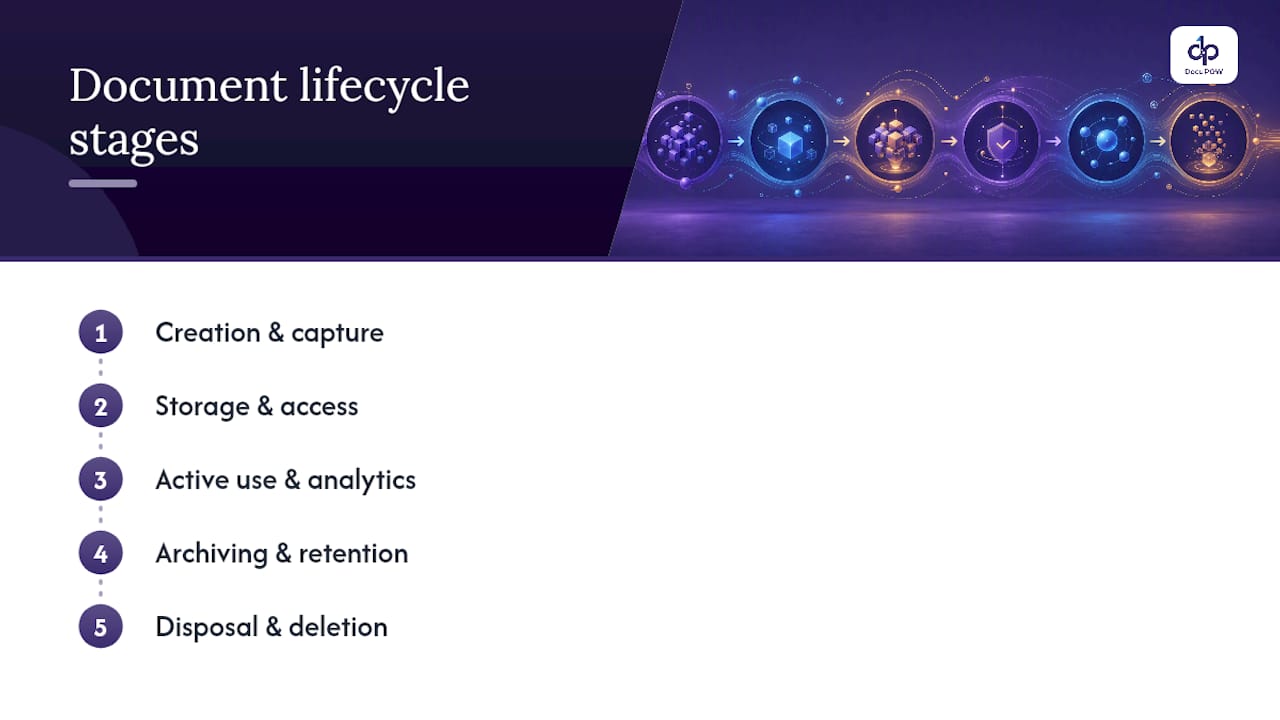
    Every mature document lifecycle management program runs on the same five-stage skeleton: creation and capture, storage and access, active use and analytics, archiving and retention, and disposal. This model comes straight from how information lifecycle management frameworks treat data generally, and it maps cleanly onto documents specifically. Skip a stage’s controls and you get exactly the kind of gap auditors flag.

    1. Creation and capture. A document is authored or ingested (scanned, emailed, uploaded from a vendor). At this stage you need required metadata (author, document type, effective date, classification level), a named owner, and a unique ID. Systems should reject unclassified uploads rather than let them sit in a general folder.

    2. Storage and access. The document lands in a repository with role-based permissions. The common failure here isn’t loss, it’s over-permissioning: too many people can edit a controlled SOP, which quietly breaks your audit trail before anyone even changes the content.

    3. Active use and analytics. People reference, revise, and route the document for approval. This is where workflow automation earns its keep, tracking cycle time, flagging stalled approvals, and logging every touch.

    4. Archiving and retention. Once superseded or expired, a document moves to a retention schedule rather than getting deleted or, worse, left active. The retention clock should start automatically at the trigger event (publication, contract expiry, project close).

    5. Disposal and deletion. Defensible destruction, documented with a certificate of disposition naming who authorized it and how it was executed. Without that record, you can’t prove you followed your own policy.

    The place these programs actually break isn’t inside a stage. It’s at the gate between stages. A document sitting in “draft” gets emailed around and treated as final. A “review” document gets approved by someone without signature authority. Most compliance gaps form at these transition points rather than during storage, which is why modern platforms enforce state changes as hard rules: no document reaches “approved” without a logged signature from an authorized role, and no “obsolete” document stays visible in active search results.

    Pro Tip: Audit your last five approved SOPs and trace who actually clicked “approve.” If any approval came from someone outside the authorized signer list, your workflow isn’t enforcing the gate, it’s just recording that something happened.

    How Is DLM Different From DMS, ECM, and Records Management?

    These terms get used interchangeably, and that’s exactly how organizations end up with the wrong tool for the job. Each one solves a different problem:

    • Document management system (DMS): stores, versions, and lets people search files. Good for collaboration, weak on enforcing retention or proving a defensible chain of custody.

    • Enterprise content management (ECM): a DMS at scale, often adding content types like images and web pages, plus broader governance features, but still typically light on lifecycle-state enforcement.

    • Document lifecycle management (DLM): governs a document through defined states, with mandatory transitions, retention triggers, and audit trails baked in.

    • Information lifecycle management (ILM): broader still. ILM covers data across multiple systems, not just documents, and adds legal-hold readiness, WORM (write-once-read-many) archival, and disposition defensibility at an enterprise scale.

    • Records management: the discipline of classifying documents as official records and applying legally mandated retention and disposition, often the compliance layer that sits on top of DLM.

    You’ve outgrown plain file storage when you start seeing specific symptoms: nobody can produce a clean audit trail for who approved a controlled document, retention rules exist on paper but nothing enforces them, or a legal hold request sends someone scrambling through shared drives instead of triggering an automatic freeze. Any of those is a sign you need lifecycle enforcement, not just a better filing system.

    What Governance and Compliance Controls Does DLM Require?

    Auditors don’t grade good intentions. They grade evidence. A retention matrix is the backbone: a table mapping each document type (SOP, contract, invoice, quality record) to a retention period, a legal basis, and a disposition action. Build it once, review it annually, and tie every document’s metadata to a row in that matrix so retention isn’t a judgment call made document by document.

    Regulated environments raise the bar further. GxP-oriented document control expects periodic review discipline (documents get re-certified as current on a schedule, not left to go stale indefinitely), electronic signatures that meet Part 11 standards, and a tamper-evident audit log that captures every view, edit, and approval with a timestamp.

    Three controls tend to separate mature programs from check-the-box ones:

    • Legal hold workflows. When litigation or investigation triggers a hold, the system must freeze disposition automatically for affected documents, not rely on someone remembering to pull them from the deletion queue.

    • Defensible disposition records. Every deletion needs a certificate naming the authorizing person, the method, and the retained proof that destruction happened on schedule and on policy.

    • Training linkage. When a document changes, the system should auto-assign training to the roles affected and supersede the old version into a restricted archive, so nobody can accidentally reference outdated instructions.

    Skipping periodic reviews is one of the most common findings inspectors cite, and it’s almost entirely preventable with a dashboard that flags documents approaching their review date before they go overdue.

    How Do You Build a Document Lifecycle Management Program?

    Most DLM programs fail on policy, not technology. Unclear retention rules, undefined ownership, and no formal criteria for archiving cause more breakdowns than any software gap. Here’s the sequence that actually works, in order:

    1. Inventory everything. Catalog document types, where they live, and who currently touches them. You can’t govern what you haven’t counted.

    2. Classify by risk and regulation. Sort documents into tiers (public, internal, confidential, regulated) since retention and access rules differ by tier.

    3. Assign named owners. Every document type needs one accountable person, not a department. “Compliance owns it” produces no accountability; “Maria in Compliance owns the QMS SOPs” does.

    4. Build the retention matrix. Map each classified type to a retention period and disposition method, with the legal or regulatory basis noted.

    5. Configure workflows and approval gates. Translate your policy into system rules: who approves what, in what order, with what signature requirement.

    6. Monitor and adjust. Set up dashboards for overdue reviews, stalled approvals, and missing owners, then run a governance meeting on a fixed cadence to act on what the dashboard shows.

    The minimum artifact set is smaller than most teams assume: a documented SOP for the lifecycle process itself, the retention matrix, and a defined approval workflow per document category. Everything else is refinement.

    Ownership should sit with a cross-functional group rather than IT alone, though IT often ends up as the operational backbone because it manages the systems enforcing the rules. A quarterly governance review, with compliance, IT, and the business unit owner in the room, catches drift before it becomes a finding.

    Pro Tip: Start your retention matrix with the ten document types that generate the most audit questions, not the ten with the most volume. You’ll get compliance coverage faster than trying to boil the ocean on day one.

    What Technology Features Actually Enforce the Lifecycle?

    Software alone doesn’t fix a bad policy, but the right platform features make a good policy nearly impossible to violate. The checklist worth holding vendors to: configurable workflows that mirror your approval chain, hard approval gating (no skipping a required signer), tamper-evident audit trails, automated retention triggers, a legal-hold workflow that freezes disposition instantly, and WORM-compliant archival for records that must remain unaltered.

    Best Policy Management Software: Compare Tools and Features ...

    Where this gets genuinely better than the last decade of document software is AI extraction that doesn’t depend on rigid templates. Traditional systems choke when a vendor changes an invoice layout or a contract comes in a new format. Template-free AI extraction reads the document for context, pulls the metadata that matters, and classifies it automatically, which means fewer documents get miscategorized or dropped into a generic folder where retention rules never apply.

    Real-time analytics change the nature of periodic review. Instead of a compliance officer combing spreadsheets once a quarter, dashboards surface documents approaching expiry or missing an owner as they happen. That shift, from calendar chore to standing operational alert, is what keeps a review program from becoming theater. Programs that automate transition gates and tie publication directly to downstream obligations like training assignment see less lifecycle drift than programs that just archive documents and hope someone checks in on them.

    Which KPIs Show Whether Your DLM Program Is Working?

    Track a handful of numbers and you’ll know your program’s health before an auditor does:

    • Percent of documents with a named owner — anything under 100% is a gap waiting to surface.

    • Overdue reviews — count and trend, not just a snapshot.

    • Average time-to-approval — rising cycle times often signal a bottleneck at one approver.

    • Disposition completion rate — how many scheduled disposals actually happened on time, with a certificate on file.

    • Audit findings trend — quarter over quarter, this should decline as your program matures.

    Set thresholds that trigger action, not just observation. If there are any overdue reviews of your active document set, that should generate an automatic remediation task, not a note in next month’s meeting.

    Why Do Document Lifecycle Management Programs Break Down?

    A few failure patterns show up again and again, and each has a fast fix:

    • Skipped periodic reviews. Fix it with a dashboard alert 30 days before the due date, escalating to the owner’s manager if it’s missed.

    • Orphaned obsolete versions. Old files stay discoverable in search. Fix it by enforcing automatic supersession into a restricted archive at the moment a new version is approved.

    • Missing training-on-change. A document updates, nobody trains on it. Fix it by auto-assigning training the instant a revision publishes.

    • Approvals bypassed. Someone routes around the workflow under deadline pressure. Fix it by hard-blocking publication until every required signature is captured, no exceptions.

    What Separates Real Programs From Paper Compliance?

    Most document lifecycle management failures aren’t technology failures. They’re behavioral: an approver who rubber-stamps under deadline pressure, a manager who lets “temporary” exceptions become permanent. The programs that hold up under audit are the ones where leadership treats a bypassed gate as a real incident, not a rounding error.

    Case studies and internal benchmarking data from platforms enforcing gate discipline tend to bear this out consistently.

    How DocuPOW Puts These Controls Into Practice

    Everything covered above, transition gating, audit trails, training linkage, retention automation, is easier to design on paper than to run day to day. DocuPOW closes that gap by turning your document lifecycle into a system that enforces itself instead of relying on someone remembering the rules.

    DocuPOW

    The platform’s agentic AI reads documents without needing a template, so contracts, invoices, and quality records from different vendors and formats still get classified and routed correctly the first time. Real-time analytics flag overdue reviews and missing owners before they become audit findings, and every approval, revision, and disposition gets logged in a tamper-evident trail you can hand an auditor without prep work. Workflow orchestration means your approval gates aren’t a policy document, they’re a system rule nobody can quietly skip.

    If you’re building or fixing a document lifecycle management program, DocuPOW’s platform is built to enforce exactly the governance controls this article walks through. Request a demo and see how your own document types would move through the workflow before you commit to anything.

    Sources

    FAQ

    What Are the Five Stages of a Document’s Lifecycle?

    Creation and capture, storage and access, active use and analytics, archiving and retention, and disposal and deletion make up the standard five-stage model applied to documents and data alike.

    Diagram of five stages in document lifecycle

    What’s the Difference Between DMS and ECM?

    A DMS focuses on storing, versioning, and searching documents, while ECM extends that to broader content types and enterprise-wide governance, though neither necessarily enforces lifecycle-state transitions the way dedicated DLM does.

    What Are the Best Document Management Systems to Consider?

    Rather than one universal answer, the right choice depends on whether you need basic storage (a DMS), enterprise content governance (ECM), or true lifecycle enforcement with audit trails and retention automation, which platforms like DocuPOW are purpose-built to deliver.

    What Are the Stages of Records Management?

    Records management typically mirrors the document lifecycle: creation, classification as an official record, active maintenance, retention scheduling, and defensible disposition with a documented certificate of destruction.

    Does DLM Require Electronic Signatures?

    In regulated environments, yes. Standards like 21 CFR Part 11 require electronic signatures that are traceable to a specific authorized individual, tied to an audit trail that can’t be altered after the fact.

  • Digital Workforce for Documentation: A Guide for Operations & IT

    Digital Workforce for Documentation: A Guide for Operations & IT

    A digital workforce for documentation is a system of AI agents that reads incoming documents, pulls out the data, and pushes it through the right business process without a human retyping anything. If you run high-volume, document-heavy lanes (AP, onboarding, claims), pilot one now. Wait only if your document mix is low-volume or already mostly structured data.

    • Fast win: AP invoice intake and three-way matching typically show results within weeks.

    • Required ownership: operations needs to own exception handling; IT owns integrations.

    • ROI signal: enterprise deployments have shown payback within six months and a 336% ROI in a commissioned Forrester study.

    Key Takeaways

    A documentation-focused digital workforce works when agentic, template-free extraction is paired with disciplined pilot scoping and honest measurement of exceptions, not just throughput.

    Point Details
    Start with one lane Pilot the intake process with the most chasing and rework, not the highest raw document volume.
    Measure completeness, not just accuracy Track missing-field rates and exception-handling speed alongside classification accuracy.
    Expect a real payback window Enterprise deployments have shown full payback within six months and measurable ROI.
    Choose architecture deliberately Reusable templates suit stable layouts; template-free extraction suits variable or changing formats.
    DocuPOW’s approach Agent-based, template-free extraction with DocuPOW Flow orchestration and built-in audit trails reduces maintenance overhead.

    Table of Contents

    What Is a Digital Workforce for Documentation?

    A digital workforce for documentation is a layer of software agents, built on agentic Intelligent Document Processing (IDP), that reads a document, understands what it is, extracts the relevant fields, and hands the result off to whatever system or workflow needs it next. It is not one tool. It is a stack of digital workers that behave like a coordinated team, each handling intake, extraction, validation, or execution.

    That distinguishes it sharply from three things people often confuse it with:

    • RPA bots click through screens and follow scripted steps; they don’t read or interpret unstructured content on their own.

    • Legacy ECM systems store and retrieve files but rarely extract structured data from them automatically.

    • Standalone IDP extracts fields from a document but often stops there, leaving a human to decide what happens next.

    A documentation-focused digital workforce closes that gap. It’s genuinely intelligent document automation: it reads, reasons about the next action, and executes it, covering everything from intake to SLA tracking to exception routing to the final system update. That’s the scope IT and operations need to plan around, not just “OCR plus a dashboard.”

    What Technologies Power a Documentation Digital Workforce?

    Six technology layers do the actual work, and each one solves a different piece of the puzzle.

    • IDP (agentic, template-free): reads unstructured documents like invoices, contracts, and claims without requiring a pre-built template for every layout.

    • OCR and recognition: converts scanned images and PDFs into machine-readable text, the foundation every downstream step depends on.

    • NLP and ML models: interpret context, classify document types, and flag ambiguous fields for review.

    • RPA and low-code connectors: step in when a target system has no API, automating the manual clicks a human would otherwise perform.

    • Workflow orchestration engines: route documents through approval chains, exception queues, and SLA timers.

    • APIs and connectors to ERP/CRM: push validated data into the systems that actually run the business, like SAP, NetSuite, or Salesforce.

    • Analytics and observability tooling: track accuracy, throughput, and exception rates so leaders can see where the system is winning or drifting.

    IDP is mandatory the moment your documents are unstructured or vary in layout. RPA becomes necessary only when the target system has no usable API. The direction of the market in 2026 favors agentic IDP that folds extraction, validation, and execution into a single stack, which raises straight-through processing rates and cuts the ongoing maintenance that template-heavy systems require.

    How Does a Digital Workforce Process a Document?

    The pipeline runs in six stages, and understanding each one helps you spot where your current process is bleeding time.

    1. Intake: documents arrive by email, upload portal, EDI feed, or scanned mail batch.

    2. Classification: the system identifies document type (invoice, purchase order, claim, contract) automatically.

    3. Extraction: field-level data gets pulled out with a confidence score attached to each value.

    4. Validation: the system checks for a complete data packet, flags missing fields, and cross-references related records.

    5. Routing: documents move to the correct queue, whether that’s a human reviewer, an approval chain, or straight execution.

    6. Execution: validated data updates the ERP, CRM, or line-of-business system, closing the loop.

    Human-in-the-loop review sits inside stages three through five. Low-confidence extractions land in a review queue instead of flowing through blind, and every correction a reviewer makes should get logged, creating an audit trail that satisfies compliance and improves the model over time. That auditability matters more than most teams initially budget for. Regulators and internal audit teams will ask for it eventually, even if it’s not day-one requirement.

    Pro Tip: Prioritize the intake lane with the highest “chase” signal, meaning the process where staff spend the most time tracking down missing information, not the lane with the highest document volume. Measure completeness of the data packet, not just how accurately documents get classified. A system that classifies perfectly but still produces incomplete records hasn’t actually solved anything.

    Which Use Cases Deliver the Fastest ROI?

    Five use cases consistently produce the clearest payback for enterprise operations teams.

    • Accounts payable and invoice processing: matches invoices to purchase orders and receipts automatically, cutting days-to-pay.

    • Vendor onboarding and KYC: extracts and validates compliance documents without manual data entry across departments.

    • Order entry: converts emailed or faxed purchase orders into system-ready records in minutes instead of hours.

    • Contract intake and triage: classifies incoming contracts, flags key terms, and routes them to legal or procurement.

    • Claims and receipts processing: extracts line items and supporting data for faster adjudication.

    The numbers back up the priority order. Practical playbooks show that even modest pilots, around 200 documents a month with a 10-minute manual processing time per document, can already build a positive business case, and standard document types typically reach 95 to 98% extraction accuracy once a pilot is tuned.

    The clearest large-scale proof point comes from SEW-EURODRIVE’s enterprise content automation engagement, which managed a very large volume of content across hundreds of millions of documents, delivering significant time savings in specific document processes and full payback within six months. That’s not a small pilot result. It’s what happens when automation gets paired with real governance and an operations team committed to scaling it, rather than a proof-of-concept left to gather dust after the demo.

    What Does a Successful Pilot Look Like?

    Pilots that scale into production follow a specific pattern, and skipping steps here is where most rollouts stall.

    1. Pick one lane. Choose the documentation flow with the most chasing and rework, not the highest raw volume.

    2. Define the completeness packet. Agree upfront on exactly which fields count as “done” for that document type.

    3. Set three or four KPIs. Straight-through processing rate, exception rate, and field-level accuracy are the minimum.

    4. Run the pilot for four to eight weeks. Long enough to hit edge cases, short enough to keep momentum.

    5. Review the exception queue weekly. This is where you learn what the model still misses.

    Architecture choice matters just as much as pilot scope. A reusable-template approach can work well when document layouts are relatively stable. One enterprise deployment built a reusable intake template covering diverse PDFs and emails in about 200 development hours over ten weeks, a realistic timeline for teams planning their own build. Template-free, agentic extraction trades some of that upfront template work for ongoing investment in model governance and validation tooling, which tends to pay off faster when document formats vary widely or change often.

    • Assign a clear RACI: IT owns integrations and security, operations owns exception handling and KPIs.

    • Build observability into the pilot from day one, not as an afterthought once it’s already in production.

    • Test against real historical documents, including the messy ones, not a clean sample set.

    How Do You Choose the Right Vendor?

    Ask every vendor the same set of questions, and treat vague answers as a warning sign rather than a formality.

    • Does the platform offer template-free extraction, or does every new document layout require a new template build?

    • How deep is the connector library for your ERP, CRM, and line-of-business systems?

    • Is the platform API-first, or does it depend heavily on screen-scraping RPA?

    • What security and compliance certifications does it hold, and do they match your industry’s requirements?

    • What does the human-in-the-loop review tooling actually look like in practice, not just in a slide deck?

    • Does it provide analytics and an audit trail you can hand to a compliance team without extra work?

    Red flags worth walking away from: opaque confidence scores with no explanation of how they’re calculated, extraction templates that need constant rebuilding, thin exception-handling tools, and dashboards that show volume but nothing about accuracy trends.

    Pro Tip: Require every vendor to report pilot results using the same five metrics: straight-through processing rate, exception rate, mean time to correction, accuracy by field, and SLA adherence. A vendor that can’t produce these numbers from a pilot isn’t ready for your production environment.

    What Evidence Should You Ask Vendors to Show?

    Real numbers, not marketing slides. SEW-EURODRIVE’s deployment is a useful benchmark: 22+ terabytes managed, roughly 313 million documents, and 30 to 35 million documents in annual growth capacity, with measurable productivity gains built into the ROI case.

    To translate a vendor’s case study into your own numbers, run the simple math: your monthly document volume, multiplied by current manual time per document, multiplied by your fully loaded labor cost, gives you the baseline the automation needs to beat.

    Why Template-Free, Agentic Extraction Matters

    DocuPOW takes the agentic, template-free route rather than forcing your team to build and maintain a template library.

    • Template-free extraction: handles new document layouts without a rebuild cycle every time a vendor changes their invoice format.

    • DocuPOW Flow orchestration: manages multi-step workflows from intake through downstream execution in one connected system.

    • Human-in-the-loop audit trails: every correction gets logged, giving compliance teams the traceability they’ll eventually ask for.

    • ERP/CRM connectors: push validated data directly into the systems your finance and operations teams already run on.

    • Real-time analytics and predictive insights: surface exception trends before they become a backlog problem.

    That combination directly targets the two failure modes that stall most pilots: template maintenance overhead and an exception queue nobody has time to audit.

    A pilot-first path forward

    Operations leaders who wait for a perfect enterprise rollout plan often lose a year to analysis. The evidence favors starting narrow, measuring completeness and exceptions honestly, then scaling what works.

    Ready to Pilot Your Own Document Automation?

    Most teams evaluating this space end up choosing between building a template library that needs constant upkeep or adopting an agentic platform that adapts to new document formats on its own. DocuPOW takes the second path: template-free extraction paired with DocuPOW Flow orchestration means your intake lane can go live without months of template configuration first.

    DocuPOW

    If accounts payable, vendor onboarding, or claims intake is where your team spends the most time chasing missing data, that’s the right lane to pilot first. DocuPOW’s high-volume document processing guide walks through exactly how to scope that pilot, and you can request a working demo against your own documents through the AI workflow automation services page to see the extraction accuracy for yourself before committing to anything.

    Sources

    FAQ

    What Are Some Good Digital Tools for Documentation?

    Tools worth evaluating combine agentic IDP for extraction, workflow orchestration for routing, and audit-ready human-in-the-loop review. Platforms like DocuPOW build all three into one connected stack rather than requiring separate point solutions.

    Digital Training Made Easy: Visual manuals with Manual.to

    What Are Some Examples of Digital Workplace Technologies?

    Digital workplace technologies include document intelligence platforms, workflow orchestration engines, ERP and CRM connectors, and analytics dashboards that track processing accuracy and exception rates.

    What Are the Main Areas of Digital Transformation?

    Common areas include process automation, data-driven decision-making, customer and employee experience, cloud infrastructure, and workforce augmentation through AI. Documentation automation typically falls under both process automation and data-driven decision-making.

    What Is the Best Document Automation Software?

    The strongest fit depends on document variability and integration needs. Teams with highly variable, unstructured documents generally benefit most from agentic, template-free platforms like DocuPOW, since they avoid the ongoing template maintenance that rigid systems require.

    How Long Does a Document Automation Pilot Take?

    Realistic pilots run four to eight weeks, though one enterprise reusable-template build took about 200 development hours over ten weeks. Timelines vary based on document complexity and how many systems need integration.

  • Contract Intelligence for Enterprise Teams: A Buyer’s Guide

    Contract Intelligence for Enterprise Teams: A Buyer’s Guide

    Contract intelligence turns static contract text into structured, queryable data that feeds directly into business decisions, workflows, and automations. Instead of a signed PDF sitting in a shared drive, you get parties, clauses, dates, and obligations pulled out, tagged, and connected to the systems that act on them.

    The payoff shows up fast. Workday’s 2026 Contract Intelligence Index found that a large majority of professionals say only a few people in their organization know who owns a given contract, and many organizations already report measurable value from contract intelligence within weeks or months of adoption, with a high proportion seeing returns inside a year. That gap between “contracts as buried paperwork” and “contracts as live business data” is exactly what this technology closes.

    • Faster first-pass reviews because clauses and obligations are pre-tagged, not manually re-read
    • Fewer missed renewals, auto-renewals, and compliance deadlines
    • Recovered value from unclaimed discounts, rebates, and entitlements sitting in old agreements

    Platforms like DocuPOW approach this with template-free extraction, meaning the system reads contracts by understanding their structure and language rather than matching them to a rigid form. That matters more than it sounds. Most enterprise contract portfolios contain dozens of formats, redlines, and one-off addenda that break template-based tools on day one.

    Key Takeaways

    Contract intelligence works because it converts unstructured contract text into structured data that other systems and people can act on immediately.

    Point Details
    Definition first Contract intelligence extracts clauses, obligations, and dates into structured, searchable data.
    Value shows up fast Workday reports most organizations see returns within a year, many within months.
    Complements, not replaces, CLM CLM handles workflow and signature; contract intelligence handles understanding and analytics.
    Pilot before scaling Start narrow, on renewals or NDAs, with metrics defined before the pilot begins.
    DocuPOW fits the checklist Template-free extraction, agentic workflows, and human-in-the-loop review cover the core capabilities buyers need.

    Table of Contents

    How Does Contract Intelligence Actually Work?

    Under the hood, contract intelligence is a pipeline, not a single feature. Documents come in from wherever they already live: scanned PDFs, email attachments, e-signature exports, shared drives. From there, the system has to make sense of pages that were never designed to be read by a machine.

    The typical flow looks like this:

    • Ingestion: pulling documents from repositories, inboxes, or upload portals in whatever format they arrive
    • OCR and layout analysis: converting scans and images into machine-readable text while preserving structure like tables and signature blocks
    • Clause and field extraction: identifying parties, effective dates, payment terms, termination clauses, and other defined fields using natural language processing
    • Normalization: mapping extracted terms to a consistent internal vocabulary, or ontology, so “termination for convenience” and “termination without cause” resolve to the same concept
    • Indexing: storing the structured output in a searchable format
    • Downstream integration: feeding that structured data into CLM systems, ERP platforms, alerting tools, or autonomous agents that act on it

    Deployment can run in the cloud, in a private environment, or as a hybrid setup, with API endpoints connecting the extraction layer to whatever systems already run the business. The honest caveat: extraction quality depends heavily on document quality and template diversity. Handwritten amendments, low-resolution scans, and contracts in less common languages remain harder to process accurately.

    Pro Tip: Before a full rollout, run a sample of your messiest, oldest contracts through any system you’re evaluating, not just your cleanest templates. That’s where extraction accuracy actually gets tested.

    What Capabilities Should You Expect From a Contract Intelligence Platform?

    Enterprise buyers should treat contract intelligence like any other mission-critical system: with a checklist, not a sales pitch. Microsoft’s Document Intelligence prebuilt contract model illustrates the baseline technical bar: it extracts parties, jurisdictions, contract IDs, titles, key-value pairs, and line items from PDFs, scans, and Office files, returning structured JSON. A serious enterprise platform needs to go well beyond that baseline.

    Core extraction and analysis features:

    • OCR plus support for multiple file formats (PDF, scanned images, Word, email)
    • Clause classification that recognizes indemnification, limitation of liability, auto-renewal, and similar clause types
    • Entity and obligation extraction tied to specific parties and dates
    • Deadline and renewal tracking with automated alerting
    • Semantic, natural-language search across the full contract portfolio, not just keyword matching
    • Cross-portfolio analytics that surface risk concentrations or non-standard terms at scale
    • Risk scoring and playbook comparison against approved clause language

    Integration and governance features:

    • APIs and pre-built connectors for CLM, ERP, and CRM systems
    • Webhook or event-based support so a flagged obligation triggers an alert somewhere a human will see it
    • Human-in-the-loop review for low-confidence extractions
    • Audit logs tracking who reviewed, edited, or approved extracted data
    • Configurable extraction models and role-based governance controls

    Vendors and product pages, including Icertis’s own explainer, frame contract intelligence as the layer that turns agreement text into operational rules, alerts, and automated actions. That framing is useful: if a platform can’t turn a clause into a trigger somewhere downstream, it’s an extraction tool, not an intelligence platform.

    Is Contract Intelligence the Same as Contract Lifecycle Management?

    No, and confusing the two leads to wasted budget. Contract Lifecycle Management (CLM) handles the administrative side of a contract’s life: drafting, routing for approval, e-signature, and storage. Contract intelligence handles understanding: what the contract actually says, what it obligates you to do, and how it compares across a portfolio of thousands of similar documents.

    • CLM answers: Where is this contract in the approval process? Who needs to sign next?
    • Contract intelligence answers: What are our total indemnification exposures across all vendor contracts? Which agreements auto-renew in the next 90 days?

    The decision rule is straightforward. If your pain point is workflow and routing, prioritize CLM. If you’re sitting on a large, complex portfolio and need How to Improve Contract Intelligence-style visibility across it, prioritize an intelligence layer. Independent guidance suggests the tipping point often lands around 500 or more active contracts, past which manual clause-by-clause analysis simply stops scaling. The strongest setups don’t force a choice. Look for platforms that either integrate cleanly with your existing CLM or offer both capabilities natively, rather than locking you into a single point solution.

    Where Should Contract Data Live, and How Is It Protected?

    Deployment architecture is usually the first question security and IT teams ask, and it should be. Three models dominate:

    • Cloud SaaS: fastest to deploy, easiest to scale, and typically the most cost-effective for mid-size portfolios
    • Private cloud: keeps data within a dedicated environment, often required by regulated industries with strict data residency rules
    • On-premise or hybrid: maximum control over where documents physically sit, at the cost of slower deployment and higher maintenance overhead

    Whichever model you choose, verify the fundamentals directly rather than taking a sales deck’s word for it: encryption at rest and in transit, role-based access controls that limit who can view sensitive clauses, and detailed audit logging. Ask specifically about SOC 2 and ISO 27001 attestations, and ask to see the actual certificates rather than a logo on a webpage. Cloud platform pages, including Microsoft Azure’s compliance documentation, are a useful benchmark for what “enterprise-grade” should actually include.

    On integration, expect bi-directional APIs that sync with your CLM, ERP, and CRM systems, plus event-driven webhooks that fire alerts when a contract hits a renewal window or a flagged clause. Connector patterns for existing document stores and email archives matter too. Contracts rarely live in one clean place.

    Hand connecting data cable in server rack

    Pro Tip: Ask any vendor to run a proof-of-value on a sample of your own contracts before you sign anything. Accuracy claims on a vendor’s demo dataset tell you almost nothing about how the system performs on your actual paperwork.

    Which Enterprise Use Cases Deliver the Most Value?

    Contract intelligence pays for itself fastest in a handful of specific, repeatable scenarios rather than as a vague portfolio-wide upgrade.

    • Inbound NDA and vendor intake triage: automatically flagging non-standard terms before they reach a lawyer’s desk
    • Obligation tracking and renewal management: catching auto-renewals and termination windows before they pass unnoticed
    • Entitlement recovery: surfacing rebates, discounts, and credits buried in vendor agreements that finance never claimed
    • M&A due diligence: rapidly analyzing an acquired company’s full contract portfolio for risk exposure
    • SLA and compliance monitoring: tracking whether vendors are actually meeting the service levels they agreed to

    Industry commentary from Ironclad points to meaningful post-signature value leakage in large organizations, much of it tied to unclaimed entitlements and missed renewal windows that nobody was tracking. That leakage compounds across procurement, finance, and sales, not just legal. Procurement teams use contract intelligence to benchmark vendor terms; finance teams use it to catch billing discrepancies against contracted rates; sales teams use it to speed up quote-to-contract cycles when reviewing customer paper.

    What Does a Contract Intelligence Rollout Actually Look Like?

    A pilot-to-scale approach beats a big-bang rollout almost every time. EY’s guidance on GenAI adoption in contract management recommends starting with a narrow, high-impact use case, defining success metrics before you begin, and investing in change management from day one rather than treating it as an afterthought.

    1. Select a high-value scope: renewals, NDAs, or a specific vendor category, not the entire portfolio
    2. Ingest a representative sample, including your messiest documents, not just clean templates
    3. Validate extraction accuracy against manual review on that sample
    4. Measure outcomes against metrics defined before the pilot started
    5. Iterate on extraction models and workflows based on pilot findings
    6. Scale to the broader portfolio once accuracy and adoption both clear your bar
    Metric What it tells you
    Extraction accuracy Percentage of key fields correctly identified without manual correction
    Time saved per review Reduction in hours spent per contract during first-pass review
    Obligations tracked Share of total portfolio obligations now monitored automatically
    Recovered value Dollar value of entitlements or renewals caught that would have been missed
    Stakeholder adoption Percentage of target users actively using the system after 90 days

    Governance can’t be an afterthought either. Assign named contract owners for each category, not a vague team. Define a clause playbook with preferred and fallback language. Set clear escalation rules for what happens when the system flags something high-risk, and schedule periodic audits of the extraction models themselves, since accuracy can drift as contract language evolves.

    Office desk with eyeglasses and governance tools

    How Do You Evaluate Contract Intelligence Vendors?

    Run a structured evaluation rather than a features comparison based on marketing pages. Check these first:

    • Accuracy benchmarks tested on your own sample documents, not the vendor’s demo set
    • Supported file types and language coverage matching your actual contract portfolio
    • API depth and existing connectors for your CLM, ERP, or CRM stack
    • Security attestations, SLA terms, and published uptime history
    • Pricing model that fits your portfolio size, not a flat enterprise rate designed for a much larger company

    Bring these questions to every demo:

    1. Can we test this on 50 of our own contracts before committing?
    2. How does the system handle low-confidence extractions, and who reviews them?
    3. Can extraction models be retrained on our specific contract language?
    4. Where does our data physically reside, and can we get that in writing?

    Watch for red flags: vague accuracy claims with no sample test offered, no visible audit trail for extracted data, resistance to running a proof-of-value on your documents, or contract terms that make it hard to export your own data later.

    Why DocuPOW Fits the Contract Intelligence Checklist

    DocuPOW was built around the exact gap most legacy tools struggle with: rigid templates that break the moment a contract deviates from the expected format. Its agent-based approach reads documents by understanding context and structure, not by matching against a fixed layout, which covers the template-free extraction capability enterprise buyers should be checking for.

    • Template-free extraction across contract types, formats, and languages without manual template setup
    • Agentic, multi-step workflow orchestration that routes extracted obligations into downstream systems automatically
    • Human-in-the-loop audit review for low-confidence extractions, with full audit logging
    • Real-time analytics and predictive insights that surface portfolio-wide risk instead of one contract at a time
    • API-based integration with ERP and CRM systems, plus developer tools for custom connectors
    • Enterprise-grade security and compliance controls built for regulated industries

    That combination directly maps to the capability checklist covered earlier: extraction, analytics, integration, and governance, in one platform rather than three stitched together.

    What Most Contract Intelligence Rollouts Get Wrong

    The recurring failure pattern isn’t technical. It’s ownership. Teams launch a pilot without naming who actually owns contract data going forward, so the initiative stalls the moment the project sponsor moves to a different priority. Poor source data compounds the problem: feeding a system your worst, oldest scans without cleanup expectations sets accuracy targets that were never realistic to begin with. Scope creep kills momentum too, when a focused pilot on renewals quietly expands to “the entire portfolio” before anyone has validated the approach works.

    The fix is almost boring in its simplicity. Centralize contracts in one place before you extract anything. Pilot on a narrow, high-value slice like renewals or NDAs. Pick two measurable metrics before you start, and don’t add a third until those two are tracked reliably.

    Ready to Pilot Contract Intelligence on Your Own Documents?

    Reading about extraction accuracy is one thing. Watching it work on your actual, messy, decade-old contract portfolio is another. DocuPOW’s template-free approach means a pilot doesn’t require weeks of template configuration before you see real output.

    DocuPOW

    If your team manages high contract volume, whether that’s vendor agreements, leases, or supply chain paperwork, DocuPOW’s guidance on scaling document processing for large portfolios walks through what a proof-of-value should measure before you commit budget. Sector-specific flows exist too. Property teams managing lease renewals and tenant obligations can see how the same extraction engine applies to their own real estate contracts.

    The most useful next step is the simplest one: run a proof-of-value on a sample of your own contracts, not a vendor demo set, and measure accuracy against your actual paperwork before scaling anything.

    Sources

    FAQ

    What degree do you need to be a contract analyst?

    Most contract analyst roles look for a bachelor’s degree in business, paralegal studies, or a related field, though some senior positions prefer a legal background or paralegal certification.

    What is Icertis contract intelligence?

    Icertis is one enterprise vendor offering a contract intelligence platform that uses generative AI to extract terms and automate contract workflows, illustrating a broader category that includes template-free platforms like DocuPOW.

    Can ChatGPT analyze a contract?

    General-purpose AI chat tools can summarize or answer questions about a single contract you paste in, but they lack the audit trails, portfolio-wide analytics, and governance controls that dedicated contract intelligence platforms provide.

    How much is Icertis worth?

    Icertis’s private valuation isn’t publicly listed with a current, verifiable figure, and valuations for privately held vendors change frequently based on funding rounds.

    Do I need contract intelligence if I already use a CLM?

    If your CLM handles routing and signatures but you still can’t answer questions like “which contracts auto-renew next quarter,” you likely need an intelligence layer on top, whether that’s a dedicated platform or one that combines both functions like DocuPOW aims to.

  • Business Process Digitization: A Playbook for Leaders

    Business Process Digitization: A Playbook for Leaders

    Business process digitization means converting manual workflows and paper-based documents into digital, instrumented processes that can be tracked, automated, and improved over time. If you’re deciding where to start, don’t start with your most complex process. Start with the one that already hurts.

    Target processes that are high-volume, repetitive, and prone to error, especially ones that involve documents crossing between systems: invoice processing, procurement approvals, vendor onboarding. These are the workflows where digitization pays for itself fastest.

    Look for these signals before you pick a pilot:

    • Transaction volume high enough that small time savings compound quickly

    • Cost-per-transaction that finance already flags as too high

    • Error rates that trigger rework, disputes, or compliance exposure

    • Audit or regulatory pain from missing or inconsistent paper trails

    Key Takeaways

    Business process digitization succeeds when leaders pilot one high-volume, document-heavy process with predefined KPIs before scaling automation across the organization.

    Point Details
    Start narrow Pilot one high-volume, high-error process like invoicing or onboarding before scaling.
    Separate the stages Treat digitization, digitalization, and digital transformation as distinct goals with distinct metrics.
    Simplify before automating Fix broken process steps first; automation only speeds up whatever you feed it.
    Set KPIs before launch Lock in cycle time, error rate, and cost-per-transaction targets before the pilot begins.
    Match tools to complexity Use template-free extraction for variable documents; DocuPOW’s agent-based approach fits high-volume, inconsistent-format workflows.

    Table of Contents

    What Is Business Process Digitization, Exactly?

    Confusion here costs companies real money, because teams set the wrong goals for the wrong stage of maturity. Digitization is narrow and technical: it’s the act of converting analog information (a paper invoice, a signed contract, a fax) into digital form. Digitalization is what happens next, when you use that newly digital data to change how a process actually runs, routing approvals automatically instead of walking a folder around the office. Digital transformation is bigger still: a strategic shift in operating model, culture, and business logic that digitalized processes make possible.

    SAP frames the distinction simply: digitization creates the digital asset, digitalization uses that asset to change workflows and business models. A systematic review in the Journal of Product Innovation Management found so many overlapping, inconsistent definitions across academic and industry literature that the authors recommended organizations adopt precise, parsimonious definitions and stick to them, specifically to avoid the confusion that derails cross-functional projects.

    Stage Purpose Typical technology Short-term outcome
    Digitization Convert analog records to digital format Scanners, OCR, document capture Searchable, storable digital files
    Digitalization Use digital data to change how work flows Workflow engines, BPM, RPA Faster cycle times, fewer manual handoffs
    Digital transformation Rethink strategy and operating model around digital capability AI/ML, analytics platforms, integrated ecosystems New business models, competitive repositioning

    Precise, separate definitions of digitization and digitalization aren’t academic nitpicking. When a CFO says “digitize AP” and means one thing while IT hears another, budgets and timelines both slip.

    Getting this vocabulary straight before you scope a project saves you from measuring a digitization pilot against digital-transformation-sized expectations.

    What Are the Benefits of Digitizing Business Processes?

    The business case writes itself once you can see it in numbers. Digitized processes cut cycle times because work no longer waits in a physical inbox or a shared drive folder nobody checks. Error rates drop because data gets captured once, correctly, instead of being retyped at every handoff. Operating costs fall as headcount previously spent on manual entry and reconciliation shifts toward exception handling and analysis.

    Beyond cost, digitization delivers benefits that are harder to put a dollar figure on but matter just as much:

    • Faster cycle times across approvals, onboarding, and fulfillment

    • Lower error rates from eliminating repeated manual data entry

    • Reduced cost per transaction as manual labor shrinks

    • Stronger auditability with a digital trail for every action and approval

    • Better customer and employee experience through faster turnaround

    • Sharper decision-making, since instrumented processes generate the data leaders need in real time

    Research on BPM implementation reports productivity gains up to roughly 50% for administrative processes and up to 30% for knowledge-worker tasks when automation is applied well, though results vary widely by sector and process complexity. Operational efficiency also functions as a mediator for financial performance: firms that integrate digital processes report better resource use and fewer errors, and those gains tend to show up on the P&L within a few quarters.

    Pro Tip: Don’t promise the board your full ROI range on day one. Set a modest benefit horizon for the pilot (cycle time and error rate only), then expand your KPI set once you scale, so early wins build credibility instead of setting up a letdown.

    How Do I Digitize My Business Step by Step?

    A digitization project fails less often from bad technology than from bad sequencing. Here’s the order that actually works.

    1. Inventory your processes. List every workflow that touches documents or crosses departments. Rank by volume, cost, and error frequency.

    2. Map the current state. Document every step, handoff, and decision point in your target process, including the informal workarounds nobody put in the manual.

    3. Simplify before you automate. Cut redundant approvals and dead steps first. Automating a broken process just makes it fail faster.

    4. Set acceptance criteria and KPIs. Define cycle time, error rate, labor hours, SLA compliance, and cost per transaction targets before you build anything.

    5. Select your tools. Match technology to the process complexity (more on this below) and prioritize API-friendly platforms over rigid, template-locked systems.

    6. Build and pilot. Scope the pilot to one process, one team, one region if possible. Keep it small enough to fix quickly.

    7. Run user acceptance testing. Validate against your predefined KPIs, not just “does it technically work.”

    8. Go live, measure, and scale. Expand to adjacent processes once the pilot clears its acceptance gates.

    Timeline expectations matter for setting stakeholder patience correctly. Discovery and mapping typically take one to two weeks for a single process. Pilot build and testing run four to eight weeks depending on integration complexity. Most organizations should expect measurable ROI within three to six months of go-live, a timeline consistent with BPM implementation case data showing pilots reaching ROI payback in roughly six months and scaling to ten or fifteen processes within a year.

    Budget across three categories: licensing (the platform itself), integration (connecting to ERP, CRM, or accounting systems), and change management (training, champions, and communication). Underfunding the third category is the most common reason pilots stall after a promising start.

    Build go/iterate/stop gates into your plan:

    • Go if the pilot hits at least 80% of its KPI targets within the test window

    • Iterate if results are directionally right but short of targets, and the gap traces to a fixable configuration issue

    • Stop if the underlying process itself is still broken after simplification, meaning the problem isn’t technology at all

    Pro Tip: Freeze your KPI definitions before the pilot starts. Teams that redefine “success” mid-project almost always do it to avoid admitting the pilot underperformed.

    What Do Real Business Process Digitization Examples Look Like?

    Abstract benefits convince nobody. Concrete before/after numbers do.

    • Accounts payable / invoice processing: Manual three-way matching across email and spreadsheets shrinks to automated extraction and matching, cutting invoice cycle time from days to hours and removing most manual keying errors.

    • Procurement approvals: Paper or email approval chains that stall when someone is out of office become routed digital approvals with automatic escalation, closing an entire class of bottleneck.

    • HR onboarding: New-hire paperwork scattered across forms and file cabinets becomes a single digital packet with e-signatures and automatic system provisioning.

    • Shipping and receiving paperwork: Bills of lading and receiving reports move from clipboard to scan-and-extract, syncing directly into inventory systems.

    • Quality and CAPA tracking in manufacturing: Corrective action reports that lived in binders become searchable digital records with automatic escalation on overdue items.

    McKinsey’s research on process digitization documents cases where a multi-day manual process, like customer onboarding, dropped to minutes once the paperwork and approval chain were digitized end to end, with pilots scoped tightly enough to show payback within months rather than years.

    The pattern repeats across industries: pick one painful process, digitize it completely rather than partially, measure the before and after honestly, then use that proof point to fund the next one.

    What Technology Do You Need to Digitize Processes?

    Six categories cover most digitization stacks, and picking the wrong one for your use case is the fastest way to build something brittle.

    • Document capture and intelligent data extraction (IDP): Pulls structured data out of invoices, contracts, and forms regardless of layout.

    • BPM or low-code workflow engines: Route tasks, approvals, and exceptions between people and systems.

    • RPA (robotic process automation): Useful for narrow, stable, rule-based tasks, but brittle when the underlying screens or data formats change.

    • Integration middleware / iPaaS: Connects your document and workflow layer to ERP, CRM, and accounting systems.

    • Analytics and BI layer: Turns process data into the dashboards leaders actually check.

    • Identity and security controls: Governs who can see, approve, or edit what, and creates the audit trail compliance teams need.

    Use case complexity Recommended technology mix
    High-volume structured documents (invoices, POs) Document capture / IDP + workflow engine
    Cross-system approvals with multiple stakeholders BPM platform + integration middleware
    Narrow, stable, repetitive data-entry tasks Targeted RPA, tightly monitored
    Unstructured or variable-format documents Template-free, AI-driven extraction

    A practical guide to intelligent document processing walks through how capture technology fits into a broader workflow stack for teams evaluating this layer first.

    Large-Format Blueprint & Engineering Drawing Scanning | SRS

    Pro Tip: Prioritize API-first platforms over anything that only integrates through screen scraping. RPA-only solutions built on brittle UI automation break every time a vendor updates their portal, and you’ll spend more on maintenance than you saved on labor.

    How Do You Measure Digitization Maturity and ROI?

    Most organizations move through four recognizable stages, and knowing which one you’re in keeps expectations realistic.

    • Manual: Paper or unstructured digital files (PDFs, scanned images) with no instrumentation. Nobody can answer “how long does this actually take?”

    • Instrumented: Processes are digitized and timestamped, so you can measure cycle time and volume, even if steps are still manual.

    • Automated: Routing, matching, and approvals run without manual intervention for the majority of cases.

    • Optimized / insight-driven: Analytics and predictive signals flag exceptions before they become problems, and the process improves itself over time.

    Track these KPIs from day one: cycle time, error rate, cost per transaction, automation rate (percentage of cases requiring no human touch), SLA compliance, and user satisfaction. Baseline each one before you touch the process, or you’ll have no credible before/after story.

    A quick ROI example: if a process currently costs $12 per transaction across 10,000 transactions a month ($120,000/month) and digitization cuts that to $7 per transaction, you’re saving $50,000 monthly. Against a $150,000 implementation cost, that’s a three-month payback, in line with the three-to-six-month range BPM benchmarks report for well-scoped pilots.

    What Goes Wrong With Digitization Projects, and How Do You Fix It?

    Most failures trace back to a small set of repeat offenders.

    • Automating a broken process: Speeding up bad workflow steps just produces errors faster. Simplify first, then automate.

    • Underinvesting in change management: Technology adoption fails when people aren’t trained or bought in. Budget training and champions from the start, not as an afterthought.

    • Scope creep: Pilots that try to digitize everything at once rarely ship. Keep the first phase narrow.

    • Brittle integrations and RPA-only builds: Screen-scraping automation breaks on every UI update. Favor API-based integration where it exists.

    • Poorly defined KPIs: Vague goals like “improve efficiency” can’t be measured or defended to finance. Set specific, numeric targets before launch.

    • Lack of executive sponsorship: Without a visible sponsor, funding dries up the moment priorities shift elsewhere.

    Pro Tip: Publicize small wins loudly and early.

    When Does Agent-Based Document Automation Make Sense?

    Traditional template-based extraction tools break the moment a vendor changes their invoice layout or a new document type shows up. That’s the gap agent-based platforms like DocuPOW are built to close: autonomous agents interpret document context and structure rather than matching against a fixed template, which matters most when your document mix is genuinely varied.

    • Template-free extraction across invoices, contracts, and unstructured records without manual template maintenance

    • Human-in-the-loop audit review to catch exceptions before they hit your financial systems

    • API integrations with ERP and CRM platforms for straight-through processing

    • Real-time analytics and predictive insights that shift teams from reactive fixes to proactive monitoring

    This approach earns its keep fastest in high-volume invoice processing, cross-border document sets with inconsistent formatting, and rapid post-acquisition integration where two companies’ document systems collide overnight.

    The processes that benefit most from agent-based extraction are the ones where “just add another template” stopped working years ago.

    Whatever platform you evaluate, check its integration depth with your existing ERP or CRM and its support model before committing. A tool that extracts data brilliantly but can’t get that data into your financial system solves only half the problem.

    Why Incremental Pilots Beat Big-Bang Digitization Programs

    Big-bang digitization programs collapse under their own scope more often than they fail on technology. A tightly scoped pilot with predefined KPIs proves value in weeks and builds the internal credibility that funds everything after it. Leaders who wait for a perfect enterprise-wide plan usually wait past the point where competitors already moved.

    If you take one action from this guide, run a 60 to 90 day pilot on a single high-volume invoice or onboarding flow, with cycle time, error rate, and cost-per-transaction targets locked in before day one.

    Put Your Documents to Work Instead of Filing Them Away

    DocuPOW is built for exactly the bottleneck this guide keeps circling back to: document-heavy processes that break rigid, template-based tools the moment formats vary. Instead of maintaining a template library that falls apart with every new vendor invoice or contract format, DocuPOW’s agents read the document itself, extract what matters, and route it through your workflow with a human checkpoint for anything uncertain.

    DocuPOW

    That means faster financial close, cleaner data feeding your ERP, and fewer manual corrections down the line for finance, operations, and procurement teams juggling high volumes of varied paperwork. If your first pilot process involves invoices, contracts, or cross-border documents with inconsistent layouts, DocuPOW’s AI workflow automation services are built for exactly that starting point. Start a trial or request a demo to see how quickly your own high-volume document set can move from manual to measured.

    Sources

    FAQ

    What Are the 7 Steps of Business Process Digitization?

    Seven-step business process digitization workflow

    Most implementation playbooks follow: inventory processes, map the current state, simplify before automating, set KPIs, select tools, pilot and test, then measure and scale.

    What Are the Four Types of Digitalization?

    Digitalization commonly applies at four levels: task-level (automating one step), process-level (redesigning a workflow), function-level (transforming a department), and organization-level (changing the business model itself).

    How Do I Digitize My Business?

    Start by inventorying document-heavy, high-volume processes, simplify them, then pilot digital capture and workflow tools on the highest-cost one before expanding to others.

    What Are the Steps Involved in the Digitization Process?

    The core steps are assessing current processes, mapping workflows, selecting the right technology (document capture, workflow automation, or agent-based extraction), piloting, measuring against KPIs, and scaling what works.

    How Long Does a Digitization Pilot Take to Show ROI?

    Most well-scoped pilots reach measurable ROI within three to six months, based on BPM implementation benchmarks and McKinsey case data.

  • Business Efficiency Through AI Starts With Your Documents

    Business Efficiency Through AI Starts With Your Documents

    AI improves business efficiency reliably in one specific scenario: when it’s aimed at high-volume document workflows and measured against the P&L, not just adoption metrics. Point AI at invoice processing, contract review, or PO matching first, track the dollar impact, then reinvest the savings into the next process. That sequence is what separates companies seeing real gains from those still running pilots.

    The proof is already in: 66% of organizations report measurable productivity and efficiency gains from enterprise AI adoption. Companies that link AI to cost transformation, rather than treating it as a bolt-on tool, see roughly three times greater cost reduction and 1.6x higher EBIT margins than their peers. And document-heavy processes, still eating up more than 40% of knowledge-worker time according to the Arahi AI 2026 workflow guide, are the fastest place to prove it.

    • Enterprise AI adoption correlates with real productivity gains, not just hype.
    • Companies that redesign end-to-end processes around AI outperform those bolting AI onto old workflows.
    • Document automation (invoices, contracts, PO matching) is the highest-leverage starting point for measurable ROI.

    Pick one document workflow. Pilot it in the next 30 to 90 days. Measure the dollar impact before you scale anything further.

    Key Takeaways

    AI improves business efficiency most reliably when applied first to high-volume document workflows and measured directly against P&L outcomes rather than adoption alone.

    Point Details
    Start with documents Pilot invoice processing, contract approvals, or PO matching before broader automation efforts.
    Redesign the value flow Fix handoffs across departments, not just one team’s task, to unlock trapped value.
    Build the data foundation first Reliable ingestion, integrations, and a semantic layer prevent fragmented, error-prone automation.
    Measure against the P&L Track cycle time, cost per transaction, and EBIT impact, not just tickets automated.
    Use DocuPOW for template-free extraction Its agent-based platform pairs human-in-the-loop review with real-time analytics to prove pilot ROI fast.

    Table of Contents

    Why Document Workflow Automation Is Your Best First Move

    Every operations leader has a list of processes they’d love to automate. The mistake is starting with the flashiest one instead of the most measurable one. Document workflows win because they are high-volume, rule-based, and generate a data trail you can audit against the P&L within weeks, not quarters.

    Invoice processing, contract approvals, and PO/invoice matching are the classic starting points, and for good reason. They repeat thousands of times a month, follow predictable logic, and touch systems that already produce clean before-and-after data. Functional AI adoption for document tasks is already widespread, with 75–95% of employees and executives using some form of AI for redaction, extraction, or summarization, often outside sanctioned tools. That’s a governance risk, but it’s also a signal: your teams already know these tasks are ripe for automation.

    Look for tasks with four traits before you commit a pilot budget:

    • High volume — hundreds or thousands of instances per month, not dozens.
    • Rule-based logic — a human could explain the decision tree in five minutes.
    • Data-rich inputs — structured or semi-structured documents like invoices, POs, or contracts.
    • High cycle frequency — processes that repeat weekly or daily, so improvements compound fast.

    Done right, you should see cycle times drop from days to hours and manual touches fall dramatically, with some finance and legal teams scaling throughput 3 to 5 times on the same headcount.

    Pro Tip: Scope your first pilot to a single document type and a single approval chain. Resist the urge to automate an entire department on day one. A narrow, working pilot in production beats a broad one still stuck in testing.

    From Pilot Wins to Enterprise-Wide Value

    A successful invoice automation pilot feels great until you realize it didn’t move the needle on total operating costs. That’s the trap of functional optimization: fixing one team’s workflow without touching the process it feeds into. Real efficiency gains come from redesigning the entire value flow, not just automating a task inside it.

    EY’s analysis found that up to 70 to 75% of potential AI value stays trapped across functional silos, because procurement, finance, and operations each optimize their own slice without coordinating the handoffs between them. An invoice that processes faster in AP but still waits five days for a manager’s manual sign-off hasn’t actually gotten faster.

    Scaling past the pilot stage requires organizational moves, not just more automation licenses:

    • Executive sponsorship that owns the outcome across departments, not just within one function.
    • Cross-functional ownership of the value stream, so procurement and finance share the same success metric.
    • OKRs tied directly to P&L line items, not vanity metrics like “tickets automated.”
    • Tolerance for early failure, since the first redesign attempt rarely gets the handoffs right.

    Choose your next pilot based on which use case can fund the following one. A PO-matching project that frees up $200,000 in working capital should pay for the contract-automation rollout that comes after it.

    The Technical Foundation AI Efficiency Depends On

    None of this works without a data foundation that can actually feed AI systems clean, structured information. Rushing into automation before this groundwork exists tends to accelerate fragmentation instead of fixing it. You end up with faster processing on top of the same messy data.

    Start with the basics: reliable document ingestion through optical character recognition or intelligent document processing, direct integration into your systems of record (ERP, CRM, HRIS), robust APIs that let data move without manual re-entry, and secure storage that meets your industry’s compliance requirements.

    Above that sits the intelligence layer, the part most companies underestimate. Ontologies, semantic models, or knowledge graphs let AI agents understand that “vendor” in your ERP and “supplier” in your procurement system are the same entity. Without that layer, agents can extract data perfectly and still make context errors that a human would catch instantly.

    Stanford’s Digital Economy Lab found that most scaling failures trace back to process redesign, data quality, and change management, not model performance. Companies that invest in data products and clean integrations before scaling AI report more reliable outcomes than those chasing the newest model.

    • Confirm ingestion accuracy before you trust downstream automation.
    • Map your systems of record and their integration points early.
    • Build the semantic or ontology layer before adding more agents, not after.
    • Treat data governance and security review as a prerequisite, not an afterthought.

    Rolling Out AI Without Losing Track of the Numbers

    A staged rollout beats a big-bang launch every time, mostly because it forces you to prove value before you ask for more budget. Here’s a sequence that works across most mid-size and enterprise operations:

    1. Days 1–30: Select one high-volume document workflow, define baseline metrics (cycle time, cost per transaction, error rate), and stand up the pilot with a human-in-the-loop review.
    2. Days 30–90: Run the pilot at production volume, validate accuracy against the baseline, and calculate the realized dollar impact.
    3. Months 3–6: Present the P&L case to leadership, secure funding for a second workflow, and start redesigning the cross-functional handoffs the first pilot exposed.
    4. Months 6–12: Scale to two or three additional workflows, reinvesting savings from the first pilot to fund the rollout.

    BCG’s research on successful scaling programs shows leaders typically set 1 to 2 year timelines from pilot to full scale, and they track value at the P&L line item, not just at the functional metric level.

    Track these before you claim victory:

    • Cycle time (days to hours, measured against your original baseline).
    • Touch count (how many people handle a document before it’s resolved).
    • Cost per transaction (fully loaded, including software and review labor).
    • EBIT impact (the number your finance team actually cares about).

    Build a simple measurement checklist before launch: document your assumptions, capture a true baseline, and set a validation date 90 days out to confirm the savings are real and not just a temporary dip in volume.

    Where Agentic AI Fits and What It Requires

    Agentic AI, systems that take multi-step action rather than just extracting data, delivers the biggest jumps in productivity, but only in the right conditions. Stanford’s research found agentic implementations posting median productivity gains well above simpler automation approaches, though they depend on the intelligence layer and governance structure being in place first.

    The use cases that compound value fastest are the ones spanning multiple systems: cross-system approvals, multi-step document orchestration, and exceptions routing where an agent decides whether a case needs human review.

    Where Agentic AI Fits and What It Requires — overview diagram

    The design pattern that works in practice is an escalation model: AI handles the routine 80% of cases, and humans review the exceptions. This keeps throughput high without sacrificing accuracy on the cases that actually carry risk.

    Before you deploy agents at scale, put a governance checklist in place:

    • Model monitoring to catch drift in accuracy over time.
    • Access controls limiting which systems an agent can act on autonomously.
    • Audit trails for every action an agent takes, especially in finance and legal workflows.
    • Periodic validation against a human-reviewed sample set.

    Pro Tip: Start every new agentic workflow with a 100% human review rate, then reduce it gradually as accuracy data builds. Jumping straight to full autonomy is how a small extraction error becomes a compliance incident.

    Evaluating a Document Automation Vendor

    Choosing the wrong platform costs you the ninety days you just spent proving the concept works. Run every vendor through three lenses before signing anything.

    Diagram of vendor evaluation criteria

    Technical: Does it handle template-free extraction, or does it break the moment a vendor changes their invoice layout? Check its accuracy rate, integration catalog, API depth, and how it performs at your actual document volume, not a demo sample of ten files.

    Operational: Does it support human-in-the-loop review for exceptions? What SLA and throughput guarantees back the contract, and what security and compliance certifications does it hold?

    Business: Can they show measurable ROI from comparable customers? Is pricing predictable as you scale, and what does implementation actually take, in weeks, with your team’s time included?

    Ask during the demo: “Show me how this handles a document type it’s never seen.” “What happens when extraction confidence is low?” “What’s the real timeline from contract signature to production?” A vendor that can’t answer clearly is telling you something.

    Author perspective: what successful leaders do differently

    The leaders getting real returns aren’t the ones with the most ambitious AI roadmap. They’re the ones disciplined enough to prove value on one document workflow before touching a second. Every dollar saved gets reinvested, every metric gets tied to the P&L. If you lead a team facing this decision, sponsor one document automation pilot in the next 90 days and demand the cost data before you approve anything bigger.

    How DocuPOW Fits Into This Playbook

    DocuPOW builds around the exact sequence this article lays out: start with documents, prove the P&L impact, then scale. Its agents read documents contextually rather than relying on rigid templates, so a pilot doesn’t break the moment a vendor sends an invoice in a new layout.

    DocuPOW

    The platform handles template-free extraction, multi-step workflow orchestration, and human-in-the-loop audit review in the same system, which means the escalation model described above isn’t a custom build, it’s already there. Real-time analytics and predictive insights give finance and operations leaders the P&L visibility to justify the next phase of the rollout, instead of waiting on a quarterly report to find out if the pilot worked.

    If your first move is invoice processing or PO matching, DocuPOW’s accounting workflow tools and automated three-way matching are built for exactly that starting point. Request a demo and bring one real workflow to it, ideally the same one you’d pilot in the next 90 days, and see how it handles your actual documents rather than a canned sample.

    Sources

    FAQ

    What’s the fastest way to see AI efficiency gains?

    Automate a single high-volume document workflow, like invoice processing or PO matching, and measure the dollar impact within 90 days before scaling further.

    How long does an AI pilot typically take to show ROI?

    Most staged rollouts show measurable pilot results within 30 to 90 days, with full enterprise scaling taking 1 to 2 years according to BCG’s research on scaling programs.

    What’s the difference between automation and agentic AI?

    Automation typically handles a single task, like extracting data from a form, while agentic AI takes multi-step action across systems, such as routing, matching, and escalating exceptions without manual handoffs.

    Does DocuPOW require rigid templates for document extraction?

    No. DocuPOW uses context-aware agents rather than fixed templates, so it can adapt to new document formats without requiring reconfiguration.

    What KPIs prove AI is actually improving efficiency?

    Track cycle time, touch count, cost per transaction, and EBIT impact rather than adoption metrics like the number of automated tasks alone.

  • Enterprise Search in 2026: The IT Leader’s Buying Guide

    Enterprise Search in 2026: The IT Leader’s Buying Guide


    TL;DR:

    • Modern enterprise search combines AI-driven semantic retrieval, grounding, and actions to surface accurate answers from organizational data.

    • A successful deployment requires validating retrieval quality, grounding accuracy, and governed workflows through a scoped pilot in four to six weeks.


    Modern enterprise search is a permission-aware, AI-driven knowledge layer that combines semantic retrieval, Retrieval-Augmented Generation (RAG), and optional agentic actions to surface accurate answers from your organization’s documents and systems. The short version for procurement teams: evaluate any platform as long-lived infrastructure, not a point solution, and validate retrieval quality, grounding, and governed action triggers in a scoped pilot before committing to full rollout.

    Key facts to anchor your evaluation:

    Many digital workers say they waste too much time hunting for information or chasing updates. IDC estimates that a knowledge workforce can lose significant salary costs annually from failed search and content recreation.

    • Enterprise search remains primarily a data governance challenge — models alone cannot fix ambiguous, duplicated, or stale documents.

    • Trust anchors to require from any vendor: SOC 2 certification, RAG with explicit grounding and citations, and a connector catalog that covers your live systems. DocuPOW meets all three.

    Table of Contents

    What does enterprise search actually mean in 2026?

    The term has outgrown its original definition. Legacy keyword search matched terms to documents. Modern AI-powered enterprise search interprets intent, enforces role-based context, and in mature implementations, triggers governed actions across connected systems.

    The technical stack underneath that experience has three layers working together:

    • Retrieval: Hybrid retrievers combine BM25 (exact-match keyword) with dense vector embeddings for conceptual matching. A strong reranker sits on top to balance precision and recall before any answer is generated.

    • Grounding: RAG feeds retrieved passages into a large language model (LLM) to generate a cited, verifiable answer. Without reliable retrieval, RAG produces confidently wrong answers — a failure mode worse than a blank result.

    • Agentic layer: Multi-hop reasoning, workflow triggers, and human-in-the-loop checkpoints let the system move from answering a question to initiating an approved action (submitting a request, routing a ticket, flagging a discrepancy).

    A useful mental model for the architecture: connectors → ingestion/metadata/permissions → retriever/ranker → reasoning/agent layer → actions and audit log. Every layer must be designed; skipping permissions at ingestion creates expensive remediation later.

    Traditional keyword-based search cannot handle this level of context or access enforcement. That gap is why most organizations treating search as a solved problem are quietly losing productivity and compliance ground.

    Recommended Image

    What capabilities should you require from any platform?

    Start with three non-negotiables: permission-aware retrieval, semantic ranking, and explicit grounding with citations. Everything else is a tier-two requirement.

    Retrieval and ranking:

    • Hybrid retrieval (BM25 + dense vectors) with a configurable reranker

    • Knowledge-graph support for entity relationships across documents

    • Multimodal inputs: text, tables, PDFs, scanned images via OCR

    Grounding and reasoning:

    • RAG with provenance: every generated answer cites its source document and passage

    • Agentic orchestration with multi-hop reasoning and configurable action triggers

    • Explicit “I don’t know” policy when retrieval confidence falls below threshold

    Security and compliance:

    • SOC 2 Type II and ISO 27001 certification

    • TLS encryption in transit, AES-256 at rest

    • RBAC/ABAC at the document level, SSO via SAML/OIDC

    • Audit logging for every query, retrieval event, and action taken

    Operations:

    • Pre-built connector catalog (HRIS, ITSM, ERP, CRM, SharePoint, Confluence, Slack)

    • Incremental indexing with delta detection per source

    • Monitoring and observability dashboards; throttling and partition awareness

    Pro Tip: Map each capability to a specific document-automation use case before vendor demos. Contracts need field-level security and version provenance. Invoices need structured extraction plus semantic search. HR policies need role-scoped answers. A generic demo will not surface these gaps — your test dataset will.

    What architecture and data work does reliable search actually require?

    Infographic showing key enterprise search capabilities

    The biggest costs in any enterprise search project are integration and permissions, not licenses. Integration effort dominates total implementation cost, and teams that underestimate it pay for it in scope changes.

    Connector strategy:

    • Decide live (API-federated, real-time) vs. indexed (crawled, scheduled) per source based on freshness requirements and API rate limits.

    • Prioritize connectors by value: identity directory and HRIS first (they anchor permissions), then ITSM and ticketing, then ERP/CRM, then shared drives and collaboration logs.

    • Each enterprise data source connector adds roughly 2–4 weeks of engineering time.

    Ingestion pipeline:

    • Use layout-aware parsing and OCR quality controls; raw text dumps materially degrade RAG reliability compared to document intelligence with section hierarchy.

    • Tag provenance at ingestion: source system, document version, authoritative owner, and last-verified date.

    • Deduplicate aggressively. Duplicate content is one of the top causes of conflicting answers.

    Document preparation:

    • Canonicalize authoritative sources before indexing (one HR policy, not five versions across three drives).

    • Build curated answer banks for high-risk query intents (benefits, compliance, legal) before exposing broad corpora.

    Pro Tip: Run a permissions audit before writing any ingestion code. Map every Active Directory or LDAP group, including nested groups, and validate late-binding vs. early-binding security patterns. Teams that skip this step routinely absorb $30,000–$60,000 in unplanned remediation.

    How do you run a pilot that actually proves value?

    A scoped pilot must validate three things: retrieval relevance on your corpus, ground-truth accuracy of generated answers, and safe execution of governed action flows. A scoped pilot validating retrieval quality, grounding accuracy, and governed action flows typically runs four to six weeks, including data preparation and connector configuration.

    Phase Duration Key Activities
    Discovery and scoping Week 1 Define target domain, query intents, success KPIs
    Data prep and connectors Weeks 1–2 Permissions audit, ingestion pipeline, source canonicalization
    Baseline testing Week 3 Precision@k, recall, hallucination rate on labeled query set
    Closed-user testing Weeks 4–5 20–50 internal users, time-to-answer, ticket deflection tracking
    KPI validation and go/no-go Weeks 4 and 5 Compare results to acceptance criteria; document gaps

    Metric definitions to use:

    1. Precision@k: share of top-k results that are relevant to the query intent

    2. Hallucination rate: percentage of generated answers containing unsupported claims

    3. Time-to-answer: median seconds from query submission to answer rendered

    4. Ticket deflection rate: queries resolved without human escalation

    5. Automation completion rate: governed action flows completed without error

    Go/no-go checklist: permissions validated end-to-end; acceptable precision on target intents; audit trail and explainability in place; latency within SLA at expected query load.

    For procurement, prioritize platforms with a platform-plus-services model — vendors who provide professional services for connector integration and permissions work, not just software licenses. Evaluate their connector catalog, SLA commitments, pricing model (usage vs. seat), and integration roadmap before signing.

    From pilot to production: what does the rollout look like?

    Treat the search layer as an owned platform with SRE ownership, data stewardship, and product governance. A one-time deployment without ongoing ownership degrades within months.

    Rollout milestones:

    1. Pilot on one high-value domain (IT or HR) — narrow, curated answer engines are more reliable than broad general-purpose search over uncontrolled corpora.

    2. Limited production with a defined user group and monitored KPIs.

    3. Domain answer engines for two or three additional business units.

    4. Enterprise rollout with federated governance.

    5. Continuous evaluation: model refresh cadence, connector health checks, permission drift audits.

    Role Responsibility
    Platform owner Roadmap, vendor relationship, SLO ownership
    Data steward Source canonicalization, provenance tagging, content governance
    SRE Uptime, latency monitoring, connector health
    Security/compliance Permission audits, access-control testing, audit log review
    Business owner Domain KPIs, user adoption, curated answer bank maintenance

    For adoption, phase rollout by domain, train power users first, and publish adoption KPIs alongside technical ones. Teams that see their own deflection rates tend to self-reinforce the behavior.

    How do you calculate and present ROI?

    Measure time saved, ticket deflection, automation completed, and error reduction tied to high-value document workflows. Forbes guidance on AI enterprise search recommends presenting a clear example calculation to finance stakeholders.

    A simple formula: (average minutes saved per query × daily queries × working days × average hourly labor cost) + (deflected tickets × average handle-time cost) = annual productivity value.

    KPI What it measures
    Time-to-answer Median seconds from query to answer; baseline vs. post-deployment
    Ticket deflection rate Queries resolved without escalation as a share of total queries
    Automation success rate Governed action flows completed without human correction
    Cost per automated transaction Total platform cost ÷ completed automation actions
    Compliance incident reduction Audit findings tied to stale or inaccessible policy documents

    Vendor case studies typically highlight pilot deflection percentages, average handle-time reduction, and headcount redeployment. Require vendors to show these metrics from a deployment comparable in size and document complexity to yours, not just a marquee logo.

    Where do enterprise search projects fail?

    The biggest failure modes are garbage-in data, permissions mismatch, and brittle answer generation. Each is preventable with upfront governance work.

    • Stale or duplicated content: Index only canonicalized, versioned sources. Stale documents produce confidently wrong answers that erode user trust faster than a blank result.

    • Permissions drift: Access controls that were correct at deployment drift as org structures change. Schedule quarterly permission audits and automate group-membership sync where possible.

    • Hallucination without guardrails: Require an explicit “I don’t know” policy and multi-retriever pipelines. A single retriever that misses relevant passages sends the generator off-track.

    • Hidden platform limits: Cloud-managed search platforms carry field/attribute caps and partition limits that cause production incidents if not tracked in the architecture roadmap. Document these constraints before go-live.

    • No human review gate for actions: Any agentic action that touches a system of record needs a human-in-the-loop checkpoint until the automation completion rate is proven over at least 90 days.

    An enterprise AI strategy that skips governance planning typically stalls at the pilot stage — not because the technology fails, but because the organization cannot agree on who owns the answer.

    Why DocuPOW fits this architecture

    DocuPOW is built for exactly the use case this guide describes: agent-based, template-free document extraction combined with AI-powered semantic search and multi-step workflow orchestration. It does not require rigid templates, which means it handles the messy, heterogeneous document types that break rules-based systems — contracts, invoices, HR forms, compliance filings.

    Key capabilities relevant to the buyer criteria above:

    • Template-free extraction from any document type (PDFs, scanned images, structured forms)

    • Agentic orchestration with configurable workflow triggers and back-office automation

    • AI-powered semantic search and query across extracted document data

    • Pre-built enterprise connectors for ERP and CRM via API

    • Human-in-the-loop audit review at configurable checkpoints

    • Real-time analytics and predictive insights dashboards

    • SOC 2 compliance and enterprise-grade security controls

    Sample pilot outline aligned to the checklist above: Scope to one document-heavy domain (procurement or AP). Connect two to three source systems via DocuPOW’s API connectors. Define five to ten target query intents with labeled ground-truth answers. Run baseline precision and hallucination tests in week three. Measure ticket deflection and time-to-answer over a closed user group in weeks four and five. Go/no-go at week six based on agreed KPIs.

    Pro Tip: Use DocuPOW’s AI data extraction guide to pre-define the extraction fields and provenance tags for your pilot corpus before ingestion. Clean metadata at the source cuts reranker errors significantly.

    Key Takeaways

    AI-driven enterprise search requires treating retrieval, grounding, and governance as infrastructure — not a one-time software purchase — and validating all three in a scoped pilot before full rollout.

    Point Details
    Search is infrastructure Budget for ongoing SRE ownership, permission audits, and model refresh — not just a license fee.
    Pilot narrow first Start with one curated domain (IT or HR) before expanding to broad corpora to keep accuracy predictable.
    Permissions dominate cost Active Directory complexity is the top cost driver; audit nested groups before writing any ingestion code.
    Require grounding and citations RAG without reliable retrieval produces confidently wrong answers; insist on provenance in every vendor demo.
    DocuPOW for document automation DocuPOW’s template-free extraction, agentic orchestration, and SOC 2 compliance align directly with the pilot criteria above.

    The case for treating search like a product, not a project

    The conventional wisdom in enterprise IT is to treat search as a feature — something you bolt onto an intranet or a service desk and tune once. That framing is what causes most implementations to quietly degrade over 18 months.

    What actually works in the field: assign a platform owner with an SLO and a quarterly roadmap review. The search layer is a product with users, a backlog, and a release cadence. The moment you stop treating it that way, permission drift accumulates, connector health degrades, and users revert to emailing colleagues.

    Three practical tips worth acting on immediately: First, start with canonical sources only. Indexing everything is tempting and almost always wrong. Second, isolate high-risk query intents (benefits eligibility, compliance deadlines, contract terms) into curated answer banks before exposing them to the general retriever. Third, assign a permissions auditor as a named role before the pilot starts. Not a committee — one person who owns the AD/LDAP mapping and signs off on it.

    The long-term stewardship point is the one most procurement teams skip in the RFP. Ask every vendor: what does your professional services team do after go-live? The answer tells you more about real TCO than any pricing sheet.

    DocuPOW runs pilots that prove retrieval and automation outcomes

    Faster answers and fewer escalations are measurable within six weeks when the pilot is scoped correctly. DocuPOW’s pilot engagements are designed to validate retrieval relevance, grounding accuracy, and governed automation flows against your actual documents and query intents — not a generic demo dataset.

    DocuPOW

    What a DocuPOW pilot delivers: a scoped connector configuration for two to three of your live systems, a labeled test corpus with ground-truth answers for your target intents, baseline and post-deployment KPI measurements (time-to-answer, deflection rate, automation completion), and a go/no-go report your team can present to finance and security stakeholders.

    The timeline is four to six weeks. The deliverables are yours to keep regardless of the procurement outcome. If your team is evaluating AI workflow automation for document-heavy operations, the pilot is the right first step. Request a scoped pilot engagement at docupow.ai.

    Useful sources and further reading

    Annotated resources for procurement and technical teams building internal business cases:

    • The Enterprise Search Reality Check (Gradient Flow) — The most direct analysis of why data governance, not model capability, determines enterprise search outcomes. Essential reading before any RFP.

    • The Fundamentals of AI Enterprise Search (Forbes) — Covers hybrid retrieval architecture and KPI frameworks; useful for technical sections of a business case.

    • Enterprise Search Software Development Cost (Raft Labs) — Detailed cost breakdown by build tier; the permissions-complexity analysis is the most accurate TCO framing available.

    • When Search Becomes Infrastructure (Aaxis.ai) — Covers platform limits and operational monitoring requirements at enterprise scale.

    • DocuPOW Intelligent Document Automation Platform — Primary resource for DocuPOW’s agent-based extraction, semantic search, and enterprise security posture.

    • Enterprise AI API Integration Examples (DocuPOW) — Practical connector and API integration patterns for enterprise deployments.

    “Cognitive search platforms will become the brains of accurate agentic AI.” — Forrester, as cited by Kore.ai’s enterprise search analysis

    FAQ

    What is enterprise search in simple terms?

    Enterprise search is a single interface that lets employees find information across all of an organization’s internal systems — documents, databases, chat, and applications — while respecting each user’s access permissions.

    AI-powered search interprets the intent behind a query, not just the words, and uses RAG to generate cited answers from retrieved content rather than returning a list of links.

    What security certifications should an enterprise search vendor have?

    At minimum, require SOC 2 Type II and ISO 27001, plus document-level RBAC, SSO via SAML/OIDC, TLS encryption in transit, and full audit logging for every query and action.

    A scoped pilot validating retrieval quality, grounding accuracy, and governed action flows typically runs four to six weeks, including data preparation and connector configuration.

    Can DocuPOW handle unstructured documents like contracts and invoices?

    Yes. DocuPOW uses template-free, agent-based extraction that understands document context without predefined rules, making it suited for contracts, invoices, HR forms, and compliance filings across enterprise workflows.

  • Process Optimization for Document Workflows: 2026 Guide

    Process Optimization for Document Workflows: 2026 Guide


    TL;DR:

    • Mapping workflows before automation prevents locking in inefficiencies and ensures measurable ROI.
    • Implementing a structured, phased approach with pilot testing and security controls is crucial for successful, scalable document process optimization.

    Successful process optimization for document workflows starts with one rule: map and fix the process before you automate anything. Organizations that skip this step automate their inefficiencies and lock them in. The practical sequence is assess, prioritize, pilot, then scale, with an AI-driven platform like DocuPOW handling extraction, orchestration, and integration once the workflow is clean. Automation can dramatically cut per-document processing time, reducing a lengthy manual task to just a fraction of the original duration at scale.

    The short version: Map workflows first. Quantify hidden costs (waiting time, rework, audit failures). Run a focused 4–12 week pilot on a high-volume document type. Measure baseline before you touch anything. Then scale what works.

    Table of Contents

    Why process optimization projects fail before they start

    The most common failure mode is not a bad tool choice. It is automating a broken process. Salesforce and Capgemini both emphasize that mapping and root-cause analysis must precede any automation investment, precisely because automation amplifies whatever is already in the workflow, good or bad.

    Three patterns show up repeatedly in failed projects:

    • Template dependence. Legacy OCR systems require a unique template for every document layout. When a supplier changes their invoice format, the template breaks and IT rebuilds it. That recurring maintenance burden is a hidden cost most ROI models ignore entirely.
    • Undercounting hidden costs. Hidden costs of manual processing are typically 2.3x to 4.7x greater than visible labor costs. Waiting time between process steps, search and rework cycles, and audit remediation are the biggest offenders, and they rarely appear in the initial business case.
    • Treating optimization as a project, not a program. Only 15% of IT leaders optimize processes continuously; 42% haven’t touched a process in the past year. One-and-done implementations drift back toward manual workarounds within months.

    Pro Tip: Before any vendor conversation, pull three months of actual cycle-time data for your target document type. Separate active processing time from waiting time. In most organizations, waiting time accounts for a significant portion of total cycle time, and that is where the real ROI lives.

    What does a practical optimization roadmap look like?

    Capgemini’s six-phase framework (identify, define, assess, prioritize, implement, steer) maps cleanly onto a five-phase execution sequence for document workflows. The table below shows what each phase produces and how long it typically takes.

    Phase Key Output Typical Duration
    Assess Baseline metrics: cycle time, error rate, cost per document Weeks 1–2
    Map End-to-end workflow diagram with friction points annotated Week 2
    Prioritize Ranked list of document types by volume, complexity, and downstream impact Week 2
    Pilot Validated extraction model, integration test, ROI proof point Weeks 4–12
    Scale Governed rollout with SLAs, monitoring, and retraining schedule Post-week 12

    Infographic of document workflow optimization phases

    Before you hand anything to a vendor, gather: representative data samples (minimum 200–500 documents per type), current SLAs and exception-handling rules, security and data-residency requirements, and a named IT owner for integration access.

    How does AI-driven document processing actually work?

    Document automation is the missing link for ERPs and CRMs. Without structured extraction feeding those systems, you get fragmented visibility, duplicate records, and reporting you cannot trust. The technical patterns that make modern platforms reliable are worth understanding before you evaluate vendors.

    Core patterns in Intelligent Document Processing (IDP):

    • Template-free extraction uses large language models and computer vision to locate and pull fields from any document layout, with no pre-built template required.
    • NLP classification routes documents to the correct workflow based on content, not filename or folder.
    • Human-in-the-loop review flags low-confidence extractions for a human validator, then feeds that correction back into the model. Accuracy improves over time without IT involvement.
    • Autonomous agents orchestrate multi-step workflows: extract, validate, enrich, route, and push to downstream systems in a single automated sequence.
    • API integration delivers structured data directly into SAP, Oracle, Salesforce, or any ERP/CRM, eliminating manual re-entry. For a deeper look at connecting document automation to existing systems, the integration patterns are well-documented.

    The contrast with legacy approaches is stark:

    Dimension Template-based OCR AI-driven IDP
    Layout changes Breaks; requires IT rebuild Adapts automatically
    New document types Weeks of template work Zero-shot extraction
    Accuracy ceiling around 80% without human review above 95% with human-in-the-loop
    IT maintenance High (recurring) Near-zero

    What metrics and ROI should you build your business case on?

    Primary KPIs to track: time per document, throughput volume, error rate, automation rate, invoice cycle time, cost per document, and FTE-equivalent hours freed. Track all of them at baseline before the pilot starts.

    Hidden cost categories most teams omit: waiting time between steps, search and retrieval time, rework after errors, audit remediation labor, and the opportunity cost of staff doing work a system should handle. These hidden costs are where the majority of the business case lives.

    An ROI model for a mid-sized operations team processing a substantial volume of invoices per month shows labor savings leading to payback within several months under typical automation rates.

    Practitioner data shows payback within 4–9 months when hidden costs are included. For a broader view of how to structure the business automation ROI calculation, independent frameworks confirm the same cost categories matter most.

    Pro Tip: Measure your baseline for at least four weeks before the pilot. One week of data is almost always atypical. Four weeks captures end-of-month spikes, exception volumes, and the rework cycles that inflate true cost.

    What security and compliance controls does your team need?

    Enterprise document automation touches sensitive financial, legal, and operational data. The controls below are non-negotiable before any production deployment.

    • Encryption in transit (TLS 1.2+) and at rest (AES-256 or equivalent)
    • Role-based access control with least-privilege enforcement
    • Immutable audit trails logging every extraction, validation, and routing decision
    • Configurable retention and deletion policies aligned to your data governance framework
    • SOC 2 Type II attestation (or equivalent) from the vendor
    • Data-residency options if your organization operates under HIPAA, CCPA, or sector-specific regulations

    Operational risks to mitigate: data leakage via poorly scoped API integrations, model drift as document layouts evolve, automated decision errors on edge cases, and vendor lock-in from proprietary data formats. AI governance controls built into the platform, rather than bolted on afterward, are the cleaner solution.

    Human-in-the-loop review is not just an accuracy feature. It is a compliance control. Every low-confidence extraction that routes to a human validator creates a documented decision record. That record is what survives an audit.

    IT teams own the governance layer here. For a detailed breakdown of why IT teams manage document automation rather than business units alone, the operational and security rationale is clear.

    Why DocuPOW fits enterprise document processing needs

    DocuPOW’s platform is built around the patterns that matter most for enterprise document workflows: template-free extraction via autonomous agents, human-in-the-loop review with continuous learning, multi-step workflow orchestration, real-time analytics and predictive insights, and ERP/CRM integration via API.

    The subscription model (monthly or annual, usage-tiered) means no large upfront commitment. A pilot can start with a single document type, a defined data set, and a clear success metric. The platform’s capabilities cover the full IDP stack: extraction, classification, orchestration, search, and analytics in one environment.

    For finance teams, automated three-way matching (PO, invoice, receipt) is a common first pilot because the volume is high, the ROI is measurable within weeks, and the downstream ERP integration is well-defined.

    How do you run a low-risk pilot in 4–12 weeks?

    Scope selection criteria: pick a document type with high monthly volume (100+ per month), predictable structure, and a clear downstream system that consumes the extracted data. Accounts payable invoices, purchase orders, and shipping documents are the most common starting points.

    Hands typing preparing document pilot data

    Milestone Week Success Criteria
    Data readiness — 200–500 labeled samples delivered; integration credentials confirmed
    Model baseline 2 Extraction accuracy >85% on held-out test set
    Human review threshold set 4 Confidence threshold defined; exception queue staffed
    Integration cutover 5–7 Structured data flowing into ERP/CRM; zero manual re-entry
    Pilot review 10–12 Automation rate, error rate, and cycle time vs. baseline

    For AI-powered workflow steps that align business and IT during implementation, the sequencing of data readiness before model tuning is the detail most pilots get wrong. Roll/fail criteria: if automation rate is below 60% at week 10, pause and investigate data quality before expanding scope.

    Key Takeaways

    Mapping workflows before automating is the single decision that separates successful process optimization programs from expensive failures.

    Point Details
    Map before you automate Identify friction points and root causes before any tool selection or pilot begins.
    Include hidden costs Hidden processing costs are typically 2.3x–4.7x visible labor; omitting them understates ROI.
    Pilot fast, measure baseline Run a 4–12 week pilot on a high-volume document type; measure four weeks of baseline first.
    Require enterprise security Demand SOC 2, audit trails, encryption, and human-in-the-loop controls before production.
    DocuPOW as pilot path DocuPOW’s template-free, agent-based platform supports a low-risk pilot with measurable payback within 4–9 months.

    What experienced implementers do differently

    The gap between a successful rollout and a stalled one usually comes down to change management, not technology. The teams that get this right do two things most don’t: they involve the people who handle exceptions in the pilot design, and they set realistic accuracy expectations before go-live.

    A 90% automation rate sounds impressive until your AP team discovers the 10% exception queue is all the hard cases, and nobody trained them on the new review interface. The fix is straightforward: run a two-week shadow period where the system processes documents in parallel with the existing manual workflow. Staff see the outputs, flag disagreements, and build confidence before the cutover. That shadow period also surfaces edge cases the model hasn’t seen, which improves accuracy before it matters.

    Continuous improvement means scheduling a quarterly review of automation rates, exception patterns, and new document types entering the workflow. Process optimization is not a deployment. It is a governance rhythm.

    Ready to validate this playbook with a DocuPOW pilot?

    The fastest way to prove the ROI case internally is a scoped, time-boxed pilot on your highest-volume document type. DocuPOW’s agent-based platform handles template-free extraction from day one, so you are not spending the first month building templates before you see a single result.

    DocuPOW

    A pilot typically runs 4–12 weeks, produces measurable cycle-time and accuracy data against your own baseline, and requires no long-term commitment upfront. For operations and finance teams, the document process automation benefits are clearest when the numbers come from your own documents, not a vendor’s case study. Start with your highest-volume document type and a defined success metric, then explore the platform to see how DocuPOW scales from pilot to enterprise deployment.

    Selected sources and further reading

    • Salesforce: Process automation and the iterative optimization cycle — supports the mapping-first principle and continuous improvement framing
    • Capgemini: Outlining the path to value from process optimization — source for the six-phase framework used in the roadmap section
    • IBM: Four benefits of applying AI-led automation to document processing — ERP/CRM integration value and structured data dependency
    • DocuExprt: The hidden cost of manual document processing — primary source for the 2.3x–4.7x hidden cost multiplier, 92% time reduction figure, and 4–9 month payback data
    • Luce IT: The hidden cost of manual document management — template maintenance burden and IDP technical patterns
    • Celonis: Process Optimization Report (IT Edition) — survey data on IT leader optimization frequency and continuous improvement gaps
    • Bika.ai: How AI document automation improves quality, compliance, and brand consistency — governance and compliance controls in AI document systems

    FAQ

    What is the first step in process optimization for document workflows?

    Map the current workflow end-to-end before selecting any tool. Identify where waiting time, rework, and exception handling consume the most time, since those friction points determine where automation delivers the highest return.

    How long does a document automation pilot typically take?

    A well-scoped pilot runs 4–12 weeks, from data readiness through integration cutover and results review. Payback typically follows within 4–9 months when hidden costs are included in the ROI model.

    What hidden costs should an ROI model include?

    Beyond visible labor, include waiting time between process steps, search and retrieval time, rework after data errors, audit remediation labor, and the opportunity cost of staff handling tasks that automation can own.

    How does DocuPOW handle documents with changing layouts?

    DocuPOW uses template-free extraction via autonomous agents, so layout changes do not break the system. The platform adapts without IT rebuilding templates, which removes the recurring maintenance cost that legacy OCR systems carry.

    What security controls should you require before deploying document automation?

    At minimum: TLS encryption in transit, AES-256 at rest, role-based access control, immutable audit trails, SOC 2 Type II attestation, and configurable data retention policies. Human-in-the-loop review adds a documented decision record that supports audit readiness.