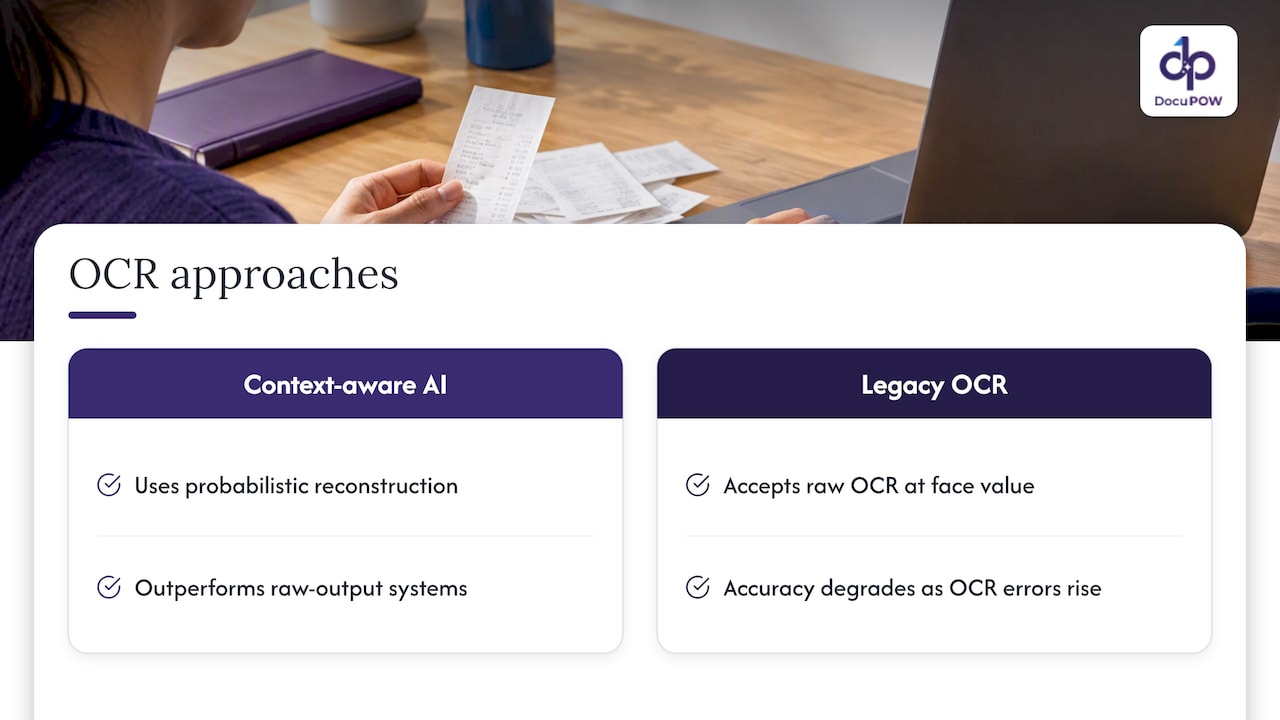
Author: Naveed Abbas

  • Document Question Answering: How It Works and What to Check

    Document Question Answering: How It Works and What to Check

    Document question answering (document QA) is software that reads your files, takes a question in plain English and returns an answer drawn from those files, ideally with a pointer to the page it came from. Done well, it replaces the hunt through a 200-page contract or a folder of supplier invoices. Done badly, it produces confident answers that no one can verify. This guide explains how the technology works, where it breaks, and how a business team should evaluate it before trusting it with real decisions.

    DocuPOW
    Get More From Your Business Documents
    DocuPOW uses AI agents to extract and interpret information from documents, helping teams reduce manual entry and find answers faster.

    Request a demo

    TL;DR

    • Document QA has two jobs: finding the right passage (retrieval) and reading it correctly (reasoning). Most failures come from the first job, not the second.
    • On long documents, retrieving relevant pages beats feeding the model every page. One 2025 study reported gains of up to 22.5 ANLS points from retrieval.
    • Tables, scans and images matter. A system that only reads plain text will miss answers that sit in a table or a stamped form.
    • Demand source citations and a human review path for anything that touches money, compliance or contracts.
    • Test on your own messy documents, not on a vendor’s demo file.

    Table of Contents

    What document question answering actually is

    The research community calls the visual version of this task Document Visual Question Answering, or DocVQA. A model gets a document image or text plus a question and must produce an answer. In a business setting the same idea shows up as a chat box on top of your files: “What is the termination notice period in the Acme supply agreement?” or “Which invoices from March exceed the purchase order amount?”

    It differs from a search engine in one important way. Search returns documents and leaves the reading to you. Document QA returns the answer itself, and, if it is built responsibly, shows where in the source that answer lives so you can check it in seconds.

    It also differs from classic data extraction. Extraction pulls a fixed set of fields (invoice number, date, total) from every document. Question answering handles the open-ended request nobody planned a field for. Most teams end up needing both: extraction for the repeatable work that flows into an ERP, and question answering for the one-off questions that come from legal, finance or operations.
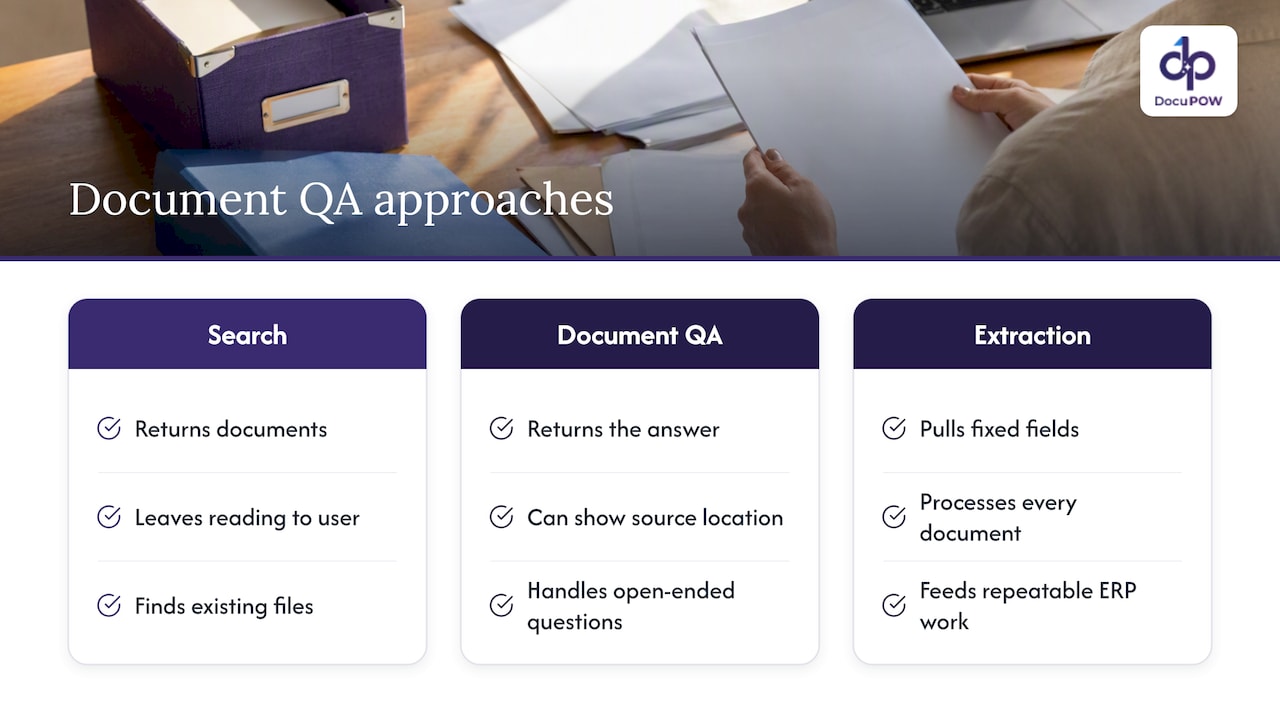
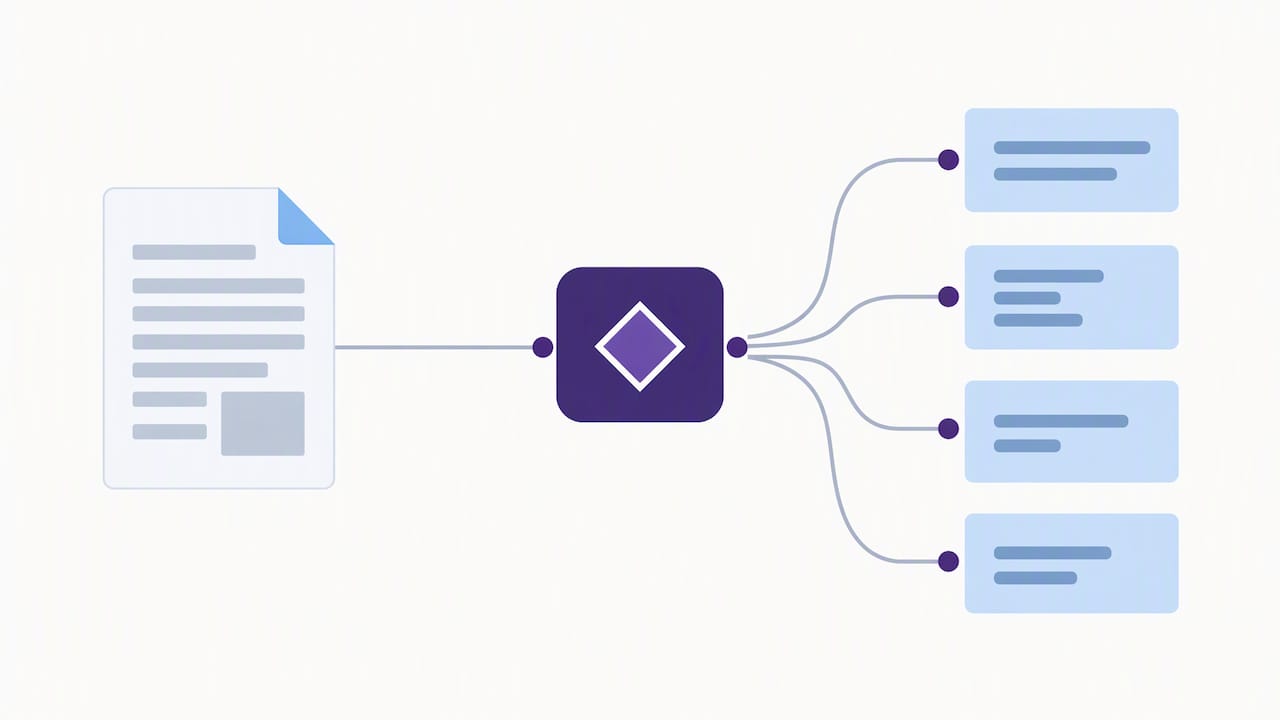
    What document question answering actually is — overview diagram

    How it works under the hood

    A typical pipeline has five stages. Knowing them helps you ask vendors sharper questions.

    1. Ingestion. The system reads PDFs, scans, spreadsheets and images. Scans need optical character recognition or a vision model to turn pixels into text and layout.
    2. Chunking. Documents are split into passages. Split too small and a clause loses its context. Split too large and the passage becomes noisy.
    3. Indexing. Each passage is converted into a numerical representation (an embedding) so that passages with similar meaning can be found even when the wording differs.
    4. Retrieval. When you ask a question, the system finds the passages most likely to contain the answer.
    5. Generation. A language model reads those passages and writes the answer, ideally quoting or citing the source.

    This pattern is known as retrieval-augmented generation, or RAG. It exists because language models cannot reliably hold an entire document set in working memory, and because you want answers grounded in your files rather than in the model’s general knowledge.

    Why retrieval matters more than the model

    It is tempting to judge a document QA product by the language model behind it. The research suggests the weak link is usually earlier in the chain. A 2025 paper on multi-page DocVQA describes how leading systems often concatenate every page or lean on very large vision-language models, both of which are memory-hungry. Its evaluation found that text-centric retrieval improved accuracy by up to 22.5 ANLS over baseline models on benchmarks such as MP-DocVQA, and that text-based retrieval variants generally gained more than purely visual ones on those standard multi-page datasets.

    The practical translation: if a system cannot find the right page, no model will rescue it. And if it stuffs in every page, performance degrades and cost climbs. When you evaluate a tool, ask how it selects evidence, not just which model it calls.

    Text is not enough: tables, images and layout

    Business documents are rarely clean prose. A bill of lading has stamps. A quality certificate has a results table. A purchase order has a scanned signature block. Researchers behind a 2025 benchmark for retrieval-augmented multimodal DocVQA describe the field’s twin challenges: lengthy documents that mix text, images and tables, and the need for reasoning across those modes.

    For a buyer, that means a few concrete tests:

    • Ask a question whose answer sits only in a table cell, such as a unit price on line 14.
    • Ask something that requires combining two places, such as comparing a contract rate with the rate on an invoice.
    • Upload a skewed, low-quality scan and see what happens.
    • Ask a question the document does not answer. A trustworthy system says so instead of guessing.

    Where document QA goes wrong

    The failure modes are predictable, which makes them testable.

    Fabricated answers. NIST’s generative AI profile uses the term confabulation for erroneous or false content produced in response to prompts. In document QA this looks like a plausible payment term that appears nowhere in the contract.

    Missed evidence. The right clause exists but was never retrieved, so the answer is based on a neighboring paragraph. This is the retrieval problem above.

    Cross-document blending. Asked about “the agreement,” the system mixes terms from two vendors. Good systems let you scope a question to a specific document, folder or customer.

    Stale or duplicate files. If three versions of a contract sit in the index, the answer may come from the superseded one. Governance of the document set matters as much as the AI. Our document lifecycle management playbook covers how to keep that set clean.

    Bad upstream data. A Parseur-commissioned survey reported that 88% of U.S. organizations find errors in the data feeding their systems, even though a similar share of leaders say they are confident in their data accuracy. Note that the survey was commissioned by a data extraction vendor, so read it as a signal rather than a precise measure. The point stands: an answer is only as good as the text and numbers read from the page.
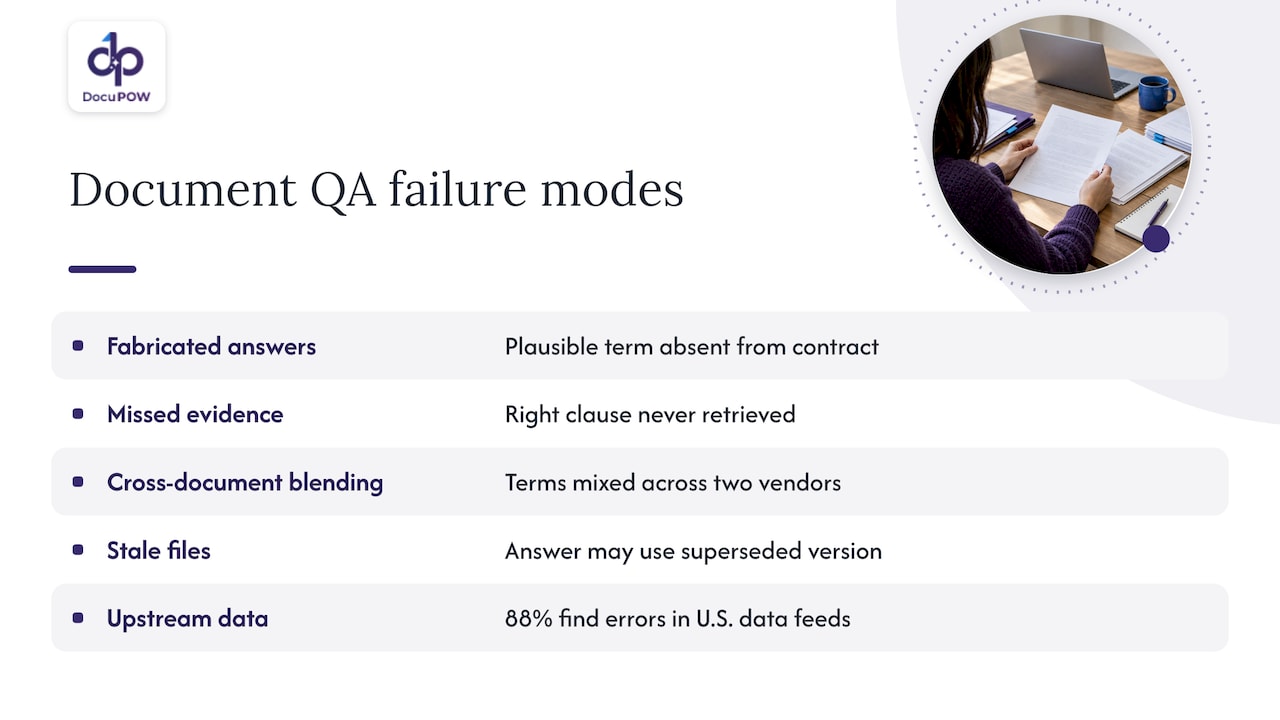
    Five common document question answering failure modes

    A practical evaluation checklist

    Before you commit, run a pilot with 30 to 50 real documents and 40 to 60 real questions collected from the people who will use the system. Score each answer on these criteria.

    Criterion What to test Pass looks like
    Accuracy Questions with known answers Correct on the large majority, errors are explainable
    Citations Click every source reference Each answer links to the exact page or passage
    Abstention Questions with no answer in the files The system says it cannot find it
    Layout handling Tables, scans, multi-column pages Values come from the right cell or field
    Multi-document reasoning Compare two files Both sources cited, no blending
    Access control Ask as a user without permission Restricted documents never surface
    Review path Flag a wrong answer A person can correct it and the fix is logged
    Integration Push an answer or field to your ERP or CRM Available through an API, not by copy and paste

    Write the expected answers down before the pilot, so you are not tempted to accept a fluent but wrong response.

    Governing document AI: what NIST asks for

    If your documents contain contracts, financial records, employee files or patient information, the question is not only “is it accurate?” but “is it managed?” The NIST AI Risk Management Framework organizes AI risk work into four functions: govern, map, measure and manage. Applied to document QA, that translates roughly into:

    • Govern: name an owner for the system, decide which document types are in scope, and set who can ask about what.
    • Map: list the risks for each use case. A question about a lunch policy is not the same as a question about a covenant in a loan agreement.
    • Measure: track accuracy, abstention and citation quality on a recurring test set, not just once at purchase.
    • Manage: define what happens when the system is wrong, including review, correction and escalation.

    NIST also publishes a Playbook with suggested actions for each function, which is a useful starting point for a compliance team writing its own procedure. For a closer look at how these controls map to document processing, see our guide on NIST-aligned controls for secure AI processing.

    This is guidance for managing risk, not a certification. Legal and compliance staff in your organization should decide which obligations apply to your documents and your industry.

    Our perspective: question answering is the last step, not the first

    We build document automation, and what we see is that teams often start with the chat box because it demos well. The harder and more valuable work happens before and after it.

    Before it, documents have to be read accurately without someone building a template for every supplier layout. That is why we focus on template-free, agent-based extraction that adapts to layouts it has not seen. If the structure of a document is understood at ingestion, the answers downstream are better, because the system knows a number is a unit price and not a part number.

    After it, an answer needs somewhere to go. A finance lead who learns that an invoice exceeds its purchase order does not want to stop at an answer. They want the exception routed, reviewed and resolved. So we treat conversational querying as one capability inside a workflow that includes multi-step orchestration and human-in-the-loop review, with source citations on every answer so a reviewer can verify it quickly.

    Our advice is simple. Pick a narrow, high-value question set, such as payment terms across supplier contracts or exceptions on inbound invoices. Measure it for a month. Then expand. Teams that begin with “ask anything about everything” tend to lose trust after the first confident wrong answer, and trust is very hard to win back.

    — Syed Naveed Abbas

    Use cases where it pays off

    Accounts payable and finance. Ask which invoices carry a payment term different from the master agreement, or what the total tax charged to a vendor was last quarter. Pairing questions with structured extraction is covered in our guide to automating financial data extraction.

    Legal and compliance. Locate indemnity language across hundreds of agreements, or pull every document that mentions a particular regulation. Citations and audit trails are non-negotiable here. Our overview of audit-ready AI for compliance teams goes deeper.

    Operations and manufacturing. Check a supplier’s certificate against the spec, or find which work instructions reference a discontinued part. See how AI is changing manufacturing documents.

    Real estate and construction. Surface lease clauses, change-order terms or closing conditions from large transaction files. We outline how this plays out on our real estate solutions page.

    Sales and customer service. Answer a customer’s question about contract terms or warranty coverage without paging legal.

    Build, buy or assemble

    There are three common routes, and each fits a different team.

    • Build it yourself. Open-source tooling and a model API will get a prototype running in a weekend, and it is a good way to learn. Getting from prototype to production means handling scans, access control, evaluation, citations and maintenance. Expect an ongoing engineering commitment.
    • Use a general-purpose chat assistant with uploads. Fine for a single document and an occasional question. It generally lacks workflow, audit trails and system integration, which is where business value accumulates.
    • Adopt a document automation platform. Best when questions are part of a larger process: extraction, review, routing and integration. The tradeoff is that you adopt the platform’s way of working.

    If your IT team needs to connect answers and extracted fields to existing systems, look for a documented API and developer tools rather than a closed interface. Our AI integration guide explains what to look for.

    Where DocuPOW fits

    DocuPOW is an agent-based document automation platform. It extracts data from any document type without templates, orchestrates multi-step workflows, keeps a human in the loop for audit review, and lets you search and query documents conversationally with source citations. It connects to ERP and CRM systems through an API and runs on encrypted, enterprise-grade infrastructure.

    Plans are published on our pricing page: Starter is $99 per month and Professional is $499 per month. Enterprise pricing is not published, so talk to us if you have high volumes or specific security requirements. The simplest way to judge fit is to bring a handful of your own hardest documents and the questions your team actually asks, then see what comes back. You can start from the DocuPOW homepage.

    Getting started in four steps

    1. Collect questions. Interview three to five people who currently dig through documents. Write down the exact questions they ask.
    2. Assemble a test set. Choose 30 to 50 documents that include the ugly ones: scans, multi-page contracts, unusual layouts.
    3. Define success. Decide what accuracy, citation quality and turnaround time would justify rollout, and who reviews the answers.
    4. Pilot, then widen. Start with one team and one document type. Review errors weekly, and add document types only when the first set is stable.

    If your volumes are high, our notes on high-volume document processing cover how to scale the pipeline behind the questions.

    FAQ

    Search returns a list of files or passages and leaves the reading to you. Document question answering reads the relevant passages and writes a direct answer, ideally with a citation to the source. Many products combine both, so you can jump from the answer to the original page.

    Can document QA read scanned PDFs and tables?

    It can, but quality varies widely between systems. Scans need OCR or a vision model, and tables need layout understanding so values land in the right row and column. Test with your own scans and with a question whose answer is only in a table, because that is where weak systems fail.

    How do I stop an AI from making up answers about my documents?

    You cannot eliminate the risk, but you can reduce it. Use retrieval so answers are grounded in your files, require citations, make sure the system says when it cannot find an answer, and keep a human review step for high-stakes questions. NIST’s generative AI profile describes this category of risk in detail.

    Is a general chatbot good enough for contracts and invoices?

    For a single file and a casual question, often yes. For recurring business work, you usually need access control, audit trails, consistent citations and integration with your accounting or contract systems. Those are platform features, not chatbot features.

    How should I measure accuracy?

    Build a fixed test set of real questions with answers written down in advance. Score correctness, citation accuracy and whether the system correctly declines unanswerable questions. Rerun it after any change to the system or the document set.

    Sources

  • Semantic vs Keyword Search: How to Choose for Documents

    Semantic vs Keyword Search: How to Choose for Documents

    Keyword search finds documents that contain the words you typed. Semantic search finds documents that mean what you asked, even when the wording differs. Neither is better across the board. Keyword search wins on exact identifiers such as invoice numbers, part codes and clause references. Semantic search wins when people describe a concept in their own words. For most business document collections, the strongest setup uses both, which is called hybrid search.

    This guide explains how each method works, where each one breaks, what the research says about combining them, and how to judge a document search tool before you buy one.

    DocuPOW
    docupow.ai
    Turn Documents Into Usable Data
    DocuPOW uses AI agents to extract information from documents without rigid templates, helping teams reduce manual entry and improve operational efficiency.

    Request a demo

    TL;DR

    • Keyword search (lexical retrieval, usually BM25) matches surface words. It is precise for IDs, names and rare terms, and it fails when the query and the document use different vocabulary.
    • Semantic search (dense retrieval) compares embeddings, so it handles synonyms and intent. It can also surface text that sounds related but is not what you needed.
    • Hybrid search combines both and, in published studies, outperformed either method alone on technical documentation.
    • For contracts, invoices and compliance records, also test permissions, citations and audit trails. Those decide whether a search tool is safe to use, not only whether it is clever.

    Table of Contents

    What keyword search actually does

    Keyword search, also called lexical search, builds an index of the words in your documents. When you type a query, it looks for documents containing those words and ranks them by signals such as how often a term appears and how rare it is across the collection. The classic ranking function is BM25, and lexical models like BM25 remain a strong baseline for high-precision exact matching after decades of use.

    That makes it the right tool when you know what you are looking for:

    • A purchase order number, serial number or case number.
    • A specific party name in a contract archive.
    • A rare technical term, such as a part designation that no general language model has seen often.
    • A quoted phrase that must appear verbatim, such as a defined term in a master services agreement.

    Its weakness is the vocabulary mismatch problem. The same CMU paper notes that exact matching fails when query and document use different terminology, such as synonyms. Search a contract folder for “termination for convenience” and you will miss the agreement that says “either party may cancel without cause on 60 days’ notice.” Nothing is wrong with the index. The words simply do not overlap.

    What semantic search does differently

    Semantic search converts text into embeddings, which are lists of numbers that place a passage in a shared vector space. A query is converted the same way, and the system returns the passages whose vectors sit closest to the query vector. Because the vectors encode meaning and context, dense retrieval can match softly beyond the exact words on the page.

    In practice, a question like “which supplier agreements let us cancel early?” can retrieve the clause about cancellation without cause, even though it never uses the word “early.” That is the behavior people mean when they search for semantic document search.

    It also has real failure modes:

    • Plausible but wrong results. The CMU authors note that dense retrieval can elevate tangential or misleading content when retrieval is not well calibrated. A clause about early payment discounts may look close to a clause about early termination.
    • Weak handling of identifiers. An embedding of “PO-448213” carries little meaning. Exact IDs are where lexical search shines.
    • Jargon gaps. In specialized fields, pre-trained models often struggle. A ScienceDirect study on industrial maintenance text found that good semantic retrieval frequently needs domain-specific tuning or ontologies to capture unique terminology.

    Semantic vs keyword search side by side

    Criterion Keyword (BM25) Semantic (embeddings) Hybrid
    Matches on Exact words and word stems Meaning and context Both
    Best query type IDs, names, quoted phrases, rare terms Natural-language questions, concepts Mixed real-world queries
    Handles synonyms Poorly Well Well
    Handles exact identifiers Very well Poorly Well
    Typical failure Misses relevant text with different wording Returns related but wrong passages Needs tuning of how scores are merged
    Explainability Easy: you can see the matched words Harder: similarity scores are opaque Moderate
    Setup cost Low Needs an embedding model and vector store Highest, but most robust

    Why hybrid search usually wins

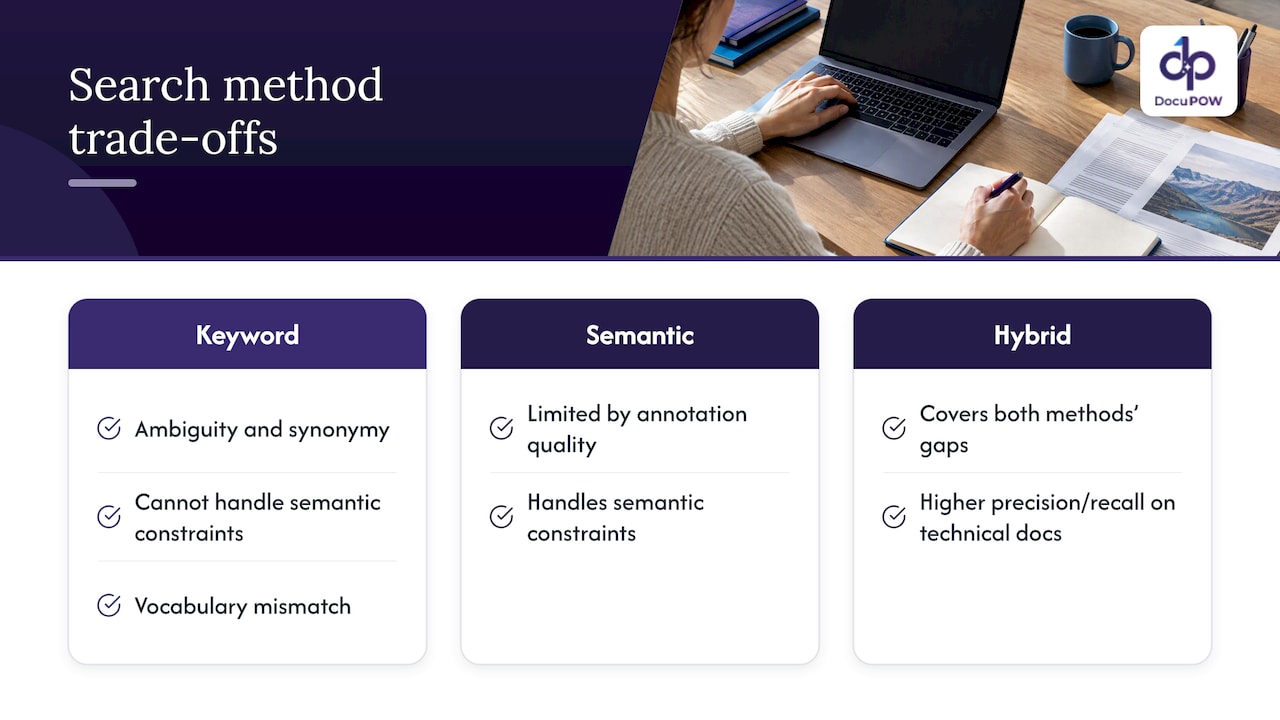
    The two methods fail in opposite directions, so combining them covers the gaps. The HyKSS research from BYU describes how keyword search suffers from ambiguity, synonymy and an inability to handle semantic constraints, while semantic search is limited by the quality of its annotations. In that line of work, hybrid search outperformed both keyword and pure semantic search on precision and recall for large collections of technical and maintenance documentation.

    Comparison of keyword, semantic, and hybrid search

    A 2023 paper in ACM Transactions on Information Systems explains why the fusion step matters. Lexical search is simple and efficient, but susceptible to the vocabulary mismatch problem. The paper analyzes the functions used to blend lexical and semantic scores, which is the part of a hybrid system that most often needs tuning.

    There is a second reason to care, and it matters if you use AI assistants over your documents. A 2025 arXiv paper on legal GenAI argues that retrieval quality, more than the language model, drives the quality of answers in retrieval-augmented generation. Many errors labeled as hallucinations start as retrieval errors: the model was handed the wrong passage. The same paper points toward multi-method retrieval rather than a single approach, since no one method wins on every query type.

    A worked example with contracts

    Imagine a legal or procurement team with 4,000 supplier contracts and three typical questions:

    1. “Find every contract with Acme Industrial Supply.” Keyword search handles this instantly. Semantic search might also return contracts with similar suppliers, which is noise.
    2. “Which agreements let us walk away without cause?” Semantic search finds the cancellation clauses however they are phrased. Keyword search needs you to guess every phrasing.
    3. “Show liability caps above $1 million in agreements governed by Texas law.” This needs both: semantic matching for the concept of a liability cap, and exact matching for “Texas” and the dollar figures. It is also a structured question, which is where extraction beats search, as the next section explains.

    The example is illustrative, not data from a study. It shows why a contract semantic search tool that offers only one method will frustrate someone within a week.

    When search is the wrong tool: extraction

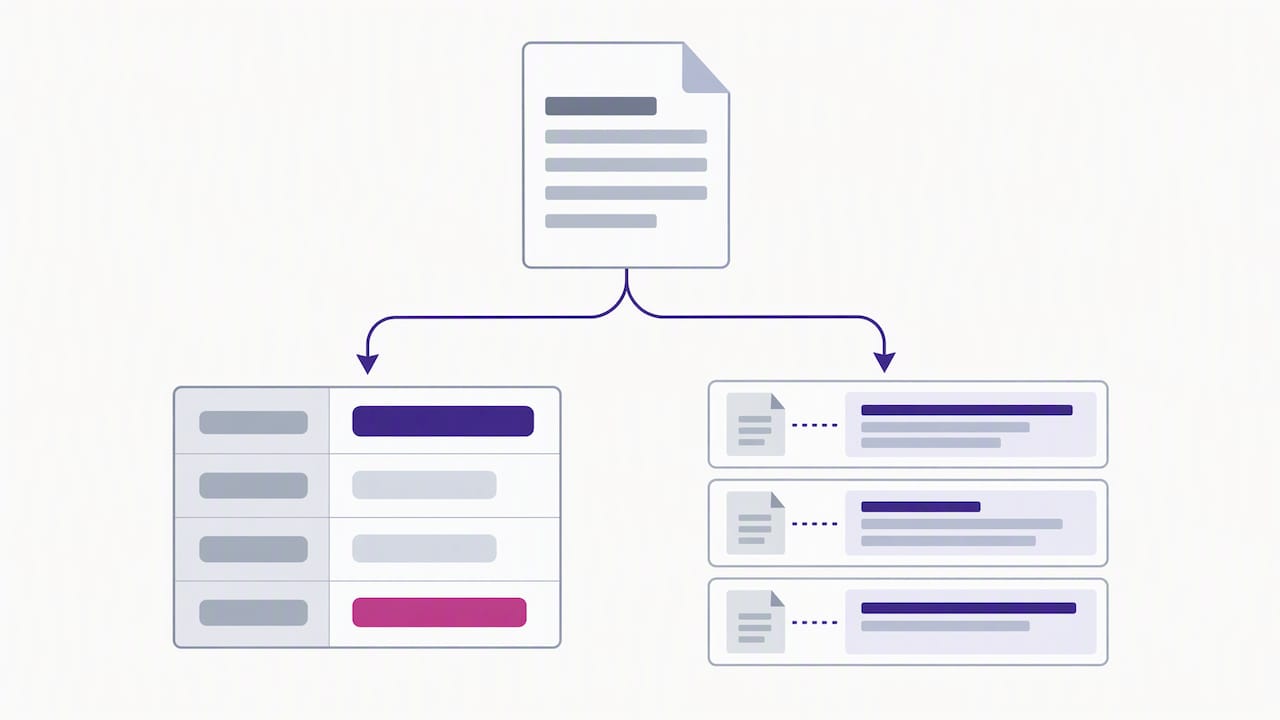
    Search returns passages. Many business questions need fields: invoice total, payment terms, renewal date, ship-to address. If you find yourself searching for the same data point across hundreds of files, you are doing extraction by hand.

    Extraction turns each document into structured records once, and then you query the records. Search and extraction complement each other: extraction answers “what is the value?”, search answers “where does it say that, and what else is relevant?” Our guide to AI data extraction for business professionals covers where that line falls, and our information retrieval technical guide goes deeper on ranking models for practitioners.

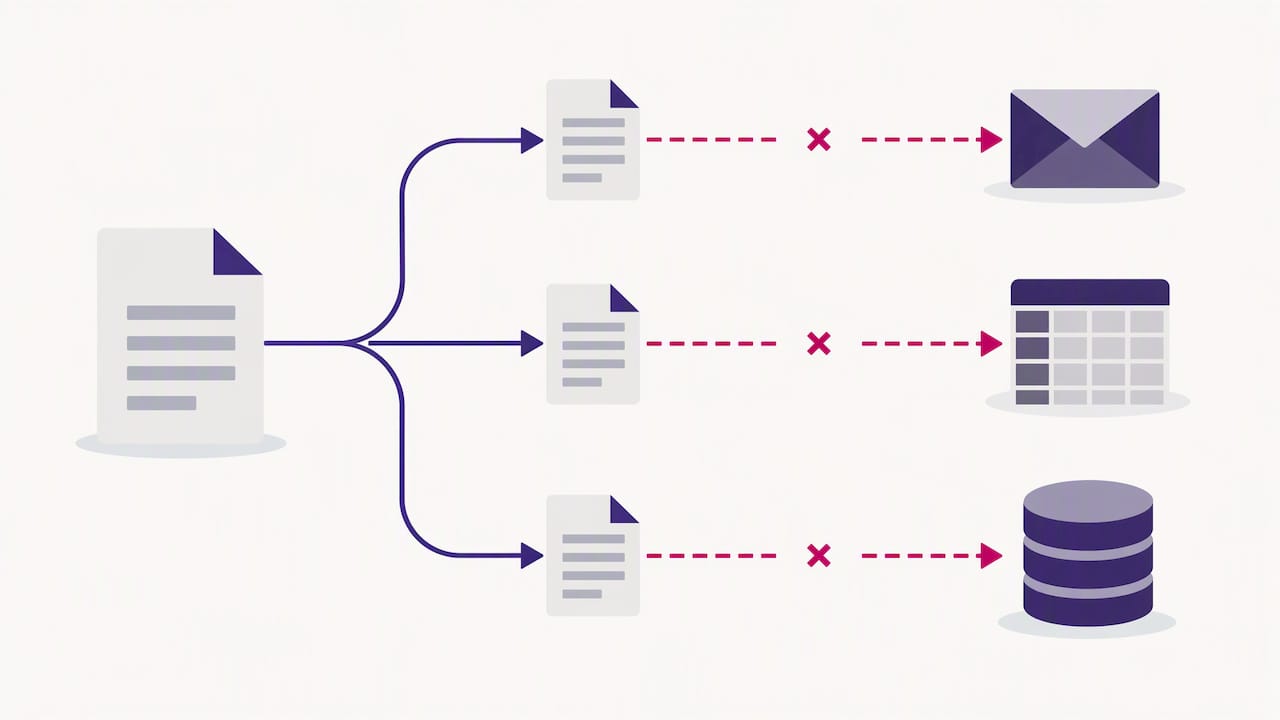
    Document branching into a record and source passages

    What to check before you choose a document search tool

    Ranking quality is only part of the decision. For contracts, HR files, patient records and financial documents, these checks matter just as much.

    Permissions at the retrieval layer

    Do not rely on an AI model to hide restricted content. GS Consulting’s guidance on secure RAG for government contractors says security trimming must happen at the retrieval layer: the system verifies who is asking, resolves their permissions and filters results before anything reaches the model. Ask any vendor how this works, and ask for a demonstration with two users who have different access.

    Citations and an audit path

    The same source warns that companies often neglect the audit path. Every answer should trace back to a specific source document, because without transparent citations a system lacks defensibility in law, finance and government work. If a search tool gives you an answer with no page or clause reference, a reviewer cannot verify it.

    Treat embeddings as sensitive data

    It is tempting to think vectors are anonymous numbers. The OWASP RAG security cheat sheet says otherwise: text can be reconstructed from embeddings through inversion attacks, so organizations should encrypt embeddings at rest, limit similarity search exposure and apply the same access controls as the source repository. Your security team should ask where the vector store lives and who can query it.

    Retrieved text is untrusted input

    Microsoft’s zero-trust guidance on AI treats retrieved passages as data, not trusted instructions, and says they should be inspected and authorized before they influence the model. See its section on input, context and retrieval hygiene. A poisoned or malicious document in your repository should not be able to steer an assistant. For a fuller control list, see our piece on NIST-aligned controls for secure AI processing.

    A quick evaluation method

    You do not need a research lab to compare tools. Build a test set from your own files:

    1. Collect 30 to 50 real questions your team asks, and tag each as identifier-style, concept-style or mixed.
    2. For each, note the document and passage that is the correct answer.
    3. Run every candidate tool on the set and record whether the right passage appears in the top three results.
    4. Check the failures by type. If misses cluster on IDs, the tool lacks strong lexical search. If they cluster on paraphrases, it lacks semantic strength.
    5. Repeat with two user accounts to test permissions.

    The same discipline applies outward. If you publish content and want to know how AI systems surface it, measuring AI search visibility with a set of test prompts follows the same logic of testing with real queries instead of trusting claims.

    Our perspective: search is the last step, not the first

    We build document automation, and what we see again and again is that teams ask for “better search” when the real problem is that their data is trapped in files that were never structured. Swapping keyword search for semantic search helps, but it does not change the fact that someone still has to open the PDF and read it.

    Three convictions shape how we think about this:

    Hybrid is the honest default. Anyone selling pure semantic search as a replacement for exact matching is skipping the cases where your finance and legal teams live: invoice numbers, part numbers, defined terms. Meaning and exactness both matter.

    An answer without a source is a liability. Conversational querying is only useful in regulated work if every answer points back to the document it came from, so a person can check it. That is why we pair semantic querying with source citations and human-in-the-loop review for audit-sensitive steps.

    Extract first, then search. When the platform understands a document’s content and structure without rigid templates, you get fields you can filter and total, plus passages you can search. Search over structured, validated data is far more reliable than search over a pile of scans. This is also the idea behind our work on hybrid GraphRAG and document knowledge graphs, where relationships between documents, parties and terms become queryable.

    None of this makes search less important. It makes search the layer you build on top of data you can trust.

    — Syed Naveed Abbas

    Where DocuPOW fits

    DocuPOW is an agent-based document automation platform. It extracts data from any document type without templates, orchestrates multi-step workflows, keeps a human in the loop for audit review, and lets your team query documents in natural language with source citations. It integrates with ERP and CRM systems through an API.

    If your team is stuck between “search is not finding things” and “we are retyping data from PDFs,” it is worth seeing both problems handled in one place. Plans are published on our pricing page: Starter is $99 per month, Professional is $499 per month, and Enterprise is available with custom pricing on request. For a broader view of the category, read our enterprise search buying guide for IT leaders.

    FAQ

    Not universally. Semantic search is better when people phrase questions in their own words, and keyword search is better for exact identifiers and rare terms. Studies of hybrid approaches found that combining the two beat either alone on technical documentation, which is why most production systems use both.

    What is the difference between vector search and BM25?

    BM25 scores documents by how well their words overlap with the query, weighting rare terms more heavily. Vector search compares embeddings, so it can match passages with no shared words. BM25 is simpler, cheaper and easy to explain, while vector search captures meaning but needs an embedding model and a vector store.

    Do I need semantic search to use an AI assistant on my documents?

    In most cases you need some form of retrieval, and retrieval quality largely determines answer quality. Research on legal GenAI suggests that many apparent hallucinations are retrieval failures. Whatever method you choose, require citations so reviewers can verify each answer.

    Is semantic search safe for confidential contracts?

    It can be, if permissions are enforced at the retrieval layer and embeddings are protected like the source files. OWASP notes that embeddings are not anonymous. Your security and legal teams should review the vendor’s architecture before any confidential repository is connected.

    Can semantic search work on specialized jargon?

    Sometimes, but not out of the box. Research on industrial maintenance text found that domain tuning or ontologies are often needed for specialized vocabulary. Test any tool on your own documents and terminology before you commit.

    Sources

  • Document Processing Analytics: Metrics That Matter

    Document Processing Analytics: Metrics That Matter

    Document processing analytics is the practice of measuring how well your document workflows actually run: how many documents finish without a human touching them, how accurate each extracted field is, where work stalls, and which sources keep causing exceptions. If you only track volume, you will know how busy the system is but not whether it is working. The metrics below tell you the second thing.

    This guide covers the core metrics, how to read them together, how to set up a dashboard, and what to add for accounts payable. It also covers how to keep AI-driven extraction accountable in a U.S. compliance setting.

    DocuPOW
    Turn Document Analytics Into Action
    DocuPOW uses AI agents to extract document data and provides real-time analytics and predictive insights for more informed decisions.

    Request a demo

    TL;DR

    • Track extraction accuracy and straight-through processing (STP) rate separately. They answer different questions, and blending them hides the real problem.
    • Exceptions are your best data. Log the document type, vendor, field and root cause for every manual touch, then fix the top few causes first.
    • Watch for drift. Document layouts change, so accuracy that was fine in March can slip by September without anyone noticing.
    • For accounts payable, add touchless invoice rate, cycle time, cost per invoice and duplicate or mismatch catches.
    • Keep a documented human review path for low-confidence and high-risk documents, and record the results.

    Table of Contents

    What document processing analytics actually measures

    Intelligent document processing (IDP) goes beyond legacy OCR. OCR turns characters on a page into text. IDP uses computer vision, natural language processing and large language models to understand context, pull structured data out of unstructured formats such as invoices or contracts, and orchestrate business workflows. That difference matters for analytics. A system that only reads text has one thing to measure: character accuracy. A system that classifies, extracts, validates, routes and posts to an ERP has a pipeline, and every stage can fail in its own way.

    Good analytics therefore cover four layers:

    1. Intake: how many documents arrive, from which channels, in which formats and at what quality.
    2. Understanding: whether each document was classified correctly and each field was read correctly.
    3. Flow: how long documents take, where they wait, and how many leave the automated path.
    4. Outcome: what the data did downstream, such as invoices paid on time, contracts filed or claims closed.

    Most teams instrument layers one and three because their tools report them by default. The value sits in layers two and four.

    The metrics to track, and how to read them

    Metric What it tells you How to calculate it
    Field-level accuracy Whether specific values (total, date, PO number) are read correctly Correct fields divided by total fields checked, per field and per document type
    Confidence score distribution How sure the system was, and whether that matches reality Share of fields in each confidence band, compared with audited correctness
    Straight-through processing rate How many documents finish with no human touch Documents completed automatically divided by documents received
    Exception rate How many documents leave the automated path Documents routed to review divided by documents received
    Workflow latency Time from receipt to posted data Median and 90th percentile, tracked against your SLA
    Review time per exception The real labor cost of the exceptions Average minutes a reviewer spends per flagged document
    Correction rate How often reviewers change what the system produced Corrected fields divided by fields reviewed
    Classification accuracy Whether documents reach the right extraction logic Correctly typed documents divided by total

    Accuracy and STP are not the same thing

    This is the most common mistake in IDP reporting. Extraction accuracy tells you how often fields are read correctly. STP rate tells you how often a document completes without anyone intervening. You can have high accuracy and a low STP rate: the fields are right, but a validation rule rejects the document because, say, a purchase order has not yet been entered in the ERP. The reverse is also possible. A high STP rate with weak accuracy means errors are flowing through unchecked, which is worse.

    Report both, side by side, and when they diverge, ask which stage is responsible.

    Confidence scores only help if you calibrate them

    Confidence scores decide which documents go to a person. If a field is marked 97% confident but is wrong 10% of the time, your routing threshold is meaningless. Each month, pull a random sample from each confidence band, have a reviewer check it, and compare. Where the score and the truth disagree, move the threshold or retrain. This sampling is also the evidence an auditor will want to see.

    Latency needs percentiles, not averages

    An average processing time of a few seconds can hide a tail of documents that sit in a review queue for two days. Track the median and the 90th percentile, and track queue wait separately from machine time. Your SLA breaches live in the tail.

    Exceptions are where the insight is

    A throughput chart tells you how much happened. An exception log tells you why the rest did not. For each document that leaves the automated path, capture:

    • The document type and source (vendor, customer, plant, branch)
    • The field or rule that triggered the exception
    • The root cause: poor scan, new layout, missing reference data, failed validation, or genuine ambiguity
    • The resolution and how long it took

    Over a few weeks, patterns appear. Practitioners point to exception patterns and root cause attribution as what moves a team from watching its dashboard to improving its process. Typically a small number of vendors or document types create a disproportionate share of manual work. Fixing the cause upstream (asking a supplier for a machine-readable PDF, adding a missing master-data record, tightening a validation rule) is cheaper than reviewing the same exception every week.

    A worked example

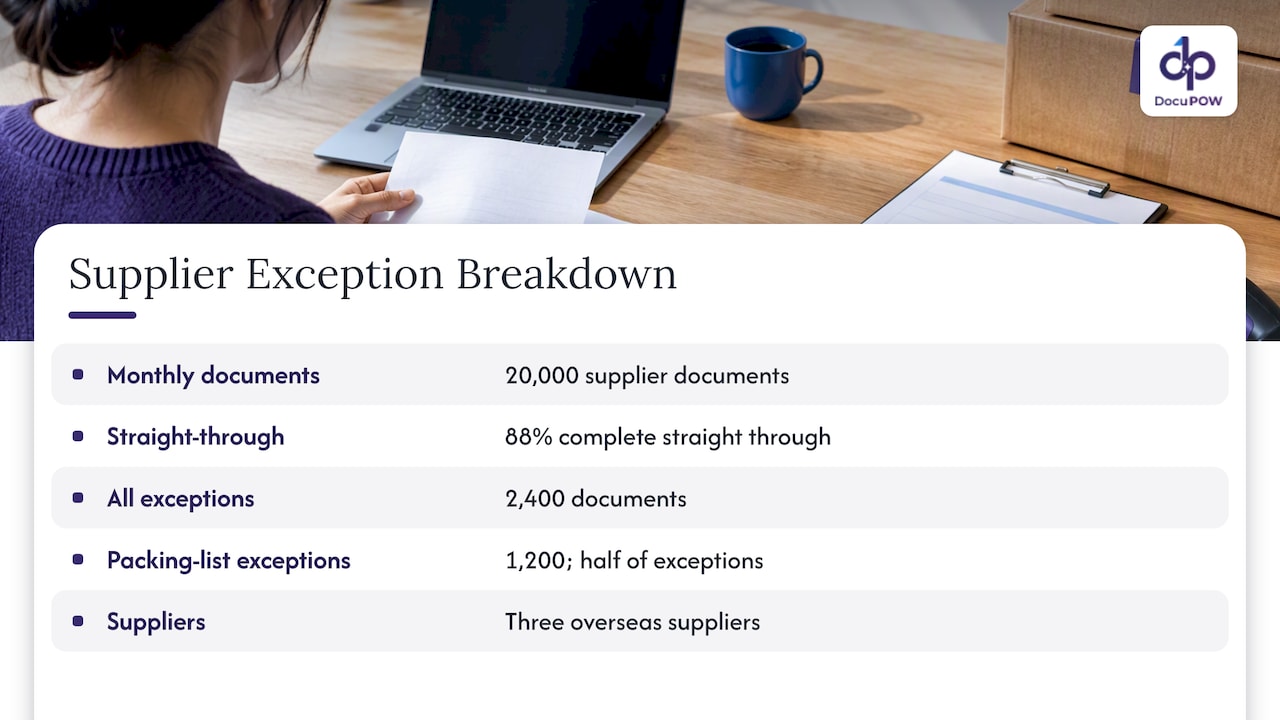
    Imagine a manufacturer processing 20,000 supplier documents a month. The dashboard shows 88% of documents completing straight through. That sounds healthy until the exception breakdown shows that half of the remaining 2,400 exceptions come from one category: packing lists from three overseas suppliers whose layouts changed. This is an illustrative scenario, not a customer result. The action is clear: review those three suppliers’ formats, confirm the system handles the new layouts, and measure the STP rate for that segment alone. Without the breakdown, the team would only see a number stuck at 88%.

    Worked example of supplier document exceptions

    Drift: the metric most teams forget

    Many businesses expect 100% accuracy from AI on day one. In practice, STP rates are built iteratively. Strong teams monitor accuracy drift as document variations evolve, and use predictive signals to trigger retraining or prompt and rule updates before performance falls below SLA.

    A practical drift watch looks like this:

    • Plot weekly field accuracy and STP rate by document type, not in aggregate.
    • Alert when a rolling four-week average drops by a set margin, for example two percentage points.
    • Track the count of “new layout” documents, meaning ones the system has not seen from that sender before.
    • Review the lowest-confidence fields every month, even if the overall number looks fine.

    Template-based systems make drift painful because every new layout means a new template. AWS technical guidance describes the shift from fragile template pipelines to intelligence-based extraction that handles document variations, and advises designing for adaptable models rather than perfect templates. Analytics are how you confirm that adaptability is holding up in production.

    Building a document processing dashboard

    One dashboard rarely serves everyone. Build three views from the same data.

    Executive view

    Four to six numbers, trended monthly: STP rate, cost or labor hours per document, SLA attainment, and the dollar value of documents processed. Leadership wants to know whether the program is paying for itself.

    Operations view

    The working screen for the team lead: queue depth, oldest item in the queue, exceptions by cause, review time per exception, and volume by source. This is the view that gets checked daily.

    Model quality view

    For whoever owns extraction quality: field-level accuracy, confidence calibration, classification accuracy, drift charts and the audited sample results. This is the view that gets checked weekly and before any change.

    Setup steps

    1. Define the document types in scope. Start with the two or three that drive the most volume or pain.
    2. Establish a baseline. Measure the manual process first: minutes per document, error rate, cycle time. Without it you cannot quantify improvement.
    3. Create a ground-truth sample. Have a reviewer verify a few hundred documents per type. This becomes your accuracy yardstick.
    4. Log every touch. Each human intervention needs a reason code, or exceptions turn into an unreadable pile.
    5. Set thresholds and owners. Every metric needs a target and a named person who acts when it is missed.
    6. Review on a schedule. Weekly for operations, monthly for quality, quarterly for leadership.

    Accounts payable analytics

    Accounts payable is where many teams first apply IDP, because invoices are high volume, varied in layout and tied directly to cash. AP dashboards add business metrics on top of the processing metrics above:

    • Touchless invoice rate: invoices that go from receipt to approved posting with no manual touch. It is the AP version of STP.
    • Invoice cycle time: days from receipt to payment, tracked against terms so you can see missed early-payment discounts and late fees.
    • Cost per invoice: total AP labor and overhead divided by invoices processed. Compute it yourself from your own baseline rather than borrowing an industry average.
    • Match rate: the share of invoices that pass two-way or three-way matching against purchase orders and receipts on the first attempt.
    • Exception reasons: price variance, quantity variance, missing PO, duplicate invoice, unknown vendor.
    • Duplicate and anomaly catches: how many suspicious invoices the system flagged before payment.
    • Vendor scorecards: exception rate by supplier, so procurement can ask the worst offenders to fix their formats.

    The last item is underused. A vendor scorecard turns analytics into a conversation with the supplier and often removes a recurring exception completely. For more on this workflow, see our guide to automating financial data extraction and our page on automated invoice processing.

    Keeping humans in the loop, and keeping a record

    A sound IDP design uses the machine for the high-volume first pass and reserves people for low-confidence fields and high-risk documents. This follows a long-standing finding that human and machine recognition have complementary strengths and weaknesses, a conclusion from NIST’s evaluation of form-recognition systems.

    For analytics, this means measuring the review step itself:

    • What share of documents go to review, and is it falling as the system learns?
    • How often do reviewers overturn the machine’s answer? A very low overturn rate suggests the threshold is too cautious and wasting time. A high one suggests the opposite.
    • Do reviewers agree with each other? Sampling the same documents across two reviewers exposes unclear rules.

    In the U.S., there is no single federal rule for AI-driven document processing, but many enterprises use the NIST AI Risk Management Framework as voluntary guidance to map, measure and manage AI risks, including accuracy, bias and privacy. It points organizations toward documenting methodology, characterizing the data and recording validation results. Your analytics history, with its audited samples, threshold changes and exception logs, is much of that documentation. If you operate in a regulated field such as healthcare, financial services or government contracting, ask your compliance or legal team which specific rules apply to your documents. The framework does not replace them.

    Our perspective: analytics should change what you do on Monday

    We built DocuPOW around a simple belief: the point of reading a document is to act on what it says, and the point of measuring the reading is to improve it. Many document programs fail quietly. They launch, the headline number looks fine, and the team spends the next year absorbing exceptions nobody categorizes.

    Three convictions shape how we think about analytics.

    First, template-free extraction changes what you measure. When a platform handles unseen layouts without a template per supplier, the maintenance burden shifts from building and repairing templates to watching quality. That is a better problem to have, but only if you can see quality clearly.

    Second, human review is a feature, not a failure. A human-in-the-loop audit step gives compliance teams evidence and gives you labeled corrections. Measure it, trend it and make it shrink where it can.

    Third, answers need sources. When someone queries a document set conversationally, they should see the passage the answer came from. Citations let a finance or legal reviewer verify in seconds, and they turn “the AI said so” into something auditable.

    If your dashboard cannot tell you which vendor, document type and field caused last week’s manual work, it is a report, not a tool. Fix that before you buy anything else.

    — Syed Naveed Abbas

    What to look for in a tool with strong analytics

    When you evaluate document automation software, check the analytics as carefully as the extraction. Types of alternatives differ here:

    • Cloud AI services from large providers give powerful building blocks, but you usually assemble the dashboards, review queues and routing yourself.
    • Legacy capture suites often report volumes well but rely on templates, so analytics tend to show template maintenance rather than learning.
    • Workflow or RPA tools track bot runs, not field-level data quality.
    • Agent-based document platforms combine extraction, workflow, review and reporting in one place, so a corrected field and its effect on STP live in the same system.

    A short checklist for demos:

    1. Can I see accuracy per field and per document type, not just a global number?
    2. Are confidence scores exposed, and can I compare them to audited results?
    3. Does every exception carry a reason code?
    4. Can I trace any extracted value back to its place in the source document?
    5. Can I export metrics through an API to my own BI tool?
    6. Is there a review workflow with a record of who changed what?

    Bring a messy sample of your own documents to the demo. Clean vendor samples prove little.

    How DocuPOW fits

    DocuPOW is an agent-based document automation platform: template-free extraction from any document type, multi-step workflow orchestration, human-in-the-loop audit review, real-time analytics, predictive insights, and semantic search with source citations. It connects to ERP and CRM systems through an API. You can see how the pieces fit on the platform page or the product overview, and learn how teams use it in operations and manufacturing.

    Plans start at $99 per month for Starter and $499 per month for Professional, and Enterprise is priced on request. Details are on the pricing page.

    A 30-day plan to get started

    • Week 1: Pick one document type. Measure the current manual time, error rate and cycle time.
    • Week 2: Build a ground-truth sample and run it through your process. Record field-level accuracy and STP.
    • Week 3: Add reason codes for every exception and review the top five causes.
    • Week 4: Set targets and owners, schedule the weekly operations review and the monthly quality sample, and decide which upstream fix to try first.

    For broader context on throughput gains, read how document automation improves throughput.

    FAQ

    What is the most important document processing metric?

    Straight-through processing rate is usually the headline number, because it shows how much work needs no human touch. Pair it with field-level accuracy, though, since a high STP rate with poor accuracy means errors are passing through unchecked.

    How is IDP analytics different from OCR reporting?

    OCR reporting mostly measures character recognition quality. IDP analytics cover the whole pipeline: classification, field extraction, validation, routing, review and downstream outcomes. That is why exception causes and drift matter far more than raw volume.

    How often should I audit extraction accuracy?

    Sample monthly at minimum, and after any change to documents, models, rules or thresholds. Draw the sample from each confidence band so you can check that your routing thresholds still match reality.

    What should an AP analytics dashboard show?

    Touchless invoice rate, cycle time against payment terms, first-pass match rate, exception reasons, duplicate catches and exception rate by vendor. Calculate cost per invoice from your own labor and overhead baseline.

    Sources

  • HITL Document Processing: How to Design Human Review

    HITL Document Processing: How to Design Human Review

    Human-in-the-loop (HITL) document processing is a workflow in which software extracts data from documents automatically and sends only the uncertain or high-risk results to a person, who confirms or corrects them before the data moves on. Done well, people review a small share of documents, not all of them, and every correction is recorded. Done badly, reviewers become a slow second extraction system. This guide covers how to set it up so it does the first and not the second.

    DocuPOW
    docupow.ai
    Reduce Manual Document Review
    DocuPOW uses context-aware AI agents to extract data from documents, helping teams reduce manual entry and improve operational efficiency.

    Request a demo

    TL;DR

    • HITL is a routing rule, not a safety blanket: the system auto-approves what it is sure about and queues the rest for a person.
    • Three design choices decide whether it works: where you set confidence thresholds, what the reviewer sees on screen, and what gets logged.
    • Reviewers need the original document next to the extracted value. Without that, review is guesswork.
    • Corrections should feed back into the process, so the review queue shrinks over time instead of staying flat.
    • Treat review as part of risk management, with named owners, not as a checkbox.

    Table of Contents

    What HITL means in document processing

    Intelligent document processing (IDP) goes beyond OCR. OCR only converts images of text into machine-readable text, while IDP uses machine learning to extract, classify, validate and interpret data, and it can route documents into automated workflows. HITL adds a deliberate checkpoint to that chain.

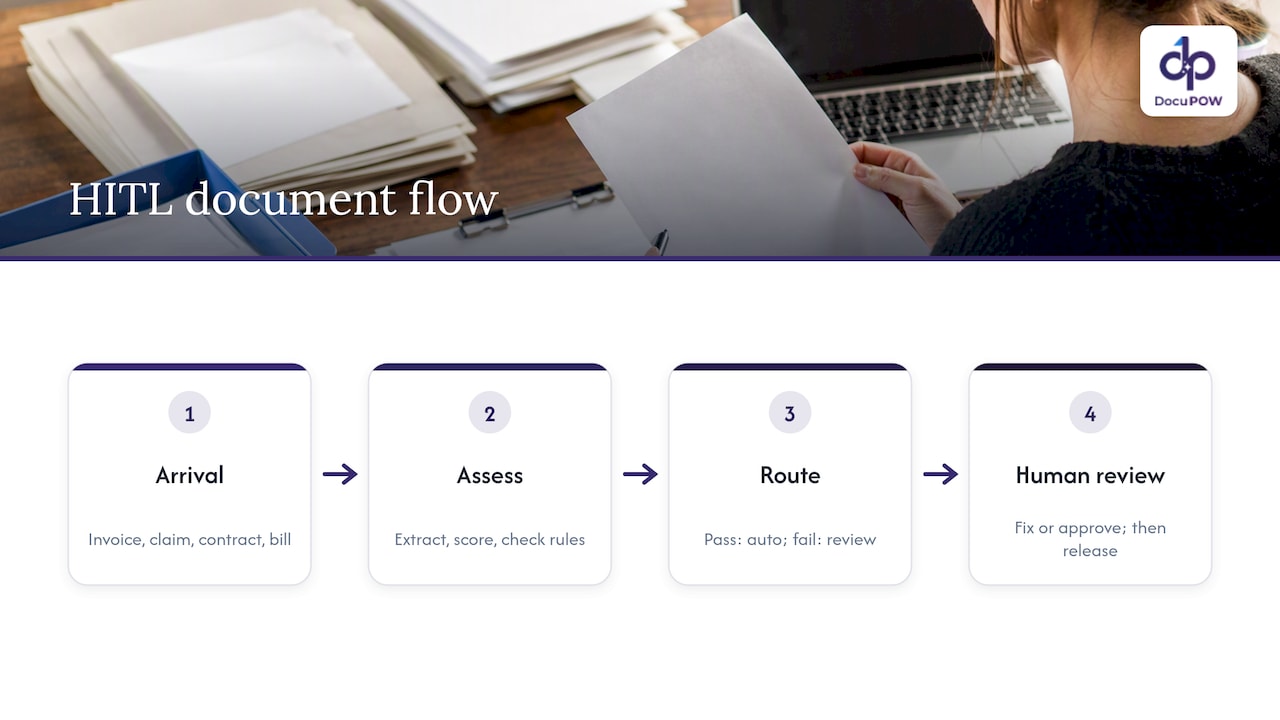
    In practice the checkpoint looks like this. An invoice, claim form, contract or bill of lading arrives. The system extracts fields, scores its own certainty for each one, and checks the values against rules (does the total equal the sum of the line items, does the PO number exist in your ERP). Anything that passes goes straight through. Anything that fails or scores low lands in a review queue, where a person looks at it, fixes it or approves it, and releases it.

    Human review branch in document processing flow

    Some vendors frame HITL as an admission that the AI is not good enough. That misreads it. The strongest systems process most documents with no human touch, and use people for the exceptions and for the decisions where a wrong value is expensive. The point is to put human attention where it changes the outcome.

    Why a human checkpoint still matters

    Two reasons stand out: accuracy on the long tail, and accountability.

    Accuracy on the long tail. Extraction models are very good on clean, common layouts. Trouble comes from the smudged scan, the handwritten annotation, the supplier who changes their invoice format, the contract with an unusual clause. The U.S. Government Accountability Office notes that AI outputs can be inaccurate and that people may over-rely on them, and that including human review in AI systems can mitigate those risks. The same report points to quality assurance testing and making outputs traceable to source documents as ways to prevent systematic error.

    Accountability. When extracted data drives a payment, a claim decision or a compliance filing, someone has to be able to show what was checked and by whom. One expert submission to the SEC describes well-designed oversight as turning residual blame into structured responsibility: the provider answers for provenance and logging, the deployer for threshold configuration and workflow integration, and the reviewer only for what they explicitly signed off. That division is a useful way to think about who owns what in your own deployment.

    How a HITL workflow runs, step by step

    The pattern is similar across platforms, and it is worth mapping before you buy or build anything.

    1. Ingest and classify. Documents arrive by email, upload, API or shared folder. The system identifies the type (invoice, purchase order, certificate of insurance, lease).
    2. Extract. Fields and tables are pulled out, each with a confidence score.
    3. Validate. Business rules run: totals reconcile, dates are plausible, vendor and PO numbers match records in your systems.
    4. Route. Items that clear both the confidence threshold and the rules go straight to the destination. The rest go to a review queue.
    5. Review. A person sees the document and the extracted values together, corrects what is wrong, and approves.
    6. Release and log. Approved data flows to the ERP, CRM or database. The system records the automated steps and the human ones.
    7. Learn. Corrections are analyzed to find which document types and fields cause the most trouble, and the process or prompts are adjusted.

    Cloud document AI tools use the same logic. For example, a walkthrough of Google’s Document AI human review feature describes checking confidence scores against configured thresholds and sending anything below the line to a review queue. The tuning knob is the same everywhere: a lower threshold means fewer reviews and more risk, a higher one means more reviews and more safety.

    Setting thresholds without guessing

    The most common mistake is picking one global confidence number, such as 90%, and leaving it. Different fields carry different costs when they are wrong.

    Field type Cost of an error Suggested approach
    Invoice total, bank account, tax ID High: wrong payment or fraud exposure Strict threshold, plus rule checks against PO or vendor master
    Invoice date, document number Medium: reconciliation noise Moderate threshold
    Free-text description, notes Low Loose threshold or sample-based review
    Contract clauses such as termination, liability, renewal High: legal exposure Always route to a reviewer, with the clause highlighted
    Patient or claimant identifiers High: privacy and compliance Strict threshold, restricted reviewer access

    These are working defaults, not standards. Start strict, measure how often reviewers change a value they were shown, and loosen thresholds only where reviewers almost never make a correction. If a field is corrected 1 time in 200, you are paying people to confirm what the system already got right. If it is corrected 1 time in 5, the problem is upstream: the extraction setup, the document quality or the rules.

    Sampling helps here. Even for auto-approved documents, pull a small random sample into review each week. It tells you whether the system is drifting, for instance after a major supplier changes its template.

    What the reviewer sees decides the speed

    Review screens are where most HITL projects quietly fail. A builder guide on AWS describes the principle bluntly: show a side-by-side view with the original document segment highlighted, because otherwise reviewers rely on memory or guess and become a slow second extraction system instead of a quality gate. The same guide stresses inline editing, which speeds up corrections and produces clean, labeled data you can use to improve the system.

    A good review screen has these traits:

    • Source highlighting. Click a value and the matching spot on the page lights up.
    • Reason for the flag. “Low confidence on total” or “vendor not found in master data” tells the reviewer where to look first.
    • Inline edit and one-key approve. No separate forms, no re-keying.
    • Field-level actions. Approving three fields and fixing one should be a single pass.
    • Context. Related documents (the PO, the contract) visible without leaving the screen.
    • Prioritization. Oldest, highest-value or deadline-bound items first.

    Routing and queues: avoiding the bottleneck

    A review queue is a small operations system and needs the same care as any other. Three habits keep it healthy.

    Route by skill, not just by volume. Invoice coding goes to accounts payable, contract exceptions to legal or contract managers, claims to adjusters. A generalist who has to guess at policy language is slow and unreliable.

    Set service levels. If a flagged invoice sits for five days, you lose early-payment discounts or trigger late fees. Track time in queue as a metric alongside accuracy.

    Escalate cleanly. Give reviewers a way to reject a document, ask for a second opinion, or send it back to the sender, with reasons recorded.

    Audit trail and governance

    HITL pays off in regulated work only if you can reconstruct what happened. At minimum, log for each document: the original file, the extracted values and confidence at each step, rules triggered, who reviewed it, what they changed, and when it was released. That record lets you answer an auditor, resolve a vendor dispute, or investigate a bad payment.

    For wider governance, the NIST AI Risk Management Framework is the usual U.S. reference. Its guidance, as summarized for this article, is that human oversight should not be bolted on as a stand-alone checklist: it belongs inside enterprise-wide risk management, with clear executive accountability for high-risk systems, continuous monitoring, and varied stakeholder input during design. (The link goes to NIST’s Japanese translation of AI RMF 1.0; the English original is published by NIST as AI 100-1.) In practical terms: name an owner for each automated process, review the exception rate on a schedule, and decide in advance what happens if accuracy drops.

    If your documents contain health, financial or personal data, involve your compliance or legal team when you define who can see what in the review queue. Reviewer access should follow the same least-privilege rules as any other system holding that data.

    Measuring whether HITL is working

    Track a handful of numbers monthly:

    • Straight-through rate: the share of documents that need no human touch. It should rise as you tune.
    • Correction rate per field: where the system is weakest.
    • Reviewer time per document: if this is high, the screen or the routing is the problem.
    • Queue age: how long items wait.
    • Escaped errors: mistakes found downstream after approval, from sampling or from complaints.

    Be wary of vendor claims about cost reduction. Figures like “up to 70%” circulate in marketing pages, but your results depend on document mix, quality and how you set thresholds. Measure your own baseline for a few weeks before you automate, so you can compare honestly.

    Our perspective: review should shrink, not stay

    At DocuPOW we think of human review as a feedback loop, not a permanent tax. Our platform extracts data without fixed templates, so a new layout from a supplier does not mean a developer has to build a new template before documents flow. That changes what reviewers do: they spend less time on routine layout failures and more on genuine judgment calls.

    Our perspective: review should shrink, not stay — overview diagram

    We also think review has to be built into the process, not placed after it. That is why our workflows combine multi-step orchestration with human audit review, so a flagged item pauses one step, gets resolved, and continues, instead of ending up in a spreadsheet someone emails around. And because document queries return answers with citations to the source, a reviewer or auditor can see where a value came from.

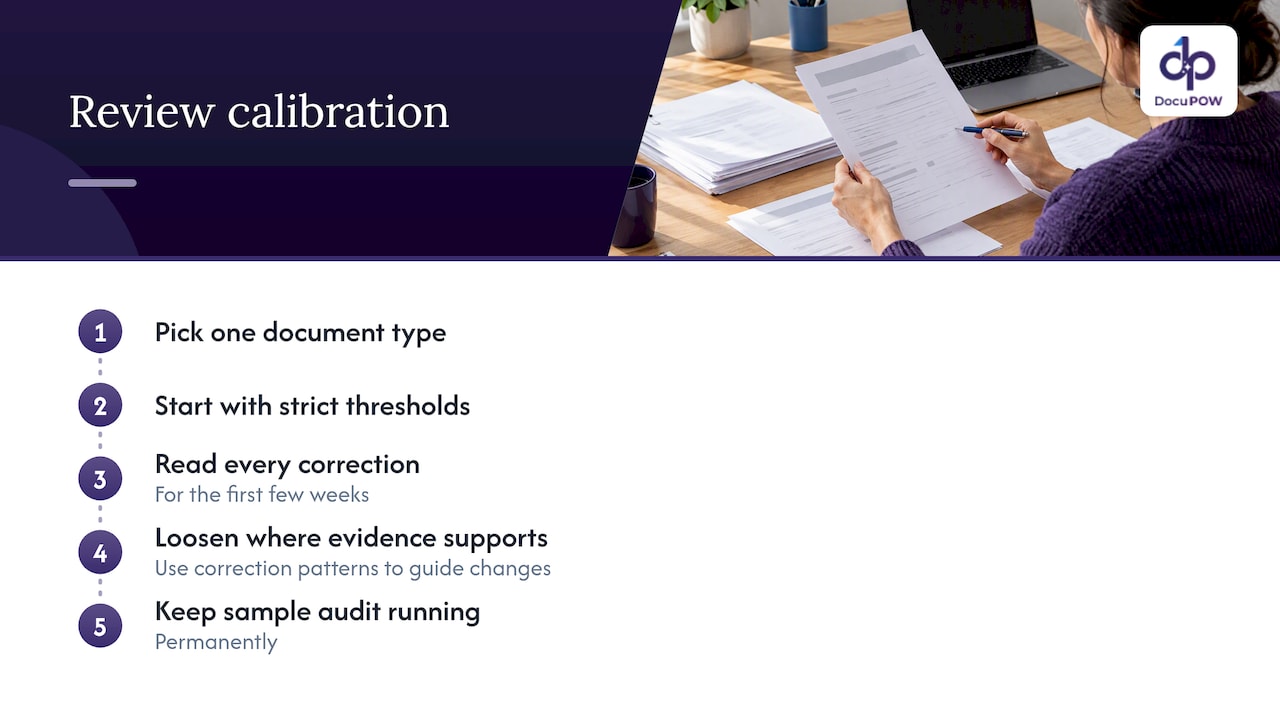
    Our advice to any team starting out: pick one document type, start with strict thresholds, and read every correction for the first few weeks. The pattern of corrections tells you more about your process than any benchmark. Then loosen the thresholds where the evidence supports it, and keep a sample audit running permanently.

    — Syed Naveed Abbas

    Choosing a HITL-ready platform

    Whether you build or buy, check for these capabilities:

    Question Why it matters
    Can thresholds be set per field and per document type? One global number wastes reviewer time or lets errors through
    Does the reviewer see the source highlighted next to the value? Prevents guesswork and speeds approval
    Does it work on unseen layouts without template building? Controls setup and maintenance when suppliers change formats
    Is every automated and human action logged? Supports audits and dispute resolution
    Can it write to your ERP or CRM through an API? Approved data has to land where work happens
    Can you export corrections and review statistics? Lets you find systemic problems
    Are encryption and access controls enterprise-grade? Review queues expose raw documents to people

    For background on the technology behind this, see our explainer on intelligent document processing for decision-makers, and for a view of the full path from file to finished process, how DocuPOW works. If your documents are forms, our guide to AI form processing for enterprise workflows covers the specifics.

    Where DocuPOW fits

    DocuPOW is an agent-based document automation platform with template-free extraction, multi-step workflow orchestration, human-in-the-loop audit review, real-time analytics and API integration with ERP and CRM systems. Teams in industries such as insurance use it to turn claim and policy paperwork into structured data with review where it counts.

    Published plans start at $99 per month for Starter and $499 per month for Professional, with Enterprise available on request. You can compare them on the DocuPOW pricing page, or look at the product overview first to see whether the workflow matches yours.

    A practical starting plan

    1. Pick one document type with real volume and a clear cost of errors, such as supplier invoices.
    2. Baseline it. Record current handling time, error rate and who touches each document.
    3. Define the rules that must always pass: totals, vendor matching, required fields.
    4. Set strict thresholds on high-impact fields and always-review rules for high-risk content.
    5. Train reviewers on the screen and on the escalation path, and agree on service levels.
    6. Run for four to six weeks and study corrections by field and by sender.
    7. Adjust thresholds and rules, add sampling of auto-approved items, then expand to the next document type.

    FAQ

    What does HITL stand for in document processing?

    HITL stands for human in the loop. It describes a workflow where automated extraction handles documents on its own until a result is uncertain or high-risk, at which point a person reviews and approves it. The reviewer’s decision is recorded, so the process stays auditable.

    Does HITL mean the AI is not accurate enough?

    No. Even highly accurate systems meet unusual scans, new layouts and ambiguous values, and some decisions carry enough financial or legal weight that a person should sign off. HITL lets you automate the bulk of documents while keeping human judgment where an error would cost the most.

    How do I decide which documents go to a reviewer?

    Combine three signals: the model’s confidence for each field, business rules such as totals matching or vendors existing in your master data, and the risk of the document type. Start with strict settings and loosen them only where reviewers rarely change what they are shown.

    What should a review screen include?

    Show the extracted values next to the original document with the relevant region highlighted, let reviewers edit inline, and explain why the item was flagged. That avoids forcing reviewers to hunt through pages, and it creates clean corrections you can use to improve the process.

    How is HITL different from simple manual data entry?

    In manual entry, a person types everything. In HITL, software does the extraction and a person handles only the exceptions and the high-stakes checks. The workload shifts from keying data to making judgments, and the volume that needs a person falls as the process is tuned.

    Sources

  • Zero Trust Document Access: A Practical Guide for US Teams

    Zero Trust Document Access: A Practical Guide for US Teams

    Zero trust document access means no one gets a file because of where they sit on the network. Every request is checked against identity, device health and the sensitivity of the document, and it is checked again for each session. The control moves from the folder or network to the document itself. This guide covers what that takes, where document AI fits, and how to think about data residency.

    DocuPOW
    Bring Document Intelligence Into Your Workflow
    DocuPOW uses AI agents to extract data from documents without rigid templates, helping teams reduce manual entry and improve operational efficiency.

    Request a demo

    TL;DR

    • Zero trust is a design approach, not a product. NIST SP 800-207 defines it around protecting resources, not network segments.
    • Documents need persistent labels (sensitivity, type) so policy can follow the file wherever it goes.
    • Access should be decided per session, with the ability to cut off view, download or print after a file is opened.
    • Audit logs must record who, what, when, where, how and the allow/deny decision, not just a connection.
    • Document AI is both a risk and a lever: it touches your most sensitive files, but it can also automate the classification that zero trust depends on.

    Table of Contents

    What zero trust means for a document

    Most zero trust content is about networks and logins. A document is different because it moves. It gets emailed, downloaded, attached to a ticket, dropped into a shared drive, and fed to software that extracts its contents. A folder permission protects none of that once the file leaves.

    NIST’s Zero Trust Architecture publication frames the shift: location on the network is no longer a basis for trust, and the focus is on protecting resources. In the same document, authentication and authorization of both the user and the device happen before a session to a resource is established. For documents, that translates into four questions asked on every request:

    1. Who is asking, and how strongly have they proven it?
    2. What device are they on, and is it managed and compliant?
    3. How sensitive is this specific file?
    4. What is this person allowed to do with it: view, edit, download, print, share?

    If any answer changes mid-session, the decision should change with it.

    The data pillar: where documents live in the model

    The CISA Zero Trust Maturity Model organizes zero trust into pillars. Documents sit in the data pillar. The NSA’s cybersecurity information sheet on the data pillar gives recommendations for maturing data security and enforcing access to data at rest and in transit, so that only authorized parties get in.

    The practical capabilities that follow from that guidance:

    • Discovery and classification. You cannot protect what you have not labeled.
    • Encryption of data at rest and in transit.
    • Granular rights management, such as restricting view, print and download.
    • Continuous monitoring of how files are actually used.

    The federal baseline is relevant even for private companies. If you handle controlled unclassified information for a federal customer, NIST SP 800-171 governs how that information is protected on nonfederal systems. Your contracts will tell you whether it applies to you.

    Start with classification, because policy depends on it

    Practitioners consistently call automated classification the hardest and most important step. An access policy that says “only finance can see invoices with bank details” does nothing if nobody knows which files are invoices with bank details.

    The common failure is trying to tag millions of legacy files by hand. The NSA data pillar guidance points toward automated discovery and classification, starting with the highest-value, highest-risk datasets. A sensible order:

    1. Pick the document families where a leak would hurt most: contracts, payroll and HR records, patient or claims files, bank details on vendor paperwork, export-controlled drawings.
    2. Define a small label set. Three to five levels beat fifteen that nobody applies consistently.
    3. Classify automatically on ingestion, and route low-confidence results to a person.
    4. Store the label as metadata that travels with the file, not as a folder name.

    We go deeper on how classification works in our practical guide to document classification.

    Per-session decisions, not one login

    A typical weakness is protecting the front door and nothing else. Once someone authenticates, they keep access until the session expires.

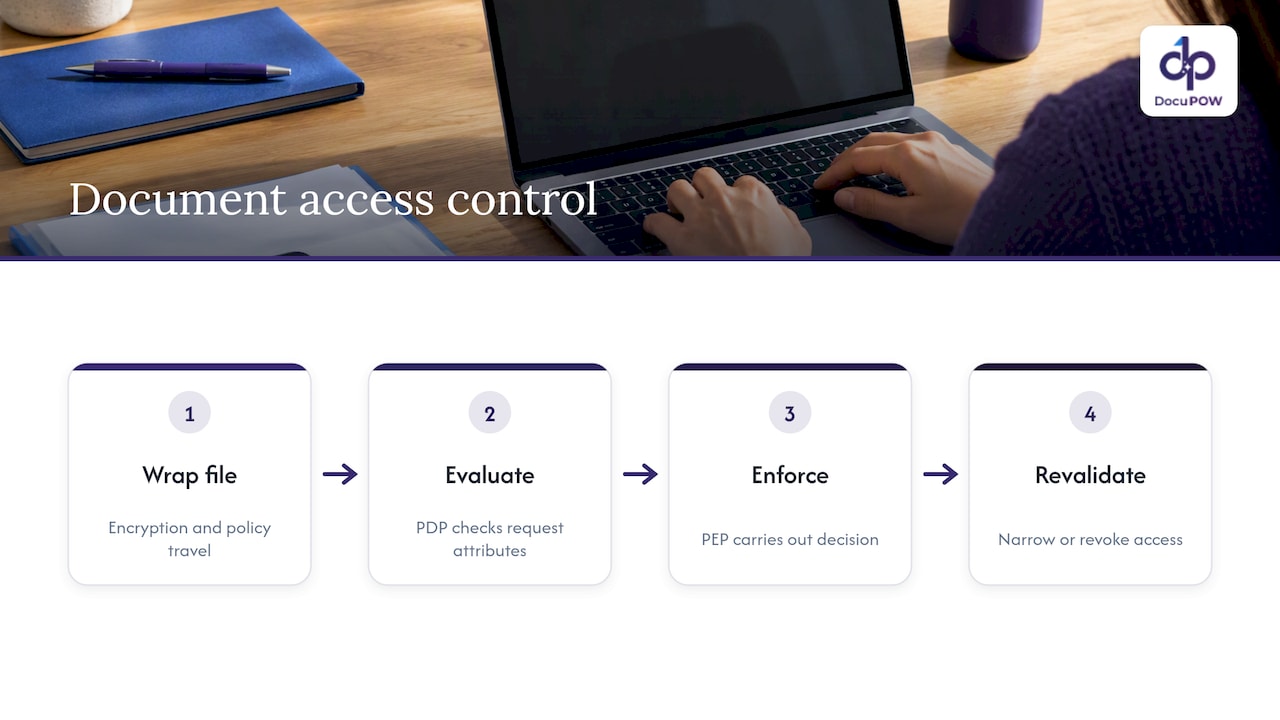
    Zero trust architectures split the job in two. A policy decision point evaluates the request, and a policy enforcement point carries out the decision. The Kiteworks overview of the Trusted Data Format describes this data-centric approach: each file is wrapped with encryption and policy so protection travels with it, and each access attempt is re-validated against attributes. The practical payoff is revocation. If a contractor’s engagement ends, or a laptop falls out of compliance, access can be removed or narrowed, for example by blocking download, even for a file that is already open.

    Policy decision and enforcement for protected files

    This is also what makes sharing safer, not slower. With attribute-based access control, a document can go to a partner or contractor because the policy goes with it. Security teams often assume zero trust will hurt productivity. Done at the document level, it can remove the reason to lock everything down.

    Phishing-resistant MFA at the application layer

    The CISA Zero Trust Architecture implementation report covers how federal agencies are progressing on their plans. Its themes are a useful checklist for any organization: strong authentication, enforcing it at the application layer, and not leaning on the network to do the work. For document systems, that means the repository, the viewer, and any AI tool reading the files each enforce their own authentication rather than trusting a shared network.

    Audit logs: the part auditors actually read

    Saying “we log access” is not enough. A connection log that shows an IP touched a server will not satisfy a HIPAA, CMMC or FedRAMP assessor. A log that supports zero trust should capture:

    Field Why it matters
    User identity Ties the action to a person or service account
    Specific file or record Shows exactly what was touched
    Timestamp Builds the timeline
    Location and IP Flags impossible travel and unusual sources
    Device status (managed or unmanaged) Shows the posture at the time
    Policy decision (allow or deny) Proves the control actually fired

    The decision outcome is the field most teams miss, and it is the one that demonstrates the control is working. Logs should also be tamper-resistant. Done well, this replaces the scramble before an examination with continuous evidence. See our guide to document audit trails for compliance teams for how this maps to NIST and SEC expectations.

    Where document AI changes the picture

    Document AI creates a new access path. The system opens files, reads them, extracts fields, and may send content to a model. If you apply zero trust to people but not to this pipeline, you have left a hole.

    Treat the AI platform as a non-person entity with its own identity and least-privilege rights. Ask these questions of any vendor, including us:

    • Isolation. Is your data separated from other customers’ data?
    • Encryption. Is it encrypted in transit and at rest?
    • Model use. Are your documents used to train models for others? Get the answer in writing.
    • Human review. Can a person audit and approve sensitive extractions before they reach downstream systems?
    • Traceability. When the system answers a question about a document, can you see which source it came from?
    • Integration scope. Do API credentials to your ERP or CRM follow least privilege?

    Our seven NIST-aligned controls for secure AI processing page goes through these in more detail, and a broader overview sits in our document security guide.

    Data residency for document AI

    Residency questions come up fast once documents go to a cloud AI service. Where are files stored? Where is inference run? Where do logs, caches and backups live? And who are the subprocessors?

    There is no single US residency law that covers all documents. What applies depends on your sector, your contracts and your data. Federal contractors may be bound by NIST SP 800-171, which requires FIPS-validated cryptography to protect CUI. Healthcare organizations should confirm requirements with their compliance officer and counsel. If you also handle personal data of people abroad, other jurisdictions’ transfer rules may apply, and your counsel should decide that, not a vendor brochure.

    One analysis of AI data residency notes that major cloud AI platforms now offer region-pinned inference, zero-retention configurations and written residency commitments. It also describes a more controlled tier: dedicated single-tenant infrastructure in a chosen jurisdiction, with the customer holding the encryption keys. Use that as a vocabulary for your vendor questionnaire.

    A residency checklist for any document AI vendor:

    1. Where is data stored at rest, and can you pin the region?
    2. Where does AI inference run?
    3. Are prompts, outputs and documents retained after processing, and for how long?
    4. Where are logs, caches and backups kept?
    5. Who are the subprocessors, and in which countries do they operate?
    6. Who holds the encryption keys?
    7. What happens to your data at contract end?

    For DocuPOW’s specifics on hosting and controls, check our security page and ask us directly during a demo. Put the answers in your contract, not just in a sales call.

    Perspective: security belongs inside the workflow

    We build agent-based document automation, so we see the same pattern in many organizations. Security is bolted on at the repository, while documents are copied into email, spreadsheets and ERP fields by hand. Every manual copy is an access decision nobody made and nobody logged.

    Document copies branching into systems without audit trail

    Our view is that automation done properly shrinks that surface. When an agent extracts data from an invoice, contract or claim without a template, the sensitive content moves through one governed pipeline rather than through ten inboxes. A human-in-the-loop audit step lets a reviewer confirm what the system read before anything posts to a downstream system. Source citations on document queries mean an answer can be traced to the page it came from.

    We also hold a firm opinion on the buying side: zero trust is a design philosophy, not a feature a vendor can sell you in a box. Be skeptical of anyone who claims otherwise. What a vendor can do is support your design: encrypted infrastructure, clear identity and permission boundaries, reviewable outputs and logs you can export. Judge us on those, and make us prove them.

    — Syed Naveed Abbas

    A rollout plan you can start this quarter

    You do not need to redesign everything at once. The NSA guidance points to starting with high-risk data, and that works.

    1. Inventory (weeks 1 to 2). List where your riskiest document types live: repositories, inboxes, shared drives, AI tools.
    2. Label (weeks 2 to 6). Define a small sensitivity scheme and automate classification on the highest-risk families first.
    3. Tighten access (weeks 4 to 8). Move from folder-level permissions to file-level rules based on label, role and device. Require phishing-resistant MFA.
    4. Add per-session checks. Make sure you can revoke or restrict access mid-session.
    5. Fix the logs. Capture identity, file, time, location, device status and decision outcome. Send them to your monitoring tools.
    6. Bring AI into scope. Give automation tools their own identities, least-privilege API access and human review for sensitive outputs.
    7. Review quarterly. Check denied requests, stale permissions and classification accuracy.

    The timelines are our suggested pacing, not a standard. Adjust them to your team’s size and your regulatory deadlines.

    Where DocuPOW fits

    If your documents are mostly PDFs, forms and scans that people key into other systems, the fastest way to cut exposure is to stop the manual handling. DocuPOW extracts data from any document type without templates, orchestrates multi-step workflows, offers human-in-the-loop review, and connects to ERP and CRM systems through an API. Plans start at $99 per month for Starter and $499 per month for Professional, and Enterprise is priced on request. See the pricing page or explore the platform.

    FAQ

    Is zero trust the same as least privilege?

    No, but they work together. Least privilege limits each user or system to the access it needs. Zero trust adds continuous verification of identity, device and context on each request, so even a permitted user can be denied when conditions change.

    Can I buy zero trust document access as one product?

    No. CISA and DoD guidance treat zero trust as an approach spanning identity, devices, networks, applications and data, not a single purchase. You assemble it from controls such as strong authentication, classification, encryption, policy enforcement and logging, and tools can support each part.

    Does zero trust slow down document sharing?

    It does not have to. When the policy travels with the file, you can share with partners and contractors under defined rights, such as view-only, and revoke access later. The friction you feel usually comes from coarse folder-level rules, not from zero trust itself.

    What should I ask a document AI vendor about data residency?

    Ask where files are stored, where inference runs, what is retained and for how long, where logs and backups live, who the subprocessors are, and who holds the encryption keys. Get the answers in the contract, and have your compliance officer or counsel confirm that they meet your sector’s rules.

    Where should a small team start?

    With classification of your highest-risk documents, then phishing-resistant MFA and file-level permissions for those documents. Fixing audit log quality comes next, because it shows whether the controls are working.

    Sources

  • Sales Order Data Extraction: From PDFs and Emails to Your ERP

    Sales Order Data Extraction: From PDFs and Emails to Your ERP

    Sales order data extraction means pulling the fields of a customer order (customer, ship-to, part numbers, quantities, prices, dates, terms) out of the PDFs, spreadsheets and emails it arrives in, and delivering them as structured data your ERP or CRM can use. Done well, nobody re-keys anything, and people look only at the orders the system is unsure about. Done badly, you automate your errors and ship them faster.

    This guide covers what to extract, how the main approaches differ, how to roll the project out without stalling, and where packing slips, order acknowledgments and invoice matching fit.

    DocuPOW
    docupow.ai
    Move Sales Orders Into Your ERP
    DocuPOW uses context-aware AI agents to extract data from varied documents, helping manufacturers reduce manual entry and streamline order workflows.

    Request a demo

    TL;DR

    • Sales order extraction turns unstructured customer orders into ERP-ready records. The goal is a single pipeline for every channel, not one workflow per customer.
    • Template-based tools break when a customer changes a layout. Template-free, agent-based extraction reads each document in context and handles layouts it has never seen.
    • Clean your master data (product codes, price tables, ship-to addresses) before you switch automation on. Automation exposes bad data quickly.
    • Start with the 80% of routine orders, route exceptions to a human reviewer, then widen the rules.
    • The same approach covers purchase orders, packing slips, order acknowledgments and the documents behind invoice matching.

    Table of Contents

    What sales order data extraction actually covers

    Most people searching this phrase mean one of two things. Some want to export sales orders out of an ERP such as SAP for reporting. Others want to get orders into the ERP from the messy documents customers send. They are opposite directions, and the tools differ.

    Outbound extraction (ERP to report). In SAP, for example, VA01 creates a sales order, VA03 displays it, and VA05 lists orders by criteria such as sales organization, distribution channel and division. The header and item data sit in tables like VBAK and VBAP, and can be pulled through DataSources, BAPIs or ODP-based models, as SAP’s documentation on the sales order object describes. That is a reporting problem, and your ERP team owns it.

    Inbound extraction (document to ERP). This is where the hours go. A customer emails a PDF purchase order. Another sends an Excel sheet. A distributor attaches a scanned fax. Someone in order entry reads each one and types it into the ERP. This article is mostly about that direction.

    What sales order data extraction actually covers — overview diagram

    The fields worth capturing

    A sales order is more than a line-item table. Missing the surrounding fields is what sends orders back to a human.

    Header fields

    • Customer name and account number
    • Customer PO number and PO date
    • Bill-to and ship-to addresses
    • Requested delivery date and shipping method
    • Payment terms and currency
    • Tax or exemption references

    Line-item fields

    • Customer part number and your internal SKU
    • Description and unit of measure
    • Quantity and unit price
    • Line-level delivery dates
    • Notes, revision levels or special instructions

    Fields people forget

    • Handwritten or stamped notes on the page
    • Terms and conditions attached to the order
    • Partial-shipment permissions
    • Contract or quote references that should match pricing

    The last group is where templates fail. A fixed zone on the page cannot know that a margin note changes the delivery date.

    Four ways to extract order data, compared

    Approach Setup effort Handles new layouts Where it breaks
    Manual keying None Yes (a person reads it) Slow, error-prone, does not scale
    Template-based OCR High, per customer layout No A customer updates their PO format and the template fails
    Rules and email parsers Medium Partly Free-form PDFs, scans, mixed languages
    Agent-based, template-free extraction Low Yes, including unseen layouts Needs clean master data and clear exception rules

    Template approaches look cheap until you count maintenance. With 200 customers you may have 200 layouts, and each changes without warning. Our own approach at DocuPOW is template-free: autonomous agents read the document for context rather than matching positions on a page, so a new customer’s order does not need a setup project first.

    Why manual order entry costs more than the keystrokes

    Order entry kicks off a chain of downstream work: credit checks, inventory allocation, scheduling, shipping, billing. A Forbes Technology Council piece on manual sales order workflows makes the point that each touchpoint is a chance for inefficiency and error, especially when people carry the work.

    In practice that looks like this:

    1. A quantity is mistyped, so the wrong amount is allocated.
    2. A ship-to address is picked from the wrong customer record, so the order goes to the wrong dock.
    3. A price is keyed from memory rather than the agreed price list, and the invoice gets disputed.
    4. A rush date in an email body is missed, and the customer calls.

    None of these is dramatic. Together they eat margin and goodwill, and they are hard to see because they surface weeks later in disputes and credits.

    One pipeline for every channel

    Orders do not come from one place. Email attachments, EDI-adjacent portals, spreadsheets, scanned faxes and photos all show up in the same inbox. A common mistake is to build a separate workflow per channel or per large customer. Then you have silos again, with different data quality and no single view of order-to-cash.

    The better design is to define one internal order model, usually what your ERP expects, and map every incoming format to it. You do not adapt your system to each customer’s preferred format. You adapt the extraction layer.

    In practice:

    • Ingest from email, upload, API and shared folders into the same queue.
    • Classify the document (purchase order, quote acceptance, order acknowledgment, packing slip).
    • Extract fields into the same schema regardless of source.
    • Validate against ERP master data.
    • Post the order, or route it to review.

    Fix your master data first

    This is the step most projects skip. Automation does not enforce company rules by magic. It exposes whatever was already wrong. If your product codes are duplicated, your customer price tables are stale, or one customer has five ship-to variants of the same address, a human order-entry clerk quietly compensates. An automated pipeline does not. It passes the error through at machine speed.

    Before go-live, spend a week on this checklist:

    • Deduplicate customer and ship-to records.
    • Build a cross-reference of customer part numbers to your SKUs.
    • Confirm that price lists and contract pricing are current and accessible by API.
    • Standardize units of measure (each, case, pallet).
    • Decide which fields are mandatory for an order to post.

    This is dull work and it decides whether the project succeeds.

    Roll out progressively, not all at once

    Planning to automate every order scenario on day one is how projects stall. Split shipments, negotiated price tiers and custom configurations all create edge cases, and building logic for each before you have seen real volume creates complexity and maintenance cost you will not recover.

    A sturdier sequence:

    1. Pick the routine majority. Identify the standard, high-volume orders from your top customers, which for many companies is the large share of volume. Automate those first.
    2. Set confidence thresholds. Orders where every field is extracted with high confidence and validates against the ERP post automatically. Anything below goes to review.
    3. Review exceptions. A person sees the original document beside the extracted fields, corrects what is wrong and approves. Their corrections become the evidence for improving rules.
    4. Expand. Add the next layer of cases, such as split shipments or blanket orders, only after the first layer runs cleanly.
    5. Measure. Track touchless rate, exception rate, time from receipt to posted order and downstream credit memos.

    Handle negotiated exceptions without friction

    Sales and operations often see automation differently. Salespeople worry that a rigid system will punish the custom terms they negotiated for valuable accounts. Operations wants discipline and consistency. Both are right. The system should flag a negotiated exception, such as a price that differs from the list or an unusual delivery term, for human review instead of rejecting the order. The account manager confirms the exception, and the order moves on.

    Where packing slips, acknowledgments and invoices fit

    The searches around sales order extraction tend to branch into neighboring documents. The same extraction engine handles them, but the logic after extraction differs.

    Packing slips and packing lists. These carry shipped quantities, lot or serial numbers, carton counts and weights. Extract them to confirm receipt against the purchase order, update inventory and trigger the invoice match. The challenge is variability: every supplier formats them differently, and many arrive as scans. This is where template-free reading earns its place.

    Order acknowledgments. A supplier’s acknowledgment confirms price, quantity and promised date, and often quietly changes one of them. Extract the acknowledgment and compare it with your purchase order. Flag differences automatically so a buyer resolves them before the goods are late.

    Supplier invoice matching. In a three-way match, the purchase order, the receiving document (often the packing slip) and the invoice must agree before payment. Extraction makes each document machine-readable. A workflow then compares quantities, prices and totals within tolerances you set, and sends mismatches to a person. For more on this side, see our guide to financial data extraction and our overview of procure-to-pay automation.

    Invoice accruals. When goods are received but the invoice has not arrived, finance needs an accrual. If receipts and POs are already extracted into structured data, the accrual list can be generated from them rather than assembled in a spreadsheet at month-end.

    Quote to cash. Quotes, order confirmations, shipping documents and invoices are one chain. Extracting each into the same data model gives you a single view of where an order stands, which is hard to get when each document lives in a different system.

    Where packing slips, acknowledgments and invoices fit — overview diagram

    What to look for in a tool

    Whether you build or buy, test these things on your own documents, not a vendor’s demo set:

    • Unseen layouts. Feed it orders from a customer it has never processed. Does accuracy hold without setup?
    • Line-item tables. Multi-page tables, merged cells and wrapped descriptions are the usual failure point.
    • Validation against your ERP. Extraction alone is half the job. The system should check part numbers, prices and customers against your data.
    • Human review that is fast. The reviewer should see the source page and the extracted value side by side, with the reason an order was flagged.
    • Audit trail. You should be able to show who changed what and when, which matters for compliance.
    • Integration. API access to your ERP or CRM, and developer tools for custom steps.
    • Security. Encryption and enterprise-grade controls, since orders contain pricing and customer data.

    Our perspective

    We built DocuPOW because we kept seeing the same pattern: teams buy extraction software, then spend their time maintaining templates and fixing the documents that do not fit. The extraction was never the hard part. The hard part is everything around it.

    We think the right unit of automation is the process, not the page. An order arrives, an agent reads it in context, checks it against your systems, flags what looks wrong, asks a person only when needed and posts the result. That is why we pair template-free extraction with multi-step workflows and human-in-the-loop audit review, instead of selling extraction alone.

    We also think teams should resist the urge to automate everything on day one. Start with the orders you see every day, clean the data they rely on, and let exceptions teach you what to build next. Automation that earns trust slowly lasts longer than automation that promises full autonomy and gets switched off after a bad week.

    — Syed Naveed Abbas

    How DocuPOW handles sales orders

    DocuPOW reads purchase orders, order acknowledgments, packing slips and invoices without templates, orchestrates the steps that follow, and sends reviewers only the documents that need a human. You can query documents conversationally and get answers with source citations, and connect to ERP and CRM systems through the API.

    Plans are published on our pricing page: Starter is $99 per month and Professional is $499 per month. Enterprise is priced on request. If you want to see how it works before choosing, start with how the platform works, or look at our pages for retail and wholesale and supply chain teams. Manufacturers can also read our guide to automating manufacturing document processing.

    A 30-day starting plan

    Week 1: Baseline. Pull a month of orders. Count volume by customer and channel, and time how long an order takes from receipt to posting. Note the five most common errors.

    Week 2: Data cleanup. Work through the master data checklist above. Build the part-number cross-reference for your top customers.

    Week 3: Pilot. Run your top customers’ orders through extraction in parallel with manual entry. Compare field by field. Set your confidence thresholds from what you see.

    Week 4: Go live on the routine majority. Post high-confidence orders automatically, route the rest to review, and hold a short weekly meeting with sales and operations to look at exceptions together.

    FAQ

    What is the difference between OCR and sales order data extraction?

    OCR converts an image of text into characters. Extraction goes further: it identifies which text is the PO number, which is a line item and which is a delivery date, and returns structured fields. Modern extraction also validates those fields against your ERP data.

    How accurate does extraction need to be before I turn on automation?

    There is no universal number, so set it by risk. Let orders post automatically only when every required field is extracted with high confidence and passes validation, and send everything else to review. Measure the exception rate and downstream credit memos for a few weeks, then adjust the thresholds.

    Can the same system process packing slips and purchase orders?

    Yes. The extraction layer reads any document type, and the workflow after it differs. A purchase order creates a sales order, while a packing slip confirms receipt and feeds the invoice match.

    Do I need to replace my ERP?

    No. Extraction sits in front of your ERP and sends clean, validated data into it through an API or integration. Your ERP stays the system of record.

    Sources

  • Document Approval Workflow: Design, Steps and Controls

    Document Approval Workflow: Design, Steps and Controls

    A document approval workflow is the defined path a document takes from draft to approved, released and auditable: who reviews it, who has authority to approve it, what happens when changes are requested, and where the final version and its evidence live. The workflows that work share three traits. Each gate has one named owner. Each gate has a time limit. Every decision leaves a record you can reconstruct later. The rest of this guide shows how to build that, and where automation pays off most.

    DocuPOW
    Make Document Workflows More Efficient
    DocuPOW uses context-aware AI to extract data from documents, helping teams reduce manual entry and improve workflow accuracy.

    Request a Free Demo

    TL;DR

    • Route documents through fixed stages (draft, review, revision, authorization, storage) and give each approval gate one named owner with explicit signing authority.
    • Set a service level for every gate, such as 1 to 2 business days, and use automatic escalation instead of someone watching an inbox.
    • Design the evidence first: the decision, the approver, the timestamp and the exact version reviewed should be captured by the workflow itself, not rebuilt before an audit.
    • Validate the document’s data before it reaches a human approver, so reviewers decide on clean information instead of hunting for typos.
    • Connect the workflow to the ERP, CRM or document system your team already uses, or you will end up with a shadow process.

    Table of Contents

    What a document approval workflow actually is

    Strip away the software and an approval workflow answers four questions about every document:

    1. Who must look at it, and in what order?
    2. Who is allowed to say yes?
    3. What happens on a no or a “change this”?
    4. Where does the approved version live, and what proves how it got there?

    Guidance from PandaDoc describes an effective workflow as a structured, automated process that moves documents through predetermined stages: drafting, review, revision, authorization and storage. The aim is consistency, regulatory compliance and auditability. The same guidance says organizations that replace email-based routing with automated routing report more transparency, faster cycle times and fewer compliance risks from lack of oversight.

    That last point is the real dividing line. A manual process lives in inboxes. A designed process lives in a system that knows the state of every document at every moment.

    The stages, and what each one needs

    Most document approval processes, whether for a purchase order, a contract, a policy or a supplier packet, follow the same five stages. What differs is the rules attached to each.

    Stage What happens What to define up front
    Draft The author prepares or receives the document Required fields, template or source, naming and version rules
    Review Subject experts check content Who reviews, in parallel or in sequence, and by when
    Revision Comments are resolved Who owns the changes, and how a new version restarts review
    Authorization An approver signs off Signing authority, thresholds, delegation rules
    Storage The approved version is filed Where it lives, retention period, link to the parent record

    Review versus approval

    A reviewer improves a document. An approver accepts responsibility for it. Mixing the two is a common reason workflows stall: five people “review” a contract, and nobody knows who can actually say it is final. Write down which gates are advisory and which are binding.

    Sequential or parallel routing

    Sequential routing suits cases where each step depends on the one before it, such as finance approving only after legal. Parallel routing suits independent checks, such as security and legal reviewing a vendor agreement at the same time. Parallel is faster, but only when the reviewers do not need to see each other’s changes. If one reviewer’s edit can invalidate another’s sign-off, route in sequence or restart the parallel round after any change.

    Comparison of sequential and parallel approval routing

    Conditional rules

    Good workflows do not send every document through every gate. A $400 purchase should not need the same chain as a $400,000 one. Define thresholds (amount, document type, risk category, region) that add or remove approvers. Keep them in a table the business can read, not buried in someone’s head.

    Four rules that keep approvals moving

    1. One gate, one owner

    The “shared responsibility” approach, where a group owns a gate, tends to produce delays because everyone assumes someone else will act. Moxo’s compliance automation guide recommends rotating the role or authority rather than the responsibility, so that every gate has one, and only one, named owner with explicit signing authority. When that person is out, a delegate inherits the authority by rule, not by a hallway request.

    2. Put a clock on every gate

    The same guide suggests committing to specific service levels, for example 1 to 2 business days for gates like Legal or Security, with automated escalation when a task ages past the threshold. Escalation should be boring and predictable: a reminder at the halfway point, a notice to the owner’s manager at the limit, a reassignment to the delegate after that.

    Track two numbers to improve the process over time: cycle time (submission to final approval) and bottleneck frequency (which gate holds documents longest). The slowest gate is almost never the one people complain about.

    3. Make rejection a first-class path

    Most designs describe the happy path in detail and treat rejection as an exception. In practice, a large share of documents come back for changes. Define what a rejection must include (a reason code and a comment), who receives it, and whether the resubmission restarts the full chain or only the gate that rejected it.

    4. Keep the work where people already are

    Compliance automation specialists note that workflows succeed when they sync with the systems teams already use, such as CRMs and document management systems. This prevents shadow processes and lets metadata attach automatically to the parent account or engagement (Moxo). If approvers must log into a separate tool and re-key what they already have in your ERP, they will approve by email instead, and your audit trail has a hole in it.

    Validation rules: fix the data before a human sees it

    Most approval delays are not about judgment. They are about a reviewer finding that the invoice total does not match the purchase order, the contract date is missing, or the supplier’s tax ID has a digit too few. Each of those sends the document back to the start.

    Document validation rules catch these before routing. Typical examples:

    • Completeness: every required field is present (vendor name, amount, currency, effective date, signatory).
    • Format: dates, tax IDs, IBANs and PO numbers match the expected pattern.
    • Cross-checks: invoice totals equal line items plus tax; the PO number exists and has budget remaining; the vendor is on the approved list.
    • Thresholds: amounts above a limit trigger an extra approver rather than a rejection.
    • Consistency across documents: the same entity name and address appear in the contract, the W-9 and the invoice.

    Validating in real time, at the moment a document arrives, means the submitter fixes problems while the context is fresh. It also means the approver’s queue contains only documents that are ready to decide.

    The obstacle is that validation needs structured data, and most approval inputs are PDFs, scans and emailed attachments. That is where extraction comes in.

    Where AI extraction fits in the workflow

    Traditional capture tools rely on templates: you configure each vendor’s layout, and the setup breaks when the layout changes. That works for a handful of suppliers and falls apart for a manufacturer with thousands.

    We built DocuPOW around a different approach. Autonomous agents read the document in context and extract the data without a fixed template, so a layout the system has never seen still yields usable fields. Those fields feed validation rules, then routing, then the approver’s screen, with the source document alongside. Our platform overview and the how it works page show the sequence from raw document to finished process.

    Two features matter specifically for approvals:

    • Human-in-the-loop review. When extraction confidence is low or a validation rule fails, the document goes to a person for audit review instead of silently passing through. The human step is a designed gate, not an afterthought.
    • Conversational querying with source citations. An approver can ask a question about a document or a set of documents and see which passage the answer came from, which makes the check faster and the reasoning visible.

    If you are deciding how much to automate, our overview of document workflow automation covers the building blocks in more detail.

    Build the evidence trail before you build the flow

    This is the step teams most often skip, and the one they regret.

    Process Street’s guidance on compliance as proof of control argues that approval should be treated as a data-collection phase, not an end state. Define the evidence artifact first. A timestamp and a signature are the minimum. A stronger record also captures the specific input that was reviewed, any exception notes and the owner of any remediation. Teams that do this move from preparing for audits after the fact to having continuous, built-in proof.

    Ordered approval record linking decisions to evidence

    What regulators and frameworks expect

    If you work in a regulated area, the expectations are concrete. For FDA-regulated records, 21 CFR Part 11 requires, for closed systems, secure, computer-generated, time-stamped audit trails that independently record actions that create, modify or delete electronic records. Changes must not obscure earlier entries, and the audit trail must be kept as long as the records themselves and be available for agency review and copying. Part 11 applies to records under FDA predicate rules, so confirm with your quality or regulatory lead whether it covers your documents.

    More broadly, security teams use NIST SP 800-53 as a reference for access control and audit accountability. In practice that means your workflow should prove that only authorized people took an action and let you reconstruct who did what, and when, for every decision.

    The practical consequence: approval evidence cannot sit in email threads or a shared folder of PDFs. The audit trail has to be inseparable from the workflow record, with submissions, reviews and changes tracked in time order. Our guide to document audit trails for compliance teams goes deeper on NIST and SEC expectations, and the audit preparation checklist for accounting teams turns it into a timeline.

    A worked example: supplier contract approval

    Here is how the pieces combine for a manufacturer onboarding a new supplier. This is an illustrative design, not a description of a specific customer.

    1. Intake. The supplier’s agreement, W-9 and insurance certificate arrive as PDFs from procurement.
    2. Extraction. The data is pulled without templates: legal entity name, tax ID, payment terms, liability cap, insurance expiry.
    3. Validation. The system checks that the entity name matches across all three documents, that insurance has not expired, and that payment terms fall within policy.
    4. Conditional routing. Standard terms go to the procurement manager. A liability cap above the policy limit adds legal as a gate with a 2 business day service level.
    5. Exceptions. A mismatched tax ID goes to a human reviewer with the source pages highlighted, not to the approver.
    6. Authorization. The named approver signs off. The system records the decision, the signer, the timestamp and the version reviewed.
    7. Storage and sync. The approved set is filed and key fields write back to the ERP through the API, so the vendor master record updates without re-keying.

    Notice what the approver never does: read through scans looking for inconsistencies. They decide.

    Our perspective

    We see the same pattern across document-heavy teams. Companies invest in routing software and still stall, because the bottleneck sits upstream: the data inside the document is trapped in a file nobody can validate quickly. Once data is extracted and checked at the door, approvals become a short decision instead of a long investigation.

    We also think automation should not remove people from the loop where judgment or compliance requires them. The goal is to spend human attention on the exceptions and the decisions, and let agents handle reading, matching and routing. That is why our platform pairs template-free extraction with auditable human review and keeps a record of each step, rather than promising a black box that approves everything.

    Finally, we would start small. Pick one document type with a clear owner, a measurable cycle time and a painful backlog. Prove the design there, then widen it.

    — Syed Naveed Abbas

    Choosing tooling: what to ask

    Whatever you buy or build, press on these points:

    • Can it read documents it has never seen? If every new vendor layout requires configuration, maintenance will eat the savings.
    • Does validation run before routing? Otherwise approvers become your data-quality team.
    • Is the audit trail part of the workflow record? Ask to see the log for a rejected and resubmitted document.
    • Does it integrate with your ERP or CRM through an API? Our guide on connecting document automation to existing systems lists what to check.
    • Can you define thresholds and delegates without a developer? Policies change quarterly.
    • Are security and access controls documented? Role-based access and encryption should be answerable questions, not sales promises.

    If you also need industry-specific handling, see how we approach manufacturing and operations document flows.

    Try it on your own documents

    DocuPOW offers a Starter plan at $99 per month and a Professional plan at $499 per month, plus an Enterprise plan for which no price is published. Plans and credit options are on our pricing page. If you would rather see it with your own approval documents first, start from the DocuPOW homepage and request a trial or demo.

    Common mistakes to avoid

    • Approving by email “just this once.” Every exception becomes a gap in the record.
    • Too many approvers. Each extra gate adds waiting time. Remove any approver who has never rejected or changed anything.
    • No delegate rules. Vacations and travel are the most predictable cause of stuck documents.
    • Automating a broken process. Map the current path first. If three gates do the same check, merge them before you automate.
    • Ignoring versioning. An approval is only meaningful for the exact version reviewed. A changed file must restart the relevant gate.

    FAQ

    What is a document approval workflow?

    It is the set of steps a document passes through before it is accepted as final: submission, review, revision, authorization and storage. It defines who reviews, who can approve and what happens when changes are requested. Done well, it also records evidence of each decision.

    How do I create a document approval workflow?

    Start by mapping your current path for one document type. Then name one owner per gate, set a time limit and escalation rule for each, and define the evidence you want captured (decision, approver, timestamp, version). Add validation rules before the first gate, and only then choose or configure the tool.

    What is the difference between document review and document approval?

    Review is advisory: a person checks content and suggests changes. Approval is binding: an authorized person accepts the document as final. Keeping them separate prevents the situation where many people comment and no one can sign off.

    Does my approval workflow need to meet 21 CFR Part 11?

    Only if your records fall under FDA requirements that Part 11 covers, which is typical in life sciences and some manufacturing. Ask your quality or regulatory affairs lead to confirm scope. If it applies, the workflow needs secure, time-stamped audit trails that preserve the history of changes.

    Sources

  • Invoice Data Extraction for Finance Teams: Catch Errors Before Posting

    Invoice Data Extraction for Finance Teams: Catch Errors Before Posting

    Invoice data extraction captures header and line-item fields from invoices and delivers them as CSV, Excel, JSON or API payloads, cutting manual entry. You can reach it through template-based tools or template-free, agentic models. Either way, safe automation depends on validation: pair extraction with human-in-the-loop review so a wrong amount never reaches your ledger unnoticed.


    TL;DR:

    • A published test reported 73% auto validation coverage at a 0.96% field level false positive rate across 11,253 enterprise invoices, not a universal guarantee.
    • Test extraction approaches on your ten messiest suppliers, because clean invoices conceal layout failures; fixed templates need upkeep whenever suppliers change formats.
    • Skip OCR for born digital PDFs with embedded text, straighten scans, and separate credit notes, statements, and remittance advice before extraction to prevent confident errors.
    • Use one row per invoice for payment runs, expanded rows for cost coding and purchase order matching, and JSON with page locations for developer review.

    DocuPOW
    docupow.ai
    Reduce Manual Invoice Data Entry
    DocuPOW uses AI agents to extract data from documents without rigid templates, helping finance teams streamline invoice workflows and reduce manual errors.

    Request a demo

    Table of Contents

    What does invoice data extraction capture, and in what formats?

    Extraction software reads an invoice and returns two layers of data. The first is the invoice header. The second is the line items underneath it. Most finance teams need both, but not always in the same file.

    Header fields usually include:

    • Supplier name and remit-to address
    • Invoice number, invoice date and due date
    • Purchase order (PO) number
    • Tax amounts and the invoice total

    Line-item fields describe what you were billed for:

    • Item description and quantity
    • Unit price and line total

    In a spreadsheet, line items expand into one row per item, with the header values repeated on each row. That makes pivot tables and PO matching easier, but it also makes the file longer. If you only need to pay the invoice, a single row per invoice is often enough.

    The output format should follow the destination:

    • Single-row CSV or Excel: one row per invoice, best for payment runs and quick reconciliation.
    • Expanded line-item CSV or Excel: one row per line, best for cost coding and PO matching.
    • JSON with bounding boxes and confidence scores: best for developers, because each field carries its location on the page and a reliability signal.
    • API payloads: best when extracted data posts straight into an ERP.

    Storing confidence and page location with every field costs little at extraction time. It pays off later, when a reviewer needs to see exactly where a number came from.

    How do the main extraction approaches compare?

    Several approaches are common, and they stack more than they compete. The right choice depends on how many different supplier layouts you receive and how much maintenance you can absorb.

    • OCR plus templates: Optical character recognition turns pixels into text, and a template tells the system where each field sits. This works well when you have few layouts and want fast first results. It breaks the moment a supplier changes its format.
    • Template-free machine learning: Research on extracting structured data describes a content-driven approach that combines OCR output, layout and token features to predict field values. The authors report better accuracy than template-driven systems on unseen layouts, with lower latency. New suppliers need little or no setup.
    • Layout-aware text analysis: Work on scanned invoice images shows that processing text and layout signals together can reach recovery rates around 90% on some English test sets.
    • VLM and agentic denoising: A vision-language model (VLM) reviews the page image and corrects OCR and language-model mistakes before validation. That correction step is what lets you automate more invoices under strict error limits.

    The trade-offs are practical. Templates are the easiest to explain to an auditor but cost the most to maintain. Template-free models cut maintenance but need confidence scores and review queues to stay auditable. VLM stages add latency in exchange for coverage.

    Pro Tip: Start with a sample of your ten messiest suppliers, not your ten cleanest. Layout variety is where approaches diverge, and a pilot on easy invoices tells you nothing.

    Which preprocessing steps improve extraction accuracy?

    Most extraction failures start before the model sees the page. A few ingest habits prevent them.

    1. Standardize file types. Accept PDFs and common image formats, and render PDF pages at a consistent resolution. Born-digital PDFs with embedded text should skip OCR where possible.
    2. Fix geometry first. Deskew tilted scans and crop away borders. Straightening a skewed page usually helps more than sharpening it, because sharpening amplifies noise without repairing line alignment.
    3. Normalize color channels. Convert to a consistent color mode so stamps, highlights and shaded table headers do not confuse text detection.
    4. Separate document types. Split credit notes, statements and remittance advices from true invoices before extraction. A statement parsed as an invoice produces confident, wrong data.
    5. Capture metadata at ingest. Record the source (email, portal, SFTP) and a timestamp for every file. Both help with duplicate detection, vendor matching and audit trails later.

    If your inputs include crumpled or photographed documents, the same discipline applies to receipts. Our guide on receipt data extraction covers catching OCR errors on that kind of messy input.

    How do you validate extracted data safely?

    The core idea is that a wrong value accepted silently costs far more than a right value sent to a person. That is why safe pipelines are tuned around the field-level false positive rate (FPR): the share of accepted fields that turn out to be wrong. Rejections are cheap, because a reviewer fixes them. Undetected errors become overpayments and reversals.

    The Safe Invoice Data Extraction paper frames production deployment as a multi-stage pipeline:

    • OCR and language-model extraction produce candidate fields.
    • VLM denoising corrects recognition errors.
    • Conservative business rules check totals, dates and referential matches such as supplier and PO.
    • A machine-learning gatekeeper, calibrated to an FPR target, decides what passes automatically.

    The paper reports 73% auto-validation coverage at a 0.96% field-level FPR across 11,253 enterprise invoices. The paper reports auto-validation coverage of 73%, while error exposure stayed under one percent per field.

    Everything that fails a check goes to a “Review Needed” queue. The best queues show the extracted row beside the source page, so a reviewer confirms or corrects in seconds. Invoice-processing guides from public agencies, such as this Concur reviewer workflow, describe the same pattern: processors validate key fields and line items, and can send an invoice back, which preserves the audit trail before posting.

    Track these safety and coverage metrics:

    • Field-level FPR, by field type
    • Auto-validation coverage
    • Share of invoices routed to review, and why
    • Correction rate per reviewer decision

    What does a production workflow look like, step by step?

    A dependable workflow covers ingest, extract, validate, integrate and pilot.

    1. Ingest invoices from email, a supplier portal or SFTP, and tag each with source metadata.
    2. Extract in single-row or line-item mode, storing confidence scores and bounding boxes with every field.
    3. Validate with supplier reconciliation, PO matching and amount checks, then route anything doubtful to human review.
    4. Integrate through CSV or Excel exports for accountants, or through API and webhooks for direct ERP posting, mapping invoice-level and line-level fields deliberately.
    5. Pilot before scaling: assemble a test set with real layout variety, run it for a short period, and measure auto-validation coverage and FPR.

    Pro Tip: Freeze your pilot test set and rerun it after every model or rule change. A fixed benchmark is the only way to tell whether a tweak helped or quietly raised your error rate.

    Our touchless invoice processing resource goes deeper on finance benchmarks beyond OCR.

    How do you get extracted data into Excel, ERPs and APIs?

    Choose the integration pattern by how fast and how safely you need data to land.

    • CSV or Excel suits human review and batch posting. Accountants can eyeball totals, and a mistake is easy to catch before import.
    • JSON over an API suits real-time posting, where no one touches the invoice unless validation fails.
    • Connector modes include scheduled batch exports, scheduled ingestion, and event-driven webhooks that fire when an invoice clears validation.

    When mapping, keep invoice-level fields (supplier, number, totals) separate from line-level fields (description, quantity, price), and decide in advance how taxes and multiple currencies are handled. Our invoice data capture services page shows how this mapping looks in practice.

    Watch for these common pitfalls:

    • Duplicate posting when the same invoice arrives by email and portal
    • Inconsistent vendor identifiers across systems
    • Date and currency format mismatches, such as day-first versus month-first dates

    If your ERP has unusual constraints, a bespoke build may be the faster route. Specialist teams such as CorLab Tech do custom AI development and complex integrations.

    Which KPIs prove the pilot is working?

    Pick a small set of measures before the pilot starts, so results cannot be argued after the fact.

    • Field-level FPR: set a tolerance based on the cost of an undetected error for each field. Amounts and bank details deserve stricter limits than descriptions.
    • Auto-validation coverage: the percentage of invoices or fields that clear without review.
    • Manual hours saved: your headline ROI figure.
    • Cost per invoice, reversal rate and reviewer turnaround: the secondary checks.

    Accounts Payable Automation Trends 2025 reports that 66% of AP teams still enter invoice data into ERPs by hand. That manual share is the baseline your pilot should shrink.

    For ROI, multiply reviewer minutes saved per invoice by invoice volume and loaded hourly cost, then subtract review time on the exceptions you still handle.

    Where should you start? An editorial view

    Most automation projects stall because they start with the hardest problem. Don’t. Begin with a high-volume stream of suppliers whose layouts rarely change, or with PO-matched invoices, where validation rules do the heavy lifting. Early wins buy you the sponsorship you need for messier streams.

    Two invoice automation pilot paths to early wins

    Secure support across finance and IT before launch, and agree on rollback and audit procedures in writing. Industry research agrees on the shape of this: AP automation trends point to invoice data extraction as a top AI use case and recommend structured pilots, ROI monitoring and vendor transparency.

    Document every validation rule, log every automated decision, and treat safety thresholds as living settings you revisit with data. The teams that keep their thresholds conservative early are the ones allowed to loosen them later.

    — Syed Naveed Abbas

    How we help you extract invoice data without templates

    If your supplier base changes faster than a template library can keep up, we built our platform for that problem. Our agents extract invoice fields without rigid templates, so new layouts need little setup and less ongoing maintenance. Audit review keeps a person in the loop, and our API connects extracted data to your ERP.

    DocuPOW

    Our Starter plan costs $99 per month and Professional costs $499 per month. Compare them on our pricing page, or read our guide to automating financial data extraction before you plan a pilot.

    FAQ

    What is invoice data extraction?

    Invoice data extraction is the automated capture of fields such as supplier, invoice number, dates, taxes, totals and line items from invoices. The result is structured data you can send to a spreadsheet or accounting system instead of typing it in.

    How do you capture invoice data?

    You ingest the invoice from email, a portal or SFTP, run OCR and field detection, then validate the output against business rules. Anything uncertain goes to a person for review before the data posts to your system.

    What does “invoice extracted” mean?

    It means the system has read the document and produced structured field values, typically with confidence scores. It does not mean the data is approved. In review workflows like this invoice capture job aid, processors still verify imported fields against the source image.

    Which solution can be used to extract data from scanned invoices?

    OCR-based tools can read scanned invoices, and template-free machine learning models handle varied layouts better than fixed templates. Look for confidence scores, a review queue and export or API options, and test candidates on your own messiest scans.

    Sources

  • Document Data Lineage for RAG: Trace Each Answer to Its Source

    Document Data Lineage for RAG: Trace Each Answer to Its Source

    Document Data Lineage for RAG: Trace Each Answer to Its Source

    One source document linked to derived chunks

    Document data lineage is the traceable path from a raw document through every parsing, cleaning and chunking step to the final JSON, embeddings or AI answers it produces. Teams need it for auditability, reproducibility and fast root-cause debugging. We build on the OpenLineage model and on NIST guidance, and AWS documents the same capture idea for governed pipelines.


    TL;DR:

    • Assign every document a permanent ID before processing, then record parser, model, and code versions at each run; these details are hardest to reconstruct later.

    • Link each chunk to its parent document, its embedding ID, and any downstream answer or extracted field; dataset level records cannot identify a source PDF.

    • Use runtime events as the primary record, add static parsing for jobs that cannot emit them, and label manual declarations clearly.

    • Pilot one document class through the full pipeline, then reconcile recorded lineage with actual runs and replay sample documents to catch gaps before expanding.


    DocuPOW
    Make Document Workflows More Traceable
    DocuPOW uses AI agents to extract data from documents and automate workflows, helping teams improve operational efficiency and accuracy.

    Request a demo

    Table of Contents

    What does document data lineage actually cover?

    Document lineage follows one document, and the pieces cut from it, across its whole life. It starts at the raw source: an S3 bucket, a Google Drive folder, an email attachment. It then covers the transformations, such as parsing, cleaning and chunking, and ends at the outputs, such as extracted JSON, vector embeddings and the answers an AI system gives. AWS describes this lifecycle as inputs, transformations (the job or code version that processed the file) and outputs, and treats it as a basic requirement for governed document processing in regulated industries.

    The word that matters is “item.” Classic data lineage works at the dataset or table level: this table was built from those two tables. That is useful for analytics, but it tells you nothing about which PDF produced which chunk. Document lineage works at the item level, linking a raw unstructured file to the specific extracted chunks, the parsing strategy used and the versioned code that ran. If you track only where the file sits in S3 and ignore which parser version touched it, you cannot reproduce the result.

    One source document linked to derived chunks

    A quick contrast makes this concrete. Dataset-level lineage might say “the invoices table was loaded from the landing bucket on Tuesday.” Item-level lineage says “a scanned PDF from the vendor portal was parsed by a particular parser version, split into chunks, and one chunk became the vector that supported this answer.” The second statement is what an auditor or a debugging engineer needs.

    Here is the minimal set of metadata a document registry should hold to support that traceability:

    • Stable document ID: a provenance ID that never changes, even if the file moves.

    • Source location and version: the bucket, folder or mailbox, plus the object version ID where the store supports it.

    • Content hash: a fingerprint that proves the bytes you processed are the bytes you registered.

    • Acquisition details: how and when the document arrived, and from whom.

    • Parser and method: the parser name, its version and any OCR settings.

    • Chunk IDs: one identifier per chunk, linked back to the parent document.

    • Embedding or vector IDs: the link from each chunk to its stored vector.

    • Run identifier and code version: the run that produced each artifact and the commit hash behind it.

    • Owner and timestamp: who is accountable and when each step happened.

    None of these fields is exotic. The discipline is in recording all of them for every document, every time, and in keeping them connected through stable IDs rather than file paths.

    Which types of lineage should you build, and for whom?

    Lineage is not one thing. Different people ask different questions, and each question needs a different view of the same flow. Mapping stakeholders to the right scope keeps you from building one oversized graph that nobody trusts.

    • Technical lineage: the engineer-facing trace. It follows code, SQL, columns and files, and answers “which job wrote this output and from what inputs?” Developers use it to debug a broken transform or to see what breaks when a schema changes.

    • Business lineage: the steward-facing view. It maps technical assets to business terms and shows how a reported figure was derived, so an analyst can see that “net invoice amount” comes from a specific extracted field and a specific tax calculation.

    • Operational lineage: the run-state view for operations and site reliability teams. It records when jobs ran, which failed, how long they took and what runtime metadata they emitted. It answers “did last night’s batch finish, and which documents were skipped?”

    • Document and item-level lineage: the view for unstructured content. It ties each individual file to its chunks, parser settings, embeddings and downstream outputs.

    The fourth type needs different instrumentation because unstructured content has no schema to lean on. A table has named columns, and a SQL parser can infer how one column feeds another. A scanned contract has no columns. The “transformation” is an OCR engine, a layout model or a chunking rule, and its behavior depends on version, language and settings. If those details are not captured at the moment of processing, they are gone, and you cannot rebuild them from the file alone.

    In practice, these types share one backbone. The same run events can feed an engineer’s debugging view, an operations dashboard and an auditor’s report, as long as the events carry stable identifiers and enough facets. The mistake we see most often is treating item-level tracking as a later add-on. Retrofitting chunk IDs and parser versions onto months of processed documents is painful, so decide early that every document gets an ID and every transformation records its version.

    How does lineage get captured, and which method should you trust?

    There are several common capture techniques. Each has blind spots, which is why most mature teams combine them.

    1. Runtime event capture. The orchestration layer emits lineage events while jobs execute. The OpenLineage design records metadata for a job in execution and defines events for the Run lifecycle, with transports for http, Kafka and file output. For Airflow, the apache-airflow-providers-openlineage integration collects task input and output metadata, run-level metadata and job-level metadata through hooks and listeners, then sends events to your configured backend. Because the events come from the thing that actually ran, they stay current when pipelines change.

    2. Static parsing of code and SQL. Tools read pipeline definitions or queries and infer which inputs feed which outputs. This is helpful for planning and for covering jobs you cannot instrument at runtime. Its blind spot is dynamic behavior: a path built from a variable, a branch that only runs on certain files, or a parser chosen at runtime will not show up in static analysis.

    3. Log and query parsing. Warehouse query logs and application logs can be mined after the fact to reconstruct relationships. This works well for structured data already in a database. It is weak for documents, because a parsing step that never touches a SQL engine leaves no query to read, and logs rarely carry chunk IDs or parser versions.

    4. Manual declaration. A person writes down the flow in a spreadsheet, wiki or catalog form. It is quick for a small pilot and fine for documenting an external system you cannot instrument. The cost is maintenance: every pipeline change needs a human update, and the record quietly drifts from reality.

    The reason runtime capture matters so much is accuracy. Practitioners writing for AWS put it plainly: observability is the goal of lineage, and lineage graphs that are not programmatically linked to the execution environment are likely to be inaccurate or incomplete. Automatic capture by the orchestration layer is what makes lineage trustworthy.

    Runtime signals from other tools can strengthen this. If you already instrument services with traces, the application observability plan using OpenTelemetry shows how to collect runtime telemetry alongside your lineage events, so that a slow or failing parse step can be tied to the trace that explains it.

    A hybrid pattern usually wins. Use runtime events as the primary source of truth, add static parsing to catch jobs that cannot emit events, and keep manual declarations only for the few systems outside your control, clearly labeled as manual. Then reconcile the three on a schedule so gaps show up as alerts rather than surprises.

    Pro Tip: Capture stable IDs and the parser or model version first. If you can only record two things on day one, record a permanent document ID and the exact version of whatever processed it, because those two fields are the hardest to reconstruct later.

    What belongs in the lineage model for documents?

    The most practical starting point is the OpenLineage model, then extend it with document-specific facets. OpenLineage defines three core entities: a dataset (a thing that is read or written), a job (a process that does the work) and a run (one execution of that job). Everything else is enrichment through facets.

    For documents, you can map the entities like this: a raw file or a chunk collection is a dataset, a parsing or embedding task is a job, and a single processing pass over a batch is a run. Facets are additive and extensible, so you can attach as much detail as you need without changing the core. Per the OpenLineage specification, facets are additive, and re-emitting a facet with the same name replaces the previous instance, which keeps the latest state clean.

    Standard facets worth including:

    • schema: the structure of the output, for example the fields in your extracted JSON.

    • dataSource: where the data lives, such as the object store bucket.

    • lifecycleStateChange: whether a dataset was created, overwritten or dropped.

    • version: a pointer to the exact version of the dataset.

    • columnLineage: how output fields derive from input fields, useful for extracted values.

    • ownership: who is responsible for the asset.

    On top of those, we recommend a custom set of document-specific facets:

    • Source path: the original location of the file.

    • Parser name and version: the exact tool and release that processed it.

    • OCR or extraction method ID: which method and settings were used.

    • Chunk ID: the identifier of each chunk, tied to its parent document.

    • Embedding ID: the vector or index entry created from the chunk.

    • Run commit hash: the code version that produced the artifact.

    • Timestamp: when the step completed.

    • Owner: the team or person accountable.

    Versioning deserves its own decision, because “which version of the input?” has several valid answers. OpenLineage’s own examples mention snapshot identifiers such as Iceberg snapshot IDs for table formats. For files in object storage, use the store’s object version ID plus a content hash, so you detect changes even if the version feature is off. For code and models, use the commit hash and, where you ship containers, the image tag. Recording the data version, the code version and the model version is what turns a lineage graph into a reproducible recipe.

    Why does document lineage matter to the business?

    Lineage earns its budget when you can name the specific moments it saves you. Several use cases come up repeatedly, in roughly this priority order.

    • Auditability and compliance. When a reported figure is questioned, you can trace it from the number back through each transformation to the original document. This is the capability regulators and internal reviewers ask for, and it is hard to fake after the fact. Our guide to standards-first document audit trails shows how those controls map to the metadata described above.

    • Faster troubleshooting. When a bad extraction or an odd RAG answer appears, lineage lets you follow the output to the source chunks and the parser version that created them. Instead of guessing whether the model hallucinated or the parser mangled a table, you look at the chunk and see.

    • Reproducibility. Preserving the exact input and transform metadata means you can rerun a result and get the same one, or explain why you cannot. For AI systems this matters twice: once for debugging a model, and once for proving to a reviewer what the system saw.

    • Impact analysis. Before you change a parser, a model or a source location, lineage tells you which downstream documents, chunks and reports depend on it. You can plan a re-processing run instead of discovering the damage in production.

    The common thread is time. Without lineage, each of these questions becomes an investigation that pulls in several people for days. With item-level lineage, it is a query. That difference is the honest case to make when you ask for investment: the first audit or incident that you can answer in minutes pays for much of the instrumentation.

    How do you instrument a document pipeline step by step?

    Use this checklist to move from nothing to end-to-end lineage. It follows the flow register, parse, emit, store, query.

    1. Register every incoming document. Create an entry in a document registry and assign a stable provenance ID. Record the source location, object version, content hash, acquisition method, timestamp and owner. Do this before any processing, so the ID exists for every later step to reference.

    2. Capture preprocessing and parser metadata. For each parse, record the parser name, its version, the parameters and any OCR settings. These values explain why two runs over the same file can differ, and they are the details most often lost.

    3. Create chunk-level records. Give each chunk its own ID linked to the parent document, then map each chunk to its embedding or vector ID and to any downstream artifact, such as an extracted field or a retrieved passage.

    4. Emit lineage events at run boundaries. Use an OpenLineage-compatible client or a custom transport (http, Kafka or file) to send start and complete events for each job run. If you orchestrate with Airflow, the provider integration handles much of this automatically.

    5. Record code and model versions in run facets. Attach commit hashes, container image tags and model identifiers to the run, so the code that produced each artifact is always known.

    6. Store and expose lineage for operations and auditors. Keep the events in a queryable backend, save common lineage queries and visualizations for the people who need them, and schedule validation and reconciliation jobs that compare recorded lineage against what actually ran.

    A note on event-driven designs: if your pipeline reacts to file arrivals rather than running on a schedule, the same checklist applies, and emitting an event at each stage is natural. Our write-up on event-driven document processing without templates walks through that pattern.

    Pro Tip: Start with one document class, such as vendor invoices, and run the full six steps on it before widening scope. A narrow pilot exposes missing facets cheaply, while a broad rollout buries them.

    What goes wrong, and how do you keep lineage honest?

    Most lineage failures are quiet. The graph still renders, but it no longer matches reality, and nobody notices until an audit or an incident.

    The classic failure is lineage drift. It happens when the physical flow of data changes, say a new source folder or a rerouted path, but the metadata registry is not updated. AWS practitioners call this out as a common operational pitfall and note that coupling metadata collection to the orchestration layer avoids it. The symptom is a lineage record that confidently points to a path nobody uses anymore.

    A second failure is missing transformation detail. If you store the location of a document but not the parser version, you cannot reproduce an extraction, and you cannot tell whether a changed answer came from new data or a new tool. Incomplete facets cause the same problem in smaller doses: a run with no commit hash, a chunk with no parent ID.

    Controls that work:

    • Couple capture to orchestration so lineage is produced by the same system that runs the job, not by a separate manual step.

    • Run periodic reconciliation jobs that compare recorded lineage with actual job runs and storage contents, then flag mismatches.

    • Alert on missing facets such as an absent parser version or commit hash, so gaps surface the day they appear.

    • Add lightweight end-to-end tests that push a known sample document through the pipeline and assert that the expected chain of IDs comes out the other side.

    • Run daily completeness checks that count documents processed against documents with full lineage.

    • Replay a random sample on a regular schedule, rerunning a handful of documents from their recorded metadata and confirming the outputs match.

    The sample replay is the strongest check, because it tests the one claim lineage exists to support: that you can rebuild the result from what you recorded.

    Which standards should your lineage follow?

    You do not need to invent a metadata vocabulary. A few references cover much of what a document pipeline needs.

    • OpenLineage. It supplies the event model and the Airflow integration. It defines the dataset, job and run entities, supports http, Kafka and file transports, and has integrations for systems including Apache Airflow, Flink, Hive, Spark, dbt, Feast, Great Expectations, SQL and Trino. The Airflow provider automates event capture through hooks and listeners, which is why we recommend it as the backbone for runtime capture.

    • NIST documentation guidance. The NIST generative AI profile recommends documenting the origin and history of training and generated data and adopting documentation templates to support provenance tracking. It includes actions to establish transparency policies and processes for documenting data provenance, versioning and ownership. Those three words, provenance, versioning and ownership, line up neatly with the registry fields and facets above.

    • MILD. Minimal Item-Level Documentation prescribes a small set of item-level properties, including content hash, item metadata, acquisition method and source information, so training data can be identified and disclosed without publishing the full dataset. It complements runtime provenance: OpenLineage tells you what ran, and MILD-style records tell you exactly what each item was.

    A practical mapping between these standards and our document facets:

    • Content hash and acquisition method (MILD) map to the registry’s hash and acquisition fields.

    • Provenance, versioning and ownership (NIST) map to the document ID, version facets and ownership facet.

    • Dataset, job and run (OpenLineage) map to files or chunk sets, parse and embed tasks, and processing passes.

    • Parser name and version, chunk ID and embedding ID are our custom facets, attached through OpenLineage’s extensibility.

    Adopting all three gives you an auditable record, a runtime event stream and a transparent item description, each covering a gap the others leave open.

    Notes from the field: how we suggest rolling this out

    We have found that the teams who succeed start small and stay honest about what they capture. Pick one document class that matters, such as supplier invoices or contracts, and instrument the full register, parse, emit, store, query path for it. Look at what your first audit question or debugging session wanted that the facets did not provide, add those facets, and only then widen to the next class. Trying to cover every document type on day one tends to produce a large graph full of empty fields.

    Several of our platform features line up with the lineage needs described here. Our template-free extraction processes documents without per-layout templates. Our human-in-the-loop audit review leaves a trail of who checked and corrected what. Our platform also supports document processing.

    If you want to see how others have structured their rollouts, our real-world examples of AI document processing factories show several approaches, and our NIST-aligned controls for secure AI processing are a good companion for governance teams. Reach out if you would like related case-study material.

    What should you prioritize before anything else?

    Most advice on lineage starts with tools: pick a catalog, buy a visualizer, build a graph. I think that gets the order backward for document pipelines. The graph is the least important part. What decides whether your lineage is useful is whether every document has a permanent ID and every transformation recorded its version at the moment it ran. A beautiful visualization built on missing parser versions is a confident-looking guess.

    The conventional wisdom also undersells how much the unstructured case differs from tables. Teams reuse their warehouse lineage playbook and then discover that a chunk of a scanned PDF has no column to point at. Item-level records are not a nice extra for RAG systems. They are the only way to answer “where did this sentence in the answer come from?”

    So prioritize in this order: stable IDs, parser and model versions, chunk-to-embedding links, then runtime event capture, then visualization. Start by handling the highest-priority items for one document class, and you will already be able to answer questions that most teams cannot.

    — Syed Naveed Abbas

    How does DocuPOW make lineage easier to get right?

    Lineage breaks down at the manual steps: someone maps a layout, someone forgets to log a parser change. We built our platform to remove those steps. Our agent-based, template-free extraction reads each document in context instead of through a hand-built template, so there is far less mapping to maintain, and the parsing details are recorded where the work happens. Human-in-the-loop review adds an audit trail on top, so you can show who validated a value.

    DocuPOW

    A sensible next step is a small pilot. Pick one document class, run it through our platform, and check the resulting records against the registry fields listed earlier. If you want to see how that fits your volumes, our pricing page lists the Starter plan at 99 USD per month and the Professional plan at 499 USD per month, and Enterprise pricing is available on request. For a closer look at how we approach extraction, read our AI data extraction guide, then request a demo and bring your trickiest documents.

    FAQ

    What is a lineage document?

    A lineage document is a record that shows where a piece of data came from, what happened to it, and where it went. For document pipelines, it lists the source file, each processing step with its version, and the outputs produced. OpenLineage formalizes this with datasets, jobs and runs.

    What is an example of data lineage?

    Take a scanned invoice stored in S3. It is parsed by a specific parser version, split into chunks, turned into embeddings, and one chunk then supports an AI answer. The lineage records every link in that chain, so you can trace the answer back to the original file.

    What is the best data lineage tool?

    The right choice depends on your stack, so start with the standard rather than the product. An OpenLineage-compatible setup gives you portable events, and its Airflow provider automates capture for Airflow users. Pick tooling that emits and stores those events and lets you add document-specific facets.

    What is data lineage?

    Data lineage is the traceable history of data as it moves from its origin through transformations to its final use. It records inputs, the jobs that changed them and the outputs they created. Good lineage makes data auditable, reproducible and easier to debug.

    Sources

  • Receipt Data Extraction for Finance: Catch OCR Errors, Meet IRS Rules

    Receipt Data Extraction for Finance: Catch OCR Errors, Meet IRS Rules

    Receipt data extraction turns receipt images and PDFs into structured fields, merchant name, date, tax, total, and line items, ready to drop into your ERP or accounting system. It pairs OCR with parsing, validation, and exception review to produce audit-ready records instead of raw text. Finance operations, accounts payable, and expense management teams are the primary beneficiaries.


    TL;DR:

    • Test any system with a representative batch of messy, varied receipts, then measure accuracy for each field and exception volume before scaling.

    • Set a confidence threshold that sends uncertain fields to human review; loose settings risk posting errors, while tight ones can overwhelm reviewers.

    • Clean and validate images before OCR, since blurry or skewed receipts can multiply recognition errors and trigger avoidable manual corrections downstream.

    • IRS acceptance of electronic receipts depends on preserving records that software can process, edit trails, and supporting details, especially for unclear expenses over $75.


    DocuPOW
    Make Receipt Data Easier to Use
    DocuPOW uses context-aware AI to extract data from documents without rigid templates, helping reduce manual entry and improve accuracy.

    Request a demo

    Table of Contents

    What receipt data extraction is and how it differs from basic OCR

    Basic OCR reads a receipt and hands back plain text: a jumble of words and numbers in the order they appeared on the page, with no sense of what each piece means. Receipt data extraction goes further. It takes that raw text and assigns meaning to it: this string is the merchant name, this one is the tax amount, this one is the total. That labeling step, often called semantic parsing or entity extraction, is what makes the output usable by an accounting system rather than just readable by a human.

    The distinction matters because a finance team doesn’t need a transcript of a receipt. It needs fields it can map directly into a general ledger or expense report.

    • Raw OCR output is unstructured text with no field labels or relationships.

    • Structured extraction assigns each value to a named field (merchant, date, total) with a data type.

    • Template-based extraction works well for known, repeating formats but breaks when a new vendor or layout appears.

    • Template-free, zero-shot extraction adapts to unfamiliar receipt layouts without a pre-built template for every vendor.

    Template-free extraction can be a practical choice for teams processing receipts from many different merchants, since building and maintaining a template library for every possible layout is not realistic at scale.

    Which fields receipt extraction typically captures

    Most extraction systems are built around a core set of fields that accounting and ERP systems expect, plus a set of optional fields that matter for itemized expense review.

    • Core fields: merchant name, transaction date, subtotal, tax amount, total, currency, and payment method.

    • Optional fields: line items (description, quantity, unit price), store location, receipt or transaction ID, tip amount, and invoice number.

    • Field-level confidence scores that flag low-certainty reads before they reach your books.

    • Validation rules that check totals against subtotal plus tax, catching arithmetic mismatches automatically.

    NIST research on scanned-text retrieval shows that downstream accuracy is highly sensitive to OCR error rates, which is the reason field-level confidence scoring matters more than an overall “looks accurate” impression. A receipt that reads correctly at a glance can still have one misread digit in the tax field, and that single error is exactly what a confidence score and a validation rule are built to catch before the record is posted.

    How a receipt extraction workflow works, step by step

    A production-grade extraction workflow is a sequence of checkpoints, not a single scan-and-done action. Understanding each step helps you plan a pilot, test a vendor, or troubleshoot why exception rates are high.

    1. Capture: receipts enter the system through a phone camera, an email forward, a desktop scanner, or bulk PDF ingestion.

    2. Image cleanup: the system corrects skew, reduces noise, adjusts contrast, and checks that resolution is high enough to read small print.

    3. OCR and recognition: the cleaned image is converted into raw text.

    4. Parsing and entity extraction: the raw text is segmented and labeled into named fields.

    5. Validation: business rules check that totals reconcile and that required fields are present, each with a confidence score.

    6. Exception routing: low-confidence or failed records are sent to a human reviewer instead of posting automatically.

    7. Export and integration: validated records move into your ERP or accounting system, with an audit log recording what changed and who approved it.

    Pro Tip: Run a small batch of your messiest, most varied receipts through any system you’re evaluating. Clean, well-lit receipts tell you almost nothing about how a tool handles the edge cases that actually drive exception volume.

    Skipping the cleanup step is a common shortcut that backfires: feeding a blurry or skewed image straight into OCR multiplies errors downstream, which means more exceptions, more manual correction, and less trust in the automated output. The steps that look optional, image cleanup and validation, are usually the ones separating a workflow that scales from one that quietly accumulates bad data.

    Benefits and finance use cases for receipt data extraction

    Receipt extraction shows up most visibly in a handful of recurring finance and operations workflows, each with its own reason to automate.

    • Expense reimbursement: employees submit receipts and get reimbursed faster, with less manual keying by finance staff.

    • Accounts payable automation: receipts tied to purchase orders or vendor invoices get matched and posted without manual data entry.

    • Travel and T&E audits: extracted fields make it easier to spot policy violations, duplicate submissions, or missing itemization before reimbursement.

    • Spend analytics: structured data from receipts feeds category-level reporting that a pile of paper or PDFs never could.

    The operational payoff can be fewer manual touches per receipt and a shorter cycle time between purchase and posted record. For finance teams specifically, that translates into closing periods faster, having audit-ready documentation on hand instead of scrambling to find it, and getting a clearer, more current view of spend by category or department. Our invoice data capture and AI billing services page covers how this extends into broader accounts-payable mapping.

    How to implement receipt extraction in your finance stack

    A pilot that proves out field accuracy before you scale is far cheaper than discovering gaps after rollout. A practical implementation sequence looks like this.

    1. Choose your ingestion channels and confirm supported file formats: JPEG, PNG, TIFF, multi-page PDF, and email attachments.

    2. Define the exact fields you need and map each one to the corresponding field in your ERP or accounting system before writing any integration code.

    3. Design exception-handling service levels: who reviews a flagged receipt, how fast, and what happens if it can’t be resolved.

    4. Run sample testing on a batch of real receipts, not synthetic ones, and measure field-level accuracy before moving to production.

    5. Establish retention, backup, and access controls so every record stays auditable later.

    Within that sequence, a few details tend to determine whether the rollout holds up under real volume.

    • Multi-page PDF handling matters for bundled travel receipts and folio-style hotel invoices.

    • Field mapping should account for currency and tax fields that vary by region if you operate internationally.

    • Access controls should log who edited a field and when, not just who approved the final record.

    Our guide to automating financial data extraction walks through a fuller enterprise checklist for teams scaling past a pilot.

    Common challenges and practical mitigations

    Most extraction exceptions trace back to a small number of recurring problems, and each one has a workable fix.

    • Poor image quality: blurry or low-light photos can contribute to low-confidence reads. Set a minimum resolution guideline for mobile capture and reject images that fall below it.

    • Handwritten values: handwritten tips or corrections on a printed receipt are harder to parse reliably. Route anything with handwriting straight to human review rather than trusting an automated read.

    • Missing itemization: some receipts, particularly lodging folios, omit line-item detail entirely. Cross-reference vendor master data or apply a policy threshold that flags any receipt over a set amount for manual itemization review.

    • Reconciliation drift: small errors can compound across receipts if nothing catches them early.

    Pro Tip: Set your confidence-score threshold deliberately rather than accepting a vendor’s default. A threshold tuned too loose lets errors slip into your books; one tuned too tight floods your reviewers with exceptions that didn’t need a human.

    Compliance and audit readiness: meeting IRS substantiation rules

    The IRS confirms that electronic receipts can satisfy substantiation requirements under section 274(d), provided the system maintains the integrity of the record and keeps it available when requested. That acceptance comes with conditions worth building into your controls from the start.

    • Preserve machine-sensible records, not just scanned images: the IRS automated recordkeeping guidance specifies that records must remain capable of being processed, with formats and field definitions documented.

    • Keep an audit trail of every edit, approval, and export, since the IRS FAQ on electronic accounting software records notes that examiners may request machine-readable backup files and administrator-level access during an audit.

    • Retain supplemental records, such as vendor master data or itemized descriptions, when a digital receipt lacks the detail section 274(d) requires, particularly for expenses over $75 where the nature of the expense isn’t clear on its face.

    • Document your retention period, who has access, and how human edits to extracted data are logged, so an auditor can trace a record back to its source without guesswork.

    Digitizing a paper receipt is not, by itself, sufficient. The system behind it has to preserve integrity, remain available, and fill in the detail a bare image sometimes leaves out.

    Why context-aware AI outperforms legacy OCR

    NIST’s TREC-5 confusion track found that retrieval and downstream accuracy degrade sharply as OCR error rates rise, and that probabilistic, context-aware reconstruction consistently beats systems that simply accept raw OCR output at face value. Segmentation errors, where a system misreads how a form or receipt is laid out, can contribute to OCR errors. Image quality and segmentation are among the factors that affect accuracy. Measuring field-level error rates and routing anything below a confidence threshold to a human reviewer is the practical way to keep those research-backed accuracy risks from showing up in your books.

    Why context-aware AI outperforms legacy OCR — overview diagram

    Why template-free extraction fits modern receipt volume

    Legacy template libraries demand a template for every vendor layout, and that library needs constant upkeep as merchants redesign receipts or new vendors appear. Agentic, template-free extraction sidesteps that maintenance burden by adapting to unfamiliar layouts without a pre-built match, which matters more as receipt sources multiply across travel, procurement, and expense channels. Human-in-the-loop review stays necessary regardless of the extraction method; no automated system should post a low-confidence field without a person checking it first. The practical next step for most teams is a small pilot on representative receipts, measuring field accuracy and exception volume before committing to a full rollout.

    — Syed Naveed Abbas

    Automating receipt extraction with DocuPOW

    We built our platform around agentic, template-free extraction, so a new vendor layout or an unfamiliar receipt format doesn’t require a setup project before it can be processed. Our platform includes human-in-the-loop audit review, and validated records can be integrated with your ERP or accounting system.

    DocuPOW

    Our platform includes real-time analytics. If you’re ready to see how this fits your receipt volume, view our pricing plans and start with the tier that matches your team’s scale.

    This article is general information, not a substitute for advice from a qualified financial advisor. Consult a qualified financial professional about your own circumstances before acting on anything here.

    Automating receipt extraction with DocuPOW — overview diagram

    FAQ

    What are the two types of data extraction?

    Data extraction is generally split into unstructured, where a system pulls raw text or values with no labeling, and structured, where extracted values are assigned to named fields like merchant or total. Receipt data extraction specifically falls into the structured category, since its output is meant to map directly into accounting fields.

    How can I scan receipts into Excel?

    Capture the receipt as a clear image or PDF, run it through an extraction tool that outputs labeled fields rather than raw text, and export the result as a CSV or spreadsheet file that Excel can open directly. Checking that totals reconcile against subtotal and tax before import helps catch misread values early.

    Can you actually make money from scanning receipts?

    Scanning your own receipts for expense reimbursement or tax substantiation saves time and reduces errors, but it is an operational efficiency gain rather than a revenue source. Some cashback or rewards apps pay small amounts for submitted receipts, though that is a separate consumer use case from business receipt data extraction.

    What is the best app for storing receipts?

    The right choice depends on whether you need simple storage or structured extraction tied to an accounting system: a basic storage app keeps images organized, while a finance-grade extraction platform also validates fields and exports them to your ERP. Teams handling receipt volume for audits or reimbursements typically need the latter to keep records both searchable and substantiation-ready.

    Sources