Author: Naveed Abbas

  • 4–8 Week Pilot to Automate Logistics Data Entry

    4–8 Week Pilot to Automate Logistics Data Entry

    Automated logistics data entry reliably cuts error rates and speeds up order and shipment processing when it pairs document capture with system integration and clear governance. The main approaches are OCR and intelligent document processing (IDP), robotic process automation (RPA), AI agents, and ERP or API connectors. Teams that deploy them well typically track error rate, orders processed per hour, and time-to-acknowledgement as proof the shift is working.


    TL;DR:

    • Setting a baseline for error rate, throughput, and time-to-acknowledgement is essential before scaling automation to identify actual improvements.
    • Integration with existing systems and data sharing with partners are the primary barriers to scaling logistics automation, not the extraction technology itself.
    • Template-free, AI-driven document processing handles layout variation across carriers better than fixed-template OCR methods, with human-in-the-loop review ensuring governance.
    • Connection to ERP, WMS, and TMS systems via API and other automation patterns is crucial for seamless data flow and scaling automation efforts.
    • Pilots should focus on a single document type, run for four to eight weeks, and include clear acceptance criteria to ensure measurable results before expansion.

    DocuPOW
    Automate Logistics Data Entry
    DocuPOW uses context-aware AI agents to extract data from varied logistics documents and support faster, more accurate workflows.

    Request a Free Demo

    Table of Contents

    Why accurate data entry matters for order and shipment processing

    A single mistyped SKU or transposed quantity on a purchase order can send the wrong pallet to the wrong dock. Manual transcription from email attachments, spreadsheets, or scanned bills of lading introduces exactly these errors, and logistics operations absorb the cost in three ways: rework to correct the record, customer service time spent fielding status queries, and delayed shipments when exceptions stall a load before it moves. None of these show up as a single line item, which is part of why they persist unnoticed for years.

    The fix starts with measurement, not software. Before changing any process, operations managers need a baseline for the KPIs that automation is supposed to move:

    • Error rate: the share of orders or shipment records containing at least one incorrect field after manual entry.
    • Throughput: orders or shipments processed per hour per person, which shows where capacity is actually lost.
    • Time-to-acknowledgement: how long between document receipt and confirmed, system-of-record entry, a number that directly drives customer-facing promise dates.

    Partner data-sharing gaps, not a shortage of extraction tools, are usually the real obstacle to eliminating this manual re-entry, according to analysis from Brookings. That matters for how you scope a fix: capturing data accurately inside your own four walls solves only part of the problem if your carriers, forwarders, or customers still send incompatible formats.

    Market scale and measured benefits: survey and research evidence that justify investment

    Operations leaders are not experimenting at the margins anymore. PwC’s 2025 Digital Trends in Operations survey finds teams deploying coordinated AI agents across procurement, logistics tracking, and forecasting specifically to resolve bottlenecks before they cascade into missed shipments.

    Integration and data quality, not technology availability, are what actually limit scaling. PwC’s survey reports that a significant share of operations leaders cite integration with existing systems as a top obstacle, and a notable portion cite data quality issues, even as adoption of AI and automation tools spreads quickly. This is the gap most pilots underestimate: the extraction technology works in a demo, but connecting it cleanly to an ERP, WMS, or TMS and trusting the output enough to automate downstream actions is a separate, harder problem.

    The pattern holds outside general operations surveys too. Research on digitalization in maritime chartering documents that adopting electronic bills of lading reduces repetitive data entry and enables end-to-end digital document chains, which lowers transaction costs and improves shipment monitoring. The U.S. Department of Transportation’s Electronic Freight Management initiative reached a similar conclusion nearly two decades earlier: a service-oriented, web-services architecture that lets partners exchange shipment data without a central repository reduces redundant entry and improves visibility without forcing anyone to rip out legacy systems. The lesson across both is consistent: the architecture of data sharing matters as much as the extraction method itself.
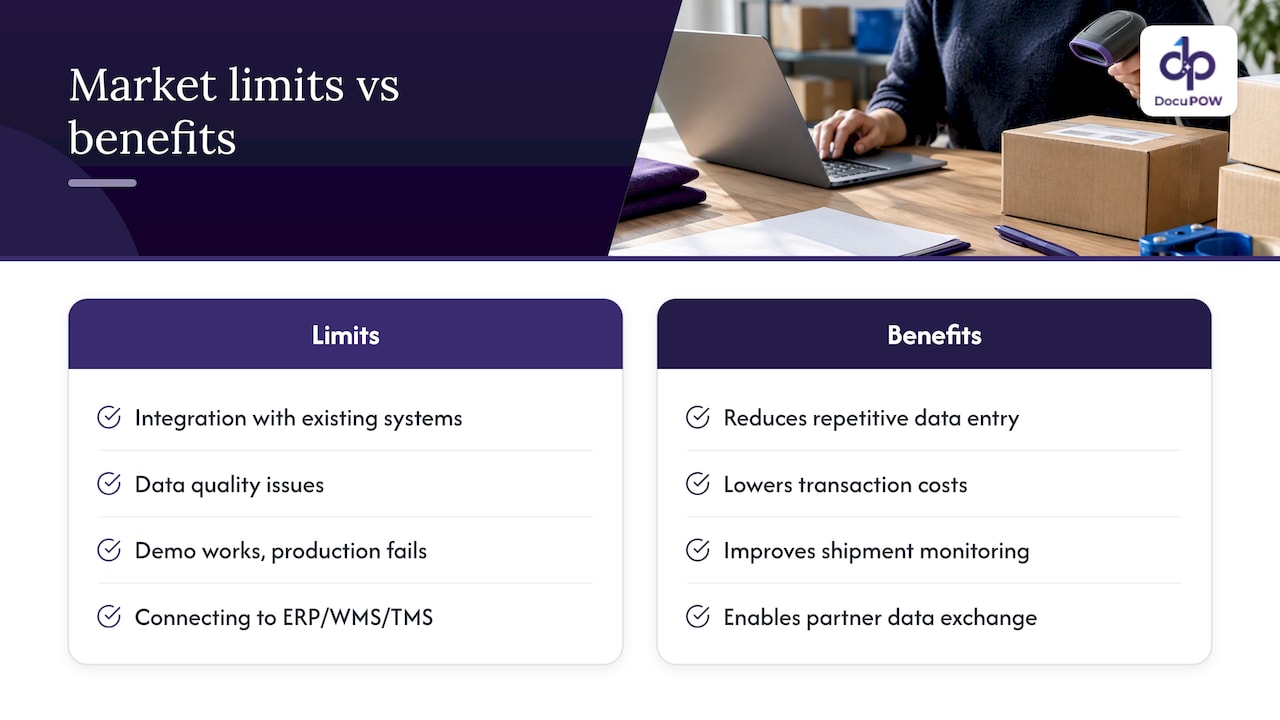
    Market scale and measured benefits: survey and research evidence that justify investment — overview diagram

    Technology options: OCR/IDP, RPA, AI agents, and integration patterns

    Four technology categories do most of the work in logistics data entry automation, and they are not interchangeable.

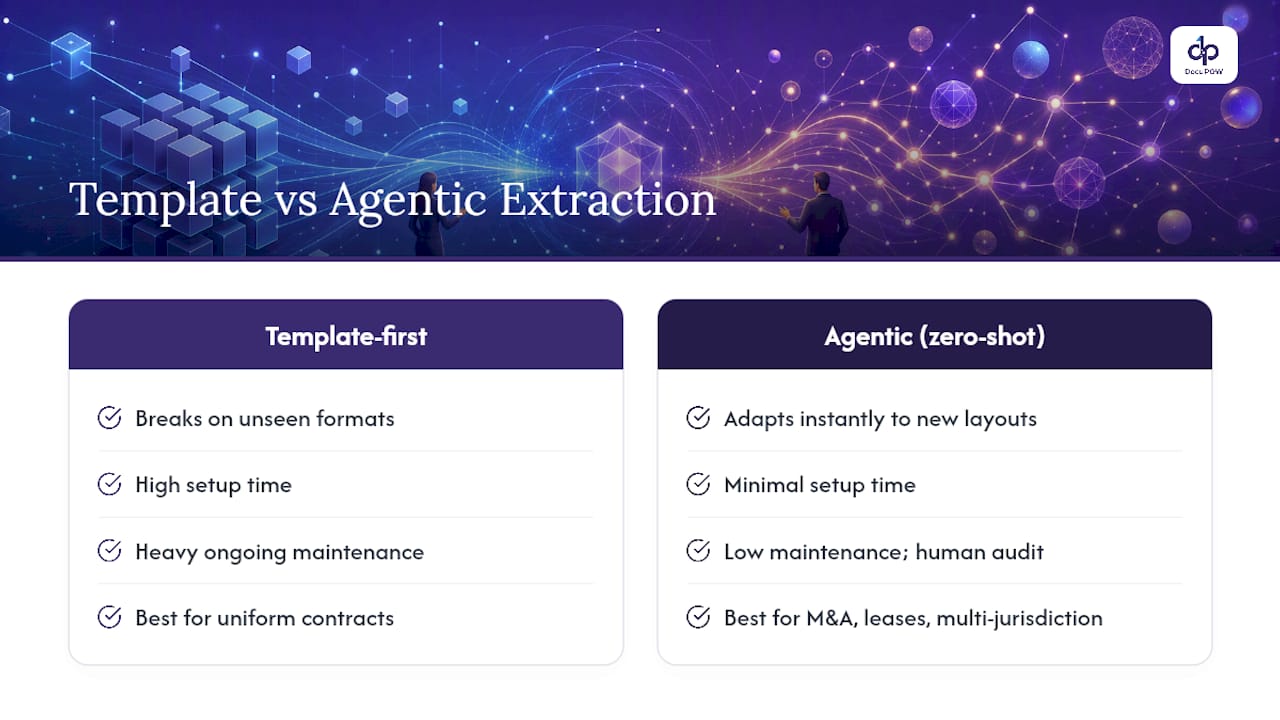
    Template-based OCR reads text from a fixed layout. It works well when every bill of lading from a given carrier looks identical, and it breaks the moment that carrier changes its form or you onboard a new one. Template-free, agentic IDP instead reads a document for context, meaning it can extract shipper, consignee, and line-item data from a freight invoice it has never seen before, without a human building a template first. That difference matters enormously in logistics, where document layouts vary by carrier, forwarder, and customs broker.

    RPA excels at repetitive, rules-based actions once clean data exists: copying a validated field from one screen into another, triggering a status update, or filing a confirmation. It struggles the moment a document deviates from the expected pattern, because RPA has no understanding of what it is looking at, only instructions to follow. AI agents fill that gap by making judgment calls, flagging ambiguous fields, routing exceptions, and adapting to variation that would stop an RPA bot cold.

    Getting extracted data into the systems that run your operation requires one of a few types of logistics process automation: integration patterns such as API and ERP connectors that enable smooth, automated data flow.

    • API and ERP connectors push validated records directly into your system of record, closing the loop without manual re-keying.
    • EDI transactions remain the standard for high-volume carrier and customer exchanges, particularly in customs and freight billing.
    • Portal and email ingestion covers the long tail of smaller partners who still send documents as PDFs or scanned attachments.

    Customs workflows add their own layer of structure. U.S. Customs and Border Protection’s ACE CATAIR documentation specifies exact record formats, including QP10 and QP30 message types, for manifest and bill of lading transmissions, which means any automation touching customs data has to map to those fields precisely rather than guess at a generic structure.

    How to implement automated data entry: a pilot-to-scale roadmap for logistics teams

    Automation projects that skip baseline measurement tend to produce impressive demos and disappointing rollouts. A disciplined path from pilot to full deployment looks like this:

    1. Map your document sources and formats. List every channel documents arrive through, email, shared spreadsheets, customer portals, EDI feeds, and note the format and volume for each.
    2. Record your baseline KPIs. Capture current error rate, throughput, and time-to-acknowledgement for at least two to four weeks before any change, so improvement is measurable rather than assumed.
    3. Scope a narrow pilot. Pick one document type and one partner segment, often freight invoices or purchase orders from your top five suppliers, to keep volume manageable and results interpretable.
    4. Set acceptance criteria up front. Define the error rate and throughput thresholds the pilot must hit before expansion, typically run over four to eight weeks to capture enough volume variation.
    5. Build in human-in-the-loop checkpoints. Route low-confidence extractions to a reviewer instead of auto-posting them, and set an error budget that defines how much residual error is acceptable before scaling further.
    6. Connect to ERP, WMS, or TMS. Validate that extracted, approved data flows into the system of record without a manual handoff, since this integration step is where most scaling friction appears.
    7. Expand in stages and monitor continuously. Add document types and partner segments one at a time, reviewing KPI trends monthly rather than assuming the pilot’s results hold indefinitely.

    Pro Tip: Run your pilot against the messiest document source you have, not the cleanest, since that is where automation either proves its worth or reveals its limits early.

    Real-world patterns: how RPA and AI combine to automate logistics document workflows

    Most working implementations follow the same basic architecture regardless of industry vertical: capture the document, classify what type it is, extract the relevant fields, validate those fields against business rules, and post the result to the appropriate system.

    Applied to logistics, that architecture takes a few recognizable shapes:

    • Order entry: a purchase order arrives by email or portal, gets classified automatically, has line items and delivery terms extracted, and posts directly into the order management system once validated.
    • Freight invoice processing: an invoice is matched against the original rate quote and bill of lading, with discrepancies flagged for human review rather than paid automatically.
    • Bills of lading: shipment details are extracted and cross-checked against the original booking, reducing the manual reconciliation that historically happened at the dock.
    • Customs documentation: fields are mapped to required formats like those specified in ACE CATAIR, with low-confidence extractions routed to a compliance reviewer before submission.

    The error-handling layer is what keeps service-level agreements intact. A well-designed workflow does not simply flag an error and stop. It routes the exception to the right reviewer based on document type and confidence score, logs the correction so the system can improve, and keeps the rest of the batch moving so one bad invoice does not delay an entire shipment’s processing.

    Adoption checklist and change management: governance, roles, and controls to avoid rollout failures

    Technology failures are rare in these rollouts. Governance failures are common. Clear ownership prevents both.

    Operations should own the day-to-day process design and KPI targets, IT should own system integration and security review, and compliance should own audit requirements for customs and regulated documents. Procurement typically manages vendor selection and contract terms. Without one accountable owner who can make tradeoff decisions, pilots stall in committee.

    A practical adoption checklist covers:

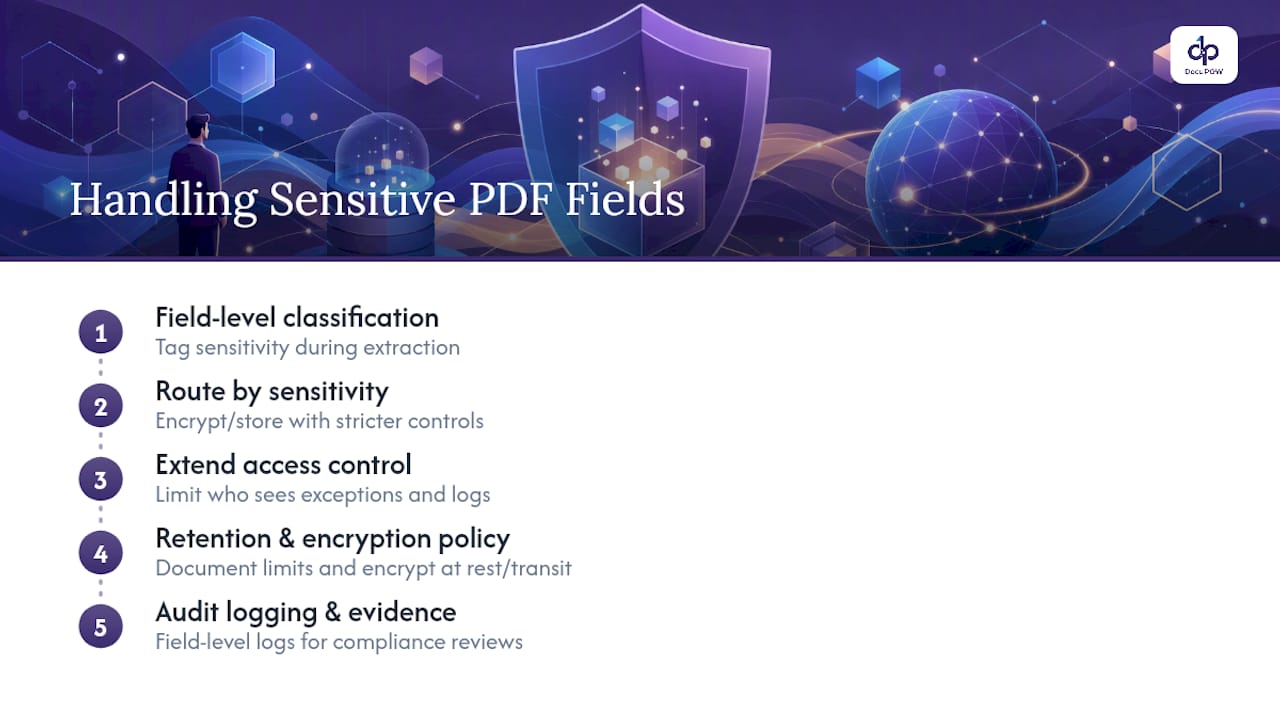
    • Audit trail and confidence logging: every extracted field needs a logged confidence score and change history so compliance teams can triage review by threshold rather than checking everything manually.
    • SLA and exception design: define upfront how long an exception can sit before it escalates, and to whom.
    • Phased training: roll out to a small team first, gather feedback on false positives and false negatives, then expand.
    • Ongoing ROI tracking: revisit error rate, throughput, and time-to-acknowledgement monthly, not just at launch, since drift happens as document mix changes.

    Pro Tip: Assign one person to review flagged exceptions daily during the first month of any rollout. That single habit catches configuration problems before they become a backlog.

    Security deserves its own line of attention. Logistics documents often carry customer pricing, banking details for payment, and regulated customs data, so any automation platform handling them needs encryption in transit and at rest, role-based access controls, and a clear data retention policy that matches your compliance obligations.

    How DocuPOW’s agentic, template-free platform maps to logistics needs

    DocuPOW applies autonomous, context-aware agents to extract data from freight invoices, bills of lading, and customs paperwork without requiring a template for every carrier format, which matters directly for the layout variation described above. Human-in-the-loop audit review lets teams set the same confidence-based checkpoints the adoption checklist calls for, while API and ERP connectors handle the integration step that PwC’s research identifies as the top scaling obstacle. Real-time analytics give operations teams the KPI visibility a pilot needs to prove results before expansion. DocuPOW’s logistics solution page details the specific document types supported.

    The gap between automation’s promise and its practice

    The conventional pitch around logistics automation oversells the extraction step and undersells everything after it. Reading data off a document accurately is now a solved problem for most document types. What actually determines whether a project succeeds is whether the organization built the integration, governance, and exception-handling layers around that extraction, and most do not plan for those until the pilot stalls.

    If you take one thing from the evidence here, prioritize mapping your partner data-sharing gaps before you evaluate any extraction technology. Brookings’ analysis and the EFM initiative’s findings both point the same direction: the hardest part of this work is rarely reading the document correctly. It is getting your carriers, forwarders, and customers to send data your system can actually use, and building the human checkpoints that let you trust automation enough to act on it without review every time.

    — Syed Naveed Abbas

    Where DocuPOW fits once you are ready to automate

    If the roadmap above matches where your team is headed, DocuPOW’s template-free extraction means you are not stuck rebuilding configurations every time a carrier changes its invoice format, a real cost for logistics teams juggling dozens of partner document types. Human-in-the-loop audit review and confidence-score logging give you the governance controls this article walks through, out of the box rather than as a custom build.

    DocuPOW

    The platform connects to ERP, WMS, and TMS systems through API integrations, so validated data moves into your system of record without a manual handoff. Plans range from the Starter tier at $99 per month to the Professional tier at $499 per month, with Enterprise pricing available on request for larger document volumes. You can review plan details and start a pilot on your own highest-volume document type through the pricing page.

    FAQ

    What are some examples of automation in logistics?

    Common examples include automated extraction of freight invoices and bills of lading, AI-driven classification of incoming customer orders, and connector-based posting of validated shipment data into ERP or TMS systems. Electronic bills of lading and EDI transactions for carrier and customs communication are also widely used automation patterns, as documented in research on maritime digitalization.

    What are the 7 C’s of logistics?

    Definitions vary by source, but a common version lists the 7 C’s as the right customer, product, quantity, condition, place, time, and cost, representing the core service standard logistics operations aim to meet. This framework is a general operations principle rather than a measured research finding, so treat it as a planning heuristic.

    Is AI replacing logistics?

    AI is not replacing logistics operations; it is changing how routine document and data tasks within them get done. PwC’s 2025 survey finds operations leaders deploying coordinated AI agents to resolve bottlenecks proactively, but integration and data quality remain the leading obstacles to scaling that work, which means human oversight stays central to the process.

    What is the best software for automating data entry tasks?

    The right choice depends on your document variety and integration needs: template-based OCR suits fixed-format documents, while template-free, agentic platforms like DocuPOW handle the layout variation common across carriers and forwarders without manual template building. For logistics teams processing invoices, bills of lading, and customs paperwork from many partners, a template-free approach with human-in-the-loop review and ERP connectors, as described on DocuPOW’s logistics page, tends to scale better than rigid, template-dependent tools.

    How long does a typical automation pilot take?

    Pilots scoped to a single document type and partner segment typically run four to eight weeks, enough time to capture realistic volume variation and measure error rate, throughput, and time-to-acknowledgement against acceptance criteria. Projects that skip baseline measurement or scope too broadly tend to take longer and produce less reliable results.

    Sources

  • Cut Customs Delays: Intelligent Document Processing for Logistics

    Cut Customs Delays: Intelligent Document Processing for Logistics

    Intelligent document processing (IDP) turns the logistics paperwork bottleneck into structured, machine-ready data so teams can cut manual processing and clear shipments faster. It reads invoices, bills of lading and customs forms, extracts the fields that matter and feeds them straight into a TMS or ERP, cutting exceptions and speeding customs clearance. The fastest way to prove it works is a narrow pilot tied to one KPI, such as invoice processing time or exception rate, before expanding to a full document set.


    TL;DR:

    • IDP is most effective when handling highly variable document formats, with a broad range of supplier, carrier, and customs documents, rather than fixed templates.
    • Validation against specific layout rules, such as CBP’s CATAIR and CAMIR standards, is critical to prevent silent rejections during customs filings or manifest submissions.
    • Running a 60 to 90 day pilot with human-in-the-loop review on a few document types ensures reliable accuracy and highlights edge cases before scaling.
    • For workflows with low volume or highly standardized documents, OCR combined with RPA may offer a cheaper, faster solution but lacks scalability.
    • The success of IDP projects depends on upstream data quality and integration readiness, with a focus on a narrow scope and clear KPIs from the outset.

    DocuPOW
    Streamline Logistics Document Workflows
    DocuPOW uses AI-powered agents to extract data from varied documents, helping logistics teams improve visibility and reduce manual processing.

    Request a demo

    Table of Contents

    What intelligent document processing actually does

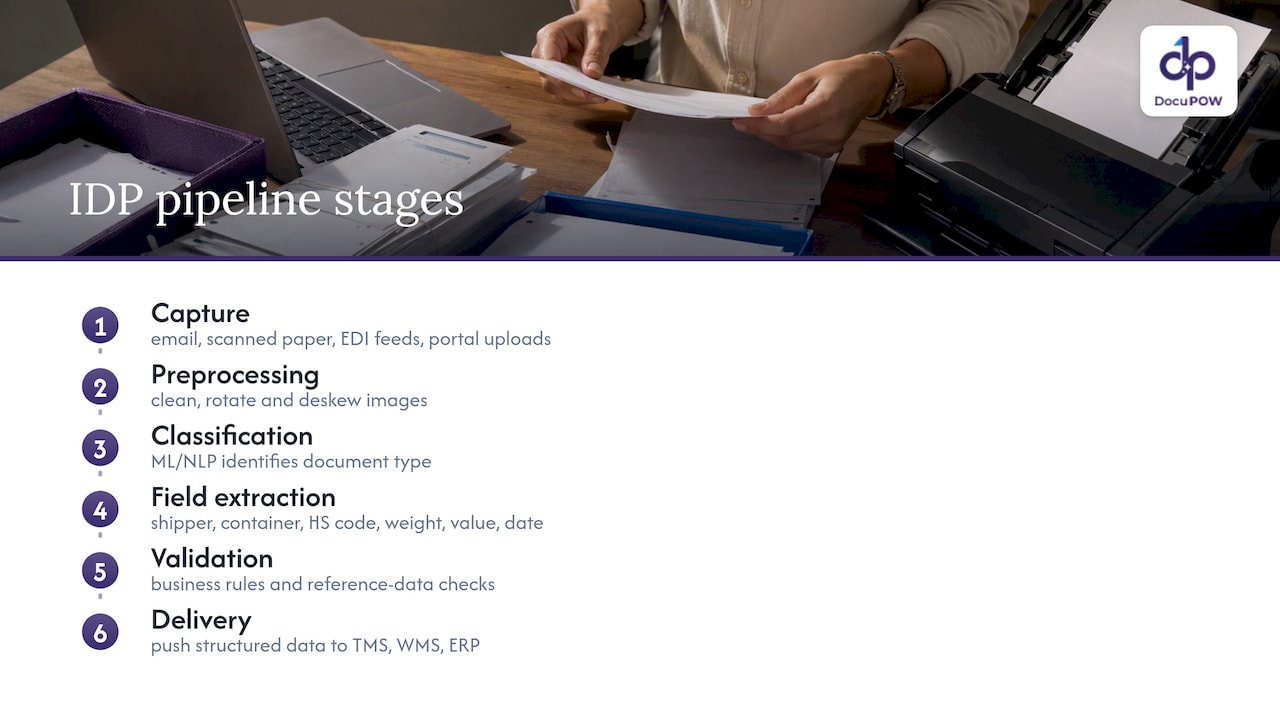
    IDP is a pipeline, not a single tool. It starts with capture, pulling in documents from email, scanned paper, EDI feeds or portal uploads, then moves to preprocessing, where images are cleaned, rotated and deskewed so the text underneath is readable. From there, machine learning and natural language processing models classify the document type (invoice, bill of lading, certificate of origin) and extract the specific fields a logistics team needs: shipper name, container number, HS code, weight, value, date of issue.

    Six stages of logistics document processing

    The difference from plain OCR shows up at this stage. OCR converts an image into raw text, a wall of characters with no understanding of what any of it means. IDP goes further: it recognizes that a string of digits next to the word “container” is a container number, not a phone number, and it outputs that as a structured field a system can act on, not a line of text a person has to re-key. Academic prototypes that pair OCR with AI for customs declaration preparation illustrate this gap directly, showing measurable time savings when extraction feeds structured fields rather than raw text dumps.

    Validation is the next layer. Extracted fields get checked against business rules (does this HS code exist, does this invoice total match the line items) and against reference data (is this carrier SCAC code valid). Only validated records move on to the final stage: delivery, where connectors push the structured data into a TMS for routing, a WMS for receiving, or an ERP for accounts payable.

    For logistics decision-makers evaluating vendors, this pipeline is the real checklist. Ask how each stage handles your specific document mix, how classification performs on layouts the system has never seen, and how validation errors get routed for human review before anything touches your core systems.

    When OCR or RPA still make sense

    Not every workflow needs full IDP. If your documents follow one unchanging template and volume is low (a single customer sending the same invoice layout every week), basic OCR with a fixed template can do the job cheaply. Robotic process automation (RPA) still earns its place too, not for extraction, but for orchestration: once data is extracted, RPA bots can log into legacy systems, move files between folders or trigger downstream approvals.

    The trade-off comes down to maintenance and scale. A templated OCR setup breaks the moment a supplier changes their invoice layout, and someone has to rebuild the template. IDP, especially template-free approaches, adapts to new layouts without that rework. The speed-to-value question is simple: if your document variety is low and static, OCR plus RPA may get you there faster and cheaper. If your document mix spans dozens of suppliers, carriers and customs formats, IDP is the investment that scales.

    Benefits for logistics teams and the KPIs that prove it

    The operational case for IDP in logistics rests on three things: fewer exceptions, faster cycle times and better visibility into where documents sit in a process. When extraction is accurate, invoices move through three-way match faster, bills of lading populate a TMS without manual re-entry, and customs paperwork reaches a broker complete instead of bouncing back for corrections. Each of those failures costs real time, and in customs, a rejected or incomplete filing can mean a container sitting in detention while fees accrue.

    Academic and industry work on automating customs declaration preparation points to the same pattern: pairing OCR with AI to populate structured declarations shows profitability and measurable time savings in real logistics contexts, which supports treating faster clearance as a genuine cost lever, not just a convenience.

    To know whether a pilot is working, track a short list of KPIs rather than a vague sense of improvement:

    • Extraction accuracy: the share of fields correctly captured without human correction.
    • Exception rate: how often a document fails validation and needs manual review.
    • Processing time per document: from receipt to structured, validated output.
    • Time-to-clearance: for customs-bound documents, how long from submission to cleared status.
    • Cost per document: fully loaded, including any human review time.

    Pro tip-style note aside, the real ROI levers worth modeling are concrete: fewer manual data-entry hours freeing staff for exception handling, faster invoice turnaround improving days payable outstanding, and fewer late or incomplete customs filings reducing detention and demurrage fees. None of these require guesswork. GAO’s review of freight data finds that public data sources often lack the scope needed for detailed operational planning, which is exactly why internally generated, validated document data, the kind IDP produces, matters more for forecasting your own exception rates and cycle times than any industry-wide average.

    Logistics use cases: from invoice to customs clearance

    Every logistics operation runs on a handful of document types, and each one has a different failure mode that IDP addresses differently.

    1. Supplier invoices and three-way match: IDP extracts line items, quantities, prices and PO numbers, then matches them against the purchase order and receiving record automatically, flagging only genuine mismatches for a human to resolve instead of routing every invoice through manual review.
    2. Bills of lading and manifests: extraction pulls shipper, consignee, container number, weight and routing details, feeding them directly into a TMS and, where relevant, into the data elements CBP’s manifest systems expect. Getting this mapping right matters because manifest records follow strict, non-negotiable formatting rules.
    3. Customs entry documents and PGA message sets: CBP’s CATAIR implementation guide defines exact data elements and submission methods for PGA filings, down to field order and record identifiers. An extraction system that outputs a field in the wrong format does not get flagged politely, it gets silently rejected downstream, so validation against these record layouts has to happen before data ever reaches a broker’s submission system.
    4. Proof of delivery (POD): a scanned or photographed POD triggers downstream workflows the moment it is captured, confirming delivery, closing out a shipment in the TMS and, where a claim is needed, starting the carrier claims process automatically instead of waiting for someone to notice a missing signature.
    5. Certificates, insurance documents and packing lists: these route differently depending on content. A certificate of origin might need to be matched against a trade agreement rule, an insurance certificate against a coverage threshold, and a packing list against the invoice it accompanies. IDP’s value here is less about volume and more about routing accuracy: getting the right document to the right compliance check without a person reading every page.

    The common thread across these use cases is that structured extraction only pays off when the output format matches what the receiving system expects. Platforms built for supply chain document extraction are evaluated as much on how cleanly they map fields to TMS, WMS and ACE formats as on raw extraction accuracy.

    A few patterns show up across all five use cases worth noting directly:

    • Document variety (not just volume) is the real driver of IDP value over templated OCR.
    • Validation rules specific to each document type catch errors before they become downstream rejections.
    • Human review should concentrate on genuine exceptions, not on documents the system already extracted correctly.

    How to implement IDP: a pilot-to-scale checklist

    Treat the first ninety days as a controlled test, not a full deployment. Rushing straight to scale is the most common way these projects stall out.

    1. Inventory your documents before anything else: list every document type, its volume, who owns the process today and what “correct” output looks like for each one.
    2. Normalize and validate sample data: pull a representative batch of real documents, including messy ones, and define the validation rules the system needs to check against before any model training begins.
    3. Design a narrow pilot: pick one or two document types with clear volume and a defined owner, set your KPIs (accuracy, exception rate, processing time) up front, and run a human-in-the-loop audit on every extracted record for 60 to 90 days.
    4. Prioritize integrations deliberately: decide early whether you need direct API connections to your TMS, WMS or ERP, or whether a middleware layer is needed to handle legacy EDI formats and ACE-specific constraints.
    5. Operationalize before you scale: define SLAs for exception handling, assign staff to review flagged records, and build a change management plan so the people currently doing manual entry understand their new role in the process.

    Pro Tip: Run the human-in-the-loop audit on every single extracted field for the full pilot window, not a sample. Silent errors that slip through in week two are the ones that compound by week ten.

    Projects that skip the normalization step tend to fail quietly: the model looks accurate on clean test data, then falls apart on the first supplier invoice with an unusual layout. A short, deliberate normalization phase, paired with that human-in-the-loop audit, is what catches those edge cases before they reach production. Guidance on starting automated logistics systems echoes the same sequencing: define scope and data quality before chasing integration speed.

    Integration and regulatory rules that trip up automation projects

    Customs and manifest data are not forgiving formats. CBP’s CATAIR and CAMIR implementation guides define rigid record layouts, uppercase-only transmission rules, filler spaces and specific record identifiers that extracted data must match exactly before it reaches ACE. A field that is the right value but the wrong case, or missing a required filler space, does not get a helpful error message, it gets rejected without explanation.

    This is where middleware earns its keep. Rather than asking an IDP system to output ACE-ready records directly, most teams build an adapter layer that enforces these legacy constraints (uppercase conversion, fixed field lengths, record sequencing) between extraction and submission. That adapter is also where you want your preflight checks to live.

    Beyond customs filing, there is a separate opportunity worth understanding: the U.S. DOT’s Freight Logistics Optimization Works program. FLOW gives participating companies aggregated, anonymized feeds of purchase orders and asset-availability data to help forecast capacity, and the program had onboarded dozens of companies by its second anniversary. Joining FLOW is not a plug-and-play API call: it requires validated, anonymized data feeds and a structured onboarding process built around test files.

    A few practical steps reduce the risk of these integration headaches:

    • Validate extracted fields against CATAIR and CAMIR record layouts before any live transmission, not after a rejection.
    • Build and test with sample files early, iterating with your customs broker on edge cases rather than discovering them in production.
    • Treat FLOW-style data sharing as a separate workstream from transactional document processing, since the data preparation step often takes longer than the technical integration itself.

    DocuPOW’s approach for logistics document workflows

    DocuPOW takes a template-free, agentic approach to extraction: rather than relying on fixed templates per document layout, its autonomous agents interpret document context directly, which matters in logistics where supplier invoices, bills of lading and customs forms rarely share a format. That reduces the ongoing maintenance burden of rebuilding templates every time a new supplier or carrier format shows up.

    The platform pairs extraction with human-in-the-loop audit review, real-time analytics and predictive insights, giving logistics and finance teams a way to catch exceptions before they become downstream rejections while building visibility into where documents are stalling. For teams considering a pilot, DocuPOW’s supply chain-specific capabilities are built around exactly this kind of document mix: invoices, shipping documents and compliance paperwork that do not follow one template.

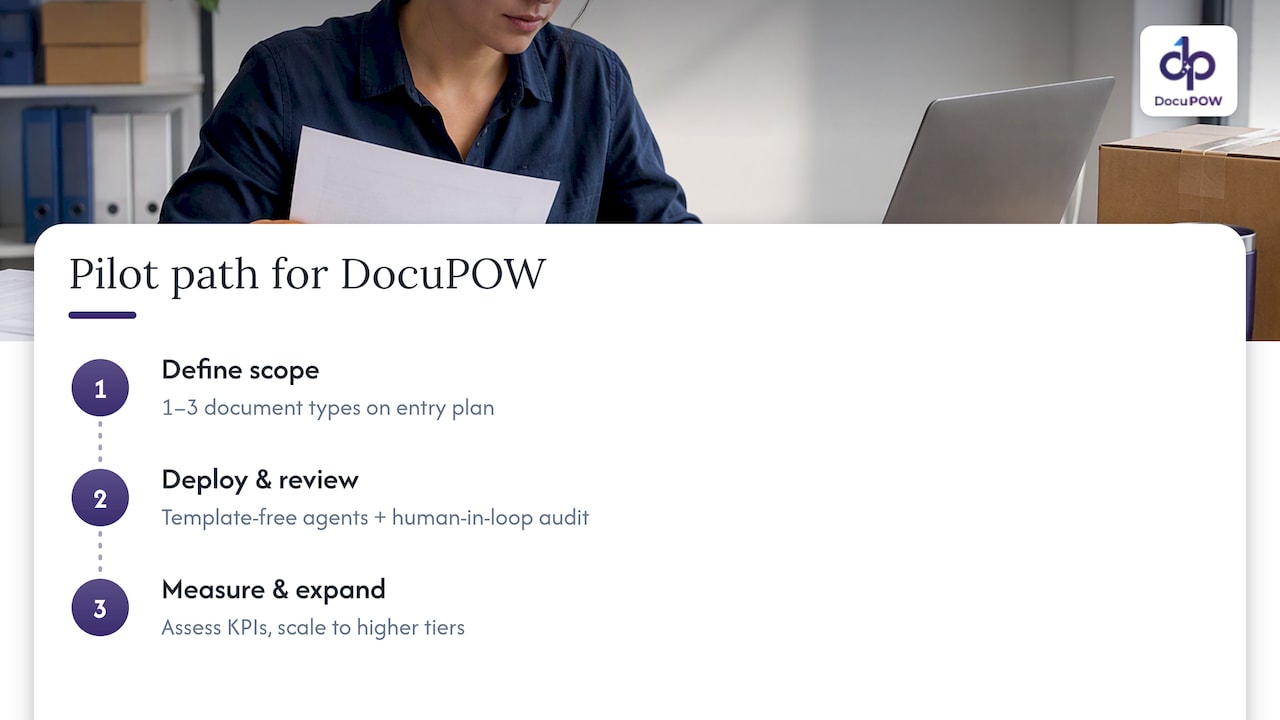
    A practical pilot path starts narrow: a defined set of one to three document types on an entry-level plan, measured against the KPIs outlined earlier, with room to expand toward higher tiers as volume and document variety grow.

    DocuPOW's approach for logistics document workflows — overview diagram

    Timing and scope: when to pilot and when to hold off

    Pilot now if your document volume is high enough that manual entry errors are recurring, and if you have the integration resources to connect extracted data to a TMS or ERP within the pilot window. Those two conditions together are what make a 60 to 90 day human-in-the-loop pilot worth running.

    Hold off if your upstream data discipline is poor, meaning documents arrive in wildly inconsistent formats with no owner accountable for quality, or if nobody on your team can commit to building even a lightweight integration. IDP amplifies whatever data discipline already exists; it does not fix the absence of it. The safest starting point remains the same regardless of your timeline: a narrow, measurable pilot with a human reviewing every extracted record before you trust the system unsupervised.

    — Syed Naveed Abbas

    Try a focused pilot with DocuPOW

    If you are weighing a pilot after reading through the implementation steps above, template-free extraction and human-in-the-loop auditing are practical approaches for the diverse document mix logistics teams deal with: invoices, bills of lading, customs forms and certificates that rarely follow the same layout twice. Instead of building and maintaining templates for every supplier and carrier, the platform’s agents adapt to new formats as they appear, and real-time analytics give you visibility into exception rates from day one.

    DocuPOW

    A practical first step is to run a Starter plan pilot on one to three document types, the same narrow scope recommended earlier in this guide, before deciding whether to expand. Plans and current pricing, including Starter and Professional tiers, are listed on the DocuPOW pricing page.

    • Start with the document types causing the most manual rework today, not the full catalog.
    • Keep the human-in-the-loop audit running for the full pilot window before loosening review.
    • Review the platform’s extraction pipeline to see how it maps to your existing TMS or ERP.

    Visit the DocuPOW pricing page to compare plans and get started with a focused pilot.

    Sources

    Before building toward ACE or manifest automation, read the primary sources rather than relying on secondhand summaries, since formatting requirements change and small errors cause silent rejections.

    FAQ

    What is the best intelligent document processing software for logistics?

    The right choice depends on your document mix and integration needs rather than any single universal answer. Look for template-free extraction that handles varied layouts, human-in-the-loop audit capability and direct integration with your TMS, WMS or ERP, since these three factors determine whether a pilot actually reduces exceptions.

    What are the most common documents used in logistics?

    Logistics operations typically process supplier invoices, bills of lading and manifests, customs entry documents, proof of delivery records, and certificates such as certificates of origin or insurance. Each document type carries different fields and validation rules, which is why extraction accuracy varies by document type even within the same system.

    What is the difference between OCR and intelligent document processing?

    OCR converts a scanned image into raw text without understanding what that text means, so a person still has to interpret and re-key it. Intelligent document processing goes further, classifying the document type and extracting specific structured fields, like a container number or invoice total, that downstream systems can use directly.

    What is the best AI software for logistics document automation?

    There is no single best option for every operation, since the right platform depends on document variety, volume and the systems you need to integrate with. Platforms built around template-free extraction and human-in-the-loop review, such as DocuPOW’s supply chain tools, tend to fit logistics operations better than rigid, template-based systems because carrier and supplier document formats change constantly.

    How long does an intelligent document processing pilot usually take?

    Most practitioner guidance points to a 60 to 90 day pilot window with a human-in-the-loop audit reviewing every extracted record during that period. This timeframe is long enough to surface edge cases in document layouts while still keeping the pilot narrow and measurable.

  • Standards First Document Audit Trails for Compliance Teams: NIST, SEC

    Standards First Document Audit Trails for Compliance Teams: NIST, SEC

    A document audit trail is a chronological, tamper-evident record of every action taken on a file, built so a reader can reconstruct exactly who did what, when, where, and why. Organizations rely on it for three jobs: proving compliance to regulators, supporting security investigations, and diagnosing operational breakdowns. Bodies like NIST, the SEC, and NARA all treat this reconstructive ability as the real test of whether a log qualifies as an audit trail at all.


    TL;DR:

    • A comprehensive audit trail must log all actions affecting a document, including views, edits, approvals, signatures, sharing, permission changes, and deletion attempts.
    • Timestamps need to be synchronized to an authoritative source, and logs must include specific fields such as actor identity, event type, object ID, outcome, and source context to ensure reliability.
    • Protecting log integrity with cryptographic hashing, append-only storage, and regular reconstruction tests is essential, especially as document volume and system complexity grow.
    • Logs should be centralized, searchable, and exportable in structured formats like JSON or XML to support regulatory compliance and facilitate quick evidence retrieval.
    • Continuous monitoring, retention mapping, and regular review are necessary to prevent gaps, ensure adherence to legal standards, and maintain usable, defensible audit records.

    DocuPOW
    Make Document Workflows More Traceable
    DocuPOW uses AI-powered document processing and automation to improve visibility, accuracy, and efficiency across document-heavy workflows.

    Request a Demo

    Table of Contents

    Definition and Scope: Audit Trail Versus Version History

    NIST’s definition frames an audit trail as a record sufficient to reconstruct and examine the sequence of activities around a security-relevant operation. For a document, that means capturing every lifecycle event, not just the moments someone hit save.

    A defensible trail typically logs:

    • Creation and initial upload of the document
    • Every view or access, including by whom
    • Edits, with the specific fields or content changed
    • Approvals and rejections in a workflow
    • Digital signatures and signing events
    • Sharing, exports, and downloads
    • Permission or access-level changes
    • Deletion attempts, successful or not
    • Administrative actions, such as retention overrides

    This is where people often confuse two different things. Version history shows you the states a document passed through: draft one, draft two, final. An audit trail shows you the actions that produced those states, along with actions that leave no version at all, like a permission change or a failed deletion attempt. A file can have a clean version history and a dangerously incomplete audit trail if viewing, sharing, and access events were never captured.

    Scope decisions follow from risk, not convenience. A signed contract or a financial record usually needs full-event logging, while an internal draft memo might only need creation and edit tracking. The right approach maps record classes to retention obligations first, then decides how granular the logging needs to be for each class. Teams building this out often start with a document lifecycle management framework to make those scoping calls consistently.

    Why Document Audit Trails Matter for Different Stakeholders

    The value of an audit trail changes depending on who is asking the question. An external auditor wants proof that a control operated as designed. An incident responder wants to know how an unauthorized change happened and who else might be affected. A process owner wants to know why an invoice sat unapproved for two weeks.

    Each group gets something different from the same record:

    • Compliance teams use trails to produce defensible evidence during audits or regulatory examinations
    • Security teams use trails to trace unauthorized access, scope a breach, and support incident response
    • Operations teams use trails to find bottlenecks, like approvals stuck with one reviewer
    • Legal teams use trails to establish timelines when a dispute or investigation requires it

    NIST’s SP 800-92 guidance recommends designing logs for two audiences at once, investigators and process owners, so the same record serves forensic detail and operational visibility. That dual purpose is what separates a useful audit trail from a log nobody reads until something breaks.

    The stakes show up clearly during an audit. A trail that can reconstruct exactly when a contract was approved and by whom turns a multi-day evidence hunt into a quick export. Without it, the same request can stall an entire audit cycle while someone manually reassembles email threads and file timestamps.

    Core Components: Fields and Integrity Controls Every Audit Record Needs

    A record that omits the wrong field can be technically present and still useless in a dispute. NIST’s control set in SP 800-53 lays out what a well-formed audit event needs to contain and how it should be protected.

    At minimum, each entry should capture:

    • Timestamp, synchronized to an authoritative time source, not a local device clock
    • Actor identity, tied to an authenticated user or system account, never a shared login
    • Event type, described specifically rather than as a generic “modified”
    • Object identifier, pointing to the exact document, version, or field affected
    • Outcome, recording success, failure, or a denied attempt
    • Source context, such as IP address, device, or originating system

    Integrity controls matter as much as the fields themselves. Cryptographic hashing lets you verify a log has not been altered after the fact. Append-only storage prevents entries from being edited or deleted once written. Where write-once-read-many storage is impractical, an audit-trail alternative that can reliably recreate original records serves the same evidentiary purpose, an approach the SEC has explicitly recognized for regulated recordkeeping.

    Time synchronization deserves its own attention. If systems across a workflow drift out of sync by even a few minutes, event sequencing becomes unreliable exactly when you need it most, during a dispute over which action happened first. NIST’s AU-8 control specifically addresses synchronized timestamps for this reason.

    Indexing and searchability round out the design. A trail that exists but can’t be queried by document ID, actor, or date range fails the same test as one with missing fields: it can’t answer a question fast enough to matter.

    Pro Tip: Store a cryptographic hash of each log entry alongside the entry itself, so any tampering attempt changes the hash and flags itself automatically.

    Design and Operations: The Audit-Trail Lifecycle and Implementation Checklist

    Building an audit trail is not a one-time setup. It’s an operational lifecycle that has to keep working as document volume and system count grow. NIST’s SP 800-53 and SP 800-92 guidance treats logging as a full cycle: generation, transmission, storage, access, analysis, and disposal.

    1. Define auditable events for each record class based on risk and regulatory exposure.
    2. Capture and normalize events across every system that touches the document, using a consistent field structure.
    3. Synchronize timestamps to a shared, authoritative time source across all logging systems.
    4. Centralize logs into a searchable store rather than leaving them scattered across applications.
    5. Protect the store with hashing, append-only writes, or an equivalent audit-trail alternative.
    6. Restrict administrative access to logging systems, and log the administrators’ own actions too.
    7. Review and correlate logs on a schedule, not only after an incident triggers a look.
    8. Test reconstruction by picking a real document and confirming you can rebuild its full history end to end.
    9. Map retention requirements by record class, so logs aren’t destroyed before their legal or regulatory window closes.
    10. Confirm export readiness so a regulator or auditor request can be answered in a usable format quickly.

    Two steps deserve extra weight. Testing reconstruction is the only way to know your trail actually works, rather than assuming it does because logging is turned on. Pick a document with a complex history, an approval chain, a permission change, an export, and try to rebuild the sequence from the logs alone. If you can’t, you’ve found the gap before an auditor does.

    Monitoring logging failures matters just as much as capturing events in the first place. A system that silently stops logging creates a gap that looks, to an outside reviewer, indistinguishable from evidence tampering. Capacity planning belongs in the same conversation: as document volume grows, log volume grows faster, and a store that worked at one scale can become slow or unsearchable at another. Teams working through this often lean on a structured compliance documentation approach to keep the checklist consistent across departments.

    Regulatory and Records-Management Considerations

    Three sources of guidance shape what a defensible audit trail has to look like, and each answers a different question.

    • NIST’s SP 800-53 controls define what to log and how to protect it, covering event selection, record content, timestamp synchronization, log protection, retention, and disposal.
    • The SEC’s audit-trail alternative under Rule 17a-4 lets broker-dealers preserve records electronically without write-once-read-many storage, provided the system maintains a complete, time-stamped audit trail that can recreate an original record if it’s modified or deleted. The amendments took effect January 3, 2023, with a compliance deadline in 2023 for firms electing the alternative.
    • NARA’s metadata guidance requires that permanent federal electronic records carry documentation adequate to identify, service, and interpret them, with metadata preserved through any migration until the destination system is confirmed reliable.

    The common thread across all three is that format matters less than evidentiary reliability. The SEC’s rule is explicitly technology-neutral: it cares whether a system can prove authenticity and recreate a record, not which vendor built it. NARA’s guidance similarly focuses on whether metadata survives a transfer, not which file format carries it. For retention and exportability, this means building logs that can be pulled into a machine-readable format on demand, since a regulator’s request rarely waits for a custom export job to be built from scratch.

    Common Challenges and Mitigation at Scale

    Audit trails tend to work fine in a pilot and break down at scale. Volume is the first problem: high-frequency systems can generate more log data than a team can store affordably or search quickly, forcing hard choices about what to sample versus capture in full.

    Timestamp drift is a quieter but more damaging issue. When systems across a workflow aren’t synchronized to the same time source, event sequences become unreliable right when a dispute needs them most.

    Cross-system correlation adds another layer of difficulty. A single document might touch a content management system, an e-signature platform, and an ERP system, each logging events in its own format, making it hard to assemble one coherent timeline.

    • High volume: prioritize logging for high-risk record classes rather than logging everything at maximum detail
    • Clock drift: synchronize all systems to one authoritative time source
    • Fragmented logs: normalize event formats before centralizing them
    • Administrative gaps: log admin actions with the same rigor as user actions, including failed deletion attempts

    Pro Tip: Run a quarterly reconstruction test on a randomly chosen document rather than waiting for an audit to reveal a correlation gap.

    Concrete Examples and Use Cases

    A contract dispute is the clearest illustration. If a vendor claims a clause was changed after signing, a complete audit trail can show the exact edit, the actor, the timestamp, and the signature event that followed, settling the question without relying on memory or email threads.

    Accounts payable teams face a similar scenario when an invoice payment is questioned. The trail shows who approved it, whether the amount was edited after initial entry, and when it moved through each approval step, which is often the fastest way to close out an internal dispute.

    E-signature workflows depend on the same principle. A signed document’s trail should show the signer’s identity verification, the exact document version presented, and the completion timestamp, since courts and regulators increasingly expect that level of detail as standard practice.

    • Contracts: reconstruct edits and approvals to resolve disputed clauses
    • Invoices: trace approval chains and edits to resolve payment disputes
    • E-signatures: verify signer identity and document version at signing

    Sector expectations differ too. Financial firms operate under SEC-style recreation requirements, while public archives under NARA guidance focus more on long-term metadata survival through system migrations than on rapid dispute resolution.

    Teams under time pressure need a short list they can start acting on today, not a full audit program to design from scratch.

    1. Define auditable events per record class before anything else.
    2. Synchronize clocks across every system that touches a document.
    3. Hash log entries to make tampering self-evident.
    4. Centralize logs into one searchable store.
    5. Restrict and log administrative access separately from user access.
    6. Test reconstruction on a real document with a complex history.
    7. Map retention periods to each record class’s regulatory obligation.
    8. Confirm logs can be exported in a usable format on request.
    9. Set up monitoring and alerts for logging failures.
    10. Review logs and alerts on a recurring schedule, not only reactively.

    One of the most time-consuming parts of this checklist in practice is steps one and six: defining events and proving reconstruction works, especially for organizations extracting data from documents that arrive in inconsistent formats. Agentic, template-free extraction can shorten that work because it captures structured event data from documents without requiring a rigid template for every layout, and a human-in-the-loop audit review step gives compliance teams a documented checkpoint rather than a black-box process.

    Escalate to legal or records management when a reconstruction test fails on a record tied to active litigation, an open regulatory inquiry, or a permanent-record retention obligation. At that point, the cost of a gap is no longer theoretical.

    Standardized Formats and Protocols for Audit Trail Data Exchange

    Audit trails only prove their value when they can move between systems without losing meaning, and that’s where format choice matters. Structured, machine-readable formats like JSON and XML remain the common baseline for exchanging audit records between platforms, since both can carry nested event data and are widely supported by log management tools.

    Common log standards like Syslog handle the transport side, routing event data from distributed systems into a central store in near real time. Where documents move between organizations, such as a contract shared with an outside counterparty, the receiving system needs enough embedded metadata to interpret the trail independently, not just a human-readable export.

    NARA’s metadata guidance is instructive here even outside government archives: metadata can be embedded directly in a file or maintained separately, but it has to survive migration to a new system, and it has to remain interpretable once the original creating system is gone. That principle applies just as much to a company migrating from one document platform to another. A trail exported in a proprietary format that only the original vendor’s software can read fails the same test a paper record would fail if the only person who could interpret it retired.

    The practical takeaway for teams choosing tools is to prioritize export formats over vendor promises. If a platform can’t produce a structured, portable export of its audit data on request, that’s a gap worth flagging before, not after, a regulator or new system migration exposes it.

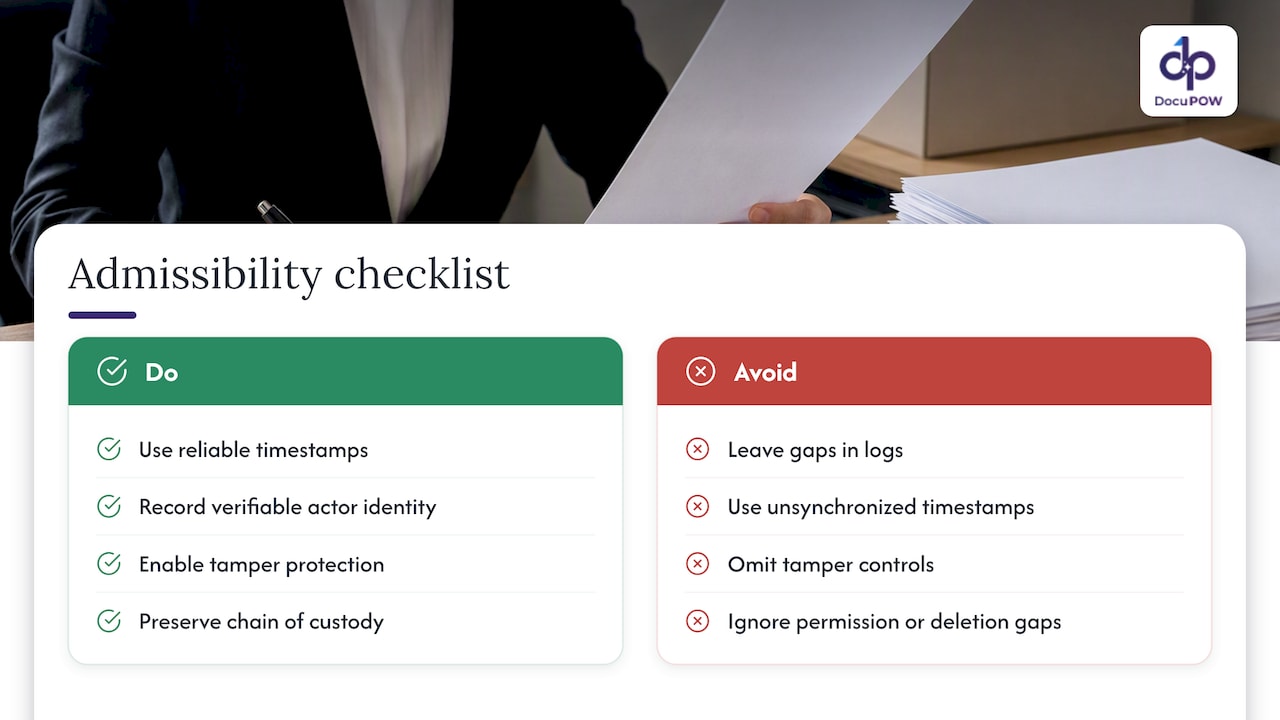
    An audit trail’s value in a legal or regulatory proceeding depends on the same qualities that make it useful internally: reliable timestamps, verifiable actor identity, and evidence that the record has not been altered after the fact. A log with gaps, unsynchronized timestamps, or no tamper protection invites the argument that it can’t be trusted, regardless of what it appears to show.

    The SEC’s audit-trail alternative illustrates the underlying legal logic well. Rather than mandating a specific storage technology, it requires that a system be able to recreate an original record if it’s modified or deleted, treating recreation capability as the real evidentiary standard. That framing extends beyond broker-dealers: any organization trying to establish that a document trail is trustworthy in a dispute needs to show the same thing, that the record could be independently verified or reconstructed, not just displayed.

    Chain of custody matters here too. A document’s audit trail is strongest as evidence when it shows an unbroken sequence of custody and action, with no unexplained gaps between who touched the file and when. A missing entry, especially around a deletion attempt or a permission change, can undercut the credibility of an otherwise solid record.

    None of this substitutes for legal advice specific to a given proceeding or jurisdiction. Organizations facing active litigation or a regulatory inquiry involving document evidence should involve legal counsel and records management early, since the standards for admissibility can vary by court, agency, and record type.

    Legal Considerations and Admissibility in Court or Regulatory Proceedings — overview diagram

    What Teams Consistently Get Wrong About Audit Trails

    Most organizations treat audit trails as a compliance checkbox rather than an operational asset, and that mindset shows up the moment something goes wrong. The teams that struggle most in an audit or investigation are usually the ones that logged plenty of data but never tested whether they could reconstruct anything from it.

    My view, after looking at how these systems fail, is that reconstruction capability and exportability deserve more attention than event volume. A trail with fewer fields that you can reliably rebuild and export beats a sprawling log nobody has ever pulled a real timeline from. Metadata and provenance should be treated as part of the record itself, not an afterthought bolted on for archivists. And a periodic proof-of-reconstruction exercise, run before an auditor asks for one, is worth more than any additional logging feature a vendor tries to sell you.

    — Syed Naveed Abbas

    How DocuPOW Helps Deliver Compliance-Ready Audit Trails

    Every checklist item above gets harder when documents arrive in inconsistent formats that require manual setup for every new layout. Template-free, agentic extraction can read document context directly, so audit-relevant fields can be captured without a maintenance backlog when new document types show up. A human-in-the-loop review step can provide compliance teams a documented checkpoint for the kind of reconstruction test this guide recommends, with exportable evidence that supports retention and export readiness.

    DocuPOW

    If reconstruction speed and audit prep time are the priority, check current plans and pricing or request a demo to see the audit review workflow on your own documents.

    Sources

    FAQ

    What Does an Audit Trail Check For?

    An audit trail checks for the sequence of actions taken on a document or system, including who performed each action, when it happened, what changed, and whether the action succeeded or failed. It exists to let a reviewer reconstruct that sequence later, which is why NIST’s definition centers on reconstructive sufficiency rather than a simple activity list.

    Can You Give Me an Example of an Audit Trail?

    A signed contract’s audit trail might show its creation date, an editor’s change to a payment clause, a reviewer’s approval, and the final e-signature event, each with a timestamp and actor identity attached. That sequence lets someone later confirm exactly what happened and in what order, without relying on memory or separate email records.

    Can We Delete an Audit Trail?

    Generally, no, not while the underlying record remains subject to a retention or regulatory obligation. Deleting or altering a trail undermines its evidentiary value and can itself become an audit finding, which is why integrity controls like append-only storage exist to prevent it.

    Is an Audit Trail Mandatory?

    Whether an audit trail is legally mandatory depends on the industry and record type. Regulated sectors like broker-dealer recordkeeping have explicit requirements, such as the SEC’s audit-trail alternative under Rule 17a-4, while other organizations adopt audit trails voluntarily for security and operational reasons even without a specific mandate.

  • 30–60 Day POC: Validate Agentic AI Freight Invoice Automation for AP

    30–60 Day POC: Validate Agentic AI Freight Invoice Automation for AP

    Freight invoice automation replaces manual data entry and rate lookups with software that captures, validates, and matches carrier invoices automatically, cutting overpayments and speeding accounts payable cycles. Teams processing more than a few hundred invoices a month, working across multiple carriers, or struggling with slow reconciliation see the fastest returns. Platforms like DocuPOW now use agentic, template-free extraction rather than fixed templates, which matters once you see how many invoice formats a single freight desk actually receives.


    TL;DR:

    • Automated validation and matching reduce overpayments by catching rate or shipment mismatches before payments are made.
    • Template-free extraction allows new carriers and invoice formats to be onboarded within days without rebuilding templates or supporting manual adjustments.
    • Linking invoice data to purchase orders and shipment records provides visibility into lane-level and carrier-specific cost patterns, enabling better network management.
    • Confidence scoring thresholds ensure uncertain extractions are reviewed by humans, improving accuracy and compliance without sacrificing speed.
    • Running a 30 to 60-day proof of concept on high-volume lanes helps validate a vendor’s ability to handle your messiest invoice formats and failure conditions.

    DocuPOW
    docupow.ai
    Validate Freight Invoice Automation
    See how DocuPOW uses AI agents and template-free extraction to streamline document workflows for faster, more accurate invoice processing.

    Request a free demo

    Table of Contents

    What freight invoice automation is: components and modern architecture

    Freight invoice automation is not one tool but a chain of connected steps. Invoices arrive from carriers in wildly different formats: PDFs, EDI 210/810 transactions, scanned proofs of delivery, and even email attachments with no consistent layout. A working system has to accept all of them without forcing a carrier to change how they bill.

    Once captured, documents move through extraction. Early systems relied purely on OCR, which reads text but does not understand structure. Modern platforms layer machine learning and vision-language models on top, so a line-haul charge, a fuel surcharge, and an accessorial fee get identified correctly even when they sit in different columns on different carrier templates.

    Extracted data then gets validated against rate tables, contract terms, and published indices, and matched line-by-line to purchase orders and shipment records. Anything that fails a match, such as a rate that does not tie to a contract or a shipment ID that does not exist in the transportation management system, gets routed to a human reviewer instead of paid automatically.

    • Capture: PDFs, EDI feeds, scanned proofs of delivery, and email attachments all enter the same pipeline.
    • Extraction: OCR handles raw text, while machine learning and vision-language models interpret tables, line items, and inconsistent layouts.
    • Validation: Charges are checked against contract rates, rate tables, and fuel or accessorial indices.
    • Matching: Invoice lines are reconciled against purchase orders and shipment records, not just totals.
    • Exception handling: Discrepancies route to human-in-the-loop review rather than auto-paying.

    How AI and template-free agents change freight invoice processing

    Legacy invoice automation depended on templates: a system learned the exact coordinates of fields on a specific carrier’s PDF, and it worked until that carrier changed its layout, added a new accessorial code, or switched billing software. Every change meant a support ticket and a manual template rebuild, which is why freight AP teams historically resisted automating anything beyond their top handful of carriers.

    Template-free agentic invoice extraction process

    Agentic, template-free extraction works differently. Instead of memorizing coordinates, the system uses vision-language models to interpret a document the way a person would: recognizing that a number next to the word “fuel surcharge” is a fuel surcharge regardless of where it sits on the page. That adaptability is what lets a platform onboard a new carrier in days rather than weeks, and it is the core distinction driving current freight payment technology, as industry reporting on the shift toward combined audit-to-pay programs has noted.

    This shift changes daily operations in a few concrete ways:

    • No template maintenance: A new carrier or a changed invoice layout does not require a rebuild, since the system adapts to unseen formats.
    • Confidence scoring replaces binary pass/fail: Extracted fields carry a probability score, so a low-confidence read triggers review instead of silently posting a bad number.
    • Faster onboarding: New carriers can be added to the pipeline without a manual template project.
    • Resilience under real conditions: Scanned, skewed, or partially legible documents degrade gracefully instead of failing extraction entirely.

    The tradeoff is that template-free systems are probabilistic, not deterministic. A well-designed platform sets confidence thresholds so that anything below a defined certainty level gets flagged for a person rather than posted automatically. That threshold is a policy decision, not a technical afterthought, and it should be tunable per invoice type and per carrier relationship.

    Pro Tip: Ask any vendor to show you their confidence threshold settings during a demo, not just their extraction accuracy on a clean sample invoice.

    Benefits and measurable outcomes finance and logistics teams can expect

    The business case for freight invoice automation rests on four categories of gain: accuracy, speed, cost, and auditability. Manual entry introduces errors at every keystroke, and freight invoices are dense with line items where a single misread rate can mean a real overpayment. Automated validation against contract rates catches those discrepancies before payment rather than during a quarterly audit.

    Cycle time is where the shift is most visible day to day. Invoices that once sat in a queue for days while someone manually cross-checked a rate table can clear validation in hours when the match against POs and shipment data happens automatically, freeing up working capital sooner.

    • Accuracy gains: Automated rate and contract validation catches mismatches before payment instead of after.
    • Cycle-time reduction: Matching and validation that took days manually can complete in hours.
    • Cost savings: Less manual entry, fewer audit hours, and faster overpayment recovery all reduce total AP overhead.
    • Auditability: A digital trail of every match, exception, and approval supports faster disputes and cleaner audits.

    User reviews on G2 report centralized carrier visibility and stronger audit history as recurring benefits of freight and logistics software, though the same reviews flag synchronization delays and unclear API-failure handling as risks worth testing before rollout.

    Industry coverage frames this evolution as a move beyond simple bill payment toward integrated audit-to-pay programs that combine delivery-performance reporting with planning intelligence, meaning the payoff extends past AP into carrier scorecarding and network decisions. Supplier relationships also improve when disputes get resolved with a documented trail instead of a phone call and a guess.

    Implementation checklist and how to choose a freight invoice automation solution

    Choosing a vendor and running a proof of concept is where most freight invoice automation projects succeed or stall. A structured approach keeps the evaluation grounded in your actual invoice mix rather than a vendor’s demo environment.

    1. Define scope first. List your invoice types, lanes, and carrier mix, and decide whether the pilot covers all of them or starts with your highest-volume lane.
    2. Map your integration matrix. Confirm the vendor connects to your ERP, TMS, EDI feeds, and carrier portals through documented APIs, not custom one-off scripts.
    3. Specify your data model. Require that purchase order IDs, shipment IDs, and line-level rate components survive the extraction and matching process intact.
    4. Build a POC test plan. Test idempotency, retry behavior, duplicate-event suppression, and audit trail completeness under failure conditions such as disconnected carriers or delayed EDI feeds.
    5. Check security and retention policies. Confirm how long source documents and approval histories are retained and whether that meets your compliance obligations.
    6. Evaluate the pricing model. Compare per-invoice, per-user, and tiered subscription structures against your actual volume, not a vendor’s average customer.

    A visually smooth demo does not prove financial reliability. Reviewers on G2 note that synchronization delays and unclear handling of failed API calls tend to surface only under real operating conditions, which is exactly why a POC needs to simulate failure, not just a clean happy path.

    Pro Tip: Run your POC on your messiest carrier, not your cleanest one. A vendor that handles your worst invoice format well will handle the rest without surprises.

    Integration and data model: linking invoices to POs, shipments, and operational context

    An invoice number and a total dollar amount tell you almost nothing on their own. The value of freight invoice data comes from linking it to purchase orders, shipment records, lane identifiers, and rate components, so a finance team can answer questions like which lanes are running over contracted rates or which carrier’s accessorial charges are creeping up.

    This is where DOT’s own data infrastructure offers a useful model. The FLOW program aggregates anonymized purchase-order and throughput data daily, giving participants a way to compare freight demand against available logistics capacity at a network level. That only works because the underlying data preserves structured identifiers instead of collapsing everything into a single line-item total.

    Freight invoice automation should follow the same logic at the company level:

    • Preserve identifiers end to end: PO numbers, shipment IDs, and carrier codes should map cleanly from the invoice through to your TMS and ERP.
    • Capture rate components separately: Line haul, fuel surcharge, and accessorials should be tracked as distinct fields, not folded into one total.
    • Track lane-level and TEU data where relevant: Aggregated patterns across lanes reveal cost trends a single invoice cannot show.
    • Govern the data before layering predictive analytics on top: Clean identifiers and consistent field mapping have to come first, or forecasting models inherit the same gaps.

    The FLOW example shows that governed, anonymized data sharing can support network-level decisions without exposing individual company records, which is a useful governance model to borrow even for internal invoice data.

    Controls, compliance, and audit trail requirements for freight AP

    Automation cannot mean auto-paying everything without oversight. DOT’s contract-financing guidance sets a clear principle for invoice and voucher review: invoices must meet defined contract and regulatory requirements, and anything that does not conform gets routed to human approval rather than paid automatically. That same logic applies directly to commercial freight AP, where an invoice that fails to match a contracted rate or a valid shipment record should stop, not clear.

    Two controls matter most in practice. First, source documents and the full approval history need to be retained in a way that supports a later dispute or audit, not just a payment confirmation. Second, rate tables and contract terms used for validation need version tracking, so if a rate changes mid-quarter, you can prove exactly which version applied to a given invoice.

    • Human routing for exceptions: Any invoice that fails contract or shipment matching should require a person’s approval before payment.
    • Document retention: Source PDFs, EDI files, and approval logs should be retained long enough to support audits and disputes.
    • Rate table versioning: Every validation should reference the specific contract or rate table version active at the time of billing.
    • Audit trail testing: POCs should confirm that every approval, exception, and override is logged and retrievable.

    G2 reviewers of freight and logistics software cite audit history as one of the clearer benefits of these platforms, but the same reviews note that sync delays can create gaps if the audit trail is not tested under real failure conditions before go-live.

    How DocuPOW solves the problems described

    DocuPOW addresses the core requirements above through its agentic, template-free extraction, which adapts to new carrier invoice formats without the manual template rebuilds that slow down legacy tools. That approach directly supports the onboarding speed and layout resilience discussed earlier, since a new carrier’s invoice format does not require a setup project before it can be processed.

    Human-in-the-loop auditing is built into the platform’s workflow orchestration, so invoices that fail matching or confidence thresholds route to a reviewer rather than posting automatically, aligning with the routing controls freight AP compliance requires. DocuPOW also connects to ERP and TMS systems through APIs, which supports the integration matrix and identifier preservation that a sound data model depends on.

    • Template-free extraction adapts to new or changed carrier invoice layouts without manual reconfiguration.
    • Human-in-the-loop review routes exceptions to a person instead of auto-paying uncertain matches.
    • API-based integration connects invoice data to existing ERP and TMS systems.
    • Real-time analytics surface patterns across invoices once the data model is in place.

    Teams evaluating this approach can start with the accounts payable flow or the invoice-processing flow to see how extraction and review work on a real document set before committing to a broader rollout.

    Author perspective: strategic lessons from implementing freight AP automation

    The biggest mistake I see is treating freight invoice automation as a point tool bolted onto an existing process. It is an operating-model change. The teams that get real value from it put finance, logistics, and IT in the same room before selecting a vendor, because the data model decisions (which identifiers to preserve, who approves exceptions) affect all three.

    My honest recommendation: run a focused 30 to 60 day proof of concept on a single high-volume lane before committing to a full rollout. You will learn more about a vendor’s real-world handling of messy invoices in that window than in a dozen demo calls.

    — Syed Naveed Abbas

    DocuPOW: direct next steps for finance and logistics teams

    If your team is buried in manual rate checks and carrier disputes, template-free extraction and human-in-the-loop review solutions are built to handle exactly that without a months-long setup project. Plans start with Starter at $99 per month and Professional at $499 per month, with Enterprise pricing available on request.

    DocuPOW

    Review the pricing page or explore the invoice-processing flow to see how a starter proof of concept fits your invoice volume.

    This article is general information, not a substitute for advice from a qualified financial advisor. Consult a qualified financial professional about your own circumstances before acting on anything here.

    Sources

    FAQ

    What is freight invoice automation exactly?

    Freight invoice automation is software that captures carrier invoices from PDFs, EDI feeds, or email, extracts and validates the charges against contracts and rate tables, and matches them to purchase orders and shipments before payment. It replaces manual rate checking and data entry with an automated pipeline that flags exceptions for human review.

    How long does a freight invoice automation implementation take?

    Timelines vary by scope, but a focused proof of concept on a single high-volume lane typically runs 30 to 60 days before a broader rollout begins. Full deployment across all carriers and invoice types takes longer and depends on integration complexity with existing ERP and TMS systems.

    What should I test during a proof of concept?

    Test the system under failure conditions such as disconnected carriers, delayed EDI feeds, and changed invoice layouts, not just on clean sample invoices. G2 reviews specifically flag synchronization delays and unclear API-failure handling as risks, so confirm idempotency, retry behavior, and audit trail completeness before go-live.

    Why does linking invoices to purchase orders and shipments matter?

    Linking invoice data to PO and shipment identifiers lets finance and logistics teams see cost patterns across lanes and carriers instead of reviewing invoices in isolation. DOT’s FLOW program demonstrates this at a network level by aggregating anonymized PO and throughput data to compare demand against capacity.

    How much does DocuPOW cost for freight invoice automation?

    DocuPOW’s Starter plan is $99 per month and Professional is $499 per month, with Enterprise pricing available on request through the DocuPOW team.

  • Integration First, CBP Grounded Customs Document Automation for Brokers

    Integration First, CBP Grounded Customs Document Automation for Brokers

    Yes, modern AI-driven document automation, combining intelligent document processing with agentic workflows, can remove most manual customs data entry when it is integrated with your TMS and ACE/ABI pipeline. The gains show up as fewer keystrokes, fewer transcription errors, and faster surfacing of exceptions before they become delays. DocuPOW is one example of a template-free, agentic platform built for this kind of document variability.


    TL;DR:

    • Extraction tools now identify customs data fields by context, allowing adaptation to diverse invoice and document formats without manual template creation.
    • Automated reconciliation flags mismatches in invoice values, weights, or origin information by cross-checking multiple documents before review.
    • Integration requires careful mapping to ACE/ABI CATAIR standards, with thorough testing and error handling to avoid shipment delays or rejections.
    • Prioritized document types for initial pilots include commercial invoices, bills of lading, and packing lists, focusing on fields that most often trigger CBP exceptions.
    • Compliance requires submitting proper notices for recordkeeping method changes and maintaining detailed audit trails, not just implementing technology.

    DocuPOW
    docupow.ai
    Automate Customs Documents With Context
    DocuPOW uses AI agents to extract and reconcile data from varied documents, helping brokers reduce manual entry and process information faster.

    Request a Free Demo

    Table of Contents

    How AI and agentic workflows extract and reconcile customs data

    Template-free extraction reads a document the way a person does: it identifies fields by context rather than by matching a fixed layout. That matters in customs work because a commercial invoice from one supplier rarely looks like one from another, and a rigid template breaks the moment a new format shows up. Agentic systems handle this by detecting entities such as consignee, shipper, and commodity description, then cross-checking those values against a bill of lading or packing list for the same shipment.

    Typical fields pulled from a single file set include the HS code, the invoice total, and the consignee ID, each validated against a second or third document before it reaches a broker for review. Reconciliation catches the case where an invoice value does not match the packing list weight, or where a country of origin field is blank on one document but populated on another.

    Accuracy on clean, well-scanned documents tends to be high, but handwriting, faxed copies, and multi-language invoices remain common failure points. That is why human-in-the-loop review still matters: a licensed broker signs off on flagged exceptions rather than letting a low-confidence extraction pass silently into a filing.

    • Extraction identifies fields like HS code, invoice total, and consignee ID by context, not fixed position.
    • Cross-document checks flag mismatches between invoice value, packing list weight, and bill of lading detail.
    • Low-confidence fields route to a person for review instead of auto-filing.

    Pro Tip: Set a confidence threshold that routes anything below it to a human, rather than trusting a single accuracy average across all document types.

    Integration patterns: connecting automation to TMS, ACE/ABI, and EDI pipelines

    There are three common ways to connect extraction output to the systems that actually move freight. API-first agents push structured data directly into a TMS or broker platform in near real time. Middleware adapters sit between the extraction layer and legacy systems, translating formats without touching either system’s core code. EDI or batch ABI submission patterns queue validated records and send them in scheduled runs, which suits high-volume, lower-urgency lanes.

    Whichever pattern you choose, field-level mapping to ACE/ABI is not optional. The ACE CATAIR entry summary specification defines the input record layouts and field definitions that CBP’s system expects, and a mismatch at the field level is what turns a clean shipment into a rejected or delayed entry summary.

    A short integration checklist keeps rollout risk low:

    1. Map every extracted field to its corresponding CATAIR data element before writing any integration code.
    2. Run preflight tests against a sandbox environment before touching production ACE/ABI submissions.
    3. Build explicit error handling for rejected transmissions, including automatic retry limits and alerting.
    4. Keep a documented rollback plan so a bad batch can be paused without disrupting the rest of the pipeline.
    5. Review authentication and access controls quarterly, since automated submission credentials are a common audit gap.

    DocuPOW’s supply chain solution outlines how extraction output can feed downstream systems through this kind of API-first pattern.

    Which documents and fields to prioritize first

    Not every document deserves equal attention in a pilot. The commercial invoice, bill of lading, and packing list carry the fields that most often trigger CBP exceptions when they are missing or inconsistent, so they are the natural starting point.

    • Commercial invoice: HS code, invoice value, currency, and destination control statement, all fields Trade as central to clearance speed.
    • Bill of lading: consignee name and address, carrier reference, and container or seal numbers.
    • Packing list: unit counts, gross and net weights, and package dimensions used to cross-check invoice quantities.
    • Certificates of origin: country of origin and preference program eligibility, which affect duty rates directly.

    Mismatches between invoice value and packing list weight, or between HS code and product description, are among the most common triggers for a CBP hold. A simple document-to-field priority matrix, ranking each field by how often it appears in exception reports, gives a pilot team a clear place to focus extraction tuning before expanding to less common document types. DocuPOW’s invoice processing flow is built around this same prioritization logic.

    Compliance and recordkeeping obligations you cannot skip

    Automating extraction does not remove your recordkeeping obligations, and treating it as a pure IT project is where audit risk creeps in. CBP’s recordkeeping guidance explains the (a)(1)(A) list of required import records and, importantly, requires advance written notification to CBP at least 30 days before switching from hard copy to an alternative electronic storage method under 19 CFR Part 163.

    A commonly missed step: brokers moving from paper to automated electronic recordkeeping must submit that 30-day notice, and CBP’s recordkeeping publication is explicit that skipping it is a compliance gap, not a technicality.

    Field-level mapping to ACE CATAIR is also a compliance matter, not just a technical one, since an entry summary that does not conform to CBP’s modernized broker regulations can be rejected outright.

    A working compliance checklist for any automation project:

    • Confirm whether your storage method change requires the 30-day CBP notice, and file it if so.
    • Retain records in a format that allows rapid retrieval on request.
    • Keep a full audit trail of every automated extraction, correction, and broker sign-off.
    • Map every automated field to its CATAIR equivalent before go-live, not after.

    Implementation timeline, cost components, and realistic ROI

    A realistic rollout moves through four phases: discovery and document sampling, a pilot running four to eight weeks, a scale phase spanning three to nine months as more lanes and document types are added, and finally full rollout across the operation.

    Four stages of automation implementation

    Costs cluster into four buckets: platform licensing or usage credits, integration engineering time to connect extraction output to your TMS and ACE/ABI pipeline, staffing for human-in-the-loop audit review, and change management for the brokers and ops staff adjusting their workflow.

    A simple way to frame the business case: take the minutes saved per file, multiply by the number of files processed per month, then subtract implementation cost to see how many months until payback. The exact numbers depend entirely on your file volume and current manual process time, so run this calculation with your own figures rather than an industry average.

    1. Discovery: sample representative documents and define target fields.
    2. Pilot: run four to eight weeks on a narrow lane before expanding.
    3. Scale: extend to more lanes and document types over three to nine months.
    4. Rollout: move to full production once accuracy and exception rates are stable.

    Pro Tip: Track payback in terms of reduced exception volume, not just extraction speed. Speed without fewer exceptions just moves the bottleneck downstream.

    Pilot checklist: testing customs document automation with low risk

    A narrow, measurable pilot beats a broad rollout every time, since it lets you catch mapping errors before they touch live entry summaries.

    1. Select 50 to 200 shipments from frequent, representative lanes rather than edge cases.
    2. Gather sample documents and label the target fields your team wants extracted.
    3. Define acceptance thresholds for extraction confidence before the pilot starts.
    4. Set human-in-the-loop SLAs and clear exception routing rules for anything below threshold.
    5. Validate every ACE/ABI submission pattern in a sandbox before touching production.
    6. Track exception rate, time saved per file, and audit trail completeness as your rollout triggers.

    DocuPOW case brief and proof points

    DocuPOW’s platform is built around the same principles this article recommends: template-free, agentic extraction that adapts to new document layouts without manual template setup, paired with human-in-the-loop auditing so a person signs off on flagged items rather than letting automation run unchecked. Real-time analytics give ops teams visibility into where files are stuck, and the platform’s how it works page describes the integration approach for connecting extraction to downstream systems.

    • Template-free extraction adapts to new document layouts without manual setup.
    • Human-in-the-loop auditing keeps a licensed reviewer in the compliance loop.
    • Real-time analytics surface bottlenecks before they become missed deadlines.

    Evaluate any vendor claim, including DocuPOW’s, against the technical and compliance checklist in this article: field-level CATAIR mapping, recordkeeping notice compliance, and exception handling discipline.

    Author’s perspective: what actually separates good automation from good marketing

    The differentiator in customs automation is never the accuracy number a vendor leads with. It is whether the system integrates cleanly with ACE/ABI, routes exceptions to a human before they become filing errors, and leaves an audit trail a broker can defend. Start narrow, measure compliance impact before speed, and scale only what holds up under scrutiny.

    — Syed Naveed Abbas

    Where DocuPOW fits and how to start a pilot

    If you have read this far, you already know the hard part of customs automation is not extraction accuracy, it is integration and auditability. DocuPOW’s template-free extraction matches the document variability customs paperwork throws at any process, its human-in-the-loop review keeps a broker in the sign-off loop, and its orchestration connects extracted data to your TMS and ACE/ABI pipeline without rebuilding your existing workflow.

    DocuPOW

    • Template-free extraction adapts to new invoice and BOL formats without manual retraining.
    • Human-in-the-loop audit review keeps compliance sign-off with your licensed staff.
    • API-based integration connects extracted fields to your TMS and filing pipeline.

    Governance still matters here: a pilot still needs the CBP 30-day notice where a storage method changes, and mapping work against ACE CATAIR fields before go-live. Review the Starter, Professional, and Enterprise plans and start with a narrow pilot on your busiest lane.

    Sources

    FAQ

    What are some examples of document automation?

    Document automation covers tools that extract structured data from invoices, bills of lading, and packing lists, then push that data into a TMS, ERP, or filing system. Examples include intelligent document processing platforms that read commercial invoices and agentic tools like DocuPOW that adapt to varied layouts without a fixed template.

    What is IDP and OCR?

    OCR, or optical character recognition, converts scanned text into machine-readable characters, while intelligent document processing, or IDP, goes further by identifying which extracted text belongs to which field, such as an HS code or invoice total. IDP typically uses OCR as one step inside a broader extraction and validation pipeline.

    How do you automate the customs documentation process?

    You automate it by connecting an extraction tool to your TMS and ACE/ABI pipeline, mapping extracted fields to CATAIR data elements, and routing low-confidence results to a human reviewer before filing. Compliance steps, including CBP’s recordkeeping notice requirements, need to be built into the workflow from the start rather than added later.

    What software is available for customs brokers?

    Customs brokers use a mix of broker management systems, ACE/ABI filing platforms, and document extraction tools that feed structured data into those systems. DocuPOW is one example of an extraction and workflow platform built to handle varied trade document formats without rigid templates.

    Is customs document automation secure for sensitive trade data?

    Reputable platforms use encrypted infrastructure and role-based access controls to protect trade data, though the specific security certifications vary by vendor. Ask any vendor directly about encryption standards and access logging before connecting automation to live shipment data.

  • Enterprise Legal Teams: Cut Time 37% with Smart Contract Intelligence

    Enterprise Legal Teams: Cut Time 37% with Smart Contract Intelligence

    Smart Contract Intelligence is AI that reads, extracts, and structures obligations, dates, clauses, and risk from traditional contracts, not blockchain code. Applied at scale, it turns filing cabinets of PDFs into a searchable dataset that flags renewal deadlines, surfaces noncompliant clauses, and stops revenue leakage before it happens. For legal, procurement, finance, and compliance leaders, the payoff is fewer missed obligations and faster, better-informed decisions across the entire contract portfolio.


    TL;DR:

    • Contract intelligence platforms must handle inconsistent formats, scanned images, and legacy documents without pre-mapped templates for effective extraction.
    • Prioritize platforms that offer clause-level traceability, configurability to match your negotiation playbook, and robust API integrations with existing systems.
    • Most enterprise AI contract projects stall due to fragmented data storage; centralizing contracts and defining clear governance are essential before scaling.
    • Pilot strategies should focus on high-impact contract categories like supplier agreements or real estate leases to demonstrate measurable ROI quickly.
    • When evaluating platforms, ensure they provide explainable results, support human review, and deliver accurate, source-linked information critical for audits or negotiations.

    DocuPOW
    docupow.ai
    Make Contracts Easier to Act On
    DocuPOW uses autonomous AI agents to extract contract data without rigid templates, helping legal teams improve visibility and reduce manual document work.

    Request a Free Demo

    Table of Contents

    Core Capabilities Enterprise Teams Should Expect From Contract Intelligence

    Most contract portfolios are a mess of PDFs, scanned images, and Word documents signed across a decade of mergers, vendor changes, and legal counsel turnover. A serious contract intelligence platform has to read all of it, not just the clean digital files.

    The baseline starts with optical character recognition and natural language processing strong enough to parse scanned images and inconsistent formatting. From there, the platform should extract clauses and metadata without requiring you to pre-map every document type. That template-free, zero-shot capability matters enormously once you factor in how many contract formats a typical enterprise actually holds, often numbering in the hundreds across departments and acquired entities.

    Beyond extraction, look for these capabilities:

    • Obligation tagging and key date detection that flags renewals, termination windows, and payment triggers automatically
    • Semantic search that returns answers with a citation to the exact clause and page, not a black-box summary
    • Portfolio analytics showing clause frequency, risk heatmaps, and compliance scoring across the whole document set
    • Agentic workflows that route contracts for review, suggest redlines, and trigger downstream actions when a deadline or breach condition hits
    • API-level integration with ERP, CRM, and e-signature systems so extracted data flows into the systems your finance and sales teams already use

    KPMG’s analysis of AI-driven contract lifecycle management frames this shift plainly: contracts stop being static records and become a queryable dataset that surfaces risk and opportunity on its own, rather than waiting for someone to go looking.

    Pro Tip: When you evaluate a platform’s search function, ask it a question you already know the answer to. If it cannot point you to the exact clause and page that generated the response, the output is not something you can rely on in an audit or a negotiation.

    Business Value and ROI: What KPIs Actually Move the Needle

    The business case for contract intelligence rests on a handful of measurable KPIs: cycle time reduction, legal hours saved, cost avoidance on outside counsel, and dollars recovered from entitlements you were already owed but never claimed.

    Business Value and ROI: What KPIs Actually Move the Needle — overview diagram

    Deloitte’s 2026 survey on AI contract lifecycle management found average efficiency gains of about 36% across agreement workflows, with legal teams reporting roughly 37% time savings and a 29% reduction in deal delays. Those numbers hold up because the biggest wins rarely come from new contracts. The most valuable ROI often comes from existing contracts, where AI can surface missed rebates, unclaimed volume discounts, or auto-renewal clauses that were not tracked.

    Real value capture tends to show up in a few recurring patterns:

    • Renewal leakage prevention, catching auto-renew clauses before the notice window closes
    • Claims and rebate validation against supplier or licensing agreements
    • Faster negotiation cycles because redline history and fallback positions are instantly retrievable

    If you are building a business case, measure time-to-value on a single pilot cohort rather than the whole portfolio at once. KPMG’s guidance points to high-impact pilot categories like payor contracts, IT and licensing agreements, real estate leases, and supplier contracts, where financial impact is easy to isolate and report to leadership.

    Implementation Checklist: Avoiding the Data-Readiness Trap

    Most AI contract projects that stall do not fail because the model is bad. They fail because the underlying data was never ready for AI in the first place. Fragmented storage across shared drives, email attachments, and departmental silos routinely blocks enterprise AI from delivering consistent results, according to BriefGlance’s analysis of stalled enterprise AI projects. Fix the data problem before you scale anything.

    Work through implementation in this order:

    1. Centralize your contract repository. Pull agreements out of scattered drives and inboxes into one system-of-record before running large-scale extraction.
    2. Build and maintain your playbooks. Document preferred positions, acceptable fallback language, and escalation triggers so AI outputs reflect actual negotiation logic, not generic defaults.
    3. Set governance thresholds. Decide which clause types require human sign-off, which can auto-approve, and how audit trails get logged for every AI-assisted decision.
    4. Lock down access and encryption. Role-based access control, encryption in transit and at rest, and tenant segregation are non-negotiable in regulated industries, per KPMG’s security guidance.
    5. Map your integrations early. Identify which ERP, CRM, or procurement systems need to receive extracted data automatically, and which events (a missed renewal, a breach flag) should trigger downstream action.
    6. Pilot on one cohort, then scale. Pick a single contract category, validate accuracy against a manual sample, gate expansion on hitting your KPI targets, and only then roll out portfolio-wide.

    Pro Tip: Treat your playbook as a living document, not a one-time setup task. Scale LLP’s research on institutional knowledge in AI contract review found that outdated fallback positions are one of the most common reasons AI-assisted reviews drift away from what legal actually wants.

    For teams building out a phased rollout, DocuPOW’s guidance on agentic contract lifecycle management walks through pilot structuring in more detail.

    How to Evaluate a Contract Intelligence Platform Without Getting Burned

    Skip the feature checklist and focus on five things that actually predict whether a platform will hold up at scale.

    • Traceability. Every extracted answer should link back to the source clause and page. If a vendor cannot show you clause lineage, treat that as disqualifying, not a minor gap.
    • Configurability. Can you load your own playbooks, fallback language, and escalation rules, or does the system force a generic negotiation logic onto every contract?
    • Interoperability. Confirm API depth and whether the platform supports event-driven triggers into your ERP or CRM, not just a one-way data export.
    • Explainable operations. Ask how human review integrates into the workflow, and whether the audit trail would survive scrutiny from a compliance officer or outside auditor.
    • Total cost. Licensing is only one line item. Factor in implementation, data migration, integration builds, and the change management effort of getting legal and procurement teams to trust the outputs.

    Watch for platforms that rely on generic large language model outputs without structured, traceable extraction. Brightleaf’s research on general-purpose AI in legal workflows found these tools often produce coherent-sounding but incomplete results at scale, exactly the kind of gap that surfaces in an audit, not a demo.

    Why Template-Free, Agentic Extraction Changes the Calculus

    Why Template-Free, Agentic Extraction Changes the Calculus — overview diagram

    Template-first extraction tools break the moment a contract format they have not seen before shows up, which happens constantly across mergers, regional vendors, and legacy agreements. An agentic, zero-shot extraction approach is built to adapt to unseen layouts instantly, cutting the setup and maintenance burden that template-dependent systems carry.

    Paired with human-in-the-loop auditing, this approach fits template-heavy portfolios especially well: supplier agreements inherited through acquisitions, real estate leases with wildly different formats, or multi-jurisdiction vendor contracts where no two documents look alike. That is where rigid, template-based systems tend to lose the most time.

    — Syed Naveed Abbas

    Ready to See What Your Contracts Are Actually Telling You

    DocuPOW is built for exactly the data-readiness problem this article just walked through: template-free, agentic extraction that adapts to unseen contract layouts instead of breaking every time a new format shows up.

    DocuPOW

    If your portfolio spans acquired entities, regional vendors, or a decade of inconsistent templates, that adaptability is the difference between a pilot that stalls and one that scales. This extraction can be paired with human-in-the-loop review, real-time analytics, and API-level integration into ERP and CRM systems, so extracted obligations and key dates reach the teams that need to act on them. For a related use case on intelligent intake and process orchestration, Segua is worth a look.

    Before you book a demo, pull together a sample of your messiest contracts (the scanned ones, the inconsistent formats, the ones nobody wants to touch), your top three KPIs, and a list of the systems you need extracted data to reach. Then check the pricing page for the Starter, Professional, and Enterprise tiers, or start with a focused pilot through DocuPOW’s 90 day agentic AI accessibility program to see results on a single contract cohort before committing further.

    Sources

    FAQ

    What Is Smart Contract Intelligence in Plain Terms?

    It is AI applied to traditional contracts (leases, vendor agreements, licensing deals) that extracts obligations, key dates, and clauses so legal and procurement teams can query their portfolio instead of manually rereading it. It has nothing to do with blockchain-based smart contracts.

    How Long Does It Take to See ROI From Contract AI?

    Time-to-value depends on the pilot cohort, but organizations that centralize their data first and pilot on a single contract category, like supplier agreements or real estate leases, tend to see measurable gains fastest. Deloitte’s 2026 survey reports average efficiency gains of about 36% and legal time savings near 37% among organizations using AI contract lifecycle management.

    Why Do Enterprise AI Contract Projects Fail?

    The most common cause is data readiness, not the AI model itself. Fragmented contract storage across drives, emails, and departmental silos prevents consistent extraction, a failure point BriefGlance’s research identifies as a leading cause of stalled enterprise AI initiatives.

    What Should I Bring to a Contract Intelligence Demo?

    Bring a sample of your most inconsistent contracts, your top KPIs (cycle time, cost avoidance, renewal tracking), and a list of the ERP or CRM systems that need to receive extracted data. This lets the vendor show real accuracy on your actual documents rather than a clean demo file.

    How Much Does DocuPOW Cost?

    DocuPOW offers a Starter plan at $99 per month and a Professional plan at $499 per month, with Enterprise pricing available on request based on scope and volume.

  • Make Contract Risk Analysis an Operational Control With 1 to 5 Scoring

    Make Contract Risk Analysis an Operational Control With 1 to 5 Scoring

    Contract risk analysis is the process of identifying which clauses in a contract could cause financial, operational, legal, or reputational damage, then scoring each one by likelihood and impact. The immediate move is to stop reviewing every contract equally: pick your highest-value and highest-dependency agreements, score each risk on a 1 to 5 scale for both likelihood and impact, and fix anything that lands above your threshold before you sign. ISO frameworks offer a solid structure for this, and automation platforms can compress the review timeline considerably.


    TL;DR:

    • Priority should be given to high-value contracts involving revenue, sensitive data, or long-term dependencies, with ongoing monitoring throughout the contract lifecycle.
    • Risks should be categorized into liability, financial, operational, regulatory, and reputational, to enable targeted review and efficient triage.
    • Use a simple 1 to 5 scoring scale for likelihood and impact to evaluate risks, avoiding complex formulas that lack real trust or clarity.
    • Critical clauses like liability caps, auto-renewal terms, and data export rights require negotiation and preventative measures before signing.
    • Deploy automation tools for bulk clause detection, score transparency, renewal alerts, and cross-functional review to make contract risk analysis scalable and effective.

    DocuPOW
    Make Contract Review More Operational
    DocuPOW uses autonomous AI agents to extract and understand contract data, helping teams improve accuracy and operational efficiency.

    Request a free demo

    Table of Contents

    Defining the Scope: What Belongs in a Contract Risk Review

    Contract risk analysis is not proofreading. A lawyer checking for typos and inconsistent defined terms is doing something different from a team asking, “If this vendor disappears, what happens to our operations in 90 days?” The second question is the actual job. It requires looking past grammar into business consequence: revenue exposure, data dependency, and what breaks downstream if a clause gets triggered.

    Not every contract deserves the same scrutiny. Prioritize agreements that touch revenue directly, involve sensitive data handling, lock you into multi-year commitments, or create technical integration dependencies you can’t easily unwind. A one-page NDA with a low-risk vendor doesn’t need the same treatment as a five-year platform agreement your finance team depends on for reporting.

    The review also has to span the full lifecycle, not just the signing moment. Pre-signature is where you catch problems cheaply. Renewal and amendment windows are where risk quietly compounds if nobody’s watching. Ongoing monitoring and eventual exit planning matter just as much, since the clauses that hurt most (data lock-in, termination penalties) tend to surface only when you’re trying to leave.

    The Five Risk Categories Every Reviewer Should Tag

    Sorting contract risks into categories speeds up bulk review because you can triage by type instead of reading every clause with the same generic lens.

    • Liability risk: uncapped or poorly capped exposure, indemnity obligations that outweigh the deal’s value, and limitation-of-liability clauses that carve out too little for your side.
    • Financial risk: price escalators tied to vague indices, hidden renewal fee jumps, and payment terms that create cash flow strain.
    • Operational risk: dependencies on a vendor’s uptime, API stability, or support responsiveness. This is where a single deprecation clause can trigger months of unplanned engineering work.
    • Regulatory risk: data residency requirements, industry-specific compliance obligations, and clauses that shift compliance burden onto you without adequate support.
    • Reputational risk: publicity rights, co-marketing obligations, or breach notification terms that could expose your brand if the vendor stumbles.

    Tagging clauses this way during first-pass review lets a legal or procurement team scan a hundred contracts and immediately see which ones cluster around liability exposure versus operational fragility, rather than treating each document as a fresh mystery.

    A Step-by-Step Process for Analyzing Contract Risks

    Most failed reviews skip straight from reading to gut-feel judgment. A repeatable process fixes that. Here’s the sequence that holds up under volume:

    1. Identify. Build a clause inventory using metadata tags (contract type, value, counterparty, renewal date) and flag business-context risks like data volume or integration depth.

    2. Assess. Score each identified risk on two axes: likelihood (1 to 5) and impact (1 to 5). Multiply them for a composite score.

    3. Prioritize. Set a threshold. Anything scoring above it goes into active mitigation; anything below gets logged and monitored.

    4. Mitigate. Choose your response: negotiate different language, add an operational control (like a backup vendor), or accept the risk with a documented compensating control.

    5. Monitor. Track renewal windows, SLA breach counts, and operational red flags on a set cadence, not just when something breaks.

    The scoring step is where most teams overcomplicate things. Risk-scoring practice favors simple 1 to 5 scales over elaborate weighted formulas, because complexity creates a false sense of precision without improving the decision.

    Pro Tip: Resist the urge to build a 20-variable risk formula in a spreadsheet. A clean 1 to 5 by 1 to 5 grid, applied consistently, beats a complicated model nobody trusts enough to act on.

    The Pre-Sign Checklist and Scoring Rubric

    Before any contract gets a signature, run it against a fixed checklist rather than relying on memory. The items that matter most, in practice: data access and export rights, liability cap size, indemnity scope, SLA definitions and exclusions, auto-renewal terms, price escalation triggers, termination rights, assignment restrictions, and audit rights.

    Score each flagged issue using the same impact times likelihood grid from the process above:

    1. Score 1 to 8: low priority. Log it and move on.
    2. Score 9 to 15: moderate. Flag for negotiation if time allows, but not a blocker.
    3. Score 16 to 19: high. Requires a specific mitigation plan before signing.
    4. Score 20 to 25: immediate mitigation required. Do not sign until this is resolved or formally accepted by someone with authority to accept that level of exposure.

    Recording the outcome matters as much as the scoring itself. Every flagged risk needs an owner: legal typically negotiates clause language, IT or operations implements technical controls, and procurement tracks remediation deadlines. Without a named owner, a “high risk, flagged for follow-up” note in a shared document tends to die there.

    Pro Tip: Keep the rubric visible to everyone reviewing contracts, not just legal. When finance and procurement use the same scoring language, escalation conversations get a lot shorter.

    High-Risk Clauses and How to Negotiate Them

    A handful of clauses account for most of the damage in vendor agreements. Practitioner triage repeatedly points to liability caps, termination for convenience, most-favored-customer terms, IP assignment, and weakened auto-renewal provisions as the ones worth fighting for.

    • Auto-renewal: push for a defined notice window (60 to 90 days) and put a calendar reminder process in place internally, since missing the window is often the actual failure, not the clause itself.
    • Limitation of liability: negotiate cap size relative to contract value, and insist on carve-outs for data breaches and IP infringement that are separate from the general cap.
    • Data access and export: minimum 60 to 90 day post-termination export windows in machine-readable formats, not a vague promise of “reasonable assistance.”
    • SLA credits: define exactly how uptime is measured and make sure credits aren’t your only remedy for repeated failures.
    • API deprecation: attach a technical addendum specifying notice periods and migration support, since unplanned re-engineering from a deprecated integration can cost more than the contract’s entire value.

    Common Paper’s 2026 benchmark data shows liability supercaps and AI-specific contract language becoming standard inclusions, which means the clauses worth scrutinizing keep shifting even in agreements that look boilerplate.

    Where Automation Helps and Where Humans Still Have to Sign Off

    Automation earns its place in contract risk analysis by handling volume: detecting clause types across thousands of documents, applying consistent scoring, flagging renewal deadlines, and generating dashboards that show risk concentration by category or counterparty. None of that replaces judgment on the close calls.

    • Clause detection and bulk scoring across a full contract portfolio in far less time than manual review.
    • Renewal alerts tied to actual dates pulled from document text, not a shared calendar someone forgot to update.
    • Audit logs and evidence export, so a compliance reviewer can see exactly why a contract was scored the way it was.
    • Human-in-the-loop review on anything flagged high risk, since explainability and auditability remain essential for compliance use even when detection is automated.
    • Integration with CLM, procurement, and ERP or CRM systems, so risk data doesn’t sit isolated from the workflows that act on it.

    Any platform you evaluate should support these integration points and produce transparent, exportable scoring, not a black-box number nobody can defend to an auditor.

    Piloting Contract Risk Analysis With Agentic Automation

    DocuPOW’s template-free extraction reads contract structure without preset templates, which matters because contract formats vary constantly across vendors and regions. Its human-in-the-loop audit review and real-time analytics give teams the explainability that compliance officers need.

    A practical pilot: pick one high-risk contract class (say, data-processing agreements), run it through automated scoring, and measure three things:

    • Time-per-contract, comparing manual review hours to automated throughput.
    • Percentage of flagged high-risk contracts actually remediated within 30 days.
    • Reduction in total manual review hours across the batch.

    If those numbers move in the right direction on one contract class, the case for scaling writes itself.

    Unmanaged contract risk isn’t just a business problem. It can create direct legal exposure. Regulatory frameworks in data protection, financial services, and healthcare increasingly hold organizations accountable for the terms they accept from vendors, not just their own internal practices. A data-processing agreement with weak breach notification language can leave your company non-compliant with obligations you owe to your own customers, even though the failure originated with a third party.

    Aligning contract review to a recognized standard gives you a defensible process if a regulator or auditor ever asks how risk decisions got made. ISO’s risk management frameworks provide language and structure that many compliance teams map their internal contract review policies against, which matters when you need to demonstrate consistency across hundreds of agreements rather than relying on one reviewer’s judgment call.

    Compliance requirements also change based on contract category. A vendor agreement touching personal data carries different obligations than a straightforward equipment lease. Regulatory risk in a contract isn’t static either. A clause that was compliant last year can become a liability after a rule change, which is why monitoring has to include a periodic re-check against current regulatory requirements, not just a one-time signing review.

    Legal counsel should be involved specifically in setting the risk thresholds that trigger escalation, since the line between “acceptable risk” and “unacceptable exposure” often depends on regulatory context that a purely operational reviewer might miss.

    Legal Implications and Compliance Requirements Tied to Contract Risk — overview diagram

    What Contract Risk Failures and Successes Actually Look Like

    The clearest failures share a pattern: a clause everyone assumed was standard turns out to have teeth. A company relying on a vendor’s API discovers a deprecation clause allowing 30 days’ notice for a shutdown, then spends months on emergency re-engineering because no technical addendum specified a longer transition period. Another common failure: an auto-renewal clause with a narrow cancellation window locks a company into another full year at a price increase nobody budgeted for, because the notice deadline passed while the contract sat in a shared drive nobody was monitoring.

    The successes tend to look less dramatic, which is part of why they don’t get talked about. A procurement team that catches an uncapped indemnity clause during pre-signature review and negotiates a cap tied to contract value avoids a lawsuit that never happens, and nobody writes a case study about the disaster that didn’t occur. A legal team that insists on a 90-day data export window before signing a new platform contract saves itself an operational crisis two years later when the vendor relationship sours and migration becomes urgent.

    The pattern across both outcomes is the same: risk that gets identified and scored before signing is a negotiation. Risk that surfaces after signing is a crisis. The gap between those two states is almost always the presence or absence of a structured review at the point of signature, not the sophistication of the tools used to run it.

    Contract risk analysis fails most often not from bad scoring methodology but from siloed review. Legal catches liability language nobody else understands. IT sees the API dependency that legal has no way to evaluate. Finance knows the price escalator will hurt in year three, but the contract never crosses their desk until it’s signed. Procurement holds the counterparty relationship history that could have predicted the vendor’s slow support response.

    Structuring risk analysis as a cross-functional process, even a lightweight one, catches problems that any single department misses on its own. This doesn’t require a standing committee for every contract. A high-value, high-dependency agreement warrants a 30-minute review with representatives from each affected function before signature. Lower-risk contracts can run through a single reviewer with a checklist, escalating only if something crosses the threshold.

    Communication after signing matters just as much. A monitoring cadence is only useful if the person who spots a warning sign (a missed SLA, a renewal date approaching) actually tells someone who can act on it. Building that escalation path into the process, rather than assuming it will happen organically, is what separates teams that catch problems early from teams that discover them during a crisis.

    Beyond AI: Other Tools Supporting Contract Risk Management

    Automation and AI get most of the attention, but several other tool categories play a real role in contract risk management. Contract lifecycle management (CLM) systems provide the repository and workflow backbone: version control, approval routing, and a single source of truth for which version of a contract is actually in effect. Without a CLM system, even a good risk analysis process degenerates into people negotiating against outdated drafts.

    Clause libraries and playbooks, whether built internally or licensed, give reviewers pre-approved language to fall back on during negotiation instead of drafting from scratch under time pressure. Risk registers, the kind used in broader enterprise risk management, give contract-specific findings a home alongside other organizational risks, so a contract risk doesn’t live in isolation from operational or financial risk tracking elsewhere in the business.

    Project and procurement templates also matter more than they get credit for. Adapting a structured project management contract template for technical addenda, or using targeted procurement question sets to gather vendor information before negotiation starts, closes gaps that pure document review often misses. Manufacturing teams assessing vendor operational dependencies can draw on frameworks used in predictive maintenance planning to think through what happens if a critical supplier contract fails unexpectedly.

    None of these tools replace scoring and prioritization. They support the infrastructure around it.

    Fitting Contract Risk Into Enterprise Risk Management

    Contract risk analysis works best when it isn’t a standalone exercise sitting in legal’s corner of the business. Enterprise risk management (ERM) frameworks treat contract exposure as one input among several: operational risk, financial risk, cybersecurity risk, and strategic risk all feed into the same governance structure. A contract risk that scores high on the 1 to 5 rubric should surface in the same reporting that an enterprise risk committee already reviews, not sit in a separate spreadsheet only legal ever opens.

    Contract risk connected to enterprise risk categories

    This integration matters practically because contract risks rarely stay contained to contracts. A vendor concentration risk (too many critical functions depending on one supplier) is a contract issue and an operational resilience issue simultaneously. A data processing agreement with weak breach terms is a contract issue and a cybersecurity governance issue at the same time. Treating them as separate silos means the same underlying exposure gets evaluated twice, inconsistently, by two different teams that don’t talk to each other.

    Aligning contract risk scoring language with the broader ERM framework, using the same likelihood and impact scales across risk types, lets an executive team see contract exposure next to every other category of organizational risk on one dashboard. That’s the difference between contract risk analysis as a compliance checkbox and contract risk analysis as an actual input into how the business makes decisions about vendors, growth, and where to invest in operational resilience.

    Turning Contract Review Into an Automated, Governed Workflow

    Running this process consistently across hundreds of contracts is where most teams stall, not because the methodology is unclear but because manual review doesn’t scale. DocuPOW’s contract analysis platform applies agentic, template-free extraction to pull risk-relevant clauses out of any document format, then feeds that into scoring and analytics dashboards your legal, finance, and procurement teams can actually use together. Pricing starts from an affordable monthly fee for the Starter plan, with higher tiers available for additional features (https://docupow.ai/pricing), with Enterprise pricing available on request for organizations running high contract volumes across multiple business units. If you’re managing a contract portfolio that’s outgrown spreadsheet tracking, a pilot on your highest-risk contract class is the fastest way to see whether automated scoring actually moves your remediation numbers.

    A Governance-First Take on Contract Risk

    Scoring a contract means nothing without a governance structure that acts on the score. The organizations that get real value from contract risk analysis treat it as an operational control tied to measurable outcomes, not a legal exercise that ends when the document gets signed. Pilot one high-risk contract class, score it consistently, integrate the findings into your existing risk reporting, and put legal, finance, IT, and procurement in the same review loop from the start. Skip any one of those and the process quietly reverts to spreadsheet theater.

    — Syed Naveed Abbas

    Sources

    FAQ

    What Is Contract Risk Analysis?

    Contract risk analysis is the process of identifying, scoring, and prioritizing clauses in an agreement that could create financial, operational, legal, or reputational exposure. It goes beyond legal proofreading to focus on business impact, using a structured method like a 1 to 5 likelihood and impact scale to decide which risks need negotiation before signing.

    What Are Some Examples of Contract Risk?

    Common examples include uncapped liability clauses, auto-renewal terms with narrow cancellation windows, vague SLA credit remedies, and API deprecation rights that can trigger unplanned re-engineering work. Data access restrictions and short post-termination export windows also rank among the most frequently flagged risks in practitioner reviews.

    What Are the Three C’s of a Contract?

    Definitions vary across sources, but a common framing centers on clarity, consideration, and consent, referring to unambiguous terms, fair value exchanged, and mutual agreement without coercion. This framing is more of a general contract-law heuristic than a formal legal standard.

    What Is an Example of Risk Analysis in a Contract Review?

    A practical example is scoring a vendor’s limitation-of-liability clause: if a data breach is moderately likely (a 3 out of 5) and the potential financial impact is severe (a 5 out of 5), that clause scores 15, landing in the moderate-to-high range that typically requires negotiation before signature. Applying the same scale consistently across every contract is what turns individual judgment calls into a defensible, repeatable process.

  • Stop Missed Renewals: Three Stages to Manage Contracts at Scale

    Stop Missed Renewals: Three Stages to Manage Contracts at Scale

    The fastest path to managing contracts at scale is centralizing every agreement into one repository, standardizing templates and playbooks, then layering in automation and agentic AI in controlled stages. Companies that follow this sequence typically see fewer missed renewals, faster approval cycles, and clean audit trails. Forrester’s Q2 2026 CLM landscape report confirms that vendor capability varies widely, so the process matters as much as the platform, and DocuPOW’s phased rollout model shows how the sequence works in practice.


    TL;DR:

    • Centralizing contracts into one repository and running a thorough cleanup within the first 90 days is crucial to prevent chaos and support scalable management.
    • An effective playbook and clause library must include version control, clear ownership, and escalation rules to ensure contracts remain current and properly governed.
    • Prioritizing automation on renewal alerts and obligation tracking offers the best return, but only after establishing responsible owners and review workflows.
    • Agentic, template-free AI extraction is necessary for legacy contracts, focusing on key fields like dates, renewal terms, and payment details to enable downstream automation.
    • Building integrations with CRM, ERP, and procurement systems relies on standardized data, canonical identifiers, and real-time API updates to maximize contract value across business functions.

    DocuPOW
    docupow.ai
    Make Contract Data Work Harder
    DocuPOW uses context-aware AI to extract contract data without rigid templates, helping teams automate workflows and improve document visibility.

    Request a Free Demo

    Table of Contents

    How Do Companies Managing Contracts at Scale Build a Reliable Repository?

    Contract chaos starts with a simple problem: nobody agrees on where the real contract lives. Is it the signed PDF in someone’s inbox, the version in the shared drive, or the redlined draft from three rounds ago? Companies managing contracts at scale solve this by defining a single canonical record for every agreement, one that includes the signed document, all amendments, referenced exhibits, and any OCR-corrected attachments.

    Getting there means running a structured cleanup during the first 30 to 90 days of any contract management program. That work looks less like a project and more like triage.

    • Bulk-import every contract source: shared drives, email attachments, e-signature platforms, and paper scans.
    • Run OCR correction on scanned or image-based documents so text becomes searchable, not just visible.
    • Deduplicate versions and designate the fully executed copy as the canonical record.
    • Assign required metadata on ingestion: contract owner, effective date, expiration date, and contract type.
    • Enforce consistent file naming so search and reporting actually work later.

    Skipping the cleanup step is the single most common reason CLM rollouts stall. A repository full of unlabeled, duplicate, or unreadable files just moves the chaos into a new folder. BusinessModelAnalyst’s analysis of scalable contract operations notes that manual, ungoverned systems break down almost immediately once volume increases, which is exactly what a clean, centralized repository is built to prevent.

    What Belongs in a Contract Playbook and Clause Library?

    A playbook is the difference between contract review taking two days and contract review taking two weeks. Without one, every negotiation reinvents the wheel, and legal becomes a bottleneck for terms that should never have reached their desk in the first place.

    An effective playbook covers four areas:

    1. Negotiable terms with pre-approved fallback language, so business teams can counter without waiting on legal for routine requests.
    2. Non-negotiable clauses (data protection, liability caps, indemnification) clearly flagged as requiring legal sign-off, no exceptions.
    3. Approval thresholds tied to contract value and risk category, so a $15,000 vendor agreement doesn’t trigger the same review chain as a $2 million supply contract.
    4. Escalation triggers that define exactly when a deal moves from templated to attorney-reviewed.

    The clause library underneath the playbook needs version control just like source code. Every clause should carry a version number, an owner, and a last-reviewed date, so nobody negotiates off a fallback that legal retired eighteen months ago. ContractNerds points out that a maintained playbook, paired with a dedicated contract operations manager, is one of the clearest differentiators between programs that scale and programs that stall. Someone has to own the playbook. Left ownerless, it goes stale within a quarter, and teams quietly revert to redlining everything from scratch.

    Which Contract Processes Should Be Automated First?

    Automation should target the failures that actually cost money, not every process that looks automatable. Renewal deadlines are the classic example. A contract that auto-renews unnoticed can lock a company into unfavorable pricing for another year, and that single missed date often costs more than an entire quarter of manual review work combined.

    Priority automation targets, in rough order of payoff:

    • Renewal alerts tied to owner queues, with escalating notices at 90, 60, and 30 days before auto-renewal deadlines.
    • Approval routing that branches by contract value, type, and the signer’s delegated authority, so low-risk deals skip unnecessary approval hops.
    • Obligation tracking that converts contractual commitments (SLAs, delivery dates, reporting requirements) into tasks with owners and due dates.
    • Proof-trail generation, so every automated action leaves an audit record showing who approved what, and when.

    Pro Tip: Don’t automate a process before you’ve assigned a human owner to it. An automated renewal alert that nobody is accountable for reading is just noise with a timestamp.

    Over-automation without ownership is the quiet failure mode nobody talks about. Teams build elaborate workflows, then discover six months later that the queue everyone was supposed to check has 400 unread items. Automation should reduce manual work, not just relocate it.

    Can AI Really Read Legacy Contracts Without Templates?

    Template-based extraction tools have always struggled with legacy contract estates, because older agreements rarely follow a consistent format. A five-year-old vendor contract, an amended master service agreement, and a one-page addendum scanned from paper don’t share a layout, so template matching breaks the moment a document deviates even slightly.

    Mixed contract formats entering AI extraction

    Agentic, template-free extraction works differently. Rather than matching a document against a predefined layout, it reads the contract contextually, the same way a human reviewer would, identifying terms, dates, and obligations regardless of formatting. That matters enormously for companies managing contracts at scale, because legacy estates are almost never uniform.

    The fields worth prioritizing during extraction are the ones that unlock downstream automation:

    • Effective and expiration dates — the backbone of every renewal alert.
    • Auto-renewal terms and notice periods — without these, renewal automation is guesswork.
    • Governing law and jurisdiction — critical for compliance and dispute handling.
    • Payment terms and value — feeds approval routing and financial reporting.
    • Counterparty and contract owner — required for accountability and escalation.

    None of that works if AI output goes straight into production without review. ContractSafe’s guidance on scaling AI in contract management is blunt about this: before trusting AI-extracted data, teams need required metadata standards, a review status field on every record, permission controls, and audit logs that show exactly what was extracted, corrected, and confirmed. A field marked “unreviewed” should never trigger a downstream action.

    Quality benchmarks that matter here: extraction accuracy against a known-answer test set, the percentage of fields still flagged for human review, and average correction time per document. Track those three, and you’ll know whether your AI extraction program is actually production-ready or just impressive in a demo.

    How Should Contract Data Connect to ERP, CRM, and Procurement?

    Contract data sitting in isolation is only half useful. Its real value shows up when it feeds the systems that run the rest of the business: the CRM that tracks the deal, the ERP that recognizes the revenue, and the procurement system that manages the vendor relationship.

    Integration priority should follow where the data actually gets used:

    • CRM and quote-to-cash systems first, since sales-originated contracts need to sync pricing and renewal terms back into pipeline forecasting.
    • ERP and finance systems next, so contract value and payment terms inform revenue recognition and budgeting.
    • Procurement platforms for vendor-side agreements, tying contract terms to purchase orders and spend tracking.

    Underneath all three, a minimal data model needs canonical identifiers: one contract ID that every connected system references, standardized field names for dates and values, and a single source of truth for status. CIOPages’ CLM buyer’s guide frames the best-of-breed versus suite-embedded decision around exactly this: pick the architecture based on where your contract pain actually concentrates, not on which system has the flashiest AI demo. API-first syncs with event-driven updates tend to hold up better than nightly batch exports, especially once renewal automation depends on near-real-time contract status.

    Who Should Own Contracts, and What Are the Escalation Rules?

    Ownership gaps are where contract governance quietly falls apart. A contract with no assigned owner is a contract nobody notices when it starts drifting toward a bad renewal.

    A workable governance model assigns responsibility at two levels:

    1. Contract-level owners, typically the business stakeholder who requested or negotiated the agreement, responsible for tracking obligations and flagging renewal decisions.
    2. Clause-level permissions, restricting who can view or edit sensitive terms like pricing, liability caps, or termination rights, while allowing broader self-service access to non-sensitive metadata.
    3. Defined roles, including a contract operations manager who owns the repository and playbook, a legal ops lead who maintains the clause library, and a procurement lead who owns vendor-side agreements.
    4. Escalation paths with SLA targets, such as a five-business-day turnaround for standard reviews and a 48-hour target for high-value or high-risk contracts flagged for legal.

    Skipping the dedicated ops role is a common mistake. ContractNerds cites a Deloitte Legal estimate that poor contract lifecycle management can cost companies an average of 9.2% of annual contract value. That number gets worse, not better, when there’s no single person accountable for the system that’s supposed to catch it.

    Which Metrics Actually Prove Your Contract Program Is Working?

    Dashboards full of vanity metrics don’t help anyone make a decision. The KPIs that matter are the ones that turn into someone’s next task, not just a chart in a quarterly deck.

    The core set to track:

    • Cycle time, from contract request to fully executed signature.
    • Renewal capture rate, the percentage of renewals actioned before the auto-renewal deadline.
    • Unreviewed AI field count, tracking how many extracted fields still need human confirmation.
    • Time-to-remediation, how fast flagged issues (missing signatures, expired insurance certificates) get resolved.
    • Realized savings, from renegotiated terms or avoided auto-renewal penalties.

    Reports built around these metrics should generate owner queues, not just static totals. A report showing “12 contracts expiring in 30 days” should assign those 12 rows to specific owners with a due date, not sit in a shared inbox waiting to be noticed. Analytics on contract terms also feed supplier governance directly, surfacing which vendors consistently push unfavorable terms so negotiation teams know where to focus next.

    What Does a Phased Rollout for Contract AI Look Like?

    Enterprise-ready AI adoption in contract management works best as a staged process, not a big-bang launch. DocuPOW’s phased approach to agentic extraction illustrates a pattern that applies broadly, regardless of which platform a company chooses.

    1. Stage one: discovery and repository. Focus entirely on getting contracts into one searchable place with OCR-corrected text and canonical records. No automation, no AI extraction yet, just visibility.
    2. Stage two: metadata and reviewed fields. Layer in AI-assisted metadata extraction, but every field carries a review status. Teams generate renewal reports and clean up ownership gaps discovered during stage one.
    3. Stage three: obligations and self-service. Extend into obligation tracking, business self-service search, and broader workflow automation once reviewed data has proven reliable across a meaningful sample of contracts.

    Change management runs alongside every stage. Pilot owners need to be named before rollout starts, not after. Training on the new playbook and repository should happen in the same session, not as separate initiatives that compete for calendar time. Success criteria should be defined before stage one begins: a target extraction accuracy rate, a maximum acceptable review backlog, and a cutoff date for retiring the old process.

    Pro Tip: Run stage two on a single contract category first, like vendor NDAs or SaaS renewals, before expanding AI extraction across the entire estate. A contained pilot surfaces metadata gaps you’d otherwise discover at full scale, when fixing them is far more expensive.

    Why Contract Management Programs Really Stall

    Most failed CLM initiatives don’t fail because the software was wrong. They fail because leadership treated the purchase as a technology decision instead of an operating model decision. Buying a platform and skipping ownership assignment, playbook governance, and staged rollout planning produces the same chaotic repository, just with a nicer search bar on top.

    Contract management works when it’s treated as infrastructure that supports revenue recognition, compliance, and negotiation leverage, not as a filing cabinet. If you’re leading this effort, spend your first 90 days on ownership and cleanup before you spend a dollar on AI capability. The extraction technology is the easy part.

    — Syed Naveed Abbas

    DocuPOW: Where Agentic Extraction Meets Contract Governance

    DocuPOW is built around the exact sequence this article walks through: template-free extraction that adapts to legacy contract formats without months of setup, human-in-the-loop review so no unreviewed field ever drives an automated decision, and real-time analytics that turn contract data into negotiation leverage instead of a static archive.

    DocuPOW

    The platform’s agentic extraction approach means it reads contracts contextually rather than matching them against rigid templates, which matters most when your legacy estate spans a decade of inconsistent formatting. Reviewed fields, owner assignments, and audit logs are built into the workflow from stage one, not bolted on afterward. Integration with ERP and CRM systems via API means contract data doesn’t just sit in a repository, it feeds the systems finance and sales already run on. You can see how the extraction and review process works on the platform overview, and current pricing details are available on the pricing page. If your contract estate has outgrown spreadsheets and shared drives, start with a pilot on one contract category and expand from there.

    Sources

    The Forrester CLM platforms landscape maps vendor differences in AI reliability and integration depth. ContractSafe’s scaling guidance details the metadata and review controls AI adoption requires. CIOPages’ buyer’s guide breaks down architecture tradeoffs for growing programs. ContractNerds offers practitioner-level tips on avoiding common governance failures, and Ciphrix’s vendor risk lifecycle guide is useful background for supplier governance work tied to contract data.

    FAQ

    Who Are the Top CLM Vendors?

    Vendor strength varies by AI reliability, integration openness, and market focus, according to Forrester’s Q2 2026 CLM landscape report. Rather than chasing a single “best” vendor, match your choice to where your contract pain actually concentrates, whether that’s legacy document extraction, approval routing, or integration depth with existing ERP and CRM systems.

    What Is the Difference Between CLM and ERP?

    A CLM platform manages the full contract lifecycle, drafting, negotiation, execution, renewal, and obligation tracking, while an ERP manages broader financial and operational processes like revenue recognition and procurement. The two systems work best connected, with contract value and payment terms syncing from the CLM into the ERP for accurate financial reporting.

    What Is the Salary of a Contract Manager?

    Compensation for contract administration roles varies significantly by industry and seniority, according to Salary. Industry choice and company size affect earning potential more than job title alone, so companies scaling their contract operations should benchmark against their specific sector.

    What Are the Five Steps of Contract Management?

    A typical contract lifecycle runs through request and drafting, negotiation and review, approval and execution, obligation and renewal management, and archiving or termination. Companies managing contracts at scale automate the middle steps first, since approval routing and renewal tracking generate the most operational risk when handled manually.

    How Does DocuPOW Handle Legacy Contracts Without Templates?

    DocuPOW uses agentic extraction that reads contracts contextually instead of matching them against a fixed template, which lets it handle inconsistent legacy formats without manual setup for each document type. Every extracted field carries a review status, so human-in-the-loop checks confirm accuracy before the data drives renewal alerts or approval workflows.

  • Cut Audit Prep: 6 Step Continuous Compliance Roadmap for Organizations

    Cut Audit Prep: 6 Step Continuous Compliance Roadmap for Organizations

    The fastest way to reduce audit effort and make compliance operational is to adopt continuous compliance backed by targeted automation and a linked compliance management system. Organizations seeking compliance efficiency see faster audit prep, fewer control gaps, and measurable ROI once they stop treating audits as annual fire drills. Frameworks like SOC 2 and ISO 27001 already reward this shift, and platforms such as DocuPOW show what continuous evidence collection looks like in practice.


    TL;DR:

    • Automating continuous evidence collection can significantly reduce audit preparation time and detect control failures more quickly than traditional point-in-time reviews.
    • Implementing automated controls requires building an obligation register and mapping processes before deploying monitoring tools to prevent automating the wrong controls.
    • Focus on automating high-effort controls like access management and vulnerabilities first, since approximately 70% of controls are automatable with existing source systems.
    • A well-designed compliance management system must link obligations, controls, owners, and evidence, with regular reporting, third-party risk monitoring, and remediation tracking.
    • Using agent-based, template-free document extraction tools like DocuPOW addresses evidence collection bottlenecks, especially from unstandardized PDFs and vendor documents.

    DocuPOW
    Make Compliance Evidence Easier
    DocuPOW helps teams extract data from unstandardized documents, reduce manual entry, and improve visibility across compliance workflows.
    • ✓AI-powered document data extraction
    • ✓Real-time analytics and predictive insights
    • ✓Secure document automation and integrations

    Request a free demo

    Table of Contents

    What Creates Compliance Inefficiency in the First Place?

    Most compliance drag traces back to five recurring failure modes. If any of these sound familiar, the problem isn’t your team’s effort. It’s the operating model underneath it.

    • Tool and data fragmentation: evidence lives across shared drives, email threads, and three different GRC tools that don’t talk to each other.
    • Reactive evidence collection: teams scramble for six weeks before every audit instead of maintaining readiness year round.
    • Control duplication and drift: the same control gets tested by three teams, while another control quietly stops working and nobody notices.
    • Unclear ownership: a control exists on paper, but no single person is accountable when it fails.
    • No continuous oversight: leadership sees a compliance dashboard once a quarter instead of tracking real-time metrics.

    These aren’t isolated annoyances. They compound. A fragmented toolset makes ownership harder to assign, which makes drift harder to catch, which turns every audit into a sprint. Breaking that cycle is the entire point of moving to continuous compliance.

    What Is Continuous Compliance and Why Does It Work Better?

    Continuous compliance means monitoring controls and collecting evidence in real time, rather than reconstructing a compliance story once a year. Point-in-time audits ask “were you compliant on the day we checked?” Continuous compliance asks “are you compliant right now, and can you prove it in five minutes?” That distinction changes how teams work day to day.

    Three shifts define the model:

    1. Evidence becomes continuous, not retroactive. Instead of pulling logs and screenshots the week before an audit, systems capture proof of control operation automatically, which reduces audit-prep time and friction because there’s nothing left to reconstruct.
    2. Monitoring replaces sampling. Auditors traditionally sample a handful of transactions from the year. Continuous monitoring watches every relevant control event, which auditors increasingly prefer because it closes the gap between “policy exists” and “control actually operated.”
    3. Frameworks adapt accordingly. SOC 2 and ISO 27001 audits now favor organizations that can produce a live evidence trail over those that produce a binder assembled the week before the auditor arrives.

    The payoff shows up in hard numbers. Automating evidence collection and continuous monitoring can cut audit-prep hours dramatically while also shrinking the window where a failed control goes undetected. That’s the efficiency case in one sentence: less scrambling, fewer surprises, cleaner audits.

    How Do You Actually Implement This? A Step-by-Step Roadmap

    Continuous compliance isn’t a software purchase. It’s a sequence. Skip a step and the automation you bolt on later won’t have anything reliable to connect to.

    1. Build an obligation register. Map every regulatory and contractual obligation to the controls that satisfy it. Without this, automation just speeds up chaos.
    2. Prioritize with a risk-based lens. A Regulatory Efficiency Methodology approach, combining value-focused analysis with risk-based prioritization, has produced 20 to 35% cost reductions in pilot cases when paired with process mining.
    3. Map and mine your processes. Process mapping shows where evidence gets created; process mining shows where it gets stuck, duplicated, or lost in handoffs.
    4. Automate the highest-effort controls first. Access management and vulnerability controls tend to deliver the fastest ROI, and roughly 70% of controls are automatable where source systems and APIs already exist.
    5. Stand up dashboards and alerting. Continuous monitoring only pays off if someone sees the alert before the control fails, not after.
    6. Pilot, then measure. Track cycle time, percentage of controls automated, and cost per compliance activity, then expand what works.

    Pro Tip: Run your pilot on one obligation, not one department. Picking a single regulatory obligation and automating it end to end gives you a clean before-and-after metric, whereas piloting an entire department mixes too many variables to prove anything.

    Teams that follow this order rarely need to rip out their first automation investment. Teams that automate before mapping obligations usually do.

    Which Automation Categories Actually Move the Needle?

    Not every “compliance tech” purchase pays for itself. Five categories consistently do, based on where manual effort concentrates:

    • Regulatory intelligence and horizon scanning: automated detection of rule changes so your obligation register updates itself instead of relying on someone reading newsletters.
    • Continuous control monitoring: API-based connectors that pull evidence from source systems (identity providers, cloud infrastructure, HR systems) instead of asking a control owner to screenshot a setting.
    • Template-free document extraction: AI that pulls structured data out of PDFs, scanned forms, and vendor contracts without a rigid template, which rescues evidence that would otherwise sit untouched in a shared drive.
    • Process mining and workflow automation: tools that expose handoffs and rework in the compliance workflow itself, not just in the controls it monitors.
    • A single data model for evidence: integration work that lets monitoring, extraction, and reporting tools reference the same obligation and control IDs, so evidence doesn’t fragment across systems again.

    Consultancies estimate that technology-enabled compliance, when properly integrated and governed, can save 15 to 30% on compliance operating costs. The “properly integrated” qualifier matters more than the number. A best-of-breed approach connected by a common architecture tends to scale better than a single monolithic platform trying to do everything.

    What Does a Well-Designed Compliance Management System Look Like?

    A compliance management system holds up when four elements stay linked instead of living in separate spreadsheets: obligations, the controls that satisfy them, the owners accountable for each control, and the evidence proving the control ran. Break any one of those links and the system degrades into paperwork.

    Linked compliance evidence elements illustration

    Regulators grade this directly. The OCC’s Comptroller’s Handbook on Compliance Management Systems expects board oversight, an active compliance program, and independent testing, not just a policy binder. Examiners increasingly ask whether controls are operating right now and whether evidence is available on demand, not whether a policy document exists somewhere.

    A functioning CMS also needs:

    • Defined reporting cadence to the board, not an annual summary buried in a risk committee packet.
    • Third-party risk monitoring that treats vendor compliance evidence with the same rigor as internal controls.
    • Remediation tracking that closes the loop when monitoring catches a gap, so the audit trail shows the fix, not just the failure.

    Get these four links solid and automation has something real to plug into. Skip this step and you’ve automated a broken process faster.

    What Mistakes Should You Avoid When Rolling This Out?

    The biggest mistake is automating before mapping. Teams that buy monitoring tools before finishing the obligation register end up automating the wrong controls, or automating controls nobody owns.

    A close second: building a new silo. If your continuous monitoring tool doesn’t feed the same CMS as everything else, you’ve just added a fourth fragmented data source to the three you already had.

    Watch for these specific traps:

    • Automating without obligation mapping first produces fast, confident answers to the wrong question.
    • Standing up a parallel system instead of integrating into the existing CMS doubles your maintenance burden.
    • Removing human review from high-risk decisions trades a slow process for a fast, unaccountable one.
    • Rolling out to everyone at once instead of piloting on one obligation invites resistance and confused feedback.

    Pro Tip: Define your KPIs before the pilot starts, not after. Teams that wait to decide what “success” means tend to declare victory on whatever metric happened to improve, which makes the second pilot much harder to sell to leadership.

    Change management matters as much as the technology and automation. Communicate early wins in terms people outside compliance understand, cycle time and audit hours, and train users by role rather than running one generic session for the whole company. A structured approach to documentation helps standardize that training across teams.

    How Does DocuPOW Fit Into This Roadmap?

    The hardest part of continuous compliance is usually evidence, not monitoring. Most organizations already know which controls matter. What they lack is a fast, reliable way to pull evidence out of the PDFs, scanned forms, and vendor documents where it actually lives.

    DocuPOW’s template-free extraction approach addresses that gap directly. Because it doesn’t rely on rigid document templates, it can pull structured data from invoices, contracts, and supplier documents even when formats vary, which matters when your evidence sources span dozens of vendors that will never standardize their paperwork. Human-in-the-loop review keeps a person validating anything flagged as unusual, so automation handles the routine extraction while judgment stays with your team on the exceptions.

    Three pilot scopes tend to work well as a starting point:

    • Automated invoice evidence for financial controls that currently require manual reconciliation.
    • Regulatory submission packet assembly, pulling data from multiple source documents into one audit-ready file.
    • Supplier document evidence, extracting terms and certifications from vendor contracts for third-party risk monitoring.

    Each of these maps to a control category examiners already ask about, which makes the pilot easy to defend internally.

    Author Perspective: Compliance as Infrastructure, Not Overhead

    Compliance efficiency isn’t a cost-cutting exercise. It’s a speed problem. Every hour spent reconstructing evidence after the fact is an hour your team isn’t spending on the risk analysis that actually protects the organization. Treat compliance as operational infrastructure, and measure the pilot the same way you’d measure any infrastructure investment: cycle time and audit readiness, nothing softer. If you’re a leader reading this, the next step is small: authorize one pilot, assign one owner, set two KPIs. That’s it.

    — Syed Naveed Abbas

    Ready to Pilot Continuous Compliance? Start Here

    DocuPOW gives compliance and operations teams a way to close the evidence gap without hiring a document-processing team. Its agent-based extraction reads any document layout, invoices, contracts, supplier certifications, without a template setup phase, and routes uncertain cases to human reviewers instead of guessing.

    DocuPOW

    For a roadmap-aligned pilot, start with a single high-friction evidence source: invoice reconciliation, supplier contract terms, or a regulatory submission packet. Measure cycle time before and after, and let that number make the case for expansion. The platform overview walks through how extraction, workflow orchestration, and analytics connect for exactly this kind of use case, and the Automated Invoice Processing tool is a practical place to run a first test. Plans start at the Starter tier for $99 per month, with a Professional tier at $499 per month for teams running larger evidence volumes; Enterprise pricing is available on request through the same pricing page.

    Sources

    FAQ

    What Are the Pillars of an Effective Compliance Program?

    Common frameworks point to five pillars: leadership commitment, risk assessment, policies and controls, training and communication, and monitoring with enforcement. The OCC’s guidance on compliance management systems folds these into board oversight, an active program, and independent testing.

    What Are the Three C’s of Compliance?

    Definitions vary by industry, but a common version is Culture, Controls, and Communication, the idea that policies only work when the organizational culture reinforces them and communication keeps everyone aligned on what’s expected.

    What Are the Top Global Compliance Concerns Right Now?

    Data privacy, third-party and vendor risk, AI governance, cybersecurity resilience, and evolving ESG reporting requirements consistently top compliance leaders’ lists. Frameworks like the NIST AI Risk Management Framework have emerged specifically because AI governance wasn’t adequately covered by older compliance models.

    How Is DocuPOW Different From a Standard OCR Tool?

    DocuPOW uses agent-based, template-free extraction that adapts to new document layouts without manual setup, paired with human-in-the-loop review for anything flagged as uncertain. That combination targets the evidence-collection bottleneck that slows down most continuous compliance programs.

    What Does DocuPOW Cost?

    DocuPOW’s Starter plan runs $99 per month and the Professional plan runs $499 per month, both listed on the pricing page. Enterprise pricing is available on request through the same page.

  • 90% Confidence Template Free PDF Extraction for Enterprises

    90% Confidence Template Free PDF Extraction for Enterprises

    The best approach for businesses handling high volumes of PDFs is a template-free, agent-based document-AI pipeline: one that preserves layout, extracts to schema-driven JSON with field-level confidence scores, and routes low-confidence fields to human review before posting downstream. DocuPOW builds on this model with autonomous agents that read documents contextually rather than matching them to rigid templates. Done right, the payoff is auditable extraction at scale and faster financial and operational decisions, a gap that benchmarks like ExtractBench and analysis from Thoughtworks show most rigid, template-based tools cannot close.


    TL;DR:

    • Rigid, template-based extraction tools often fail on complex layouts, schemas larger than 12 fields, or poor-quality scans, making autonomous, context-aware agents more reliable.
    • Per-field accuracy testing and confidence scoring are essential, with about a 90% confidence threshold used to determine automatic posting versus human review.
    • A phased rollout involving scope definition, pilot testing, scale validation, and ongoing monitoring ensures high-volume PDF pipelines maintain accuracy and efficiency.
    • Handling sensitive data requires field-level classification, strict access controls, and encryption, with retention policies tailored to document types to ensure compliance.
    • Hardware acceleration and caching are underutilized strategies that can significantly boost throughput and reduce latency in enterprise-scale PDF processing systems.

    DocuPOW
    Modernize Your PDF Workflows
    DocuPOW uses autonomous agents to extract data from complex documents without rigid templates, helping teams process information more efficiently.

    Request a Free Demo

    Table of Contents

    What Does an Enterprise PDF Extraction Pipeline Look Like?

    A production-grade pipeline for processing large PDF files runs through six stages, and skipping any one of them is where most projects lose accuracy.

    Ingestion comes first: documents arrive from email, scanned inbound mail, ERP exports, or vendor portals, and each needs normalization, page splitting, and deduplication before anything else touches it. Poor ingestion is the most common root cause of downstream failures, according to Thoughtworks, which is why deskewing, denoising, and resolution control belong at the front of the line, not as an afterthought.

    From there, the pipeline has to decide how to read the page. OCR-first processing is cheaper and fast enough for clean, text-native PDFs, but multimodal, layout-aware models earn their cost on scanned contracts, handwritten annotations, or documents with mixed columns and embedded images.

    The remaining stages build on that foundation:

    • Classification and routing sorts documents into type-specific paths, since an invoice, a lease, and a compliance report each need different extraction logic.
    • Extraction to schema-driven JSON pulls structured fields and attaches confidence metadata to each one, not just the document as a whole.
    • Validation and human-in-the-loop review sends anything below a set confidence threshold to an exception queue with a full audit trail.
    • Export and integration posts verified data through message queues or APIs, using synchronous calls for real-time lookups and asynchronous batches for high-volume runs.

    Storing that output as JSON alongside relational or graph databases makes the extracted facts queryable for analytics later, not just archived.

    Why Do High-Volume PDF Projects Fail at Scale?

    Document processing at scale is not one problem. It is three: text and layout parsing, table structure extraction, and image or diagram understanding, and each one breaks differently, according to Thoughtworks. Treating them as a single “PDF extraction” task is the single most common design mistake enterprises make.

    Three failure patterns show up repeatedly:

    1. Layout confusion. Multi-column layouts, nested headers, and merged table cells trip up naive OCR, scrambling reading order and mixing up columns that were never meant to touch.
    2. Schema breadth collapse. Frontier models degrade sharply as schemas grow larger. Baseline tests on a 369-field financial reporting schema produced 0% valid output, a stark reminder that “the model can read PDFs” says nothing about whether it can extract 300 fields correctly.
    3. Cascading ingestion errors. A blurry scan or wrong page orientation at intake corrupts everything downstream, no matter how good the extraction model is.

    Specialized, multi-pass parsing pipelines correct for a lot of this, since general-purpose OCR plus a naive language model can hallucinate content or flatten structure entirely, a pattern The Verge has documented across mainstream AI tools.

    Pro Tip: Run OCR as the default path for every document, and escalate only low-confidence or layout-heavy files to a multimodal model. This hybrid pattern keeps per-document cost under control without sacrificing accuracy on the documents that actually need it.

    How Do You Measure Extraction Accuracy at Scale?

    Aggregate accuracy scores hide the failures that matter most. A pipeline can report 95% overall accuracy while silently mangling every invoice total, because ninety other easy fields dragged the average up.

    How Do You Measure Extraction Accuracy at Scale? — overview diagram

    Schema-driven, per-field scoring solves this by grading each field type differently: exact match for identifiers, numeric tolerance for quantities and totals, semantic equivalence for free text. This is the methodology behind ExtractBench, and it is the only honest way to know whether a pipeline is production-ready for a 300-field contract schema versus a 12-field receipt.

    Four metrics belong on every operations dashboard:

    • Straight-through processing rate (STP%): the share of documents that post with no human touch.
    • Exception rate: how often fields fall below the confidence threshold and get routed for review.
    • Mean time to resolve: how long exceptions sit in the queue before a person clears them.
    • Cost per document: all-in cost including compute, review labor, and correction cycles.

    Manual invoice processing typically runs $5 to $15 per invoice, while document AI can push that down to roughly $0.50 to $2.00, often paying back the investment within 6 to 12 months.

    A confidence threshold of roughly 90% for auto-posting, the pattern used in SAP’s Document AI reference architecture, gives teams a defensible line between what ships automatically and what a human confirms. Build a pilot corpus that mirrors your real document mix, not a cherry-picked sample, and re-benchmark it quarterly to catch model or format drift before it shows up in your general ledger.

    What Should Be in Your PDF Automation RFP?

    Procurement teams evaluating bulk PDF processing tools need a checklist that separates real capability from a good demo.

    Non-negotiable technical requirements:

    • Template-free, zero-shot extraction that handles a new document layout without a rebuild cycle.
    • Table and layout fidelity across nested headers, merged cells, and multi-column pages.
    • A human-in-the-loop workspace with field-level confidence scores, not just a document-level flag.
    • API access for ERP and CRM integration, plus documented security controls for data in transit and at rest.

    Pilot acceptance should be measured, not assumed. Set a minimum per-field pass rate before go-live, verify throughput against your actual document volume, and require a working integration proof-of-concept, not a slide deck describing one.

    Evaluation area What good looks like
    Extraction accuracy Per-field pass rate meets threshold on your own document sample
    Table handling Correct reading order on nested/merged tables
    Integration Working API or queue-based POC to your ERP/CRM
    Audit trail Full field-level history, reviewer identity, and timestamp logged
    Pricing model Transparent per-document or per-seat cost, no hidden review fees

    Red flags to reject outright: vague accuracy claims with no per-field data, extraction tied to rigid templates, or pricing that hides the true cost of manual post-processing.

    How Do You Roll Out PDF Automation From Pilot to Production?

    Scaling automating PDF workflows safely means treating it as a staged rollout with hard gates, not a single big-bang deployment.

    1. Stage 0: Define scope. Write the extraction schema, collect a representative document sample, and set target KPIs (STP%, cost per document, exception rate) before any code runs.
    2. Stage 1: Pilot. Stub the integration, run the sample corpus through the full pipeline, and measure per-field accuracy against your acceptance thresholds.
    3. Stage 2: Scale testing. Push real volume through the system, tune batch sizing, confirm rate-limit handling, and verify the pipeline meets its SLA under load.
    4. Stage 3: Production. Turn on monitoring, assign schema ownership, and build feedback loops so exception patterns feed back into model tuning, not just a growing backlog.

    Organizational readiness matters as much as the technology. Someone needs to own schema changes when a vendor updates an invoice layout, and exception-queue reviewers need real training, not a five-minute walkthrough. The DocuPOW blog’s real-world deployment examples show how different teams staged this rollout across industries.

    Pro Tip: Budget extra review capacity for the first two weeks of production, not the pilot. Volume and document variety both spike once real business users start feeding the system, not the curated test set you validated against.

    How Does DocuPOW Handle High-Volume PDF Extraction?

    The platform uses autonomous agents that read documents contextually instead of matching them against a rigid template library, so a new invoice format or contract layout does not require an engineering rebuild before it can be processed. That template-free, agentic zero-shot approach is DocuPOW’s stated advantage over legacy extraction tools.

    The platform pairs that extraction layer with:

    • Human-in-the-loop audit review for compliance-sensitive fields before data posts downstream.
    • Multi-step workflow orchestration that carries a document from ingestion through extraction to export without manual handoffs.
    • API integration with ERP and CRM systems, so extracted data lands where finance and operations teams already work.
    • Real-time analytics and predictive insights, which customers report improve financial visibility and speed up data-driven decisions.

    If you are evaluating a demo, come with your hardest documents, not your cleanest ones. Bring a nested-table contract, a multi-column report, and ask to see the audit log and a live integration proof-of-concept, since that combination is what separates a real pipeline from a polished sales demo.

    How Should You Handle Sensitive Data in High-Volume PDFs?

    PDFs moving through an enterprise pipeline routinely carry personal data, financial account numbers, and health information, often mixed into the same document as routine operational fields. That mix is what makes PDF document management a compliance question, not just an engineering one.

    Field-level classification matters here as much as extraction accuracy. A pipeline that tags a social security number or a patient identifier at the moment of extraction can route it through stricter handling, encryption at rest, restricted access, shorter retention, than a purchase order line item. Treating every field the same way, regardless of sensitivity, is how a document workflow ends up out of step with regulations like the EU’s GDPR or the United States’ HIPAA framework for health data.

    Access control needs to extend past the extraction step. Who can view an exception queue containing a scanned government ID? Who can export raw extraction logs, and are those logs themselves scrubbed of sensitive values before they land in a general-purpose analytics dashboard? These questions belong in the pilot design, not in a post-incident review.

    Encryption in transit and at rest is table stakes, but the harder work is process: defining which fields trigger stricter handling, documenting retention limits for sensitive categories, and making sure human reviewers in the audit workflow only see what their role requires. A platform with enterprise-grade security controls and field-level audit logging gives compliance teams the evidence they need when a regulator or auditor asks how a specific data point was handled.

    How Should You Handle Sensitive Data in High-Volume PDFs? — overview diagram

    What’s the Right Storage Strategy for High-Volume PDF Archives?

    Storage decisions for large PDF volumes come down to three questions: where the original document lives, where the extracted structured data lives, and how long both need to be retrievable.

    The source PDF itself typically belongs in object storage, cheap, durable, and built for exactly this kind of static file at volume. But the structured output, the JSON with field-level values and confidence scores, belongs somewhere queryable. Many enterprises pair JSON extraction outputs with relational or graph databases specifically so analytics teams can query across thousands of documents without re-parsing a single PDF.

    Retention policy should be tied to document type, not applied as one blanket rule. A signed contract might need seven years of retention for legal reasons; a routine shipping notice might not need more than eighteen months. Building that distinction into the archiving strategy from day one avoids a costly re-architecture later, when someone realizes the system is storing everything indefinitely at unnecessary cost, or worse, purging something a compliance team still needed.

    Version control matters too, particularly for contracts and compliance documents that get amended. The archive should preserve which version of a document a given extraction ran against, so an audit six months later can trace a disputed number back to the exact source page it came from, not just the current version of the file.

    How Do You Manage Errors in High-Volume PDF Processing?

    Exception handling is what separates a pipeline that scales from one that quietly accumulates a backlog nobody notices until a quarter-end close goes sideways.

    The core mechanism is confidence-based routing. Every extracted field gets a score, and anything below the auto-post threshold, commonly around 90% in reference architectures like SAP’s, lands in a human review queue instead of flowing straight to your ERP. That threshold is not arbitrary; it is the line between documents accurate enough to trust unattended and ones that need a second set of eyes.

    Not every exception is the same kind of problem, though, and treating them identically wastes reviewer time. A blurry scan needs re-ingestion, not a manual field correction. A genuinely ambiguous field, two possible totals on a poorly formatted invoice, needs a person to make a judgment call. Building validation rules directly into the schema, including tolerances and canonicalization logic, and automating downstream reconciliation like three-way PO, goods-receipt, and invoice matching cuts the exception volume dramatically before it ever reaches a human.

    The queue itself needs structure: priority tagging so a $200,000 invoice exception jumps ahead of a $40 office supply receipt, clear ownership so exceptions don’t sit unassigned, and a full audit log showing who resolved what and when. Without that log, you cannot answer the question every compliance audit eventually asks: how did this number get corrected, and who approved it?

    How Do You Monitor a High-Volume PDF Pipeline?

    A pipeline processing thousands of documents a day fails quietly long before anyone notices, unless monitoring is built in from the start, not bolted on after the first outage.

    Three categories of health metrics matter. Throughput metrics track documents processed per hour against expected volume, catching a stalled queue before it becomes a two-day backlog. Accuracy metrics track the STP rate and exception rate over time, since a sudden jump in exceptions often signals a new document format the model hasn’t seen, not a system failure. Latency metrics track how long documents sit at each pipeline stage, flagging bottlenecks between OCR and extraction, or between extraction and the human review queue.

    Alerting needs to be tiered, not uniform. A single failed document should log and retry automatically. A complete pipeline stall needs to escalate immediately, since every hour of downtime is a growing backlog that someone eventually has to clear manually.

    Dashboards should be role-specific. Operations leaders need STP% and cost per document. Engineering needs latency and error-rate breakdowns by pipeline stage. Compliance needs audit log completeness and exception resolution times. A single generic dashboard trying to serve all three audiences usually ends up serving none of them well.

    How Do You Optimize Performance for High-Volume PDF Workloads?

    Throughput at scale comes down to three levers: caching, parallelization, and hardware acceleration, and most high-volume PDF operations underuse all three.

    Caching applies more often than teams expect. If a vendor sends the same invoice template hundreds of times a month with only the numbers changing, caching layout analysis for that document type avoids redundant processing on the parts of the page that never change. Classification results can be cached too, particularly for recurring document sources.

    Parallel processing is where batch versus near-real-time trade-offs actually show up. Overnight batch runs can fan documents out across many workers simultaneously, since nothing needs an instant response. Near-real-time processing, like validating a document at the moment a customer uploads it, needs a different architecture, one that prioritizes low latency on a single document over maximum aggregate throughput. Message queues are the standard pattern for decoupling these two needs, letting synchronous, latency-sensitive requests and asynchronous, bulk batch jobs run on separate paths without competing for the same resources.

    Hardware acceleration matters most at the OCR and multimodal-model stages, where GPU processing can cut per-document latency significantly compared to CPU-only inference. That said, hardware spend should follow the hybrid pattern already covered: reserve GPU-accelerated multimodal processing for the low-confidence and layout-heavy documents that actually need it, and let cheaper OCR handle the bulk of the volume.

    Governance and Timelines: What to Expect Long-Term

    Extraction is not a one-time build. It is an ongoing engineering lifecycle, and treating it as a shipped project instead of a maintained system is how accuracy quietly erodes over eighteen months. Assign clear schema ownership, set labeling policies, and put SLA responsibilities in writing with every downstream team that consumes the data.

    Expect diminishing returns as you push accuracy higher. The last five points, the genuinely ambiguous documents, cost far more per point of accuracy gained. Budget for that curve instead of promising a stakeholder 99% automation on day one.

    — Syed Naveed Abbas

    Ready to Pilot Template-Free PDF Extraction?

    If your team is still manually keying data from PDFs or maintaining a brittle library of extraction templates, the fix isn’t more templates. It’s removing the need for them entirely. DocuPOW’s agent-based platform reads document context directly, so a new vendor invoice layout or an amended contract clause doesn’t trigger a maintenance ticket before it can be processed.

    DocuPOW

    A strong pilot starts with a checklist: bring your three hardest document types (a nested-table contract, a multi-column report, a scanned form), define your target STP% and per-field accuracy thresholds up front, and ask to see the audit log alongside a working integration proof-of-concept. Most teams see measurable time-to-value within the first pilot cycle, not a multi-quarter rollout. Review the high-volume PDF processing best practices guide before your first meeting, and check the Starter, Professional, and Enterprise plans to see which tier matches your document volume. Teams building out the surrounding data infrastructure often pair this work with a partner like Bitrupt’s AI and data engineering services for production pipeline design. Book a demo and bring your worst documents, not your best ones.

    Sources

    FAQ

    What Is Template-Free PDF Extraction?

    It’s an approach where AI agents read a document’s context and structure directly instead of matching it against a pre-built template, letting the system handle new or unseen layouts without manual reconfiguration.

    How Accurate Is AI-Based PDF Data Extraction?

    Accuracy varies sharply by schema size and document complexity. Benchmarks like ExtractBench show some frontier models producing zero valid output on schemas with hundreds of fields, which is why per-field, schema-driven testing matters more than a single aggregate accuracy number.

    What Confidence Threshold Should Trigger Human Review?

    Many reference architectures, including SAP’s, use roughly 90% confidence as the line for auto-posting, routing anything below that threshold to a human review queue.

    How Much Does DocuPOW Cost?

    DocuPOW offers a Starter plan at $99 per month and a Professional plan at $499 per month, with Enterprise pricing available on request based on volume and integration needs.

    How Long Does a PDF Automation Pilot Typically Take?

    Most pilots run a defined sample corpus through the full pipeline, measure per-field accuracy against set thresholds, and verify an integration proof-of-concept before moving to scale testing, a process most teams complete well within a single quarter.