Author: Naveed Abbas

  • Prove Template Free Enterprise AI Powered File Management in 4–8 Weeks

    Prove Template Free Enterprise AI Powered File Management in 4–8 Weeks

    AI-powered file management, in the enterprise sense, means agent-based software that reads any invoice, purchase order, or contract without a preset template, pulls out the structured data, and routes it straight into your ERP or CRM. Some platforms build on this model, aiming to reduce manual entry, speed three-way matching, and provide an audit trail that is easy to follow. Analysts tracking this category note that orchestration and validation, not extraction alone, decide whether a rollout actually works.


    TL;DR:

    • AI-powered document management interprets document structure and content without fixed templates, enabling adaptation to layout changes from suppliers.
    • Core platform capabilities include classification, semantic search, workflow orchestration with validation, API integration into enterprise systems, and real-time analytics.
    • Accurate table extraction with hierarchical relationships and validation layers is essential to avoid errors that compromise automation quality.
    • High-volume, repetitive tasks like invoice processing, contract management, and supply chain documentation benefit most, often achieving up to 90% time savings.
    • A successful rollout begins with a short pilot on one document type, measuring accuracy and throughput before expanding and integrating into existing workflows.

    DocuPOW
    docupow.ai
    See Template-Free Processing in Action
    DocuPOW uses autonomous AI agents to extract structured data from complex documents and connect it with your existing business systems.

    Request a demo

    Table of Contents

    What Does “AI-Powered File Management” Mean for Enterprise Teams?

    Forget the desktop apps that rename your downloads’ folder. In an enterprise context, AI-powered file management refers to agent-based systems that classify incoming documents, extract data without a fixed template, and hand structured output to downstream systems automatically. That distinction matters because template-based intelligent document processing (IDP) breaks the moment a supplier changes their invoice layout, while an agentic approach interprets the document’s structure and content the way a trained analyst would.

    Enterprise teams need more than extraction. They need semantic search across millions of stored files, workflow orchestration that routes exceptions to the right person, and API connections that push clean data into SAP, NetSuite, Salesforce, or a procurement system without a developer rebuilding the pipeline every quarter. The payoff shows up in three places: extraction accuracy climbs, document cycle times shrink, and every transformation gets logged for audit purposes.

    What Core Capabilities Should You Expect From an Enterprise Platform?

    A serious platform in this category earns its budget line by covering five capability areas, not just one.

    • Classification and template-free extraction: the system identifies document type on the fly and pulls key-value pairs and nested tables without a preconfigured layout.
    • Semantic search and conversational access: teams query stored documents in plain language instead of hunting through folders, similar to how partner tools like AmmarAI’s document analyzer let users chat directly with a document set.
    • Workflow orchestration with human-in-the-loop validation: exceptions get routed to a reviewer, not buried in an inbox, and every override is captured.
    • ERP/CRM connectors and structured API delivery: extracted fields land in the systems finance and procurement already use, in formats those systems expect.
    • Real-time analytics and predictive insights: dashboards flag bottlenecks in accounts payable or contract renewal before they become quarter-end fire drills.

    Any vendor missing two or more of these is selling extraction, not file management.

    Why Table Extraction and Data Quality Make or Break the Rollout

    Enterprise documents live and die by their tables: line items on an invoice, nested cost breakdowns on a purchase order, indented clauses in a contract. Document processing is genuinely three separate problems: text extraction, structural interpretation, and workflow orchestration, and most failed deployments collapse one of those into another.

    The architecture that holds up under enterprise volume separates concerns. OCR and layout analysis locate where content sits on the page. A semantic interpretation layer figures out what a cell means in context, not just what it says. A validation layer then reconciles extracted values against master data before anything posts to the general ledger. Skip that last layer and you get confident, well-formatted, wrong numbers, which is worse than no automation at all.
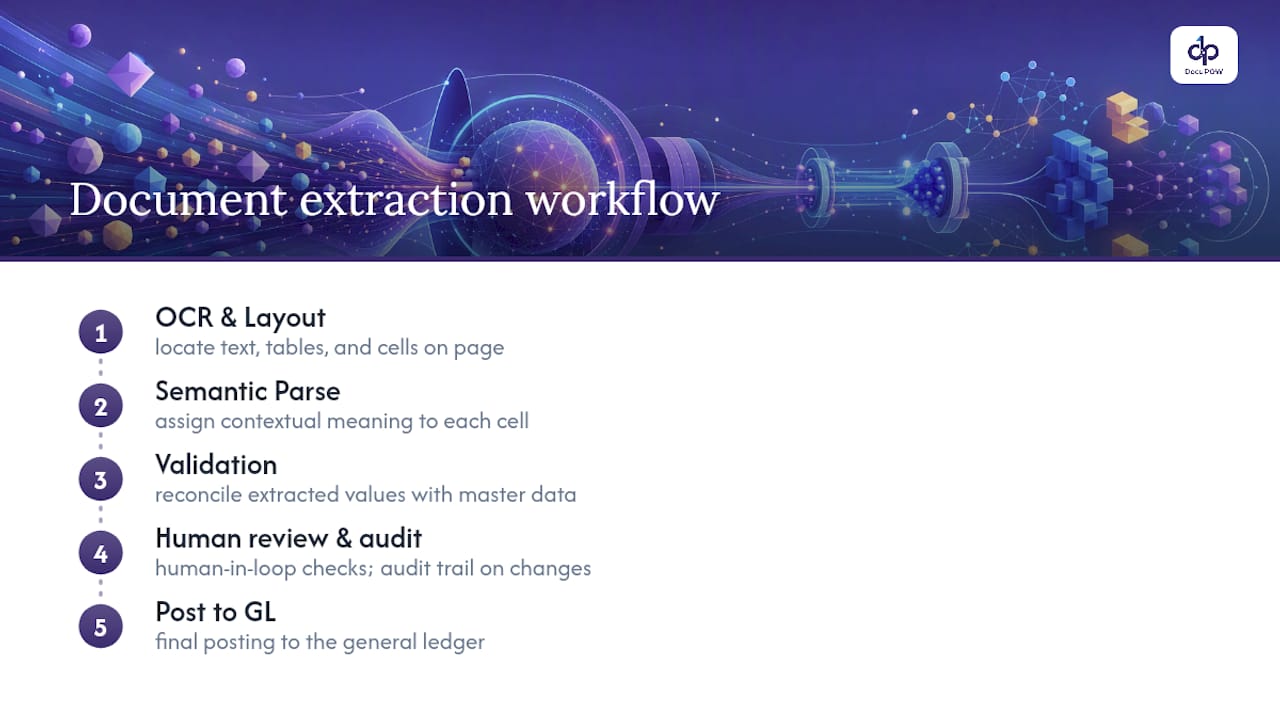
    Three-layer document data quality workflow

    Parent-child relationships deserve particular attention. A purchase order with sub-line items, or a contract with nested obligations under a single clause, only works downstream if those hierarchies survive extraction intact. Human-in-the-loop review, paired with an audit trail on every field change, is what keeps a system honest at scale rather than merely fast.

    Which Enterprise Use Cases See the Biggest Impact?

    The clearest wins show up wherever high document volume meets a repetitive manual task.

    • Accounts payable: invoice capture feeds directly into three-way matching against purchase orders and receipts, with mismatches routed automatically for exception handling.
    • Procurement: incoming POs and new supplier documentation get parsed on intake, cutting onboarding time from weeks to days.
    • Legal: contract repositories become searchable by clause, so obligation tracking and renewal deadlines stop living in a spreadsheet someone forgot to update.
    • Operations and supply chain: bills of lading, certificates of conformity, and order confirmations get logged and reconciled without a warehouse team retyping serial numbers.

    Manufacturing and distribution firms tend to see the fastest payback simply because their document volume is highest. SEW-EURODRIVE’s automation program reported time savings as high as 90% on document-centric workflows once the system reached production scale, an example of the significant improvements achievable when volume and process maturity line up.

    How Should Procurement Score Vendors During an RFP?

    Buyers who skip a structured checklist tend to pick the vendor with the best demo, not the best fit. Score every candidate against four categories, in this order:

    1. Business fit: document volumes per month, document types in scope, required SLAs, and the specific KPI the pilot must move.
    2. Technical fit: the actual connector list for your ERP and CRM, supported API formats, and whether extraction handles nested tables, not just flat forms.
    3. Operational fit: how human-in-the-loop review works day to day, how corrections feed back into the model, and who owns governance once it’s live.
    4. Commercial fit: what drives pricing (volume, seats, document types), how the pilot is scoped, and a realistic estimate of integration effort.

    Pro Tip: Ask every vendor to run their extraction engine live on your five messiest real documents during the demo, not a curated sample. That single test tells you more than a week of sales calls.

    Templated tools frequently fail once business-unit-specific document variations show up at scale, so weight the technical-fit category heavily if your document set spans multiple regions or subsidiaries.

    How Do You Roll Out AI File Management Without Disrupting Operations?

    Start narrow. A four to eight week pilot on one high-value document type, at 2,000 to 5,000 documents monthly from a single supplier or invoice category, gives you a clean read on accuracy and throughput before you touch a single ERP integration.

    • Pilot: define target extraction accuracy and touchless-processing rate up front, then measure against them weekly.
    • Expand: connect the validated workflow to your general ledger or ERP, automate exception routing, and tune the validation rules that caused the most reviewer overrides.
    • Scale: formalize governance, set a retraining cadence, and stand up a small center of excellence to own new document types as they arrive.

    Track extraction accuracy, time-to-post, reduction in manual touches per document, and cost-per-document at each stage. No-code modeling tools shorten the time between “we found a new document type” and “it’s in production,” which is where a lot of legacy IDP projects stall for months.

    How Does the AI Model Keep Learning After Launch?

    A model that never improves after go-live is a model quietly losing accuracy as your document mix drifts. Continuous learning in this category works through the human-in-the-loop queue itself: every correction a reviewer makes gets fed back as a labeled example, tightening extraction on that document type without a data science team rebuilding a pipeline.

    Retraining cadence should be scheduled, not ad hoc. Weekly or biweekly reviews of override patterns catch drift early, whether that’s a supplier who changed invoice formats or a new contract template legal started using last quarter. Governance around this matters as much as the model itself: role-based access to review queues and defined retention rules keep the feedback loop auditable rather than a black box someone in IT half remembers configuring two years ago.

    The practical test of a mature system isn’t perfect accuracy on day one. It’s whether accuracy on a new document type climbs measurably within the first few weeks of exposure, and whether that improvement is visible in a dashboard rather than anecdotal.

    Can It Handle Multilingual and Nonstandard Documents?

    Global operations rarely deal in one language or one format, and this is where template-based tools show their age fastest. An invoice from a German supplier, a bill of lading from a Southeast Asian freight forwarder, and a contract drafted in French all need to land in the same structured output, mapped to the same fields.

    Agentic, template-free extraction handles this better than rigid systems because it interprets meaning and layout together rather than matching against a fixed template per language or format. A purchase order scanned as a low-resolution fax, a native PDF contract, and a photographed delivery receipt from a mobile device all need to clear the same OCR and layout-analysis stage before semantic interpretation can do its job.

    The practical requirement for enterprise buyers: confirm language coverage and document-format tolerance during the pilot, not after signing a multi-year contract. Ask specifically about handwritten fields, low-quality scans, and mixed-language documents, since those are where extraction accuracy drops fastest and where the human-in-the-loop layer earns its keep.
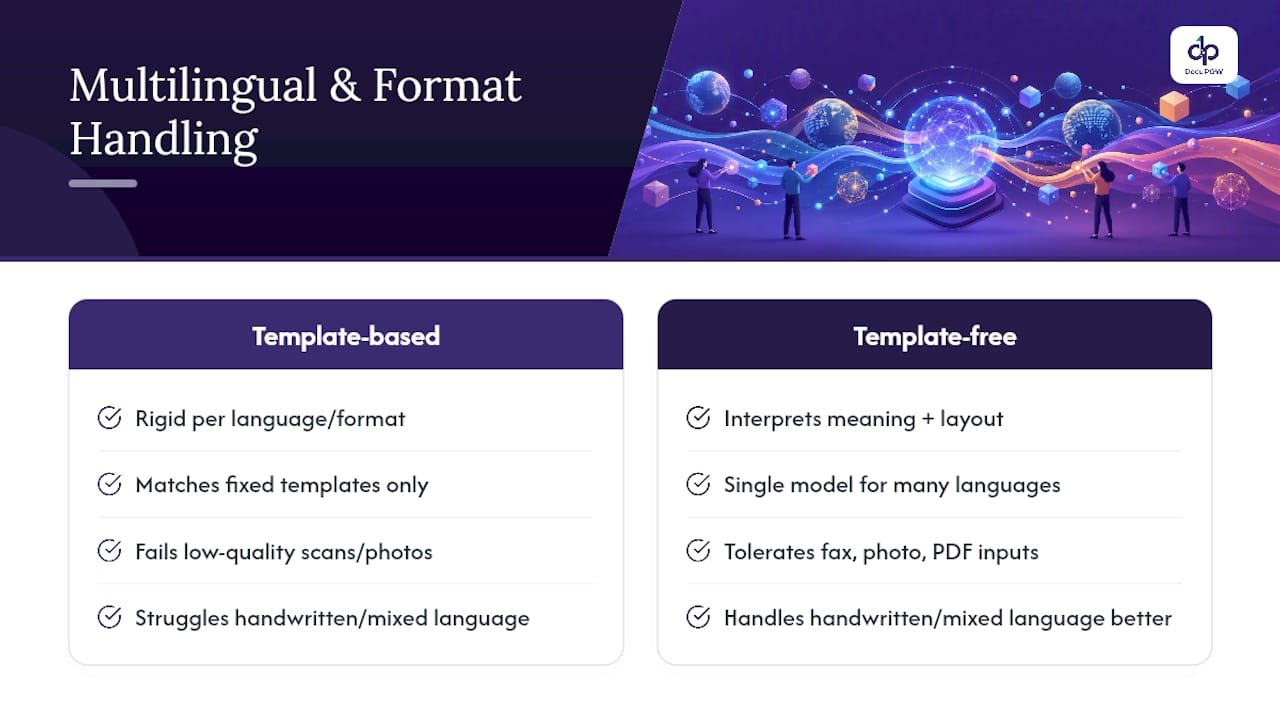
    Can It Handle Multilingual and Nonstandard Documents? — overview diagram

    What Data Privacy Questions Should Enterprise Buyers Ask?

    Document AI touches sensitive data by default: vendor banking details, employee records buried in HR contracts, customer information in service agreements. Before extracted fields ever reach a database, ask where documents are stored, how long raw files are retained, and whether data is used to train models shared across other customers.

    Redaction rules matter as much as encryption. A platform that can mask or exclude specific field types (Social Security numbers, banking details) before they hit a review queue reduces exposure for every reviewer who touches that document, not just the systems downstream. Role-based access to human-in-the-loop queues should be table stakes, not an enterprise add-on tier.

    Why Agentic Automation Beats the Alternatives in Practice

    The workflow-complexity problem is real, and most vendors underestimate it because extraction demos look impressive while orchestration failures only show up at scale, three months into production. What convinces me template-free extraction is worth the switching cost isn’t the accuracy number on a spec sheet. It’s that the model adapts when a supplier changes an invoice format without anyone filing a change request. An agent-based approach treats adaptability as the baseline, not a premium feature, which is exactly where this category needs to go.

    — Syed Naveed Abbas

    Ready to Pilot Template-Free Document Automation?

    Some document automation platforms are built around the architecture this article just walked through: agent-based extraction that skips rigid templates, human-in-the-loop review baked into the workflow, and direct API delivery into existing ERP and CRM systems. No document mapping project, no six-month template library to maintain before you see a single processed invoice.

    DocuPOW

    If you’re weighing a pilot, the smartest first move is picking one high-volume document type, one supplier or invoice category, and a clear accuracy target, the same scoped approach outlined earlier in this piece. DocuPOW’s document intelligence platform is designed for exactly that kind of proof-of-value run before any larger rollout. Start with a demo request to see how template-free extraction handles your own messiest documents, not a vendor’s curated sample set.

    Sources

    FAQ

    What Is Agentic, Template-Free Document Extraction?

    It’s an AI approach that interprets a document’s structure and content directly, without matching it against a preconfigured template, so it adapts automatically when a supplier or format changes.

    How Long Does a Typical Pilot Take?

    Most enterprise pilots run four to eight weeks on a single document type, processing roughly 2,000 to 5,000 documents monthly before expanding scope.

    What ROI Can Enterprises Realistically Expect?

    Results vary by document volume and integration maturity, but reported case studies show time savings as high as 90% with multi-hundred-percent ROI once a program reaches full production scale.

    Does This Replace My ERP or CRM?

    No. AI-powered file management platforms like DocuPOW extract and structure document data, then deliver it into your existing ERP or CRM through API connectors rather than replacing those systems.

    How Does Human-in-the-Loop Review Work?

    Exceptions or low-confidence extractions route to a human reviewer for correction, and those corrections feed back into the model to improve accuracy on future documents of the same type.

  • 6–10 Week Pilot: Agentic Automated Policy Management for Enterprise

    6–10 Week Pilot: Agentic Automated Policy Management for Enterprise

    Automated policy management uses agentic, template-free document extraction paired with an enforceable policy-as-code layer to turn policy text into machine-readable rules that drive fast, auditable decisions. If your organization processes recurring contracts, expense rules, or regulatory manuals with measurable workflows attached, a pilot is worth running now rather than later. One credible option for that pilot is a platform built specifically around this extraction-to-enforcement model rather than static templates.


    TL;DR:

    • Automating policy management relies on extracting unstructured policy text into enforceable, machine-readable rules, primarily for contracts, regulations, and vendor agreements.
    • The process involves document normalization, context-aware extraction by large language models, and an iterative judgment system that refines rules before enforcement.
    • Pilot success depends on narrowing scope, building quality datasets, setting clear evaluation criteria, and managing ambiguous policy language through document cleanup.
    • Most pilot failures stem from overly broad scope and unaddressed policy ambiguity, highlighting the need for precise policies and measured confidence thresholds.
    • Effective platforms support real-time enforcement, transparent decision logs, and seamless integration with existing systems, with pilot timelines typically lasting 6 to 10 weeks.

    DocuPOW
    Turn Policy Documents Into Action
    DocuPOW uses context-aware AI agents to extract data from documents, reduce manual entry, and support faster, more accurate decisions.

    Request a Free Demo

    Table of Contents

    What Is Automated Policy Management, Exactly?

    This isn’t policy portal software for publishing employee handbooks or tracking who clicked “acknowledge” on a code-of-conduct PDF. That’s a different product category entirely. Automated policy management, as covered here, is document-centric: it converts unstructured policy text (contracts, regulatory manuals, procurement terms, expense guidelines) into structured, enforceable rules that an agent-based system checks against incoming documents in real time.

    The scope matters because vendors and buyers often talk past each other. Automated policy management, in this sense, covers:

    • Contract clauses that trigger approval workflows or flag deviations from standard terms
    • Regulatory manuals translated into pass/fail validation logic for compliance checks
    • Expense and procurement rules applied automatically to incoming invoices or purchase requests
    • Vendor agreements where terms need continuous monitoring against live transactions

    The output looks different from a compliance dashboard. Expect typed rule units (discrete, machine-readable policy statements), pass/fail validation results tied to specific clauses, and audit logs that trace every automated decision back to its source document. If a vendor’s demo shows you a policy library with search and tagging but no extraction or enforcement engine underneath, you’re looking at the wrong category of tool.

    How Does Automated Policy Management Work?

    The pipeline starts with document normalization. Scanned contracts, PDFs, and legacy manuals get run through OCR and converted into structured Markdown or chunked text, canonicalizing formats so an extraction agent can work across inconsistent source documents without a preset template for each one.

    From there, agentic large language models perform the extraction itself. Instead of matching fields against a fixed template, the agent reads context and intent, producing typed rule units or knowledge-graph nodes that represent each policy statement. This template-free approach is what separates modern platforms from the rules-engine software of a decade ago, and it’s why knowledge-graph-based extraction has gained traction: PoliGrapher’s research found this method identified 40% more collection statements than prior extraction approaches, at 97% precision.

    Raw extraction alone isn’t trustworthy enough for enterprise decisions, though. That’s where LLM-as-a-judge verification comes in: a second model evaluates the extracted rules against multiple criteria, flags weak or ambiguous outputs, and triggers iterative repair before anything reaches production.

    According to research on the De Jure extraction pattern, this judge-guided iteration produces monotonic quality improvements within three rounds at most, and downstream question-answering grounded in the refined rules was preferred over unrefined outputs in 73.8% of single-rule tests, climbing to 84% at broader retrieval depth.

    Pro Tip: Ask any vendor exactly how many repair iterations their judge loop allows before a document escalates to a human. “Unlimited retries” sounds generous but usually means no real quality gate exists at all.

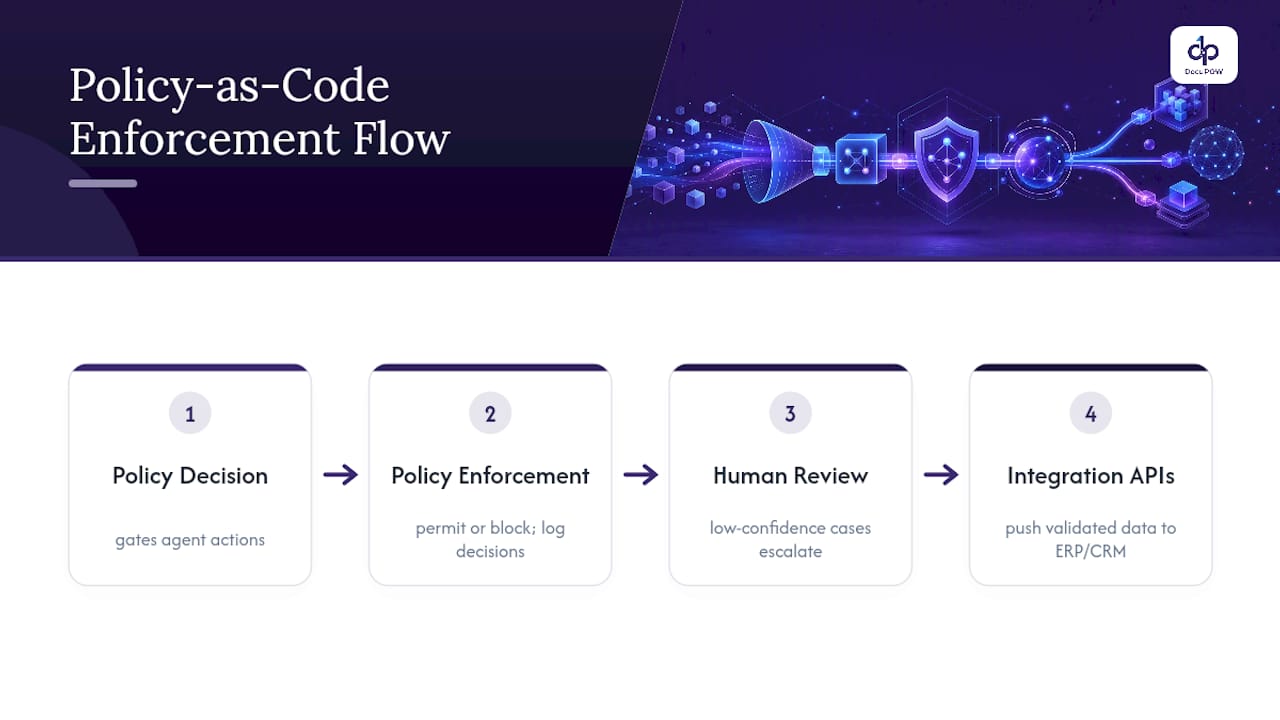
    Once rules pass verification, a policy-as-code layer enforces them. This typically means a policy decision point (PDP) and policy enforcement point (PEP) architecture that gates agent actions in real time, similar to the guardrail model Kyndryl describes for regulated industries. Every decision gets logged. Human-in-the-loop checkpoints catch low-confidence cases, and integration APIs push validated data into your ERP, CRM, or workflow engine without a separate manual handoff.

    Policy enforcement and review workflow

    What Are the Measurable Benefits of Automated Policy Management?

    The business case comes down to fewer hours spent on manual review and faster time to decision, but the specific KPIs vary by function. Finance teams tracking invoice exceptions want reduced touch time per document. Procurement teams checking vendor terms against contract standards want fewer missed deviations. Compliance teams validating regulatory manuals want a defensible audit trail more than raw speed.

    Vendor case notes in this space, including examples from GLIK’s policy automation templates, point to reductions in manual review effort approaching 70% for expense and invoice workflows in some deployments. Treat figures like that as directional rather than guaranteed. Every document mix, ambiguity level, and integration setup changes the outcome.

    Function-level patterns worth tracking during a pilot:

    • Finance: percentage of invoices auto-approved without human touch, average exception-handling time
    • Procurement: number of vendor-term violations caught pre-payment versus post-payment
    • Compliance: regulatory manual coverage percentage and time-to-flag for new rule changes

    For reporting cadence, weekly reviews during the first 90 days catch drift early; monthly cadence works once confidence thresholds stabilize. Cost per document processed is the metric finance leaders ask for first, but pair it with an error-rate figure. A cheaper process that lets more bad decisions through isn’t actually cheaper.

    How Do You Implement Automated Policy Management?

    Moving from pilot to production follows a predictable sequence, and skipping steps is the most common way teams stall out.

    1. Define scope narrowly. Pick one document type and one policy class (say, expense reports against a single reimbursement policy) rather than trying to cover every contract type at once.
    2. Build a golden dataset. Assemble 50 to 100 representative documents, including edge cases and intentionally ambiguous language, so the system’s accuracy gets tested against real messiness, not clean samples.
    3. Set evaluation criteria upfront. Extraction fidelity, judge accuracy, auditability of the decision trail, integration readiness with existing systems, and security and compliance posture all need pass/fail thresholds before the pilot starts, not after.
    4. Run the pilot with a defined HITL budget. Decide in advance what percentage of documents route to human review versus automated pass, and set the confidence threshold that triggers escalation.
    5. Establish acceptance and rollback criteria. Know what “good enough to scale” looks like and what triggers a pause, before you’re staring at week six results trying to decide in real time.

    A typical pilot runs 6 to 10 weeks for a single document type and policy class. Ambiguous source language is the biggest hidden cost here: research on policy ambiguity shows that vague or inconsistent policy text directly reduces automated extraction accuracy, so cleaning up the underlying policy documents often matters more than tuning the model.

    Pro Tip: *Before you evaluate any vendor, write down your confidence threshold for auto-approval in numbers, not adjectives.

    What Do Deployment Pilots Actually Teach Teams?

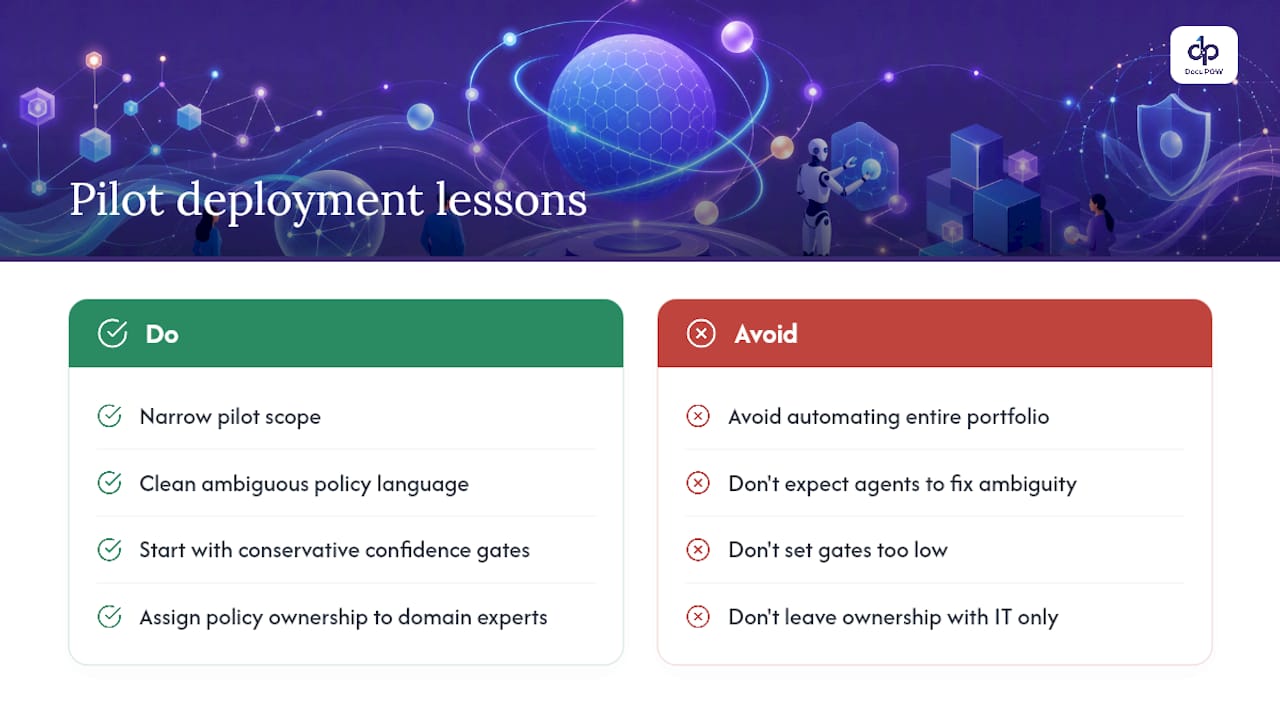
    Most failed pilots share the same root cause: scope that’s too broad for the timeline allotted. Teams want to automate every contract type in the portfolio during a single quarter, and when the results come back mixed across document types, the whole initiative gets labeled a disappointment rather than a scoping error.

    What Do Deployment Pilots Actually Teach Teams? — overview diagram

    The second common trap is treating ambiguous policy language as the system’s problem to solve rather than the organization’s problem to fix. If your expense policy says “reasonable travel costs” without a number attached, no extraction agent will resolve that ambiguity consistently. Clean the policy before you automate it.

    Confidence gates deserve more thought than most teams give them. Setting the threshold too low floods reviewers with false escalations; setting it too high lets bad decisions through silently. Start conservative, measure actual error rates against human review for the first month, then loosen the gate deliberately. Ownership should sit with whoever owns the underlying policy, not just IT. A compliance officer who understands the regulatory manual should sign off on rule accuracy, not just system uptime.

    — Syed Naveed Abbas

    Where DocuPOW Fits Into Your Evaluation

    A platform built around the same extraction-to-enforcement model this article describes features template-free extraction that reads document context instead of matching fixed layouts, agentic enforcement tied to policy rules, and real-time analytics that give finance and compliance leaders visibility into decisions as they happen rather than after a quarterly audit.

    DocuPOW

    For procurement teams building a pilot proposal, the checklist above translates directly into what to bring to a demo: a sample set of your actual policy documents (not sanitized examples), your target confidence threshold, and the KPIs your function cares about most, whether that’s exception-handling time in finance or vendor-term coverage in procurement. An audit trail and API integrations with existing ERP and CRM systems mean the pilot data doesn’t live in a silo. The platform page walks through how document intelligence and workflow orchestration connect, and the enterprise workflow automation guide covers broader orchestration patterns if your scope extends past a single policy class. If you’re weighing systems-integration partners for the rollout itself, firms like Autonomousfirm specialize in that kind of change management. Request a demo and bring your messiest document set. That’s the one that tells you whether the extraction actually holds up.

    Sources

    For readers who want to verify the technical claims vendors make, a few sources stand out: the De Jure paper on iterative LLM refinement, AWS’s Policy Discovery Module documentation, the open-source PolicyFlow project, and PoliGraph-er’s knowledge-graph research.

    FAQ

    What Makes Automated Policy Management “Agentic”?

    Agentic means the extraction system reads document context and intent rather than matching fields against a fixed template, letting one agent handle varied document formats without per-type configuration.

    Is Automated Policy Management the Same as HR Policy Software?

    No. This category extracts and enforces rules from documents like contracts and regulatory manuals; it doesn’t publish or track employee acknowledgment of company handbooks.

    How Long Does a Typical Pilot Take?

    Most single-document-type pilots run 6 to 10 weeks, though ambiguous source policies can extend that timeline since unclear language reduces extraction accuracy.

    What Confidence Threshold Should We Set for Auto-Approval?

    There’s no universal number since it depends on document risk and volume, but most teams start conservative, measure error rates against human review for a month, then adjust.

    Do platforms Support Integration With Existing ERP Systems?

    Yes, some platforms provide APIs designed to connect extracted, validated policy data directly into existing ERP and CRM systems without a manual data transfer step.

  • 5 Governance Moves to Enable Template Free Extraction for Enterprises

    5 Governance Moves to Enable Template Free Extraction for Enterprises

    Centralize governed storage and automate capture and metadata at the point of ingest. That single move fixes more retrieval delays, compliance gaps, and audit failures than any other change organizations managing large volumes of documents can make. Governance gives automation something reliable to work with, which is why the two have to move together, not sequentially. Skip the governance layer and even the best AI extraction tool will just process chaos faster.


    TL;DR:

    • Centralized, governed storage with clear ownership and a taxonomy linked to business processes reduces retrieval delays and compliance risks.
    • Proper indexing methods, including metadata-driven search and semantic analysis, improve search speed and reduce dependency on rigid file naming conventions.
    • Building governance, including retention policies and role-based permissions, is crucial for trustworthy automation and accurate AI extraction results.
    • Phased migration prioritizing high-risk or high-value document categories and involving pilot runs enhances success and uncovers edge cases early.
    • Template-free, context-aware extraction tools like DocuPOW enable flexible processing across varying document formats, provided metadata and integration are properly established.

    DocuPOW
    Make Document Extraction Governable
    DocuPOW uses context-aware AI agents to extract data from varied documents without relying on rigid templates.

    Request a demo

    Table of Contents

    Core Best Practices for High-Volume Document Environments

    Volume alone doesn’t break document programs. Unowned, unstructured chaos does. Every organization managing large volumes of documents that gets this right starts with the same five moves, in roughly this order.

    1. Assign ownership and build a taxonomy. Someone specific, not a committee, owns the metadata schema, and that schema maps to actual business processes, not abstract categories nobody uses.
    2. Centralize the repository. Ad hoc shared drives and shadow archives in individual departments are where documents go to disappear. One governed system, one source of truth.
    3. Enforce version control and audit trails. Every edit, approval, and access event gets logged automatically, not tracked in someone’s memory.
    4. Apply retention and disposition rules tied to regulation. Documents get deleted or archived on a schedule tied to legal requirements and business need, not left indefinitely because nobody wants to make the call.
    5. Lock down access with role-based permissions and encryption. Not everyone needs to see everything, and secure sharing protocols prevent the sensitive-document-in-an-email problem that shows up in nearly every compliance postmortem.

    Industry guidance on high-volume workflows consistently points to the same core controls: centralized repositories, metadata-driven classification, automated workflows, RBAC, and retention policies. Skip any one of these and the others lose most of their value.

    Pro Tip: Build your metadata schema around how people actually search for documents, not how your org chart is structured. A schema that mirrors departments instead of workflows forces users to guess which silo a file landed in.

    Choosing the Right Technology and Integration Pattern

    Not every organization needs a full electronic document management system (EDMS). If your documents live in three or four systems with clear boundaries, a layered content services approach connecting those systems through APIs might cost less and deploy faster than a monolithic EDMS. If you’re consolidating dozens of sources across departments or entities, a unified DMS earns its complexity.

    Capture technology has moved well past basic scanning:

    • OCR handles simple, structured documents where fields sit in predictable spots.
    • Structured extraction works for semi-variable formats like standardized invoices.
    • Agentic, template-free extraction reads context and intent across documents that don’t follow any fixed layout at all, which matters enormously once you’re dealing with vendors, subsidiaries, or partners who each format things differently.

    Indexing strategy matters just as much as capture. Metadata-first indexing gets you fast filtered searches. Full-text search catches what metadata misses. Semantic search, built on the natural language processing techniques behind modern extraction tools, lets users search by meaning and intent rather than exact keyword match, which is a real advantage when document volume outpaces anyone’s ability to remember exact file names.

    On integration, prioritize ERP and CRM connectors, single sign on, and API-based ingestion pipelines before anything else. Connecting document automation to existing systems is the step most projects underestimate, and the one that determines whether the new system actually gets used.

    Illustration of document integration pathways

    Governance Structure That Makes Automation Trustworthy

    Automation only works as well as the structure underneath it. A governance core needs to define policy, name stewards for each document category, and build enforcement into the system itself rather than relying on people following a written policy on faith.

    That governance core has to cover four things concretely:

    • Retention and disposition mapped explicitly to the regulations and business rules that apply to each document type, not a blanket “keep everything forever” default.
    • Versioning and approval workflows enforced technically, so an outdated draft can’t get pulled into a report by accident.
    • Named stewards for each major document category, with clear escalation paths when exceptions come up.
    • Metadata consistency checks run regularly, since drift in tagging quietly undermines search and automation over time.

    This structure isn’t paperwork for its own sake. It’s what lets AI and automation tools return results people can actually trust, because an extraction engine pointed at an ungoverned mess will confidently produce wrong answers just as fast as right ones.

    Planning a Phased Migration for Large Document Sets

    Big-bang migrations for large document sets fail more often than they succeed, mostly because nobody discovers the edge cases until real users hit them at scale. A phased approach catches problems while they’re still small.

    1. Prioritize by value and risk. Migrate the document categories with the highest compliance exposure or business impact first, and hold off on anything with messy or incomplete data until you’ve built confidence with cleaner sets.
    2. Pilot, then expand. Run one business unit or document type through the full process, validate results against defined checkpoints, and keep a rollback plan ready in case something breaks.
    3. Inventory every connector before you start. Multi-entity organizations especially benefit from mapping ERP and CRM integrations up front, since a single “perfect” platform covering every existing system rarely exists and integration fit matters more than feature lists.
    4. Set realistic timelines per phase, with named owners for data cleanup, integration testing, and user acceptance at each stage.

    Research on complex digital programs backs this up directly: governance and staged delivery are consistently linked to program success, while programs that skip staging tend to discover their integration gaps in production. A migration guide built for phased rollouts can help map out which business unit to start with.

    Pro Tip: Migrate by business unit, not by document type across the whole company at once. It’s easier to fix a broken workflow for one team than to unwind a global rollout that hit an unexpected exception in week two.

    Measuring ROI: The KPIs That Actually Matter

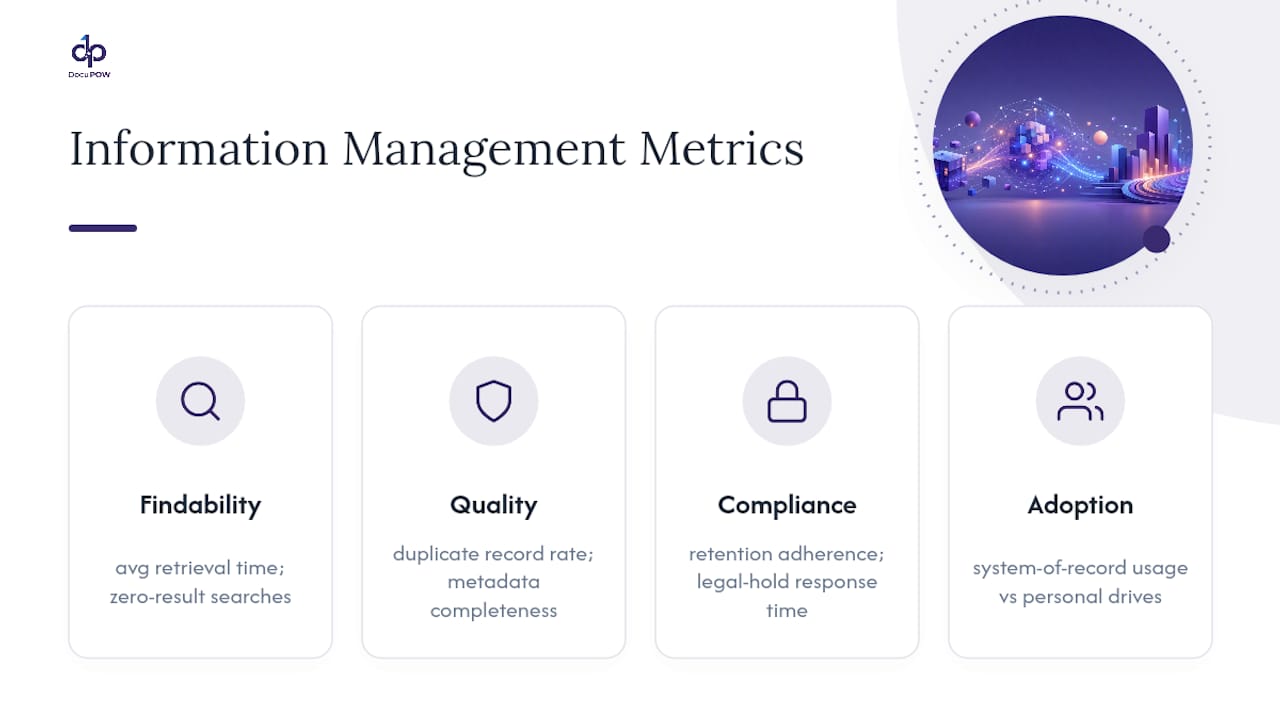
    Two categories of metrics tell you whether a document program is working. Operational metrics include time-to-retrieve, processing throughput, and exception rates. Financial metrics cover cost per document processed, storage costs, and audit penalties avoided.

    • Track time-to-retrieve before and during a pilot; a jump from minutes to seconds is the clearest sign metadata and indexing are working.
    • Watch exception rates closely. A rising rate usually points to a governance gap, not a tool failure.
    • Calculate cost per document processed, including labor, and compare it against your pre-automation baseline.
    • Log audit findings and penalties avoided as a direct financial argument for the program’s budget.

    Organizations that pair electronic document management with proper training and governance see measurable gains in retrieval speed and document security, though the size of that gain depends heavily on how disciplined the metadata and access controls were before automation arrived. Run a controlled pilot in one department, measure the same metrics before and after, and you’ll have a defensible case to bring to leadership instead of a vague sense that things feel faster.

    The Expert Take: Why Template-Free Extraction Changes the Math

    Legacy OCR and RPA tools depend on rigid templates. Change a vendor’s invoice layout and the whole pipeline breaks until someone rebuilds the template. Agentic, template-free extraction works differently: it reads context and intent across a document rather than matching fixed coordinates, which means it survives format changes that would stop a template-based tool cold.

    That approach only delivers value under the right conditions.

    Agentic approaches shine where the underlying corpus is governed. Once metadata and structure are in place, this kind of automation can genuinely liberate trapped data from static files instead of just digitizing the same chaos faster.

    The prerequisites are non-negotiable: a governed corpus, consistent metadata, and integration endpoints ready to receive the extracted data. Meet those, and the outcomes are real. Less manual entry, faster analytic visibility into what’s actually in your documents, and fewer costly transcription errors feeding into downstream systems.

    Why Governance Has to Come First, Not Automation

    AI amplifies whatever structure it’s given, good or bad. Poor governance won’t get fixed by adding automation on top. It just fails faster. Start with your best-governed document domain, prove the model, then expand as governance matures elsewhere. Someone specific needs to own that expansion and track the business value it delivers.

    — Syed Naveed Abbas

    Where DocuPOW Fits Once Governance Is in Place

    Once your governance foundation is solid, the bottleneck usually isn’t policy anymore. It’s how fast you can actually extract and route data out of the documents piling up in that governed repository. DocuPOW is built for exactly that gap: template-free extraction that reads context instead of fixed layouts, multi-step workflow orchestration, real-time analytics, and direct integration with ERP and CRM systems so extracted data lands where finance and operations teams already work.

    DocuPOW

    It fits best in high-volume processing scenarios, multi-entity financial reporting, and claims workflows, where document formats vary and manual entry is a significant cost factor. If you’re running a three-way match between purchase orders, invoices, and receipts, or your teams still hand-key data from vendor documents that never look the same twice, that’s the exact scenario DocuPOW was built to eliminate. Before a pilot, confirm your document categories have clean metadata, list the ERP or CRM endpoints you need connected, and identify one business unit to test with first. From there, a demo of the platform is the fastest way to see how template-free extraction handles your actual documents rather than a generic sample set.

    Sources

    FAQ

    What Are the Top Document Management Systems for Large Organizations?

    There’s no single best system for every organization. The right choice depends on document volume, the number of existing systems you need to integrate, and whether you need a full EDMS or a layered content services approach connecting systems through APIs.

    Where Should Organizations Store All Their Documents?

    A centralized, governed repository, not scattered shared drives or department-level silos. Centralization is one of the core controls industry guidance on high-volume document workflows identifies as essential to managing volume reliably.

    How Much Does a Document Management System Cost?

    Costs vary widely based on volume, integration complexity, and whether you need agentic extraction versus basic capture, and most vendors price by usage tier or user count rather than a flat fee. Budget for implementation and integration work alongside the software subscription itself, since connector setup is often the larger cost.

    What Is the Best Way to Organize Documentation?

    Build a metadata schema mapped to actual business processes, not your org chart, and enforce it with role-based access, version control, and retention rules tied to regulatory requirements. Consistent metadata is what makes both search and automation reliable at scale.

    Can AI Extraction Tools Handle Documents Without Fixed Templates?

    Yes. Agentic, template-free extraction tools like DocuPOW read context and intent across a document rather than matching a fixed layout, which lets them handle format changes that would break traditional OCR or RPA pipelines.

  • 90 Day Agentic AI Powered Information Accessibility for Enterprises

    90 Day Agentic AI Powered Information Accessibility for Enterprises

    AI-powered information accessibility turns static documents into structured, queryable data your systems can act on. For enterprise teams, that means invoices, contracts, and claims stop sitting in folders and start feeding analytics, workflows, and decisions. Most deployments hit measurable ROI within 6 to 12 months, provided a human review loop backs the extraction.


    TL;DR:

    • Without governance controls, errors from low-confidence extractions can spread widely and impact legal and compliance outcomes.
    • Setting confidence thresholds between 85 and 90 percent ensures most fields route automatically while low-confidence data goes to human review.
    • Proper classification and filtering before extraction help prevent sensitive or irrelevant documents from entering AI workflows, reducing risk.
    • A typical pilot phase lasts 90 days, with initial discovery, focused testing, and scaled deployment to validate accuracy and process improvements.
    • Vendors should provide detailed API, confidence scoring, audit trails, and support for sensitive data handling to ensure operational and legal compliance.

    DocuPOW
    Make Enterprise Documents Actionable
    DocuPOW uses autonomous AI agents to extract contextual data from documents, helping teams improve workflow efficiency and information access.

    Request a Free Demo

    Table of Contents

    What Is AI-Powered Information Accessibility, and How Does It Differ From OCR?

    AI-powered information accessibility, more precisely called intelligent document processing (IDP), converts PDFs, scanned forms, emails, and images into structured data that analytics tools and business systems can query directly. That’s a distinct capability from plain optical character recognition, which just turns pixels into text strings with no understanding of what those strings mean.

    Enterprise document estates break down into three categories, and each demands a different extraction strategy:

    • Structured documents — forms and templates with fixed fields, like standardized purchase orders.
    • Semi-structured documents — invoices and receipts that share a general layout but vary by vendor.
    • Unstructured documents — contracts, emails, and inspection reports with no predictable layout at all.

    Legacy OCR reads characters. Modern IDP reads context: it recognizes that a number near the word “Total” on page two of an invoice is likely the amount due, even when the vendor’s template has never been seen before. That contextual reasoning is what Databricks points to as the foundation for retrieval-augmented and agentic AI workflows. Classification models now hit 95 to 99% accuracy on trained document types, which is the benchmark worth holding vendors to before you sign anything.

    Why Enterprise Teams Are Prioritizing This Now

    The ROI case for information accessibility tools rests on three levers: automation rate, exception reduction, and freeing up staff for higher-value work. When a process that used to require manual review on every document drops to exception-only review, the savings compound fast.

    High-value use cases cluster in a handful of areas:

    1. Accounts payable automation — matching invoices to purchase orders without manual keying.
    2. Contract intelligence — surfacing renewal dates, indemnity clauses, and pricing terms across thousands of agreements.
    3. KYC and compliance intake — extracting identity and entity data from inconsistent onboarding documents.
    4. Logistics and supply chain — reading bills of lading, customs forms, and delivery confirmations at volume.

    One documented deployment cut weekly invoice processing from 8 hours to 45 minutes at 92% accuracy, which is the kind of shift that turns a two-person data-entry function into a one-person exception-review function. Payback windows for these projects typically land between 6 and 12 months, tracked against KPIs like straight-through processing rate, cost per document, and hours redeployed to analysis work instead of transcription.

    How Does the Extraction Pipeline Actually Work?

    Every credible IDP system runs the same five-stage pipeline: ingest, classify, extract, validate, and route. Each stage exists to catch a specific failure mode before it reaches your ERP or CRM.

    • Ingest pulls documents from email, scanners, shared drives, or APIs. Failure mode: inconsistent file formats. Mitigation: normalize to a common format before classification.
    • Classify identifies document type. Failure mode: misrouted document types with lookalike layouts. Mitigation: confidence thresholds that flag ambiguous cases for human review.
    • Extract pulls the actual field data. Failure mode: low-confidence fields passed through as if certain. Mitigation: field-level confidence scoring, not just document-level.
    • Validate cross-checks extracted values against business rules or source systems. Failure mode: silent errors in downstream systems. Mitigation: automated reconciliation against master data.
    • Route sends validated data to its destination workflow. Failure mode: orphaned records with no owner. Mitigation: explicit routing rules tied to exception queues.

    On architecture, you’re choosing between platform-native extraction tied to a cloud ecosystem you’ve already standardized on, a general-purpose IDP platform, or agentic, template-free parsing that adapts to new layouts without retraining from scratch. Platform-native tools reduce friction if you’re already locked into that ecosystem; neutral, agent-based platforms serve better when your document sources span vendors, formats, and business units. For teams building retrieval or RAG workflows on top of extracted data, chunking strategy matters as much as extraction accuracy. Splitting a contract clause across two chunks can break its meaning entirely and raise hallucination risk downstream.

    Pro Tip: Set your extraction confidence threshold at 85 to 90% before a field routes automatically. Anything below that goes to human review, not straight into your general ledger.

    What Governance Controls Keep AI Extraction Safe?

    Extraction speed without governance is how errors spread across millions of records before anyone notices. That’s the core warning from Moor Insights & Strategy on agentic AI and unstructured content: agents that act fast on bad data create risk fast, too.

    The fix starts before extraction, not after. ATechReview’s analysis recommends classifying and scoping document sets first, removing records that shouldn’t be indexed at all, whether for privilege, consent, or retention reasons.

    • Screen for retention, privilege, and consent obligations at the point of ingestion, not after data is already searchable.
    • Apply role-based access controls at the retrieval layer so extracted data inherits the same permissions as its source document.
    • Log every query and extraction event for audit purposes.
    • Hold field-level accuracy to the 85 to 95% range and route anything below that to human review.

    Field-level accuracy in this range, paired with a retraining cycle, is what turns a pilot into something legal and compliance teams will actually sign off on.

    What Does a 90-Day Rollout Look Like?

    A realistic pilot-to-production timeline runs in three phases over 90 days:

    1. Weeks 1 to 3: Discovery and scoping. Inventory document types, define governance boundaries, and pick one category to pilot.
    2. Weeks 4 to 8: Pilot. Run extraction against a single document type, baseline accuracy and processing time, and set an automation target.
    3. Weeks 9 to 12: Production rollout. Scale to additional document types, establish the retraining cadence, and hand operations to the process owner.

    Track automation rate, exception rate, mean processing time, and cost per document throughout. Those four numbers tell you within one quarter whether the pilot is worth scaling. For a deeper operational walkthrough, DocuPOW’s guide for business professionals covers pilot sizing in more detail.

    What Should Procurement Ask Before Signing a Vendor?

    Evaluate on operational fit, not feature lists. The strongest technical criteria include API connectors to your existing ERP and CRM, data residency guarantees, and a documented retraining process for when accuracy drifts.

    • Does the platform expose confidence scores at the field level, or only at the document level?
    • What human-in-the-loop tools exist for reviewing low-confidence extractions?
    • Can it produce an audit trail showing which model version processed which document? Learn more about how AI enhances compliance workflows in our partner article on How AI transforms security compliance: faster, smarter.
    • Does it support redaction and masking for sensitive fields before data reaches downstream systems?
    • What does a 30-day pilot look like, and what accuracy baseline will it report against?

    Vendors that expose model choice, confidence scores, and audit trails as standard features tend to outcompete opaque ones once legal and compliance get a seat at the procurement table.

    Why Template-Free, Agent-Based Extraction Scales Better

    Template-based extraction breaks the moment a vendor changes their invoice layout. Agentic, template-free systems read documents the way a trained analyst does, by understanding context and intent rather than matching a fixed pattern. That distinction matters most at scale, when a manufacturer’s document estate spans thousands of supplier formats that no template library could ever anticipate.

    Some manufacturers using this approach report improved financial visibility and faster data-driven decisions once extraction stops depending on rigid templates. DocuPOW’s own research on agentic discovery explores how autonomous agents can turn document archives into searchable knowledge bases rather than static storage.

    — Syed Naveed Abbas

    See AI-Powered Information Accessibility in Action

    If your document estate spans dozens of vendor formats, template-based tools will always be one layout change behind. Some platforms are built around autonomous agents that read documents for context and intent, so extraction keeps working when a supplier changes their invoice template without warning.

    DocuPOW

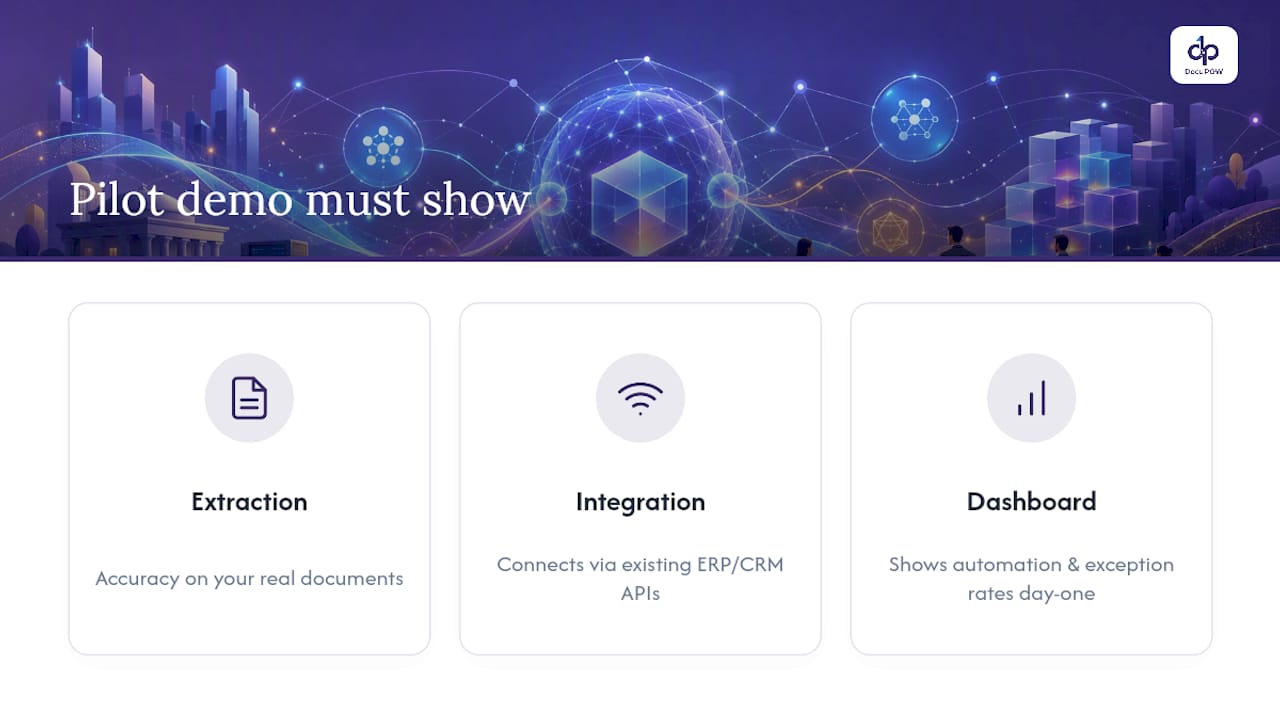
    A pilot worth running should demonstrate three things: extraction accuracy on a real sample of your own documents, proof that the platform connects cleanly to your ERP or CRM through existing APIs, and a dashboard showing automation rate and exception rate from day one. Some platforms offer real-time analytics and predictive insights to answer exactly those questions before you commit to a full rollout.

    Manufacturers and operations teams managing high document volume can review best practices for scaling document processing or start with a solution built for their industry, including construction and real estate document workflows. If your documents span multiple formats and vendors, request a pilot and see your own data extracted before you decide anything.

    See AI-Powered Information Accessibility in Action — overview diagram

    Sources

    For deeper technical grounding, see Databricks on intelligent document processing and Moor Insights & Strategy on agentic AI bottlenecks.

    FAQ

    How Long Does an IDP Pilot Take to Show ROI?

    Most enterprise deployments reach measurable ROI within 6 to 12 months, with a 90-day pilot typically enough to validate accuracy and automation targets before scaling.

    What Accuracy Rate Should I Expect From AI Extraction?

    Field-level extraction typically runs 85 to 95% at initial deployment, improving to 92 to 98% after several months of retraining.

    Do I Need Human Review If Extraction Accuracy Is High?

    Yes. Human-in-the-loop review on low-confidence fields, generally anything below an 85 to 90% threshold, is what keeps errors from reaching financial or compliance systems.

    How Is This Different From Basic OCR Software?

    OCR reads characters; AI-powered information accessibility platforms like DocuPOW read context and intent, extracting meaning without relying on fixed templates.

    What Governance Steps Come Before Extraction?

    Classification and scoping come first: removing ineligible or sensitive records and applying retention and access rules before any data becomes searchable.

  • Make Intelligent Compliance Management Audit Ready With Governance

    Make Intelligent Compliance Management Audit Ready With Governance

    Intelligent compliance management is the practice of embedding AI directly into compliance workflows so it recommends, drafts, and routes regulatory artifacts while a human still signs off on every decision. More than 83% of compliance leaders now report using AI in some form, and 84% say it made their departments more efficient, according to a Compliance Week and konaAI survey. What follows covers the actual capabilities behind that shift, the governance controls that keep it defensible, and a pilot checklist you can run in the next quarter.


    TL;DR:

    • Most vendors’ AI-driven compliance tools perform four core functions: horizon scanning, obligation extraction, structured classification, and real-time controls monitoring, embedded into existing workflows.
    • ROI includes reductions in time per case and cost per case, with 84% of users reporting efficiency gains and 41% observing cost savings, though governance gaps remain a major challenge.
    • Effective agent patterns include classify-and-route, draft artifact generation, deterministic remediations, and triage with human approval, all requiring disciplined design, validation, and continuous monitoring.
    • Governance controls such as documented scope, detailed audit trails, model validation, and regular review are essential to meet regulator expectations and ensure compliance credibility.
    • Successful pilots focus on high-volume, measurable tasks with ground-truth data, clear exit criteria, and early integration with existing systems, while data quality and oversight remain common pitfalls.

    DocuPOW
    docupow.ai
    Make Compliance Data Audit Ready
    DocuPOW uses contextual AI to extract data from documents, support secure workflows, and improve visibility for compliance teams.

    Request a free demo

    Table of Contents

    Core Capabilities of Intelligent Compliance Management

    Most vendors describe intelligent compliance management in abstractions. In practice, it comes down to four working capabilities that plug into workflows you already run.

    Regulatory horizon scanning watches rule changes across agencies and jurisdictions, then extracts the specific obligations buried in dense text. Instead of a 40-page rule update landing in a shared inbox, the system produces a structured summary: which sections changed, which business units are affected, and what the deadline is.

    Obligation extraction turns unstructured regulatory language into something a compliance system can act on. A new disclosure requirement becomes a tagged obligation with an owner, a due date, and a linked control, rather than a paragraph someone has to reread three times.

    Classification with structured outputs is where the technical rigor matters most. A well-built agent doesn’t just guess; it returns a schema-validated object with a label, a confidence score, and a short reasoning string, like {"category": "AML_alert", "confidence": 0.91, "reasoning": "..."}. That structure is what lets a downstream system decide whether to auto-route the case or escalate it.

    Continuous controls monitoring replaces the quarterly sample-check with real-time alerting. A transaction that breaches a threshold, or a vendor contract missing a required clause, gets flagged the moment it happens instead of during next month’s audit cycle.

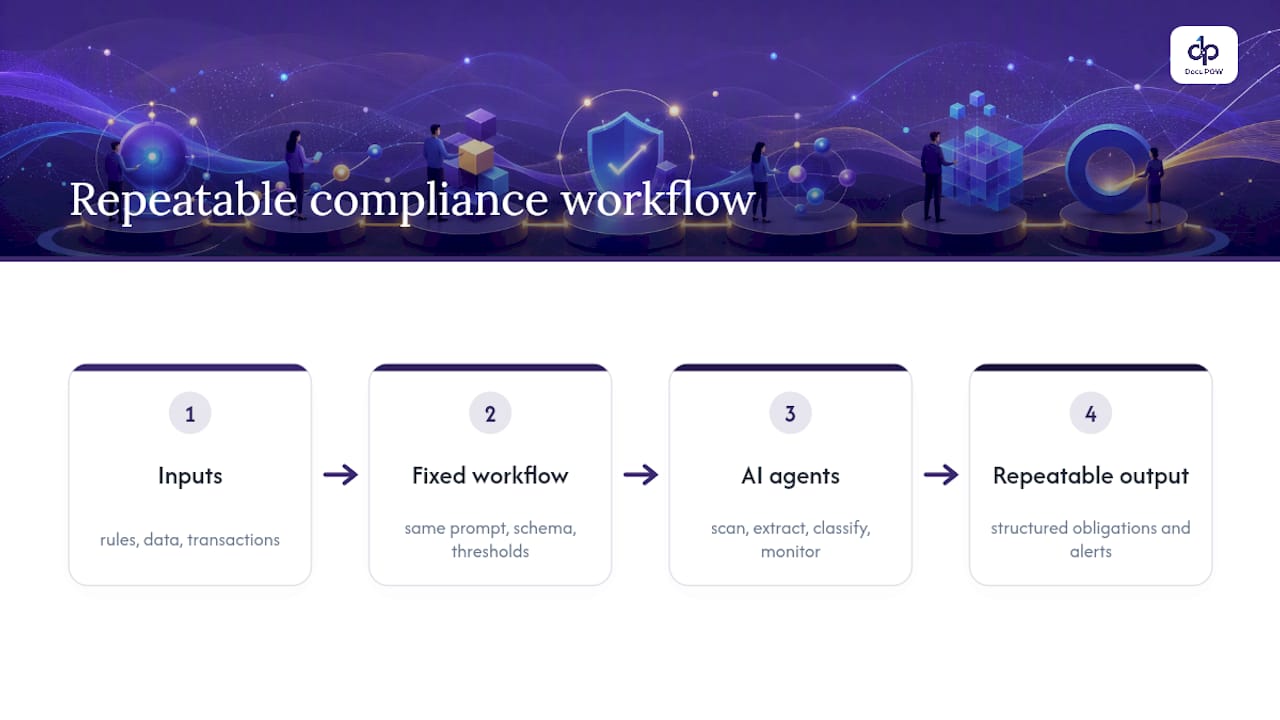
    The common thread across all four is embedding AI into a defined process rather than handing analysts an open chat window. An open-ended prompt produces a different answer every time you ask it. A prompt wired into a fixed workflow, with the same inputs, schema, and thresholds every time, produces a repeatable one. That repeatability is what auditors and regulators actually want to see. As adoption grows, real-time data processing has become the backbone that makes continuous monitoring possible instead of theoretical.

    Repeatable governed AI workflow diagram

    What ROI Does Intelligent Compliance Management Actually Deliver?

    Compliance leaders aren’t adopting AI for novelty. They’re adopting it because the numbers back it up.

    Statistic Callout: Among compliance leaders using AI, 84% report improved departmental efficiency and 41% report direct cost savings, per the Compliance Week and konaAI survey. Separately, 53% of risk and compliance professionals are now using or piloting AI specifically to move from reactive to proactive compliance models.

    Efficiency gains and cost savings are the headline, but they only mean something if you’re tracking the right operational metrics underneath them:

    • Time per case: how long a review takes from intake to disposition, before and after automation.
    • Human approval rate: the percentage of AI-generated recommendations a reviewer accepts without material edits.
    • Cost per case: fully loaded cost, including reviewer time, not just software licensing.
    • Coverage increase: how much more of your transaction or document volume you can now actually review.

    None of this arrives automatically. The same survey data that shows high adoption also shows governance lagging behind it, meaning plenty of organizations are running AI without the controls to prove it’s working. Poor data quality, weak integration with legacy systems, and a shortage of staff who can supervise these tools are the three blockers that show up most often. Mitigating them starts with fixing data pipelines before scaling agent scope, not after.

    Which Agent Design Patterns Actually Work in Production?

    Compliance teams that get real ROI from AI tend to converge on the same handful of patterns, according to Purcell Analytics’ implementation guide. The four worth building around are:

    1. Classify-and-route. The agent categorizes an incoming case (a transaction, a document, a customer complaint) and routes it to the right queue based on confidence score. High-confidence, low-risk cases move automatically; anything below threshold goes to a human.
    2. Draft regulator-shaped artifacts. The agent produces the actual deliverable, like a SAR narrative, a policy citation, or a recommended remediation, in the format a regulator or reviewer expects. The reviewer edits and approves rather than starting from a blank page.
    3. Deterministic remediate-only. For narrowly scoped, low-ambiguity fixes (a missing field, a mismatched date), the agent applies a fixed correction with no judgment call involved. No approval loop needed because there’s no decision to make.
    4. Triage-and-approve. The agent surfaces a ranked list of what needs attention today, and a human approves or reprioritizes. This is the pattern most useful for teams still building trust in the system.

    None of these hold up without design discipline underneath them. Deterministic pre-filters should catch the obvious cases before they ever reach the model. Every output needs schema validation, so a malformed response gets rejected rather than silently passed downstream. Prompt and model versions need to be logged with every single output, and reviewers need one-click accept or reject actions, not a five-step override process that nobody uses.

    Pro Tip: *Track human approval rate as your single most important health metric.

    Monitoring has to run continuously, not just at launch. That means drift detection on model outputs, and a scheduled cadence of ground-truth evaluation, where a sample of agent decisions gets checked against a known-correct answer set to catch quiet degradation before it becomes a finding.

    How Do You Govern AI Risk in Compliance Workflows?

    Governance is the part most teams underbuild, and it’s the part regulators care about most. Standards bodies and practitioners increasingly expect explainability and documented human oversight for any high-risk AI use, a point echoed in Thomson Reuters’ summary of practitioner sentiment. Four controls make that expectation concrete:

    • Written scope documents that name exactly which actions an agent is permitted to take and which ones it is never allowed to take, reviewed and versioned like any other policy.
    • Per-case audit trails capturing the prompt sent, the model ID and prompt version used, the full response returned, the reviewer’s identity, and the final decision, reconstructable months later if a regulator asks.
    • Data protection and model validation, including periodic testing against fresh ground-truth sets to confirm the model still performs the way it did at launch.
    • A quarterly review cadence where governance, not just IT, revisits scope, thresholds, and approval rates.

    ISO’s governance and data management standards offer a useful frame for structuring these controls, particularly around retention and model risk documentation. None of this is optional overhead bolted onto a “real” AI project. It’s the difference between a pilot that survives its first regulatory exam and one that doesn’t. DocuPOW’s audit-readiness framework covers this same territory for teams building the underlying document workflows.

    How Do You Start a Compliance AI Pilot?

    Compliance leaders who succeed with a first pilot follow roughly the same sequence, and it rarely takes longer than 90 days to reach a go or no-go decision.

    1. Pick a narrow, high-volume, verifiable task. Invoice classification, KYC document review, or contract clause extraction all work because outcomes are measurable and volume is high enough to matter.
    2. Build a ground-truth evaluation set before touching production. You need a set of cases with known-correct answers to test against, not just a live-fire launch.
    3. Set your data readiness and reviewer UI first. Practitioners who’ve run these deployments at scale note that context layers and evaluation infrastructure matter more than which model you pick, according to lessons published in CDO Magazine. Get security approvals and integration checkpoints scheduled early since they’re usually the longest lead-time item.
    4. Define your exit criteria before you launch. Decide the approval-rate threshold and case volume that trigger scaling, and the thresholds that trigger a pause.
    Pilot stage Primary gate Owner
    Task selection Volume and measurability confirmed Compliance lead
    Evaluation build Ground-truth set complete Data/risk team
    Production test Approval rate stable above target Reviewer team
    Scale decision Cost-per-case and coverage goals met Compliance leadership

    How DocuPOW Implements These Patterns in Practice

    An agent-based platform maps directly onto the patterns above. Autonomous agents extract data from documents without relying on rigid templates, which matters for compliance teams dealing with contracts, invoices, and disclosures that never arrive in a consistent format.

    • Template-free extraction handles document variability the way a classify-and-route agent needs to, pulling structured fields from whatever format actually shows up.
    • Multi-step workflow orchestration turns a document into a finished process, from intake through the review step, mirroring the draft-then-approve pattern compliance teams rely on.
    • Human-in-the-loop review keeps a person making the final call on every extracted or routed item.
    • Real-time analytics and predictive insights give compliance leaders the coverage and cost-per-case visibility that ROI tracking requires.

    Specific customer case metrics and named implementations are best confirmed directly with DocuPOW, since figures vary by industry and document volume.

    What Data Protection Standards Apply to Compliance AI?

    Compliance AI touches some of the most sensitive data an organization holds: customer financial records, transaction histories, personally identifiable information, sometimes health data. That raises the stakes on every control decision.

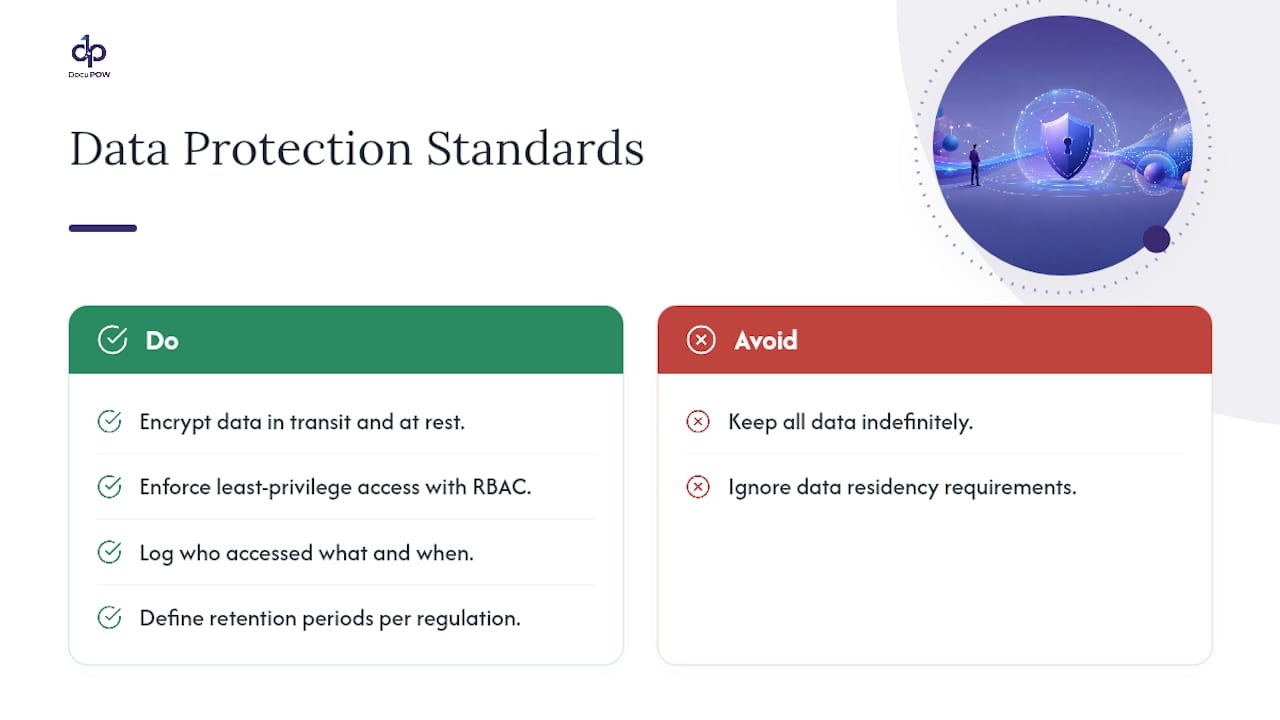
    Encryption in transit and at rest is table stakes, not a differentiator. What actually separates a defensible deployment from a fragile one is access control granularity: does every person and every service account that touches compliance data have a documented, minimum-necessary reason to see it? Role-based access, paired with logging of who accessed what and when, gives you the evidence trail regulators expect if something goes wrong.

    Data residency matters more than most teams initially plan for. If your compliance workflows touch customers across multiple jurisdictions, you need to know where the data physically sits and whether that location satisfies each jurisdiction’s requirements, not just your headquarters’ rules.

    Model validation deserves the same rigor as data security. A model that was accurate at deployment can drift as inputs shift, whether through data changes, new regulatory language, or shifts in customer behavior. Periodic revalidation against a held-out evaluation set catches that drift before a regulator does. Retention policy is the other piece teams underweight: audit trail data, prompts, and model outputs need a defined retention period tied to your regulatory obligations, not an indefinite “keep everything” default that becomes its own liability.

    What Data Protection Standards Apply to Compliance AI? — overview diagram

    How Does This Fit With ERP, GRC, and Document Management Systems?

    Intelligent compliance management rarely runs as a standalone system. It sits between your document sources and the systems your compliance program already depends on: your GRC platform, your ERP, your document management repository.

    The practical challenge is integration depth, not integration existence. A tool that can only read a PDF and hand back a static extract adds little value if your GRC platform still requires manual re-entry. The more useful pattern is API-level integration, where an agent’s output, a classified alert, an extracted obligation, a drafted narrative, writes directly into the case management or GRC workflow your team already uses, carrying its confidence score and audit metadata with it.

    ERP integration matters most for teams whose compliance exposure runs through financial transactions: procurement, accounts payable, vendor onboarding. A platform that connects to ERP data natively can flag a compliance issue at the point a transaction is created, rather than during a retroactive audit weeks later. Document management integration matters for everything upstream of that: contracts, policies, disclosures, and the obligation extraction work described earlier depends on having clean access to that repository rather than a manual document dump.

    DocuPOW’s platform architecture is built around this integration layer specifically, connecting extracted data to ERP and CRM systems via API rather than treating extraction as an isolated step.

    How Do You Handle Multi-Jurisdictional Compliance Requirements?

    Regulatory coverage is the area where AI’s promise and its actual limitations show up most clearly. A model trained on one jurisdiction’s regulatory language doesn’t automatically understand another’s, even when the underlying concept (anti-money laundering, data privacy, disclosure) looks similar on the surface.

    The practical fix isn’t a single universal model. It’s building jurisdiction-specific context layers on top of a shared extraction and workflow engine, so the same platform can apply different obligation sets, different thresholds, and different regulator-shaped output formats depending on where a case originates. A SAR narrative built for one regulator’s expectations won’t satisfy another’s format requirements, and treating them as interchangeable is a common early mistake.

    PwC’s guidance on this point is worth taking seriously: building virtual regulators, persona-driven simulators that pressure-test a compliance plan against how a specific regulator is likely to respond, before you ever submit anything for real, according to PwC’s risk and compliance research. That approach catches jurisdiction-specific gaps in a plan before they become actual regulatory friction.

    Multi-jurisdictional coverage also means your governance scope documents need jurisdiction as a field, not an afterthought. What an agent is permitted to draft or auto-approve in one region may need a stricter human review threshold in another, depending on local regulatory maturity and enforcement posture.

    How Do You Manage Organizational Adoption of These Tools?

    The technology is rarely the reason a compliance AI rollout stalls. Adoption resistance usually comes from compliance analysts who’ve spent years building judgment they’re now asked to hand partially to a system they don’t yet trust.

    The fix that works consistently is transparency about scope from day one: tell the team explicitly what the agent will and won’t decide, and where the human stays firmly in charge. A classify-and-route agent that surfaces its confidence score and reasoning alongside every recommendation gives reviewers something to evaluate rather than a black-box verdict to accept or reject blindly.

    Training needs to cover more than “how to use the tool.” Reviewers need to understand what a falling approval rate means, what drift looks like, and when to escalate a pattern of disagreement with the system rather than just overriding case by case. Building that literacy across the team is what turns a pilot’s early skepticism into sustained use.

    Change management also has a political dimension worth naming directly: whoever owns the human approval rate metric effectively owns the program’s credibility. Give that ownership to a compliance lead who has both the authority to pause a rollout and the technical fluency to read what the metric is actually telling them, not to an IT owner disconnected from the regulatory stakes.

    Where Has Intelligent Compliance Management Actually Worked?

    Financial services has moved fastest, largely because AML and KYC workflows are high-volume and rule-based enough to suit agentic patterns well. Transaction monitoring teams use classify-and-route agents to triage alerts, cutting the volume that reaches a human analyst while keeping every escalation auditable.

    Healthcare compliance teams have applied similar patterns to claims review and disclosure tracking, where obligation extraction from constantly shifting payer and regulatory rules is a genuine bottleneck. Manufacturing and supply chain organizations, particularly those managing vendor compliance across many suppliers, have used document-extraction-driven workflows to catch missing certifications or expired contract clauses that used to slip through manual spot checks.

    Insurance compliance teams have leaned on regulator-shaped artifact generation for filings that follow rigid, jurisdiction-specific formats, letting an agent produce a first draft that a compliance officer edits rather than building each filing from scratch.

    The common pattern across every industry that’s made this work isn’t the specific use case. It’s narrow scope, measurable outcomes, and a human approval step that never disappears, even as the volume of cases going through it scales up.

    What Are the Real Limitations of AI in Compliance?

    AI in compliance is genuinely useful and genuinely limited, and pretending otherwise is how pilots fail.

    The biggest limitation is context. A model can extract an obligation from regulatory text accurately and still miss the intent behind an unusual edge case that an experienced analyst would catch instantly. Agents are pattern matchers operating on the data and rules they’ve seen; a genuinely novel regulatory scenario, or a case that mixes signals in a way training data didn’t anticipate, can produce a confident, wrong answer.

    Data quality is the second limitation, and it’s often the one that kills a pilot quietly rather than dramatically. An agent trained or evaluated against messy, inconsistent source documents will inherit that inconsistency in its outputs, and it usually takes weeks of falling approval rates before anyone traces the problem back to the data pipeline instead of the model.

    Explainability has real limits too. Even with a reasoning string attached to every classification, a complex model’s actual decision process can be harder to fully reconstruct than a rule-based system’s ever was, which is exactly why the audit trail and human sign-off matter as much as they do.

    And no governance framework eliminates the risk of overreliance. A team that starts trusting a high approval rate as permission to stop reviewing carefully has misread what the metric means. It measures whether the agent is useful, not whether oversight is still necessary.

    Where Compliance Leaders Should Focus Next

    Governance and evaluation need to be the baseline you build from, not a compliance checkbox added after a pilot already works. Teams that invest in data readiness and reviewer interfaces before expanding agent scope end up scaling faster, not slower, because they aren’t retrofitting controls under pressure. Engage regulators early, and treat human approval rate as the metric that tells you whether the whole program is actually healthy.

    — Syed Naveed Abbas

    How DocuPOW Fits Into Your Compliance Roadmap

    If the checklist above sounds like the right sequence but building it from scratch feels like a multi-quarter project, that’s exactly the gap DocuPOW’s platform is built to close. Its agent-based extraction handles the document-to-structured-data step that most compliance teams try to bolt together with fragile templates and manual review, then hands the output into workflows with human-in-the-loop approval built in, not added on afterward.

    DocuPOW

    Real-time analytics and predictive insights give you the coverage and cost-per-case visibility that ROI conversations require, without waiting months for a custom reporting build. For teams handling high transaction or document volume specifically, DocuPOW’s AI workflow automation services walk through how the extraction, orchestration, and review layers fit together for enterprise compliance use cases. Book a demo to see how your current document pipeline maps onto an agent-based workflow before you commit to a full build.

    Sources

    FAQ

    What Are the Three C’s of Compliance?

    The three C’s most commonly cited are communication, culture, and controls. Effective compliance programs depend on clearly communicated policies, a culture that reinforces ethical behavior, and controls, increasingly AI-assisted, that catch violations before they escalate.

    What Is the Best AI Tool for Regulatory Compliance?

    There’s no single best tool across every industry, since needs vary by document type and regulatory scope. Agent-based platforms like DocuPOW that combine template-free document extraction with human-in-the-loop review tend to fit teams handling high volumes of varied compliance documentation.

    Is Compliance a Stressful Job?

    Compliance roles carry real pressure, driven by regulatory deadlines, personal liability concerns, and the volume of cases a small team often has to review. Intelligent compliance tools that automate triage and drafting reduce some of that load by cutting the manual case volume reaching each analyst.

    What Are the Seven Pillars of Compliance?

    Definitions vary across frameworks, but a commonly cited version includes written policies, a compliance officer, training, monitoring and auditing, reporting mechanisms, enforcement and discipline, and prompt response to detected issues. AI-driven monitoring and obligation extraction increasingly support the monitoring and reporting pillars specifically.

    How Do I Know if My Compliance AI Pilot Is Working?

    Track human approval rate as your primary signal. A rate holding steady above roughly 90%, alongside falling time-per-case and rising coverage, indicates the pilot is ready to scale.

  • 8–12 Week Pilot for ERP: API First AI Driven Process Documentation

    8–12 Week Pilot for ERP: API First AI Driven Process Documentation

    Agentic, template-free AI extraction reads unstructured documents by meaning rather than layout, validates the resulting data against live ERP or CRM records, and posts it under human-in-the-loop review. Choose this approach when a transaction workflow (invoices, purchase orders, claims) is high volume, repeatable, and needs an audit trail regulators will accept. The fastest way to prove it out: run a focused pilot on one high-value process before committing to an enterprise rollout.


    TL;DR:

    • A successful pilot requires selecting a high-volume, high-impact transaction type and defining clear success metrics like exception rate and posting speed.
    • In a pilot, automate schema extraction, connect directly to ERP test systems, and keep only one human checkpoint for exceptions to streamline validation.
    • Master-data quality issues, such as duplicate vendors or outdated cost centers, often cause failures and should be addressed during controlled production testing.
    • API-based integration with existing identity management ensures compliance and security, unlike screen scraping, which is fragile and harder to govern.
    • Expect a pilot to take 8 to 12 weeks, with early emphasis on master-data validation, stakeholder ownership, and thorough KPI tracking to ensure smooth scaling.

    DocuPOW
    docupow.ai
    Prove Your Document Workflow
    DocuPOW uses context-aware AI extraction and API integration to help teams automate document workflows with fewer manual errors.

    Request a demo

    Table of Contents

    What AI-Driven Process Documentation Actually Covers

    AI-driven process documentation, in the enterprise sense, is not software that writes your SOPs or onboarding guides. It’s the pipeline that turns a scanned invoice, a supplier contract, or a claims form into structured data an ERP or CRM can act on, without a human retyping any of it.

    The architecture has three parts working together: agent-based extraction that reads documents without a rigid template, workflow orchestration that routes data through validation steps, and API integration that posts the result into systems like SAP, Oracle, or Salesforce. Template-based OCR breaks the moment a vendor changes their invoice layout; contextual extraction that validates against live ERP master records keeps working because it reads structure and meaning, not fixed coordinates.

    Plan for a mix of ingestion channels:

    • Email attachments and shared inboxes
    • Scanned paper routed through a digitization step
    • EDI and supplier portals
    • Mobile capture from field teams
    • Direct API feeds from partner systems

    Business Benefits and the KPIs That Prove Them

    The pitch that matters to a CFO isn’t “AI extraction.” It’s fewer posting errors, faster close cycles, and finance teams that can see exposure in real time instead of three weeks after the fact. Manual entry is where most transaction errors originate, and it’s also the slowest, most expensive step in the chain.

    Track a small set of numbers, not a dashboard full of vanity metrics:

    • Automated posting rate: percentage of documents that flow straight through without human touch
    • Exception rate: how many transactions get flagged for review, and why
    • Time per document: from ingestion to posted record
    • Cost per transaction: fully loaded, including exception handling
    • Audit exceptions: flagged discrepancies caught before they hit financial statements

    Statistic Callout: A production SAP BTP automation framework processed 5,780 consignment sales orders in a single quarter while cutting manual effort per order by 90%. If your team handles even a fraction of that volume manually today, the math on a pilot practically writes itself.

    Project pilot results conservatively: if a 90 percent reduction in manual effort holds on 500 documents a month, model your enterprise savings at 60 to 70 percent once queue variability, exception spikes, and new document types enter the picture.

    How Does the Extraction-to-ERP Pipeline Work?

    Five stages carry a document from inbox to ledger, and each one has a specific job:

    1. Classification sorts incoming files by type (invoice, PO, claim, contract) so the right extraction logic applies.
    2. AI vision and language-model extraction pulls structured fields from unstructured text, tables, and handwriting, without a pre-built template for every vendor.
    3. Normalization maps extracted fields to the target schema (currency formats, date conventions, tax codes).
    4. Master-data validation checks extracted values against live ERP records: vendor IDs, cost centers, contract terms.
    5. Exception routing and posting sends clean records straight to the ERP or CRM, while flagged items go to a human reviewer before anything touches financials.

    Integration pattern matters more than most IT teams assume up front. API-based or native platform integration reuses the identity and access management controls Finance already trusts, so transactions inherit governance instead of bypassing it. RPA-driven screen scraping does the opposite: it clicks through interfaces built for humans, breaks on every UI update, and adds a credential layer nobody in security wants to own.

    Pro Tip: Ask any vendor how they validate against master data in real time, not in a nightly batch. Same-day validation catches a duplicate vendor ID before payment, not after.

    For secure connectivity into on-premise ERP instances, look for Cloud Connector style patterns that tunnel traffic without opening inbound firewall ports. A realistic pilot runs 8 to 12 weeks: two weeks for scoping and connector setup, four to six weeks for extraction tuning against real documents, and the remainder for validation testing and stakeholder sign-off. DocuPOW’s approach to AI form processing for enterprise workflows follows this same sequence.

    Eight to twelve week ERP pilot timeline

    Your 8 to 12 Week Pilot and Scale Checklist

    Before writing a line of integration code, get four things settled:

    1. Pick one high-friction transaction type with clear dollar or compliance impact (three-way invoice matching is a common starting point).
    2. Define success criteria numerically: target exception rate, target posting speed, target error reduction.
    3. Map every document source and stakeholder who touches the current manual process.
    4. Confirm which ERP or CRM test environment the pilot will validate against.

    Once scoped, the pilot itself runs in five moves:

    • Configure schema-driven extraction for the chosen document type.
    • Connect extraction output to ERP test records for validation.
    • Set exactly one human-in-the-loop checkpoint for exceptions, no more.
    • Run the pipeline against live (not sample) transactions for two to three weeks.
    • Collect KPI data: posting rate, exception rate, time per document, cost per transaction.

    Scaling from pilot to production means tightening what the pilot left loose:

    • Automate triage rules based on exception patterns discovered during the pilot.
    • Add logging and audit trails sufficient for a compliance review.
    • Project capacity needs against real transaction volume, not pilot volume.
    • Formalize governance ownership between IT, data stewardship, and finance.

    Assign roles early. IT owns the integration layer, an ERP integrator handles connector and API work, a data steward owns master-data quality, and a finance owner signs off on KPI targets. Most pilots that stall do so because no one owned that last role. DocuPOW’s guidance on API-based integration examples walks through the same milestone sequence in more technical depth.

    What Usually Breaks a Pilot (And How to Fix It Fast)

    Master-data quality, not extraction accuracy, is the failure point that catches most teams off guard. When automation validates against ERP records for the first time at scale, it surfaces duplicate vendor entries, stale cost centers, and mismatched tax codes that manual processing had been quietly working around for years.

    Treat that discovery as useful, not embarrassing. Running controlled production transactions is how you find master-data gaps, and fixing them through exception-driven cleanup beats trying to audit the entire master file before you start.

    The second common trap: bolting a document-AI tool onto existing RPA rather than integrating natively. Pairing RPA with OCR tends to create a dual toolchain that needs separate credentials, separate testing cycles, and separate governance sign-off from the ERP itself.

    • Reuse existing IAM rather than provisioning new service accounts.
    • Keep exactly one human checkpoint for exceptions, both for model training and audit defensibility.
    • Log every exception with a reason code, not just a flag.
    • Start remediation with the vendor or cost-center records tied to your highest transaction volume.

    Pro Tip: Run a “master-data stress test” before the pilot: pull 50 recent transactions and manually check them against current ERP records. Whatever breaks there will break during automation, just at higher volume.

    Where DocuPOW Fits This Architecture

    A platform matches the pattern this guide recommends: autonomous agents that read documents without rigid templates, human-in-the-loop review built into the workflow rather than bolted on, and API-based connections into ERP and CRM systems instead of screen-scraping.

    What to ask for in a demo:

    • A live extraction test on your own document samples, not vendor demo files
    • A walkthrough of exception routing and how the human checkpoint is configured
    • Real-time analytics showing throughput and exception rate on a sample dataset
    • Documentation on IAM reuse and audit-trail structure for compliance sign-off

    Request integration artifacts (API specs, connector documentation, sample audit logs) before the pilot kickoff, not during it. DocuPOW’s predictive analytics and template-free extraction overview covers the technical detail a procurement review will want on file.

    An Editor’s Take on Getting This Approved

    Most pilots die in committee, not in production. The teams that get funded pick a problem with a dollar figure or a compliance deadline attached to it, not a vague “improve efficiency” mandate. If procurement can’t see the number in the first sentence of your proposal, rewrite the proposal.

    An Editor's Take on Getting This Approved — overview diagram

    Insist on governance being designed in from day one, not retrofitted after a pilot succeeds. That single choice determines whether IT and compliance become allies or blockers.

    When you brief executives, lead with three things: forecasted savings based on pilot data, the specific risk being reduced (posting errors, audit exceptions, compliance gaps), and where the human checkpoint sits in the process. Skip the technology narrative. Nobody approving budget cares how the extraction model works; they care whether it’s controlled.

    — Syed Naveed Abbas

    See DocuPOW’s Approach on Your Own Documents

    A solution runs the pipeline this guide describes: autonomous agents extract structured data from any document type without a template library to maintain, validate it against live ERP or CRM records, and route exceptions to a human reviewer before anything posts. For teams tired of rebuilding OCR templates every time a vendor changes an invoice layout, that’s the practical difference.

    DocuPOW

    The fastest way to see it work is on your own documents, not a demo dataset. Request a pilot brief through DocuPOW’s AI workflow automation services page, or start a conversation with the team directly at DocuPOW to scope an 8 to 12 week pilot on your highest-friction transaction workflow. (Case studies and testimonials from pilot engagements available on request.)

    Sources

    A few sources worth handing to your technical and procurement reviewers:

    FAQ

    What Is Agentic, Template-Free Document Extraction?

    It’s AI extraction that reads a document by its structure and meaning rather than matching it against a fixed template, so it keeps working when a vendor changes their invoice layout.

    How Long Does a Pilot Take?

    A typical pilot runs 8 to 12 weeks, covering scoping and connector setup, extraction tuning against real documents, and validation testing before a production decision.

    Why Avoid RPA and Screen Scraping for This?

    RPA clicks through interfaces built for humans and breaks whenever a screen changes, while API or native integration reuses existing IAM controls and avoids a second toolchain to maintain.

    What KPIs Prove a Pilot Worked?

    Automated posting rate, exception rate, time per document, and cost per transaction are the core metrics, with audit exceptions tracked separately for compliance sign-off.

    Does DocuPOW Fit This Kind of Deployment?

    DocuPOW uses autonomous agents for template-free extraction, validates data against ERP and CRM records, and keeps a human-in-the-loop checkpoint for exceptions, matching the architecture this guide recommends.

  • Researchers: Build Agentic AI Discovery Engines From Trapped Documents

    Researchers: Build Agentic AI Discovery Engines From Trapped Documents

    Knowledge discovery through AI is the process of converting fragmented research and operational data into machine-readable knowledge artifacts that accelerate non-obvious hypothesis generation and validation. The payoff is speed: agentic systems now compress literature reviews that traditionally took researchers many hours into just a few hours. Discovery engines and enterprise platforms already prove this works outside the lab, turning static documents into structured, queryable knowledge.


    TL;DR:

    • A discovery pipeline relies on structured stages—ingestion, semantic extraction, normalization, representation, and provenance tracking—to convert unstructured data into machine-readable knowledge.
    • Techniques like knowledge graphs, geometric deep learning, and Bayesian surprise rewards enhance accuracy and reliability by embedding domain structure and focusing on surprising findings.
    • Combining retrieval with knowledge graphs improves relationship-based search, reducing hallucinations and increasing meaningful discoveries in scientific corpora.
    • Proven benefits include processing thousands of documents rapidly, generating hypotheses in hours instead of weeks, and revealing cross-domain patterns often missed by humans.
    • Handling unstructured documents at scale requires template-free extraction tools and provenance-focused workflows to avoid false conclusions and enable trustworthy AI-driven discovery.

    DocuPOW
    Turn Trapped Documents Into Insight
    DocuPOW uses autonomous AI agents to extract context from static files, helping teams create more efficient, accurate document workflows.

    Request a Free Demo

    Table of Contents

    What Knowledge Discovery Through AI Actually Means

    Forget the vague definitions floating around most AI explainer content. Knowledge discovery through AI is a pipeline, not a single algorithm, and it has five distinct stages that turn a pile of unstructured files into something a machine can reason over.

    The pipeline runs from raw ingestion to a finished knowledge artifact, with each stage solving a different problem:

    • Ingestion: pulling in PDFs, lab notebooks, spreadsheets, scanned reports, and API feeds without assuming a fixed template or format.
    • Semantic extraction: pulling entities, relationships, and claims out of that raw text using large language models rather than keyword matching.
    • Normalization: reconciling naming conflicts, units, and duplicate records so “Fe3O4 nanoparticle” and “iron oxide NP” collapse into one canonical concept.
    • Representation: encoding the normalized knowledge into a structure a machine can traverse, typically a knowledge graph or tensor representation.
    • Provenance tracking: recording where every claim originated, so a researcher can trace a generated hypothesis back to its source document.

    The scale problem is real. One proof-of-concept framework designed around this exact pipeline ingested roughly 1,000 publications in the electro-optic materials domain and distilled them down to structured records before harmonization, using an autonomous scientific knowledge generation framework built for this purpose. A related Discovery Engine and Conceptual Nexus Model proof-of-concept demonstrated the harmonization step directly: it took 29 raw scientific records, riddled with inconsistent terminology and duplicate claims, and reduced them to 7 canonical, semantically consistent records ready for machine reasoning.

    That four to one compression ratio matters more than it sounds. It means an AI-driven harmonization step can strip out redundancy that would otherwise bury a human reviewer, leaving behind a dataset small enough to reason over but rich enough to still contain the signal. This is the foundational layer everything else in this article builds on. Skip normalization and provenance, and you get a fast system that hallucinates fluently instead of one that discovers reliably.

    What Knowledge Discovery Through AI Actually Means — overview diagram

    The AI Techniques Actually Driving Discovery

    Every technique below maps to a specific stage in the pipeline above. Picking the right one for the right stage, rather than throwing a general-purpose LLM at the whole problem, is what separates a working discovery system from a demo.

    • Retrieval-augmented generation (RAG) and semantic retrieval ground language model outputs in a vetted corpus instead of the model’s training memory, which is the single biggest lever for cutting hallucination in research contexts.
    • Knowledge graphs and the Conceptual Nexus Model encode entities and relationships as traversable structures, letting an agent ask “what connects to this” instead of “what sounds plausible.”
    • Geometric deep learning and representation learning handle multimodal scientific data (molecular structures, imaging, sensor time series) by preserving the underlying geometry rather than flattening it into text.
    • Reinforcement learning with Bayesian surprise rewards trains agents to chase findings that shift their internal model the most, rather than findings that simply confirm what’s already known.
    • Multimodal LLMs stitch text, tables, figures, and structured data into a single reasoning context, which matters because most scientific insight lives across formats, not inside one.

    Academic reviews of AI-for-science methods consistently point to the same underlying mechanism: baking domain structure directly into a model’s architecture, rather than hoping a generic model infers it from scale alone, cuts the amount of training data needed and improves reliability on scientific tasks, according to a Stanford-authored review in Nature. That’s the argument for geometric deep learning over brute-force text mining whenever the underlying data has real structure, like a molecule’s bond geometry or a protein’s fold.

    Pro Tip: Don’t default to plain semantic search for scientific corpora. Pair it with a knowledge graph layer so the retrieval step returns relationships, not just similar sentences.

    The reward function question deserves its own callout. In the AUTODISCOVERY evaluation, agents trained with a Bayesian surprise reward, meaning they were pushed to pursue findings that most changed their existing model of the domain, produced 5 to 29% more discoveries that large language models judged genuinely surprising. Roughly two-thirds of those discoveries were also rated surprising by human domain experts, which is the detail that actually matters: the system wasn’t just impressing other AI models. It was impressing the people who’d know.

    The AI Techniques Actually Driving Discovery — overview diagram

    Agentic Science and the Rise of Discovery Engines

    Agentic Science reframes the scientific method as a loop a machine can run, not just assist with. The framework typically breaks into four stages: observation of existing data and literature, experimental planning based on gaps identified in that observation, analysis of new results, and synthesis back into the knowledge base for the next cycle.

    That loop only works if the knowledge sitting underneath it is structured for machine reasoning, which is exactly what a Discovery Engine and its Conceptual Nexus Model are built to provide. Instead of storing knowledge as prose a human has to reread, CNM represents it as a network of typed concepts and relationships an agent can walk through programmatically, surfacing connections between distant fields that a single human researcher would likely never stumble on.

    Three examples make the abstract case concrete:

    1. Robin, a multi-agent system combining literature-search agents with data-analysis agents, analyzed 551 papers in about 30 minutes, work estimated at roughly 294 human hours, and went on to propose therapeutic candidates for dry age-related macular degeneration that were later experimentally validated.
    2. CNM harmonization proofs of concept turned scattered, duplicate-laden literature into small sets of canonical records, the same 29-to-7 compression seen in the Discovery Engine work, showing the approach scales beyond a single toy example.
    3. Autonomous knowledge-generation pipelines applied to materials science retrieved roughly 1,000 publications and converted them into a unified, AI-ready knowledge base without a human manually tagging each source.

    The common thread across all three: the time-to-insight reduction isn’t marginal. It’s an order-of-magnitude shift, and it’s happening because the knowledge representation underneath the agent was built for machines first, humans second.

    How to Build an AI Knowledge Discovery Workflow

    A working pilot doesn’t need every technique above on day one. It needs a defensible sequence, run at a small enough scope that failure is cheap and provenance is never optional.

    1. Acquire the corpus. Pull in documents, datasets, and internal reports relevant to one narrow research question, not your entire archive.
    2. Extract semantically. Run entity and relationship extraction across that corpus, ideally with a model tuned for template-free document handling, since real research documents rarely follow one consistent layout.
    3. Harmonize. Normalize terminology, units, and duplicate claims into canonical records, the step that made the difference between 29 messy records and 7 usable ones in the proof-of-concept work cited above.
    4. Represent. Load the harmonized records into a graph or tensor structure an agent can traverse, using tools built for knowledge base construction rather than a flat spreadsheet.
    5. Explore agentically. Let an agent generate candidate hypotheses against that structure, weighted toward high-surprise findings rather than confirmatory ones.
    6. Validate with a human in the loop. Route every generated hypothesis through expert review before it moves toward experimental testing.

    Two things separate a pilot that produces something real from one that produces confident nonsense. First, metadata standards: decide on your naming conventions and unit formats before ingestion starts, not after. Second, provenance capture: every extracted claim needs a traceable link back to its source document, or you can’t debug a bad hypothesis when one shows up.

    Pro Tip: When designing the reward function for an exploratory agent, weight it toward Bayesian surprise rather than confidence scores. A model that’s highly confident about an obvious finding is not the same as a model that found something worth funding.

    Track three metrics from the first pilot onward: time-to-insight compared with the manual baseline, reproducibility of generated hypotheses when the same query is rerun, and provenance coverage, the percentage of generated claims that trace cleanly back to a source. If provenance coverage drops below your comfort threshold, that’s a workflow problem, not a model problem.

    What AI Discovery Delivers, and Where It Still Fails

    The benefits are concrete and measurable. Discovery pipelines built this way genuinely deliver on scale (processing corpora no human team could read in full), speed (Robin’s 30-minute analysis against roughly 294 human hours is the clearest example on record), and cross-domain analogy detection, since a knowledge graph doesn’t care whether two similar structures come from the same field.

    • Scale: corpora with thousands of documents become tractable rather than theoretical.
    • Speed: hypothesis generation cycles shrink from weeks to hours in documented cases.
    • Cross-domain pattern matching: graph-based representations surface analogies a siloed human reviewer would likely miss.
    • Operational cost reduction: enterprise teams applying semantic retrieval to internal corpora report ROI materializing within weeks rather than quarters, according to industry deployment patterns.

    The limits are just as real, and the field’s own reviews are candid about them. A Frontiers survey on agentic models and lab automation flags hallucination risk, data drift as corpora update, validation bottlenecks when human experts can’t review at machine speed, and reproducibility challenges when an agent’s exploration path isn’t logged.

    The governance fix is architectural, not procedural. Semantic RAG constrains model outputs to a vetted corpus instead of open training memory, which is the most reliable lever available today for keeping hallucination rates down in business-critical or research-critical settings. Pair that with provenance-first design and mandatory human audit checkpoints before any generated hypothesis moves to experimental validation, and most of the failure modes above become manageable rather than fatal.

    The DocuPOW Approach to Turning Documents Into Discoverable Knowledge

    Most of the knowledge discovery pipeline described above assumes clean, structured input. In practice, most organizational knowledge starts life trapped in invoices, contracts, lab reports, and scanned forms that don’t follow any consistent template. That’s the exact gap DocuPOW’s agent-based extraction closes.

    Some document automation platforms use autonomous agents that understand document context rather than matching rigid templates, aligning with the ingestion and harmonization stages every discovery pipeline depends on, as demonstrated by the AI Document Analyzer from AmmarAI. A few concrete ways that plays out operationally:

    • Template-free extraction can handle document variety without a rebuild every time a source format changes.
    • Real-time analytics and predictive insights can turn extracted data into a usable signal faster than a manual review cycle.
    • API integration with existing ERP and CRM systems can help ensure extracted knowledge reaches research and operations teams where they already work.
    Discovery pipeline stage DocuPOW capability
    Ingestion Template-free extraction across document types
    Normalization Context-aware agents standardize extracted fields
    Representation Structured data feeds into analytics and downstream systems
    Validation Human-in-the-loop audit review before data moves forward

    Why the Hype Around “AI Discovers Everything” Misses the Point

    The conventional pitch for AI-driven discovery oversells the model and undersells the plumbing. Robin’s headline number, 551 papers analyzed in 30 minutes against an estimated 294 human hours, gets treated as proof that the model is smart. It’s really proof that someone built a disciplined pipeline: retrieval, extraction, harmonization, then agentic reasoning on top of clean structure. Skip the harmonization step and you get a fast system that’s confidently wrong.

    Researchers evaluating this space should prioritize provenance and normalization before they touch reward function design or model selection. That’s backwards from how most teams approach it, chasing the flashiest agentic architecture first, and it’s exactly why so many pilots stall at the validation bottleneck instead of producing anything a peer reviewer would accept.

    The enterprise angle gets underrated too. Most organizations don’t have a literature problem; they have a document problem, years of contracts, reports, and records sitting unstructured in file systems. Platforms like DocuPOW that solve template-free extraction at that layer aren’t adjacent to the discovery conversation. They’re the unglamorous prerequisite for it.

    — Syed Naveed Abbas

    Bring Your Trapped Documents Into the Discovery Pipeline

    DocuPOW gives research and operations teams a way to feed the harmonization and representation stages above without building a custom extraction pipeline first. Instead of manually tagging thousands of contracts, lab reports, or financial records before any AI reasoning can start, template-free agents pull structured data directly from whatever format the document arrives in.

    DocuPOW

    That matters most for teams drowning in mixed-format sources: invoices next to lab notebooks next to compliance filings, none sharing a layout. Some AI agents extract context-aware fields from diverse document types, provide real-time analytics and predictive insights to teams, and connect through APIs to ERP and CRM systems in use. For a deeper look at how this plays out in high-volume environments, the guide on high-volume document processing best practices walks through the operational side in detail.

    If your team is sitting on a backlog of unstructured documents that a discovery pipeline could actually use, start a DocuPOW pilot and see what surfaces once that data stops being trapped.

    Sources

    FAQ

    What Is the 30% Rule in AI?

    There’s no single established “30% rule” in AI research; the phrase gets used loosely across different contexts, from data-split conventions in machine learning training to informal productivity claims, so treat any specific figure attached to it with caution unless the source defines its methodology.

    Which Jobs Are Most Likely to Survive AI Automation?

    Roles centered on physical dexterity, high-stakes human judgment, and relationship-based trust, such as skilled trades, clinical care, and complex negotiation, tend to be harder to automate than roles built around repetitive document review or pattern-based analysis, which agentic systems increasingly handle.

    What Discoveries Have Been Made Using AI?

    Documented examples include the Robin multi-agent system proposing experimentally validated therapeutic candidates for dry age-related macular degeneration after analyzing 551 papers in roughly 30 minutes, and proof-of-concept discovery engines harmonizing scattered materials-science literature into unified, machine-readable knowledge bases.

    What Does “AI Discovery” Mean in Practice?

    AI discovery means using AI systems, often agentic ones combining retrieval, knowledge graphs, and reasoning, to generate and test non-obvious hypotheses from existing data rather than simply summarizing or searching it. In enterprise settings, platforms like DocuPOW support this by converting trapped document data into the structured, AI-ready format discovery pipelines depend on.

  • 70–90% Automation With Smart Information Processing for Enterprises

    70–90% Automation With Smart Information Processing for Enterprises

    Smart Information Processing is agent-based, template-free intelligent document processing (IDP) that extracts, validates, and routes enterprise data from any document type, whether it’s an invoice, a lease, or a claims form. It frees data trapped in PDFs and scans, cuts manual entry, and speeds up decisions that used to wait on someone typing numbers into a spreadsheet. Platforms like DocuPOW build this on autonomous agents rather than rigid templates, so the system understands a document’s context instead of matching it to a preset layout.


    TL;DR:

    • Most enterprises can automate 70 to 90 percent of document processing tasks, with error rates around 0.1 to 0.5 percent on targeted document types.
    • Cost savings are maximized by reserving expensive multimodal AI models for complex or low-confidence documents, while using faster OCR for standard, straightforward files.
    • Regularly re-tuning confidence thresholds every three months is essential to prevent drift and maintain accuracy as vendor templates change over time.
    • Successful pilot projects should start by defining exact data schemas and setting error thresholds based on the financial impact of mistakes, not convenience.
    • Agentic, template-free processing eliminates maintenance overhead from template libraries and reduces the risk of overconfident automation causing compliance issues.

    DocuPOW
    Automate Enterprise Document Processing
    DocuPOW uses autonomous AI agents to extract data from varied documents without rigid templates, reducing manual entry and improving operational efficiency.

    Request a demo

    Table of Contents

    What Does Smart Information Processing Mean for Enterprises?

    Legacy OCR reads characters. It doesn’t know that “Net 30” is a payment term or that a clause buried on page 14 obligates your company to a renewal. Agentic IDP closes that gap. It classifies the document, understands its layout, and extracts data based on meaning rather than fixed coordinates, which is why template-free extraction handles a vendor invoice you’ve never seen without a setup project.

    That shift matters because most enterprises deal with thousands of document variants across suppliers, regions, and formats. A capability set worth expecting from any serious platform includes:

    • Classification that sorts incoming files by type and urgency before extraction starts.
    • Multimodal extraction that reads text, tables, handwriting, and stamps in one pass.
    • Validation against business rules and reference data, not just format checks.
    • Routing that sends clean records downstream and exceptions to a human queue.
    • Analytics that surface processing trends and bottlenecks in real time.

    DocuPOW packages these into a single workflow, which is the practical difference between “smart” processing and a scanner with better marketing.

    How Does the Smart Document Processing Pipeline Work?

    Every reliable deployment moves data through four functional layers: OCR, layout understanding, extraction, and validation. Skip validation and you’ve built a fast way to feed bad data into your ERP, which is why it’s considered the most critical layer for production success.

    1. Ingestion and classification. Documents arrive by email, API, upload portal, or scanner, and the system sorts them by type before anything else happens.
    2. Text and layout recognition. Traditional OCR handles cheap, high-volume baseline reading; multimodal large language models step in for complex or low-confidence layouts, since hybrid architectures balance accuracy against cost better than either approach alone.
    3. Schema-based extraction. Fields map to your target schema, and each one gets a confidence score, not just a value.
    4. Validation and routing. Business rules, cross-document checks (does this PO match that invoice?), and confidence thresholds decide what gets auto-approved and what goes to a reviewer.

    Pro Tip: Don’t judge a pipeline by its extraction accuracy alone. Ask what happens to the 10 to 20 percent of documents that fail validation, because that exception path is where most pilots quietly fail.

    What ROI Should You Expect From Document Automation?

    Mature deployments typically push 70 to 90 percent of document volume through straight-through automation, leaving the remainder as exceptions for human review. That exception rate isn’t a flaw. It’s the safety valve that keeps confidence scoring honest.

    Well-trained systems can hit error rates of roughly 0.1 to 0.5 percent on targeted document types, a sharp improvement over manual keying, where fatigue and inconsistent formatting drive far higher error rates.

    Payback periods generally range from less than a year to nearly two years, depending on a few concrete levers:

    • Document volume and variety (higher volume shortens payback).
    • Depth of ERP/CRM integration (deep integration removes manual handoffs and accelerates ROI).
    • Whether the deployment starts with a narrow, high-value use case or tries to automate everything at once.

    Finance and procurement leaders should model payback against the exception rate they’re willing to tolerate, not against a fantasy of 100 percent automation.

    How Do You Scope and Pilot a Smart Information Processing Project?

    A pilot that skips the boring groundwork tends to fail expensively in production, not in testing. Follow this order:

    1. Define schemas first. Map every field you need and where it flows downstream (ERP, CRM, a claims system) before anyone touches an extraction model.
    2. Set confidence thresholds by cost of error, not convenience. A missed decimal on a $2 million invoice costs more than a slightly slower approval queue, so tune thresholds accordingly rather than chasing maximum auto-approval.
    3. Design human-in-the-loop review for exceptions, not for everything. The review queue should catch genuine ambiguity, with full audit trails on every override.
    4. Pick your integration pattern deliberately. Asynchronous message queues suit high-volume, latency-tolerant workflows like batch invoice processing; synchronous APIs suit real-time lookups where a user is waiting on a response.
    5. Lock down security and compliance early, including data residency and access controls, and plan the change management your teams will need before go-live, not after.

    Pro Tip: Setting thresholds too low to force higher automation rates almost always backfires. It shifts errors from a cheap upfront review into expensive downstream remediation, and remediation is a much worse place to catch a mistake.

    For governance and risk questions that go beyond the platform itself, a partner like AITHEA can help enterprises get compliance and risk controls right before scaling.

    Where Does Smart Information Processing Deliver the Fastest Returns?

    Some document types pay back an IDP investment faster than others, and prioritizing correctly is most of the strategy.

    • Accounts payable. Three-way matching between purchase orders, receipts, and invoices, plus early-payment discount capture, routinely frees up the equivalent of multiple full-time roles.
    • Contracts. Clause extraction and obligation tracking route renewal dates and liability terms straight to legal or compliance instead of sitting in someone’s inbox.
    • Claims and regulatory filings. Detailed audit trails on every extracted field and human override reduce compliance exposure, which matters more than raw speed in regulated industries.
    • Onboarding. New employee, vendor, or customer paperwork gets classified and routed without a back-office team re-keying the same fields across five systems.

    Full workflow orchestration, pairing IDP with contract lifecycle tools and downstream automation, lets these use cases run end to end instead of stopping at “here’s your extracted data, now go do something with it.” Sectors like construction and real estate see this play out constantly, given how much of their volume is paper-heavy and multi-party by nature.

    How Do You Control Costs as Document Volume Scales?

    Cost scales with model choice more than with raw document count. Multimodal LLMs cost more per document than plain OCR, so the smartest deployments reserve them for the documents that actually need them.

    • Route by complexity. Send clean, standard-format documents to fast OCR pipelines and reserve multimodal LLMs for messy layouts or low-confidence cases.
    • Cache identical or near-identical documents so you’re not paying to re-process the same recurring form.
    • Use batch APIs for non-urgent volume instead of paying premium rates for real-time processing you don’t need.
    • Adopt a tiered model strategy, using cheaper models as a first pass and escalating only when confidence scores fall below threshold.

    Pro Tip: Re-tune your confidence thresholds every quarter, not once at launch. Document formats drift as vendors change templates, and a threshold that was safe in January can quietly start passing bad data by June.

    Monitoring matters as much as the initial architecture. A system that isn’t watched for drift will degrade slowly enough that nobody notices until an audit does.

    Why Agentic, Template-Free Processing Is the Real Shift

    Most of the industry still talks about document automation as if it’s a template problem: build enough templates and eventually you’ll cover enough formats. That thinking is backward. The moment a new vendor sends an invoice in a layout you’ve never seen, template libraries break, and someone has to build a new one before the system works again. Agentic, template-free extraction removes that maintenance tax entirely, and that’s the part procurement teams underestimate when they compare tools on extraction accuracy alone.

    The more interesting failure mode I see in enterprise IDP conversations isn’t inaccurate extraction. It’s overconfident automation, teams that set validation thresholds low to inflate their straight-through processing numbers, then get surprised months later by a compliance finding or a reconciliation nightmare. The discipline of tuning thresholds to the actual cost of an error, and building a human-in-the-loop review process that respects that discipline, is what separates a pilot that scales from one that gets quietly shut down after a bad quarter. DocuPOW’s agent-based approach to decision-maker use cases works because it treats validation as a first-class feature, not an afterthought bolted onto extraction.

    — Syed Naveed Abbas

    Ready to Evaluate Smart Information Processing for Your Team?

    If your team is still reconciling invoices by hand or chasing contract clauses through email threads, the fix isn’t another OCR tool bolted onto your existing stack. Some platforms replace the template-maintenance cycle entirely with agent-based extraction that adapts to new document layouts on its own, which can reduce the need to rebuild rules every time a vendor changes their invoice format.

    DocuPOW

    Start with a narrow pilot: pick one document type, one downstream system, and one success metric, then measure it against the automation and accuracy benchmarks covered above. Explore the enterprise workflow automation guide to scope that pilot, or go straight to a product demo to see template-free extraction handle your own document types in real time.

    Sources

    FAQ

    What Is Smart Information Processing in Simple Terms?

    It’s agent-based, template-free intelligent document processing that extracts, validates, and routes data from any document type without requiring a pre-built template for each format.

    How Is Smart Information Processing Different From Traditional OCR?

    Traditional OCR reads characters against fixed templates, while agentic IDP understands document context and meaning, so it handles layouts it has never seen without manual template setup.

    What Automation Rate Should I Expect From an IDP Deployment?

    Mature deployments typically reach 70 to 90 percent straight-through automation, with the remainder routed to human review as exceptions.

    How Long Does Payback Take on a Document Automation Investment?

    Payback periods generally range from less than a year to nearly two years, depending on document volume, integration depth, and how tightly the pilot’s scope matches a genuine high-value use case.

    Does Smart Information Processing Require IT to Build Custom Templates?

    No. Platforms built on agentic, template-free extraction, including DocuPOW, are designed specifically to handle new or varied document layouts without a custom template for each one.

  • DocuPOW Denoising: Faster Retrieval in Weeks for Enterprise Teams

    DocuPOW Denoising: Faster Retrieval in Weeks for Enterprise Teams

    Teams seeking faster information retrieval should adopt AI-enhanced retrieval built on a denoising-first pipeline, then wire it directly into daily workflows rather than treating it as a bolt-on search box. That combination, retrieval-augmented generation paired with aggressive noise reduction and, where useful, agentic search, is what separates a pilot that stalls from one that cuts real time-to-answer. Done right, teams see measurable ticket deflection and faster decisions within a single quarter. Some platforms build this pattern directly into document workflows rather than leaving it as a separate search layer teams have to remember to use.


    TL;DR:

    • Effective retrieval pipelines focus on denoising and high evidence density to prevent irrelevant information from overwhelming language models and causing hallucinations.
    • Success depends on clear measurement of metrics such as time-to-answer, search success rate, and business impact, rather than just query volume or uptime.
    • Building a robust pilot requires fixing index hygiene, mapping permissions, and implementing verification and control layers before scaling autonomy.
    • Incorporating retrieval agents that perform actions alongside search results enhances workflow efficiency and response timeliness in enterprise environments.
    • Structuring and extracting data during document ingestion reduces noise and manual corrections, enabling faster and more accurate answers in document-heavy processes.

    DocuPOW
    docupow.ai
    Make Document Data Easier to Retrieve
    DocuPOW uses context-aware AI agents to extract data from static documents, helping teams reduce manual entry and improve workflow efficiency.

    Request a demo

    Table of Contents

    Why Teams Seeking Faster Information Retrieval Hit Walls Today

    Most enterprise search problems aren’t search problems. They’re data problems wearing a search costume.

    Content lives in silos: a contract in SharePoint, the amendment in email, the approval in a chat thread nobody archived. Metadata is inconsistent across systems, so a document tagged “invoice” in one repository shows up as “AP_doc” in another. Discoverability collapses long before a query ever gets typed.

    The bigger issue for teams now running AI on top of that mess is noise. When a retrieval system stuffs a language model’s context window with tangentially related passages, the model has to spend its limited attention budget separating signal from clutter, which is exactly what makes it hallucinate confident, wrong answers. Denoising, maximizing usable evidence density inside that context window, is now considered the central bottleneck in LLM-oriented retrieval, not a minor tuning step, according to a denoising-first framework for information retrieval.

    Three other failure modes compound the problem:

    • Weak query understanding misroutes long-tail requests that don’t match a system’s training patterns.
    • Permission checks and indexing lag introduce latency that erodes trust in “real-time” answers.
    • No one is measuring the right things, so problems go unnoticed until a customer or auditor finds them.

    That last point matters more than teams realize. AI enterprise search deployments that convert fragmented internal knowledge into direct answers show measurable productivity gains, particularly in support and internal IT workflows, according to a Forbes analysis of enterprise search fundamentals. But that gain only shows up when teams track time-to-answer, search success rate, and downstream business impact, not just query volume or uptime.

    Pro Tip: If you can’t name your current average time-to-answer for a common internal question, that’s your first metric to fix, before you touch any retrieval technology.

    RAG, Denoising, and Agentic Search: The Approaches That Actually Speed Things Up

    Retrieval-augmented generation gets treated as a single technique, but the version that moves the needle for enterprise teams connects high-value sources so the answer appears inside the workflow, not a list of ten links the user still has to open and read, as detailed in this Retrieval-augmented generation, explained for marketers guide.

    Denoising-first design flips the usual assumption that the language model will filter out junk on its own. It won’t reliably. Instead, the retriever has to guarantee a high signal-to-noise ratio before content ever reaches the model, which shifts quality control upstream to where it’s cheaper to fix. Practical systems typically run a coarse-to-fine pipeline: fast approximate vector or keyword recall first, then a learned re-ranker or LLM discriminator prunes candidates, then the system assembles a compressed context out of atomic evidence units rather than whole documents, according to the same denoising-first research.

    Agentic search adds a layer on top: retrieval agents that don’t just fetch information but can execute simple actions, updating a record, drafting a reply, flagging an exception, cutting out handoffs that used to require a human to bridge two systems. Microsoft’s own rollout of retrieval agents inside Teams and SharePoint shows this pattern in production, tapping into Microsoft Graph and indexed content to deliver secure, timely answers alongside light workflow actions, per Microsoft’s account of agent-based collaboration.

    Query understanding deserves more credit than it usually gets. A schema-constrained small language model used for structured query understanding reduced request failures by a notable margin in a large production deployment while holding up under real latency constraints, per research on unified query understanding for industrial semantic search. That’s the difference between a search bar that guesses and one that actually parses intent.

    None of this is free. Trade-offs worth naming upfront:

    • Multi-stage re-ranking adds latency; you’re trading milliseconds for accuracy.
    • Agentic actions raise verification requirements, since a wrong action costs more than a wrong link.
    • Hybrid vector plus lexical retrieval usually beats either alone for enterprise content with lots of exact-match terms like part numbers or account IDs.

    Reasoning-heavy queries, the kind that require connecting three documents to answer one question, benefit from iterative retrieval-reasoning loops rather than a single retrieval pass, a pattern documented across recent reasoning-intensive retrieval research. If your team’s hardest questions involve synthesis, not lookup, budget for that iteration.

    How to Pilot, Measure, and Scale Faster Retrieval Without Breaking Things

    Speed without discipline just produces confident wrong answers faster. Here’s the order that actually works.

    1. Pick pilot workflows with clear success metrics. IT helpdesk tickets, internal knowledge lookup, and finance exception handling are the three most common starting points because they generate enough volume to measure and enough pain to justify the effort.
    2. Inventory your connectors before you inventory your ambition. Rank data sources by coverage and data quality, then map permissions so retrieval respects who can see what, not just what’s technically indexed.
    3. Fix index hygiene before adding intelligence on top of it. That means a consistent chunking strategy, canonical document IDs, real metadata, and deliberate embedding choices, not defaults left over from a demo.
    4. Build the denoising layer explicitly. Coarse-to-fine retrieval, an LLM-based re-ranker, and context compression aren’t optional extras; they’re the mechanism that keeps evidence density high enough for the model to actually use.
    5. Run a verification plan before autonomy, not after an incident. Simulating the system against historical tickets is widely regarded as the single most effective safeguard before letting any system answer without a human in the loop, according to Slack’s guidance on enterprise search rollouts. Require citations on every generated answer during this phase.
    6. Set operational controls before scale, not during a fire drill. Latency budgets, caching, cost-based model routing, and a security audit schedule all belong in the pilot plan, not the postmortem.
    7. Scale in phases with feedback loops built in. Expand autonomy gradually, track model and prompt versions like you’d track code releases, and revisit metrics monthly for the first two quarters.

    Enterprise surveys suggest a meaningful share of organizations deploy retrieval agents quickly but underinvest in the control layer, governance, observability, access checks, which is exactly where confident-but-wrong answers come from. The technical primitives are increasingly commoditized; the operational layer is where deployments actually succeed or fail.

    Where DocuPOW Fits in the Retrieval Checklist

    Most of that checklist assumes documents are the raw material clogging your retrieval pipeline. That’s DocuPOW’s starting point, not an afterthought.

    Some autonomous agents perform template-free extraction across document types, so the metadata and canonical structure your index needs gets built at ingestion rather than patched in later. A semantic search and query layer sits on top of that clean structure, and real-time analytics surface exceptions instead of burying them in a dashboard nobody checks weekly.

    For pilot workflows, three fits stand out:

    • High-volume document intake, invoices, contracts, claims, where manual entry currently creates the noise that later poisons retrieval.
    • Finance and procurement exception handling, where fast, accurate lookup across contracts and purchase orders directly shortens close cycles.
    • BPO-style operations where volume and variability punish rigid, template-based systems the hardest.

    Integration often happens through APIs and ERP/CRM connectors, with audit logs and human-in-the-loop review built into the workflow rather than added as a compliance afterthought. For teams building the pilot KPIs from the checklist above, DocuPOW’s document intelligence guide and research library both offer deeper technical detail on the extraction and indexing choices that feed clean retrieval downstream.

    Pro Tip: Measure extraction accuracy and retrieval accuracy separately during your pilot. A clean index built on messy extraction will still produce confident wrong answers.

    What Teams Get Wrong About Timelines and Trust

    Most rollouts I’ve seen described in industry write-ups follow a three to twelve month arc: simulate against historical data first, move to supervised drafts where a human approves every answer, then expand autonomy gradually as accuracy holds up under real load. Teams that skip the simulation phase almost always regret it within the first month of production traffic.

    What Teams Get Wrong About Timelines and Trust — overview diagram

    The most common pitfall isn’t a bad model. It’s trusting an unsimulated system with autonomous answers before source coverage is actually complete, or launching without any governance layer because the demo worked. A demo working on ten curated examples tells you nothing about query 10,000.

    Organizational readiness matters as much as the technology. Assign a named owner for the retrieval system, not a committee. Define SLAs for answer latency and accuracy before launch, not after complaints. Set an evaluation cadence, monthly for the first two quarters, quarterly after, and stick to it even when things seem fine. Fine is when problems hide best.

    — Syed Naveed Abbas

    Get a Faster Retrieval Pilot Running in Weeks, Not Quarters

    There are other routes to faster retrieval, general-purpose enterprise search tools, DIY RAG stacks built in house, standalone connectors bolted onto existing systems. Most of them assume your documents are already clean and structured. DocuPOW starts one step earlier: it extracts and structures the data trapped in your documents first, so the retrieval layer you build on top actually has something reliable to search.

    DocuPOW
    Alt text: Dashboard showing document extraction accuracy and retrieval pilot results over time. Dimensions: 1200x628px.

    For finance, procurement, and BPO-style teams, that means fewer manual corrections feeding noise back into the index and faster time-to-answer without the multi-quarter data cleanup most retrieval projects require upfront. If your pilot workflow involves document-heavy processes, the high-volume document processing best practices guide walks through the ingestion side of the checklist in more depth. For a full view of how DocuPOW’s agents, extraction, and analytics fit together, the AI workflow automation guide is the best starting point. Consider requesting a demo, running a simulation against historical data, and defining pilot success metrics early in your evaluation process.

    Sources

    FAQ

    What Is a Denoising-First Retrieval Pipeline?

    It’s a retrieval design that filters and compresses evidence before it reaches the language model, using coarse-to-fine search and re-ranking so the model works with high-quality context instead of raw, noisy results.

    RAG retrieves relevant content and inserts it into a model’s context to generate an answer, while agentic search adds the ability to take simple actions, like updating a record, on top of that retrieved information.

    How Long Does an AI Retrieval Pilot Typically Take?

    Most organizations move through simulation, supervised drafts, and gradual autonomy over three to twelve months, depending on source coverage and how quickly accuracy holds up under real traffic.

    What Metrics Matter Most for Faster Information Retrieval?

    Time-to-answer, search success rate, and downstream business impact like ticket deflection matter more than raw query volume or system uptime.

    Can DocuPOW Help With Retrieval, Not Just Document Extraction?

    Certain autonomous agents structure and extract data from documents at ingestion, which can give downstream semantic search and retrieval systems cleaner, more accurate content to work with from the start.

  • Cut Litigation Response to Days with Enterprise Information Management

    Cut Litigation Response to Days with Enterprise Information Management

    Information management is the practice of organizing, protecting, and enabling trusted use of information across its lifecycle, from the moment it’s created to the moment it’s deleted. Done well, it gives organizations faster, better-informed decisions, lower legal and security risk, and real operational savings from cutting duplicate work. The rest of this guide breaks down that lifecycle, the governance structures that hold it together, and the concrete steps for building a program that works.


    TL;DR:

    • Without metadata tagging at creation, organizations risk losing critical information and making future retrieval and governance impossible.
    • A lifecycle-based program must clearly define responsibilities and controls for each stage, especially archiving and disposition, to prevent unmanageable accumulation.
    • Building a successful information management program begins with an inventory and a governance committee rather than immediately investing in technology.
    • Embedding metadata standards and retention rules directly into ERP and CRM workflows ensures governance policies are actively enforced where data is created.
    • Utilizing autonomous document processing agents can accelerate inventory, extraction, and integration of large volumes of unstructured data, supporting AI readiness.

    Table of Contents

    What Are the Key Benefits of Information Management?

    Ask a records manager why information management matters and you’ll get a version of the same answer: because nobody can act on information they can’t find, trust, or legally use. That’s the practical core of it. When information is tagged, stored consistently, and tied to a known source of truth, people stop re-creating spreadsheets that already exist somewhere else and start making decisions based on data they can actually verify.

    The payoff shows up in four places.

    • Better decisions. Findable, authoritative information means fewer decisions made on stale or duplicate data.
    • Operational efficiency. Centralized, well-tagged repositories cut the time employees spend hunting for files, and eliminate redundant data entry.
    • Lower risk. Organizations with lifecycle-based programs are measurably more prepared for audits, mergers, and litigation, because they know what they have and where it lives.
    • AI and analytics readiness. Machine learning models and analytics dashboards are only as good as the inputs feeding them, and poorly governed data produces outputs nobody trusts.

    That last point deserves emphasis. AI initiatives frequently stall not because the model is weak but because the underlying information wasn’t structured or governed well enough to trust in the first place. A predictive model built on inconsistent naming conventions and orphaned spreadsheets will produce forecasts nobody should act on.

    Lifecycle-based information management programs also produce something harder to quantify but easy to feel during a crisis: preparedness. Organizations that manage information through its full lifecycle report improved availability of authoritative records and measurably reduced risk exposure during audits and legal disputes, precisely because they aren’t scrambling to reconstruct a document trail after the fact. That’s the difference between a two-day response to a litigation hold and a two-month one.

    What Are the Stages of the Information Lifecycle?

    The information lifecycle follows five stages that most enterprise frameworks agree on: creation/capture, storage/access, usage/analytics, archiving/retention, and disposition. The NIST Computer Security Resource Center treats this five-stage model as the standard reference point, and it holds up whether you’re managing a shared drive or a global ERP rollout.

    Each stage has its own owner, its own controls, and its own failure modes if skipped.

    Stage Primary owner Core activities Key controls
    Creation/capture Content creators, IT Drafting, scanning, ingesting data from forms or systems Metadata tagging at point of origin, format standards
    Storage/access IT, records management Housing files, assigning access permissions Role-based access control, encryption, version control
    Usage/analytics Business units, data teams Reporting, dashboards, decision support Data quality checks, audit trails, source validation
    Archiving/retention Records management, legal Moving inactive records to long-term storage Retention schedules, immutability where required
    Disposition/deletion Legal, compliance, records management Secure deletion or destruction of expired records Certificate of destruction, legal hold checks

    Skip the metadata step at creation, and you pay for it at every later stage. A contract scanned without a client name, effective date, or department tag becomes nearly impossible to retrieve six months later, no matter how good the search tool is. That’s why the AIIM framing matters: modern information management has to cover paper and electronic formats alike, and it has to manage that information consistently regardless of where it originated or which system eventually stores it.

    The archiving and disposition stages are where most programs fall apart, mainly because nobody wants to own the decision to delete something. But a lifecycle plan without a disposition step isn’t really a lifecycle. It’s just accumulation. Retention schedules give you the rule; legal hold procedures give you the exception when litigation or an active investigation requires that a record be preserved past its normal expiration date, regardless of what the schedule says.

    • Creation/capture determines whether everything downstream is searchable at all.
    • Storage/access determines who can see what, and whether sensitive data stays contained.
    • Usage/analytics determines whether the business trusts the numbers it’s looking at.
    • Archiving/retention determines how long you keep paying (in storage and risk) for information you rarely touch.
    • Disposition determines whether you’re defensible when a regulator or opposing counsel asks what happened to a specific record.

    For a deeper walk through governance controls at each stage, DocuPOW’s document lifecycle management playbook covers retention triggers and access policy design in more detail than fits here.

    How Is Information Management Different From Data or Knowledge Management?

    Data, information, and knowledge aren’t interchangeable, and confusing them is one of the most common reasons IM programs underperform. Data is the raw material, unlabeled numbers, timestamps, and fields. Information is data that has been organized and given context. Knowledge is what a person builds from that information through experience and judgment. Information management is the bridge between the first two; it doesn’t try to replace human expertise, it makes sure the material that expertise depends on is organized, findable, and trustworthy.

    Document management, information management, and knowledge management get lumped together constantly, but they answer different questions.

    • Document management asks: where does this specific file live, who can edit it, and what version is current?
    • Information management asks: is this piece of information tagged, retained appropriately, and accessible to the right people across every system it touches?
    • Knowledge management asks: how do we capture what our best people know, so it survives when they leave?

    Treating information management and knowledge management as the same discipline is a documented mistake in the field. Research on the relationship between the two disciplines argues that conflating them reduces the value of both; IM has to exist as its own program with its own metrics before it can meaningfully support knowledge capture. If you build a knowledge base on top of ungoverned, duplicate-riddled source documents, you’ve just made bad information more visible.

    Practically, this means picking the right KPI for the right project. A document management rollout should be judged on retrieval speed and version accuracy. An information management program should be judged on data quality, metadata completeness, and retention compliance. A knowledge management initiative should be judged on whether expertise actually transfers, measured through things like reduced onboarding time or fewer repeat support tickets.

    How Do You Implement Information Management? Best Practices

    Most information management programs fail for the same boring reason: they start with a technology purchase instead of a governance decision. Fix the sequence and the technology choice gets easier, not harder.

    1. Secure executive sponsorship and form a governance committee. Without a named executive sponsor and a cross-functional information governance committee (IT, legal, records management, and a business unit representative), retention decisions get made by whoever complains loudest.
    2. Run an information inventory. Answer five questions for every major repository: What do we have? Where is it stored? Who owns it? Why do we keep it? How long must it be retained? Skipping this step means building taxonomy on top of guesswork.
    3. Design a taxonomy and metadata standard. Decide on a controlled vocabulary for document types, departments, and retention categories before you migrate anything. Retrofitting metadata onto ten thousand existing files is far more expensive than defining the standard first.
    4. Pick authoritative sources. For every category of information (customer records, financial data, contracts), name one system as the system of record. Every other copy becomes a reference, not a source of truth.
    5. Centralize and minimize duplication. Consolidate overlapping repositories, and set up automated backups tied to your retention schedule, not a generic nightly snapshot.
    6. Train, pilot, and measure. Roll out to one department first, measure retrieval time and error rates, then expand. Skipping the pilot is how you find out about metadata gaps after they’ve spread everywhere.

    Pro Tip: Start your first information management project by tying it to one measurable business outcome, like reducing average contract retrieval time or cutting support ticket resolution time, rather than launching a general “content cleanup.” A vague cleanup project has no finish line and rarely survives its first budget review.

    Realistic sequencing matters more than ambition here. A committee that tries to inventory the entire enterprise in one pass usually stalls after month three. Departments that pilot one repository, prove the retention rules work, and then expand tend to actually finish.

    A retention schedule assigns a specific retention period to every category of record based on legal requirements, operational need, and risk tolerance, and it’s the single document that makes disposition defensible. Building one starts with classifying records by type (financial, HR, contractual, communications) and then applying the longest applicable requirement across every relevant regulation, contract term, or statute of limitations that touches that category.

    Legal holds work differently, and they override the schedule. The moment litigation is reasonably anticipated, or a regulator opens an investigation, any record that might be relevant has to be preserved regardless of what its normal retention date says. A workable legal hold process needs three things: a clear trigger definition (who decides litigation is “reasonably anticipated” and how fast that notice goes out), a preservation notice that reaches every custodian who might hold relevant records, and a monitoring system that flags attempted deletion of anything under hold.

    • Retention criteria typically weigh legal minimums, contractual obligations, tax requirements, and genuine business value, in that order of priority.
    • Legal hold notices should specify the exact scope of records covered. Overly broad holds paralyze operations; overly narrow ones create gaps.
    • Contracts with vendors and third parties handling your data need their own retention and destruction clauses, matched to your internal schedule.
    • Monitoring systems should log every access, modification, and deletion attempt on records under an active hold.

    An effective lifecycle management program of this kind delivers a specific, measurable payoff: better availability of authoritative information and reduced legal exposure during exactly the moments (audits, mergers, litigation) when scrambling costs the most. For the standards side, ARMA’s retention guidance, ISO 15489 for records management, and NIST’s information lifecycle terminology are the three references most legal and compliance teams end up citing. When a retention question touches an active regulatory inquiry or pending litigation, that’s the point to bring in outside counsel rather than resolving it internally.

    What Jobs and Skills Does Information Management Require?

    Information management supports a specific set of roles, and the titles vary by industry even when the underlying work looks similar. A records manager owns retention schedules and disposition. An information governance lead chairs the cross-functional committee and sets policy. A data steward owns data quality for a specific domain, like customer or financial records. A content strategist focuses on how information gets structured for findability and reuse.

    The skills employers actually screen for split into two buckets.

    • Technical: metadata design, taxonomy development, familiarity with enterprise content management platforms, basic SQL or data querying, and search/UX fundamentals.
    • Nontechnical: retention policy literacy, enough legal grounding to recognize a hold trigger, stakeholder negotiation, and change management.

    Certifications from ARMA (the Information Governance Professional designation) and AIIM’s content management credentials are common entry points, alongside graduate programs in information science. These skills transfer directly into data governance and knowledge management roles, which is why career paths in this field rarely stay linear. Someone who starts as a records manager often ends up leading enterprise data governance five years later.

    Where Can You Find Authoritative Information Management Resources?

    Building real fluency in this field means going past blog posts to primary standards. NIST’s information lifecycle terminology, AIIM’s foundational materials on information management, and ARMA’s practitioner guidance on retention are the three most cited references in the field, and all three are free to read.

    For a practical next move, three checklists matter more than any framework diagram: run an information inventory this quarter, form a governance committee with named owners this month, and pilot a taxonomy on one repository before touching the rest. DocuPOW’s own guides on enterprise content management and document intelligence walk through the storage and analytics stages in more operational detail, and the knowledge management roadmap is useful once your information layer is stable enough to support it.

    What Do Effective Information Management Programs Look Like in Practice?

    A mid-size manufacturer consolidating five regional ERP systems into one platform typically hits the same wall: identical part numbers tagged inconsistently across plants, making cross-plant inventory reporting unreliable. The fix isn’t a bigger database. It’s a shared taxonomy applied at the point of data entry, so “Part 4471-A” means the same thing whether it’s entered in Ohio or in a supplier’s portal in Mexico.

    Shared taxonomy across manufacturing sites

    Healthcare systems face a sharper version of the same problem, layered with regulatory stakes. A hospital network merging patient records from three acquired clinics has to reconcile inconsistent record formats while meeting strict retention and access requirements simultaneously, and a single mistagged record can mean a missed legal hold during a malpractice review years later.

    Financial services firms lean hardest on the retention and audit side. A regional bank preparing for a regulatory exam needs to produce a complete, provable record of every customer communication tied to a loan decision, going back years. Firms that already run lifecycle-based retention schedules can usually pull that record in days; firms without one often spend weeks reconstructing it from scattered inboxes and shared drives, sometimes missing the exam deadline entirely.

    Construction and engineering firms managing multi-year projects hit a different variant: contracts, permits, and change orders scattered across email, shared drives, and paper files, with no single system tracking which version is current. The projects that avoid disputes over change orders are almost always the ones that centralized document control from day one, not the ones that tried to reconstruct a paper trail after a dispute started.

    How Do You Measure Information Management Success?

    The metrics that matter fall into four categories, and the mistake most programs make is picking only one.

    Four information management metric categories

    Findability metrics track average time to locate a document or dataset, and the percentage of searches that return zero relevant results. If that second number is climbing, your taxonomy has drifted.

    Quality metrics track duplicate record rates, metadata completeness percentage, and how often the “authoritative source” flag actually gets respected instead of ignored.

    Compliance metrics track retention schedule adherence, the percentage of records properly disposed of on schedule, and legal hold response time, meaning how fast you can suspend deletion across every affected system once a hold notice goes out.

    Adoption metrics track how many employees are actually using the designated system of record versus falling back on personal drives or email attachments, which is often the most honest signal of whether governance policy matches how people actually work.

    None of these numbers mean much in isolation. Programs that track all four together tend to catch problems before they become audit findings, because a slipping adoption metric usually predicts a quality problem two quarters before it shows up anywhere else.

    How Should Information Management Connect to ERP and CRM Systems?

    Information management fails quietly when it lives outside the systems people actually use every day. An ERP platform generates purchase orders, invoices, and inventory records constantly; a CRM generates contact records, deal notes, and support tickets. If your governance policies exist in a separate binder nobody opens, none of it applies to where the real volume of information is being created.

    The practical fix is embedding metadata standards and retention rules directly into ERP and CRM workflows, rather than treating governance as a downstream cleanup activity. That means field-level validation at data entry (so a customer record can’t be saved without a required tag), automated retention flags tied to record type, and audit logging that captures who touched what, when. A structured enterprise information strategy explicitly treats data, records, and analytics as one connected system rather than separate silos, which is exactly the posture that keeps ERP and CRM data usable instead of becoming yet another disconnected repository.

    ERP and CRM governance workflow

    This also matters for anyone evaluating broader IT tooling decisions around these integrations. A useful outside reference for weighing platform and integration choices is this corporate IT decision-making guide, which covers governance and architecture tradeoffs that apply directly to ERP and CRM integration planning.

    What Leaders Get Wrong First

    The most common failure isn’t a bad taxonomy. It’s skipping governance to chase a tool, then discovering the tool has nothing trustworthy to work with. Start with an inventory and a named committee before any software decision. Expect the first ninety days to feel slow. Readers wanting concrete automation examples will find useful proof points in resources available on document intelligence.

    — Syed Naveed Abbas

    Where DocuPOW Fits Into Your Information Management Program

    Most information management programs stall at the same point: the inventory step, when someone has to actually open thousands of contracts, invoices, and forms to figure out what’s inside them. There are agent-based platforms built to address exactly that bottleneck by reading documents without rigid templates, extracting data with context awareness, and routing it through human review before integration into systems of record.

    DocuPOW

    That matters most for global manufacturers and any operations team drowning in scattered paper and PDF records across regional systems. Instead of manually tagging thousands of legacy files to fit a new taxonomy, autonomous agents can extract structured, metadata-ready data automatically, feeding ERP or CRM systems directly rather than sitting in a separate silo. Teams get real-time analytics and predictive insights on top of extracted data, which supports AI readiness that governance committees often aim for but rarely achieve on their own.

    If your organization is sitting on years of unstructured contracts, invoices, or field reports, that inventory step is exactly where to start. Explore high-volume document processing best practices to see how the extraction and audit workflow actually runs, or request a demo to see DocuPOW work against your own documents before your next governance committee meeting.

    Sources

    FAQ

    What Do You Mean by Information Management?

    Information management is the practice of organizing, securing, and enabling trusted access to information across its full lifecycle, from creation through disposition, so organizations can make faster, better-supported decisions.

    What Jobs Can I Get With an Information Management Background?

    Common roles include records manager, information governance lead, data steward, and content strategist, with career paths often moving into broader data governance or enterprise knowledge management leadership.

    What Skills Are Needed for Information Management?

    The core skills split between technical work like metadata design, taxonomy development, and content management platforms, and nontechnical skills like retention policy literacy, legal awareness, and stakeholder negotiation.

    Is Information Management a Good Career Path?

    It’s a strong path for people who like structured problem solving with real stakes: the skills transfer directly into data governance, compliance, and knowledge management roles, and demand tends to grow as organizations adopt more AI and automation that depend on well-governed data.

    How Is Information Management Different From Document Management?

    Document management focuses narrowly on where a specific file lives and who can edit it, while information management covers tagging, retention, and access across every system that information touches, not just one repository.