Author: tasnimkhan

  • Audit Preparation for Accounting Teams: Checklist & Timeline

    Audit Preparation for Accounting Teams: Checklist & Timeline

    Audit preparation is the coordinated, year-round set of controls, documentation, and workflows that lets your organization support auditor testing and obtain a clean (unqualified) opinion. Per PCAOB auditing standards, auditors scope and design testing based on risk assessment — which means your readiness directly shapes how deep they go. Corporate Finance Institute frames the practical goal simply: resolve uncertainties and document complex transactions early enough that auditors can test without excessive rework. Tools like DocuPOW can accelerate the evidence assembly side of that goal, but the discipline starts with ownership and timing.

    Your 48-hour stabilization checklist — run this before anything else:

    • Assign a single point of contact (controller or senior manager) who owns all auditor communications
    • Pull the latest trial balance snapshot and confirm it ties to the general ledger
    • Locate and date-stamp your top five schedules: bank reconciliations, A/R aging, A/P aging, fixed asset schedule, and board minutes
    • Confirm who owns external confirmation requests (bank, legal, investment custodian)
    • Verify access to passworded systems auditors will need: ERP, document management, payroll

    This emergency checklist is a triage tool for immediate stabilization and does not substitute for the full audit preparation process described in the seven-phase audit timeline below, which should commence 3–6 months before fieldwork per standard guidance. If any item is missing, that gap is your first remediation priority.


    Key Takeaways

    Year-round audit readiness, built on named ownership, current reconciliations, and documented technical positions, is the single most effective way to reduce audit delays, minimize findings, and lower fees.

    Point Details
    Start 3–6 months early Begin reconciliations, owner assignments, and remediation well before fieldwork per NowCFO guidance.
    Assign a single point of contact Every audit request needs one named owner; gaps in ownership are the leading cause of delays.
    Map evidence to FS assertions Organize documents by existence, completeness, and valuation to anticipate auditor follow-up questions.
    Fix control gaps before fieldwork Remediate design gaps early; use compensating controls for late-discovered issues and document them formally.
    DocuPOW for evidence assembly DocuPOW’s template-free extraction and human-in-the-loop review reduce document turnaround time across the audit cycle.

    Table of Contents

    What types of audits expect from you

    Not every audit is the same, and over-preparing for the wrong scope wastes time. Here are the four types most U.S. organizations encounter:

    Financial statement audit. The most common engagement. Auditors test whether financial statements are fairly presented under FASB standards. Evidence focus: trial balance, reconciliations, journal entry support, and disclosures. External auditors follow PCAOB standards for public companies and AICPA standards for private entities.

    Internal audit. Conducted by your own internal audit function or a co-sourced provider. Objective is control effectiveness, not financial statement opinion. Evidence focus: process documentation, control evidence, exception reports, and remediation tracking.

    Compliance and regulatory audits. Cover specific regulatory requirements — HIPAA, SOX Section 404, state licensing. Evidence is narrower but must be precise. Expect auditors to test specific controls tied to the regulation, not the full financial close.

    SOC audits (SOC 1 / SOC 2). Conducted by a CPA firm assessing service organization controls. SOC 1 covers controls relevant to user entities’ financial reporting; SOC 2 covers security, availability, and related trust service criteria. IT general controls and access management evidence are central.

    Single audits. Required for federal award recipients spending $750,000 or more in federal funds in a fiscal year. Governed by the Uniform Guidance (2 CFR Part 200). Expect auditors to test compliance with specific federal program requirements alongside the financial statements.

    • Engage a tax specialist early when tax items are material — the IRS conducts its own tax audits with separate documentation requirements
    • Bring in a valuation specialist for goodwill, intangibles, or complex financial instruments before fieldwork starts
    • For SOC and IT audits, loop in your IT security team at the planning stage, not after the opening meeting.

    Pro Tip: For SOC 2 and compliance audits, map your control inventory to the specific criteria before the auditor arrives. A control matrix with evidence owners already assigned cuts opening-meeting time in half.


    How to build your audit preparation timeline

    FieldGuide’s seven-phase audit process maps directly to what your team needs to prepare. NowCFO recommends starting 3–6 months before fieldwork to allow time for reconciliations, technical position papers, and remediation. Here is how to translate that into a working timeline with owners.

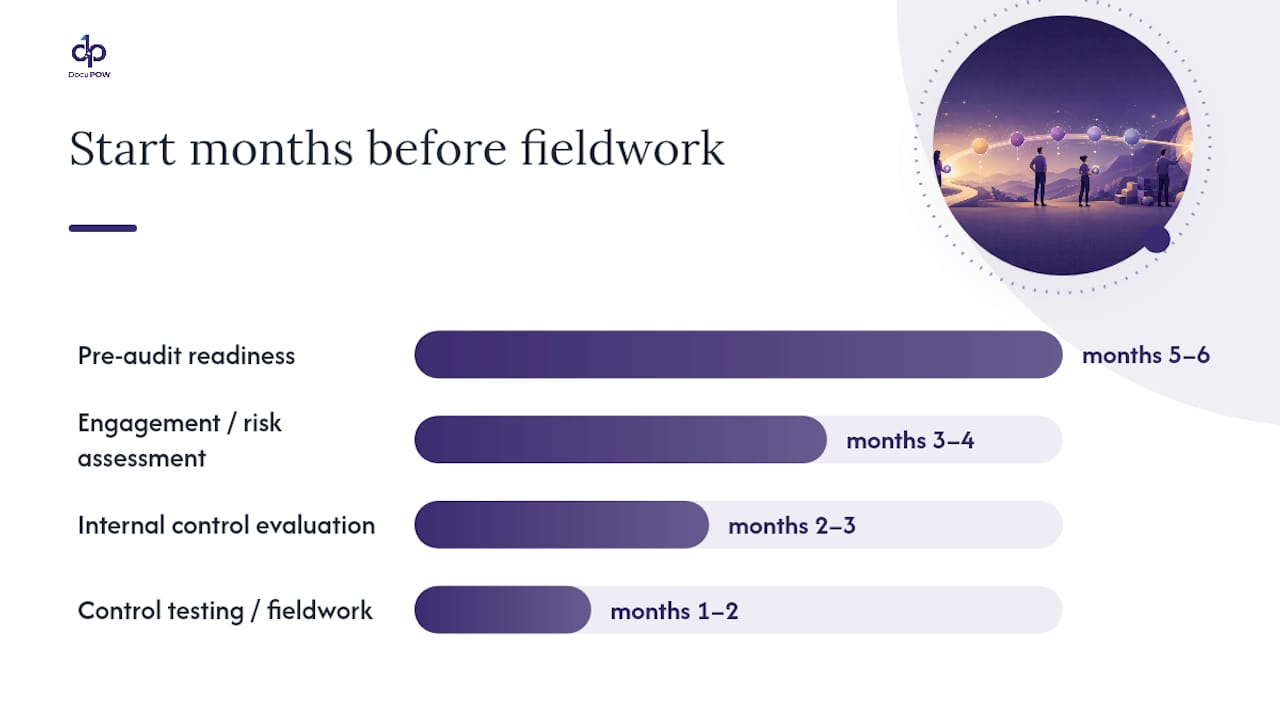
    1. Pre-audit readiness (months 5–6 before fieldwork). Controller and CFO assign owners to every major account and schedule. Close prior-year open items: outstanding reconciling differences, unadjusted audit differences from the prior year, and any open management letter points. This is also when you pull prior-year auditor recommendations and build a remediation tracker.

    2. Engagement and risk assessment (months 3–4). Auditors send a preliminary document request list (PBC — Prepared by Client). Your single point of contact logs every item into a request tracker and assigns due dates. RSM recommends that every audit request have a named accountable owner to avoid delays and duplication.

    3. Internal control evaluation (months 2–3). Finance and IT walk through entity-level controls, IT general controls, and key transaction-level controls. Document walkthroughs and collect control evidence (approvals, system logs, reconciliation sign-offs). Identify gaps and begin remediation.

    4. Control testing and substantive procedures (fieldwork, months 1–2). Auditors arrive and begin sample testing. Your team responds to evidence requests within agreed SLAs. Interim fieldwork (often Q3 for calendar-year entities) covers controls; year-end fieldwork covers substantive procedures on balances.

    5. Evaluation of findings (weeks 2–4 post-fieldwork). Auditors draft findings and communicate proposed adjustments. Management reviews, responds, and provides additional support where needed.

    6. Report delivery (weeks 4–6 post-fieldwork). Auditors issue the draft report. Management reviews the opinion, footnotes, and any management letter comments.

    7. Remediation and follow-up (ongoing). Assign owners to every management letter point. Track remediation to completion before the next cycle begins.

    Owner assignment reference:

    Phase Typical Owner Key Deliverable
    Pre-audit readiness Controller Prior-year open items closed, schedule owners assigned
    Engagement / risk assessment Controller + CFO PBC tracker populated, SLAs confirmed
    Internal control evaluation Finance + IT Walkthrough documentation, gap list
    Control testing / fieldwork All schedule owners Evidence responses within SLA
    Findings evaluation Controller + legal Management response letters
    Report delivery CFO + audit committee Final opinion review
    Remediation follow-up Controller Management letter tracker updated

    Audit preparation timeline with phases and owners


    What documents auditors will ask you to provide

    Every auditor request ties back to a financial statement assertion: existence, completeness, valuation, rights and obligations, or presentation and disclosure. Organizing your evidence around those assertions — not just by account — helps your team anticipate follow-up questions before they arrive.

    Core document list:

    • Trial balance and general ledger detail (existence, completeness)
    • Bank reconciliations and bank statements for all accounts (existence, valuation)
    • A/R aging schedule and customer confirmations (existence, valuation)
    • A/P aging schedule and vendor confirmations (completeness, rights/obligations)
    • Fixed asset schedule with additions, disposals, and depreciation detail (existence, valuation)
    • Lease schedules (right-of-use assets and liabilities under relevant lease accounting standards) (completeness, valuation)
    • Contract summaries for significant agreements (rights/obligations, presentation)
    • Board and audit committee minutes (completeness, presentation/disclosure)
    • Payroll registers and benefit accruals (completeness, valuation)
    • Inventory count sheets and cut-off documentation (existence, completeness)
    • Tax filings and tax provision workpapers (valuation, presentation)
    • External confirmations: legal representation letters, investment custodian statements (existence, rights/obligations)

    Document-to-assertion mapping:

    Document Typical Owner Primary FS Assertion
    Bank reconciliations Treasury Existence, valuation
    A/R aging + confirmations AR manager Existence, valuation
    Fixed asset schedule Fixed assets / controller Existence, valuation
    Board minutes Corporate secretary Completeness, disclosure
    Lease schedules (ASC 842) Lease administrator Completeness, valuation
    Payroll registers HR / payroll Completeness, valuation
    Inventory count sheets Operations / warehouse Existence, completeness
    Tax provision workpapers Tax director Valuation, presentation

    RSM South Africa’s guidance on month-end close discipline and organized documentation confirms that teams with structured evidence repositories see materially fewer audit delays. Build your folder structure before fieldwork starts, not during it.

    Electronic vs. physical evidence. Most auditors now accept electronic evidence via secure portals. Redact personally identifiable information (PII) from payroll and HR documents before uploading. Use version-controlled folders with clear naming conventions (account_period_version). For physical originals — signed contracts, original board minutes — maintain a log of what was scanned and where the original is stored. Secure file transfer is non-negotiable; email attachments for sensitive financial data are not acceptable.

    Pro Tip: Build your compliance documentation folder structure to mirror the auditor’s PBC list. When auditors send their request, you map each item to an existing folder rather than hunting for files.
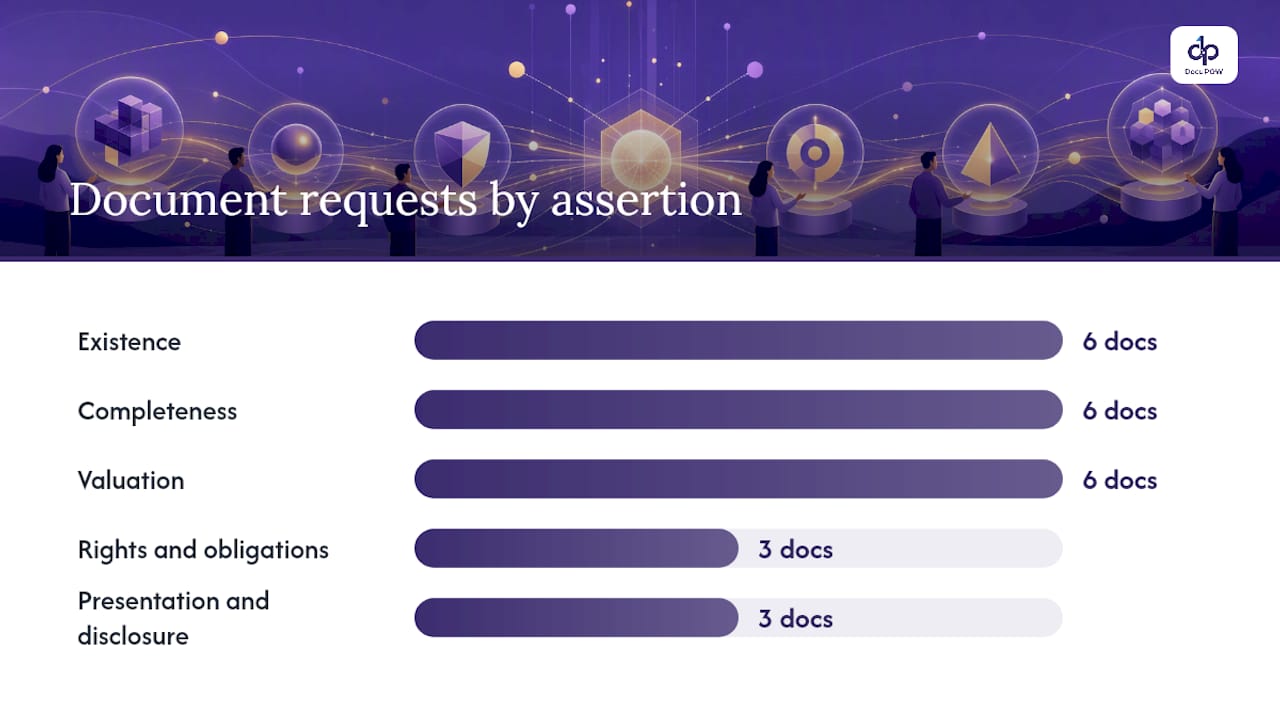

    What documents auditors will ask you to provide — overview diagram

    How to assess and fix control gaps before fieldwork

    Auditors evaluate controls at four levels: entity-level controls (tone at the top, risk assessment, monitoring), period-end controls (close process, journal entry review), IT general controls (access management, change management, operations), and transaction-level controls (authorization, three-way match, reconciliation). Gaps at any level affect how much substantive testing auditors perform — and how long fieldwork takes.

    Steps to test controls internally before auditors arrive:

    • Select a sample of transactions for each key control (authorization, reconciliation, system access review) and verify evidence exists
    • Conduct walkthroughs: follow one transaction from initiation to recording and confirm each control operated as designed
    • Collect control owner sign-offs on the walkthrough documentation
    • Compare results to the prior-year control matrix and flag any new gaps or changed processes

    When you find a gap, the response depends on timing. A gap discovered four months out can often be remediated through a policy update, a new approval workflow, or a system configuration change. A gap found two weeks before fieldwork needs a compensating control: a manual review layer that achieves the same objective while the permanent fix is implemented. Document the compensating control formally — auditors will ask for it.

    FASB standards govern the recognition and disclosure requirements auditors check. When a control gap touches a complex accounting area (revenue recognition, lease accounting, business combinations), prepare a short technical position paper that documents your accounting policy, the standard applied, and the judgment made. Write it before fieldwork, not in response to an auditor question.

    Pro Tip: Document technical accounting positions contemporaneously — the day you make the judgment, not the day auditors ask. A position paper written after the fact reads as a rationalization; one written at decision time reads as governance.


    Common pitfalls that cause audit delays

    Most audit delays trace back to a handful of predictable problems. Knowing them in advance is most of the fix.

    Missing or stale reconciliations. A bank reconciliation that hasn’t been prepared since Q2 is a red flag for both control quality and balance accuracy. Rolling reconciliations — prepared and reviewed monthly — eliminate this entirely. RSM’s audit readiness guidance points to month-end close discipline as one of the highest-impact practices for reducing delays.

    Undocumented journal entries. Auditors sample journal entries, particularly large, unusual, or late entries. Every journal entry needs a preparer, a reviewer, a business purpose, and supporting documentation. Entries posted without support are an immediate finding.

    Weak evidence for estimates. Allowance for doubtful accounts, warranty reserves, and fair value measurements all require documented assumptions. If your estimate methodology lives only in someone’s head, it will not survive auditor scrutiny.

    Poor access management. Auditors test whether only authorized users can post transactions, approve payments, or modify master data. Segregation of duties violations — one person who can both create and approve a vendor — are among the most common IT findings.

    Staffing gaps during fieldwork. Key staff on vacation during the two weeks auditors are on-site is a predictable problem that teams still walk into every year. Block fieldwork dates on the calendar of every schedule owner at the start of the engagement.

    Last-minute system freezes. Freezing the ERP for year-end close while auditors need live access creates friction. Coordinate the freeze window with your IT team and communicate it to auditors in advance.

    Quick triage if auditors raise a concern during fieldwork:

    • Acknowledge the request immediately; do not let it sit
    • Identify the schedule owner and set a same-day or next-day response target
    • If the support doesn’t exist, prepare a narrative explanation and escalate to the controller
    • Never provide partial or inconsistent support — auditors will expand their sample

    What to expect during fieldwork and how to manage it

    The opening meeting sets the tone for the entire engagement. Use it to confirm the request tracker format, agree on the communication channel (portal, email, or shared drive), set SLA targets for responses (typically within 24–48 hours for standard requests), and introduce all schedule owners by name. Grant Thornton recommends early auditor engagement, agreed request channels, and designated project management to avoid overload and reduce extra fees.

    Fieldwork phases:

    1. Opening meeting. Confirm scope, timeline, key contacts, and communication protocols.
    2. Interim fieldwork (if applicable). Auditors test controls and perform preliminary substantive procedures, often in Q3 for calendar-year entities.
    3. Year-end fieldwork. Auditors complete substantive testing on year-end balances, confirmations, and disclosures.
    4. Closing meeting. Auditors communicate proposed adjustments, open items, and preliminary findings before issuing the draft report.

    Request tracker — columns your team needs:

    • Request ID (sequential number for tracking)
    • Description of the request
    • Schedule owner (named individual)
    • Due date (agreed with auditor)
    • Status (open / in progress / provided / closed)
    • Auditor contact (who raised the request)
    • Notes (any clarification or partial response)

    Agreeing communication protocols up front dramatically reduces duplicated requests and confusion during fieldwork. When a request is unclear, ask for clarification before preparing the response — a misunderstood request that gets answered wrong costs more time than the clarifying question.

    Escalation. If an auditor raises a finding you believe is factually incorrect, escalate to the engagement partner, not the staff auditor. If the disagreement is material and unresolved, the audit committee should be informed. Document every escalation in writing.

    PCAOB auditing standards govern how auditors plan and scope their work. Understanding that auditors are required to respond to assessed risk helps you anticipate where they will focus — high-risk accounts get more testing, not less.


    How automation speeds evidence assembly without replacing judgment

    The highest-value automation targets in audit preparation are repetitive, high-volume tasks: extracting data from invoices, leases, and contracts; running automated reconciliations; routing confirmation requests; and maintaining versioned evidence storage with secure sharing. These are exactly the tasks where manual effort creates bottlenecks and errors.

    What to automate:

    • Data extraction from invoices, purchase orders, lease agreements, and contracts (template-free extraction handles non-standard formats)
    • Automated bank and balance sheet reconciliations with exception flagging
    • Confirmation workflow routing (send, track, receive, file)
    • Versioned evidence storage with audit trail and access controls
    • API-based pulls from ERP and CRM to populate schedules automatically

    What to keep manual:

    • Judgmental position papers and technical accounting memos
    • Valuation assumptions and model inputs
    • Legal opinions and attorney representations
    • Management’s assessment of going concern or significant estimates

    DocuPOW’s agent-based extraction works without rigid templates, which matters for audit evidence because contracts, leases, and vendor agreements rarely follow a standard format. The platform’s human-in-the-loop review layer keeps a compliance professional in the decision chain for anything that requires judgment, while the AI workflow automation handles the extraction and routing automatically. Integration with ERP systems via API means reconciliation schedules can be populated from live data rather than manual exports.

    For teams evaluating financial document automation tools, the practical question is not whether to automate but where to start. Organizational readiness for AI-assisted workflows is a real factor — AI readiness varies by team maturity and data quality, and both affect how quickly automation delivers value.

    Pro Tip: Pilot automation on one cycle — A/P or fixed assets — and measure the reduction in request turnaround time and rework before expanding. A single cycle pilot gives you defensible data for the next budget conversation.


    Why audit readiness is a governance signal, not just a compliance task

    Most finance teams treat audit preparation as a year-end sprint. That framing is the root cause of most audit delays, most findings, and most extra fees. RSM’s year-round readiness framework is right: the discipline of timely reconciliations, documented positions, and clear ownership is not audit prep — it is financial reporting governance.

    Boards and audit committees read audit outcomes as signals about management quality. A clean opinion delivered on schedule, with no material weaknesses and a short management letter, tells the audit committee that the finance function is in control. A delayed audit with multiple findings tells a different story, regardless of the technical explanation.

    Management ownership is the variable that matters most. Auditors can only test what you give them. When every schedule has a named owner, every reconciliation is current, and every technical position is documented before fieldwork starts, the audit becomes a verification exercise rather than an investigation. That shift changes the tone of every auditor conversation.

    Use the evidence checklist and timeline in this guide as your control register for the audit cycle. Review it quarterly, not just in the month before fieldwork.


    Cut evidence assembly time with DocuPOW

    Finance teams that spend fieldwork weeks hunting for documents, reformatting exports, and chasing schedule owners are paying for a problem that automation solves directly. DocuPOW’s agent-based platform extracts data from contracts, leases, invoices, and any other document type without templates, routes evidence to the right owner automatically, and maintains a versioned, access-controlled repository that auditors can review securely.
    DocuPOW

    The practical payoff: fewer last-minute requests, faster response times, and an evidence trail that holds up to auditor scrutiny. For teams not ready to automate immediately, the manual best practices in this guide — rolling reconciliations, named owners, a request tracker, and a pre-built folder structure — deliver the same discipline without a platform. When you are ready to move faster, explore DocuPOW’s document process automation capabilities and request a demo to see how the platform fits your audit cycle.


    Sources

    The recommendations in this guide draw on the following authoritative sources. Each aligns to specific sections of the guide:


    FAQ

    What does audit preparation mean?

    Audit preparation is the coordinated set of controls, documentation, and workflows an organization maintains so auditors can test financial statements and issue an opinion efficiently. The practical goal, per Corporate Finance Institute, is to resolve uncertainties and document complex transactions before fieldwork begins.

    What are the seven steps in the audit process?

    FieldGuide maps the standard audit process to seven phases: pre-audit readiness, engagement and risk assessment, internal control evaluation, control testing, substantive procedures, evaluation of findings, and report delivery. Each phase has corresponding preparation activities your team should complete before auditors begin that phase.

    How far in advance should you start preparing for an audit?

    NowCFO recommends beginning audit preparation 3–6 months before auditors commence fieldwork. That window allows time to close prior-year open items, complete reconciliations, document technical positions, and remediate control gaps before the opening meeting.

    What are the 5 C’s of audit?

    The 5 C’s is not a universally standardized framework in U.S. auditing standards; definitions vary by firm and training context. A common version covers Criteria (the standard being measured against), Condition (what was found), Cause (why the gap exists), Consequence (the risk or impact), and Corrective action (the recommended fix). These are most often used in internal audit findings, not external financial statement audits.

    How can automation help with audit preparation?

    Automation handles high-volume, repetitive tasks — data extraction from contracts and invoices, reconciliation population, confirmation routing, and versioned evidence storage. DocuPOW’s agent-based platform performs template-free extraction and integrates with ERP systems via API, reducing manual document assembly time across the audit cycle while keeping human reviewers in the loop for judgment-dependent tasks.


  • Cost Reduction for Managers: Strategic Steps & KPIs

    Cost Reduction for Managers: Strategic Steps & KPIs

    Cost reduction is the disciplined effort to lower what it costs to run your business while protecting the capabilities that generate revenue and freeing the capital you need to grow. The standard approach: target low-value spend first, then adjust working-capital levers like Days Sales Outstanding (DSO) and Days Payable Outstanding (DPO), and reinvest the savings into higher-return activities rather than simply pocketing them.

    Three signals tell you a program is overdue:

    • DSO climbing above your industry benchmark, or DPO shrinking without a strategic reason
    • Subscription and SaaS spend that no one has audited in 18 months
    • Invoice-processing costs above a typical threshold where automation often pays back within a year

    Gartner frames this as cost optimization, not cost cutting: a continuous, multidimensional discipline with three core dimensions — reduce low-value spend, improve enterprise performance, and reinvest in future value. That framing matters because it shifts the conversation from “what can we slash?” to “what should we fund?” DocuPOW’s document automation platform is built around exactly that logic: convert manual processing cost into measurable savings, then redirect the freed capacity toward higher-value work.

    Table of Contents

    What’s the difference between cost reduction and cost optimization?

    The terms get used interchangeably, and that confusion causes real damage.

    Cost cutting is tactical and often one-time: freeze hiring, cut travel, reduce headcount by 10% across the board. It produces fast results on a P&L but frequently erodes the capabilities that generate future revenue. Harvard Business Review calls this the core risk: deep, indiscriminate cuts make organizations weaker, not stronger, because they eliminate the people and processes that differentiate the business.

    Cost optimization is continuous and value-aligned. You ask not “what can we cut?” but “what does this spend actually produce, and is there a cheaper way to produce the same or better outcome?” Gartner’s framework requires all three dimensions to be active simultaneously: reducing waste, improving performance, and reinvesting. Drop any one of them and you have cost cutting dressed up in better language.

    The practical difference shows up in examples:

    • Cutting the entire training budget saves money this quarter and raises attrition next year. That is a cut.
    • Shifting instructor-led training to a blended digital model at 40% of the cost while maintaining completion rates. That is optimization.
    • Eliminating a product SKU that generates 2% of revenue but consumes 15% of supply-chain complexity. That is optimization.

    Deloitte warns specifically against “death by a thousand cuts” — siloed, short-term decisions that collectively hollow out the organization’s ability to compete.

    Pro Tip: Set up a cross-functional cost governance board with representatives from finance, operations, HR, and technology. Any proposed cut above a defined threshold (say, $250,000 annualized) requires board sign-off. This single governance step prevents the siloed decisions that Deloitte identifies as the most common source of long-term capability loss.

    Where should you target cost reduction first?

    The highest-impact categories for most mid-size and enterprise organizations fall into five areas. Each has proven levers and common traps.

    Procurement and supplier management

    • Renegotiate contracts at renewal using market benchmarks, not last year’s price.
    • Consolidate suppliers to increase volume leverage and reduce administrative overhead.
    • Use contract analytics to identify auto-renewals, price escalation clauses, and duplicate vendor relationships.

    Trap: Cutting supplier count too aggressively creates single-source risk. Maintain at least two qualified suppliers for critical inputs.

    Working capital

    • Shorten DSO by tightening credit terms, automating invoice delivery, and offering early-payment discounts selectively.
    • Extend DPO strategically by negotiating payment terms with suppliers who have pricing power, not by simply paying late.
    • Reduce days inventory outstanding (DIO) through demand-signal integration and safety-stock rationalization.

    Grant Thornton’s guidance makes the case clearly: adjusting working-capital levers often unlocks more liquidity than traditional OPEX cuts, with less organizational disruption.

    Technology and software

    Applying focused software rationalization — auditing licenses, eliminating shelfware, and rightsizing cloud instances — can produce substantial savings. Gartner research on software-cost best practices documents cases where three targeted practices have significantly reduced software spend. For a practical framework on cloud rightsizing, the IT cost reduction guide for CIOs covers the specific levers in detail.

    Cooling fans in data center server rack

    Trap: Cutting tools that shadow IT depends on creates workarounds that cost more than the license.

    Labor and operating model

    • Redeploy people from manual, repetitive tasks to higher-value roles before considering headcount reductions.
    • Consolidate back-office functions into shared services where transaction volumes justify it.
    • Upskill selectively: targeted training on high-demand skills costs less than replacing the person who leaves.

    BLS data shows a significant share of workers in management and professional occupations teleworked as of late 2023. For many organizations, that shift has already reduced facilities costs; the question now is whether the real-estate footprint has been adjusted to match.

    Overhead and facilities

    • Renegotiate leases at renewal, particularly in markets where office vacancy rates remain elevated.
    • Audit subscriptions quarterly: software, media, professional memberships, and data services accumulate fast.
    • Consolidate office locations where hybrid work patterns make partial occupancy the norm.

    Pro Tip: Run a “subscription census” every quarter. Assign one person in finance to pull every recurring charge from corporate cards and AP, map each to an active user count, and flag anything with utilization below 50%. Most organizations find 15–25% of subscription spend is either unused or duplicated.

    Early design decisions also matter more than most managers realize. Aston University research finds that design choices lock in a large majority of a product’s lifecycle cost, which means SKU rationalization and design-for-cost reviews belong in any serious cost program, not just procurement.

    How do you run a cost reduction process step by step?

    A repeatable five-step process keeps the program from becoming a one-time event.

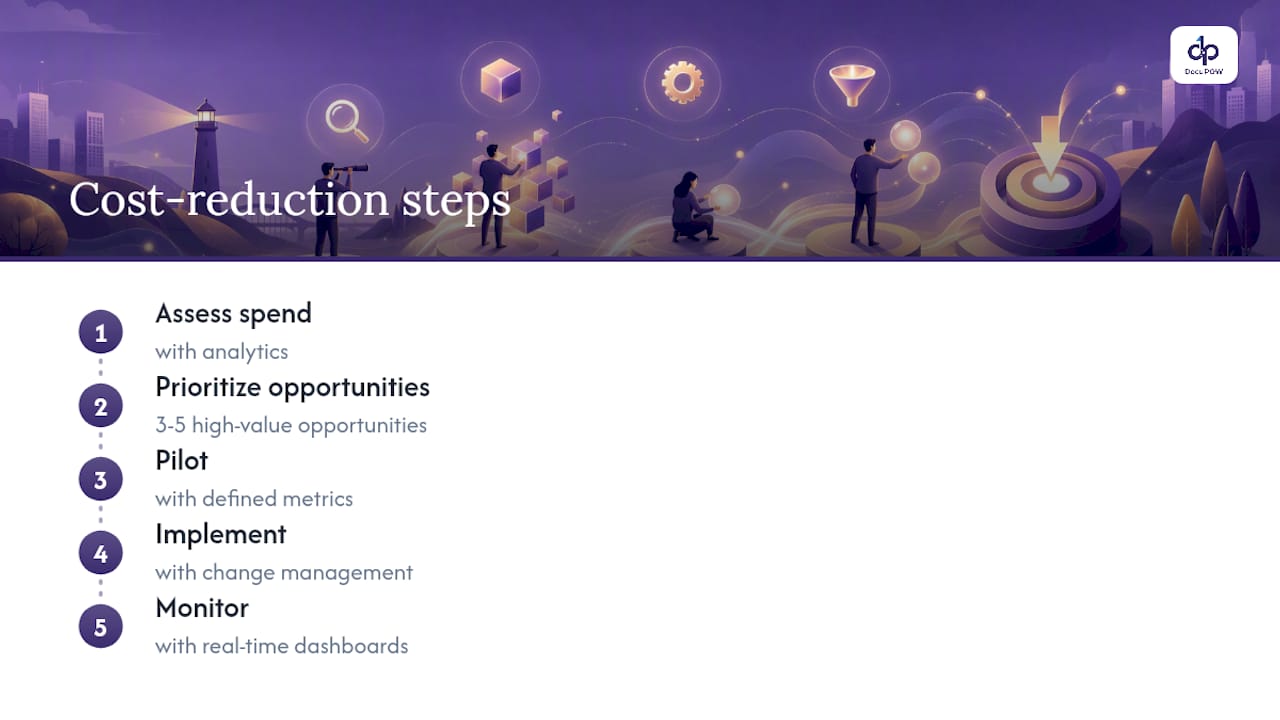
    1. Assess. Pull spend analytics across all categories. Map activities to costs using activity-based costing or a simplified driver-based model. Benchmark against industry peers where data is available. The goal is a ranked list of cost pools by size and addressability.
    2. Prioritize. Score each opportunity on three dimensions: value at stake, risk to strategic capability, and payback timeline. Select 3–5 pilot actions that score well on all three. Avoid the temptation to tackle everything at once.
    3. Pilot. Define scope, objectives, success metrics, and a minimum viable implementation for each pilot. Set a 60–90 day window with a clear go/no-go decision point.
    4. Implement. Execute change management, process redesign, technology integration, and supplier negotiation in parallel. Deloitte’s CFO guidance recommends driver-based budgeting and rolling forecasts to keep targets precise and current throughout implementation.
    5. Monitor. Build real-time dashboards for each KPI. Set trigger thresholds: if savings fall below 80% of target at the 90-day mark, escalate for review. If they exceed target, evaluate scaling.

    A practical how-to guide from ABusinessManager.com reinforces this sequence: audit everything, prioritize top opportunities, pilot with defined metrics, measure rigorously, and iterate.

    Recommended timeline:

    • Days 1–30: Spend audit complete, baseline KPIs set, pilot actions selected
    • Days 31–60: Pilots launched, governance board active, first progress review
    • Days 61–90: Pilot results assessed, go/no-go decisions made, scaling plan drafted
    • Months 4–6: Full implementation of approved initiatives, change management underway
    • Months 7–12: Run-rate savings tracked, reinvestment decisions made, next cycle initiated

    How do you measure cost reduction impact?

    Measurement is where most programs fail. Savings get claimed before they are realized, double-counted across departments, or reported without a clear baseline.

    KPI Formula Reasonable Target
    Total realized savings Baseline spend minus actual spend Varies by category; 10–20% in first year is typical for a structured program
    Run-rate savings Annualized savings from completed initiatives Should exceed program investment cost within 12 months
    ROI (Savings minus program cost) / program cost Minimum 3:1 for technology-enabled initiatives
    Payback period Program cost / monthly savings 6–18 months for most automation investments
    DSO Accounts receivable / (revenue / day) Benchmark against your industry; a 5-day reduction often equals millions in freed cash
    DPO Accounts payable / (COGS / day) Extend strategically; 30 days is common in manufacturing
    Invoice cost per transaction Total AP processing cost / invoice volume Best-in-class is under $3; many organizations run $10–$15
    FTEs freed Headcount equivalent hours saved / standard hours Track redeployment, not just elimination

    Three rules for clean measurement:

    • Set the baseline before the initiative starts, using at least 12 months of historical data.
    • Attribute savings to a single initiative owner. When two programs affect the same cost line, split the attribution explicitly.
    • Report net savings: gross savings minus the cost of the program, the technology, and any transition costs.

    Working-capital KPIs deserve special attention. Grant Thornton’s analysis shows that CFOs increasingly treat DSO, DPO, and DIO as more powerful levers than simple OPEX cuts, because they unlock cash without reducing headcount or capability.

    What do real cost reduction examples look like?

    Commercial: procurement renegotiation and SKU rationalization

    A mid-size consumer goods manufacturer ran a structured spend analysis and found that its top 20 suppliers accounted for 78% of direct material spend, but only 12 of those 20 had been renegotiated in the past three years. After a six-month renegotiation program using market benchmarks and competitive bids, the company reduced direct material costs by 11% on the renegotiated contracts. Simultaneously, a SKU rationalization review eliminated 23% of product variants that collectively generated under 4% of revenue but consumed a disproportionate share of production scheduling, warehousing, and logistics complexity. The combined program delivered margin improvement within the first fiscal year. These results are representative of structured programs; outcomes vary by industry, supplier concentration, and negotiating leverage.

    Public sector: process automation and shared services

    A state agency consolidated three separate back-office functions (accounts payable, HR administration, and procurement processing) into a single shared-services center and introduced process automation for high-volume, rule-based transactions. Administrative FTE requirements dropped without service degradation, because automation absorbed the transaction volume while staff shifted to exception handling and vendor management. The payback on the shared-services investment came within 18 months. Public-sector results depend heavily on union agreements, procurement rules, and change management quality.

    How does document automation convert to measurable cost savings?

    Manual document processing is one of the most consistently underestimated cost lines in mid-size and enterprise organizations. Invoice processing alone typically costs $10–$15 per transaction at organizations relying on manual entry, compared to under $3 at best-in-class automated operations. The gap is not marginal; at 10,000 invoices per month, it represents $840,000 to $1.44 million in annual processing cost.

    DocuPOW addresses this with template-free document extraction: autonomous AI agents that read any document format, understand context, and extract structured data without requiring rigid templates or manual field mapping. The practical impact shows up in three places:

    • Invoice-processing cost. Automated extraction and three-way matching reduce manual touchpoints per invoice, cutting cost per transaction and exception rates simultaneously. DocuPOW’s AP automation solution handles this end-to-end.

    Statistic callout: Organizations running manual AP processes typically spend $10–$15 per invoice. Automation-first operations benchmark under $3, according to industry benchmarks cited across Gartner and Deloitte research.

    Pro Tip: Pilot document automation on a single, high-volume document type first: supplier invoices, purchase orders, or remittance advices. A 90-day pilot on one document type gives you clean before-and-after data on cost per transaction, exception rate, and cycle time. That data becomes the business case for scaling.

    Implementation success depends on three factors: a clean data model that maps extracted fields to your ERP’s chart of accounts, an ERP integration that pushes data without manual re-entry, and a human-in-the-loop QA layer for exceptions above a defined confidence threshold. DocuPOW’s platform covers all three, with API-based ERP integration and real-time analytics that track extraction accuracy and processing volume. For a broader view of automation’s role in reducing operational costs, DocuPOW’s resource library covers the ROI mechanics in detail.

    What does a realistic implementation timeline and cost look like?

    Cost reduction programs vary enormously by scope, but a structured initiative typically follows a predictable cost and payback curve.

    A working-capital program (DSO/DPO/inventory) requires minimal technology investment and can show cash impact within 30–60 days of implementation. The primary cost is management time and, in some cases, a short-term consulting engagement to run the spend analysis.

    A procurement renegotiation program costs more in management time and may require external benchmarking data or a sourcing consultant. Payback typically comes within 6–9 months on the first round of renegotiated contracts.

    A technology-enabled automation program (AP automation, document processing, workflow orchestration) carries a higher upfront cost: software subscription, integration work, and change management. Payback horizons of 6–18 months are realistic for well-scoped pilots. Programs that try to automate too many document types simultaneously tend to run long and over budget.

    The most common cost mistake is underestimating change management. Technology works; adoption is the variable. Budget 20–30% of total program cost for training, communication, and process redesign.

    What change management strategies make cost reduction programs succeed?

    The technical work is the easy part. The harder problem is getting people to change how they work, especially when the change is associated with cost pressure.

    Three strategies consistently separate successful programs from failed ones.

    Visible executive sponsorship. The CFO or COO needs to be the named sponsor, not just a signatory on the approval memo. Employees read organizational signals carefully; a program that lives in a PMO without C-suite visibility gets deprioritized at the first competing demand.

    Early wins, communicated loudly. Identify one or two initiatives that can show measurable results within 60 days and publicize the outcome internally. Early wins build credibility for the harder changes that follow.

    Role clarity during transition. When automation or shared services change job responsibilities, people need to know specifically what their new role looks like, not just that their old tasks are being automated. Ambiguity drives attrition; specificity drives engagement.

    How should you communicate with stakeholders during a cost reduction effort?

    Stakeholder communication is not a soft skill in this context. Poor communication is a direct cause of program failure: it drives attrition, creates resistance, and generates the rumor cycles that make implementation harder.

    The communication framework that works is simple: what, why, when, and what it means for you. Every stakeholder group (employees, suppliers, investors, customers) needs a version of that message tailored to their concerns.

    For employees: explain the business rationale, the scope of the program, and what reinvestment looks like. If the program involves redeployment rather than elimination, say so explicitly and early.

    For suppliers: communicate changes to payment terms or sourcing strategy before they take effect. Suppliers who feel blindsided become unreliable partners; suppliers who are brought into the conversation often propose savings themselves.

    For investors and board members: frame cost reduction as a capability-building investment, not a distress signal. Show the reinvestment plan alongside the savings target.

    How do sustainability considerations fit into cost reduction?

    Sustainability and cost reduction align more often than managers expect, and the alignment is growing as energy costs and regulatory pressure increase.

    Energy efficiency investments (LED lighting, HVAC upgrades, building management systems) typically pay back within 2–5 years and reduce both operating costs and carbon emissions. Waste reduction programs in manufacturing lower disposal costs and material consumption simultaneously. Supplier consolidation, done well, reduces logistics miles and packaging waste alongside procurement cost.

    The risk is the reverse: cost cuts that increase environmental cost. Switching to cheaper materials that require more frequent replacement, or cutting maintenance budgets that lead to equipment failures, can produce short-term savings and long-term cost and compliance problems. Any cost initiative that touches physical operations should include a sustainability impact screen as part of the prioritization step.

    Key Takeaways

    Sustainable cost reduction requires targeting low-value spend, optimizing working-capital levers like DSO and DPO, measuring realized savings against a clean baseline, and reinvesting the freed capital into capabilities that drive future growth.

    Point Details
    Optimize, don’t just cut Gartner’s three-dimension framework (reduce waste, improve performance, reinvest) prevents capability loss that one-off cuts cause.
    Working capital first Grant Thornton’s guidance shows DSO/DPO/inventory adjustments often unlock more liquidity than OPEX cuts with less disruption.
    Measure with a clean baseline Set baseline KPIs before any initiative starts; report net savings after program costs to avoid overstating impact.
    Pilot before scaling A 90-day pilot on one document type or cost category gives you the data to justify full-scale investment.
    DocuPOW for document costs DocuPOW’s template-free AP automation reduces invoice-processing cost from the $10–$15 manual range toward the sub-$3 best-in-class benchmark.

    The case for treating cost as a continuous discipline

    Most cost programs are launched in response to a crisis: a margin miss, a budget shortfall, a board directive. That reactive posture is understandable, but it is also why so many programs produce one-time savings and then stall. The organizations that sustain cost advantage treat it the way they treat quality or safety: as a continuous discipline with governance, metrics, and accountability built into the operating model.

    The hardest part of that shift is not analytical. It is cultural. Leaders have to be willing to make the reinvestment argument in the same breath as the savings argument, or the program becomes an extraction exercise that hollows out the business over time. The evidence from Gartner, Deloitte, and HBR consistently points the same direction: capability-preserving cost moves compound. Blunt cuts do not.

    Cross-functional governance is the mechanism that makes the discipline stick. When finance, operations, HR, and technology all have a seat at the cost governance table, the siloed decisions that produce “death by a thousand cuts” become structurally harder to make. That is not a soft organizational principle. It is the single most reliable predictor of whether a cost program delivers sustained results or a one-time P&L improvement that reverses within 18 months.

    Cut invoice processing costs with DocuPOW

    The range between $10–$15 per invoice for manual processing and under $3 per invoice for automated operations is not a technology problem. It is a decision problem. DocuPOW’s enterprise automation platform gives AP, finance, and operations teams the infrastructure to close that gap: template-free extraction that reads any document format, multi-step workflow orchestration, automated three-way matching, and real-time analytics that track cost per transaction from day one.
    DocuPOW

    A practical pilot scope for a cost reduction program: start with supplier invoice processing and automated three-way matching across PO, invoice, and receipt. That single workflow typically covers the highest transaction volume and the highest manual-processing cost in any AP function. DocuPOW’s human-in-the-loop review layer keeps your team in control of exceptions without requiring them to touch every document. For a full picture of the operational savings from document automation, the resource covers ROI mechanics, integration requirements, and payback benchmarks. Request a demo or ROI assessment at docupow.ai to see what the numbers look like for your transaction volume.

    Useful sources and further reading

    • Cost Optimization That Funds the Future | Gartner
    • Cost Cutting That Makes You Stronger
    • BLS: Telework prevalence in management and professional occupations
    • Design determines 70% of cost — Aston Research

    FAQ

    What does cost reduction mean in business?

    Cost reduction is the disciplined effort to lower the total cost of running a business while protecting strategic capabilities and freeing capital for reinvestment. It differs from cost cutting in that it targets waste and inefficiency rather than capability.

    How do you reduce costs effectively?

    The most effective approach follows five steps: assess spend with analytics, prioritize 3–5 high-value opportunities, pilot with defined metrics, implement with change management, and monitor with real-time dashboards. Working-capital levers like DSO and DPO often produce faster results than OPEX cuts.

    Five-step cost reduction process diagram

    What’s another term for cost reduction?

    Cost optimization is the closest industry-standard term, though it implies a continuous and strategic discipline rather than a one-time reduction exercise. Gartner uses cost optimization to describe the three-dimension framework of reducing waste, improving performance, and reinvesting savings.

    What is a practical example of cost reduction?

    A manufacturer renegotiating supplier contracts using market benchmarks and eliminating low-revenue SKUs that consume disproportionate supply-chain complexity is a common example. In AP functions, automating invoice processing with a platform like DocuPOW reduces cost per transaction from the $10–$15 manual range. Automated operations benchmark under $3 per invoice.

    What KPIs should you track for cost reduction?

    Primary KPIs include total realized savings, run-rate savings, ROI, and payback period. Working-capital KPIs (DSO, DPO, DIO) and operational KPIs (invoice cost per transaction, FTEs freed, cycle time) round out a complete measurement framework.

  • Knowledge Management for Leaders: Practical Roadmap and AI Trends

    Knowledge Management for Leaders: Practical Roadmap and AI Trends

    Knowledge management (KM) is the structured practice of getting the right knowledge to the right people at the right time so they can make better decisions and perform more effectively. APQC defines it as a discipline that balances people, process, and technology to create, capture, organize, share, and apply organizational knowledge.

    When KM works, leaders see three things happen quickly:

    • Faster onboarding: New hires reach productivity in weeks rather than months because institutional knowledge is findable, not locked in someone’s head.
    • Fewer repeated mistakes: Teams stop solving the same problems twice because after-action reviews and lessons learned are captured and surfaced at the right moment.
    • Better decision speed: Leaders act on current, trusted information instead of hunting through inboxes and shared drives.

    If you’re not sure where to start, a knowledge audit is the right first move. Map what you have, who owns it, and where the gaps are before you buy a single tool or write a single policy.


    Table of Contents

    What does knowledge management actually cover?

    KM is not document storage, and it’s not an intranet project. The confusion costs organizations real money because they invest in platforms and get no behavior change.

    APQC’s framework frames KM around three interdependent elements: people (who creates, shares, and uses knowledge), process (how knowledge moves through the organization), and technology (the tools that enable search, storage, and collaboration). Remove any one of those legs and the whole thing wobbles.

    The core goals of KM are to reduce knowledge loss from turnover, accelerate learning across teams, cut the time people spend searching for information, and improve the consistency of decisions. Those are measurable outcomes, not aspirations.

    Dimension Knowledge Management Information Management Content/Records Management
    Primary goal Get knowledge to people who need it to act Organize and retrieve structured data Manage documents for compliance and retention
    Owner KM lead, HR, L&D, business units IT, data governance Legal, compliance, records manager
    Typical tools Knowledge bases, wikis, enterprise search, AI assistants Databases, MDM platforms, BI tools ECM systems, DMS, archival platforms
    Success measure Reuse rate, decision speed, onboarding time Data accuracy, retrieval time Audit pass rate, retention compliance

    What KM is not:

    • A one-time content migration project
    • An IT infrastructure upgrade
    • A SharePoint deployment with no governance
    • A training library that nobody updates
    • A search engine without curated, trusted content behind it

    The most common mis-step is treating KM as an IT project. When IT owns it without a business sponsor, you get a platform with no adoption. When a business unit owns it without IT, you get a wiki with no integration. KM needs both, with a dedicated KM lead holding the accountability.


    What types of knowledge does your organization actually hold?

    Three types of knowledge exist in every organization, and each requires a different capture strategy.

    Tacit knowledge is what people know but can’t easily write down: the troubleshooting heuristics a senior engineer uses, the negotiation instincts a seasoned sales rep has developed, the judgment calls a compliance officer makes under ambiguity. It lives in people’s heads and walks out the door when they leave.

    Engineer hands troubleshooting circuit board

    Explicit knowledge is already documented: standard operating procedures, product specs, financial models, training manuals, regulatory filings. It’s the easiest to manage but often the hardest to keep current.

    Implicit knowledge sits between the two. It’s knowledge that could be made explicit but hasn’t been yet — the informal routines embedded in how a team runs its weekly review, the unwritten rules about which escalation path actually works, the collective understanding of why a process is designed the way it is.

    Workplace examples by type:

    • Tacit: A field technician’s diagnostic sequence for equipment failure; a senior analyst’s pattern recognition for anomalous financial data; a project manager’s instinct for when a stakeholder is about to derail a timeline.
    • Explicit: An onboarding checklist; a product pricing matrix; a vendor contract template; a regulatory compliance guide.
    • Implicit: The team’s unwritten norm of always looping in legal before a client commitment; the informal review process that happens before anything goes to the VP; the shared understanding of which data source to trust when two systems disagree.

    Capture techniques differ by type:

    • Tacit: Structured interviews before retirement or role transitions, shadowing sessions with templated observation guides, after-action reviews that ask “what would you do differently?”
    • Explicit: Document ingestion pipelines, version-controlled repositories, automated metadata tagging.
    • Implicit: Process mapping workshops, retrospectives, community of practice discussions that surface undocumented norms.

    Pro Tip: The most effective technique for eliciting tacit knowledge is paired shadowing with a structured capture template. Have a knowledge analyst shadow the expert for half a day, then immediately debrief using a fixed set of prompts: “What did you notice first? What would a newcomer miss? What rule of thumb are you applying?” That debrief, not the shadowing itself, is where the knowledge surfaces.

    The Five Cs framework (Capture, Curate, Connect, Collaborate, Create) gives teams a simple vocabulary for talking about these activities without getting lost in academic taxonomy.


    Which technologies actually solve KM problems in 2026?

    Technology is an enabler, not the solution. Buy a platform before you have a content strategy and governance model, and you’ll have an expensive, empty repository within 18 months. That warning comes directly from APQC’s practitioner guidance, and it holds in 2026 as much as it ever did.

    That said, the technology landscape has shifted meaningfully. Here’s how capability classes map to KM problems:

    • Enterprise search: Solves findability. When people can’t find what they need, they recreate it or ask a colleague. A well-configured enterprise search layer with semantic capabilities reduces zero-result searches and surfaces the right asset at the right moment. Target fewer than 10% zero-result searches as a baseline KPI.
    • Knowledge repositories and wikis: Solve storage and structure. Confluence, SharePoint, and purpose-built knowledge bases give teams a governed home for explicit knowledge. The risk is content decay — without ownership and review cadence, they become unreliable fast.
    • Collaboration platforms: Solve connection and co-creation. Teams, Slack, and similar tools are where tacit knowledge often surfaces in conversation. The challenge is that conversational knowledge is ephemeral unless there’s a capture workflow attached.
    • Knowledge graphs: Solve relationship discovery. A knowledge graph maps how concepts, people, documents, and decisions connect. For large enterprises with complex product lines or regulatory environments, graphs surface non-obvious relationships that flat search misses.
    • Generative AI and semantic search: Solve synthesis and natural-language access. In 2026, 56% of organizations surveyed by Knoco International reported some AI introduction in their KM programs. Semantic search understands intent, not just keywords. Generative AI can draft summaries, answer questions from a curated corpus, and suggest related content. The governance risk is real: AI amplifies errors in bad content just as readily as it surfaces good content.
    • Automated metadata and tagging: Solve curation bottlenecks. AI-assisted metadata enrichment, as recommended in the solution path framework, reduces the manual effort of tagging and classifying content at scale.

    Evaluation checklist for selecting KM tools:

    • Does it integrate with your existing ERP, CRM, and HRIS via API?
    • Does it support your taxonomy and metadata schema, or does it impose its own?
    • Who owns content governance in the platform — can non-technical users manage it?
    • How does it handle access control and data residency for compliance?
    • What AI safety controls exist — can you restrict AI responses to curated, verified content?
    • Is there a human-in-the-loop review step before AI-generated content is published?

    Pro Tip: Don’t pilot AI features on your full content corpus. Start with a single, well-governed domain — say, IT support or HR policy — where content is current, owned, and verified. Measure search success rate and user satisfaction before expanding. A clean pilot with 200 articles beats a messy rollout across 20,000.

    For organizations managing unstructured data at scale, the metadata and extraction layer matters as much as the search interface.


    What strategic levers actually drive KM adoption?

    Five levers determine whether a KM program delivers measurable value or quietly fades after the launch event: leadership, governance, roles and ownership, incentives, and workflow integration.

    Leadership is the non-negotiable one. Knoco International’s 2026 survey found that leadership support and embedding KM into routine work strongly correlate with reported program value. 56% of organizations reported some AI introduction in KM.

    Governance elements to create:

    • A content ownership policy that assigns every knowledge asset to a named individual or team
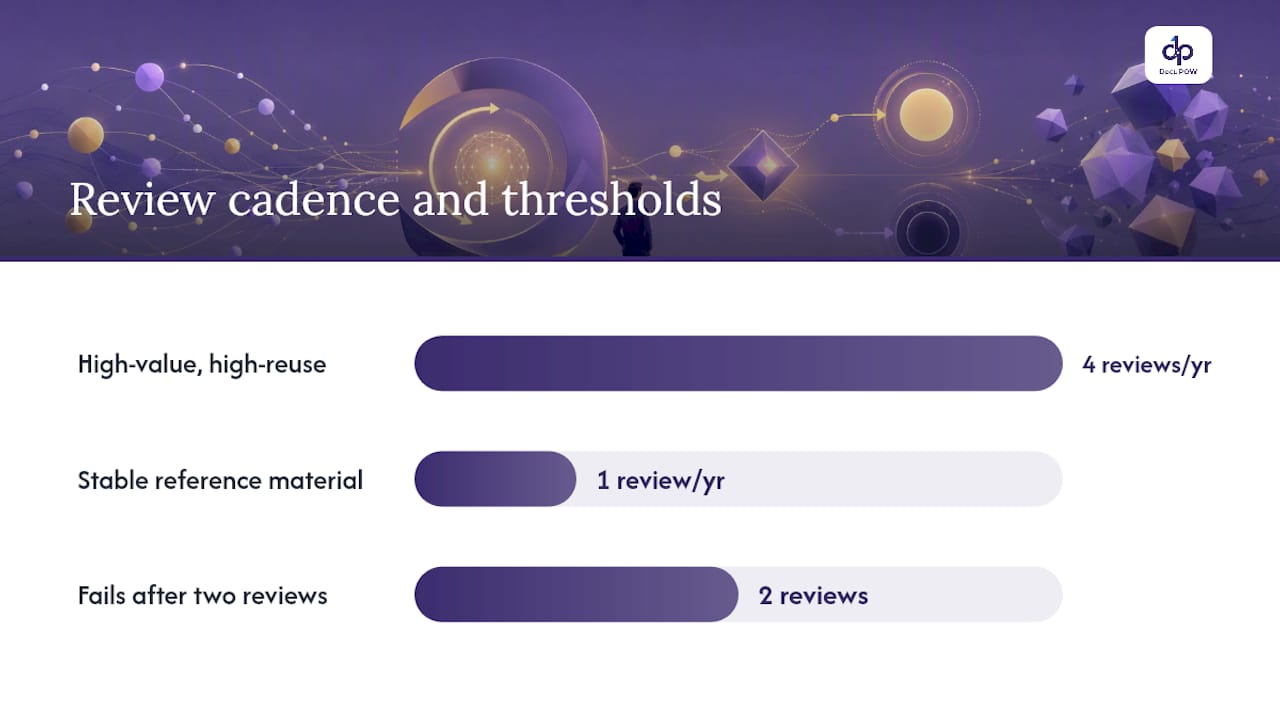
    • A review cadence (quarterly for high-use content, annually for stable reference material)
    • A metadata standard that all contributors follow, with a controlled vocabulary for key taxonomy fields
    • An escalation path for disputed or outdated content
    • A decommissioning process for content that fails its review

    Incentives and role design: Contribution to the knowledge base should be visible and recognized. Some organizations tie KM contribution to performance reviews. Others use lightweight social recognition — a “most helpful article” callout in a team meeting. The mechanism matters less than the consistency. People share knowledge when sharing is safe, valued, and easy. When it’s treated as extra work on top of a full job, they don’t.

    Workflow integration is where most programs fail quietly. If contributing to the knowledge base requires leaving the tool someone is already working in, most people won’t do it. The highest-adoption programs embed capture prompts directly into project close-out workflows, support ticket resolution, and sales CRM updates.

    Legal and compliance considerations: KM governance must account for data privacy (GDPR, CCPA, and sector-specific regulations), intellectual property ownership of contributed content, and records retention obligations. Any knowledge asset containing personal data or proprietary third-party material needs access controls and a documented retention policy before it goes into a shared repository.


    How do you measure whether KM is actually working?

    Measurement should connect KM activity to business outcomes, not just platform activity. Page views and article counts tell you the system is being used; they don’t tell you whether it’s making the organization smarter.

    Systematic reviews published in June 2026 confirm that KM has a positive but heterogeneous effect on organizational performance, with creation and sharing activities producing stronger results than passive storage. That finding has a direct measurement implication: track whether knowledge is being used, not just stored.

    KPI categories and measurement approach:

    KPI Why It Matters How to Measure
    Search success rate Measures findability — the primary user experience % of searches returning a clicked result; target <10% zero-result rate
    Time-to-onboard Connects KM to productivity ramp Days from hire to first independent task completion; compare cohorts before/after KM
    Repeat incident rate Measures whether lessons learned are applied % of support tickets matching a previously resolved issue type
    Knowledge reuse rate Shows whether content is being applied, not just stored % of knowledge assets accessed at least once in 90 days
    Content currency Measures governance health % of assets reviewed within their scheduled review window
    Employee contribution rate Measures cultural adoption % of eligible contributors who submitted at least one asset per quarter

    A simple ROI example: If a team of 50 analysts each spends 30 minutes per day searching for information they can’t find, that’s 25 hours of lost productivity daily. If a well-governed KM program cuts that search time by 40%, the organization recovers 10 hours per day. At a fully loaded cost of $75 per hour, that’s $750 per day, or roughly $195,000 per year — from a single team. That calculation is conservative and directional, but it’s the kind of number that gets a KM budget approved.

    Measurement cadence: Set baselines in the first 90 days of the pilot. Review KPIs monthly during the first year. Publish a quarterly KM health report to leadership. Adjust targets annually as the program matures.


    What kills KM programs, and how do you stop it?

    The most common showstoppers are content silos, poor metadata, outdated content, and low participation. Most of them are predictable, and most of them are preventable.

    Red-flag checklist — watch for these early:

    • No named owner on more than 20% of knowledge assets
    • Search zero-result rate above 15% after 90 days of operation
    • Fewer than 30% of eligible contributors have submitted anything in the past quarter
    • Content review dates being missed consistently
    • Leadership stops mentioning KM in team communications
    • New employees report not using the knowledge base during onboarding

    Mitigation matched to each red flag:

    1. No content owners: Run a content ownership sprint. Assign every asset to a team (not just a person) and make ownership visible in the repository. Ownerless content gets flagged for review or decommissioning.
    2. High zero-result rate: Conduct a taxonomy sprint. Interview the five most common user types, map their search language to your taxonomy, and add synonyms and redirects. Then audit the top 50 failed searches and create or surface the missing content.
    3. Low contribution: Simplify the submission process to three fields or fewer for a basic contribution. Add a capture prompt to existing workflows (ticket close, project retrospective, client debrief). Recognize contributors publicly.
    4. Missed review dates: Automate review reminders 30 days before the due date. Give content owners a one-click “still accurate” confirmation option so the bar for a quick review is low.
    5. Leadership disengagement: Schedule a quarterly KM health briefing for the executive sponsor. Present three metrics, one win, and one ask. Keep it to 15 minutes.

    Change management for KM specifically: KM adoption fails when it’s positioned as a compliance requirement rather than a personal benefit. The most effective framing is “this makes your job easier” — not “this protects institutional knowledge.” Show new hires how the knowledge base saved them a week of ramp time. Show senior engineers how their documented expertise gets credited and reused. The productivity improvement strategies that work for general team performance apply here too: make the desired behavior the path of least resistance.


    How do you run a knowledge audit?

    A knowledge audit’s purpose is simple: discover what knowledge exists, who owns it, where the gaps are, and what’s at risk. It’s the foundation for every prioritization decision in a KM program.

    Step-by-step audit checklist:

    • Step 1 — Define scope: Choose one business domain (e.g., customer support, product development, finance operations). Don’t audit everything at once.
    • Step 2 — Inventory data sources: List every place knowledge currently lives — shared drives, wikis, email threads, ticketing systems, people’s heads. Include informal sources.
    • Step 3 — Identify stakeholders: Map the people who create, use, and depend on knowledge in this domain. Include both senior experts and frontline users.
    • Step 4 — Sample and score: Pull a representative sample of 50–100 assets. Score each on four dimensions.
    • Step 5 — Gap analysis: Compare what exists against what stakeholders say they need. Identify high-risk gaps (critical knowledge with no documentation and a single expert holder).
    • Step 6 — Prioritize: Use scores to rank assets for capture, update, or decommission.
    • Step 7 — Report and act: Present findings to the KM lead and domain owner with a 90-day action plan.

    Scoring rubric (rate each asset 1–5 on each dimension):

    • Value: How much does this knowledge affect decisions or performance if unavailable?
    • Accuracy: Is the content current and verified by a subject matter expert?
    • Currency: When was it last reviewed? Is it still relevant to current processes?
    • Reuse potential: How many people or teams could benefit from this asset?

    Assets scoring 16–20 are high-priority for preservation and promotion. Assets scoring below 8 are candidates for decommissioning or urgent update.

    Retention and archival rules: High-value, high-reuse assets should be reviewed quarterly. Stable reference material (policies, standards) warrants annual review. Content that fails two consecutive reviews without an owner claiming it should be archived, not deleted — archived content can be restored if a future need emerges. Set a disposition path for each asset type: active, archive, or delete. Regulatory and compliance-related content follows its own retention schedule governed by legal requirements, not KM preference.


    How do you run a knowledge audit? — overview diagram

    Key Takeaways

    Effective knowledge management requires active creation and sharing, not just storage — organizations that treat KM as a living capability with clear ownership, governance, and AI-ready content quality consistently outperform those that treat it as a one-time platform deployment.

    Point Details
    Creation and sharing drive results Systematic reviews confirm active KM activities outperform passive storage for organizational performance.
    Governance before technology Assign content owners, set review cadences, and define metadata standards before deploying AI or search tools.
    Measure what matters Track search success rate, time-to-onboard, and repeat incident rate — not just page views or article counts.
    AI readiness requires content quality Knoco International’s 2026 survey found that 56% of organizations have introduced AI into KM programs; success depends on trusted, governed content, not the platform.
    DocuPOW accelerates capture and findability DocuPOW’s template-free extraction and semantic search reduce the manual friction in KM capture and curation workflows.

    The gap between KM strategy and where knowledge actually lives

    Most KM programs are designed around the knowledge people intend to share. The harder problem is the knowledge that’s trapped in documents, forms, contracts, and reports that nobody has time to read, tag, or summarize.

    That gap is where KM initiatives stall. A team can have excellent governance, a clear taxonomy, and a well-designed knowledge base — and still find that 60% of the organization’s most valuable operational knowledge is sitting in PDFs, scanned forms, and email attachments that the search layer can’t surface because the content was never extracted or structured.

    Document intelligence changes that equation. When an automated extraction layer can pull structured data and key insights from any document type without a rigid template, the capture stage of the KM lifecycle stops being a manual bottleneck. Semantic search on top of that extracted content means a compliance officer can ask a natural-language question and get an answer drawn from 10,000 contracts, not just the three they happened to save in the right folder.

    Consider a practical example: a procurement team runs a supplier knowledge audit. Traditionally, that means someone manually reviewing hundreds of vendor contracts to extract payment terms, compliance clauses, and performance history. With document intelligence, that extraction happens automatically, the data is tagged and searchable, and the audit that used to take three weeks takes three days. The knowledge is now in the system, owned, and findable.

    DocuPOW’s document intelligence platform is built for exactly this intersection of document processing and knowledge capture.


    Document intelligence cuts the friction out of knowledge capture

    The single biggest drag on KM programs isn’t culture or governance. It’s the sheer effort of getting knowledge out of documents and into a form that’s searchable, structured, and trustworthy. That’s the problem DocuPOW solves.

    DocuPOW

    DocuPOW’s agent-based platform extracts data from any document type without templates, enriches it with metadata automatically, and makes it queryable through semantic search. For KM leaders, that means the capture and curation stages of the lifecycle stop requiring armies of manual reviewers. For IT and operations leaders, it means document workflow automation that connects directly to ERP, CRM, and HR systems through API.

    The capabilities map directly to KM needs:

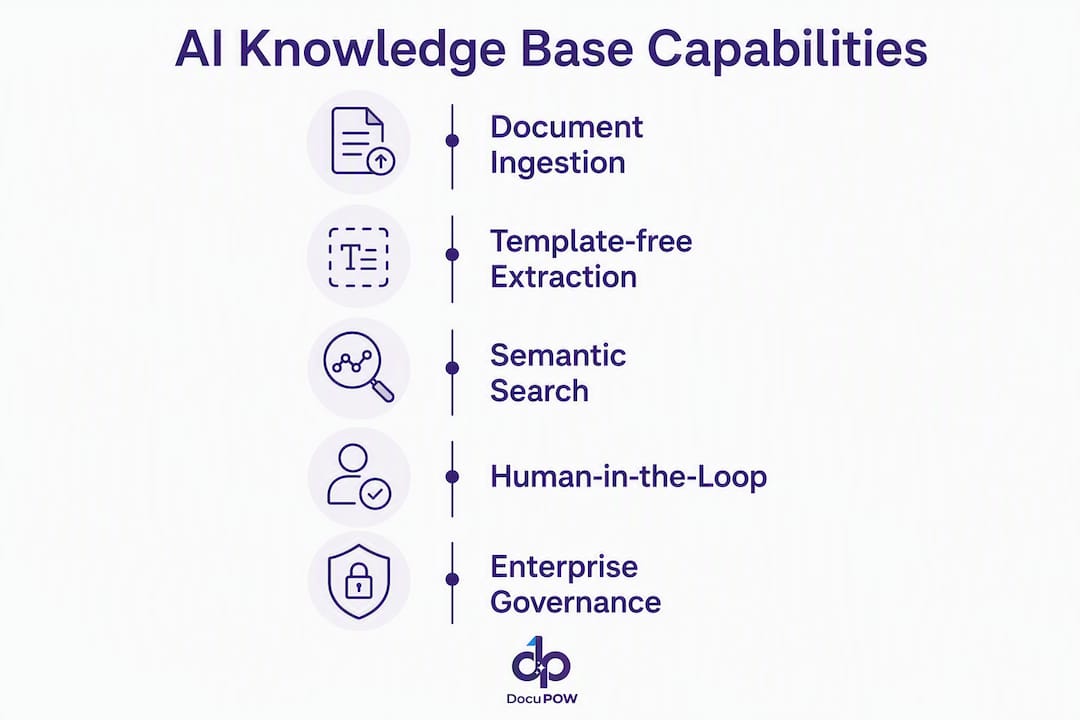
    • Template-free extraction: Captures knowledge from contracts, reports, forms, and unstructured files without pre-configuration.
    • AI-powered semantic search: Surfaces the right asset in response to a natural-language query, not just a keyword match.
    • Human-in-the-loop audit review: Keeps a governance checkpoint in the workflow so AI-generated outputs are verified before they enter the knowledge base.
    • Real-time analytics and predictive insights: Shows which knowledge assets are being used, which are stale, and where gaps are forming.
    • ERP/CRM integration: Connects knowledge capture directly to the systems where work happens, so contribution doesn’t require leaving the workflow.

    Buyer evaluation questions to ask any document intelligence vendor:

    • Can the platform extract from all document types your organization uses, without custom templates for each?
    • Does it support your existing metadata schema, or does it impose its own taxonomy?
    • Is there a human review step before extracted content is published to the knowledge base?
    • How does it handle data residency and access control for sensitive or regulated content?
    • What does the integration path to your ERP or CRM look like, and how long does it take?

    If you’re ready to see how AI workflow automation can accelerate your KM program, DocuPOW’s platform is worth a close look.


    Useful sources for going deeper

    These are the sources worth bookmarking, each for a specific purpose:


    FAQ

    What does knowledge management mean?

    Knowledge management is the structured practice of creating, capturing, organizing, sharing, and applying organizational knowledge so the right people have the right information at the right time. APQC defines it as a discipline balancing people, process, and technology to improve decisions and performance.

    What are the five stages of knowledge management?

    The five stages are create, capture (or store), organize/curate, share (or disseminate), and apply (or use), followed by an evaluate stage in most practitioner models. Academic sources and practitioner frameworks align closely on this sequence, though naming varies.

    What are the main types of knowledge in an organization?

    The three core types are tacit knowledge (skills and judgment that are hard to document), explicit knowledge (documented procedures, policies, and data), and implicit knowledge (undocumented practices that could be made explicit). Each type requires a different capture and sharing strategy.

    What are the Five Cs of knowledge management?

    The Five Cs framework describes five KM activities: Capture, Curate, Connect, Collaborate, and Create. It’s a practitioner-friendly model for communicating KM responsibilities to teams without academic jargon.

    How does AI change knowledge management in 2026?

    Knoco International’s 2026 survey found that 56% of organizations have introduced AI into their KM programs, primarily through semantic search and automated tagging. AI accelerates findability and curation but requires high-quality, governed content to avoid amplifying errors.


    The case for treating KM as infrastructure, not initiative

    Here’s the view I keep coming back to after working through the 2026 research and practitioner data: most organizations are still treating knowledge management as a project with a launch date and a go-live celebration, when the evidence clearly shows it functions more like infrastructure. You don’t “complete” your network or your data warehouse. You operate it, maintain it, and improve it continuously.

    The 2026 systematic reviews make this concrete. Creation and sharing activities drive performance gains. Passive storage doesn’t. That means the organizations getting real value from KM are the ones that have built ongoing habits — after-action reviews, communities of practice, embedded capture workflows — not the ones that did a big content migration and called it done.

    The AI dimension adds urgency to this framing. With 56% of organizations now running some form of AI in their KM programs, the quality of your knowledge base is no longer just a governance concern. It’s a competitive variable. A well-governed, actively maintained knowledge base becomes a genuine AI asset. A neglected one becomes a liability the moment you point a language model at it.

    The leaders who will get the most from KM in the next three years are the ones who stop asking “when will this be finished?” and start asking “how do we make this better every quarter?” That’s a different kind of commitment, and it requires a different kind of budget conversation. But the ROI math, even in conservative form, supports it.

  • Information Retrieval: A Technical Guide for Practitioners

    Information Retrieval: A Technical Guide for Practitioners

    Information retrieval (IR) is the set of techniques and systems that find, rank, and present the documents or passages most relevant to a user’s information need. Unlike a database query that returns exact matches, an IR system assigns a retrieval status value (RSV) to every candidate document and returns a ranked list ordered by predicted relevance. The canonical measures for judging that list are precision and recall, extended by metrics like MAP and nDCG for ranked output. Benchmark suites such as TREC and MS MARCO provide the shared test collections that let researchers compare systems fairly. Ranking functions range from classical BM25 to transformer-based neural models, and production stacks today almost always combine both.

    This guide covers:

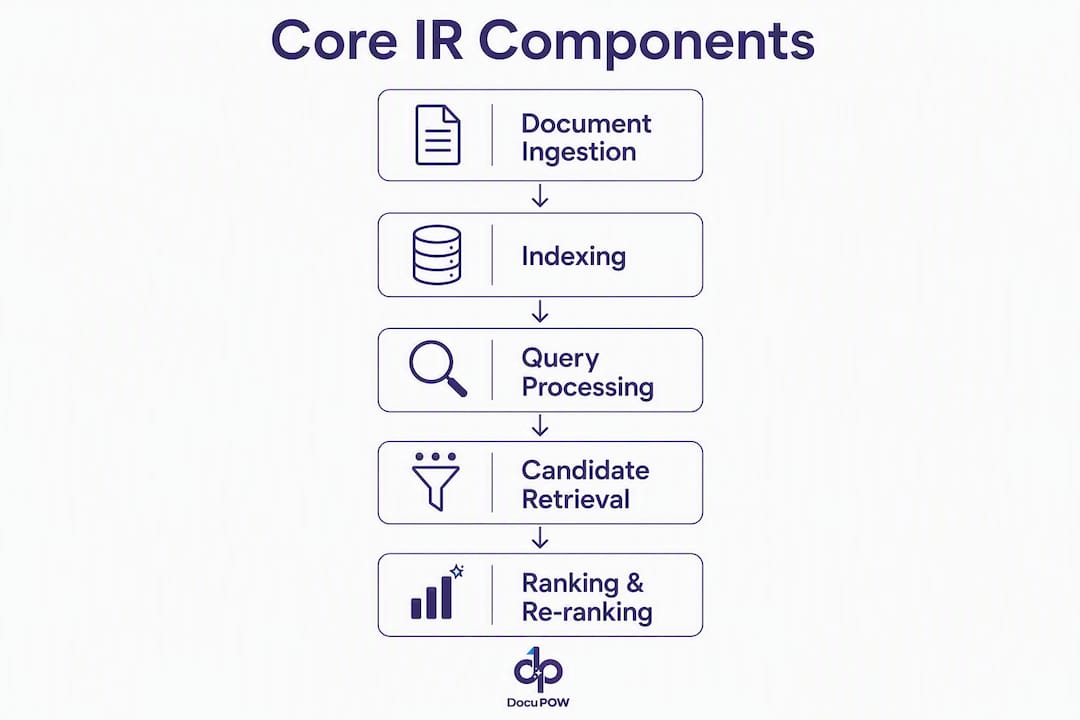
    • Core components and the IR pipeline (indexing, representation, retrieval, ranking, serving)

    • Model families: Boolean, vector-space/tf–idf, probabilistic/BM25, language models, and neural embeddings

    • Evaluation metrics and benchmark suites

    • Libraries and tools: Apache Lucene, Elasticsearch, Apache Solr, FAISS, Annoy, and Milvus

    • Modern hybrid retrieval, RAG pipelines, and multi-modal search

    • Enterprise deployment patterns, challenges, and ethical considerations


    Table of Contents

    What is information retrieval, and how does it differ from data retrieval?

    IR returns a ranked list of items ordered by predicted relevance to an information need. That single distinction separates it from almost every other data-access paradigm.

    A SQL query against a relational database returns every row that satisfies a Boolean predicate, nothing more and nothing less. The query is precise, the schema is fixed, and “relevance” is not a concept the engine cares about. IR inverts that contract: the user expresses a fuzzy, often ambiguous need (“papers on transformer-based ranking”), and the system must translate that expression into a retrieval operation, score candidates, and decide what order to present them in.

    The concept of an information need is central here. A user rarely knows exactly what they want before they search. They have a gap in knowledge, and the query is an imperfect proxy for that gap. IR systems model the gap, not just the literal query string. That modeling step, called query understanding or query translation, is where most of the interesting engineering happens.

    Typical IR tasks include:

    Pro Tip: Use IR-style ranking whenever the user’s need is fuzzy or exploratory. Use exact-match retrieval (SQL, key-value lookup) when you know the precise identifier and need a deterministic answer. Mixing the two in a hybrid stack covers most real-world cases.


    How did information retrieval evolve from Boolean logic to neural models?

    The arc runs from symbolic rule-following to statistical weighting to learned representations, and each shift was driven by a failure mode of the previous approach.

    • 1950s–1960s: Early library science and document retrieval systems used Boolean logic. Queries were AND/OR/NOT combinations of terms. Precision was controllable, but recall was brittle and ranking was impossible.

    • 1970s–1980s: Gerard Salton’s vector-space model introduced tf–idf weighting and cosine similarity, letting systems score documents by term frequency relative to how rare a term is across the corpus. Ranking became possible.

    • 1980s–1990s: The probabilistic retrieval framework, culminating in BM25 (Robertson and Sparck Jones), added term frequency saturation and document length normalization. BM25 remains the default lexical scorer in Elasticsearch and OpenSearch today.

    • 1992–present: TREC (Text REtrieval Conference) launched, giving the field shared test collections and relevance judgments. Evaluation practices matured alongside model development.

    • 2000s: Language model approaches to IR (query likelihood models) offered a probabilistic alternative to BM25 and opened the door to smoothing techniques.

    • 2013–2018: Word2Vec, GloVe, and then ELMo introduced dense vector representations. Semantic similarity became computable without exact term overlap.

    • 2018–present: BERT and subsequent transformer models enabled deep contextual representations. Bi-encoder architectures (dense retrieval) and cross-encoder re-rankers became practical at scale. MS MARCO provided the large-scale passage ranking benchmark that drove this generation of research.

    Evaluation practices evolved in parallel. Early systems were judged on precision and recall over unranked sets. As ranked retrieval became standard, MAP and nDCG replaced or supplemented those measures. Online A/B testing joined offline test collections as a required validation step for production changes.


    What are the core components of an IR system?

    Every IR system, from a simple search box to a production RAG pipeline, runs the same logical pipeline: document ingestion → preprocessing → indexing → candidate retrieval → ranking/re-ranking → serving.

    Infographic detailing core components of IR system

    Indexing: inverted indexes and positional postings

    The inverted index is the data structure that makes fast retrieval possible. For each term in the vocabulary, the index stores a posting list: the set of document IDs that contain that term, along with term frequency and, in a positional index, the positions of each occurrence. Positional postings enable phrase queries (“machine learning”) and proximity scoring.

    How To Implement Inverted Indexing Top 10 Tools

    A term dictionary maps each term to its posting list offset on disk. At query time, the engine looks up each query term in the dictionary, fetches the posting lists, and merges them. That merge is where Boolean AND/OR logic and BM25 scoring happen.

    Representation: from bags of words to dense embeddings

    Bag-of-words treats a document as an unordered set of term counts. tf–idf weights those counts by inverse document frequency, downweighting common terms. Dense embeddings encode the full semantic meaning of a passage into a fixed-length vector, typically 768 or 1,024 dimensions for transformer-based encoders. The right choice depends on the query type: exact entity matching favors sparse representations; conceptual similarity favors dense ones.

    Retrieval vs. ranking

    Candidate retrieval is fast and approximate. The goal is to reduce a corpus of millions to a few hundred candidates with high recall. Ranking is slower and more precise: a scoring function (BM25, a neural model, or a cross-encoder) assigns a final score to each candidate and sorts the list.

    Serving concerns

    Latency, freshness, and scale are the three levers that determine whether a theoretically good system works in production. Sharding splits the index across machines so queries can run in parallel. Freshness requires incremental indexing strategies that add new documents without full rebuilds. Latency budgets dictate how expensive a re-ranker you can afford.

    Pro Tip: Set a latency budget before choosing a re-ranker. A cross-encoder running on CPU adds hundreds of milliseconds per query. If your SLA is under 200ms end-to-end, you need a bi-encoder or a very small cross-encoder on GPU.


    Which IR model families should you know?

    The main families are Boolean, vector-space/tf–idf, probabilistic/BM25, language models, and neural embedding-based models. Each has a distinct use case and a distinct failure mode.

    Boolean models treat retrieval as set membership. A document either matches a query or it does not. They are fast and deterministic, which makes them useful for structured filtering (faceted search, access control), but they cannot rank results and they are sensitive to query formulation.

    Vector-space models and tf–idf represent documents and queries as vectors in a high-dimensional term space. The similarity score between a document d and query q is typically cosine similarity:

    score(d, q) = (d · q) / (|d| × |q|)

    The tf–idf weight for term t in document d is:

    tf-idf(t, d) = tf(t, d) × log(N / df(t))

    where tf(t, d) is the raw term count, N is the corpus size, and df(t) is the number of documents containing t. High idf means the term is rare and therefore informative.

    BM25 extends the probabilistic framework by adding two critical corrections to raw tf–idf. Term frequency saturation prevents a term appearing 100 times from scoring 100× better than one appearing once. Length normalization prevents long documents from dominating simply because they contain more terms. The BM25 score for a query Q with terms q₁…qₙ against document d is:

    score(d, Q) = Σ IDF(qᵢ) × [tf(qᵢ,d) × (k₁+1)] / [tf(qᵢ,d) + k₁ × (1 − b + b × |d|/avgdl)]

    where k₁ (typically 1.2–2.0) controls saturation and b (typically 0.75) controls length normalization. BM25 remains the default lexical scorer in Elasticsearch and OpenSearch because it generalizes well across domains without tuning.

    Language model approaches frame retrieval as: what is the probability that document d generated query Q? Query likelihood models with Dirichlet or Jelinek-Mercer smoothing often match or beat BM25 on standard benchmarks, and they connect naturally to neural language models.

    Neural and embedding-based models split into two architectures. Bi-encoders encode the query and document independently into dense vectors; retrieval is a nearest-neighbor search over those vectors. Cross-encoders take the query and document together as input and produce a single relevance score; they are more accurate but far slower because they cannot precompute document representations. Hybrid retrieval combining BM25 and vector search is the production standard for RAG systems precisely because vector embeddings excel at semantic similarity but fail on exact entity matching, while BM25 compensates with IDF and length normalization.

    • Boolean: structured filtering, access control, legacy systems

    • tf–idf / vector-space: baseline ranking, lightweight deployments

    • BM25: general-purpose lexical ranking, default for most production stacks

    • Language models: probabilistic retrieval, neural LM fine-tuning

    • Bi-encoders: semantic search, dense retrieval at scale

    • Cross-encoders: re-ranking top-K candidates for maximum accuracy

    Pro Tip: Add a cross-encoder re-ranker only on the top 50–100 candidates from your bi-encoder or BM25 pass. Running a cross-encoder over thousands of documents is prohibitively slow; running it over a small shortlist is where it earns its keep.


    How does text preprocessing and indexing work in practice?

    Preprocessing determines what the index actually contains. Get it wrong and your retrieval quality suffers regardless of how good your ranking model is.

    The pipeline runs in this order:

    1. Tokenization: split raw text into tokens. Whitespace tokenization is simple but misses compound words and subword units. WordPiece and BPE (byte-pair encoding) tokenizers, used by BERT-family models, handle out-of-vocabulary terms by splitting them into known subword pieces.

    2. Normalization: lowercase all tokens, strip punctuation, apply Unicode normalization (NFC or NFKC), and decide on a stopword strategy. Removing stopwords reduces index size and speeds up retrieval, but it breaks phrase queries that include them (“to be or not to be”).

    3. Stemming vs. lemmatization: stemming (Porter, Snowball) chops word endings heuristically and is fast but imprecise (“running” → “run”, “better” → “better”). Lemmatization uses morphological analysis to return the dictionary form (“better” → “good”) and is more accurate but slower. For most English-language production systems, stemming is sufficient; lemmatization pays off in morphologically rich languages.

    4. Index construction: build the inverted index by iterating over preprocessed tokens, recording (term, doc_id, position) triples, and sorting by term. The resulting posting lists are stored on disk with compression (variable-byte or PForDelta encoding).

    5. Chunking for RAG and passage retrieval: splitting long documents into passages before indexing. Chunk size is a genuine trade-off. Smaller chunks (128–256 tokens) improve precision for specific queries; larger chunks (512–1,024 tokens) preserve more context for conceptual questions. Query-adaptive retrieval selects chunk size dynamically based on query specificity, using coarse-grained vectors for broad questions and fine-grained lexical retrieval for entity-specific ones.

    Implementation notes worth knowing:

    • Incremental indexing: add new documents to a separate in-memory segment and merge periodically. Lucene’s segment architecture does this automatically.

    • Document deletion: mark documents as deleted in a deletion bitmap; they are physically removed during segment merges.

    • Update strategies: updates are deletes followed by inserts. Frequent small updates fragment the index; batch updates are more efficient.


    How are IR systems evaluated?

    Precision and recall are the foundation. Precision is the fraction of retrieved documents that are relevant; recall is the fraction of relevant documents that are retrieved. They trade off against each other: retrieving everything maximizes recall but collapses precision; retrieving only the single most confident result maximizes precision but misses most relevant documents.

    F1 is the harmonic mean of precision and recall, useful when you want a single number that penalizes extreme imbalance between the two.

    For ranked retrieval, set-based measures are not enough. Precision-recall curves and ranked metrics capture position sensitivity:

    • Precision@k (P@k): precision among the top k results. P@10 is the standard for web search evaluation because users rarely look past the first page.

    • Mean Average Precision (MAP): the mean of average precision scores across queries. Average precision rewards systems that rank relevant documents early.

    • nDCG (Normalized Discounted Cumulative Gain): accounts for graded relevance (a document can be “highly relevant,” “relevant,” or “not relevant”) and discounts gains logarithmically by rank position. nDCG is the standard metric for MS MARCO and most modern IR benchmarks.

    • Reciprocal Rank (MRR): the mean of 1/rank of the first relevant result, useful for question-answering tasks where one correct answer exists.

    Metric spotlight: nDCG@10 is the single most widely reported metric in modern IR research. It rewards placing highly relevant documents at rank 1 more than at rank 5, and it handles graded relevance labels, which makes it more informative than binary precision/recall for real-world search quality.

    Benchmark suites provide the shared test collections that make comparison meaningful:

    • TREC (Text REtrieval Conference): the oldest and most influential benchmark program, running since 1992. TREC tracks cover web search, clinical trials, news, and more. Each track provides a document corpus, a set of topics (queries), and human relevance judgments (qrels).

    • MS MARCO: a large-scale passage and document ranking dataset derived from Bing search logs, with sparse relevance labels. It drove the neural IR wave of the 2010s and remains the standard pre-training and fine-tuning resource for dense retrieval models.

    Evaluation practice distinguishes offline evaluation (fixed test collections, reproducible) from online A/B testing (real users, real behavior, but noisy and expensive). Both are necessary: offline evaluation catches regressions before deployment; A/B testing validates that metric improvements translate to user satisfaction.

    Practical pitfalls:

    • Skewed relevance distributions inflate precision metrics; always report the percentage of relevant documents in the collection.

    • Human relevance labels are noisy and annotator-dependent; inter-annotator agreement (Cohen’s kappa) should be reported.

    • Evaluation choices must match the user task: web search optimizes P@10; legal discovery optimizes recall; tune thresholds to user tolerance for false positives versus false negatives.


    Which tools and libraries should you use for building IR systems?

    The core toolkit spans two categories: lexical search engines and vector indexes. Most production systems use at least one from each.

    Apache Lucene is the foundational Java library underlying most open-source search infrastructure. It handles tokenization, inverted index construction, BM25 scoring, and query parsing. Lucene is not a server; it is a library you embed in your application. Everything else in this list either wraps Lucene or solves a different problem entirely.

    Overhead view of developer workspace with search engine books

    Elasticsearch wraps Lucene in a distributed, REST-accessible server with JSON APIs, horizontal sharding, and built-in support for dense vector fields (kNN search via HNSW). It is the most widely deployed search engine in enterprise environments and supports hybrid BM25 + vector search natively as of recent versions. BM25 is its default lexical scorer.

    Apache Solr is the other major Lucene-based search server, older than Elasticsearch and historically stronger in enterprise document management and faceted search. Solr’s SolrCloud mode provides distributed search. It has added vector search support, though Elasticsearch’s ecosystem for hybrid retrieval is currently more mature.

    FAISS (Facebook AI Similarity Search) is a C++ library with Python bindings for efficient nearest-neighbor search over dense vectors. It supports flat (exact) indexes for small corpora and approximate indexes (IVF, HNSW, PQ) for billion-scale retrieval. FAISS is the standard choice when you need maximum control over the vector index and are comfortable with lower-level APIs.

    Annoy (Approximate Nearest Neighbors Oh Yeah) is a lightweight C++ library with Python bindings, originally built at Spotify for music recommendation. It uses random projection trees to build a static, memory-mappable index. Annoy is fast at query time and memory-efficient, but the index is read-only after construction, which limits it to use cases where the corpus changes infrequently.

    Milvus is a purpose-built vector database designed for production-scale similarity search. It supports multiple index types (IVF_FLAT, HNSW, DiskANN), multi-tenancy, and hybrid scalar-vector filtering. Milvus is the right choice when you need a managed vector store with operational features (replication, backup, access control) rather than a library you manage yourself.

    Category Lucene Elasticsearch Solr FAISS Annoy Milvus
    Primary use Lexical search library Distributed lexical + vector search Distributed lexical search Vector similarity library Lightweight ANN library Vector database
    Hybrid search No (library only) Native (BM25 + kNN) Partial No (vector only) No (vector only) Scalar + vector filter
    Index mutability Yes Yes Yes Flat/IVF yes; HNSW append-only Read-only after build Yes
    Operational features None High (sharding, HA, REST) High (SolrCloud, REST) None None High (replication, multi-tenancy)
    Language bindings Java REST / many clients REST / many clients C++, Python, Java C++, Python Python, Java, Go, Node
    Best fit Embedded Java apps Enterprise search, RAG backends Enterprise document search Research, custom pipelines Static corpus, low ops overhead Production vector store

    Integration pattern: the standard production architecture pairs a lexical engine (Elasticsearch or Solr) with a vector index (FAISS for custom pipelines, Milvus for managed deployments) and fuses their result lists with Reciprocal Rank Fusion before a cross-encoder re-ranker. For teams that want to reduce operational complexity, unified data layers like PostgreSQL with pgvector consolidate lexical and vector search in a single store, reducing synchronization overhead and mitigating cross-tenant leakage.

    Pro Tip: For content freshness and ranking signals, the indexing pipeline needs to account for document age and update frequency. Content freshness affects how search engines weight documents in their rankings, and the same principle applies to enterprise IR: stale index segments degrade retrieval quality for time-sensitive queries.


    Where is information retrieval applied in the real world?

    IR techniques power a wider range of applications than most practitioners realize when they first encounter the field.

    • Web search: the most visible application. Systems like Google and Bing index hundreds of billions of documents, run multi-stage ranking pipelines (BM25 candidate retrieval, neural re-ranking, diversity re-ranking), and must return results in under 200ms. The primary success criterion is P@10 and user engagement signals (click-through rate, dwell time).

    • Enterprise search: employees searching internal knowledge bases, SharePoint repositories, Confluence wikis, and email archives. The corpus is smaller but heterogeneous (PDFs, spreadsheets, scanned documents, emails). Multi-modal ingestion and access control are the dominant engineering challenges. Enterprise document intelligence at scale requires IR pipelines that handle structured and unstructured content in the same retrieval pass.

    • eDiscovery: legal teams searching millions of documents for evidence relevant to litigation. Recall is the primary metric because missing a relevant document can have legal consequences. Technology-assisted review (TAR) combines IR with active learning to prioritize human review of the most likely-relevant documents.

    • Recommender systems: collaborative filtering and content-based recommendation both use IR-style retrieval. Item-to-item similarity search over dense embeddings is a standard component of modern recommendation pipelines.

    • Retrieval-augmented generation (RAG): a language model answers questions by first retrieving relevant passages from a corpus, then conditioning its generation on those passages. Hybrid retrieval (BM25 + dense) with cross-encoder re-ranking is the standard RAG retrieval stack. Real-world document automation factories use RAG-style pipelines to answer queries over invoice archives, contract repositories, and compliance document sets.

    • Semantic search over documents: invoice processing, contract search, and helpdesk ticket routing all benefit from semantic search that matches intent rather than exact keywords. A query for “payment terms” should surface clauses about “net 30” and “due upon receipt” even when those exact words do not appear in the query.


    What makes modern hybrid retrieval and RAG different from classical IR?

    Hybrid retrieval combining BM25 and vector search is the production standard for RAG systems. The reason is straightforward: neither approach alone is sufficient.

    Dense vector search excels at semantic similarity. A query for “how do I cancel my subscription” will retrieve passages about “account termination” and “ending your plan” even without term overlap. But vector embeddings cluster semantically similar phrases and fail to distinguish exact entities like error codes, version numbers, and product SKUs. BM25 handles those cases precisely because its IDF weighting gives high scores to rare, specific terms.

    Reciprocal Rank Fusion (RRF) solves the score normalization problem when fusing two ranked lists. Instead of trying to normalize BM25 scores (which are unbounded) against cosine similarity scores (which are bounded between -1 and 1), RRF converts each list to rank positions and combines them:

    RRF_score(d) = Σ 1 / (k + rank_i(d))

    where k is a constant (typically 60) and rank_i(d) is the rank of document d in list i. Documents that rank highly in both lists score well; documents that rank highly in only one list score moderately. No score normalization required.

    Semantic granularity matters operationally. Advanced systems adapt chunk size and retrieval depth to query specificity: coarse-grained vectors for broad conceptual questions, fine-grained lexical retrieval for entity-specific queries. A fixed chunk size is a compromise that works adequately for average queries but fails at the extremes.

    Multi-modal retrieval extends the pipeline beyond text. Tables, images, charts, and structured data fields all carry information that text-only indexes miss. Encoding tables as structured text (markdown or CSV) before indexing is a pragmatic first step; dedicated table encoders and vision-language models handle more complex cases.

    Limitations to keep in mind:

    • Dense retrievers struggle with out-of-distribution queries and rare entities not well-represented in training data.

    • RAG systems can hallucinate when retrieved passages are ambiguous or contradictory.

    • Data staleness: a vector index built on a corpus snapshot degrades as the corpus changes; incremental updates are harder for HNSW than for inverted indexes.

    • Scale: billion-scale vector indexes require significant infrastructure (GPU memory, distributed HNSW, or product quantization).

    • Vector search alone is not safe for compliance-sensitive applications; hybrid stacks and human-in-the-loop validation are the safer choice.

    Pro Tip: The recommended production architecture is: hybrid retrieve (BM25 + bi-encoder) → RRF fusion → cross-encoder re-rank on top 50 → LLM consume. Each stage filters aggressively so the expensive stages see only a small, high-quality candidate set.


    How do you build a simple IR pipeline from scratch?

    The minimal path from raw data to a working retrieval system has five stages. Each one is a checkpoint where you can measure quality and decide whether to add complexity.

    1. Prepare your data. Choose a dataset. MS MARCO Passage Ranking is the standard starting point: it has 8.8 million passages, 1 million training queries, and sparse relevance labels. TREC collections (TREC-COVID, TREC Deep Learning) provide smaller, more carefully judged alternatives. For domain-specific prototyping, a Common Crawl subset filtered to your domain works well.

    2. Preprocess and index. Tokenize, lowercase, and stem (or lemmatize) your corpus. Build an inverted index using Apache Lucene directly or via the Python whoosh library for small corpora. For dense retrieval, encode passages with a bi-encoder (e.g., sentence-transformers with the msmarco-distilbert-base-v3 model) and index the resulting vectors in FAISS with an IVF index.

    3. Candidate retrieval. Run BM25 retrieval to get the top 100 candidates per query. Separately run ANN search over the dense index for the top 100 dense candidates. Fuse the two lists with RRF.

    4. Re-rank. Pass the top 50 fused candidates through a cross-encoder (e.g., cross-encoder/ms-marco-MiniLM-L-6-v2 from the sentence-transformers library). This step typically adds 3–5 nDCG points on MS MARCO.

    5. Evaluate and iterate. Compute nDCG@10, MAP, and recall@100 using pytrec_eval against the MS MARCO qrels. Recall@100 after the retrieval stage is the most important number: if relevant documents are not in your candidate set, no re-ranker can fix that.

    Practical tips:

    • Start with BM25 alone. It is a strong baseline and fast to implement. Add dense retrieval only when BM25 plateaus.

    • Tune chunk size before tuning model hyperparameters. Chunking decisions affect recall more than most model choices.

    • Use beir (Benchmarking IR) to evaluate your pipeline across multiple domains without writing custom evaluation code.

    • Log query latency at each pipeline stage from day one. Latency regressions are hard to diagnose retroactively.


    What operational challenges should you expect when deploying IR systems?

    The top challenges in production IR are precision-recall trade-offs, data freshness, cross-tenant leakage, latency and cost, fairness and bias, and relevance drift. None of them are solved once; they require ongoing monitoring.

    • Precision vs. recall:) — every threshold decision shifts the balance. Raising the retrieval cutoff improves recall but increases the load on the re-ranker. Lowering it improves precision but risks missing relevant documents. Set thresholds based on the user task, not on what looks good in offline evaluation.

    Ethical and privacy considerations deserve explicit attention. Storing query logs creates privacy risk; anonymization and retention limits are standard practice. Differential privacy techniques can protect individual queries in aggregate analytics. Transparency about how results are ranked builds user trust, particularly in high-stakes applications like legal discovery and medical information retrieval.

    Enterprise deployments require multi-modal ingestion and scale-aware design; tools that work for single-user prototypes often fail at organizational scale. Human-in-the-loop validation, sandboxed test environments, and audit trails are not optional extras for compliance-sensitive deployments.

    Pro Tip: Build a “canary query set” of 50–100 queries with known correct answers and run it against every index update. A regression on canary queries before a deployment catches freshness and leakage issues before users do.


    How does IR power enterprise document automation?

    Semantic search, hybrid retrieval, and multi-modal ingestion are not just research concepts. They are the technical foundation of modern enterprise document automation, and the gap between a prototype and a production deployment is almost entirely an IR engineering problem.

    Consider three concrete workflows:

    • Invoice processing: a finance team needs to extract payment terms, vendor names, and line-item totals from thousands of PDFs monthly. A text-only keyword search misses invoices where “net 30” appears as “thirty days net” or in a scanned image. Multi-modal ingestion (OCR + table extraction + semantic search) retrieves the right passages regardless of surface form.

    • Contract search: a legal team needs to find every contract containing a specific indemnification clause. High recall is mandatory. A hybrid BM25 + dense retrieval pipeline with a cross-encoder re-ranker achieves recall levels that keyword search alone cannot match, and an audit trail documents every retrieval decision for compliance review.

    • Compliance workflows: a compliance officer needs to verify that all vendor agreements meet updated regulatory requirements. Semantic search surfaces agreements that are conceptually relevant even when they use different terminology, and human-in-the-loop review flags edge cases for manual inspection.

    Early-stage retrieval tools frequently fail in enterprise deployments because they lack multi-modal ingestion and the scalability required for heterogeneous document processing. The engineering requirements are specific: the system must handle PDFs, Word documents, spreadsheets, and scanned images in the same retrieval pass, maintain access control at the document level, and produce an audit trail that satisfies legal and regulatory review.

    DocuPOW addresses these requirements directly. Its autonomous agents perform template-free data extraction across document types, combining semantic search with structured data extraction and real-time analytics. The platform’s human-in-the-loop audit review integrates the kind of oversight that compliance-sensitive IR deployments require, and its API integrations with ERP and CRM systems close the loop between retrieval and action.

    Pro Tip: For enterprise deployments, prioritize data governance and access control before optimizing ranking. A system that leaks documents across tenants or fails an audit is worse than a system with slightly lower nDCG. Build the governance layer first, then tune retrieval quality.


    Key Takeaways

    Hybrid retrieval combining BM25 and dense vector search, fused with RRF and re-ranked by a cross-encoder, is the production standard for modern IR systems and RAG pipelines.

    Point Details
    Hybrid retrieval is the production norm Combine BM25 and bi-encoder retrieval, fuse with RRF, and re-rank with a cross-encoder for best results.
    Evaluation metrics must match the task Use nDCG@10 for ranked search quality, recall@100 for RAG candidate generation, and MAP for multi-query benchmarking.
    Preprocessing determines index quality Tokenization, normalization, and chunk size decisions affect recall more than most model choices.
    Tooling choice depends on operational needs Elasticsearch for managed hybrid search; FAISS for custom pipelines; Milvus for production vector stores; pgvector for unified data layers.
    DocuPOW applies IR to document automation DocuPOW uses semantic search, multi-modal ingestion, and human-in-the-loop review to deliver enterprise-grade document extraction and compliance workflows.

    The gap between IR theory and what actually ships

    Most IR courses teach you to optimize nDCG on MS MARCO. That is useful. But the problems that actually consume engineering time in production are almost never about the ranking model.

    The real bottlenecks are ingestion fidelity (can the system parse the document formats your users actually have?), access control (does the multi-tenant isolation hold under adversarial queries?), and relevance drift (is the model still good six months after deployment when query patterns have shifted?). These are operational and data engineering problems, not model problems. The field’s obsession with benchmark leaderboards has produced genuinely impressive ranking models, but it has also created a generation of practitioners who underestimate how much of production IR quality is determined before the ranking function ever runs.

    The other underappreciated insight: human-in-the-loop review is not a crutch for a weak model. It is a data flywheel. Every correction a human reviewer makes is a training signal. Systems that treat human review as a cost to be minimized are leaving their best source of domain-specific relevance signal on the table.

    The practical advice: if you are building an IR system for a new domain, spend twice as long on your evaluation setup as you think you need. A bad evaluation harness will lead you to optimize the wrong thing, and you will not discover the mistake until users complain.


    DocuPOW brings IR techniques to enterprise document workflows

    Faster document extraction without the retrieval failures that plague template-based systems: that is the concrete difference DocuPOW delivers. Where classical document processing tools rely on rigid field mappings that break when a vendor changes their invoice layout, DocuPOW’s autonomous agents apply semantic search and multi-modal ingestion to extract data from any document structure, the same hybrid retrieval logic that powers modern RAG pipelines applied directly to your document workflows.

    DocuPOW

    The platform handles the full pipeline: ingestion of PDFs, scanned images, spreadsheets, and structured data; template-free extraction using contextual AI agents; human-in-the-loop audit review for compliance-sensitive workflows; and real-time analytics that surface extraction quality metrics before errors reach downstream systems. For finance, legal, and operations teams processing high document volumes, that means fewer manual corrections, faster cycle times, and an audit trail that holds up to regulatory scrutiny.

    If you want to see how IR-driven document automation performs on your actual document types, explore DocuPOW’s enterprise automation examples or review the financial data extraction guide to understand what the pipeline looks like for your use case. Request a demo at docupow.ai to see the platform against your own documents.


    FAQ

    What does “information retrieval” mean?

    Information retrieval is the process of finding documents or passages that are relevant to a user’s information need, typically from a large unstructured collection, and returning them in ranked order by predicted relevance.

    What are the three main types of information retrieval models?

    The three main families are Boolean models (exact-match set retrieval), vector-space models (tf–idf and cosine similarity), and probabilistic models (BM25 and language model approaches). Neural embedding-based models are a fourth, increasingly dominant family.

    What is a practical example of information retrieval?

    A legal team using eDiscovery software to find every contract containing an indemnification clause is a direct example: the system retrieves and ranks documents by relevance to the query, prioritizing recall to avoid missing legally significant documents.

    What does it mean to “retrieve” information in an IR context?

    Retrieval means generating a ranked list of candidate documents from a corpus by comparing a query representation against indexed document representations, using a scoring function (such as BM25 or cosine similarity over dense vectors) to assign each document a relevance score.

    How is information retrieval different from a database query?

    A database query returns every record that exactly matches a structured predicate. An IR system returns a ranked list ordered by predicted relevance to a fuzzy, natural-language information need, tolerating ambiguity and surface-form variation that would cause a SQL query to return zero results.


    The resources below are the authoritative starting points for deeper study, organized by type.

    Textbooks and surveys:

    • Introduction to Information Retrieval by Christopher D. Manning, Prabhakar Raghavan, and Hinrich Schütze (Cambridge University Press, 2008). The standard graduate-level textbook. Freely available online. Covers Boolean retrieval, tf–idf, BM25, language models, evaluation, and query expansion.

    • Modern Information Retrieval by Ricardo Baeza-Yates and Berthier Ribeiro-Neto. The other canonical textbook, stronger on probabilistic models and user interaction.

    Evaluation and metrics:

    • Stanford IR Book: Evaluation of unranked retrieval sets: precision, recall, F-measure definitions and intuition.

    • Stanford IR Book: Evaluation of ranked retrieval results: MAP, nDCG, precision-recall curves.

    • Metrics, Statistics, Tests (Northeastern/Khoury): lecture notes covering IR effectiveness metrics and test collection methodology.

    • UNSW IR Evaluation lecture notes: TREC, MS MARCO, and A/B testing in context.

    Benchmark datasets:

    Dataset Type Scale Primary metric
    MS MARCO Passage Passage ranking 8.8M passages, 1M train queries MRR@10, nDCG@10
    TREC Deep Learning Document + passage ranking MSMARCO-based, careful qrels nDCG@10
    TREC-COVID Biomedical retrieval — nDCG@10, MAP
    BEIR Multi-domain zero-shot — nDCG@10
    Common Crawl Web-scale pretraining Petabyte-scale N/A (pretraining)

    Tools and libraries:

    • Apache Lucene: foundational Java search library.

    • Elasticsearch: distributed search server with hybrid BM25 + kNN support.

    • FAISS: Facebook AI Similarity Search library for dense vector indexes.

    • Milvus: production vector database with multi-tenancy and replication.

    • sentence-transformers: Python library for bi-encoder and cross-encoder models.

    • pytrec_eval: Python bindings for the standard TREC evaluation tool.

    • beir: multi-dataset IR benchmarking framework.

    Research papers and reports:

    • Why Vector Search Alone Isn’t Enough: Hybrid Retrieval for RAG: practical guide to hybrid stacks and RRF.

    • Semantic granularity and query-adaptive retrieval (arXiv): adaptive chunk size and retrieval depth.

    • Unified data layers and production retrieval architectures (arXiv): pgvector and synchronization patterns.

    • Knowledge engine development challenges (arXiv): enterprise multi-modal ingestion requirements.

  • Contract Management for Business Leaders: A Practical Guide

    Contract Management for Business Leaders: A Practical Guide

    Contract management is the end-to-end discipline of turning signed agreements into measurable business outcomes. According to the National Contract Management Association (NCMA), it covers overseeing contracts to confirm deliverables and deadlines are met and customer satisfaction is maintained. The single highest-priority action for any business leader is to map the current lifecycle, identify where contracts stall or go dark after signature, and close those gaps to protect revenue.

    Why does this matter financially? Practitioners estimate that nearly 9.2% of contract value is lost when obligations go unmonitored. For a company with substantial annual contract spend, this loss can amount to a significant financial impact through missed milestones, auto-renewals on underperforming vendors, and overlooked price escalation clauses.

    Quick diagnostic checklist — run this before anything else:

    • Do you have a single, searchable repository of all active contracts?

    • Can you name the owner responsible for each contract’s obligations?

    • Do you receive automated alerts at least 90 days before a renewal or expiration?

    If you answered “no” to any of these, the sections below give you a structured path to fix them.

    TL;DR: Contract management protects revenue and reduces risk. Start with a repository, assign owners, and automate renewal alerts.

    Recommended Image


    Table of Contents

    What does the contract management lifecycle actually look like?

    The seven-stage contract lifecycle model is the standard framework U.S. businesses use: Request & Intake, Authoring & Drafting, Negotiation & Redlining, Approval Workflow, Execution, Obligation Management, and Renewal or Termination. Stage clarity matters because you cannot fix a bottleneck you cannot see. Research consistently shows that negotiation and approval are the two slowest stages, and targeted automation at those points produces the fastest cycle-time gains.

    Infographic showing contract management lifecycle stages

    Stage 1: Request and intake

    The contract request is where most lifecycle problems are seeded. Without a structured intake form, legal and procurement receive incomplete briefs and spend days chasing counterparties for basic information. The owner is typically the requesting business unit, with procurement or legal ops validating completeness. A well-designed intake captures contract type, counterparty, value, risk tier, and required delivery date before a single word is drafted.

    Stage 2: Authoring and drafting

    Legal or contract ops drafts from a pre-approved template and clause library. Standardized templates and clause libraries measurably reduce custom redlines and speed approval. The output of this stage is a clean first draft with tracked metadata: effective date, term, payment terms, and key obligations. Master Service Agreements (MSAs) typically take several business days to draft internally; vendor Statements of Work (SOWs) can proceed faster when templates are in place.

    Stage 3: Negotiation and redlining

    Both parties exchange redlines. This stage is where cycle time balloons without discipline. Collaborative redlining tools with version control and comment threading cut back-and-forth email chains. The owner is the commercial or legal lead; the output is a mutually agreed final draft.

    Stage 4: Approval workflow

    Approvals route to finance, legal, and executive sign-off depending on contract value and risk tier. Automated routing with defined service-level targets prevents contracts from sitting in inboxes for weeks. Designing faster approval workflows with clear escalation paths is one of the highest-ROI process improvements available to mid-market legal ops teams.

    Stage 5: Execution

    E-signature closes the loop. In the U.S., electronic signatures are legally valid under the federal Electronic Signatures in Global and National Commerce Act (ESIGN) and the Uniform Electronic Transactions Act (UETA), adopted across most states. Execution should also trigger automatic population of contract metadata into the repository and CRM/ERP systems.

    Stage 6: Obligation management

    Signing is the start of downstream management, not the finish line. This stage tracks every deliverable, payment milestone, SLA, and reporting requirement embedded in the contract. Missed obligations are the primary driver of that 9.2% value leakage. Owners here are contract managers and business unit leads, supported by automated alerts.

    Stage 7: Renewal, amendment, and termination

    Contracts that auto-renew without review lock organizations into underperforming terms. The renewal stage should trigger a formal performance review and, where relevant, a risk re-assessment. Scope changes, payment-term modifications, or ownership transfers should also trigger a formal risk re-assessment rather than leaving the original risk profile static.

    Pro Tip: Design your intake form to capture the contract’s risk tier and required template at submission. A tiered intake that routes low-risk agreements to self-serve templates and high-risk agreements to legal review can cut average negotiation time by removing unnecessary legal involvement from routine contracts.


    Who actually owns contract management in your organization?

    Staffing contract responsibility is one of the most underestimated decisions in operations. The right model depends on contract complexity, volume, and the risk encoded in each agreement. Even a small company with a handful of high-value supplier agreements may need a formal contract owner, because the risk is material regardless of headcount.

    Core roles and what they own

    • Contract manager/owner: Day-to-day lifecycle steward. Tracks obligations, manages amendments, owns the renewal calendar, and escalates risk. Requires clause literacy, negotiation skills, and proficiency with CLM tools.

    • Legal counsel: Drafts and reviews non-standard clauses, advises on regulatory exposure, and approves deviations from playbooks. Not a bottleneck when playbooks are well-designed.

    • Procurement: Leads supplier-side contracting, manages vendor performance, and owns spend compliance. Integrates contract data with purchase orders and invoices.

    • Commercial/sales owner: Owns customer-facing agreements. Responsible for ensuring contract terms align with what was sold and that revenue recognition triggers are captured.

    • Finance: Reviews payment terms, indemnification caps, and revenue recognition implications. Needs contract metadata in the ERP to close books accurately.

    • Legal ops/LegalOps: Designs and maintains the CLM system, clause library, templates, and approval playbooks. The operational backbone of a mature contract function.

    Organizational models: which one fits your business?

    Centralized center of excellence works best for large enterprises with high contract volume and significant regulatory exposure. One team owns all contracts, enforces standards, and maintains the system of record. The tradeoff is speed: business units sometimes feel the process is slow.

    Federated model distributes contract ownership to business units, with legal and procurement providing standards and oversight. Faster for routine agreements, but consistency suffers without strong governance.

    Hybrid/embedded model places contract managers inside business units while a central legal ops function owns the technology, templates, and playbooks. Most mid-market companies land here as they scale.

    Task Primary Owner Supporting Role
    Intake and triage Requesting BU / procurement ops Legal ops
    Drafting Legal / contract manager Commercial owner
    Redlining Legal Commercial / finance
    Approval routing Legal ops Finance, executive
    Obligation tracking Contract manager Business unit lead
    Renewal decision Commercial / procurement Finance, legal

    What KPIs actually tell you whether your contracts are healthy?

    The core activities of contract management span the full lifecycle: intake, clause standardization, redline control, approval routing, e-signature execution, obligation management, audits, and amendments. Measuring them requires a small set of KPIs that are specific enough to drive action.

    Hands working on contract KPI performance materials

    Key contract performance metrics

    KPI Definition Example Target
    Contract cycle time Days from request to executed signature MSA: ≤20 days; SOW: ≤7 days
    Renewal rate % of expiring contracts actively reviewed and renewed or renegotiated ≥90%
    Obligation completion rate % of tracked obligations met on time —
    Contract value leakage Estimated % of contract value lost to missed milestones or auto-renewals <3%
    Compliance rate % of contracts executed using approved templates and clauses —

    Cycle time and compliance rate are the right KPIs to start with if your primary pain is sales cycle delays. Revenue leakage and obligation completion rate matter most if your problem is post-signature performance. Pick two metrics, baseline them, and measure monthly before adding more.

    Compliance essentials

    • All executed contracts must carry a valid ESIGN/UETA-compliant e-signature with a timestamped audit trail.

    • SOX-relevant contracts (those affecting revenue recognition or material financial commitments) require an immutable audit trail with user actions and timestamps, as auditors expect this as a baseline.

    • Contract amendments must be version-controlled and linked to the original agreement in the repository.

    • Obligation alerts should fire at 90, 60, and 30 days before key deadlines.

    Pro Tip: Before you build a full KPI dashboard, run a one-week manual audit of five recently expired contracts. Count how many renewed without a formal review, how many had untracked obligations, and how many were executed outside the approved template. That audit will tell you which two KPIs to prioritize.


    What features should you require from contract management software?

    The CLM software market has matured significantly. Buyers in 2026 should evaluate platforms against a specific feature checklist rather than relying on vendor demos alone. Gartner predicts that half of procurement contract management will be AI-enabled by 2027, which means the gap between AI-capable and legacy platforms is widening fast.

    Feature categories to evaluate

    • Centralized repository with metadata: Full-text search, tagging by contract type, counterparty, value, expiration, and risk tier. Non-negotiable.

    • Authoring, templates, and clause library: Pre-approved templates with locked clauses and a fallback library for non-standard requests. Reduces legal review time on routine agreements.

    • Collaborative redlining: In-platform version control with comment threading, change tracking, and counterparty access. Eliminates email-chain redlines.

    • Approval workflow automation: Configurable routing rules based on contract value, type, and risk tier, with SLA enforcement and escalation paths. Agreement workflow automation at this layer is where most teams recover the most calendar time.

    • E-signature with ESIGN/UETA compliance: Native or integrated e-signature with a full audit trail.

    • Obligation and milestone tracking: Automated alerts, obligation registers linked to contract clauses, and dashboards showing completion status.

    • Analytics and dashboards: Cycle time trends, compliance rates, renewal calendars, and leakage estimates.

    • API integrations with ERP and CRM: Auto-population of contract data into Salesforce, SAP, Oracle, NetSuite, or equivalent systems. Integrating CLM with CRM and ERP enables auto-population of drafts and aligns contract metadata with financial reporting, which auditors require for SOX-relevant agreements.

    • Security and audit trail: Role-based access control, SOC 2 Type II certification, and immutable logs.

    How AI changes the equation

    AI-driven clause extraction reads executed contracts and populates obligation registers automatically, without manual data entry. Risk scoring flags non-standard clauses against a playbook baseline before a human reviewer touches the document. Auto-populated drafts pull counterparty data from CRM records and pre-fill standard fields, cutting drafting time on routine agreements from hours to minutes. The downstream effect: companies using modern CLM tools reduce cycle times by approximately 30% compared with manual processes.

    For post-signature monitoring specifically, template-free AI extraction is more effective than template-based OCR. Legacy tools require a configured template for each document layout; agent-based systems understand document context and extract obligations from diverse formats, which is critical when managing portfolios with inconsistent layouts.

    Pro Tip: During a vendor proof-of-concept, bring five of your messiest legacy contracts — inconsistent formatting, scanned PDFs, handwritten amendments. Run them through the AI extraction module and check whether the output obligation register is accurate without manual correction. That test reveals more than any polished demo.


    How do you implement contract management in 90 days?

    Good governance is the foundation. Before you configure software, define your intake form, build a clause library with at least three approved templates (MSA, NDA, SOW), and assign a single named owner for each major agreement type. Without those three elements, automation accelerates chaos rather than fixing it.

    Quick wins to capture in the first two weeks

    • Centralize all signed contracts into a single folder structure or repository, even a shared drive, to establish a baseline inventory.

    • Identify the three contracts expiring soonest without a renewal decision and assign owners immediately.

    • Automate intake for one contract type (NDAs are the easiest starting point) using a web form that routes to a template and an approval workflow.

    90-day pilot roadmap

    1. Week 1–2: Audit existing contracts, build the repository structure, and define metadata schema (counterparty, type, value, expiration, owner).

    2. Week 3–4: Configure templates and clause library for the two highest-volume contract types. Set up approval routing rules.

    3. Week 5–6: Integrate the CLM with your CRM (Salesforce, HubSpot) and ERP (SAP, NetSuite, Oracle) to enable auto-population and financial alignment.

    4. Week 7–8: Automate obligation alerts for all active contracts. Train contract owners and business unit leads on the new workflow.

    5. Week 9–10: Measure baseline KPIs: cycle time, compliance rate, and obligation completion rate.

    6. Week 11–12: Review pilot results, identify the next automation target, and present a business case for full rollout.

    Timeline and cost considerations

    For small and mid-size businesses, a basic CLM pilot can be live in 30–60 days using a cloud SaaS platform with pre-built templates. Enterprise implementations with deep ERP integration and custom workflow logic typically run 3–9 months. Cost drivers include the number of integrations, the size of the legacy contract portfolio requiring migration, and the level of AI configuration needed.

    Change management essentials

    • Assign a named project sponsor at the VP level or above. Without executive sponsorship, adoption stalls.

    • Run a two-hour training session for each user group (legal, procurement, sales, finance) with role-specific workflows, not a generic platform walkthrough.

    • Communicate the “what’s in it for me” for each group: sales gets faster contract turnaround, finance gets cleaner revenue data, legal gets fewer emergency reviews.

    • Measure and share adoption metrics monthly for the first quarter. Teams that see their own cycle-time improvement sustain the behavior change.


    How AI and agentic automation are changing contract management

    AI and agentic automation make contract data usable in real time, shifting teams from reactive administration to proactive risk mitigation. That shift is not incremental. It changes the fundamental economics of post-signature management.

    The specific capabilities that matter most:

    • Clause extraction: AI reads executed contracts and builds obligation registers automatically, without a pre-configured template for each document layout.

    • Risk scoring: Models flag non-standard clauses, unusual indemnification language, or missing standard protections against a playbook baseline, before a human reviewer opens the document.

    • Trigger-based re-assessment: When a scope change, payment-term modification, or ownership transfer occurs, the system flags the contract for re-assessment rather than leaving the original risk profile static.

    • Automated obligation alerts: Milestone and deadline alerts fire based on extracted contract dates, not manual calendar entries.

    • ERP/CRM integration: Contract data flows into financial systems automatically, giving finance real-time visibility into committed spend and revenue recognition triggers.

    Consider a mid-size manufacturer managing 400 active supplier contracts across inconsistent PDF formats, scanned amendments, and legacy Word documents. Template-based OCR tools fail on roughly a third of those documents because the layouts do not match any configured template. An agent-based system with template-free extraction reads each document contextually, populates the obligation register, and flags 23 contracts with renewal dates inside 60 days that had no assigned owner. The team recovers those renewals before they auto-renew on unfavorable terms. That is the practical difference between reactive and proactive contract management.

    The limits are real, though. AI extraction is not a substitute for legal judgment on high-stakes clauses. Indemnification caps, limitation of liability language, and jurisdiction-specific regulatory requirements still require a qualified attorney to review and approve. The right model is human-in-the-loop: AI handles extraction, classification, and alerting; humans make the final call on material risk decisions.


    Key Takeaways

    Effective contract management requires a structured lifecycle, assigned owners, measurable KPIs, and AI-assisted post-signature monitoring to protect contract value and reduce risk.

    Point Details
    Revenue leakage is quantifiable Unmonitored obligations cost organizations an estimated 9.2% of contract value annually.
    Seven stages, two bottlenecks Negotiation and approval are the slowest stages; targeted automation there produces the fastest cycle-time gains.
    Start with three KPIs Cycle time, obligation completion rate, and compliance rate give you the clearest baseline before adding more metrics.
    AI extraction changes post-signature Template-free AI extraction populates obligation registers from any document format, enabling proactive renewal and milestone management.
    DocuPOW for document automation DocuPOW’s agent-based, template-free extraction and workflow orchestration directly addresses post-signature obligation tracking and cycle-time reduction.

    What teams actually get wrong about contract management

    The most common failure pattern is not a technology gap. It is a process gap that technology then inherits. Teams migrate spreadsheet chaos into a CLM and wonder why the system does not fix the underlying problem.

    Three failures show up repeatedly. First, no single owner for post-signature obligations. Contracts get signed, filed, and forgotten until a missed milestone surfaces as a financial problem. The fix is assigning a named owner at execution and linking that owner to automated alerts in the system. Second, passive renewals. Auto-renewal clauses are not inherently bad, but renewing without a performance review locks organizations into terms that no longer reflect market conditions or actual service quality. A 90-day renewal alert with a mandatory review step costs almost nothing to implement and recovers real money. Third, contract data that never reaches the ERP or CRM. Finance closes books without visibility into committed spend; sales quotes without knowing existing contract terms. Integrating contract metadata into financial and sales systems at execution is the single highest-leverage integration in a CLM rollout.

    Fix those three things and you will see measurable reductions in revenue leakage and faster cycle times before you have fully deployed any new software. The technology accelerates the fix; it does not replace the discipline.


    DocuPOW addresses the contract management gaps that cost you most

    Most contract management pain concentrates in two places: getting accurate data out of executed contracts, and keeping that data current as obligations evolve. That is precisely where template-dependent tools fall short and where DocuPOW’s agent-based approach makes a concrete difference.

    DocuPOW

    DocuPOW’s autonomous AI agents extract obligation data, key dates, and clause-level metadata from any contract format without requiring a pre-configured template for each document layout. That means your legacy portfolio, your scanned amendments, and your counterparty-generated agreements all feed the same obligation register automatically.

    The practical outcomes for contract teams:

    • Faster intake-to-execution: Automated data extraction and workflow orchestration cut manual entry at every lifecycle stage, reducing cycle time from weeks to days on routine agreements.

    • Proactive obligation monitoring: Real-time alerts and dashboards surface renewal risks and missed milestones before they become financial losses, directly reducing the value leakage that manual processes allow.

    • ERP and CRM integration: DocuPOW connects contract data to your existing financial and sales systems via API, giving finance and procurement the visibility they need without a separate data entry step.

    If your team is managing contracts across high-volume or complex document environments, see how DocuPOW handles document process automation for operations and request a demo to walk through your specific contract workflow.


    Useful sources and further reading

    • What is Contract Management? — NCMA: The authoritative U.S. industry definition from the National Contract Management Association; the starting point for any formal contract management program.

    • Benefits of Contract Management — CIPS: The Chartered Institute of Procurement & Supply’s overview of why contract management matters and how it scales with business complexity.

    • Contract management — Wikipedia: A broad reference covering roles, organizational models, and the academic and practitioner literature on contract management.

    • How Contract Management Works In The USA For Businesses — Global Fin Info: Practical U.S.-focused lifecycle guide covering the seven-stage model, ESIGN/UETA compliance, and CLM ROI data.

    • Contract risk and management process — Risk Publishing: Quantifies revenue leakage from unmonitored contracts and explains the risk management process; useful for building the business case for CLM investment.

    • Contract risk assessment checklist — Risk Publishing: Covers trigger-based re-assessment best practices; essential reading for obligation management and post-signature monitoring.

    • Gartner: Half of Procurement Contract Management Will Be AI-Enabled by 2027: Gartner’s market forecast on AI adoption in CLM; useful for benchmarking technology investment decisions.

    • Contract Lifecycle Management Process — Precoro: Practical guide to CLM stages and best practices, with specific guidance on templates, clause libraries, and approval playbooks.

    • DocuPOW AI Workflow Automation Services Guide: DocuPOW’s enterprise-oriented guide on AI workflow automation, covering integration patterns and measurable ROI for contract-heavy operations.


    FAQ

    What is the meaning of contract management?

    Contract management is the process of creating, executing, and monitoring agreements to confirm that all parties meet their obligations, deadlines, and performance standards. The NCMA defines it as overseeing contracts to maintain deliverables, deadlines, and customer satisfaction.

    What are the five steps of contract management?

    The full lifecycle has seven stages, but the five core steps are: drafting and authoring, negotiation and redlining, approval and execution, obligation tracking, and renewal or termination. Each step requires a named owner and defined outputs to prevent contracts from stalling or going dark after signature.

    What are the 5 C’s of a contract?

    The “5 C’s” is not a universally standardized framework in U.S. contract law or NCMA guidance; different practitioners define it differently. A common version covers Competent parties, Consideration, Consent, Capacity, and a lawful Cause or Object, but you should verify the specific version used by your legal counsel or training program.

    What is a typical contract manager’s salary in the U.S.?

    Salary ranges for contract managers vary by industry, company size, and location, and are not covered in the sources used for this article. For current U.S. compensation benchmarks, the NCMA and the Bureau of Labor Statistics publish regularly updated figures for contract management and procurement roles.

    How does DocuPOW support contract management?

    DocuPOW uses agent-based, template-free AI extraction to pull obligation data, key dates, and clause metadata from any contract format, then routes that data into obligation registers and integrates it with ERP and CRM systems. This directly addresses post-signature monitoring gaps and reduces the manual effort that drives cycle-time delays and revenue leakage.

  • AI Knowledge Base for Enterprise Leaders: 2026 Guide

    AI Knowledge Base for Enterprise Leaders: 2026 Guide


    TL;DR:

    • An enterprise AI Knowledge Base extracts structured data from various documents without templates and makes it searchable for workflow integration. It relies on autonomous document processing and retrieval-augmented generation, with provenance and security controls being non-negotiable for vendors. Successful implementation depends on setting clear governance, accuracy targets, and federation across content stores to deliver measurable ROI quickly.

    An enterprise AI Knowledge Base is a document intelligence platform that extracts structured data from any document type without templates, makes that data semantically searchable, and delivers workflow-ready knowledge to finance, procurement, operations, and IT teams. The industry term for the underlying architecture is intelligent document processing (IDP) combined with retrieval-augmented generation (RAG). For enterprise buyers, the short answer on vendor selection: require field-level provenance and explicit refused-generation behavior before any pilot begins.

    Pro Tip: During vendor demos, submit a document the system has never seen and ask it to show the exact page and line number behind every extracted field. A vendor who cannot demonstrate that provenance in under 60 seconds is running template-matching under the hood, regardless of what the sales deck says.

    Table of Contents

    What capabilities must an enterprise AI Knowledge Base provide?

    The gap between a genuine enterprise-grade system and a repackaged OCR tool comes down to six capabilities. Miss any one of them and you will be back at the RFP table within 18 months.

    • Template-free extraction with confidence scores. The system must pull field-level data from documents it has never seen before, attach a confidence score to each field, and link every value back to its source page and line. Human-in-the-loop routing for low-confidence rows is not optional for finance or legal workflows.

    • Semantic search with hybrid retrieval. Embeddings convert text to vectors so the system finds conceptually relevant content even when query wording differs from source documents. Hybrid BM25 plus vector search balances precision and recall better than either method alone.

    • Federation across content stores. The platform must search across SharePoint, S3, OneDrive, Box, Confluence, and similar stores while preserving source access control lists (ACLs). CIOs prioritizing permission-aware federated search are the ones breaking down cross-team data silos fastest.

    • Workflow orchestration. Extracted data should auto-route into downstream ERP, CRM, or approval workflows. Low-confidence extractions route to human reviewers; high-confidence ones proceed automatically.

    • Auditability and security controls. Role-based access, immutable audit logs, encryption at rest and in transit, and data residency controls are table stakes for SOX, HIPAA, and SOC 2 environments.

    • Open APIs and connectors. REST APIs, webhooks, and pre-built ERP/CRM connectors determine whether the platform fits your existing stack or creates a new integration burden.

    Capability Minimum Requirement Enterprise-Grade Signal
    Extraction Any document type, no template Field-level confidence + provenance pointer
    Search Keyword + semantic Hybrid BM25 + vector, knowledge graph support
    Federation 3+ content stores Source ACL preservation, incremental sync
    Workflow Manual trigger Auto-routing on confidence thresholds
    Security Encryption, RBAC SOC 2 Type II, audit logs, data residency
    Integration REST API Pre-built ERP/CRM connectors, change feed

    Why does an AI Knowledge Base matter for your bottom line?

    Infographic showing AI knowledge base capabilities

    A large portion of enterprise knowledge sits buried in unstructured documents — PDFs, scans, email attachments, and legacy contracts — that legacy keyword search cannot reach. That is not a storage problem. It is a decision-speed problem.

    Two professionals discussing AI knowledge base

    When finance teams manually key invoice data, procurement teams hunt through contract PDFs for obligation clauses, and operations teams re-read 200-page SOPs to answer a single maintenance question, the cost is measured in FTE hours, error rates, and delayed decisions. Up to 80% of enterprise data is unstructured, and AI-powered cognitive capture turns that backlog into searchable, analyzable content.

    The business case typically rests on three levers:

    • Throughput. Processing hundreds of invoices or purchase orders per hour instead of dozens per day.

    • Error reduction. Eliminating manual keying errors in three-way matching, contract data entry, and audit pack preparation.

    • Cycle time compression. Faster accounts payable cycles, shorter contract review windows, and quicker audit responses directly affect cash flow and compliance posture.

    Mapping technical accuracy metrics to business KPIs is what converts a pilot result into a CFO-ready investment case. A drop in manual review rate translates directly into FTE hours recovered and cost per processed document reduced.

    Which departments benefit most, and what ROI should you expect?

    Department Document Types Primary KPIs Example ROI Signal
    Finance / AP Invoices, remittance, POs Invoice cycle time, error rate, cost per invoice Reduced manual keying hours, faster payment cycles
    Procurement POs, contracts, supplier agreements Obligation coverage, SLA breach rate Fewer missed renewal dates, better spend control
    Operations SOPs, maintenance logs, warranty claims MTTR, onboarding time, search-to-answer time Faster technician resolution, reduced rework
    Legal / Compliance Contracts, policies, audit packs Clause coverage, audit prep time Faster regulatory response, lower outside counsel hours
    HR Offer letters, onboarding docs, certifications Processing time, compliance rate Reduced onboarding cycle, fewer compliance gaps

    Finance and procurement typically see the fastest payback because invoice and PO volumes are high, errors are costly, and the three-way matching workflow is well-defined enough to automate end-to-end. Operations and legal follow, with longer cycles but larger per-incident savings.

    How do you evaluate vendors? A practical checklist

    Start every vendor conversation with accuracy evidence, not a demo script.

    1. Request field-level precision and recall data on a document set that resembles your own. Ask for sample size, document variety, and confidence band distribution.

    2. Test connectors on live data. Ask whether the connector preserves source ACLs, supports incremental sync, and handles change feeds. Data engineering requirements around incremental ingestion and schema design are where most pilots stall.

    3. Probe scalability. Ask for ingestion rates, query latency at your expected document volume, and whether the index is multi-tenant or per-tenant.

    4. Verify security certifications. SOC 2 Type II, data residency options, encryption standards, and audit log retention periods.

    5. Clarify the operational model. Support SLAs, onboarding assistance, human review workflow configuration, and total cost of ownership across year one and year three.

    Red flags to walk away from:

    • Template-only extraction with no confidence scores

    • No provenance: the system cannot show which page and line produced a field value

    • Opaque generation behavior with no refuse-to-generate option for low-confidence answers

    • No incremental sync — full re-ingestion on every update

    • Vague SLAs with no accuracy commitments in the contract

    What does a realistic implementation roadmap look like?

    Pro Tip: Design governance into the pilot from day one. Define your provenance requirement and test human-in-the-loop routing on low-confidence extractions before you touch production data.

    1. Weeks 0–2: Discovery and data mapping. Audit document types, volumes, and source systems. Define extraction fields, confidence thresholds, and human review rules. Identify pilot dataset (300–500 representative documents minimum).

    2. Weeks 2–6: Pilot ingestion and validation. Ingest pilot dataset, measure field-level precision and recall, validate provenance pointers, and run human-in-the-loop routing tests. Set go/no-go accuracy targets before this phase begins.

    3. Weeks 6–12: Workflow integration and automation. Connect extraction outputs to ERP/CRM. Configure auto-routing rules. Run parallel processing alongside existing manual workflows to compare outcomes.

    4. Months 3–9: Scaling and governance. Expand document types and departments. Formalize data governance policies, role-based access, and audit log review cadence. Establish a feedback loop for continuous model improvement.

    Roles matter as much as timeline. IT owns connector configuration and security controls. Finance or procurement owns accuracy validation and workflow rules. Legal or compliance owns provenance requirements and audit log policy. The vendor owns onboarding, model tuning, and SLA delivery.

    For change management and user adoption, identify two or three early adopters per department who will champion the system, run short training sessions focused on the human review interface, and create a feedback channel for flagging extraction errors. Adoption stalls when users distrust outputs they cannot verify — provenance solves that problem directly.

    How do you measure ROI and know when to scale?

    KPI Typical Baseline Target After Pilot
    Manual review rate A significant proportion of documents require manual review Significantly reduced manual review
    Cost per processed document Higher with manual processing Reduced with automation
    Invoice cycle time Multiple days Much faster processing
    Field extraction accuracy Not applicable to manual process High precision and recall
    Time-to-answer (search) Several minutes to half an hour Substantially quicker responses

    A simple FTE conversion: if your team manually processes 5,000 invoices per month at 12 minutes each, that is 1,000 hours. At a fully loaded cost of $35/hour, that is $35,000 per month. Reducing manual handling to a small fraction of volume recovers a substantial monthly sum — before counting error-related rework.

    Go/no-go thresholds for scaling: field-level accuracy above 95%, manual review rate below 20%, and at least one downstream workflow (AP, procurement, or compliance) running on extracted data without manual re-keying.

    What risks and red flags should you watch for?

    • Template dependency creep. Vendors sometimes start template-free and quietly add templates for high-volume document types. Require contractual confirmation that no templates are used.

    • Missing provenance. Without page- and line-level source pointers, finance and legal teams cannot defend extracted values in audits. Make provenance a contract requirement, not a feature request.

    • Hallucination without guardrails. RAG architectures reduce hallucination by grounding responses in retrieved documents, but they do not eliminate it. Require explicit refused-generation behavior when confidence falls below your defined threshold.

    • Connector fidelity gaps. A connector that does full re-ingestion nightly instead of incremental sync will lag on high-volume document stores and miss intraday changes.

    • No exit guarantee. Require a data export clause that delivers your extracted data in a portable format if you switch vendors.

    Pro Tip: Include three contract terms that most buyers skip: a minimum field-level accuracy SLA with a remediation clause, a refused-generation behavior specification, and a data export guarantee in a standard format (JSON or CSV) within 30 days of contract termination.

    How does DocuPOW map to the enterprise checklist?

    DocuPOW’s agent-based architecture addresses every item on the checklist above without templates. Its autonomous agents understand document context, extract field-level data with confidence scores, and attach provenance pointers to every value. Hybrid vector plus BM25 retrieval powers semantic search across federated content stores including SharePoint, S3, OneDrive, Box, and Confluence, with source ACL preservation intact.

    Key feature mapping:

    • Template-free extraction with field-level confidence and provenance

    • Human-in-the-loop routing for low-confidence rows, configurable by threshold

    • Federation across major enterprise content stores with permission-aware search

    • Pre-built workflow orchestration for AP automation, three-way matching, and contract review

    • Real-time analytics and predictive insights for proactive decision-making

    • Enterprise-grade security: role-based access, audit logs, encryption, and compliance controls

    • REST API and ERP/CRM connectors for SAP, Salesforce, and similar systems

    Organizations running DocuPOW pilots on invoice and procurement workflows typically report significant reductions in manual review rates and maintain high extraction accuracy on mixed document sets that include scanned legacy files alongside native PDFs.

    The recommended pilot configuration involves a representative sample of invoices or POs from a single department, with human-in-the-loop routing active from day one. Measure field-level accuracy, manual review rate, and cycle time against your current baseline. Most teams have a go/no-go decision within six weeks.

    Explore the DocuPOW platform to see the full feature set and integration options.

    Key Takeaways

    An enterprise AI Knowledge Base built on template-free extraction, semantic search, and human-in-the-loop governance delivers measurable ROI within a six-week pilot when accuracy, provenance, and connector fidelity are required from day one.

    Point Details
    Define it correctly An AI Knowledge Base for enterprise is an IDP + RAG platform, not a help-center chatbot.
    Provenance is non-negotiable Every extracted field must link to its source page and line for audit defensibility.
    Pilot design determines success Start with 300–500 documents, set accuracy targets before ingestion, and test human review routing early.
    ROI converts on three levers Throughput, error reduction, and cycle time compression are the metrics that build the CFO case.
    DocuPOW fits the checklist Template-free extraction, federated search, human-in-the-loop routing, and enterprise security in one platform.

    The gap most enterprise AI projects fall into

    There is a pattern worth naming. Most enterprise AI knowledge projects fail not because the technology is wrong but because the governance conversation happens too late. Teams spend weeks on model selection and almost no time defining what “correct” means for a given extracted field, who reviews a disputed value, and what happens when the system refuses to generate an answer.

    The speed-versus-auditability trade-off is real, but it is not a binary choice. The teams that resolve it fastest are the ones that set confidence thresholds and human review rules before the first document is ingested, not after the pilot produces results that nobody trusts. Auditability is not a compliance checkbox you add at the end. It is the mechanism that makes the speed gains defensible to finance, legal, and regulators.

    The other thing most articles understate: federation matters more than extraction accuracy for cross-team adoption. A system that extracts perfectly from invoices but cannot search across your contract repository and your SharePoint simultaneously will still leave knowledge workers running manual searches. The value compounds when the platform connects every content store under one permission-aware query layer.

    DocuPOW delivers faster decisions from your documents

    The difference between a six-week pilot that produces a CFO-ready ROI case and one that stalls in IT review usually comes down to one thing: whether the platform was built for auditability from the start or retrofitted for it after the fact.

    DocuPOW is built for enterprise document workflows where provenance, accuracy, and governance are requirements, not features. Finance teams running AP automation recover processing hours within weeks. Procurement teams tracking contract obligations stop missing renewal dates. Operations teams searching SOPs get answers in under two minutes instead of 30.

    DocuPOW

    Prepare three things before your demo: a sample of 50–100 documents from your highest-volume workflow, your current manual processing time per document, and your target accuracy threshold. That preparation turns a demo into a scoping session and cuts your evaluation timeline in half.

    Start your pilot with DocuPOW or review high-volume processing best practices to scope your first deployment.

    Useful sources and further reading

    External research and technical references:

    • Harnessing Generative AI and Semantic Search for Enterprise Knowledge Management — AWS Partner Network blog covering RAG architecture, semantic embeddings, and federated search design for enterprise deployments.

    DocuPOW internal resources:

    • Document Intelligence: The 2026 Enterprise Guide — Deep-dive primer on document intelligence architecture, semantic search, and extraction pipelines. (Internal resource)

    • Intelligent Document Processing Explained for Decision-Makers — Covers human-in-the-loop patterns and pilot design for IDP deployments. (Internal resource)

    • Automate Financial Data Extraction: 2026 Guide — Finance-specific guide for AP automation and three-way matching pilots. (Internal resource)

    FAQ

    What is an enterprise AI Knowledge Base?

    An enterprise AI Knowledge Base is an intelligent document processing platform that extracts structured data from any document type without templates, makes it semantically searchable, and routes it into business workflows. It differs from help-center knowledge bases in that it operates on internal enterprise documents, not customer-facing content.

    Semantic search converts text to vector embeddings so the system finds conceptually relevant content even when query wording differs from source documents. Keyword search only matches exact terms, missing synonyms, paraphrases, and context-dependent meanings.

    What accuracy should you require in a pilot?

    Require field-level precision and recall above 95% on a representative sample of at least 300–500 documents, with confidence scores and provenance pointers on every extracted field. Set this threshold in writing before ingestion begins.

    How does DocuPOW handle documents it has never seen before?

    DocuPOW uses autonomous agents that understand document context rather than matching against fixed templates, so it extracts field-level data from new document types without requiring template configuration. Every extracted field carries a provenance pointer to its source page and line.

    What compliance frameworks does an enterprise AI Knowledge Base need to support?

    For U.S. enterprises, the most common requirements are SOC 2 Type II, SOX audit trail controls, HIPAA for healthcare-adjacent workflows, and data residency controls for regulated industries. Verify certifications and audit log retention policies before contract signature.

  • Compliance Documentation: Your Audit-Ready Enterprise Guide

    Compliance Documentation: Your Audit-Ready Enterprise Guide


    TL;DR:

    • Implement agentic AI orchestration for compliance documentation by conducting an obligation inventory and piloting workflows. This approach automates evidence generation and ensures immutable, audit-ready logs, reducing retrieval times and regulatory risk. Starting with high-impact document flows enhances efficiency, aided by flexible AI agents, workflow automation, and verified security controls.

    Adopt agentic AI orchestration for compliance documentation now. That is the direct recommendation. Start by running a legal and regulatory obligation inventory across your enterprise, stand up a two-to-six-week pilot on one or two high-risk document flows, and enable immutable audit logging from day one. DocuPOW’s agent-based platform handles template-free extraction, multi-step workflow orchestration, and human-in-the-loop review gates, making it the practical choice for IT, finance, operations, and compliance teams that need defensible evidence without manual assembly.

    Quick wins you can expect:

    • Faster audit response times because evidence is generated as a byproduct of normal operations, not assembled after the fact
    • Lower compliance debt through automated change propagation when regulations shift
    • Auditable records by design, with time-stamped, immutable logs that satisfy SOC 2, ISO 27001, and sector-specific regulators

    Pro Tip: Before your pilot, map which document flows currently require the most manual retrieval time during audits. Those are your highest-ROI starting points.


    Table of Contents

    Why does fragmented compliance data create audit risk?

    Compliance debt accumulates when documentation is siloed, inconsistently maintained, or stored in ways that make retrieval slow. Examiners treat slow evidence retrieval as a red flag, not a minor inconvenience. Three failure modes drive most audit exposure: hidden obligation gaps (requirements that were never logged), change propagation failures (a regulation updates but downstream controls do not), and slow retrieval during a live regulatory review.

    The scale of the problem is measurable. AscentAI’s RegTech Benchmark Survey found 39% of respondents cited fragmented data as a top compliance challenge; among Tier 1 banks the figure rose to 67%. Poor document management alone can drain over 20% of productivity across teams. When regulatory updates land in shared inboxes and obligation records are not tied to source requirements, a change in guidance does not automatically flag which controls it affects.

    Pro Tip: Measure your current mean time to retrieve a specific piece of evidence during an unannounced internal audit drill. Anything over 30 minutes signals a systemic documentation problem worth prioritizing.


    What documents does your enterprise actually need to capture?

    Regulatory compliance files span more functions than most teams initially scope. The core evidence types, with their typical owners:

    Document Type Primary Owner Retention Hint Audit-Readiness Test
    Policies and SOPs Compliance / Legal Review annually or on regulatory change Version-controlled, dated, and approved
    System configurations IT / Security Retain for audit cycle duration Linked to change records
    Audit trails and system logs IT / Operations Retain according to relevant audit cycle requirements, with financial logs typically subject to multi-year retention mandates Immutable, time-stamped, tamper-evident
    Training records and attestations HR / Compliance Retain for periods in line with employment record retention policies Signed acknowledgments with dates
    Contracts and third-party agreements Legal / Procurement Term plus regulatory hold period Mapped to obligation register
    Risk assessments and audit reports Compliance / Risk Retain per regulator guidance Tied to remediation evidence
    Change records IT / Change Management Audit cycle plus buffer Linked to affected controls
    Data lineage records IT / Data Governance Per data regulation requirements Traceable from source to output

    OSHA logs have a specific retention requirement per regulatory rules. Sensitive records containing PHI or PII require permanent redaction before sharing with third parties, not just visual masking. Ownership clarity matters here: IT must produce immutable logs as part of the control evidence chain, not as an afterthought.


    What technical architecture makes compliance documentation audit-ready?

    Evidence should be a byproduct of normal business processes, not something assembled manually before a review. That principle drives the architecture.

    The core components:

    • Ingestion layer: Connectors to source systems (ERP, CRM, GRC platforms, cloud storage) that pull documents and structured data automatically
    • Template-free extraction: AI agents that read context, not rigid field positions, so they handle varied document formats without breaking
    • Obligations register: A structured data model mapping each regulatory requirement to its source text, owner, and downstream controls
    • Workflow orchestration: Multi-step, rule-based and AI-driven workflows that route documents, trigger approvals, and flag missing evidence
    • Immutable audit logs: Append-only, cryptographically linked log entries capturing the event, triggering action, user identity, and permissions at the time of action
    • Role-based access control: Least-privilege access enforced at the workflow level, with access to log archives itself logged
    • Human-in-the-loop review gates: Gated approval steps for sensitive certifications and high-risk extractions before records are finalized
    • API integrations: Bidirectional connectors to GRC, ERP, and HR systems so the platform participates in the compliance in IT outsourcing chain, not just stores outputs

    Treating document automation as orchestration, not storage, is what separates a defensible system from a glorified file cabinet.

    Pro Tip: Validate AI-produced audit evidence by confirming each record carries an immutable log entry with a verification hash. If your vendor cannot show you that chain of custody on demand, the evidence will not hold up under examiner scrutiny.

    Hands typing on laptop with compliance architecture documents


    How do you run a pilot-to-scale compliance automation program?

    A four-phase approach keeps scope manageable and produces measurable results before you commit to full deployment.

    Phase 1: Assess (weeks 1–2). Inventory all legal and regulatory obligations by source text. Identify the three to five document flows with the highest manual retrieval burden or the most audit exceptions. Gap-analyze current retention schedules against U.S. regulatory requirements.

    Infographic showing pilot-to-scale compliance automation phases

    Phase 2: Pilot (weeks 3–8). Scope one or two critical flows, for example financial transaction records or third-party ICT provider assessments. Define success criteria upfront: target retrieval time, false-positive threshold for AI extraction, and evidence completeness rate. Stakeholders to include: compliance lead, IT architect, data privacy officer, and a business-unit control owner.

    Phase 3: Validate (weeks 9–12). Run an internal audit simulation against the pilot flows. Measure KPI baselines. Test change propagation by simulating a regulatory update and confirming downstream controls flag automatically. Compliance documentation should be reviewed at least annually or whenever regulations change, so build that cadence into the validation phase.

    Phase 4: Scale and govern. Expand integrations, onboard additional document flows, and establish a governance calendar. Common cost drivers at this stage: connector build for legacy systems, data clean-up for historical records, and human-review capacity planning.


    How do you automate controls without losing human oversight?

    Not every control is safe to automate end-to-end. The distinction matters to examiners.

    Controls safe for full automation: log collection, retention enforcement, expiration alerts, change-record creation, and evidence tagging to framework identifiers. Controls requiring human sign-off: risk classification decisions, obligation-impact assessments when guidance changes, and sensitive-data redaction approvals.

    Design patterns that work:

    • Gated approvals: Workflow pauses at defined checkpoints and routes to a named control owner before the record is finalized
    • Sampled review: A configurable percentage of AI-extracted records routes to human review, with results feeding back to improve confidence thresholds
    • Escalation rules: Records below a confidence threshold or flagged by anomaly detection route automatically to a senior reviewer
    • Immutable control evidence: Every approval, rejection, and override is logged with user identity and timestamp, creating a defensible decision trail

    Pro Tip: A minimal gating strategy: automate evidence collection and tagging, but require a named human sign-off for any record that will be cited directly in a regulator response. That single gate covers most examiner concerns without slowing routine operations.


    What security and regulatory requirements should you validate with vendors?

    U.S. enterprises automating compliance documentation need to verify specific security controls before signing a contract.

    Security certifications to request: SOC 2 Type II attestation, ISO 27001 certification, encryption at rest and in transit (AES-256 minimum), customer-managed key options, and access logging for all administrative actions including log archive access.

    Privacy and data handling: Confirm permanent redaction capability (not just visual masking) for PHI and PII. Validate that retention policies can be configured per document type to match U.S. rules, including OSHA, financial, and employment record requirements. Ask how the vendor handles data residency for regulated data.

    AI-specific controls: Request documentation of model provenance and training-data constraints. Confirm the platform has output validation with configurable confidence thresholds and a defined fallback process when AI extraction fails or scores below threshold.

    Pro Tip: During procurement, request a sample audit trail from the vendor’s own platform showing how a document was processed, who accessed it, and what the extraction confidence score was. If they cannot produce that in under 24 hours, that is your answer about their audit readiness.


    How do you measure the ROI of compliance documentation automation?

    KPI Measurement Method Target Benchmark
    Audit response time Time from examiner request to evidence delivery Pilot benchmarks show a substantial reduction in evidence retrieval time compared to manual processes.
    Evidence auto-produced Percent of audit evidence generated without manual assembly In mature deployments, most audit evidence is generated without manual assembly.
    Exceptions per audit cycle Count of audit findings related to missing or late evidence Trending toward zero
    Manual hours saved Hours per month previously spent on evidence collection Quantified in pilot phase
    Mean time to propagate a regulatory change Hours from regulation update to downstream control update Critical obligations typically see regulatory change propagated within a short timeframe.

    Secondary metrics worth tracking: cost per document processed, time to produce evidence for a specific regulator request, and percent of records carrying immutable audit trails.

    ROI levers to look for: reduced external audit preparation fees, fewer regulatory penalties, lower staff hours on evidence assembly, and faster onboarding of new regulatory frameworks through the obligations register.


    How does DocuPOW address these compliance documentation challenges?

    DocuPOW maps directly to the architecture requirements above. Its autonomous agents extract structured data from any document format without templates, so varied regulatory filings, contracts, and system exports all feed the same obligations register. Workflow automation for operations handles multi-step orchestration, routing documents through configurable approval gates with full human-in-the-loop review capability.

    For a financial-services team managing third-party ICT provider assessments, DocuPOW’s API integrations pull contract data from existing ERP and GRC systems, extract obligation-relevant fields, and log every extraction event immutably. The result: evidence is ready before the examiner asks, not assembled in a scramble after the request lands.

    For customs clearance and cross-border compliance, DocuPOW’s document automation capabilities extract classification codes, certificates of origin, and regulatory declarations from high-volume document flows, tagging each record to the relevant regulatory identifier.

    DocuPOW’s agentic approach means the platform understands document context rather than matching fixed field positions. When a new document format arrives, the agents adapt. That flexibility is what makes it viable for the full range of regulatory compliance files an enterprise actually encounters, not just the clean, structured ones.

    Real-time analytics and predictive insights let compliance leads see which obligations are approaching expiration or have evidence gaps before an audit cycle opens, shifting the team from reactive scrambling to proactive oversight.


    What are the biggest risks in AI-based compliance automation, and how do you mitigate them?

    AI automation introduces specific failure modes that manual processes do not. Knowing them in advance lets you design around them.

    Extraction inaccuracy: AI agents can misread ambiguous document layouts or low-quality scans. Mitigation: set confidence thresholds that route low-scoring extractions to human review automatically. Never let an unreviewed low-confidence record enter the obligations register.

    Model drift: An AI model trained on one document population may degrade as document formats evolve. Mitigation: schedule quarterly accuracy audits against a held-out sample of known-correct records. Track false-positive and false-negative rates as standing KPIs.

    Integration failure: A broken API connector can silently stop evidence collection. Mitigation: build alerting for connector health and missed ingestion windows. Treat a silent connector failure as a compliance event, not just an IT ticket.

    Over-reliance on automation: Teams that stop reviewing AI outputs entirely create a new kind of compliance debt. Mitigation: maintain sampled human review even after the system matures, and document that review process as part of your control evidence.

    Vendor lock-in and data portability: If your vendor cannot export your obligations register and audit logs in a standard format, you lose continuity if you switch platforms. Mitigation: require data portability and export capabilities in the contract before signing.


    How do you trial and integrate DocuPOW in your existing compliance workflows?

    Step 1: Request a scoped demo. Bring two or three real document samples from your highest-burden compliance flow. Ask DocuPOW to demonstrate extraction accuracy and show the audit log entry produced for each document.

    Step 2: Define pilot scope. Select one document flow, name a control owner, and set three measurable success criteria: extraction accuracy rate, retrieval time target, and evidence completeness percentage.

    Step 3: Connect source systems. Work with DocuPOW’s integration layer to connect your existing ERP, GRC, or document repository via API. Confirm immutable logging is active from the first document processed.

    Step 4: Run the pilot for four to six weeks. Process real documents, route exceptions to human review, and log every approval. At week four, run an internal audit drill against the pilot flow.

    Step 5: Validate and expand. Review pilot KPIs against your baselines. If extraction accuracy and retrieval time meet targets, expand to the next document flow. Use the AI workflow automation guide to plan the scale phase with your IT and compliance leads.


    Key Takeaways

    Agentic AI orchestration makes compliance documentation audit-ready by generating defensible evidence as a byproduct of normal operations, not as a manual assembly task.

    Point Details
    Start with an obligations inventory Map every regulatory requirement to a source text and owner before touching technology.
    Automate evidence generation, not just storage Extract structured fields and connect them to workflows so evidence is created at control execution.
    Immutable logs are non-optional Every record needs a time-stamped, tamper-evident audit trail to satisfy SOC 2, ISO 27001, and sector regulators.
    Measure audit response time first Reducing evidence retrieval time significantly is a realistic pilot benchmark and the clearest ROI signal.
    DocuPOW as your pilot platform DocuPOW’s template-free agents, human-in-the-loop gates, and API integrations cover the full architecture described here.

    Why agentic automation changes the compliance documentation equation

    The conventional view treats compliance documentation as a records management problem: store the right files, label them correctly, and retrieve them on demand. That framing is wrong, and it is why so many programs fail under examiner scrutiny. The real problem is orchestration. When a regulation changes, every downstream control, procedure, and evidence artifact that depends on it must update automatically. Storage cannot do that. Only a system that understands the relationship between obligations, controls, and evidence can propagate a change without human intervention at every step.

    DocuPOW was built around that principle. Autonomous agents extract context, not just fields. Workflows orchestrate the full chain from ingestion to approval to immutable logging. Human reviewers stay in the loop for decisions that require judgment, while the system handles everything that does not. The design goal is defensible evidence by default, with integration-first architecture so the platform works with the systems your teams already use, not instead of them.


    Ready to run your compliance documentation pilot with DocuPOW?

    Audit preparation costs enterprises weeks of manual effort per cycle. DocuPOW cuts that by making evidence a continuous output of your existing workflows, not a project that starts when the examiner calls. Bring your sample documents, define your pilot scope, and set your success criteria. The platform connects to your ERP and GRC systems via API, extracts structured compliance data without templates, and logs every action immutably from the first document processed.

    DocuPOW

    To start your pilot, visit the enterprise AI workflow guide or explore the full DocuPOW platform to review architecture, security certifications, and integration options. Prepare three things before your first call: a list of your highest-burden document flows, your current audit response time baseline, and your top two regulatory frameworks. That is enough to scope a meaningful pilot in the first conversation.


    Useful sources

    These references back the regulatory and technical claims in this article. Save them as part of your obligations inventory or knowledge base.

    • Compliance debt and audit exposure: Global Relay on compliance debt — consult for definitions and examiner behavior patterns
    • Fragmented data benchmarks: FinTech Global / AscentAI RegTech Benchmark Survey — use for quantifying the business case internally
    • Automated workflow architecture: Compliance and Risks architect’s guide — reference for evidence-by-design patterns
    • Document collection and orchestration: SuperDocu compliance automation guide — use for extraction vs. storage distinctions
    • Retention requirements by document type: Redactable compliance documentation guide — consult for OSHA, financial, and employment retention periods
    • Review cadence and templates: SafetyCulture compliance documentation overview — use for annual review triggers and standardized templates
    • Auditable workflow design (SOC 2, GDPR, ISO 27001): Tines compliance workflow automation guide — reference for immutable log architecture and multi-framework evidence tagging
    • Centralized documentation best practices: MetricStream compliance documentation process — use for RBAC, version control, and retention policy design

    FAQ

    What is compliance documentation?

    Compliance documentation is any record that proves your organization follows applicable laws, regulations, and internal policies. It includes policies, SOPs, audit trails, training records, contracts, and risk assessments, each tied to a specific control or regulatory requirement.

    How often should compliance documents be reviewed?

    At minimum annually, and immediately whenever a relevant regulation changes. Automated review reminders tied to your obligations register prevent gaps from opening between scheduled cycles.

    What makes compliance documentation audit-ready?

    Evidence must be generated at the point of control execution, stored in immutable logs with time-stamps and user identifiers, and retrievable on demand without manual assembly. Systems that store files without extracting structured data rarely meet that standard under examiner scrutiny.

    How does DocuPOW improve audit response time?

    DocuPOW’s agentic workflows generate evidence as a byproduct of normal operations, so records are already compiled and logged before an examiner requests them. Human-in-the-loop review gates keep a named approver in the chain for sensitive records, satisfying both speed and defensibility requirements.

    What security certifications should you require from a compliance automation vendor?

    Request SOC 2 Type II attestation and ISO 27001 certification at minimum, plus confirmation of encryption at rest and in transit, role-based access controls, and immutable access logging for all administrative actions including log archive access.

  • Document Summarization for Enterprise Teams: A Pilot-First Guide

    Document Summarization for Enterprise Teams: A Pilot-First Guide


    TL;DR:

    • Effective enterprise document summarization requires structure-aware parsing and a pilot-based approach to ensure accuracy and workflow integration. Hybrid extraction strategies and comprehensive pipeline design help prevent errors and facilitate scaling. Running focused pilots with clear metrics and governance establishes readiness for full-scale deployment.

    Enterprise document summarization must deliver structure-aware, auditable, and workflow-ready data — not just a readable paragraph. Before you evaluate any platform, define what success actually looks like:

    • Human-review rate below 15% on standard document types
    • Precision and recall above 0.90 on your labeled ground truth set
    • Cycle-time reduction of at least 30% on the target workflow
    • Integration-ready output that posts directly to your ERP, CRM, or DMS without manual reformatting

    The short version: pilot one workflow, measure against qualitative thresholds, then scale. Everything below tells you how.

    Table of Contents

    Why document summarization fails without structural parsing

    Feeding raw extracted text to a large language model produces what ThoughtWorks calls a “bag of words” failure: the model loses the spatial and relational context that gives enterprise documents their meaning. A procurement contract is not a wall of prose. It is a hierarchy of clauses, a table of payment milestones, and embedded figures that only make sense in relation to each other.

    ThoughtWorks testing identified three distinct parsing problems that must be solved separately:

    • Text and layout extraction: preserving heading hierarchy, paragraph order, and page flow
    • Table structure recognition: identifying row/column relationships, merged cells, and multi-level headers
    • Image and diagram interpretation: extracting meaning from figures, charts, and embedded visuals using vision-capable models

    Flattened or misattributed table data and fragmented diagram extraction produced inaccurate summaries and citations in ThoughtWorks’ own document-processing experiments — errors that propagated silently into downstream automation.

    A concrete failure pattern: a vendor invoice with a nested payment-terms table gets flattened to a single text string. The summarization model reads “Net 30 2% discount 10 days” as a sentence fragment and posts the wrong payment terms to the ERP. The AP team catches it three weeks later during reconciliation. That is not a model problem. It is a parsing problem, and no amount of prompt engineering fixes it after the fact.

    For diagrams and figures, ThoughtWorks used a vision-capable LLM alongside polygon-based figure extraction (Docling) to preserve figure boundaries and metadata — a pattern worth replicating in any pipeline that processes technical or financial documents.

    Which summarization approach fits your workflow?

    Hybrid approaches are the right default for enterprise use. Extract structure first, then apply abstractive summarization selectively where paraphrase genuinely improves clarity. Here is how the three modalities break down:

    • Extractive summarization selects verbatim sentences from the source. High auditability, zero hallucination risk, but can produce choppy output when source sentences lack context on their own. Best for invoices, purchase orders, and any document where exact field values matter.
    • Abstractive summarization paraphrases and synthesizes. Reads naturally, but carries hallucination risk — especially on long documents where chunking without entity tracking can cause the model to drop or invent clauses. Best for executive summaries and narrative sections of contracts.
    • Hybrid approaches combine both: extract structured fields and table data first, then apply abstractive summarization to free-text clauses. This is the pattern that hits 94% factual accuracy on legal contracts when paired with entity tracking.

    Recommended use cases by document type:

    • Invoices and POs: extractive only
    • Legal clause summaries: hybrid (extract clause text, abstractive for plain-language summary)
    • Diagrams and figures: vision model plus LLM reasoning
    • Board books and earnings transcripts: abstractive with structured output parser

    Pro Tip: Keep an auditable anchor for every summarized claim: store the source sentence, page number, and bounding box coordinates alongside the extracted value. Without that trace, a reviewer cannot verify the output, and your audit trail is worthless. Avoiding common prompt mistakes during model configuration also reduces the rate of structurally malformed outputs.

    How to design an end-to-end summarization pipeline

    Infographic showing step-by-step document summarization pilot workflow

    Pick one high-value, document-heavy workflow and design the full pipeline before touching a second use case. FluidLabs recommends procurement or contract management as the anchor workflow because both have visible cycle-time pain and clear success metrics.

    The pipeline components, in order:

    1. Intake and ingest: email inbox monitor, shared drive watcher, or API webhook
    2. Format conversion: PDF normalization, OCR for scanned documents, image extraction
    3. Layout-aware parsing: separate passes for text/layout, table structure, and figures
    4. LLM reasoning layer: chunked summarization with entity tracking and structured output schema
    5. Validation layer: schema conformance check, numeric field regex, hallucination flags
    6. Human-in-the-loop review: confidence threshold routing to exception queue
    7. Orchestration and event bus: job queue with idempotency keys and append-only event log
    8. Downstream connectors: ERP, CRM, DMS via API with transactional idempotency

    On pipeline orchestration: event-driven architectures offer error isolation and partial replay, which matters at scale. A failed table-extraction stage does not block the entire document batch. Linear pipelines are simpler to stand up for a pilot but will block on failed stages as volume grows. For most enterprise pilots, start linear and migrate to event-driven when throughput exceeds a few hundred documents per day.

    Operationally, idempotency keys per job and append-only event sourcing prevent duplicate downstream records when a stage retries. Stage-level observability lets you replay from the exact failure point without reprocessing the entire document.

    Team collaborating on summarization pipeline design

    Pro Tip: Build the human review UI so the reviewer sees the extracted value and the source evidence side by side. A reviewer who cannot see the original text cannot make a confident decision, and your exception queue becomes a bottleneck instead of a safety net.

    How do you run a pilot and measure success?

    Run a pilot on a single workflow before committing to a broader rollout. FluidLabs suggests a timeline of several weeks for a single high-volume workflow; multi-workflow programs typically take several months.

    Metric Target threshold Business impact
    Precision ≥ 0.90 Low false-positive rate in downstream systems
    Recall ≥ 0.90 Missed obligations and values stay below acceptable risk
    F1 score ≥ 0.90 Balanced accuracy across both error types
    Human-review rate < 15% Sustainable reviewer workload at scale
    Cycle-time reduction ≥ 30% Measurable throughput gain vs. baseline
    False-negative cost Quantified per document type Grounds ROI calculation in real dollar exposure

    Pilot readiness checklist:

    1. Label a ground truth set of representative documents per document type
    2. Define labeling rules for ambiguous fields before annotation begins
    3. Confirm integration endpoints (ERP/CRM sandbox) are accessible
    4. Document the rollback plan if the pilot fails validation
    5. Set reviewer SLAs and escalation paths for the exception queue
    6. Complete a compliance review covering data residency and access controls

    Run an A/B comparison against the existing manual process, and shadow the production system before cutover. The contract value at risk from missed obligations averages 11% post-signature — that figure alone justifies the ROI case for most procurement teams.

    What does production readiness actually require?

    Production requires hardened integrations, full observability, secure data handling, and clear governance before you scale beyond the pilot workflow.

    Integration best practices:

    • Define API contracts with versioned schemas before connecting downstream systems
    • Use webhook reliability patterns: retry with exponential backoff, dead-letter queues for failed deliveries
    • Normalize payloads at the connector layer so downstream systems receive consistent field names regardless of source document format

    Security and compliance checklist for U.S. enterprises:

    • SOC 2 Type II certification for the platform and any third-party parsing APIs
    • HIPAA considerations where documents contain protected health information; confirm Business Associate Agreements are in place
    • Data residency: verify documents do not leave designated cloud regions during processing
    • Encryption at rest and in transit for all document storage and API calls
    • Role-based access controls with audit logging on every extraction and review action

    Azure Document Intelligence and public LLM APIs enforce throttling; design backoff strategies, batching, and parallelization into the pipeline from day one. Model selection is also a cost lever: use smaller, faster models for classification and routing, and reserve larger models for complex clause summarization.

    Human-in-the-loop governance requires confidence thresholds that route low-confidence outputs to exception queues automatically, audit trails that store source evidence next to each extracted value, and clear reviewer accountability so every human decision is logged with a timestamp and user ID.

    How DocuPOW applies these principles in practice

    DocuPOW’s template-free extraction platform uses autonomous agents that understand document context without relying on rigid templates, which means it handles format variation across vendors, jurisdictions, and document generations without manual reconfiguration.

    Key platform capabilities:

    • Template-free, agent-based extraction across any document type or format
    • Agentic orchestration for multi-step workflows from intake through archival
    • Real-time analytics and predictive insights to shift teams from reactive to proactive
    • Native ERP and CRM connectors via API for direct downstream integration
    • Human-in-the-loop review UI with source evidence displayed alongside extracted values
    • Enterprise-grade security including SOC 2 compliance and data residency controls

    DocuPOW transforms document workflows for organizations, improving financial visibility and supporting faster data-driven decision-making with real-time analytics and predictive insights.

    The single-workflow pilot model maps directly to DocuPOW’s deployment approach: scope one high-value workflow, validate against precision/recall thresholds, then extend the same pipeline architecture to additional document types. See real-world implementation examples for how this pattern scales across industries.

    Key Takeaways

    Accurate enterprise document summarization requires structural parsing, a hybrid extraction approach, and a measurable pilot before any scaling decision.

    Point Details
    Structural parsing is non-negotiable Separate passes for text, tables, and figures prevent the “bag of words” failures that break downstream automation.
    Hybrid approaches reduce hallucination Extract structured fields first, then apply abstractive summarization to narrative sections for best accuracy.
    Pilot one workflow for 8–16 weeks Set precision, recall, and F1 thresholds at high levels and keep a low human-review rate before scaling.
    Event-driven pipelines scale better Idempotency keys and event sourcing prevent duplicate records and enable partial replay at production volume.
    DocuPOW as your pilot platform DocuPOW’s template-free, agent-based extraction and native ERP/CRM connectors are built for measurable enterprise pilots.

    What most pilots get wrong

    The teams that struggle with document summarization rollouts almost always make the same mistake: they treat the LLM as the hard part and treat parsing as a solved problem. It is the other way around. A well-configured GPT-4 chain on poorly parsed input will hallucinate with confidence, and no evaluation metric will catch it until a missed contract obligation or a mis-posted invoice value surfaces downstream.

    Two other pitfalls worth naming: first, skipping the labeled ground truth set because it feels slow. Without it, you have no baseline and no way to prove the pilot worked. Second, building the human review UI as an afterthought. Reviewers who cannot see source evidence next to extracted values will either rubber-stamp everything or reject the system entirely. Neither outcome builds organizational trust.

    The team that should own the pilot is not IT alone. Operations owns the workflow, finance owns the ROI case, and legal or compliance owns the governance requirements. A cross-functional pilot owner group is the difference between a proof of concept that stalls and one that scales.

    DocuPOW turns a pilot into a production workflow

    Faster cycle times on document-heavy workflows are achievable in 8–16 weeks when the pipeline is built right from the start. DocuPOW’s enterprise workflow automation platform gives IT and operations teams template-free extraction, agentic orchestration, and native ERP/CRM connectors in a single platform with SOC 2 compliance built in.

    DocuPOW

    A DocuPOW pilot is scoped to one workflow, runs 8–16 weeks, and delivers measurable KPIs: precision, recall, and F1 scores above 0.90, human-review rate below 15%, and a documented cycle-time reduction. The platform overview covers architecture, developer tools, and integration options in detail. For operations-specific use cases, the document process automation benefits page maps platform capabilities directly to operational outcomes.

    Request a demo or start your pilot scoping at docupow.ai.

    Useful sources for architects and ops leaders

    • ThoughtWorks: Document processing is three distinct problems — foundational reading on parsing architecture and the bag-of-words failure mode
    • FluidLabs: Document Workflow Automation Complete Guide — pilot timelines, workflow anchoring, and contract value loss data
    • DEV Community: API-Driven Document Pipeline Architecture — idempotency keys, event sourcing, and pipeline observability patterns
    • KeepSolid Automations: Document Workflow Intake and Review — human-in-the-loop review UX and confidence threshold routing
    • Markaicode: AI for Document Summarization Enterprise — LangChain + GPT-4 production benchmarks, entity tracking, and hallucination rates
    • ExtractBench: Benchmark and Evaluation Methodology — schema-driven evaluation framework distinguishing omission from hallucination
    • Frontier Enterprise: The new bottleneck in enterprise AI — executive-level framing of document intelligence as an operational and financial risk
    • Context Windows: Nasdaq Document Summarization Case Study — real-world outcomes including reading time reduction and pilot prep metrics

    FAQ

    What is the difference between extractive and abstractive summarization?

    Extractive summarization selects verbatim sentences from the source document; abstractive summarization paraphrases and synthesizes content. Hybrid approaches combine both and are the recommended pattern for enterprise documents where accuracy and readability both matter.

    How long does an enterprise document summarization pilot take?

    A single-workflow pilot typically runs 8–16 weeks; multi-workflow programs take 6–12 months when done properly, according to FluidLabs.

    What precision and recall thresholds should I target?

    Target precision, recall, and F1 scores above 0.90 on your labeled ground truth set, with a human-review rate below 15%, before scaling beyond the pilot workflow.

    Why does structural parsing matter more than model selection?

    Parsing preserves the table structures, nested headers, and figure relationships that give enterprise documents their meaning. Feeding unparsed text to any LLM produces a bag-of-words output where spatial and relational context is lost, regardless of model capability.

    How does DocuPOW handle template-free extraction at scale?

    DocuPOW uses autonomous agents that understand document context without rigid templates, enabling extraction across varying formats and document types with native ERP/CRM connectors and SOC 2 compliance for U.S. enterprise deployments.

  • Paperless Operations for Enterprise Leaders: Cut Time-to-Close

    Paperless Operations for Enterprise Leaders: Cut Time-to-Close

    Paperless operations, at the enterprise level, means replacing static scanned pages with governed digital job records that drive scheduling, asset updates, and reporting from structured data. The primary outcome: faster time-to-close on every document-intensive process. If you’re evaluating where to start, three moves matter most:

    • Identify one high-value workflow (invoices, field job closures, or contracts under active negotiation) where paper delays are costing measurable time.
    • Run a 4–8 week pilot on that workflow before committing to enterprise-wide rollout.
    • Baseline your time-to-close before the pilot begins, so you have a number to beat.

    79.5 % des organisations utilisent encore un modèle hybride papier + électronique, tandis que 20,5 % seulement déclarent des workflows entièrement numériques — ce qui indique un large potentiel de marché et des obstacles courants à la transition. DocuPOW’s agent-based platform is built specifically for this kind of pilot: template-free extraction, workflow orchestration, and real-time KPI tracking from day one.

    Table of Contents

    Why enterprise leaders must act on paperless operations now

    The financial case is harder to ignore than most leaders realize. Filing, retrieving, and recreating paper documents incur notable labor costs, and annual paper, storage, and labor expenses can accumulate substantially for companies. That’s before you factor in the compliance exposure of paper-based audit trails.

    The operational benefits of going fully digital compound quickly:

    • Faster decisions: structured digital records surface data in seconds instead of hours.
    • Lower operating cost: eliminate printing, physical storage, and manual retrieval labor.
    • Improved auditability: every document change is logged, timestamped, and tied to an identity.
    • Better customer responsiveness: digital job records close faster, which means invoices go out sooner and customers get answers without waiting for someone to find a file.
    • Sustainability gains: reduced paper usage cuts carbon footprint and supports ESG reporting.

    Key metrics to define before you start: Time-to-close (elapsed time from document creation to final approval), missing documentation rate (percentage of jobs with incomplete records), job turnaround time (end-to-end cycle), error rate (data entry mistakes per 100 documents), and cost per document (fully loaded, including labor).

    Workflow automation studies report significant productivity gains and faster process times when automation is adopted end-to-end, though exact figures vary. Those numbers don’t materialize from scanning alone. They come from connected, structured records that feed downstream systems automatically.

    What does a modern paperless system actually contain?

    Infographic showing assess-to-scale paperless roadmap

    The architecture has six layers. Miss one and the whole chain breaks.

    Hands sketching paperless system architecture diagram

    Component Function Enterprise Example
    Capture Digital intake via web, mobile, email, or EDI Field technicians submit job records offline; sync on reconnect
    AI Extraction Template-free field identification and data pull Invoices from multiple supplier formats parsed without manual mapping
    Workflow Orchestration Multi-step routing, approvals, conditional logic AP invoice routed to manager above threshold automatically
    Integrations API connections to ERP, CRM, accounts payable Extracted PO data posted directly to SAP or NetSuite
    Human-in-the-Loop Exception flagging, audit sampling, model feedback Low-confidence extractions queued for reviewer; corrections retrain the model
    Analytics Real-time dashboards, SLA tracking, predictive alerts Exception queue size and throughput visible to ops leads daily

    Security sits across all six: role-based access, SSO integration, encrypted storage, and a full audit log that ties every action to a user and timestamp. For US enterprises navigating HIPAA, SOX, or state-level privacy laws, digital systems provide the access controls and versioned audit trails that paper simply cannot.

    Pro Tip: Template-free AI extraction matters most when your document fleet is heterogeneous. If you receive invoices, contracts, and field reports from dozens of sources in different formats, a template-based system forces you to build and maintain a template for each one. Agent-based extraction reads context instead, which cuts maintenance overhead and eliminates the vendor lock that comes with rigid template libraries. For a deeper look at how modern AI extraction compares to legacy OCR approaches, the IDP vs. OCR breakdown from Sentient Concepts is worth ten minutes.

    How to run the assess-to-scale roadmap

    Phase 1: Assess (weeks 1–3). Audit your document types by volume, error rate, and business impact. Rank workflows by time-to-close cost. Perform a compatibility audit between your candidate platform and existing ERP/CRM systems before signing anything. Integration gaps found mid-implementation are the most common cause of timeline slips.

    Phase 2: Pilot (weeks 4–11). Select one active, high-impact workflow. Invoices, contracts under negotiation, and field job closures produce the fastest ROI. Run 4–8 weeks. Critères d’acceptation : précision d’extraction supérieure au seuil convenu, amélioration mesurable du temps de clôture, débit d’intégration conforme aux SLA, et adoption par les équipes de terrain supérieure à 80 %.

    Phase 3: Integrate (weeks 12–18). Connect the platform to your top ERP or CRM via API. Harden security: SSO, role-based permissions, encrypted data at rest and in transit. Document the data flow from capture to downstream system.

    Phase 4: Scale (weeks 19–30+). Roll out to additional workflows using the pilot playbook. Run change management in parallel, not after.

    Stakeholder Role Key Responsibility
    Executive Sponsor Decision authority Budget, escalation, cross-department alignment
    Process Owner Workflow expert Requirements, acceptance criteria, frontline liaison
    IT Integration Lead Technical delivery API connections, security hardening, middleware
    Compliance Officer Governance Audit trail review, regulatory sign-off
    Vendor/PM Delivery coordination Timeline, SLA tracking, model tuning

    L’implication des équipes de terrain dès la phase 1 dans la conception des workflows est le facteur le plus fiable pour une adoption supérieure à 80 %.

    How to measure success and read your dashboard

    Measure paperless success by operational KPIs, not by pages eliminated. Pages are an output metric. Time-to-close is a business metric.

    KPI Formula Baseline Target Pilot Target
    Time-to-close Date approved minus date created Measure in week 1 Reduce significantly
    Missing-document rate Incomplete jobs / total jobs Measure in week 1 Under 5%
    Extraction accuracy Correct fields / total fields extracted — High accuracy
    Cost per document Total processing cost / volume Measure in week 1 Reduce significantly
    Human review rate Exceptions / total documents — Low error rate

    A well-configured dashboard surfaces throughput, SLA breaches, exception queue size, and human review rate daily. When the exception queue spikes, that’s a signal to retrain the extraction model or investigate a new document variant entering the pipeline.

    How AI enforces quality, compliance, and brand integrity at scale

    AI-driven rules embedded in document workflows enforce brand, legal, and quality controls automatically. In practice, this means:

    • Approved clause libraries prevent non-standard contract language from reaching a customer without review.
    • Pricing guardrails block out-of-range figures from appearing on outbound quotes.
    • Brand templates apply consistent formatting, tone, and visual identity across departments.
    • Conditional content insertion pulls the correct localized language or regulatory disclosure based on document context.

    Human-in-the-loop patterns keep governance intact without slowing everything down. Low-confidence extractions route to a reviewer queue. A random sample of high-confidence outputs goes to audit. Reviewer corrections feed back into the model, improving accuracy over time.

    Every document action is tied to an identity, a timestamp, and a source record. That’s the audit trail regulators expect and paper cannot produce.

    Common pitfalls and vendor red flags to avoid

    Pitfalls that derail programs:

    • Scanning the entire legacy archive before going live. Use scan-on-retrieval instead: convert active documents first, pull legacy records on demand.
    • Skipping the compatibility audit. ERP/CRM integration gaps discovered after contract signing are expensive to fix.
    • Excluding frontline employees from design. Their workarounds become your adoption problem.
    • Defining success as “paper eliminated” rather than KPIs like time-to-close or error rate.
    • Underestimating change management. Budget time and resources for training, not just technology.

    Vendor red flags to watch:

    1. Rigid template reliance with no template-free extraction option.
    2. Vague SLAs for extraction accuracy or throughput, with no contractual commitment.
    3. No transparent audit log accessible to your compliance team.
    4. Poor or undocumented API support for your ERP/CRM stack.
    5. Hidden pricing on volume scaling, where per-document costs spike after a threshold.

    For each red flag, ask the vendor for a live demonstration, not a slide deck. Accuracy claims without a demo on your own documents are marketing, not evidence. Understanding how enterprises should govern agentic AI before it enters workflows is equally important when evaluating vendors.

    Key Takeaways

    Enterprise paperless operations succeed when they are built on governed digital job records, piloted in high-impact workflows, and measured by time-to-close rather than pages eliminated.

    Point Details
    Start with one workflow Pilotez les factures, contrats ou clôtures de missions terrain en premier pour le ROI le plus rapide.
    Baseline before you build Mesurez le temps de clôture, le taux de documents manquants et le coût par document dès la semaine 1.
    Compatibility audit is non-negotiable Les écarts d’intégration ERP/CRM découverts en cours de projet sont la principale cause de dépassements budgétaires.
    Implication des équipes de terrain dès la phase 1 Adoption supérieure à 80 % si la conception des workflows inclut les équipes de terrain dès le départ.
    DocuPOW pour des pilotes sans modèle DocuPOW effectue l’extraction contextuelle sur des jeux documentaires hétérogènes sans bibliothèque de modèles rigides.

    Why agent-based AI is the decisive advantage

    Template-based document processing works until your document fleet stops being predictable. The moment a new supplier sends invoices in a different format, or a field team starts submitting reports with a new structure, a template-based system breaks and someone has to fix it manually. That maintenance cost is invisible in vendor demos and very visible in production.

    Agent-based systems read document context instead of matching fields to a pre-built map. In accounts payable, that means a new supplier format processes correctly on the first submission, not after a two-week template build. In field operations, it means job records from different crews and equipment types all feed the same structured pipeline without custom configuration per crew.

    The AI document processing examples that produce the clearest ROI share one characteristic: high document variability. That’s exactly where agent-based extraction earns its keep, and where template-heavy platforms create long-term technical debt.

    DocuPOW closes the gap between pilot and production

    Most enterprise automation projects stall between pilot success and full deployment. The technology works in the test environment, then integration complexity, change management gaps, and governance questions slow the rollout to a crawl. DocuPOW is built to close that gap.

    DocuPOW

    The platform covers the full stack: template-free AI extraction across any document type, agentic workflow orchestration with multi-step conditional logic, human-in-the-loop audit queues, real-time analytics dashboards, and pre-built integrations to major ERP and CRM systems via API. Enterprise security features include SSO, role-based access, encrypted storage, and a complete audit trail for regulatory compliance.

    Pilots typically run 4–8 weeks on a single high-impact workflow, with KPI baselines set in week one and measurable time-to-close improvements tracked through the document process automation benefits dashboard. From there, the same architecture scales to additional workflows without rebuilding the foundation.

    Request a pilot or explore the full platform at the enterprise automation guide.

    Further reading and vendor-evaluation checklist

    DocuPOW resources:

    Vendor-evaluation checklist for procurement teams:

    • Scalability: can the platform handle your peak document volume without per-document cost spikes?
    • Integrations: does the vendor provide documented APIs for your ERP and CRM stack?
    • Governance: is the audit log accessible to your compliance team in real time?
    • Pricing transparency: are volume tiers and overage costs stated in the contract?
    • Support SLAs: what are the committed response times for extraction accuracy issues?
    • Security certifications: does the vendor hold SOC 2 Type II or equivalent?

    US compliance and governance references:

    • Federal Trade Commission data security guidance: ftc.gov
    • California Consumer Privacy Act: oag.ca.gov/privacy/ccpa

    FAQ

    What are paperless operations in an enterprise context?

    Paperless operations means replacing paper-based processes with governed digital job records that drive scheduling, approvals, and reporting from structured data. The goal is faster time-to-close, not just fewer printed pages.

    How long does a paperless operations pilot typically take?

    A focused pilot on one high-impact workflow, such as AP invoices or field job closures, typically runs 4–8 weeks and produces measurable KPI data before any enterprise-wide commitment.

    What KPIs should I track to measure paperless success?

    Track time-to-close, missing-document rate, extraction accuracy, cost per document, and human review rate. These metrics tie directly to business outcomes rather than activity volume.

    How does DocuPOW handle documents from multiple suppliers or formats?

    DocuPOW uses agent-based, template-free extraction that reads document context rather than matching fields to a pre-built map, so new supplier formats process correctly without manual template configuration.

    What compliance standards do digital document systems support?

    Digital systems with role-based access, encrypted storage, and versioned audit trails support HIPAA, SOX, GDPR, and state-level requirements such as the California Consumer Privacy Act. Confirm your vendor’s specific certifications before deployment.

  • Contract Analysis for Enterprises: Secure, Measurable AI

    Contract Analysis for Enterprises: Secure, Measurable AI


    TL;DR:

    • AI-powered contract analysis automates up to 80% of first-pass review tasks, reducing attorney workload and cycle times.
    • Organizations must ensure SOC 2 Type II, Zero Data Retention, and GDPR compliance before vendor evaluation to mitigate risks.

    AI-powered contract analysis converts unstructured contracts into structured data and automates approximately 70–80% of first-pass review tasks, including clause extraction, playbook comparison, and obligation capture. That means fewer low-risk contracts consuming attorney time, faster cycle times, and cleaner routing for the exceptions that actually need judgment. Before you evaluate any vendor, demand three things upfront: SOC 2 Type II evidence, explicit Zero Data Retention (ZDR) or a signed Data Processing Agreement (DPA), and GDPR-compatible data handling. DocuPOW is one enterprise-capable platform built around these controls, using autonomous AI agents that extract data without rigid templates.

    • AI handles clause extraction, obligation dates, playbook checks, and risk scoring automatically.
    • Security prerequisites: SOC 2 Type II, ZDR, GDPR controls, encryption in transit and at rest.
    • Expected outcomes: shorter review cycles, fewer renewal misses, and clearer exception routing.

    Table of Contents

    What contract analysis actually automates for enterprise teams

    The highest-value use cases share a common profile: high volume, rule-bound, and tied to a measurable cost. Clause extraction identifies liabilities, data protection provisions, commercial terms, and compliance references, then normalizes them into a shared taxonomy for routing and comparison.

    • NDAs and vendor MSAs: Auto-flag non-standard indemnities and liability caps; route exceptions to legal ops instead of queuing every contract for attorney review.
    • Procurement contracts: Surface payment terms, price escalators, and termination rights across hundreds of agreements simultaneously. KPI: outside-counsel spend per contract.
    • Privacy addenda and data processing agreements: Detect missing GDPR/CCPA clauses and route to privacy counsel. KPI: exception rate and compliance cycle time.
    • Real estate leases: Extract renewal dates, rent escalators, and landlord consent requirements automatically. KPI: renewal leakage avoided.
    • IT vendor agreements: Pull SLA thresholds, uptime guarantees, and auto-renewal triggers. KPI: days-to-close and renewal miss rate.

    Each of these families benefits from AI-driven contract analysis because the playbooks are definable, the volume is repeatable, and the cost of a missed clause is measurable.

    How modern AI-powered contract review actually works

    The pipeline has six stages, and understanding each one helps technical stakeholders ask the right integration questions.

    • Intake and OCR: Contracts arrive via email, shared drives, CLM, or API. Optical character recognition converts scanned PDFs into machine-readable text.
    • Clause extraction and normalization: NLP models identify clause types, extract values, and map them to a standard taxonomy (e.g., “Limitation of Liability” → dollar cap + carve-outs).
    • Playbook comparison: Extracted positions are checked against approved, fallback, and prohibited positions defined by legal ops.
    • Risk scoring and routing: Contracts score against thresholds. Low-risk agreements route to auto-approval; exceptions route to the right reviewer.
    • Workflow integration: Outputs push to CLM, ERP, CRM, or shared drives via webhooks or API. SSO/SCIM handles identity.
    • Audit trail: Every extraction, comparison, and routing decision is logged with timestamps and reviewer actions.

    The grounding layer matters as much as the model. A Retrieval-Augmented Generation (RAG) architecture connects the AI to your approved clause libraries and fallback positions, so outputs reflect organizational policy rather than generic legal language. Without that context, the system surfaces process ambiguity faster than it resolves it.

    Pro Tip: Require “Citation-First” output from any vendor you evaluate. Every extracted value should return the exact quote plus page and paragraph location. This single requirement cuts verification time and prevents hallucinations from reaching reviewers.

    Man reviewing contracts using tablet in boardroom

    What security and governance controls should you demand?

    Infographic showing contract analysis process steps

    Shadow AI is the most underappreciated risk in contract automation. Employees using consumer chatbots for contract review expose IP and confidential terms to third-party training pipelines. The enterprise-grade architecture required to eliminate that risk has specific, checkable components.

    Technical controls checklist:

    • Zero Data Retention (ZDR) or explicit DPA with deletion SLAs
    • SOC 2 Type II report (request the actual report, not a summary)
    • Encryption in transit (TLS 1.2+) and at rest (AES-256)
    • Bring Your Own Key (BYOK) option for regulated industries
    • Tenant isolation — your data never touches another customer’s environment
    • Field-level redaction for PHI and PII
    • Role-based access control with audit logs

    Contractual asks:

    • Defined breach notification timelines (72 hours is the GDPR standard)
    • Incident response SLAs and tabletop exercise rights
    • Audit rights covering data deletion and subprocessor chains

    KPMG’s guidance on enterprise AI adoption specifically calls out clause lineage, version history, reviewer logs, and retention/legal-hold policies as required in regulated industries. If a vendor cannot produce SOC 2 evidence and a signed DPA before the pilot, that is your answer.

    How do you measure ROI and choose which contracts to automate first?

    KPMG recommends establishing a performance baseline before selecting tooling. Capture these six metrics before the pilot starts:

    • Average review time per contract (minutes)
    • Legal touches per contract
    • Exception rate (% requiring negotiation)
    • Renewal misses in the past 12 months
    • Outside-counsel spend per contract family
    • Contract velocity (calendar days from request to signature)

    Cohort selection criteria: volume above 30 contracts per month, repeatable playbooks, clean source documents, and cross-functional impact (finance, security, or procurement). Point solutions are cost-effective for teams under roughly 50 contracts per month; enterprise CLM typically pays back above roughly 200 contracts per month.

    Metric Pre-Pilot Baseline Target After Pilot Phase
    Avg. review time Capture in minutes Reduce by 50%+
    Legal touches/contract Count per family Reduce substantially
    Renewal miss rate Count from past year Target zero misses
    Outside-counsel spend $ per contract family Reduce by 30%+
    Days-to-close Calendar days Reduce substantially

    For a rough labor-savings estimate: multiply minutes saved per contract by monthly volume by the fully loaded hourly rate of the reviewer. Even 45 minutes saved per NDA at $150/hour across 200 NDAs per month is $22,500 in monthly labor value. That math builds the business case before procurement asks for it. For measuring AI ROI across the broader initiative, tie each metric to a named owner from day one.

    A practical roadmap from pilot to production

    Phased implementation is the pattern that works. Skipping playbook definition or rushing to auto-approval before calibration is the most common reason pilots stall.

    1. Weeks 0–4 — Scope and playbook definition: Select 3–5 contract families. Define approved, fallback, and prohibited positions for each clause type. Assign legal ops owners for exceptions.
    2. Weeks 4–8 — Pilot with human-in-the-loop: Run the AI alongside existing review. Compare AI outputs to attorney decisions. Calibrate confidence thresholds. Do not auto-approve anything yet.
    3. Months 3–6 — Integration and threshold-setting: Connect to CLM, ERP, or CRM via API. Set auto-approval thresholds for low-risk contracts. Establish escalation paths for exceptions.
    4. Month 6+ — Scale and continuous tuning: Expand to additional contract families. Review accuracy quarterly. Update playbooks as business terms evolve.
    Role Responsibility
    Legal ops Playbook ownership, exception review, accuracy sign-off
    Privacy/security DPA review, ZDR verification, incident response
    Procurement Vendor contract families, SLA and payment term extraction
    IT/integration API, SSO/SCIM, CLM/ERP data sync
    Change management Reviewer training, adoption tracking
    Vendor support SLA commitments, calibration support, escalation path

    Common pitfalls and how to avoid them

    Most pilots that fail do so for organizational reasons, not technical ones.

    • No playbooks: AI cannot compare against positions that do not exist. Define approved/fallback/prohibited before ingesting a single contract.
    • Poor document quality: Scanned PDFs with low resolution or handwritten annotations degrade extraction accuracy. Audit source documents before the pilot.
    • AI as a replacement for legal judgment: AI narrows attention; it does not replace negotiation strategy or risk judgment. Position it as a triage tool, not a decision-maker.
    • Missing integrations: Extracted data sitting in a separate tool creates a second source of truth. Map integration points before vendor selection.
    • Insufficient security assurances: Require SOC 2 evidence and a signed DPA before the pilot, not after.
    • Ignoring change management: Reviewers who distrust AI outputs will re-review everything manually, eliminating the efficiency gain. Train early and show accuracy data.

    If accuracy drops during the pilot, three stop-gap measures help: narrow the cohort to the simplest contract family, raise the confidence threshold for auto-approval, and enforce Citation-First verification on every flagged clause until calibration improves.

    Why DocuPOW is a practical choice for enterprise contract analysis

    DocuPOW’s autonomous AI agents extract data from contracts without relying on rigid templates, which matters when your vendor agreements and leases vary in structure across counterparties. The platform’s extraction engine understands document context rather than matching fixed fields, so it handles non-standard clause placement without retraining.

    • Template-free extraction: Handles structural variation across contract families without manual template maintenance.
    • Real-time analytics: Surfaces renewal dates, payment terms, and SLA thresholds in live dashboards rather than static exports.
    • Integration-ready: Connects to CLM, ERP, and CRM systems via API, supporting the enterprise AI integration patterns described in the roadmap above.
    • Audit trail: Every extraction is logged with source location, supporting Citation-First verification and reviewer accountability.

    A real estate or manufacturing pilot typically starts with lease renewals or vendor MSAs, measuring cycle time reduction and renewal miss rate as primary KPIs. DocuPOW maps to the security checklist above: request the SOC 2 report and DPA terms during vendor evaluation.

    Key Takeaways

    AI-powered contract analysis automates approximately 70–80% of first-pass review tasks, but measurable ROI requires baseline metrics, defined playbooks, and SOC 2-compliant security controls before the pilot starts.

    Point Details
    Automate 70–80% first-pass AI handles clause extraction, playbook checks, and routing; attorneys handle judgment.
    Baseline before tooling Capture review time, legal touches, renewal misses, and outside-counsel spend first.
    Security non-negotiables Require SOC 2 Type II, ZDR or signed DPA, and BYOK before any vendor onboards your contracts.
    Citation-First verification Every extracted value must return an exact quote and page location to prevent hallucinations.
    DocuPOW for enterprise pilots Template-free extraction, real-time analytics, and API integrations support a 4–8 week calibration pilot.

    The part most enterprise teams get wrong

    The technology is not the hard part. Most enterprise AI contract pilots stall because the organization has not done the pre-work: no defined playbooks, no baseline metrics, no clear owner for exceptions. Teams buy a tool expecting it to solve an organizational problem, and when accuracy is imperfect at week six, confidence collapses.

    The better framing is to treat AI as a triage layer, not an answer machine. Its job is to narrow the stack of contracts requiring human attention from 100% to 20–30%, and to make the remaining review faster through Citation-First outputs. The legal team’s job does not shrink; it shifts toward negotiation, strategy, and the exceptions that actually carry risk. Organizations that internalize that distinction before the pilot starts consistently outperform those that position AI as headcount reduction. The required organizational changes, specifically playbook governance and named reviewer ownership, are not implementation details. They are the actual product.

    DocuPOW cuts contract review cycles without the setup overhead

    Most enterprise teams spend more time configuring a contract analysis tool than reviewing contracts. DocuPOW’s template-free extraction means you are not building field maps for every counterparty format before the pilot produces value. Connect your contract repository, define your playbook positions, and DocuPOW’s autonomous agents start extracting renewal dates, payment terms, SLA thresholds, and indemnity positions from day one.

    DocuPOW

    A standard pilot runs 4–8 weeks: ingest 3–5 contract families, calibrate confidence thresholds with human-in-the-loop review, and measure cycle time and renewal miss rate against your pre-pilot baseline. The high-volume document processing guide walks through the operational setup in detail. For teams managing real estate portfolios or vendor MSAs at scale, the DocuPOW platform covers architecture, integrations, and security controls. Request a pilot scoping call to define your first cohort and success metrics.

    FAQ

    What does AI contract analysis actually automate?

    AI automates clause extraction, playbook comparison, obligation and date capture, risk scoring, and workflow routing. Industry experts estimate this covers approximately 70–80% of first-pass review tasks, leaving attorneys to handle negotiation and judgment.

    How long does an enterprise contract analysis pilot take?

    A calibration pilot typically runs 4–8 weeks, covering 3–5 contract families with human-in-the-loop review. Full CLM/ERP integration and auto-approval thresholds generally take 3–6 months to reach production.

    What security certifications should I require from a vendor?

    Require SOC 2 Type II evidence, a signed DPA with deletion SLAs, encryption in transit and at rest, and Zero Data Retention or BYOK options. Request the actual SOC 2 report, not a vendor summary.

    What is Shadow AI and why does it matter for contracts?

    Shadow AI refers to employees using consumer chatbots to review contracts, exposing confidential terms and IP to third-party training pipelines. Enterprise-grade architectures with ZDR and SOC 2 controls eliminate this risk.

    How do I build a business case for contract analysis software?

    Capture six baseline metrics before the pilot: average review time, legal touches per contract, exception rate, renewal misses, outside-counsel spend, and days-to-close. Multiply time saved per contract by volume and fully loaded reviewer cost to quantify labor value.

    Useful sources

    • AI Contract Review Guide (2026) — AI Vortex
    • Mastering AI Contract Analysis in 2026 — linesNcircles
    • AI Revolution: Contract Lifecycle Management — KPMG
    • AI Contract Review Automation Enterprise Guide — Tribble
    • AI-Powered Contract Analysis: Benefits & Challenges — GEP
    • How GenAI Can Drive Innovation in Contract Management — EY
    • AI Contract Analysis Insights — Alice Labs
    • Ways to Measure AI ROI for Business Leaders — Tekkr
    • AI Contract Review & Analysis — Aros Platforms

    This article is general information, not legal advice. Confirm current regulatory requirements and vendor compliance postures with qualified legal counsel and primary sources before deployment.