Document Processing Webhooks: Build a Reliable Integration
How document processing webhooks work, which events and payloads to handle, and how to secure, retry, test and monitor them so extracted data reaches your systems.


A document processing webhook is an HTTP request that the processing system sends to your server when something happens to a file: it was received, extracted, flagged for review, validated or failed. Your application stops asking “is it done yet?” and gets told the moment the result exists. Done well, webhooks are the cleanest way to move extracted invoice, contract or claim data into your ERP, CRM or database. This guide covers the full path: events, payloads, endpoint setup, signature checks, retries, duplicates, testing and monitoring.
TL;DR
- Submit documents asynchronously and let a webhook deliver the result. Your code never waits on a long extraction request or polls on a timer.
- Verify every request before you read it, acknowledge it with a 2xx response fast, and do the real work in a background job.
- Store each event’s unique ID so a repeated delivery is processed once, not twice.
- Handle more than “completed”: failures, validation errors and human review events decide whether bad data ever reaches your books.
- Test with a public tunnel or request inspector, log every delivery, and alert on gaps.
Table of Contents
- What a webhook does in a document workflow
- Webhooks versus polling
- The workflow from upload to delivered result
- Events and payload details to handle
- Configuring your endpoint
- Securing webhooks that carry document data
- Retries, duplicates and timeouts
- Testing, monitoring and troubleshooting
- Our perspective: webhooks are the nervous system of document automation
- Put it to work with DocuPOW
- FAQ
- Sources
What a webhook does in a document workflow
A webhook is an asynchronous way for one application, the producer, to push an event notification to another, the consumer. It is typically an HTTP POST carrying a JSON payload. In document processing, the producer is the extraction platform and the consumer is your service: an accounts payable app, a contract repository, a claims system.
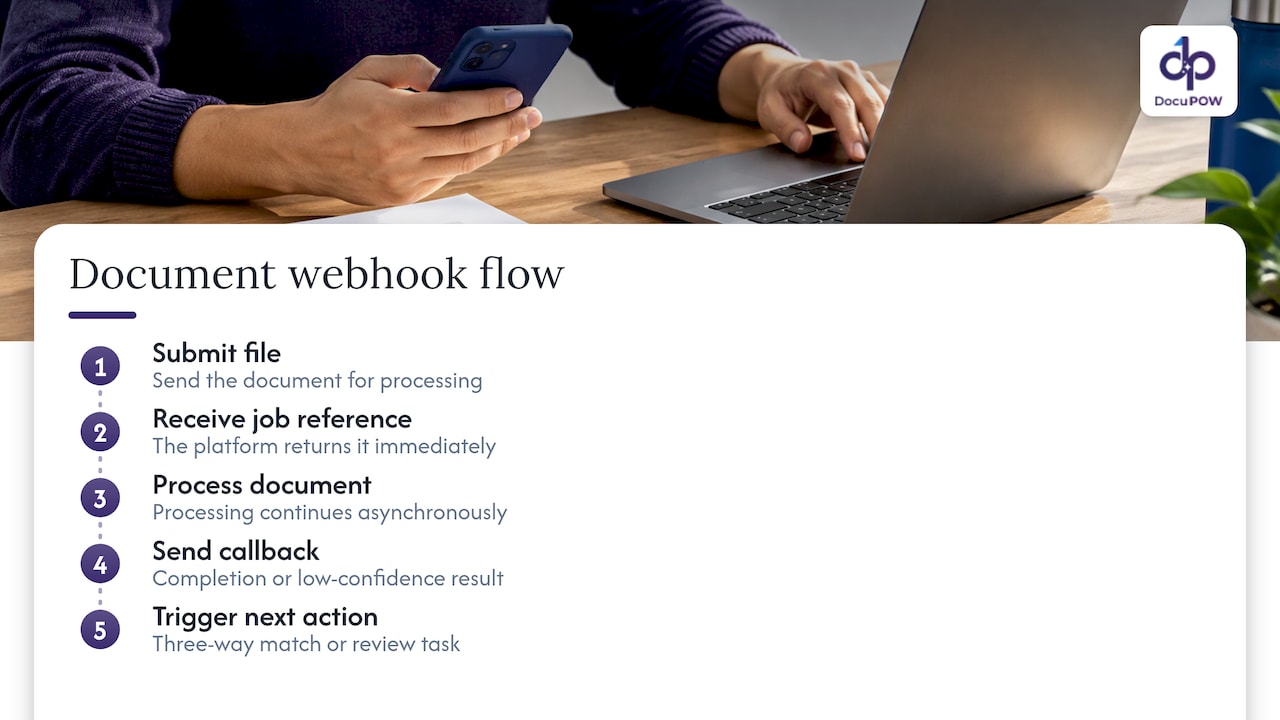
The reason this matters is time. Reading a 40-page contract or a scanned multi-page invoice bundle is not instant. A synchronous call that holds a connection open for that long will time out at some point, usually on your largest and most important files. The asynchronous pattern fixes this: you submit the file, receive a job reference immediately, and the platform calls you back when the work is done.
That callback is also where your automation starts. A payload that says “invoice extracted, all required fields valid” can trigger a three-way match. A payload that says “low confidence on total amount” can open a review task. The webhook is the hinge between reading a document and acting on it.
Webhooks versus polling
Polling means your system asks for status on a schedule. It works, and it is simple to start with, but it wastes requests and adds delay. With a polling interval, the average wait is half the interval. Hook0’s documentation works this out: at a 60-second interval the average delay is 30 seconds and the worst case is 60 seconds, while a webhook arrives in under a second, limited mainly by network round-trip time.
For a team processing a few hundred documents a day, that gap is the difference between a result that shows up while the clerk is still looking at the screen and one that arrives after they have moved on. If you want a broader look at the trade-offs, this webhook versus polling comparison walks through the same decision for tracking data.
| Factor | Polling | Webhook |
|---|---|---|
| Who starts the exchange | Your system, on a timer | The processing platform, on an event |
| Typical delay | Half the interval on average | Close to network latency |
| Wasted requests | Many, since most checks find nothing new | None, one call per event |
| Your infrastructure | Scheduler and status table | A public HTTPS endpoint |
| Failure handling | You retry on your own schedule | The sender retries, you must handle repeats |
| Best for | Firewalled systems, one-off scripts | Production pipelines and high volume |
Polling still has a place. If your system cannot expose a public endpoint, a slow poll can be a fallback. Many teams keep one anyway as a reconciliation job that catches any event that never arrived.
The workflow from upload to delivered result
Here is the sequence most production integrations follow.
- Submit. Your system sends the file, or a link to it, through the API with your own reference, such as a purchase order number or internal case ID.
- Acknowledge. The platform responds right away with a job ID and a “queued” state. Store the job ID against your reference.
- Process. The platform classifies the document, extracts fields, and validates them against your schema. Multi-step workflows may run several stages here.
- Review, if needed. Fields that fail validation or fall below your confidence rules go to a person for a decision.
- Notify. The platform sends a webhook to your endpoint with the event type, job ID and either the result or a link to fetch it.
- Verify and enqueue. Your endpoint checks the signature, saves the event, returns 2xx, and hands the payload to a background worker.
- Deliver. The worker writes the data to your ERP, CRM or database and marks the job complete on your side.
Steps 6 and 7 are where most bugs live. Keep them separate, and the rest of this guide follows from that.
If you are mapping the wider architecture around this flow, our guide to API-driven document automation covers submission, orchestration and system hand-off in more depth.
Events and payload details to handle
Do not build for a single “done” event. A realistic integration subscribes to the full lifecycle. Names differ between platforms, but the categories are consistent.
| Event category | What it tells you | What your system should do |
|---|---|---|
| Received or queued | The file was accepted | Record the job ID, show “processing” in your UI |
| Extraction completed | Fields are available | Fetch or read the data, run business rules |
| Validation failed | A field broke the schema, such as a missing tax ID or a total that does not add up | Route to an exception queue, do not post to the ledger |
| Review requested | A person needs to confirm values | Notify the reviewer, hold downstream actions |
| Review completed | A person corrected or approved | Replace earlier values with the approved ones |
| Processing failed | The file was unreadable or the job errored | Alert the submitter, allow a resubmit |
A good payload carries enough to act without a second guess:
{
  "id": "evt_01HXYZ",
  "type": "document.extracted",
  "created_at": "2026-01-15T14:02:11Z",
  "data": {
    "job_id": "job_8841",
    "external_ref": "PO-20931",
    "document_type": "invoice",
    "status": "validated",
    "fields": {
      "vendor_name": "Example Supply Co.",
      "invoice_number": "INV-5521",
      "total": 4820.50,
      "currency": "USD"
    }
  }
}
This is an illustrative shape, not any specific vendor’s format. Check the actual field names in the documentation of the platform you use.
Three design choices are worth making early. First, decide whether you want the full result in the payload or a thin notification plus a fetch call. Full payloads are faster to act on. Thin ones keep sensitive document data out of webhook logs and proxies. Second, always map the platform’s job ID to your own reference so you can find a record from either side. Third, treat the event type as the routing key and ignore event types you do not recognize rather than failing on them, so new event types do not break your endpoint.
Configuring your endpoint
Your endpoint is a URL on your server that accepts POST requests. A few practical rules keep it healthy.
Use HTTPS and a dedicated path. Keep the webhook route separate from your user-facing routes, with its own logging and its own rate limits. A path such as /hooks/documents is easy to monitor and easy to firewall.
Read the raw body first. Signature checks are computed over the exact bytes received. If your framework parses and re-serializes JSON before you verify, the check can fail for the wrong reasons. Capture the raw body, verify, then parse.
Respond quickly. Do the minimum inside the request: verify, store the event, enqueue a job, return 2xx. Writing to a slow ERP inside the request handler is the most common cause of timeouts.
Register the URL and choose events. In your platform’s settings or through its API, add the endpoint and select the event types you want. Start with the lifecycle table above. Use separate endpoints or secrets for staging and production so test files never trigger real postings.
Connect downstream systems from the worker, not the handler. The worker reads the stored event, maps fields to your ERP or CRM schema, calls their APIs, and records success or failure. If the ERP is down, the worker retries without your webhook endpoint being involved at all.
Once the plumbing works, the question becomes what the process around it should look like. A clear runbook for who owns exceptions, who reviews and who gets alerted is what keeps teams using it, and this piece on writing process documentation that teams use is a good model for that.
Securing webhooks that carry document data
A webhook endpoint is a public door into your systems, and the payloads can contain invoice totals, bank details, contract terms or patient information. Treat it accordingly.
Verify the sender. Platforms commonly sign requests or send a shared secret. As one example, Documenso’s verification guide says the secret arrives in a request header and your server should compare it with the stored value using a constant-time comparison, which prevents timing attacks. If verification fails, return 401, log the attempt, and never process the payload. Signature schemes differ between providers, so follow the exact method in your platform’s documentation.
Keep secrets out of code. Store them in a secrets manager or environment configuration, and rotate them if they are ever exposed.
Minimize what travels. If your platform lets you choose, prefer a payload with identifiers and a fetch call over full document content. Then a leaked log line exposes a job ID, not a bank account number.
Limit exposure. Accept traffic only on HTTPS, rate-limit the route, and log request metadata without writing full bodies to general-purpose logs.
Check the content, not just the sender. A valid signature proves who sent the data, not that the data is sane. Validate types and ranges before posting to a ledger. A total of zero or a negative quantity should land in an exception queue.
Retries, duplicates and timeouts
Networks fail. Servers restart. Every serious webhook sender retries, which means your endpoint will see the same event more than once. Plan for it from day one.
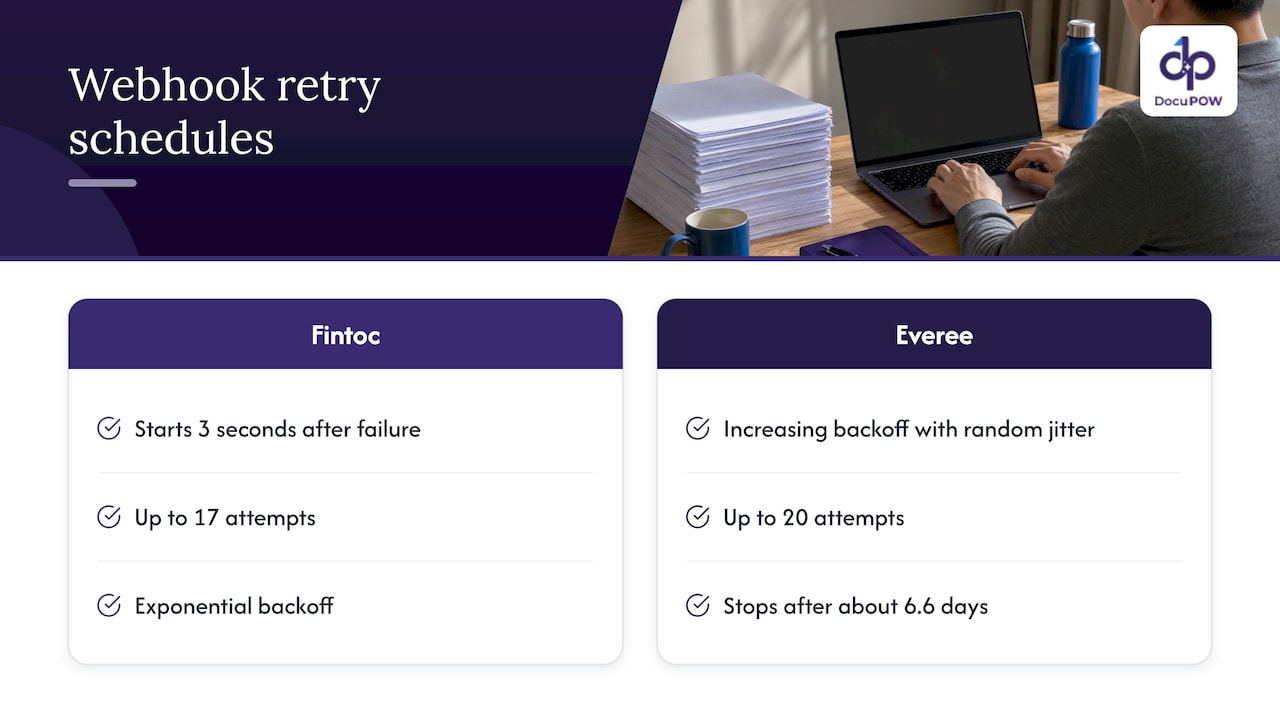
Expect retries with backoff. The schedules vary widely. Fintoc’s webhook guide describes retries with exponential backoff beginning 3 seconds after a failure, up to 17 attempts. Everee’s handler documentation describes up to 20 attempts with increasing backoff and random jitter, stopping after about 6.6 days. The lesson is not the numbers. It is that a failure on your side can echo for hours or days, so an outage must not turn into a pile of duplicate postings.
Deduplicate on the event ID. Both guides make the same point: each event has a unique ID, so save it and process each event only once. A simple table with a unique constraint on the event ID does the job. Insert first; if the insert fails because the ID exists, return 2xx and stop.
Acknowledge fast, process later. Return a 2xx status before the sender’s timeout, and run anything slow asynchronously. The pattern is: verify, persist, acknowledge, then process in the background. It reduces the chance that a timeout triggers a redundant delivery.
Make the downstream write idempotent. Even with event deduplication, use your own reference, such as the invoice number plus vendor, as a natural key in the ERP so a replay cannot create a second bill.
Handle out-of-order events. A “review completed” event can arrive before a late retry of “extraction completed.” Compare timestamps or a version field and never overwrite approved data with older data.
Return the right codes. Use 2xx for accepted, 401 for failed verification, and 5xx only for genuine temporary trouble you want retried. Returning 5xx for a malformed payload that will never succeed just burns retry attempts.
Testing, monitoring and troubleshooting
Test locally with a tunnel or request inspector. Expose your development server through a tunneling tool, or point the webhook at a request-capture service to see exactly what the sender posts. Beeceptor’s webhook testing documentation describes this approach of inspecting incoming requests while you build.
Build a test set. Include a clean invoice, a skewed scan, a document with a missing required field, a duplicate upload and a corrupted file. Each should produce a predictable event, and your handler should do the right thing for each.
Replay events on purpose. Send the same event twice and confirm only one record is created. Kill your worker mid-job and confirm the retry completes cleanly.
Log the essentials. For every delivery, record the event ID, type, job ID, your reference, verification result, response code and processing time. That is enough to answer “what happened to this invoice?” in a minute.
Monitor for silence, not just errors. The worst failure is the event that never arrives. Track counts of submitted versus completed jobs, and alert when a job stays in “processing” longer than expected. A reconciliation job that checks job status through the API for anything overdue catches missed deliveries.
Troubleshoot in order.
- Is the endpoint reachable over HTTPS from the public internet?
- Does the signature check pass against the raw body?
- Is the handler returning 2xx fast enough?
- Are duplicates being rejected correctly?
- Is the worker failing downstream, for example on an ERP validation rule?
Most issues are in steps 2 and 3.
Our perspective: webhooks are the nervous system of document automation
We build DocuPOW around a simple belief: extracting text from a page is the easy part. The value is in what happens next, and what happens next has to be driven by events.
That is why we treat the callback as a first-class part of the workflow, not an afterthought. Our agents read documents without templates, validate fields against a strict schema, and send questionable cases to a human reviewer. Each of those moments is something your systems should hear about the instant it happens: a clean extraction ready to post, a validation failure that needs an owner, a reviewer’s approval that supersedes earlier values.
We also believe the cleanest integrations keep the work small at the edge. Verify, store, acknowledge, and let the workflow do the rest. Combined with schema validation, human-in-the-loop review and an API with developer tools for your ERP and CRM connections, you get a pipeline where bad data is caught before it lands in the ledger, not after.
If you are designing this today, start with the exceptions. The happy path will work. How your system behaves on the unreadable scan and the duplicate delivery is what your finance and operations teams will remember.
Syed Naveed Abbas
Put it to work with DocuPOW
If you want template-free extraction, schema validation, human review and ERP or CRM integration through an API in one platform, take a look at DocuPOW. The Starter plan is $99 per month and the Professional plan is $499 per month, with Enterprise available for larger deployments. Compare them on the pricing page, or see how the platform fits your workflow.
For teams handling large queues, our notes on high-volume document processing best practices cover throughput, exception handling and monitoring.
FAQ
Do I need webhooks, or is polling enough?
Polling is enough for a small, low-volume setup or when your system cannot accept inbound requests. Once you process documents continuously, webhooks cut delay and wasted requests, since you get one call per event instead of many empty checks. Many teams use webhooks as the main path and a slow poll as a safety net.
What should my endpoint return?
Return a 2xx status as soon as you have verified and stored the event, before your own downstream processing. Return 401 if verification fails. Use a 5xx code only for temporary trouble you want the sender to retry.
How do I avoid processing the same document twice?
Save each event’s unique ID and skip any ID you have already handled. Back that up with a natural key from your own data, such as vendor plus invoice number, so a replay cannot create a duplicate record in your ERP.
How should I protect sensitive documents in webhook payloads?
Verify every request, use HTTPS only, and keep secrets in a secrets manager. Where the platform allows it, send identifiers in the webhook and fetch the full content over an authenticated API call, so logs and proxies never hold the document data.
What happens if my server is down when an event is sent?
Most senders retry failed deliveries with increasing delays, sometimes for days. When your server returns, expect a burst of repeated and delayed events. Deduplication by event ID and a reconciliation check against job status make recovery safe.
Sources
- Webhook vs Polling: When Real-Time Beats Repeated Requests (Hook0)
- Webhook Development & Testing (Beeceptor)
- Webhook Verification (Documenso Docs)
- Create your webhook endpoint (Fintoc)
- Implementing a Webhook Handler (Everee)
- Webhook vs Polling Tracking comparison
- Process Documentation: How to Write It So Teams Use It
Recommended
See DocuPOW on your documents.
Stop building templates. Start extracting data.


