Predictive Document Insights: How They Work in 2026
Predictive document insights turn contracts, invoices and forms into forecasts and risk flags. See how they work, what they need and how to measure them.


Predictive document insights are forecasts, risk flags and priorities drawn from the content of your documents and the workflow around them, not just the text pulled off the page. They work only when three things are in place: reliable extraction from any layout, a validated structure for the data, and human review where the stakes are high. DocuPOW is built around that sequence: template-free extraction, workflow orchestration and human-in-the-loop audit review on one platform, so the data feeding a prediction is already checked before anyone relies on it.
TL;DR
- Predictive document analytics goes past OCR: it classifies, clusters and scores documents, then connects the results to metadata and context to spot patterns and likely outcomes.
- Prediction quality depends on the data underneath it. Imposing a schema on extracted fields has been shown in academic research to improve precision and recall while cutting cost.
- Measure it like any model: validate against reviewed samples, and weigh missed risks against the cost of unnecessary review.
- Keep people in the loop. Predictions prioritize and filter; a human decision keeps the result defensible.
- Security and audit trails are part of the design, not an add-on.
Table of Contents
- What predictive document insights actually are
- How this differs from OCR and ordinary document processing
- How the models turn documents into predictions
- Why context separates insight from word counting
- What predictive insights can find
- What you need before prediction works
- Measuring accuracy and return on investment
- Keeping people, security and audit trails in the loop
- Our perspective
- A practical rollout in five steps
- Try it on your own documents
- FAQ
- Sources
What predictive document insights actually are
Most companies already digitize documents. Invoices, purchase orders, contracts, claims, onboarding forms and delivery notes arrive as PDFs, scans and emails, and software turns them into text or fields. That is the reading step. Predictive document insight is what happens after: the system looks across the whole population of documents and tells you something you did not ask a person to find.
A professional paper from the University of Maryland describes predictive document analytics as pattern-matching algorithms that parse text across a document population, supporting classification, organization, trend analysis and forecasting. In business terms, that can mean:
- Flagging which incoming contracts deviate from your standard terms and need a lawyer first.
- Grouping thousands of supplier documents into clusters, so unusual ones stand out.
- Surfacing pricing patterns across a database of quotes and vendor invoices.
- Pointing out which items in a queue are most likely to be exceptions, so reviewers start there.
The phrase predictive document analytics means the same thing in practice. Insight is the output you act on; analytics is the method that produces it.
How this differs from OCR and ordinary document processing
OCR, optical character recognition, produces a text version of a scanned image. The same Maryland source notes that documents can also be natively digital, such as email or web pages, so text is not always the problem. OCR is an input capability. It tells you what the page says and nothing about what it means for your business.
Ordinary document processing adds rules on top: this field is the invoice number, that one is the total. Rules and templates work until a supplier changes a layout. Our guide to OCR automation for business covers where that approach strains at scale.
Predictive analytics sits a layer higher. It analyzes content, metadata, context and relationships across the whole set. The difference shows up in the questions each layer answers:
| Layer | Question it answers | Example |
|---|---|---|
| OCR | What does this page say? | Text from a scanned purchase order |
| Extraction and validation | What are the values, and are they valid? | Supplier, amount, PO number checked against a schema |
| Predictive analytics | What does the pattern suggest? | This supplier’s invoices are drifting from contracted prices |
Skip the middle layer and the top one fails. A forecast built on misread totals is just a confident wrong answer.
How the models turn documents into predictions
You do not need to build these models to buy a platform, but knowing the two main approaches helps you ask better questions.
Supervised learning: models trained on reviewed examples
An economics consultancy’s explainer describes how predictive-coding models assign weights to words, phrases and metadata, then test those weights against documents people have already reviewed. Misclassified documents are used to adjust the weights until predictions stabilize or reach an acceptable accuracy and cost tradeoff. This is how a system learns that a document is, say, a high-risk contract or a routine renewal.
Deloitte describes the same idea in its review workflow: human-reviewed documents form a training set, the model scores the collection and assigns category labels, and iterative fine-tuning can improve efficiency and accuracy.
Unsupervised learning: clusters without labels
Topic modeling works without a labeled training set. The same consultancy explains that it groups documents into clusters from words, phrases and metadata that frequently appear together. This suits situations where you do not yet know the categories, such as a backlog of unfamiliar vendor paperwork after an acquisition.
A layered workflow, not one magic model
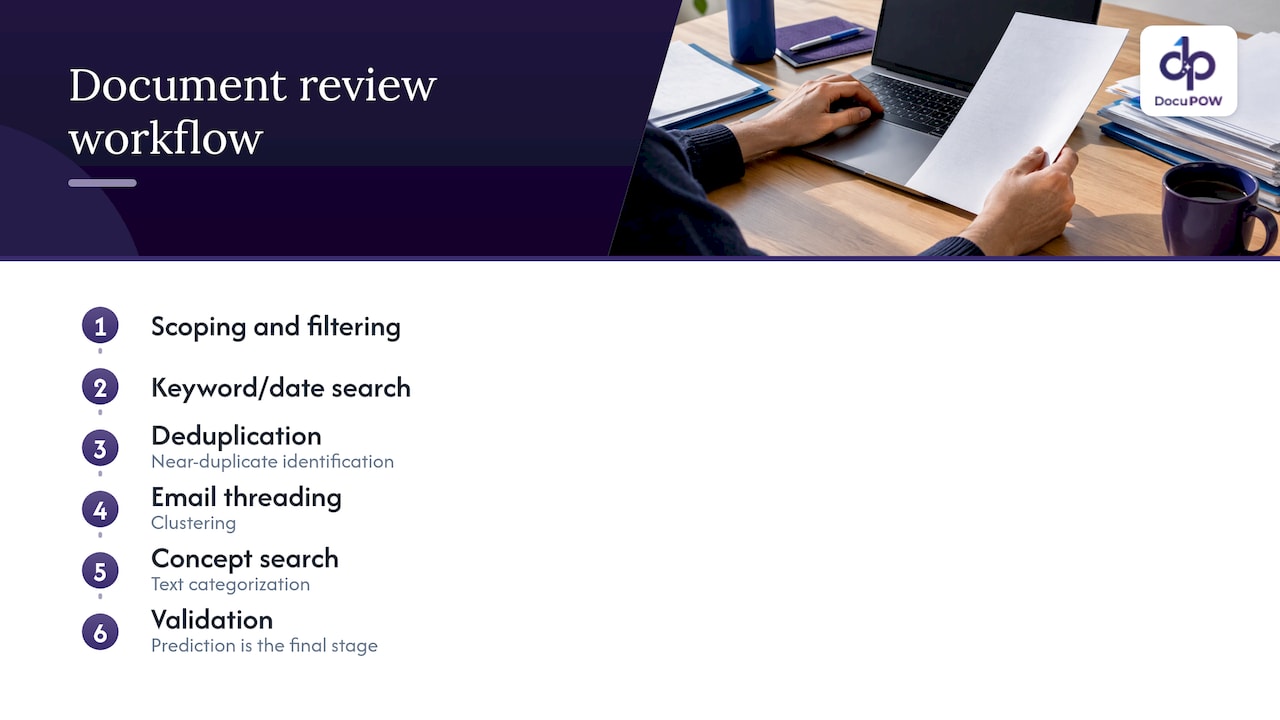
Real deployments chain steps. Deloitte’s published dynamic review approach lists scoping, filtering, keyword and date search, deduplication, near-duplicate identification, email threading, clustering, concept search, text categorization and validation. The takeaway for a business team: prediction is the last stage of a pipeline, and each earlier stage removes noise.
Why context separates insight from word counting
Two documents can use identical words and mean different things. The Maryland paper makes the point that context, meaning who wrote something, whom it was intended for, whether it was received, and its purpose and appropriateness, moves analysis beyond mathematical correlation toward behavior, intent and evidence of actions.
For a finance team, that means an invoice is more informative alongside its purchase order, the receiving record and the vendor’s history than on its own. For a legal team, a clause matters differently depending on counterparty, date and prior amendments. This is why end-to-end workflows matter: the more connected the document set, the better the signal. Our order-to-pay flow is an example of linking documents across a process rather than treating each in isolation.
What predictive insights can find
The research on document analytics shows two durable categories of output. Analytics can identify communication patterns and gather similar information, such as pricing, across a database, and predictive coding can classify documents as responsive or nonresponsive while topic modeling clusters similar ones.
Translated to the teams reading this, the typical uses fall into a few groups:
- Finance and accounting: prioritizing invoices likely to need exception handling, spotting price or quantity drift between documents.
- Legal and compliance: ranking contracts by deviation from standard language so attorneys review the riskiest first. See our piece on legal document analysis.
- Procurement and supply chain: watching vendor documents for patterns that precede delays, and keeping shipment paperwork visible across partners. Our supply chain and logistics pages show how that looks in practice.
- Sales and operations: routing quotes and contracts by complexity so simple ones move without a queue.
- HR and healthcare: sorting onboarding or patient records by completeness so missing items are chased early, with strict access controls on sensitive data.
- Insurance and financial services: triaging claims and client documentation by likely exception rate.
These are applications of the same mechanics: extract reliably, classify or cluster, score, and route to a person where judgment is needed.
What you need before prediction works
Four ingredients decide whether a predictive program delivers.
- Extraction that survives new layouts. If every new supplier format needs a new template, the data feeding your models is always partly missing. DocuPOW’s extraction is template-free, so unseen layouts do not stall the pipeline.
- A schema. Researchers at Berkeley found that imposing a document schema and using structure-aware query execution can cut LLM cost while improving precision and recall compared with naive LLM or retrieval-based processing. In plain terms, telling the system what fields a document type should contain makes answers cheaper and more accurate. Strict schema validation is part of how DocuPOW processes documents.
- Integration. Insight that stays in a dashboard does not change behavior. Predictions need to reach your ERP or CRM and trigger the next step. DocuPOW integrates with ERP and CRM systems through an API and offers developer tools for IT teams.
- Search and query on top. Teams ask follow-up questions of their documents all the time. Conversational querying with source citations lets a user check the answer against the page. We explain the mechanics in document question answering.
Measuring accuracy and return on investment
A prediction you cannot measure is an opinion. The standard approach is validation: compare the system’s labels with those of human reviewers on a sample, and use the results to decide where to trust it. Deloitte notes that validation measures text-categorization performance and provides benchmark information to guide review decisions, and that its approach can reduce the documents needing human review by up to 90% in some cases. That is a figure for its own legal review method, not a promise for your invoices, so treat it as an illustration of what filtering can do.
The Berkeley paper reports up to 30 times cost savings versus LLM-only baselines, up to 61% higher precision and 80% higher recall than retrieval baselines on three real-world document collections. These are research results on specific datasets, useful as evidence that structure pays off.
For your own business case, track:
- Touch rate: share of documents that still need a person.
- Exception rate and resolution time: how many items fail validation and how long they take to clear.
- Precision and recall of the flags: how many flagged items were really issues, and how many real issues were flagged.
- Cost of errors on each side. The consultancy’s explainer supports balancing false negatives, meaning missed risky documents, against false positives and the cost of unnecessary review. A missed compliance problem costs far more than an extra five minutes of review, so set thresholds accordingly.
A worked example: suppose a team processes 10,000 invoices a month and the system flags 800 for review. If reviewers confirm 600 as real exceptions, precision is 75%. If an audit later finds 50 real exceptions that were not flagged, recall is 600 out of 650, about 92%. Whether that is acceptable depends on what a missed exception costs you, which is exactly the tradeoff to decide before launch.
Keeping people, security and audit trails in the loop
Predictive output should augment review, not replace it. Deloitte’s method shows the pattern: filtering and prioritization shrink the population, while validation and human decisions keep the outcome defensible. A thoughtful audit-ready AI roadmap makes the same case for human review, transparency and validation in reporting workflows.
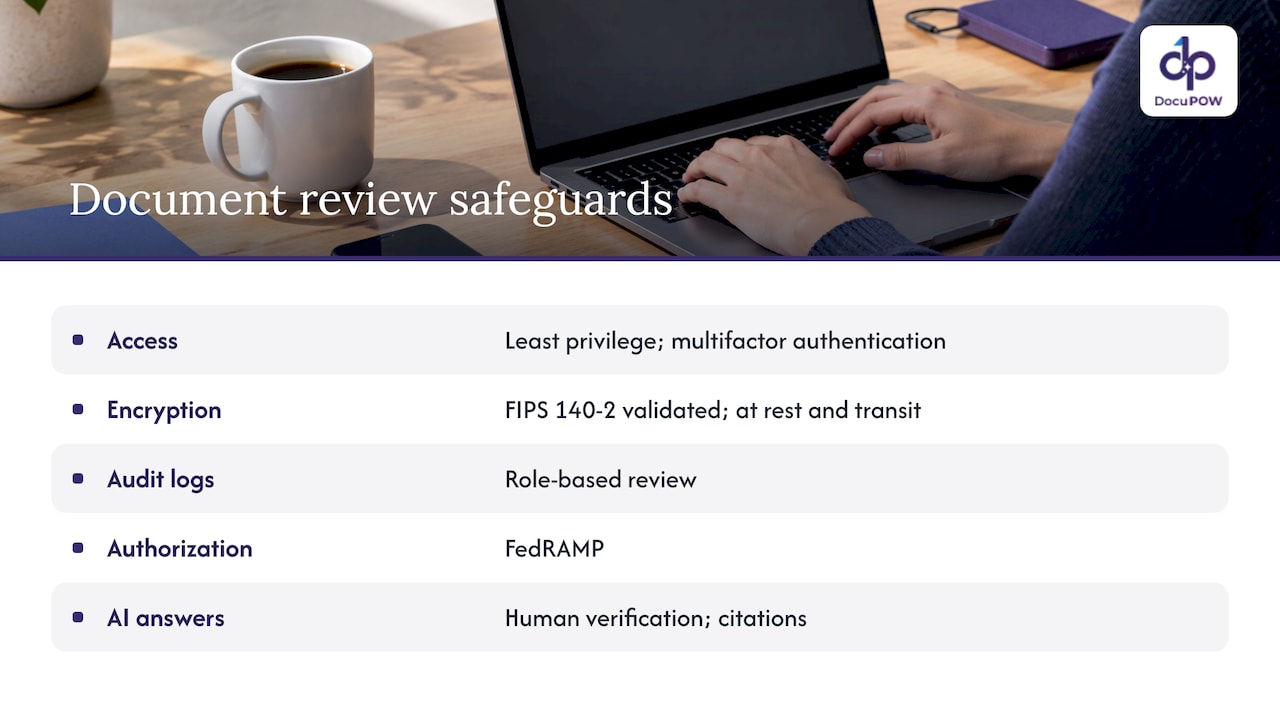
Security expectations are rising in parallel. A U.S. Department of Justice privacy assessment of a document review system describes least-privilege access, multifactor authentication, FIPS 140-2 validated encryption for data at rest and in transit, role-based audit-log review and FedRAMP authorization. The same assessment states that the system’s AI is designed to require human verification by authorized users and provide citations so answers can be verified. Those are good yardsticks for any platform that touches sensitive documents.
DocuPOW pairs human-in-the-loop audit review with source citations on document queries, and runs on encrypted, cloud-native infrastructure. Details are on our security page, and our NIST-aligned controls guide is written for compliance teams. For healthcare, legal and HR data, confirm requirements such as HIPAA or state privacy laws with your own compliance officer or counsel before rollout.
Our perspective
Most predictive document projects fail upstream of the model. The forecast is only as good as the fields beneath it, and fields pulled by brittle templates are incomplete every time a supplier changes a layout.
That is why we built DocuPOW as agentic, template-free extraction first. Our agents read documents the way a human expert would, validate every result against a strict schema, and push the data into your core systems. Once clean, validated data flows continuously, real-time analytics and predictive insights become a by-product of the workflow instead of a separate project.
We also believe the reviewer belongs inside the process. Human-in-the-loop audit review, and answers that cite the page they came from, are how a finance, legal or compliance leader can say yes to automation and still sign off on the result.
If you are choosing where to start, pick one document-heavy process with a clear cost of error, such as invoices, contracts or claims. Get extraction and validation stable, connect it to your ERP or CRM, then let prediction prioritize the queue.
Syed Naveed Abbas
A practical rollout in five steps
- Pick one process. Choose a workflow with high volume, repeated exceptions and a measurable cost, such as accounts payable or contract intake.
- Define the schema. List the fields and validation rules each document type must satisfy.
- Set a baseline. Record touch rate, exception rate and cycle time before automation so gains are real, not assumed.
- Route by confidence. Let validated, high-confidence documents flow straight through and send the rest to a reviewer, with the source page shown next to each extracted value.
- Review the flags monthly. Compare predictions with outcomes, adjust thresholds, and extend to the next document type.
Industries with heavy paperwork can follow the same path: see how we approach operations, fintech and banking and real estate documents.
Try it on your own documents
DocuPOW’s Starter plan is $99 per month and Professional is $499 per month; Enterprise is priced on request, and additional credits are available on the Starter and Professional plans. Each plan is a subscription to the cloud platform, covering template-free extraction, workflow orchestration, human-in-the-loop review, analytics and document search. Compare them on the pricing page or see how the pieces fit on the platform overview.
If you want to see how your own invoices, contracts or claims behave, start with the free trial or demo on docupow.ai.
FAQ
What is the difference between predictive document insights and document analytics?
The terms overlap heavily. Analytics is the method: classification, clustering and pattern detection across a document set. Insight is the output a person acts on, such as a flagged contract or a forecast of exceptions. Both depend on accurate extraction first.
Do I need historical data to get predictive insights?
Supervised models learn from documents people have already reviewed, so past decisions help. Clustering methods can group documents without labels, which helps when you have no history. Either way, consistent validated fields matter more than sheer volume.
Can predictive document analytics replace human review?
It should not. It filters and prioritizes so reviewers spend time where risk is highest, while validation and human decisions keep results defensible. DocuPOW includes human-in-the-loop audit review for this reason.
How do I know the predictions are accurate?
Validate against a sample reviewed by people, then track precision, recall and the cost of both missed items and unnecessary reviews. Set review thresholds based on what a missed issue would cost your business, and revisit them as document types change.
Sources
- The Larger Picture: Moving Beyond Predictive Coding (University of Maryland)
- Making The Most Of Document Analytics (Brattle)
- Document Review in a New Perspective: Dynamic Review (Deloitte US)
- Dynamic Review, full document (Deloitte)
- Towards Accurate and Efficient Document Analytics (UC Berkeley, arXiv)
- Privacy Impact Assessment, U.S. Department of Justice
Recommended
See DocuPOW on your documents.
Stop building templates. Start extracting data.


